You just shipped a new feature, fixed a nagging bug, and updated your pricing page copy. Now you need to tell someone about it, but you're stuck on whether that update belongs in a changelog vs release notes. The two terms get used interchangeably in product teams all the time, and that mix-up leads to messy documentation that neither engineers nor customers actually read.
Here's the short answer: a changelog is a chronological record of every change, written for a technical audience that wants the full history. Release notes are a curated summary built for end users, focused on what's new and why it matters to them. One documents everything; the other sells the update.
In this article, we'll break down the practical differences between the two, show you real examples of each done well, and help you decide which format fits your team. If you're running a SaaS product and trying to keep users informed without burying them in commit messages, this comparison will save you from picking the wrong approach and having to redo your documentation strategy later.
Mixing up these two formats isn't just a semantic quibble. It changes who reads your updates, how much trust you build, and how much support workload you create for yourself. When a changelog reads like marketing copy, developers skim past it looking for the actual technical detail and don't find it. When release notes read like a git log, customers close the tab because they don't care that you "refactored the auth middleware." Getting this wrong quietly erodes engagement with content you're already spending time writing.
Developers, QA teams, and technical partners open a changelog looking for specific, verifiable facts: what changed, when, and in which version. They want line items, not narrative. Your average end user opens release notes wanting the opposite: a quick answer to "what's in this for me?" They don't care about your internal refactor unless it made the app faster or fixed the bug that's been annoying them for weeks.
A changelog answers "what changed," release notes answer "why should I care."
Treat these as two different pieces of content for two different readers, because that's exactly what they are. A support engineer troubleshooting a customer issue needs the changelog to confirm a fix actually shipped in version 4.2.1. That same customer doesn't need version numbers at all. They need a sentence telling them the export bug is gone.
When you publish one document trying to serve both audiences, you usually end up serving neither well. Here's what that looks like in practice:
| Problem | Changelog written like release notes | Release notes written like a changelog |
|---|---|---|
| Missing detail | No version numbers, timestamps, or technical specifics for debugging | No plain-language summary, just a list of PR titles |
| Support impact | Engineers can't quickly confirm what shipped and when | Support tickets spike because users don't know what changed |
| Reader trust | Technical users stop checking it, assume it's marketing fluff | Non-technical users feel talked down to or confused |
| Time cost | Team ends up maintaining a second internal doc anyway | Product team has to answer "is this fixed yet" repeatedly |
That last row matters more than teams expect. If your changelog can't answer basic technical questions, someone on your team ends up keeping a spreadsheet or Slack thread as the real source of truth, which defeats the entire purpose of documenting changes in the first place.
Customers form opinions about how well-maintained a product is based partly on how you communicate change. A SaaS company that regularly publishes clear, honest release notes signals active development and accountability. Users notice when bugs they reported get fixed and get acknowledged in a public update. That builds loyalty in a way that a silent bug fix never will.
On the flip side, a changelog full of vague entries like "various improvements" or "bug fixes" tells technical users you're not being specific because you either don't track your own changes carefully or don't think they're worth explaining. Neither impression helps you. Google's own guidance on creating helpful content emphasizes giving readers a complete, specific picture rather than a vague summary, and that principle applies just as much to product documentation as it does to blog posts. Read more about that standard in Google's guidance on creating helpful content.
A well-maintained changelog also becomes a reference point when planning new work. Product managers pull up past entries to check when a feature launched, what was deprecated, and how quickly the team ships fixes. That history feeds directly into roadmap discussions and helps you set realistic expectations with stakeholders about release cadence. Skip the changelog, and you lose that institutional memory the moment the engineer who remembers it moves to another team.
Not every update needs a full changelog entry and a release notes blurb. Start by asking who needs this information and what they'll do with it. If the answer is "developers debugging an integration," write a changelog entry. If it's "customers wondering what changed in their dashboard," write release notes. Most teams overcomplicate this decision when a quick audience check settles it in seconds.
Picture the actual person opening the document. A developer integrating with your API cares about deprecated endpoints, breaking changes, and exact version numbers. A marketing manager using your product just wants to know whether the new export feature saves her time. Different readers need different depth, and trying to write one document for both usually means you satisfy neither.
Not every change is worth surfacing to customers, but every change belongs in the changelog. Use this quick reference to sort updates before you write anything:
| Type of change | Changelog | Release notes |
|---|---|---|
| New user-facing feature | Yes | Yes |
| Bug fix customers noticed | Yes | Yes |
| Internal refactor or dependency update | Yes | No |
| Security patch | Yes | Sometimes, if disclosure is appropriate |
| Minor copy or UI tweak | Yes | No |
| Deprecated API endpoint | Yes | Only if customers use it directly |
That table alone resolves most of the "do we even announce this" debates that slow teams down before a release.
Major releases almost always call for both documents working together. Ship a big feature, and your changelog logs the exact version, date, and technical scope while your release notes tell the story of why customers should care. Treat the changelog as the permanent record and the release notes as the announcement built from it, not a separate task competing for your time.
If you're unsure which to write, draft the changelog entry first, then decide if it's worth translating into release notes.
Skipping this decision entirely, and dumping everything into one feed regardless of audience, is the fastest way back to the exact confusion this comparison is meant to solve.
Good documentation follows a consistent structure, not inspiration. Most teams that struggle with this haven't picked a format and stuck to it, so every entry looks different and readers give up trying to parse them. Fix that first, before worrying about tone or word choice.
Keep each entry short, dated, and organized by type of change. Developers scan changelogs, they don't read them top to bottom, so make scanning easy.
## v4.2.1 - 2026-07-20
### Fixed
- Export to CSV no longer drops the last row on large datasets
### Changed
- Rate limit increased from 100 to 250 requests per minute
### Deprecated
- /v1/users endpoint, use /v2/users instead
That format, borrowed loosely from the Keep a Changelog convention, works because it separates fixes, changes, and deprecations into distinct buckets a developer can jump to directly.
Drop the version numbers and technical jargon. Open with the benefit, then give one or two sentences of context if needed. Skip anything that doesn't change what the user sees or experiences.
Lead with the outcome, not the mechanism: "You can now export reports in one click" beats "Added batch export functionality to the reports module." Customers don't care how you built it, they care what it does for them now.
Write release notes for the reader's five-second attention span, not your team's pride in the engineering work.
Publish on a regular cadence so readers know where to look and when. A changelog updated sporadically loses credibility fast, because technical readers assume missing entries mean missing detail, not missing changes. Release notes benefit from the same discipline: batch minor updates into a weekly or biweekly note rather than sending five tiny announcements that train users to ignore your notifications entirely.
These habits sound small individually, but together they're the difference between documentation people trust and documentation people skip past out of habit.
Abstract advice only goes so far. Seeing the same product update written twice, once as a changelog entry and once as release notes, makes the difference obvious in a way no explanation can. Below is a realistic example from a fictional project management tool that shipped a new bulk-editing feature alongside a couple of fixes.
Notice how this entry assumes technical fluency and lists every change without filtering for importance. It's written for someone auditing what shipped, not someone deciding whether to care.
## v3.8.0 - 2026-07-15
### Added
- Bulk edit for task status and assignee across up to 200 tasks
- New `PATCH /v2/tasks/bulk` endpoint for programmatic bulk updates
### Fixed
- Task filters reset unexpectedly when navigating back from detail view
- Timezone offset error causing due dates to display one day early for UTC-8 users
### Changed
- Increased API rate limit for bulk endpoints from 50 to 150 requests per minute
Here's the same update translated for end users. Gone are the version number, the endpoint path, and the rate limit detail nobody outside your API docs needs. What's left is the outcome customers actually experience.
"Update tasks faster: You can now select multiple tasks and change their status or assignee in one go, instead of clicking through each one individually. We also fixed the bug where your filters reset when you went back to your task list, and corrected an issue that showed due dates a day early for some users."
Line them up and the contrast tells you almost everything about why these formats exist separately. The changelog names the endpoint; the release note names the benefit. The changelog logs the rate limit change because a developer integrating with the API needs to know their old assumptions are out of date. The release note skips it entirely because a project manager clicking through tasks doesn't care about requests per minute.
| Element | Changelog | Release notes |
|---|---|---|
| Version number | v3.8.0 | Omitted |
| Technical detail | Endpoint, rate limits | Omitted |
| Tone | Neutral, factual | Conversational, benefit-first |
| Bug fix framing | "Timezone offset error" | "Due dates showed a day early" |
| Audience | Developers, support | Everyday users |
This is the pattern worth copying for every release: write the technical truth first, then rewrite it in plain language for the people who'll actually read the announcement. Skip the second step and you're publishing engineering notes to customers who never asked for them.
Manually writing both a changelog and release notes for every release doesn't scale past a handful of engineers. Once you're shipping multiple times a week, you need a system that pulls change data from one place and lets you shape it into two outputs, without retyping the same information twice. The right tool doesn't replace your judgment about what to say, it just removes the busywork of formatting, dating, and publishing entries so you actually keep up with the habit.
Focus on tools that separate the raw log from the polished announcement. Look for version tagging so entries link back to specific releases, and look for audience-specific templates so you're not reformatting the same update twice by hand. A few features matter more than the rest:
The best tool is the one your team actually opens on release day, not the one with the longest feature list.
Koala Feedback wasn't built as a changelog generator, but it solves the half of this problem most teams struggle with: connecting user feedback to what actually ships. Its customizable statuses track features from planned through in progress to complete, and that status history becomes the natural backbone of your release notes. When a feature moves to "complete" on your public roadmap, you already have the plain-language description users voted on, which saves you from writing that summary from scratch. Pair that roadmap with a dedicated changelog tool, and you've closed the loop between what users asked for and what you told them shipped.
If you're not ready to add another subscription, a well-organized Markdown file in your repository, following the Keep a Changelog format shown earlier, gets you most of the way there for the technical side. For release notes, a simple email template or in-app banner works fine at low volume:
Subject: What's new in [Product] this week

Hi [Name],

Here's what changed since our last update:
- [Benefit-first summary of change 1]
- [Benefit-first summary of change 2]

Questions? Reply to this email.
Whichever route you pick, consistency matters more than sophistication. A plain text file updated every release beats a polished tool that nobody remembers to use.
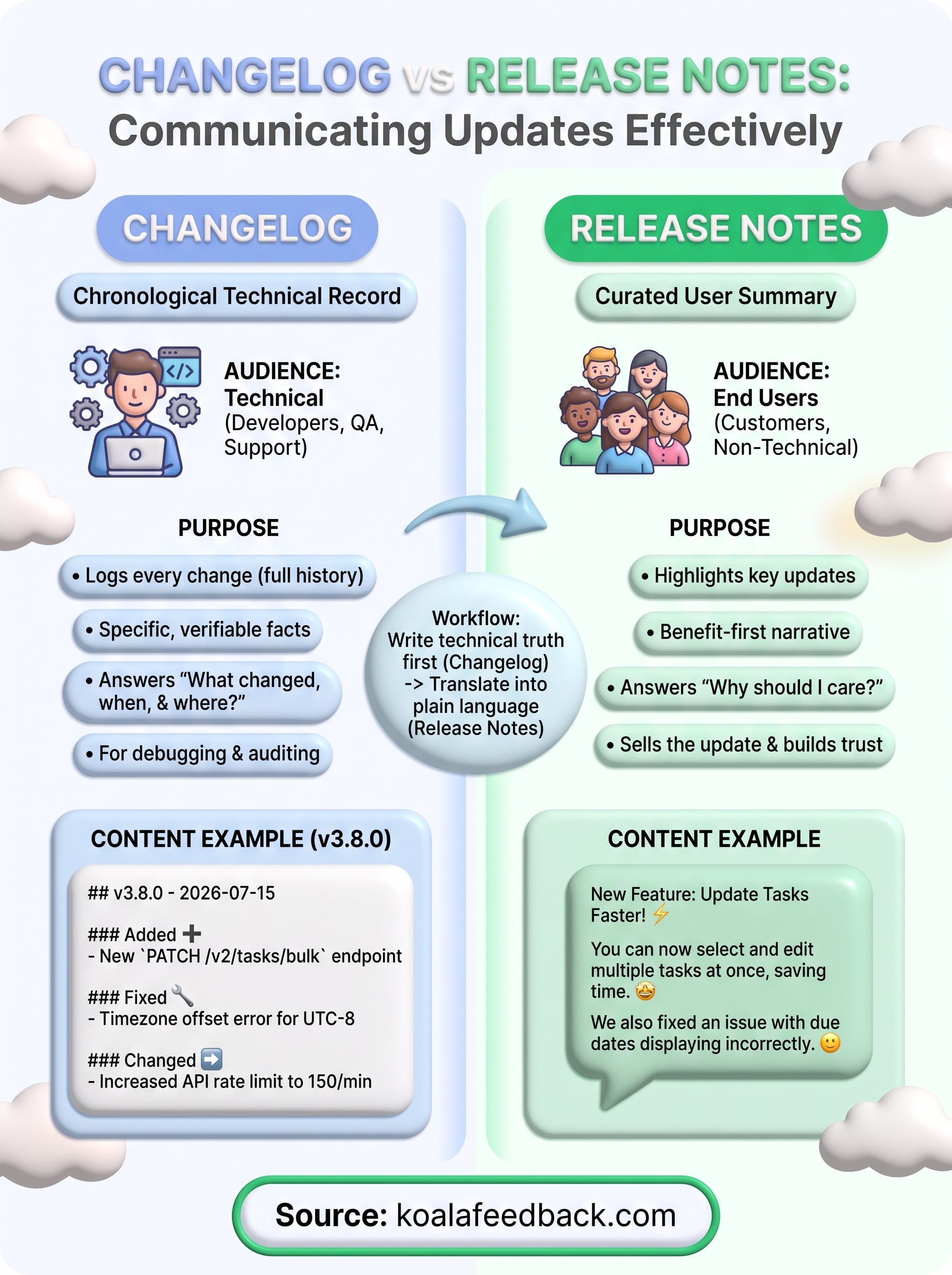
The changelog vs release notes debate isn't really about which format wins. It's about respecting two different readers who want two different things from the same update. Give developers the full technical record, and give customers the plain-language version that actually answers "what's in this for me?" Skip that split, and you'll keep watering down one document trying to please everyone.
Once you settle on that split, the real work is staying consistent release after release, without it eating your whole afternoon. That's where pairing a public roadmap with your changelog habit pays off. When you track feature requests, statuses, and progress in one place, writing the customer-facing summary becomes translation, not invention. If you want that connection between what users asked for and what you tell them shipped, try Koala Feedback and see how much easier the next release note gets to write.

Start today and have your feedback portal up and running in minutes.

