Keeping users informed about product changes sounds simple, but doing it well takes real effort. Productboard release notes give teams a way to document and share updates, but the setup process and feature limitations aren't always obvious from the start. If you're trying to figure out how to create release notes in Productboard, or wondering whether it's the right tool for the job, you're in the right place.
This guide walks through the steps to create and share product updates using Productboard's built-in tools. We'll cover what works, what doesn't, and where the gaps are. We'll also look at how platforms like Koala Feedback approach the same problem, combining feedback collection, public roadmaps, and update sharing in one place, so you can make a more informed decision about your workflow.
Productboard is a product management platform that helps teams collect feedback, prioritize features, and plan roadmaps. Release notes sit on top of that workflow as a way to close the loop with your users once work is done. The idea is straightforward: after you ship something, you write a short update that tells users what changed and why it matters to them.
A release note is not a technical changelog for your engineering team. It's a user-facing communication that bridges the gap between your internal delivery process and the people who use your product every day. When you publish a release note, you're telling users that you listened, acted, and shipped something that improves their experience.
Release notes turn shipped work into visible progress, which builds trust faster than any marketing message can.
Good release notes answer three questions: what changed, who it affects, and what the user should do next. Productboard release notes are designed to fit inside a broader product workflow, so they pull context from features and roadmap items you already manage inside the system.
Productboard's Announcements feature, available on higher-tier plans, lets you create and publish product updates directly within the platform. You can attach an announcement to a specific feature, choose who sees it, and track whether users engage with it. This keeps your updates connected to the underlying product work rather than living in a separate tool.
However, the feature has real limitations. Announcements in Productboard are not publicly accessible by default in the same way a standalone changelog page would be. Sharing updates outside the platform requires extra steps, and the formatting options are fairly basic. If your goal is a polished, public-facing changelog that your users can browse on their own, you'll need to either supplement Productboard with another tool or rethink how you structure your update workflow.
Understanding what the feature is built for helps you use it correctly. It works well as an internal communication layer and a lightweight way to notify users through in-app prompts, but it is not a full changelog solution on its own.
Before you write a single word of a release note, you need to decide who you're writing for and how often you'll publish. Skipping this step leads to inconsistent updates that confuse users more than they help. Whether you're using Productboard release notes or a different tool, these decisions shape everything downstream.
Your audience determines your tone and depth. End users need plain language that explains what changed and how it affects their workflow. Internal stakeholders want more context around business impact. Pick one primary audience per update type and write directly to that person.
Consistency matters more than frequency. Publishing one well-written update per week builds more trust than sporadic bursts of five updates followed by silence for a month.
A predictable release note schedule signals to users that your team ships and communicates reliably.
Common options include weekly roundups, per-feature announcements, or monthly summaries. Pick the one that matches your shipping velocity and stick to it.
Set a simple template before you open Productboard. A consistent structure saves time and keeps every update scannable for users.

| Element | Purpose |
|---|---|
| Title | One-line summary of what changed |
| Who it affects | User segment or plan tier |
| What changed | Two to three plain-language sentences |
| Next step | One clear action for the user |
Before you open Productboard and start drafting, you need a reliable source of truth for what actually shipped. Without a clear collection process, you'll either miss updates or spend time chasing engineers for details at the last minute.
Your engineering team's pull requests, sprint reviews, and issue trackers are the most accurate record of what changed. Don't rely on memory or secondhand summaries. Set up a weekly sync or a shared document where developers log completed work in plain language as they close tickets.
The closer your collection process sits to where code ships, the less context you lose by the time you write the release note.
Once you have a raw list, sort items by user impact rather than technical complexity. Not every code change deserves a line in your productboard release notes, and including low-impact fixes dilutes the updates that matter most.
Use a simple intake table to triage what to include:
| Update | User-facing? | Impact level | Include? |
|---|---|---|---|
| New CSV export option | Yes | High | Yes |
| Database index fix | No | Internal | No |
| Bulk action for admins | Yes | Medium | Yes |
| Error message update | Yes | Low | Optional |
Filter your list down to updates that directly change what users can do or see. Anything purely internal stays out of the release note draft.
Most users spend less than 30 seconds reading a product update. That means your writing structure does as much work as your words. When you draft productboard release notes, write for someone who is scanning, not reading line by line. Put the most important information at the top, cut anything that doesn't directly help the reader, and use formatting to guide their eye through the update.
Start every release note with what the user gains, not what your team built. "We added bulk exports" tells the user what happened. "You can now export up to 1,000 rows at once" tells them what they can do. That shift in framing changes how users respond to your update.
Writing from the user's perspective turns a status report into a reason to log back in.
Long paragraphs kill skimmability. Use the template below as your starting point and fill it in before you move anything into Productboard. Keeping the format consistent across updates also helps users know what to expect each time they open one.
Title: [One-line benefit statement]
Who it affects: [User type or plan tier]
What changed: [Two to three plain sentences max]
How to use it: [One specific action with a location, e.g., "Go to Settings > Exports"]
Apply this template to every update you publish, regardless of how small the change is. Consistent structure builds the habit of reading your release notes because users always know what they'll find.
Writing a strong update means nothing if it reaches the wrong people in the wrong place. Once you've finalized your draft inside Productboard, your next step is to match each release note to the channels where your users actually pay attention. Publishing in one place and hoping users find it is not a distribution strategy.
Your channel choice should follow your audience's behavior, not your team's convenience. An in-app notification works for active users who log in regularly. An email digest works better for users who check the product once a week. Use the table below to map your update type to the right channel:
| Update type | Best channel | Why |
|---|---|---|
| Major feature launch | Email + in-app + changelog | Maximum reach for high-impact changes |
| Minor improvement | In-app notification | Low friction, no inbox clutter |
| Admin or settings change | Email to affected users | Targets the right segment directly |
| Bug fix | Changelog only | Keeps email reserved for valuable updates |
Sending every update through every channel trains your users to ignore all of them.
When you use productboard release notes, you can trigger in-app announcements directly from a feature record. For email and social channels, copy the published content and send it through your existing tools.
After you publish, verify that the right users received the update by checking open rates or in-app engagement within 48 hours. If a channel consistently shows low engagement, drop it from your rotation and redirect that effort to channels that actually reach your audience.
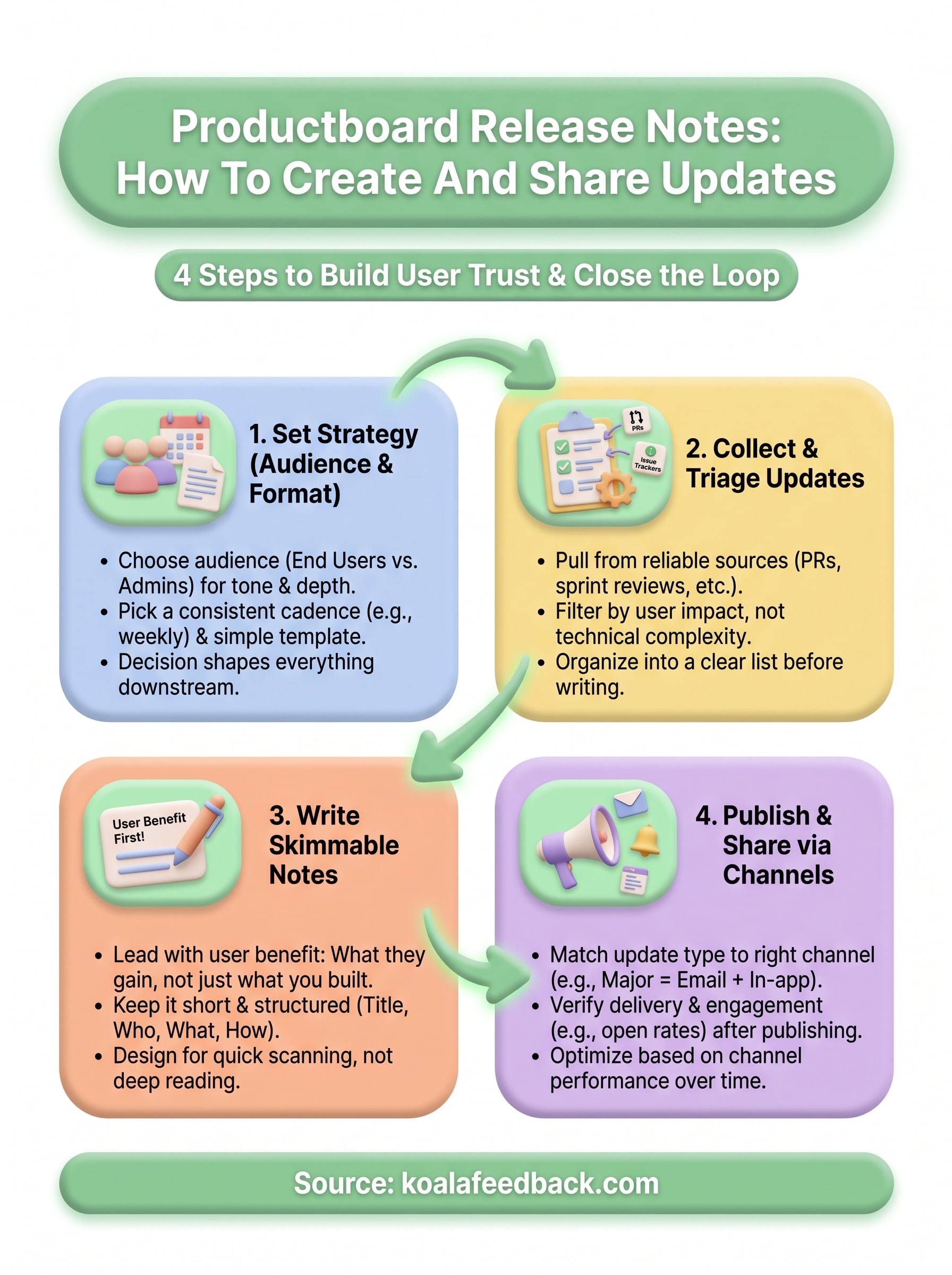
Creating and sharing productboard release notes comes down to four repeatable steps: decide who you're writing for and how often, collect what actually shipped, write for someone who skims, and distribute through channels your users already use. Each step builds on the last, so skipping any one of them creates gaps that erode user trust over time. Consistency and clarity matter more than polish, and a simple template you can fill in every week beats a complex process you abandon after a month.
That said, Productboard has real limits when it comes to public-facing changelogs and combining feedback collection with update sharing in one place. If you want a tool that handles feedback, roadmaps, and user-facing updates without stitching together multiple platforms, take a look at Koala Feedback. It gives your users a place to submit ideas, vote on features, and see exactly what you've shipped, all in one spot.

Start today and have your feedback portal up and running in minutes.

