You shipped the feature your users asked for. Now what? If nobody knows about it, it might as well not exist. That's where product release notes best practices come in, they're the bridge between what you build and the people who actually use it.
Good release notes do more than list changes. They drive adoption, reduce support tickets, and show users that their feedback led to real improvements. Bad ones? They get ignored, buried in inboxes, or worse, they confuse people into thinking something broke.
At Koala Feedback, we help teams collect user feedback, prioritize features, and share public roadmaps. Release notes are the final piece of that loop: closing the conversation with users who asked for changes in the first place. We've seen firsthand how the right update communication keeps users engaged and builds trust over time.
This guide covers how to write, structure, and distribute release notes that people actually read. You'll find actionable templates, real-world examples, and a clear framework you can start using today, whether you're announcing a major launch or a small bug fix.
Good release notes share a few things in common regardless of product size or release cadence. They're specific about what changed, clear about who it affects, and honest about what users need to do differently (if anything). Following product release notes best practices starts with knowing what information belongs in every entry before you write a single word.
The best release notes answer three questions immediately: what changed, why it matters, and what the user should do next.
Every release note entry should follow a consistent structure so readers can scan quickly and find what's relevant to them. Missing even one element creates confusion, and confusion leads users to skip the notes entirely or contact support instead.
Here are the core components that belong in every entry:
Most release notes fail because they're written from an engineering perspective rather than a user perspective. Saying "Refactored the API rate limiter" tells a developer something useful; it tells a product user nothing. Write every entry from the user's point of view and lead with the benefit, not the technical mechanism.
Your framing matters more than most teams realize. Instead of "Fixed a null pointer exception in the notification service," write "Fixed a bug that caused some users to miss email notifications." Both sentences describe the same fix, but one is actually useful to a non-technical reader and gives them the context they need to care.
Not every change belongs in user-facing release notes. Internal refactors, dependency upgrades, and infrastructure changes rarely affect users directly, so including them adds noise without adding value. Focus on changes that shift the user experience in a measurable way: new capabilities, removed limitations, fixed pain points, or altered workflows.
If you're unsure whether something belongs, ask yourself: "Would a user notice this change without being told?" If the answer is no, leave it out of your main release notes or move it to a separate technical changelog for developers and integrators. Keeping your main notes clean makes them easier to trust and faster to read.
Before you write a single line, you need a complete list of what changed and a clear decision about which changes belong in user-facing notes. Most teams skip this step and end up with bloated changelogs full of irrelevant technical details or sparse notes that miss updates users actually care about.
Your development workflow already tracks changes, so start there rather than relying on memory. Pull from your issue tracker, pull requests, and any feedback tool you use to log user requests. Cross-referencing these sources helps you connect each change back to a real user need, which makes the description much easier to write later.
Here are the common sources to check:
Once you have your raw list, sort every item by whether it changes something the user can see or feel. A database index optimization that cuts query time by 30% matters to your infrastructure team, but users experience it as "the dashboard loads faster." Translate it into user terms and it belongs in your notes. Leave internal refactors and dependency bumps out entirely.
A useful filter: if the change affects what a user can do, how fast they can do it, or fixes something that was frustrating them, it belongs in your release notes.
Apply this quick rubric to each change on your list:
| Change type | Include in user notes? |
|---|---|
| New user-facing feature | Yes |
| Performance improvement users notice | Yes |
| Bug fix affecting user workflow | Yes |
| Internal refactor or code cleanup | No |
| Dependency upgrade (no user impact) | No |
| Security patch (no behavior change) | Technical changelog only |
Following product release notes best practices means being selective at this stage. A shorter, focused list of meaningful changes builds more trust than an exhaustive dump of everything your team shipped.
Once you know what to include, how you write each entry determines whether users read it or skip it. Most teams write release notes as dense paragraphs that mix technical detail with user impact, and readers tune out fast. Structure your entries so someone can scan the headline and get the gist in under five seconds.
Your first sentence should tell users what they can now do or what problem is gone, not how your team solved it. Engineers think in mechanisms; users think in outcomes. If you rewrote the file upload system, the relevant fact for your users is that "files up to 2GB now upload without errors," not that you replaced a legacy buffer handler. One sharp sentence beats three vague technical ones every time.
Rewrite every first sentence until it answers: "What does this mean for me?"
Following this principle is one of the most effective product release notes best practices you can apply, because it forces you to translate internal work into user value before you write a single word.
Users don't read release notes linearly. They scan for their plan tier, a specific feature, or a bug that affected them. Short paragraphs, consistent labels, and a predictable layout make that scan fast and productive. Use this structure as your baseline template for each entry:
[Category] - [Date]
Title: What changed in plain language
Who it affects: All users / Admins / Pro plan
Action required: None / [specific step]
Details: 2-3 sentences with context and benefit.
Keep every "Details" section under four sentences. If a change is complex enough to need more explanation, link to a dedicated help article rather than expanding the release note itself. That keeps your notes clean and your documentation thorough without forcing users to read through a wall of text.
Consistent templates remove the guesswork from writing release notes and make your entries faster to produce and easier to read. Once your team has a template for each change type, anyone can draft an entry without reinventing the format every time. Following product release notes best practices means standardizing early so your notes stay predictable at scale.
New features need the most context because users are learning something from scratch. Lead with the capability, then explain who it helps and where to find it. Avoid vague phrases like "enhanced functionality" and name the feature directly.
[New Feature] - [Date]
Title: [Feature name] lets you [specific action]
Who it affects: [User segment or all users]
Where to find it: [Location in the product]
Action required: None / [specific step]
Details: [2-3 sentences explaining what it does and why it matters]
Bug fix entries need to be brief and specific. Name the symptom the user experienced, not the internal cause. That gives users enough information to know whether the fix applies to them without wading through technical detail.
Write bug fix entries from the perspective of someone who experienced the problem, not someone who solved it.
[Bug Fix] - [Date]
Title: Fixed: [plain description of the symptom]
Who it affects: [User segment affected]
Action required: None / [specific step if needed]
Details: [1-2 sentences describing what was happening and confirming it's resolved]
Deprecations carry the highest communication stakes because users need to act before something breaks. Give a clear deadline, state exactly what stops working, and link to a migration path or alternative. Never assume users will check on their own, so mark these entries prominently in your changelog.
[Deprecation] - [Date]
Title: [Feature/endpoint] will be removed on [date]
Who it affects: [User segment]
Action required: [Specific migration step with link]
Details: [2 sentences explaining why and what replaces it]
Writing great release notes doesn't matter if users never see them. Publishing to a single location and hoping users find it leaves most of your audience out of the loop. The final part of applying product release notes best practices is getting your notes in front of the right people through the right channels, then measuring whether those notes actually changed user behavior.
Distribution is not an afterthought; it's the step that determines whether your release notes do any real work.
Your changelog page is the primary home for release notes, but most users won't visit it unprompted. Push updates through at least two additional channels to reach users where they already are. Match the channel to the size of the change: a minor bug fix might only warrant an in-app notification, while a new feature deserves a full email announcement to the affected user segment.

Here are the channels worth using and when to use each:
| Channel | Best for |
|---|---|
| In-app notification or banner | All users, immediate visibility |
| Email to affected segment | Major features, deprecations |
| Changelog page | Ongoing reference, all changes |
| Public roadmap update | Feature completions tied to user requests |
Publishing is not the finish line. Set up basic tracking on your changelog page to see which entries get the most views, how long users spend reading, and whether they click through to related help documentation. Google Analytics gives you this data without requiring custom instrumentation.
Monitor support tickets in the week after each release and look for spikes in questions about specific features. A flood of tickets about a new setting tells you the release note for that change was unclear, not that the feature itself is broken. Use that signal to revise the entry and refine your template for next time. Closing this loop is how your release notes get sharper with every cycle.
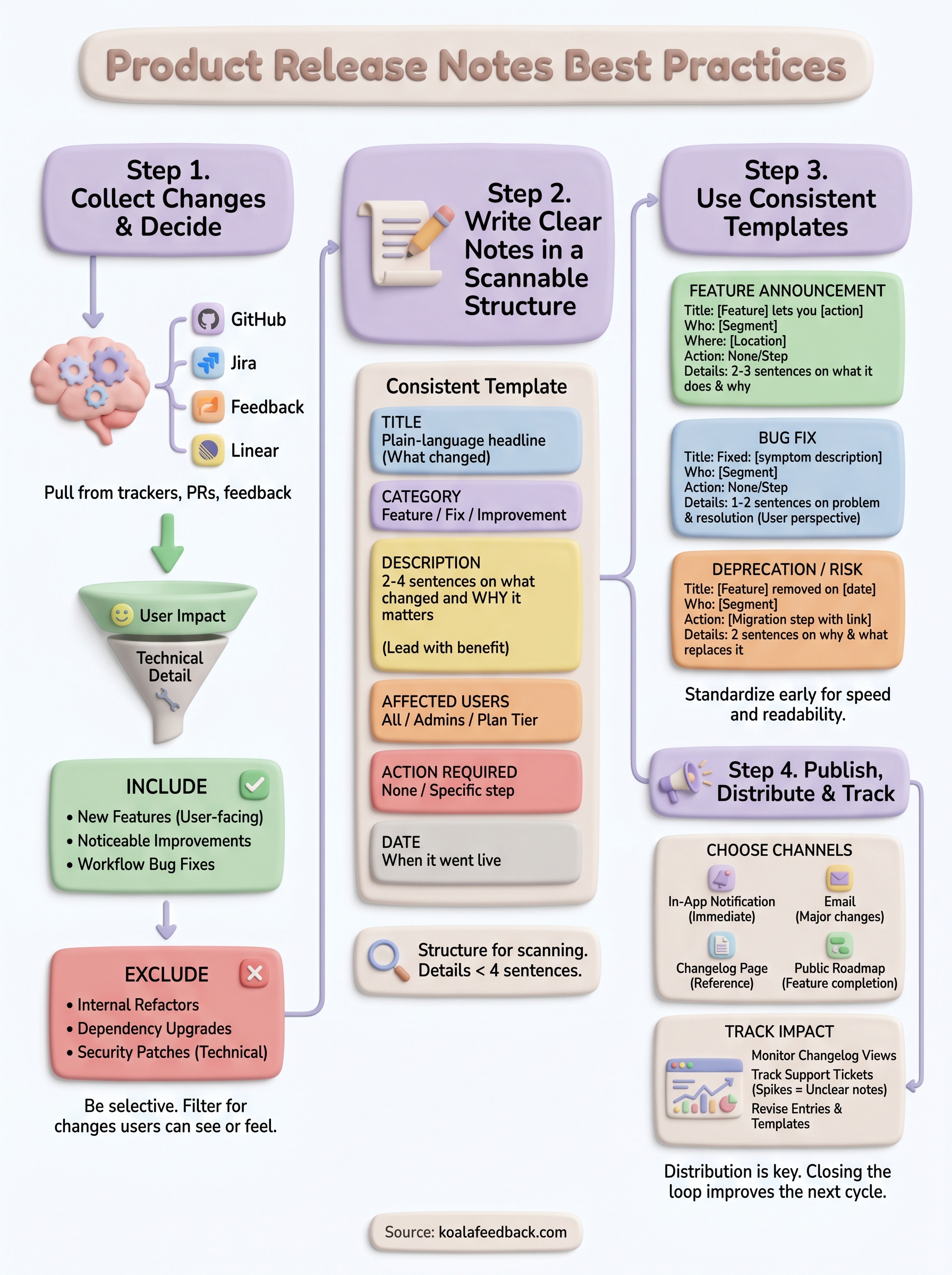
You now have everything you need to apply product release notes best practices from the first draft to final distribution. Start with the collection step, pulling every change from your issue tracker and filtering for user impact. Then use the templates in this guide to write entries that lead with benefit, not technical detail, and push your notes through at least two channels beyond your changelog page.
Track support tickets after each release, revise entries that generate confusion, and carry those lessons into your next cycle. The format improves every time you close that feedback loop. The bigger shift happens when users see that their requests show up in your release notes, because that transparency is what turns occasional users into invested ones. Tools like Koala Feedback connect your feedback portal, feature prioritization, and public roadmap so your release notes become the natural endpoint of a system your users actively participate in.

Start today and have your feedback portal up and running in minutes.

