Keeping up with Zendesk release notes can feel like drinking from a firehose. Between the core platform, SDKs, and various product lines, Zendesk publishes updates across multiple documentation pages, and missing a critical change can throw off your workflows or leave you scrambling after a deployment.
The problem isn't that Zendesk hides this information. It's that the updates are scattered, and knowing exactly where to look saves you real time. Whether you're a product manager tracking API changes or a support lead watching for new agent workspace features, having the right pages bookmarked matters.
At Koala Feedback, we help teams communicate product updates transparently, so we appreciate when companies like Zendesk make their changelogs accessible. Below, we've rounded up the five official Zendesk release notes pages you should bookmark right now, with a quick breakdown of what each one covers and who it's most useful for.
The Zendesk updates hub is your central location for tracking everything Zendesk ships across its product line. You'll find announcements, product releases, and platform notices organized in one place, making it easier to stay current without hunting across multiple pages.
This hub spans the full Zendesk product suite, including Support, Chat, Talk, Guide, and Explore. It captures both minor patches and significant feature launches, so you get a complete picture of platform activity in a single view.
The hub splits content into two main categories. Release notes document changes that are already live, while announcements flag upcoming changes or scheduled maintenance. Knowing this distinction helps you act on what is real now and plan for what is coming next.
Filtering directly to release notes prevents you from treating upcoming changes as live ones.
Product managers use this page to stay ahead of feature rollouts before users start asking questions. Support admins rely on it to catch workflow-breaking changes to triggers, macros, or ticket fields before they cause real problems. If your team manages a large Zendesk instance, a weekly check here is worth the five minutes.
Development and QA teams also find value here when checking for API or webhook changes that might affect integrations. The hub gives you enough context to triage whether a change needs immediate action or can wait for your next sprint.
Bookmark the category-level page rather than individual posts so you always open to the latest updates. Some teams also use a feed reader to pull new zendesk release notes automatically, cutting out manual checks during busy sprint cycles.
Pairing that bookmark with a recurring Monday morning reminder keeps your whole team aligned without requiring a dedicated meeting about platform changes.
The Zendesk release notes section goes deeper than the updates hub, focusing on specific documented changes tied to product versions and dates. When something in your instance shifts unexpectedly, this is the page that gives you the precise details you need.
This section logs granular product changes across Zendesk features, including the agent interface, Admin Center, and reporting tools. Each entry ties a change to a specific release date so you always have a reliable reference.
Entries appear chronologically, with the newest changes at the top. Each note identifies the affected product area and describes what changed, so you can quickly judge relevance.
Filtering by product area before reading every entry saves you meaningful time each week.
Prioritize Admin Center and Support entries if you manage a Zendesk instance. These areas update most frequently and directly impact agent workflows and ticket routing.
Tie this bookmark to your change management checklist so your team reviews it before any configuration update or deployment. That habit catches breaking changes before they reach your users.
The Zendesk What's New page takes a different approach from the detailed zendesk release notes section. Instead of granular changelogs, it delivers curated monthly summaries that highlight the most impactful features shipped during a given period.
This page focuses on high-visibility feature releases rather than minor patches or bug fixes. You'll find product highlights organized by month, making it easy to spot what changed without reading every technical entry.
Zendesk groups updates by product area and impact level, giving each feature a short description and, often, a link to deeper documentation. That format lets you skim quickly and dive deeper only on items that directly affect your team.
This page works best when you need a fast executive summary of what Zendesk shipped in a given month.
If you support stakeholder briefings or leadership updates, the What's New page saves you significant prep time. You get a polished summary rather than a raw log, which translates directly into presentation-ready content without extra formatting work.
Pair this bookmark with your quarterly roadmap reviews so you can align Zendesk's recent releases with your internal feature priorities before planning sessions begin.
The Zendesk SDK for Android release notes page is where your mobile team tracks every change to the native Android integration. Unlike the broader zendesk release notes pages, this one stays focused entirely on Android SDK versions, which makes it faster to reference during app development cycles.
This page documents version-specific changes to the Zendesk Android SDK, including new methods, deprecated functions, and bug fixes tied to each release. It gives mobile developers a precise record of what shifted between builds.
Each entry leads with the version number and release date, followed by a bulleted breakdown of what changed. That structure lets you compare two versions side by side without any guesswork about which build introduced a specific behavior.
If you skip versions during an upgrade, read every intermediate changelog to catch breaking changes before they hit production.
Before pulling a new SDK version, scan for deprecated APIs and required migration steps. These entries signal the work your team needs to complete before the update is safe to ship.
Bookmark this page alongside your sprint planning tools so your mobile and QA teams review it before every release cycle. That habit prevents last-minute surprises during testing.
The Zendesk SDK for iOS release notes page gives your mobile team a dedicated record of every change shipped to the native iOS integration. Unlike the broader zendesk release notes pages that cover the full platform, this page stays tightly scoped to iOS SDK versions, keeping your team focused during active development cycles.
This page tracks version-specific updates to the Zendesk iOS SDK, covering new features, deprecated methods, and resolved bugs tied to each individual build. Your developers get a clear audit trail for every SDK version without sifting through unrelated platform changes.
Each entry opens with the version number and release date, followed by a structured breakdown of what changed. That format makes it straightforward to identify exactly when a specific behavior was introduced or removed.
Reviewing every intermediate version is essential when you skip multiple releases during a single upgrade.
Before pulling a new version, look for deprecated APIs and required migration steps. Skipping those entries is the fastest way to introduce unexpected crashes during your next TestFlight build.
Pin this page next to your iOS sprint board so your team checks it before every release cycle without needing a separate reminder.
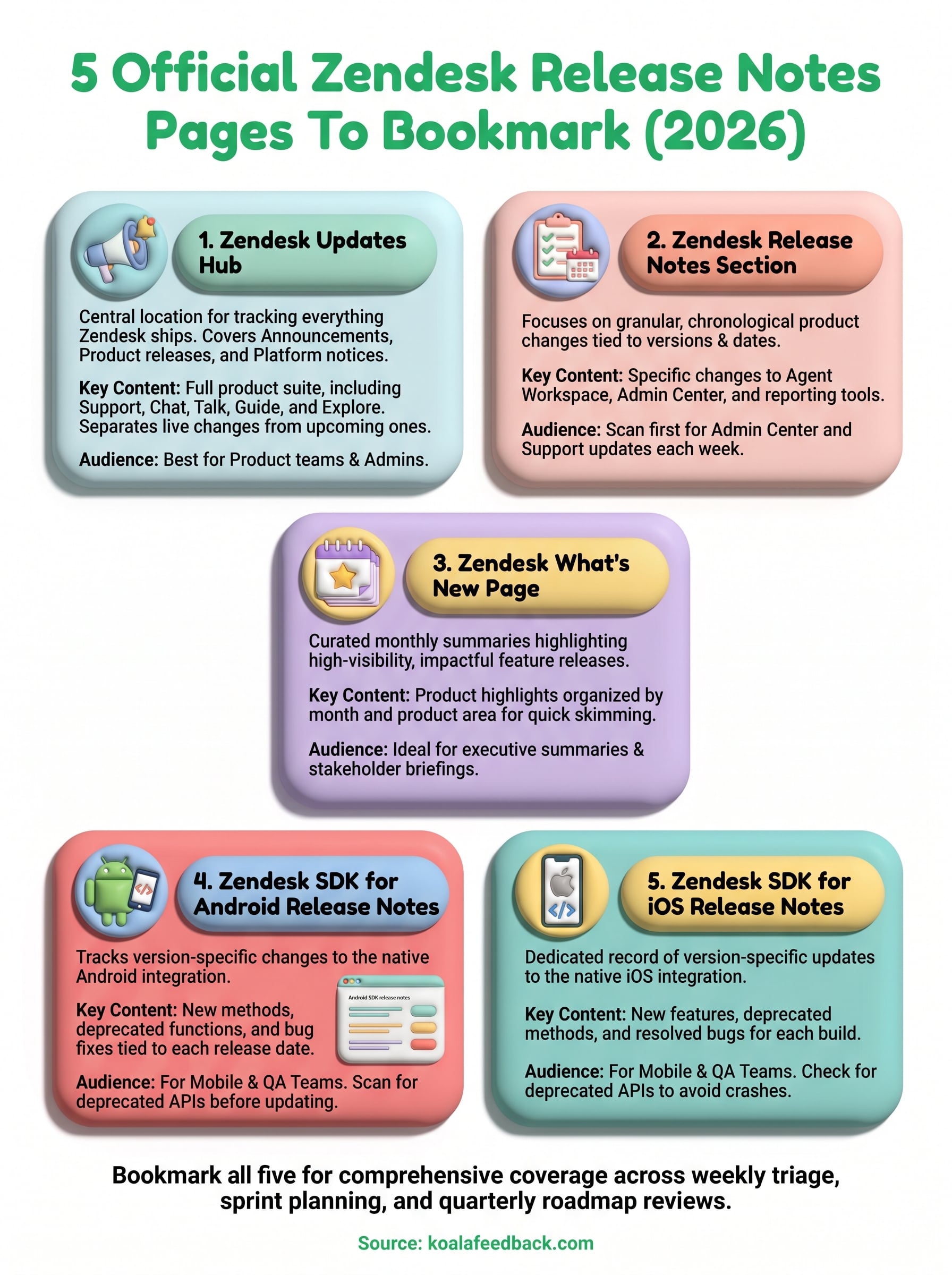
These five pages cover every layer of Zendesk's release activity, from high-level product summaries down to SDK-specific changelogs for Android and iOS. Bookmark all of them rather than relying on one, because each serves a distinct purpose depending on whether you're doing weekly triage, sprint planning, or quarterly roadmap reviews.
Staying current with zendesk release notes removes the guesswork when your team spots unexpected behavior or needs to justify a configuration change to leadership. A five-minute weekly review across these pages is far cheaper than diagnosing a broken workflow after the fact.
Once you understand what Zendesk shipped, the next challenge is communicating those changes to your own users. That's exactly where Koala Feedback helps. Your team can collect feedback, prioritize what matters most, and share a transparent product roadmap that keeps users informed and engaged throughout every release cycle.

Start today and have your feedback portal up and running in minutes.

