Writing release notes manually is tedious. You dig through commit logs, cross-reference Jira tickets, chase down engineers for context, and then try to translate it all into something your users actually care about. For teams shipping weekly or even daily, this process breaks fast. That's exactly why more product teams are figuring out how to automate release notes, and the tooling has finally caught up.
GitHub, Jira, and AI-powered workflows each offer distinct ways to generate release notes automatically, whether from pull requests, issue trackers, or plain commit history. The right setup depends on your stack, your release cadence, and how polished you need the output to be.
But here's the thing most guides skip: automated release notes are only half the equation. Your users need to actually see what you shipped. That's where a tool like Koala Feedback fits in, connecting the feedback users gave you to the updates you're now delivering, all visible on a public roadmap with customizable statuses.
This guide walks you through practical methods to automate release notes using GitHub, Jira, and AI, with step-by-step instructions you can implement today.
Before you figure out how to automate release notes, you need clarity on what the automation should actually handle. Not every part of a release note is worth automating, and treating the whole thing as a machine task is where most teams run into trouble. The goal is to use automation for data collection and first-draft generation, then let a human shape it into something meaningful for users.
Automation shines when it handles repetitive, structured work that doesn't require editorial judgment. Pulling merged pull requests, extracting Jira ticket titles, grouping changes by label or ticket type, and formatting a raw draft from structured data are all tasks machines handle reliably. If you have a consistent process for tagging pull requests or closing tickets with the right fields, the tooling can do this work every single time without anyone chasing down engineers for summaries.
The more consistent your upstream data, like commit messages, ticket titles, and labels, the more useful and accurate your automated output will be.
Here is a quick breakdown of what is safe to automate:
| Task | Automatable? |
|---|---|
| Pulling merged PRs by release tag | Yes |
| Extracting Jira tickets linked to a sprint | Yes |
| Grouping changes by type (bug, feature, fix) | Yes |
| Generating a first-draft summary with AI | Yes |
| Writing final user-facing copy and tone | Partially |
| Deciding what to highlight or keep private | No |
| Communicating impact to specific user segments | No |
Tone, context, and editorial judgment are things automation still cannot replace. A commit message like "fix null pointer on checkout page" is technically accurate, but it means nothing to a user. Someone on your team needs to translate raw technical output into language that reflects what actually changed for users, and that requires real product thinking, not a script.
Human review before publishing is also non-negotiable. Automated pipelines can pull in accidental commits, internal scaffolding changes, or half-finished features that got merged early. Skipping review because you trust the automation is how confusing or sensitive information ends up in a public changelog. Keep the review lightweight if you need to, but build it into the process before anything goes live.
Before any tool can help you figure out how to automate release notes, your GitHub data needs to be consistent. If your pull request titles are vague or your labels are inconsistent, any automated output will reflect that mess. The fix starts upstream, with clear conventions your whole team follows before a PR even gets merged.
Your PR title is the raw material for every automated summary. Train your team to write titles that describe the user-facing change, not the internal implementation. A title like "Add CSV export to the reporting dashboard" gives automation something useful. A title like "misc fixes" gives it nothing.
Pair that with a consistent set of GitHub labels so your automation can group changes by type. Here is a simple label structure that works well:
| Label | What it covers |
|---|---|
feature |
New functionality shipped to users |
bug |
Fixes for broken behavior |
improvement |
Performance or UX enhancements |
internal |
Refactors, CI changes, non-user-facing work |
Mark anything labeled
internalas excluded from your release notes pipeline from the start, so it never surfaces publicly by accident.
GitHub supports a native release note configuration file that groups PRs automatically by label. Add a file at .github/release.yml in your repository with content like this:
changelog:
  exclude:
    labels:
      - internal
  categories:
    - title: New Features
      labels:
        - feature
    - title: Bug Fixes
      labels:
        - bug
    - title: Improvements
      labels:
        - improvement
Once this file exists, GitHub will auto-generate a grouped changelog every time you create a new release. You can trigger this through the GitHub UI or via the API as part of a release workflow. This gives you a structured, label-filtered draft without writing a single line of custom automation logic.
GitHub tells you what code changed, but Jira tells you why it changed. When your team links pull requests to Jira tickets and closes them against a fix version or sprint, you have a second source of structured, context-rich data you can feed directly into your release notes pipeline. Pulling this data consistently is one of the clearest ways to improve how you automate release notes across your full workflow.
Jira's Query Language (JQL) gives you a straightforward way to filter issues by fix version, sprint, or status. Use this query as your starting point to pull all tickets tied to a specific release:
project = "YOUR_PROJECT" AND fixVersion = "v2.4.0" AND status = Done ORDER BY issuetype ASC
Swap in your project key and fix version to match your setup. This returns every resolved ticket for that release, sorted by issue type so features, bugs, and tasks come back in a predictable order every time.
Make sure your team sets the fix version field before closing a ticket, otherwise your query will return incomplete data and your release notes will have gaps.
Raw Jira API responses include far more fields than your automation needs. Use the Jira REST API with a targeted field list to keep the payload clean and easy to process. Here is what that request looks like:
GET /rest/api/3/search?jql=fixVersion="v2.4.0"&fields=summary,issuetype,status,priority
This returns just four fields per ticket: summary, issue type, status, and priority. Feed these directly into your AI prompt in Step 3 and you skip the cleanup work entirely, giving the model clean, structured input to work from.
Once you have clean data from GitHub and Jira, you can pass it to an AI model to generate a readable first draft. This is where the practical work of figuring out how to automate release notes really comes together. The output quality depends almost entirely on how well you structure your prompt, so treat this step as engineering work, not just typing a request into a chat window.
Your prompt needs to give the model a clear role, the raw data, and a specific output format. Leaving any of these vague will produce inconsistent drafts that require heavy editing every time. Here is a prompt template you can use directly in your pipeline:
You are a product writer creating user-facing release notes.
Use the data below to write a short changelog entry.
Group changes under these headings: New Features, Bug Fixes, Improvements.
Write each item as a single sentence starting with a verb.
Keep the tone clear and direct. Avoid technical jargon.
Do not invent changes not listed in the data.

Data:
[INSERT JIRA + GITHUB OUTPUT HERE]
The instruction "do not invent changes not listed in the data" is essential because models will fill gaps with plausible-sounding but entirely fabricated details if you leave them room to do so.
You also need to tell the model what to leave out. Internal tickets, security patches, and dependency upgrades rarely belong in user-facing notes. Add an exclusion rule to your prompt that tells the model to skip any item labeled internal or any ticket with "dependency" or "refactor" in the title. This keeps your published changelog clean without relying on a human to catch everything in review.
Automation handles the heavy lifting in how to automate release notes, but the final step still belongs to a person. Before you publish anything, someone on your team needs to read the draft, confirm it reflects what users actually experienced, and remove anything that should not be public. This review does not need to take long, but skipping it entirely is how internal details or misleading summaries reach your users.
Build a short checklist your reviewer runs through before hitting publish. This keeps the process fast and consistent without leaving it open to interpretation. Here is a simple checklist that covers the essential checks:
Run this in under five minutes on most releases. The goal is a lightweight gate, not a full editorial cycle.
Publishing the release notes is not the finish line. Your users will not find the update unless you push it to them directly. Send a short in-app notification, post it to your changelog page, or trigger an email to your active users depending on the size and impact of the release.
A public roadmap tied to your feedback portal closes the loop completely, because users who requested a feature can see it move from planned to shipped without you doing anything extra.
Connect each release to the original user feedback that drove it, and you turn a routine changelog into a visible sign that you listen.
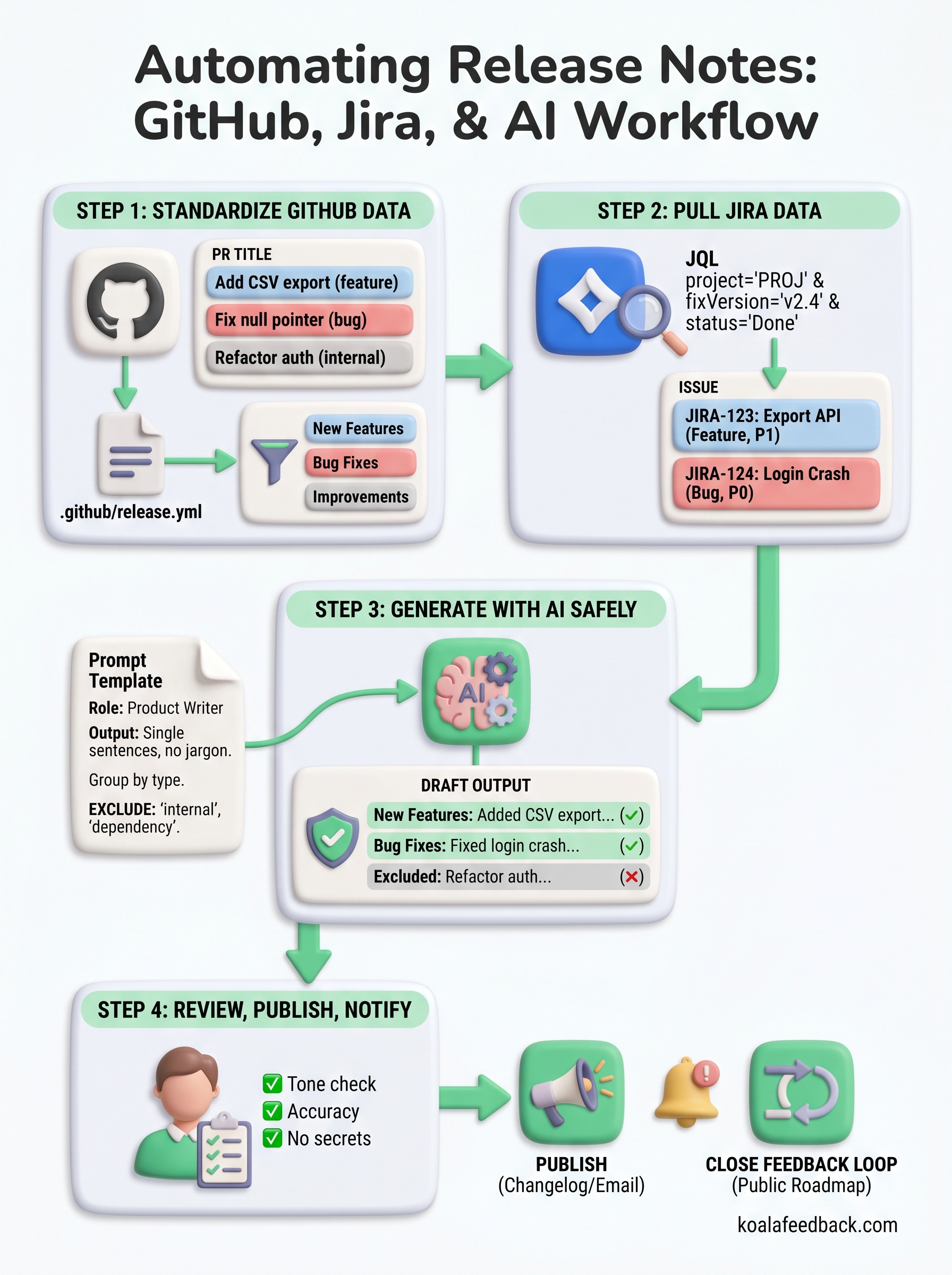
Learning how to automate release notes is a process you build in layers. You start with clean, consistent data in GitHub and Jira, then use AI to turn that data into a readable first draft, and finally run a short human review before anything reaches your users. Each step in this guide removes a specific manual bottleneck without handing full control to automation where it does not belong.
The real payoff shows up when users can connect the features they requested to the updates you shipped. That connection builds trust and keeps your product community engaged over time. Publishing to a changelog is only part of it. Closing the loop with the people who gave you feedback in the first place is what turns release notes from a routine task into something that actually drives retention.
If you want to make that loop visible, start your free trial with Koala Feedback and give your users a public roadmap tied to their input.

Start today and have your feedback portal up and running in minutes.

