Every WordPress update ships new features, security patches, and bug fixes, but tracking down a complete record of what actually changed isn't always straightforward. The WordPress changelog is the definitive source for every modification to the core software, and it's essential reading for developers, site owners, and anyone who needs to know exactly what's different after clicking "Update."
At Koala Feedback, we build tools that help product teams collect user feedback and share public roadmaps, so we understand the value of clear, accessible update documentation. Whether you're shipping changes to a SaaS product or following them in an open-source project like WordPress, knowing where to find that information matters.
Below, you'll find 5 official places to track WordPress core updates, from detailed version-by-version release notes to developer-focused resources that break down technical changes and deprecations in every release.
The WordPress.org News blog at wordpress.org/news is the official announcement channel for every core release. When the WordPress team ships a new version, this is the first place you'll find the release post with a summary of what changed, who contributed, and why those changes matter.

Each release post covers high-level feature summaries, security notes, and contributor credits. What the News blog doesn't give you is a line-by-line breakdown of every commit or a full list of resolved tickets. For that level of detail, you'll need to go deeper into Trac or the SVN repository, both of which are covered later in this article.
Release posts follow a predictable naming pattern, which makes filtering them straightforward. Use the table below to understand what each post type typically contains:
| Release type | Example | What the post covers |
|---|---|---|
| Major release | WordPress 6.7 | Full feature rundown, editor changes, dev notes |
| Minor release | WordPress 6.7.1 | Security fixes, bug count, brief summary |
| Beta or RC | WordPress 6.8 Beta 1 | In-progress changes, testing instructions |
The News blog publishes beta and release candidate (RC) posts ahead of every major release. These pre-release posts often contain the most complete description of what's coming before any official documentation is finalized.
Checking the RC posts before a major update ships gives you time to test your plugins and themes against the new version before it reaches your users.
Each beta post also links to testing resources and highlights specific areas where the team needs feedback, making it a practical tool for staying ahead of breaking changes.
Subscribe to the WordPress.org News RSS feed at wordpress.org/news/feed to get release posts directly in your reader without checking the blog manually. For a complete wordpress changelog picture, pair the News blog with the additional official sources below, since no single source covers every layer of a release.
The WordPress.org developer resources maintain a version index that lists every public release of WordPress, from the very first version to the current one. This index gives you a structured overview of the entire release history in a single place, making it a reliable starting point for tracking any core change.
Each entry in the version index lists every major and minor release with its release date and a short summary. Those entries link to dedicated documentation pages that break down what changed, including new features, resolved bug counts, and security notes.
Each version entry on the index page links to its own documentation page. From there, you'll find a link to the official Trac milestone for that release, which is where the granular, ticket-level data lives.
Jumping from the version index to Trac gives you the most complete picture of what actually changed in any specific release.
The version index is the fastest way to build a complete wordpress changelog timeline. If you need to understand what changed between two releases, start here and work backward through each version's documentation page.
Minor releases like 6.7.1 or 6.6.2 don't always carry the same depth of documentation as major releases. You may find that minor release pages link to a security advisory rather than a full breakdown, so plan to cross-reference Trac tickets for complete details.
The Make WordPress Core blog at make.wordpress.org/core is where the development team documents technical decisions in real time. Unlike the News blog, this resource targets developers directly, publishing detailed write-ups before, during, and after each release cycle.
Each major release cycle produces a field guide, which is a curated collection of developer notes covering every significant change shipped in that version. Think of the field guide as the developer-facing wordpress changelog, written by the engineers who built the changes rather than a communications team.
Dev notes are the most practical way to catch breaking changes before they affect your code. Each note explains what changed, why it changed, and what you need to update in your own plugins or themes. When a major update introduces a new API or deprecates an existing function, the dev note spells out the exact migration path you need to follow.
Reading dev notes before a major release ships saves you from debugging issues that were already documented weeks earlier.
The Make Core blog organizes posts by release milestone and component, so you can filter directly to the Block Editor, REST API, or performance work without reading every post.
Subscribe to the Make WordPress Core RSS feed to receive dev notes and field guides as they publish throughout each release cycle.
WordPress Core Trac at core.trac.wordpress.org is the official bug tracker for all core development work. Every feature request, bug report, and patch lives here, organized into milestones that correspond directly to release versions.
Each WordPress release gets its own Trac milestone, such as "6.8" or "6.7.1." Opening a milestone shows every ticket that was targeted, resolved, or closed for that version, giving you a granular wordpress changelog that goes far beyond what release posts describe. The milestone view categorizes tickets by:
Each ticket includes a full discussion thread, attached patches, and a commit reference once the change merges into core. That commit reference links directly to the SVN changeset, so you can trace exactly what code changed and when.
Reading the ticket timeline from open to commit gives you the full context behind any change, including why alternatives were rejected.
Search Trac by keyword or component to find tickets tied to a specific feature or function. Each ticket's status moves from "new" through "assigned," "patch needs review," and "committed," so you can follow the exact progress of any change in real time.
Trac is most useful when you need to understand why something changed, not just what changed. Release notes summarize outcomes, but Trac shows you the full decision trail, including rejected approaches and last-minute patches applied before a release ships.
The WordPress Core SVN repository at develop.svn.wordpress.org is the lowest-level source in the entire wordpress changelog stack. Every commit that lands in core gets recorded here as a changeset, giving you raw, unfiltered access to every line of code that changed.
Each SVN changeset shows you the exact diff between the before and after states of a code change, including file paths, line numbers, and the commit message written by the developer who made it. No other official source gives you this level of line-by-line precision.
You can browse the SVN log by date range or directory path, which lets you narrow down changes to a specific area of core. The most commonly audited directories include:
/src/wp-includes/ for core functions and APIs/src/wp-admin/ for dashboard and admin changes/src/wp-content/ for default themes and bundled pluginsThis structure makes it practical to isolate changes that touch exactly the files relevant to your task.
Every commit message in SVN references the associated Trac ticket number, typically in the format "Fixes #12345." That reference connects the changeset directly back to the full ticket discussion, patches, and decision trail covered in the previous section.
Using the Trac ticket number from a commit message is the fastest way to jump between the raw code change and the reasoning behind it.
SVN history is most useful when you need to pinpoint exactly when a specific line of code changed and who changed it. If a bug appeared after a particular release, browsing the SVN log for that timeframe often surfaces the exact commit responsible faster than any other source.
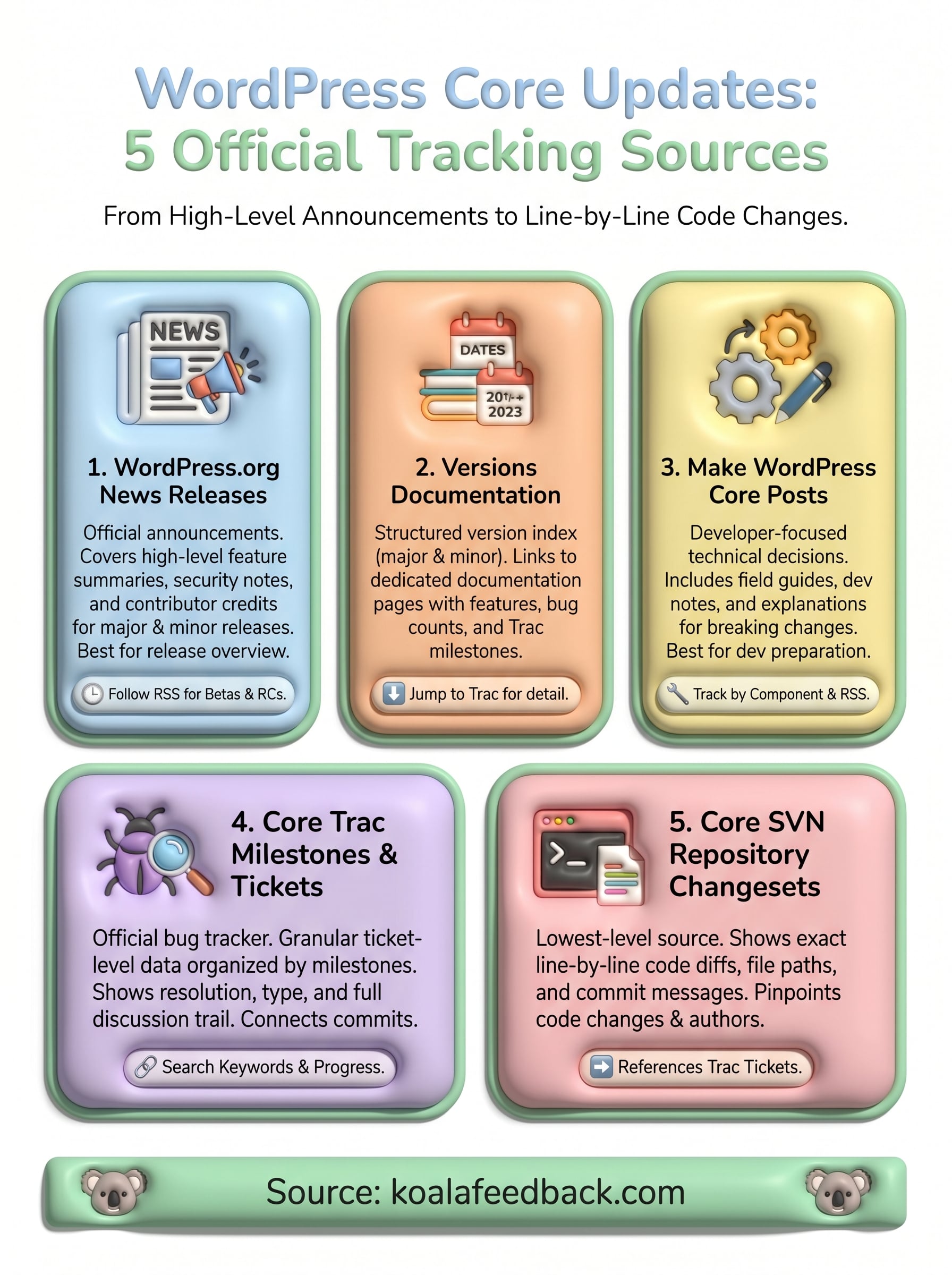
You now have five official places to track every core update, from high-level release announcements on the WordPress.org News blog to line-by-line SVN changesets that show exactly what code changed and when. Use them together: start with the News blog for the big picture, check Make Core for breaking changes and field guides, then go into Trac or SVN when you need the full decision trail behind any specific modification.
Keeping your team informed about changes matters just as much as finding them. The same principle applies when you're shipping your own product updates. A clear, accessible wordpress changelog for your product builds user trust and cuts down on support requests. If you're looking for a straightforward way to share your roadmap and communicate progress with your users, Koala Feedback gives you the tools to collect feedback, prioritize features, and keep everyone informed throughout your release cycle.

Start today and have your feedback portal up and running in minutes.

