You keep hearing the word thrown around in sales calls and product docs: this tool
Every tool your team adopts adds another data silo unless you connect it to everything else. Software integrations solve that problem by letting applications share information automatically instead of forcing someone to copy and paste between them. When you understand what integrations in software actually accomplish, the sales pitch stops sounding like jargon and starts sounding like a real business decision. This section walks through the practical reasons integrations matter, from saved hours to better decisions, so you can judge whether a given integration is worth setting up.
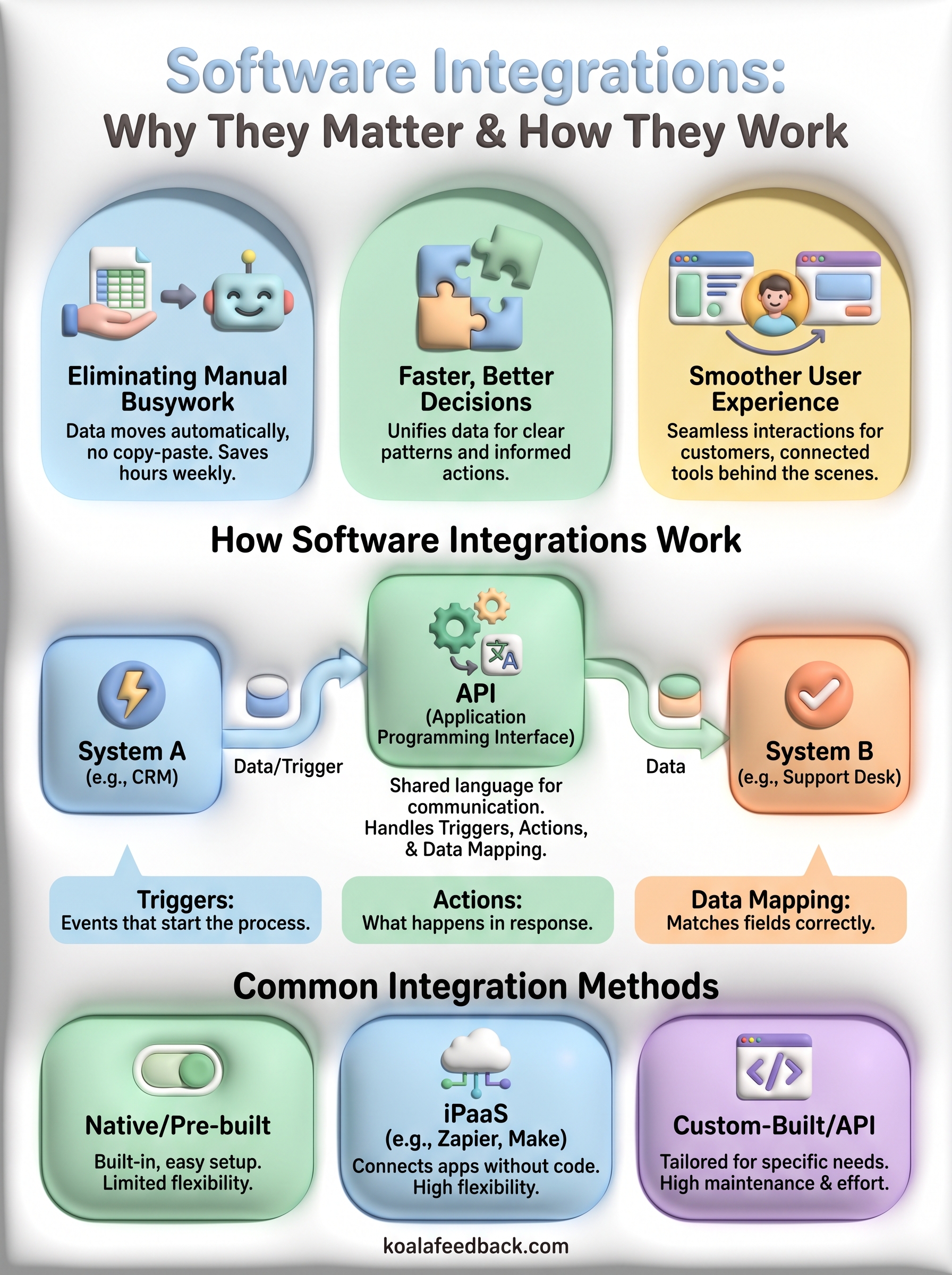
Manual data entry is where good information goes to die. Someone exports a spreadsheet from one system, reformats it, and uploads it into another, and by the time it lands, it's already stale. Software integrations remove that step entirely by moving data between systems the moment it changes. A support ticket becomes a feature request in your feedback tool without anyone touching a keyboard. A new signup in your billing platform triggers a welcome sequence in your email tool automatically. This isn't just about saving five minutes here and there; it's about removing the human error that creeps in every time someone retypes a number or forgets to update a field.
The real value of an integration isn't the data it moves, it's the hours of manual work it deletes from someone's week.
Teams that rely on disconnected tools make decisions on partial information. A product manager checking feature requests in one app, support tickets in another, and sales notes in a third is piecing together a puzzle instead of looking at a full picture. Software integrations pull those pieces into one place, so patterns become visible that would otherwise stay hidden. If ten support tickets, three sales calls, and a dozen upvotes on your feedback board all point to the same missing feature, that's a signal you can act on with confidence, not a guess based on whichever complaint you happened to read last.
Customers don't care how many separate tools power your product behind the scenes. They care whether things work. When your CRM, support desk, and product platform are integrated, a customer who submits a feature request doesn't have to explain their history again when they contact support next month. Everything is already connected. This kind of connected software experience is what separates companies that feel organized from ones that feel like every department is operating in its own bubble. Reducing that friction for the end user is often the strongest argument for investing in integrations in the first place, even ahead of the internal efficiency gains.
It helps to put numbers next to the concept, because "efficiency" is vague until you can see what it replaces. Here's a simple comparison of a common workflow, tracking and triaging user feedback, with and without integrations in place:

| Task | Without integration | With integration |
|---|---|---|
| Logging a support ticket as feedback | Manual copy-paste, 5-10 min per item | Automatic sync, 0 min |
| Notifying product team of a trend | Weekly manual report | Real-time dashboard update |
| Updating customers on feature status | Individual emails | Automated roadmap status change |
| Risk of duplicate or lost requests | High | Low |
Multiply that first row by even 20 tickets a week and you're looking at several hours of manual work saved, every single week, just from one connection between two tools.
Growing companies often feel this pain most acutely around feedback management strategy and tools, because feedback arrives from everywhere: support tickets, sales calls, app store reviews, direct emails, and social media. Without integrations, someone has to manually gather all of that into a spreadsheet before anyone can prioritize anything. That's slow, and it means feedback often gets triaged weeks after a customer actually said it. Koala Feedback's feedback portal is built to sit at the center of that process, letting requests flow in from multiple channels and giving your team one place to categorize, vote on, and prioritize what to build next. Once that hub is integrated with the rest of your stack, whether that's your support desk, your CRM, or your internal roadmap tools, feedback stops being a side project and becomes part of your regular workflow.
Moreover, integrations matter because they compound. One connection saves a few hours a week. Ten connections across your stack save entire days, and they remove the mental overhead of remembering which system holds which piece of information. That compounding effect is exactly why so many product teams treat integration support as a top criterion when they're evaluating new software, right alongside price and features. If a tool can't talk to the rest of your stack, it becomes another silo you have to manage by hand, and that cost adds up faster than most teams expect.
Understanding the mechanics behind software integrations makes it much easier to evaluate a vendor's claims, or to integrate SaaS applications and troubleshoot a connection that isn't behaving. At the core, how do software integrations work comes down to one system asking another for data, or one system pushing data to another, through a defined channel both sides agree to use. That channel is almost always an API, short for application programming interface, which acts like a translator between two pieces of software that were never designed to speak the same language natively.
An API defines a set of rules: what data can be requested, what format it comes back in, and what actions are allowed. When your feedback tool integrates with your support desk, the API, and Freshdesk's API documentation is a good example of one, is what lets the feedback tool ask "give me every ticket tagged as a feature request" and get a structured, usable answer back instead of a wall of unformatted text. Most modern SaaS products expose what's called a REST API, which uses standard web requests to send and receive data. A simple request might look like this:
GET /api/v1/feedback?status=open
Authorization: Bearer YOUR_API_KEY
That single call can return every open feedback item in a system, ready to be matched up with records somewhere else.
An integration is really just two systems agreeing on a shared language, and the API is the dictionary they both use.
Before any data moves, the two systems need to verify who's asking and what they're allowed to see. Authentication usually happens through an API key or an OAuth token, both of which prove that the request is coming from an authorized source rather than an outsider poking at the system. Permissions then determine the scope: a marketing tool might be allowed to read customer email addresses but not billing details, for example. Getting this step wrong is the most common reason integrations fail during setup, so it's worth following API security and data mapping best practices and confirming exactly what access each side needs before you connect anything.
Once authentication is sorted, the integration needs to know when to move data and what to do with it. This is where triggers and actions come in. A trigger is the event that starts the process, like a new form submission or a status change. The action is what happens in response, like creating a record in another system. Data mapping ties the two together by matching fields correctly, so a field labeled "customer_email" in one tool lands in the field labeled "email_address" in the other instead of getting dropped or misfiled.

Some integrations work through webhooks, which push data the instant something changes, giving you near real-time updates. Others rely on polling, where one system checks in with the other on a schedule, say every fifteen minutes, and pulls whatever changed since the last check. Webhooks are faster and lighter on system resources, but they require the receiving system to be ready to accept incoming data at any moment. Polling is simpler to set up and more forgiving if a system goes offline briefly, though it introduces a delay. Knowing which method a tool uses tells you how current your data will actually be at any given moment, and it's one of the SaaS integration architecture patterns worth understanding before you commit.
Not every integration is built the same way, and picking the right method matters just as much as picking the right tool. Software integrations generally fall into a handful of categories, each with different tradeoffs around setup time, flexibility, and maintenance. Knowing these categories helps you ask better questions when a vendor says "yes, we integrate with that," because the method behind that claim determines how reliable and how customizable the connection will actually be.
Many SaaS products ship with native integrations already built and maintained by the vendor. These are the connections you find in a settings menu, ready to activate with a few clicks, no coding required. A feedback tool that connects directly to Slack or pulls in Intercom feature requests out of the box is a good example. The upside is speed and reliability, since the vendor tests and updates the connection as both platforms change. The downside is limited flexibility. You get the fields and triggers the vendor decided to support, and nothing more, so if your workflow needs a custom field mapped somewhere unusual, a native integration might not stretch that far.

When no native option exists, many teams turn to an integration platform as a service, commonly shortened to iPaaS. Tools like Zapier or Make sit between two applications and let you build custom workflows without code using their triggers and actions. You pick a trigger in one app, an action in another, and the platform handles the technical handshake in between. This approach covers a huge range of combinations that vendors could never build natively, and it puts the customization in your hands rather than waiting on a product roadmap.
The best integration method is the one that matches your team's technical comfort, not the one with the most features on paper.
For workflows too specific for an iPaaS template, teams sometimes build a custom integration directly against both systems' APIs. This gives you full control over exactly what data moves, when, and in what format, but it also means your team owns the ongoing maintenance. If either API changes its structure, someone has to update the code. This route makes sense for high-volume, business-critical connections where off-the-shelf options fall short, but it's overkill for a simple one-off sync.
Some organizations run their own middleware, a layer of software whose only job is to sit between systems, translate data formats, and route information correctly. This is common in larger companies with many internal tools and strict data governance requirements, where enterprise iPaaS options like Workato and MuleSoft usually enter the conversation. Webhooks often power the real-time piece of this setup, firing an instant notification the moment something changes rather than waiting for a scheduled check.
Here's a quick side-by-side to help you match a method to your situation:
| Method | Setup effort | Flexibility | Best for |
|---|---|---|---|
| Native integration | Low | Low to moderate | Common tools, quick wins |
| iPaaS (Zapier, Make) | Low to moderate | High | Custom workflows without code |
| Custom API integration | High | Very high | Business-critical, high-volume data |
| Middleware | High | Very high | Large orgs with many systems |
Whichever method you choose, the goal stays the same: get accurate data moving between systems without adding more manual steps than you started with.
Abstract explanations only go so far. Seeing where software integrations show up in everyday tools makes the concept concrete, and it gives you a mental checklist for spotting good integration design when you're evaluating new software. The examples below cover a range of industries and team sizes, but the underlying pattern is always the same: two systems, a shared trigger, and data moving without anyone lifting a finger.
Picture a support agent closing a ticket where a customer asked for a feature that doesn't exist yet, the classic case for capturing feature requests from support tickets. Without an integration, that request lives and dies in the support desk, invisible to the product team. With an integration in place, that ticket automatically creates a new item on a feedback board, tagged with the customer's account and the original conversation for context. Koala Feedback's feedback portal is designed to sit downstream of tools like this, so requests from support, sales, and direct submissions all land in one prioritized list instead of three separate inboxes.
A feature request that never leaves the support desk is a feature request the product team will never build.
Sales teams rely on this pairing constantly. When a lead's status changes in a CRM like Salesforce or HubSpot, an integration built on something like the HubSpot API can trigger a specific email sequence in a marketing tool automatically, no export required. Say a lead moves from "trial" to "customer." That status change fires a welcome series, updates a billing record, and removes the contact from a nurture campaign meant for prospects, all within seconds. This is a textbook case of connected software doing what a person would otherwise have to do manually across three different screens.
Online stores generate a constant stream of transactions, and each one needs to show up correctly in the books. An integration between a platform like Shopify and accounting software such as QuickBooks pulls every order, refund, and tax line into the ledger automatically. Retailers processing hundreds of orders a day would need a full-time bookkeeper just to keep up without this connection. Here's what typically syncs in that kind of setup:
Once feedback gets prioritized, someone still has to tell the team, and often the customers, what's happening. Integrating a roadmap tool with Slack, usually through the Slack Web API and Events API, means the moment a feature status changes from "planned" to "in progress," the whole team sees it without checking another app. On the customer-facing side, publishing a public roadmap to customers that updates automatically as statuses change keeps users informed without anyone drafting a manual announcement every time priorities shift. That combination, feedback collection feeding a prioritized roadmap that then feeds automatic updates, shows how these examples of integrations in software rarely work in isolation. Each connection sets up the next one, and the value compounds the more of your stack you connect. Whether you're linking two tools or ten, the goal in every case is the same: information moves where it's needed, when it's needed, without someone manually carrying it there.
At its core, software integrations are just two systems agreeing to share information automatically instead of making a person do it by hand. You've seen how that works through APIs, triggers, and data mapping, and how the method you pick, native, iPaaS, custom, or middleware, shapes how flexible and durable that connection turns out to be. The examples along the way, from support tickets becoming feature requests to roadmaps updating Slack in real time, all point to the same lesson: disconnected tools cost you hours and hide patterns you need to see.
Feedback management is one of the clearest places to put this into practice. Instead of chasing requests across five different tools, connect them into one place built for prioritizing what matters. See how Koala Feedback helps you collect, prioritize, and act on user feedback in one integrated portal that turns scattered input into a clear, actionable roadmap.

Start today and have your feedback portal up and running in minutes.

