Most SaaS products don't operate in isolation. Your users expect their tools to talk to each other, syncing data, triggering workflows, and sharing context without manual effort. But connecting applications poorly leads to broken data flows, security gaps, and technical debt that compounds over time. That's why understanding SaaS integration best practices matters before you write a single line of integration code. Getting this right means your product scales cleanly; getting it wrong means firefighting production issues for months.
At Koala Feedback, we built a platform that plugs into your existing product workflow, collecting user feedback, organizing feature requests, and sharing roadmaps. We know firsthand that how you integrate matters just as much as what you integrate. A poorly planned connection between tools creates friction for users and headaches for dev teams. A well-planned one becomes invisible infrastructure that just works.
This guide covers 11 proven practices for building SaaS integrations that are secure, scalable, and maintainable. You'll find actionable advice on choosing integration patterns, handling authentication, managing API versioning, and monitoring data flow between platforms. Whether you're connecting two tools or orchestrating dozens, these practices will help you build integrations your team won't regret six months from now.
Without a single place to collect integration requests, duplicate asks pile up and prioritization becomes guesswork. Your team ends up fielding the same request from multiple users across different channels, with no way to quantify actual demand. Centralizing this process is one of the most overlooked SaaS integration best practices, and it pays off immediately in clearer roadmaps and faster development decisions.
Centralizing integration requests means routing all feedback about new connections, broken data flows, and API needs into one tracked system rather than letting them scatter across Slack messages, support tickets, and email threads. When every request lives in the same place, your team can spot patterns quickly and make decisions based on real data instead of whoever raised their voice loudest.
The team that collects integration feedback centrally always ships the right integrations first.
A centralized system also means your users can see what others have already requested, vote on shared priorities, and follow progress updates. That transparency reduces duplicate submissions and builds user trust in your roadmap process.
Set up a dedicated feedback portal where users can submit integration requests, vote on existing ones, and track status. Assign a clear owner to triage incoming requests weekly and tag each one by the connected tool, the workflow it affects, and the number of users impacted. Also ensure your internal team feeds into the same system, because sales calls and support conversations surface integration pain points that users may never formally submit.
The most common mistake is treating integration feedback as a one-time collection exercise. Requests decay in accuracy quickly; a user who asked for a specific sync six months ago may have already churned or found a workaround. Re-validate older requests before committing development time to them.
Siloed intake processes are equally damaging. If your sales team logs requests in a spreadsheet while support uses a ticketing tool, you will never get an accurate picture of demand.
Track request volume per integration and vote counts across user segments. Also monitor the time between submission and your team's first acknowledgment. A long acknowledgment window signals a broken intake process, not just a crowded backlog.
Before writing any integration code, you need to know exactly what success looks like and how you'll measure it. Integrations built without a clear business outcome tend to solve the wrong problem, shipping a connection that works technically but delivers no measurable value to your users or your team.
Defining the business outcome means tying every integration decision to a specific, measurable result your product needs to achieve, not just a feature request. Connecting two tools to cut manual data entry by 80% is a defined outcome. "Connect our tool to Salesforce" is not. That distinction shapes every technical choice that follows.
Start by writing a one-sentence outcome statement before any scoping begins: "This integration will [action] so that [user benefit], measured by [metric]." Attach a numeric target to each integration upfront, and get sign-off from both product and business stakeholders before development starts.
Integrations without defined metrics are impossible to evaluate after shipping.
The most common mistake in SaaS integration best practices is measuring activity instead of impact. Tracking API call volume tells you nothing about whether the integration solved the user's actual problem. Focus on outcome metrics like time saved, error rates reduced, or retention improvement tied directly to integration adoption.
Track activation rate (how many users turn on the integration after it ships), error rate per sync cycle, and user-reported satisfaction specific to the connected workflow. Review these numbers at 30 and 90 days post-launch to catch problems before they compound.
Starting an integration without a clear picture of what connects to what is like wiring a building without a blueprint. Systems mapping gives your team a shared reference point before development begins, and it surfaces conflicts, ownership gaps, and data quality issues while they're still cheap to fix.
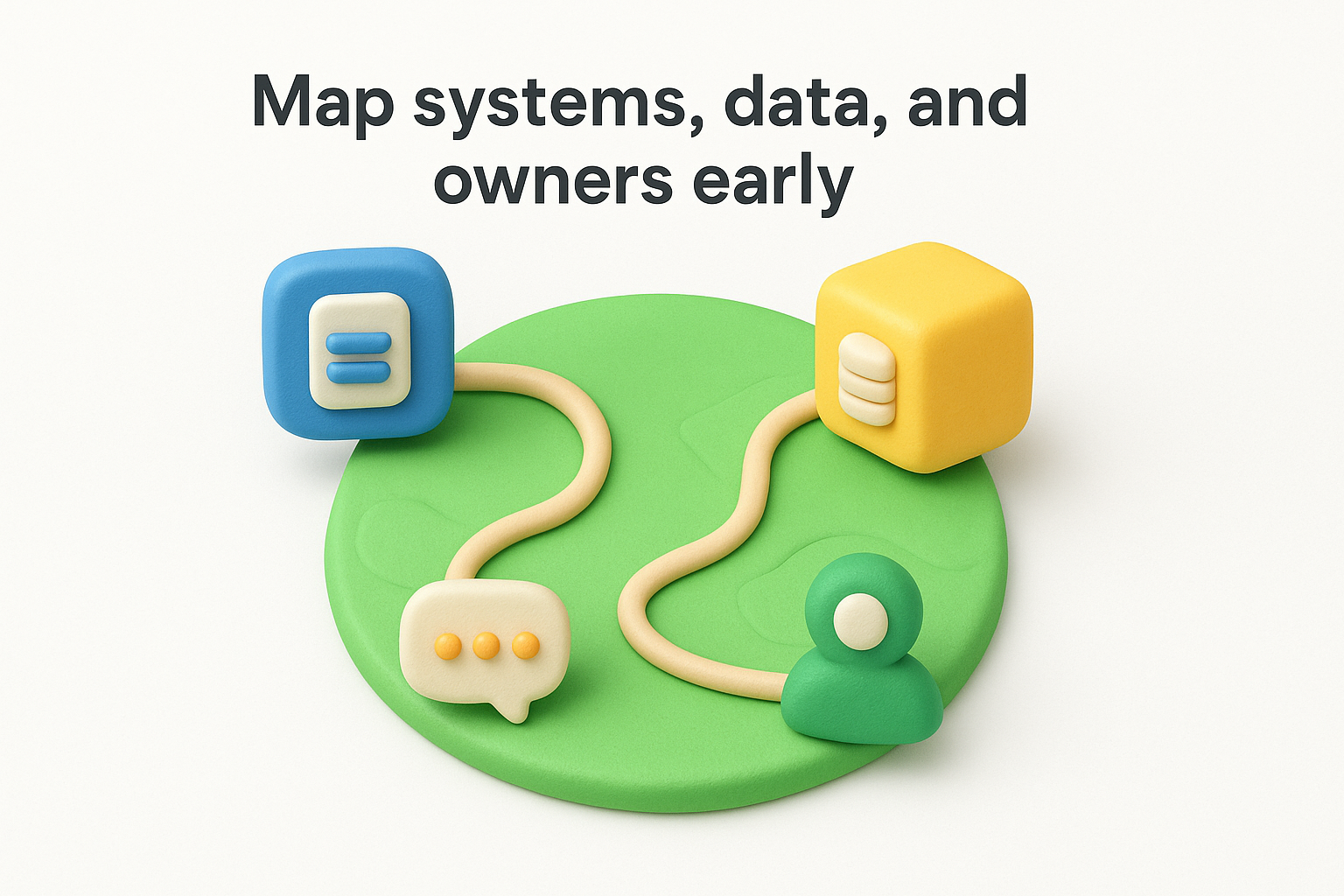
Mapping systems, data, and owners means producing a documented view of every application involved in the integration, what data each one holds, how that data flows, and who is responsible for it. This isn't a one-time diagram; it's a living artifact your team updates as integrations evolve.
A system map built before development starts will save you more time than any optimization made after.
List every system involved and document the data fields each one owns, the direction of data flow, update frequency, and the team or individual accountable for each connection. Use a simple table with columns for system name, data type, flow direction, sync frequency, and owner. Then review it with all stakeholders before writing any integration code to catch missing dependencies early.
Skipping this step is one of the most common gaps in SaaS integration best practices. Teams often discover mid-build that two systems use conflicting field formats or that nobody owns a critical data source, stalling the entire project.
Track mapping completeness (percentage of systems fully documented) and the number of ownership gaps identified before versus after development starts. Fewer post-launch surprises is a direct indicator that your mapping process is working.
Not every integration problem calls for the same solution. Picking the wrong approach early forces expensive rework later, often at the worst possible time. Your choice between point-to-point connections, an integration platform, or a custom API layer determines how much maintenance burden your team carries for years.
The right integration approach matches your team's technical capacity, your data volume, and your long-term scalability needs. A direct API connection between two tools works fine for simple, low-frequency syncs. An integration platform as a service (iPaaS) fits teams managing multiple connections without dedicated engineering bandwidth. A custom middleware layer makes sense when you need tight control over data transformation or complex business logic.
Choosing an approach based on what's fastest to ship, rather than what fits your architecture, is the most expensive mistake in SaaS integration best practices.
Evaluate each integration candidate against three criteria: data volume and sync frequency, the technical complexity of the transformation logic required, and your team's ability to maintain the connection long-term. Document your decision and the reasoning behind it so future engineers understand the tradeoffs you made.
Defaulting to custom code because it feels like more control is a trap. Custom integrations carry higher maintenance costs and break more often when third-party APIs change. Match tool complexity to actual requirements, not ambition.
Track time to first successful sync and the engineering hours required to maintain each connection monthly. Rising maintenance time signals a mismatch between the approach chosen and the actual integration demands.
Starting integration development by writing code before defining your API structure sets your team up for expensive rewrites. Defining your data contracts and API schemas upfront gives every team a shared specification, preventing conflicts over field names, data types, and sync behavior that would otherwise surface in production.
A data contract is a formal agreement between two systems about what data they'll exchange, in what format, and under what conditions. When you design this before writing implementation code, both sides of the integration work from a stable reference point. API changes become planned events rather than surprise breakages that break downstream workflows.
The teams that define data contracts before writing a single function ship integrations that require far fewer emergency patches.
Write your API specification using a standard format like OpenAPI before development begins. Document every field name, data type, and required versus optional status alongside expected error responses in that spec. Then circulate it for review across all teams involved before anyone writes implementation code, so mismatches get caught while they're still cheap to fix.
Treating the API spec as optional documentation created after the fact is one of the most damaging gaps in SaaS integration best practices. When your team builds against informal assumptions, field mismatches and type conflicts surface in production instead of in review where fixing them costs a fraction of the effort.
Track spec coverage (percentage of endpoints fully documented before development starts) and the number of contract violations caught in testing versus production. Fewer production surprises indicates your contract process is working.
Every integration you build is a potential attack surface. Granting broad permissions because it's easier than scoping them precisely is one of the most common security failures in SaaS integration best practices. A compromised credential with wide access can expose far more data than a breach targeting a single service, so locking down permissions from the start is non-negotiable.
Least privilege means each integration component gets access to only the data and actions it needs, nothing more. Secure authentication means using modern protocols like OAuth 2.0 rather than passing raw credentials between systems.
An over-permissioned integration token is a security liability waiting to become an incident.
Audit every permission scope your integration requests and remove any that aren't required for the core workflow. Use OAuth 2.0 scopes to limit access at the token level, and store credentials in a secrets manager rather than environment variables or hardcoded config files. Rotate credentials on a scheduled basis and revoke them immediately when a team member leaves or a service is decommissioned.
Reusing a single service account across multiple integrations is a common trap. If that account is compromised, every connected system is at risk. Each integration should authenticate with its own isolated credentials scoped to its specific needs.
Track credential age across all integrations and the percentage of connections using OAuth 2.0 versus legacy authentication methods. Flag any credential unchanged beyond your rotation policy threshold.
Data flowing between systems doesn't arrive clean by default. Raw data contains gaps, mismatched formats, and duplicate records that corrupt downstream workflows if you don't catch them at the boundary. Treating validation and deduplication as optional polish rather than a core part of SaaS integration best practices causes silent data quality failures that are hard to trace and expensive to fix after the fact.
Validating data means checking every incoming record against a defined schema before it enters your system. Transforming adjusts field formats and values so both systems speak the same language. Deduplication ensures the same record doesn't get written multiple times when retries or timing issues push the same event through more than once.
Apply validation at the integration boundary, rejecting records that fail your schema rules and logging them for review. Use a canonical data model as the transformation target so all connected systems map to a single shared format. Assign a unique record identifier to every incoming object and check it against existing records before writing, so retries don't create duplicates.
Building deduplication logic at the entry point costs a fraction of what it costs to clean duplicate records from a production database.
Skipping validation because you trust the source system is a reliable way to inherit upstream data quality problems. Every external system will eventually send malformed or unexpected data, so your integration boundary is where that gets caught before it spreads.
Track validation failure rate per sync cycle and the number of duplicate records blocked per day. Rising failure rates signal schema drift in the source system that needs immediate attention.
Every integration will fail at some point. Networks go down, APIs return errors, and third-party services hit rate limits without warning. Assuming success is the default state makes your integration brittle; planning for failure from the start keeps your data consistent and your users unaffected when things go wrong.
Building for failures means designing your integration to automatically recover from transient errors without requiring manual intervention. A retry strategy with exponential backoff gives failing requests time to succeed without hammering an already-stressed endpoint. Idempotency ensures that retrying an operation never creates duplicate records or side effects, so recovery is always safe to trigger.
Implement exponential backoff with jitter so retries don't all fire at the same moment, which compounds pressure on a struggling service. Route unresolvable failures to a dead-letter queue for manual review rather than silently dropping them.
A dead-letter queue is the difference between a recoverable failure and permanent data loss.
Retrying indefinitely without a cap is one of the most damaging gaps in SaaS integration best practices. Unbounded retries can trigger rate limit bans from third-party APIs and turn a small outage into a cascading failure across your entire integration layer.
Track retry rate per integration and the percentage of retried requests that eventually succeed. A high retry rate with low recovery signals a deeper issue in the source or destination system that needs immediate investigation.
Most teams test their core application code rigorously but treat integration testing as an afterthought. That gap creates a false sense of reliability. Integrations touch multiple systems simultaneously, which means a failure in one can corrupt data across all of them before anyone notices.
Testing integrations like software means applying the same structured testing discipline you use for application code: unit tests, contract tests, end-to-end tests, and regression tests. Each layer catches a different class of failure, so skipping any one of them leaves blind spots in your coverage.
An integration that isn't tested is a production incident waiting for the right moment to surface.
Write contract tests that verify both sides of the integration honor the agreed data schema without requiring a live connection to the third-party system. Use sandbox environments provided by your integration partners to run end-to-end tests against realistic data before touching production. Automate all tests in your CI pipeline so every code change triggers a full integration test run automatically.
Relying solely on manual testing before each release is one of the most common gaps in SaaS integration best practices. Manual checks don't scale, miss edge cases, and slow down your release cycle significantly. Also avoid testing only the happy path, since error handling and retry logic need explicit test coverage to be trustworthy.
Track test coverage percentage across your integration layer and the number of production bugs caught first in testing versus found by users. Improving that ratio is the clearest signal your testing process is working.
Shipping an integration and walking away is a fast path to silent failures that compound in production. Real-time monitoring and structured alerting keep your team aware of what's flowing between systems so problems get caught before users do.
Monitoring your integrations means tracking every sync event, error, and latency spike across your connected systems continuously, not just during deployments. An audit log adds a timestamped record of what data moved, when, and why, which is essential for debugging, compliance, and diagnosing data loss after the fact.
An integration you can't observe is an integration you can't trust.
Set up structured logging for every integration event, capturing the source system, destination, payload size, status code, and execution time. Configure threshold-based alerts that fire when error rates exceed a defined percentage or sync latency crosses an acceptable ceiling. Route those alerts to the team member on call, not a shared channel that everyone ignores.
Logging only failures is one of the most common gaps in SaaS integration best practices. Without successful event logs, you have no baseline to compare against when something degrades gradually rather than breaking outright. Also avoid alert fatigue by tuning thresholds carefully; too many low-priority alerts train your team to ignore them.
Track mean time to detect integration failures and the percentage of incidents caught by automated alerts versus user reports. Shrinking that detection window is a direct indicator your monitoring setup is working.
An integration that ships without a governance process becomes a liability the moment the team member who built it leaves or the connected API changes versions. Governing the integration lifecycle means treating each connection as a managed asset with a clear owner, a documented deprecation path, and a review cadence that keeps it aligned with your current product needs.
Lifecycle governance covers the full arc of an integration from the decision to build it through active maintenance to eventual retirement. Without a governance structure, your integration catalog grows unchecked, accumulating connections nobody uses but everyone is afraid to remove.
In the context of SaaS integration best practices, governance is the system that keeps your integration layer intentional rather than accidental. Each connection you maintain carries an ongoing cost in engineering attention, monitoring overhead, and security exposure.
Assign a named owner to every integration and schedule a quarterly review to assess whether each connection still delivers its original business outcome. Use that review to confirm the integration still meets your current security standards and that the third-party API hasn't introduced breaking changes.
An integration without an owner is an integration nobody will fix when it breaks.
Document a formal deprecation process that includes user notification timelines and migration guidance before any connection is switched off, so your users aren't left without a transition path.
The biggest trap is treating lifecycle governance as a one-time audit rather than a continuous process. Integrations drift as third-party APIs evolve, and a review cycle that runs only annually will always miss breaking changes before they reach production.
Track the percentage of integrations with a named owner and the average age of connections that haven't been reviewed. Flag any integration that has gone more than 90 days without a status check to prevent unreviewed connections from accumulating silently.
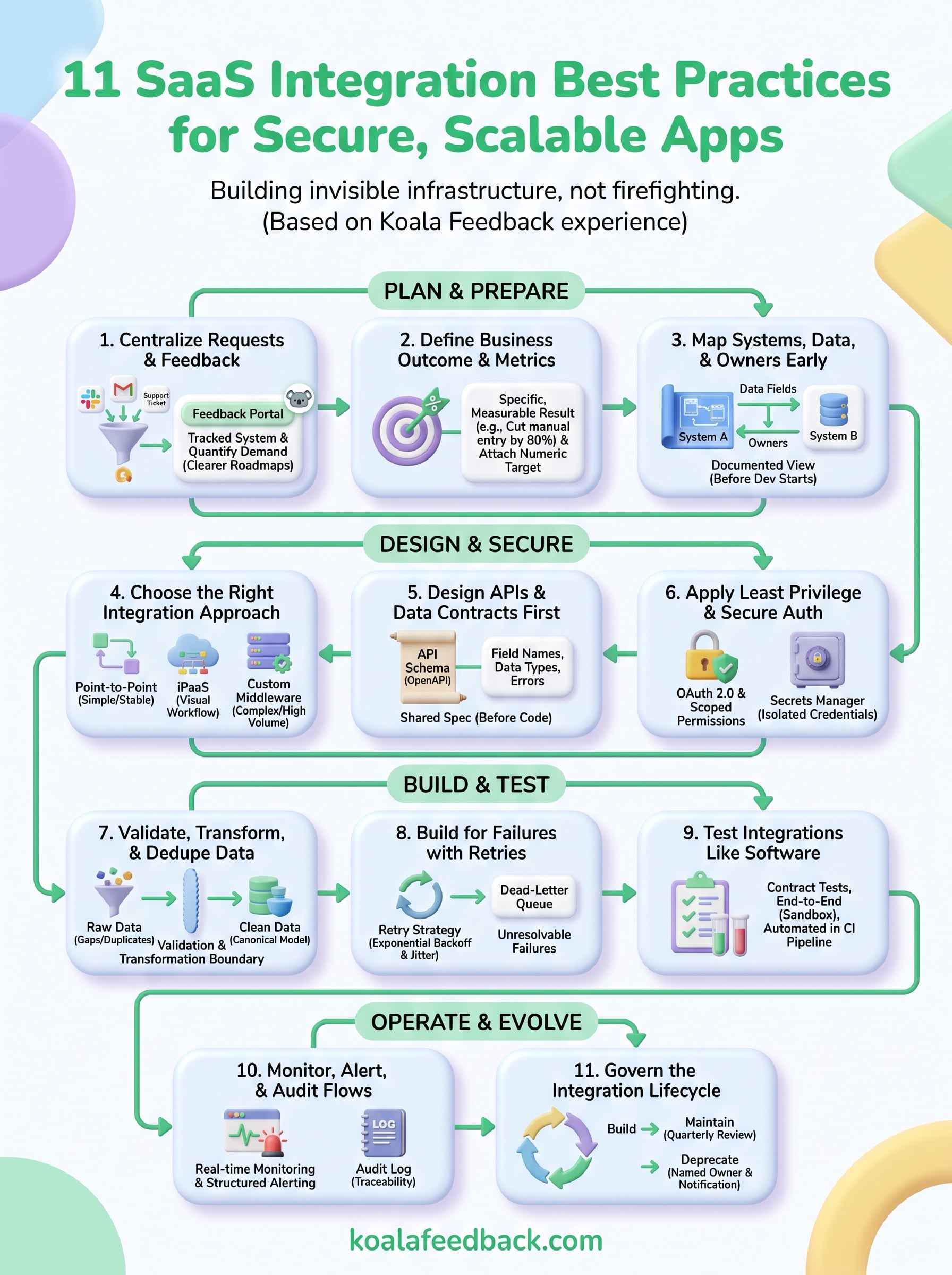
These 11 SaaS integration best practices give you a complete framework for building connections that hold up under real production conditions. Each practice builds on the ones before it, so skipping steps in the middle creates gaps that surface at the worst possible time. Apply them in order, and your integrations will be easier to maintain, safer to operate, and far less likely to generate emergency incidents six months after launch.
Start with practice one: centralizing how you collect and prioritize integration requests from your users. That single step gives your team the data it needs to build the right connections first, rather than reacting to whoever complained most recently. A structured feedback process is the foundation every other practice depends on. If you want a faster way to get that system running, start collecting integration feedback with Koala Feedback and give your users a direct line into your integration roadmap.

Start today and have your feedback portal up and running in minutes.

