Product managers at SaaS companies juggle a lot, user feedback, feature requests, stakeholder input, and the constant question of what to build next. Without the right SaaS product management tools, prioritization becomes guesswork and roadmaps turn into documents nobody trusts.
The right platform helps you collect feedback, organize requests, prioritize what actually matters, and communicate your product direction to both your team and your users. It can mean the difference between shipping features that drive growth and spending months building things nobody asked for.
At Koala Feedback, we built our platform to help SaaS teams capture user feedback and share transparent public roadmaps, so we know firsthand what makes a product management tool worth using. This guide covers 14 tools for 2026, spanning feedback collection, roadmapping, analytics, and prioritization. Whether you need a single platform or a stack of specialized tools, you'll find options here that fit your team's specific workflow.
Koala Feedback focuses specifically on capturing user feedback and sharing public roadmaps, making it a strong choice for SaaS teams who want transparency in their product development process. The platform helps you centralize feature requests, let users vote on what matters most, and communicate your product direction without overwhelming your team with scattered feedback across email, Slack, and support tickets.
You can collect feedback from your users through a customizable portal that matches your brand with your own domain, colors, and logo. The platform automatically deduplicates similar requests and organizes them into boards based on product areas or feature categories. Your users can vote on existing ideas, add comments, and stay updated on progress, which reduces the number of repeat requests your team handles. Koala Feedback keeps all feedback in one place instead of forcing you to track down insights from multiple channels.
The public roadmap feature lets you share what you're planning, building, and shipping with complete transparency. You can set customizable statuses (like Planned, In Progress, Completed) to manage user expectations and show them you're listening. Your users see exactly where their requests stand, which builds trust and reduces support volume. The voting system surfaces the most requested features automatically, so you spend less time guessing and more time building what your customers actually want. Integration capabilities allow you to connect feedback directly to your existing workflow without creating another silo.
"Transparency in product development turns users into advocates who feel heard and invested in your success."
Koala Feedback specializes in feedback collection and roadmapping, which means you'll need separate tools for detailed sprint planning or analytics dashboards. The platform doesn't include built-in time tracking, resource allocation, or Gantt charts that some dedicated project management systems offer. Teams looking for an all-in-one solution that handles everything from feedback to delivery might find they need to combine Koala Feedback with development tools. However, this focused approach means you get a polished experience for what it does best rather than a cluttered interface trying to do everything.
Koala Feedback offers straightforward pricing that scales with your team size and needs. Plans typically start with a free tier for small teams testing the platform, with paid options that unlock features like custom domains, advanced customization, and priority support. Pricing increases based on the number of team members and the level of customization you need for your feedback portal and roadmap.
Productboard positions itself as a comprehensive platform for organizing product work, connecting feedback sources, and building roadmaps that align with your business strategy. The tool helps you centralize insights from customer conversations, support tickets, and sales calls, then turn those insights into prioritized features your team can actually execute. Many SaaS product management tools try to do everything, but Productboard focuses specifically on the strategic layer of product work.
You can consolidate feedback from multiple channels into a single repository where every customer request, feature idea, and piece of market research lives. The platform lets you connect these insights to specific product features, track which customers asked for what, and analyze patterns across your user base. Productboard includes scoring frameworks like RICE and weighted scoring to help you evaluate which features deserve priority based on impact, effort, and strategic alignment.
The portal feature lets customers submit and vote on feature requests directly, similar to Koala Feedback but with deeper integration into the full product management workflow. You can create multiple roadmap views for different audiences, showing high-level strategy to executives while sharing detailed timelines with engineering. Productboard's integration ecosystem connects with tools like Jira, Slack, and Zendesk, pulling feedback automatically from where your customers already communicate.
"Connecting customer insights directly to roadmap decisions eliminates the gap between what users need and what teams build."
The platform carries a significant learning curve and requires time to configure properly. Smaller teams often find the interface overwhelming with features they don't need yet. Productboard works best when you have dedicated product managers who can maintain the system, not part-time founders juggling multiple roles.
Productboard starts at higher price points than simpler alternatives, with essential plans beginning around $20 per user monthly. The platform requires annual commitments for most features, and you'll need higher tiers to unlock portal customization and advanced integrations.
Aha! bills itself as the complete product management suite, covering everything from strategy to release planning in a single platform. The tool targets enterprise product teams who need to connect high-level roadmaps with detailed execution plans, making it one of the more comprehensive saas product management tools available. You can manage everything from strategic goals to individual feature specifications without switching between multiple applications.
You can build strategy documents that link directly to roadmap items, ensuring every feature connects back to business objectives. The platform handles release planning, feature prioritization, and dependency tracking across multiple products or teams. Aha! lets you create custom workflows that match your specific process, from initial idea submission through to shipped features.
The strategy mapping feature forces you to connect roadmap items to specific company goals, preventing feature creep and random requests from derailing your plans. You can generate multiple roadmap views from the same data, showing strategic timelines to executives while engineering sees detailed feature breakdowns. Aha! includes built-in idea portals where customers submit feedback, similar to Koala Feedback's approach but with deeper integration into the full product development lifecycle.
"Connecting every feature to strategic goals eliminates the politics around what to build next."
The platform feels heavyweight for smaller teams, with features you won't use until you reach significant scale. Many users report the interface requires extensive training before team members feel comfortable navigating all the options.
Aha! starts at approximately $59 per user monthly with annual billing required. The pricing jumps significantly as you add advanced features, making it one of the pricier options in the product management space.
Airfocus takes a modular approach to product management, letting you build a workspace that fits your specific needs rather than forcing you into a rigid structure. The platform centers on prioritization frameworks and visual roadmaps, making it particularly useful for teams who struggle with deciding what to build when every stakeholder claims their feature is urgent. You can customize the interface to show only the views and tools your team actually uses instead of navigating through features you'll never touch.
You can evaluate features using multiple scoring methods built directly into the platform, from simple effort versus value matrices to more complex weighted scoring systems. Airfocus helps you capture ideas from various sources, score them against your criteria, and organize them into visual roadmaps that communicate your strategy. The platform lets you create different views for different audiences, showing strategic timelines to leadership while your team sees detailed priority lists. Teams can connect insights to specific roadmap items, tracking which customer requests or market signals influenced each decision.
The Priority Poker feature turns prioritization into a collaborative session where team members vote on feature importance, surfacing disagreements that need discussion before you commit to building. You can set up custom prioritization frameworks that match your specific business model and goals, not just generic templates. Airfocus includes modular apps you activate only when needed, like sentiment analysis for feedback or OKR tracking for strategic alignment, keeping your workspace clean while adding functionality as you grow.
"Prioritization frameworks remove emotion from product decisions and replace arguments with data-driven discussions."
The modular structure means you spend time configuring the platform to match your workflow before it becomes truly useful. Smaller teams sometimes find the pricing jumps quickly as you add the modules that make Airfocus powerful, turning an affordable starting point into a significant investment.
Airfocus starts around $59 per user monthly with annual billing, with the Essential plan covering basic roadmapping. You need higher tiers to unlock advanced prioritization features and integrations that make the platform shine.
Jira Product Discovery arrived as Atlassian's answer to dedicated product management platforms, separating the strategic discovery work from execution in traditional Jira. The tool helps you capture ideas, evaluate opportunities, and prioritize what your team should build next before moving work into development sprints. Unlike saas product management tools that operate in isolation, Jira Product Discovery connects directly to your existing Jira Software workflows, making the handoff from strategy to execution seamless.
You can collect feature ideas from your team, customers, and stakeholders in a flexible board structure that doesn't force rigid workflows on you early in the discovery process. The platform lets you add custom fields to track whatever matters for your evaluation, from customer impact scores to technical complexity estimates. Jira Product Discovery helps you gather evidence for each idea, including customer feedback, research findings, and competitive analysis, so decisions come from data rather than opinions.
The two-way sync with Jira Software means you can move validated ideas into development without copy-pasting or losing context along the way. You can create views that surface the highest-priority opportunities automatically based on your scoring criteria, helping you focus conversations on what actually deserves attention. Atlassian built native integration with Confluence, Slack, and other tools already in your stack, reducing the friction of adding another platform to your workflow.
"Connecting discovery work directly to development tools eliminates the gap where great ideas get lost in translation."
The platform works best when your engineering team already uses Jira, making it less appealing if you've built processes around different tools. Teams report the interface feels less polished than standalone product management platforms, with fewer customization options for roadmap visualization.
Jira Product Discovery starts at $10 per user monthly with monthly billing available. The pricing scales based on team size, making it one of the more affordable options if you already pay for Jira Software.
Jira serves as the execution layer for most development teams, handling sprint planning, bug tracking, and the day-to-day workflow of building software. While not purpose-built as one of the dedicated saas product management tools, many product managers use Jira because their engineering teams already live in the platform. You get visibility into what your team is building, when features will ship, and where bottlenecks slow progress, making it valuable for tracking delivery rather than strategic planning.
You can organize work into sprints and backlogs, breaking large features into individual tasks that developers pull into their workflows. Jira tracks every issue from creation through completion, showing you status updates without asking engineers for progress reports. The platform handles bug reports, technical debt, and feature development in the same system, giving you a complete view of what occupies your team's capacity.
The customizable workflows let you match Jira to your specific development process, from simple Kanban boards to complex approval chains. You can create automation rules that move tickets, notify stakeholders, or update fields based on triggers, reducing manual busywork. Jira's integration ecosystem connects with thousands of tools, from GitHub for code commits to Slack for team notifications, making it the hub of your development operations.
"Visibility into development progress turns vague promises into concrete timelines your stakeholders can trust."
Jira feels overwhelming for product strategy work, with interfaces built for tracking tasks rather than evaluating opportunities. You'll need separate tools for customer feedback collection and roadmap communication since Jira focuses on execution.
Jira starts at $7.75 per user monthly for up to 10 users, with pricing scaling based on team size. Most teams need the Standard plan at $8.15 per user to unlock automation and advanced permissions.
Linear brings speed and simplicity to product and engineering workflows, stripping away the complexity that makes traditional project management tools feel sluggish. The platform focuses on fast performance and keyboard-driven navigation, letting you create issues, update statuses, and organize work without reaching for your mouse. Many teams switched to Linear specifically because they wanted something that feels modern and responsive rather than enterprise software from the previous decade.
You can track feature development, bugs, and improvements in a streamlined issue tracking system that connects directly to your engineering workflow. Linear organizes work into cycles (their version of sprints) and projects, helping you group related tasks and track progress toward milestones. The platform lets you build roadmaps that show what you're shipping this quarter without overwhelming your team with complicated Gantt charts or resource allocation spreadsheets. Each issue can link to related work, creating visibility into dependencies and blockers that slow your team down.
The keyboard shortcuts let you navigate the entire platform without touching your mouse, making updates feel instantaneous compared to clicking through menus. You can create custom views that surface exactly the issues you care about, filtering by status, assignee, or project. Linear includes built-in GitHub and GitLab integration that automatically updates issues when code gets merged, keeping your product view in sync with what engineering actually ships.
"Speed in your tools directly impacts how quickly your team can respond to customer needs and market changes."
Linear lacks dedicated features for customer feedback collection and public roadmaps, making it less suitable as a complete product management solution. You'll need separate saas product management tools for gathering user insights and communicating externally.
Linear starts at $8 per user monthly with annual billing. The Standard plan includes unlimited projects and cycles, making it affordable for growing teams who want modern issue tracking.
Asana functions as a project management platform that many product teams adopt for organizing work across multiple initiatives. The tool helps you coordinate product launches, track dependencies between teams, and maintain visibility into who's working on what. While Asana wasn't built specifically as one of the saas product management tools, product managers use it to bridge the gap between strategic planning and execution, particularly when working with cross-functional teams that span marketing, design, and engineering.
You can organize product work into projects and tasks that break down large initiatives into manageable pieces your team can execute. Asana lets you create timeline views (Gantt-style charts) that show how different workstreams connect and where bottlenecks might emerge. The platform helps you assign owners, set due dates, and track status updates across all the moving pieces of a product launch, from initial research through post-launch monitoring.
The portfolio feature lets you group related projects together, giving executives a high-level view of all product initiatives without drilling into individual tasks. You can build custom fields that track whatever metrics matter for your workflow, from customer impact scores to engineering effort estimates. Asana's integration library connects with Slack, Figma, GitHub, and hundreds of other tools, letting you centralize updates without forcing everyone to work in a single platform.
"Cross-functional visibility eliminates surprises and keeps product launches on track across teams."
Asana lacks purpose-built features for customer feedback collection and public roadmap sharing, requiring you to add separate tools for those needs. Teams report the platform can feel scattered when managing both strategic planning and detailed execution in the same workspace.
Asana starts at $10.99 per user monthly with annual billing. The Starter plan includes timeline views and custom fields, making it accessible for small teams beginning to formalize their processes.
Notion operates as an all-in-one workspace where product teams document strategy, organize roadmaps, and centralize knowledge that would otherwise scatter across wikis, docs, and spreadsheets. The platform gives you complete flexibility to structure information however you want, from simple product spec templates to complex database systems that track features across multiple releases. Many teams adopt Notion because it replaces several tools at once, consolidating documentation and light project management into a single interface your entire company can access.
You can build product documentation that connects strategy documents to roadmap databases, linking every feature back to the research and decisions that shaped it. Notion lets you create custom databases for tracking feature requests, organizing them with properties like priority, status, and customer impact. The platform handles meeting notes, release planning, and product specs in connected pages that reference each other, making it easy to trace how ideas evolved from initial concept to shipped feature.
The template system lets you standardize how your team documents features, conducts research, and plans releases without starting from scratch each time. You can share public pages with customers or stakeholders, showing roadmap progress without granting access to your internal workspace. Notion's database views let you display the same information as tables, Kanban boards, or calendars, adapting to whatever format makes sense for each audience.
"Flexible documentation tools adapt to your team's unique process instead of forcing you into rigid templates."
Notion lacks purpose-built features for feedback collection and voting that dedicated saas product management tools provide. The open-ended structure requires time to set up properly, and teams often struggle with maintaining consistency as the workspace grows.
Notion starts free for individuals with unlimited pages and blocks. The Plus plan costs $8 per user monthly with annual billing, unlocking unlimited file uploads and version history.
Confluence serves as Atlassian's documentation hub where product teams centralize specs, research findings, and product knowledge that everyone needs to reference. The platform connects directly to Jira, making it the natural choice for teams already using Atlassian tools who want to link documentation to specific features or issues. You can build wiki-style pages that organize product information hierarchically, making it easy to find context about past decisions, current initiatives, and technical requirements without digging through email threads or Slack history.
You can create product requirement documents, technical specifications, and research summaries in a structured format that your team can collaborate on in real time. Confluence lets you organize pages into spaces for different products or teams, keeping documentation separate while still allowing cross-referencing when projects overlap. The platform handles version history automatically, so you can track how specs evolved and roll back changes if needed without maintaining separate document versions.
The Jira integration lets you embed live issue lists, roadmaps, and project status directly into documentation pages, keeping specs connected to actual development work. You can create page templates that standardize how your team documents features, conducts retrospectives, or shares release notes. Confluence includes commenting and @mentions that turn static documentation into conversations where stakeholders ask questions and provide feedback directly on the relevant context.
"Living documentation that stays in sync with development work eliminates the confusion of outdated specs."
Confluence functions as documentation software rather than one of the dedicated saas product management tools for feedback collection or roadmap sharing. You'll need separate platforms for gathering customer insights and communicating externally.
Confluence starts at $5.16 per user monthly for up to 10 users with annual billing. Most teams need the Standard plan at $5.75 per user to unlock advanced permissions and automation features.
Miro provides a visual collaboration canvas where product teams brainstorm ideas, map user journeys, and plan features in a flexible whiteboard environment. The platform excels at early-stage discovery work where you need to visualize concepts, organize research findings, and facilitate remote workshops with stakeholders who work better with visual thinking than text documents. Many product managers turn to Miro when they need to align teams around strategy or explore problems before committing to specific solutions.

You can conduct discovery workshops where participants map customer pain points, brainstorm potential solutions, and vote on priorities using sticky notes and diagrams. Miro helps you organize research synthesis by clustering customer feedback themes, creating journey maps, and building empathy maps that surface insights from user interviews. The platform lets you create roadmap visualizations that communicate strategy through timelines, swimlanes, and custom frameworks that make more sense as pictures than spreadsheets.
The template library includes pre-built frameworks for customer journey mapping, product roadmaps, and prioritization exercises that save you from building structures from scratch. You can facilitate real-time collaboration where team members add ideas simultaneously during workshops, voting on concepts and organizing thoughts as a group. Miro integrates with platforms like Jira and Asana, letting you convert brainstorming sticky notes into actionable tasks in your development tools.
"Visual collaboration surfaces insights that text-based tools miss, especially when exploring complex problems with cross-functional teams."
Miro functions as a visual thinking tool rather than a system for managing product execution or tracking delivery. You'll need other saas product management tools for feedback collection, detailed roadmap tracking, and communicating plans to customers.
Miro starts free for individuals with three editable boards. The Starter plan costs $8 per user monthly with annual billing, unlocking unlimited boards and advanced collaboration features.
Figma operates as a design collaboration platform where product teams prototype features, refine interfaces, and bridge the gap between product vision and what developers actually build. While Figma isn't one of the traditional saas product management tools, product managers use it constantly to visualize concepts, review designs with stakeholders, and maintain a shared understanding of what you're shipping. The platform becomes particularly valuable during discovery work when you need to show rather than tell what a feature will look like before committing engineering resources.
You can create interactive prototypes that demonstrate user flows and interface concepts without writing code, letting you validate ideas with customers before development starts. Figma helps you maintain design specifications that developers reference when building features, ensuring what ships matches what you planned. The platform centralizes feedback on visual design, keeping comments and iterations in one place rather than scattered across email threads and Slack messages.
The real-time collaboration lets multiple team members work on designs simultaneously, with changes appearing instantly for everyone viewing the file. You can create component libraries that ensure consistency across your product, making design decisions reusable rather than reinventing patterns for each feature. Figma includes developer handoff tools that automatically generate specs, assets, and code snippets, reducing friction between design approval and implementation.
"Visual prototypes turn abstract discussions into concrete feedback that moves product decisions forward faster."
Figma focuses on design work rather than feedback collection, roadmap management, or prioritization features that dedicated product platforms provide. You'll need separate tools for gathering customer insights and tracking feature requests.
Figma starts free for individuals with unlimited files. The Professional plan costs $12 per editor monthly with annual billing, unlocking unlimited version history and advanced prototyping features.
Dovetail specializes in user research analysis, helping product teams transform raw customer feedback, interview transcripts, and research data into actionable insights. The platform centralizes qualitative research that would otherwise live scattered across recordings, notes, and spreadsheets, making it particularly valuable when you need to synthesize patterns from customer conversations rather than just counting feature requests. Product managers use Dovetail to understand the "why" behind what customers ask for, not just what they say they want.
You can upload interview recordings, survey responses, and support tickets into a central repository where the platform automatically transcribes and organizes content for analysis. Dovetail helps you tag themes, create highlight reels of key moments, and identify patterns across multiple research sessions. The platform lets you build insight repositories that connect customer quotes to specific product decisions, making it easy to reference research when stakeholders question why you prioritized certain features.
The automatic transcription saves hours of manual work converting recordings into searchable text that your team can analyze and reference. You can create insight charts that visualize how often specific themes appear across research sessions, surfacing opportunities based on frequency and impact. Dovetail includes collaboration features that let multiple team members tag and analyze the same research simultaneously, building shared understanding faster than solo analysis.
"Understanding customer motivations through research prevents building features that technically solve the wrong problem."
Dovetail focuses on qualitative research analysis rather than the roadmap management and feedback voting that dedicated saas product management tools provide. You'll need separate platforms for collecting feature requests and communicating product plans externally.
Dovetail starts free for individuals with limited projects. The Professional plan costs approximately $29 per user monthly with annual billing, unlocking unlimited projects and advanced analysis features.
Amplitude focuses on product analytics, helping you understand how users interact with your SaaS product through behavioral data and usage patterns. The platform tracks every click, page view, and action users take, turning raw event data into insights about what drives retention, engagement, and conversion. While not a traditional roadmapping tool among saas product management tools, product managers rely on Amplitude to validate assumptions and measure whether shipped features actually move the metrics that matter for your business.
You can track user behavior patterns across your entire product, identifying which features drive engagement and where users drop off in critical flows. Amplitude helps you analyze cohort retention, showing how different user segments behave over time and which acquisition channels bring users who stick around. The platform lets you build funnels that visualize conversion paths, measure feature adoption rates, and understand the journey from signup to active user.
The behavioral cohorts let you segment users based on actions they've taken, not just demographic properties, revealing patterns that explain why some customers succeed while others churn. You can set up automated reports that alert your team when key metrics shift, catching problems before they impact revenue. Amplitude includes experiment tracking that connects feature releases to metric changes, helping you prove which product decisions actually improved outcomes.
"Understanding user behavior through data turns product intuition into measurable improvements that compound over time."
Amplitude specializes in analytics rather than feedback collection or roadmap management that dedicated product platforms offer. You'll need separate tools for gathering customer insights and communicating product plans externally.
Amplitude starts with a free tier for up to 10 million events monthly. The Plus plan pricing varies based on event volume, typically starting around $49 monthly for growing teams.
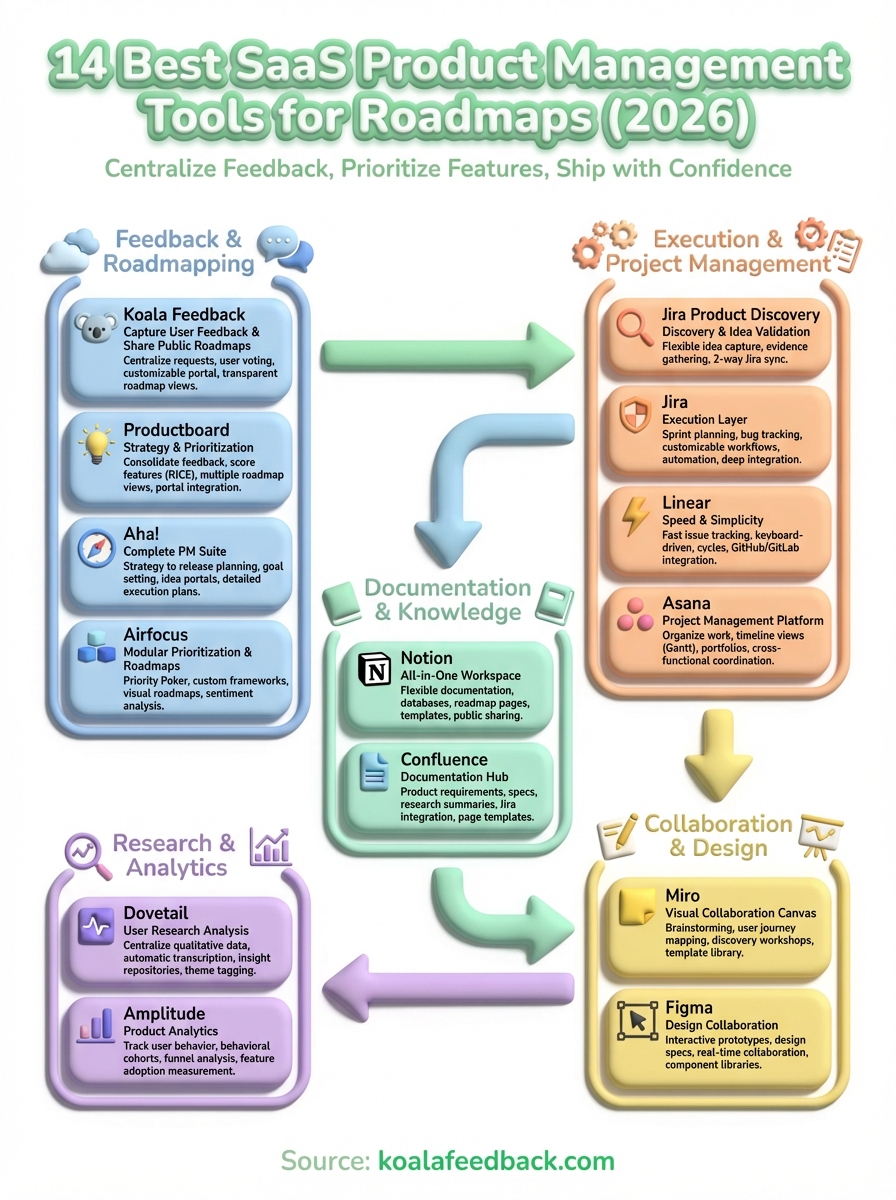
Your choice of saas product management tools depends on where your team struggles most right now. If customers submit feedback through email, Slack, and support tickets without any central system, start with a dedicated feedback platform that organizes requests and lets users vote on priorities. Teams already managing feedback well but lacking transparent roadmaps benefit from tools that communicate product direction externally.
Most successful stacks combine specialized tools rather than forcing everything into one platform. You might use Jira for development tracking, Amplitude for analytics, and a dedicated platform for customer-facing roadmaps. This approach lets each tool excel at its specific job instead of compromising on features.
Start collecting and organizing user feedback with a platform that centralizes requests, surfaces priorities through voting, and shares transparent roadmaps. Your customers will tell you exactly what to build next if you give them the right place to speak.

Start today and have your feedback portal up and running in minutes.

