Choosing between Workato vs MuleSoft comes down to how your organization handles integrations, automation, and scale. Both platforms sit at the top of the iPaaS market, but they take fundamentally different approaches to solving enterprise integration challenges, and picking the wrong one can cost you months of rework and budget you won't get back.
The decision gets even harder when multiple teams have a stake in the outcome. IT wants control, operations wants speed, and leadership wants ROI. That's exactly the kind of cross-functional decision where collecting structured input from stakeholders matters, something we help teams do every day at Koala Feedback through prioritized feedback and transparent roadmaps.
This guide breaks down six key differences between Workato and MuleSoft across features, pricing, ease of use, and scalability so you can make a confident call on which platform fits your needs. No fluff, just the details iPaaS buyers actually care about.
The philosophy baked into an iPaaS platform shapes everything from build experience to scalability limits. Before you dig into feature lists, understanding the core design philosophy of each platform will save you from buying something that technically works but fights your team at every turn.

When you evaluate Workato vs MuleSoft, the first question to ask is: who do you expect to own integration work? Some platforms are built for business teams to move fast with minimal IT involvement. Others assume a dedicated engineering team will own every connection end to end. The answer changes which platform makes sense before you ever open a trial account.
Workato built its platform around the idea that business users and IT teams can collaborate directly on automation and integration. It uses a recipe-based model where each recipe defines a trigger and a set of actions. The abstractions are high enough that a non-developer can follow the logic, but the platform still supports complex conditional logic and error handling for technical users who need it.
MuleSoft takes an API-led connectivity model as its foundation. The idea is to build reusable APIs at three layers: system APIs that connect to core systems, process APIs that orchestrate business logic, and experience APIs that serve end applications. This gives your architecture team significant structure and reusability, but it requires developers who understand API design and are comfortable working in Anypoint Studio.
MuleSoft's API-led approach pays off at scale, but it assumes you have the engineering resources to build and maintain that layered architecture from day one.
Workato fits organizations that want cross-functional teams to own integrations and move quickly without bottlenecking on IT. MuleSoft fits enterprises with large engineering teams that need a governed, reusable integration layer across dozens of systems and business units.
Ask each vendor to walk you through a scenario built around your own environment. Specifically, test how many steps it takes to connect a new system and how much of that work requires a developer. That single exercise will reveal which platform matches your team's actual capacity and technical skill distribution.
The day-to-day build experience shapes how fast your team ships integrations and how often they need outside help. In the Workato vs MuleSoft comparison, the gap between platforms becomes most visible when you watch a real user sit down and try to build something from scratch.
Look at who actually builds integrations on each platform today, not who the vendor says can use it. Ask the vendor for customer references that match your team's technical profile, whether that's a mix of business analysts and developers or a dedicated integration engineering team.
Workato uses a visual recipe editor that walks users through triggers and actions in plain language. Business users can build and test automations without writing code, while developers can drop into custom scripts or HTTP connectors when they need more control.
This dual-track approach means you can start fast with business users and hand off complex recipes to developers without rebuilding from scratch.
MuleSoft's primary build environment is Anypoint Studio, an Eclipse-based IDE designed for Java developers. Most integration flows require DataWeave, MuleSoft's proprietary transformation language, which carries a real learning curve even for experienced developers.
Workato fits teams where non-technical users need to own integrations day to day. MuleSoft fits organizations where a dedicated engineering team already exists and will own integration development end to end.
Run a timed build test: give a representative user from your team 30 minutes to connect two systems in each platform. What they actually complete tells you more than any vendor demo ever will.
The range of pre-built connectors and the ability to extend a platform when those connectors fall short separates capable iPaaS tools from ones that create bottlenecks. Your connector strategy determines how much custom development you'll need to maintain over time.
When evaluating workato vs mulesoft, focus on three things: the number of pre-built connectors available, how easy it is to build custom connectors, and whether the platform exposes APIs you can call programmatically from other tools in your stack.
Workato offers over 1,000 pre-built connectors across CRM, ERP, HR, and support tools. For connectors that don't exist, the HTTP connector lets you connect to any REST API without writing a dedicated integration. Workato also exposes its own API so external systems can trigger recipes on demand.
The combination of a large connector library and a flexible HTTP option means your team rarely has to build from scratch.
MuleSoft's Anypoint Exchange marketplace hosts thousands of pre-built connectors and API templates. The platform lets developers publish custom connectors as reusable assets across the organization, which supports long-term consistency but requires developer resources to build and maintain those assets.
Workato fits teams that need fast connector coverage without heavy development effort. MuleSoft fits organizations that prioritize reusable API assets and have the engineering capacity to build and manage a connector library over time.
Pull a list of the 15 systems your team integrates most, then check each platform's native connector catalog. For anything not covered, ask the vendor to demonstrate exactly how your team would build a custom connector using their tooling.
Governance requirements can eliminate a platform from your shortlist faster than any feature gap. When comparing workato vs mulesoft, the question isn't just whether a platform is secure; it's whether the controls are granular enough to satisfy your IT, compliance, and legal teams without slowing down every integration project.
Your evaluation should focus on how each platform handles the following controls:
Workato provides role-based access control at the workspace level, letting you define who can build, test, and deploy recipes. The platform logs recipe activity and supports data masking for sensitive fields within integration flows.
Workato's governance controls cover most mid-market use cases but may need additional configuration to meet stricter enterprise compliance frameworks.
MuleSoft centralizes governance through Anypoint Platform's API Manager, where your team can apply policies, rate limits, and SLA tiers across all APIs from one place. The platform also enforces fine-grained environment controls that separate development, staging, and production access at the infrastructure level, which matters when your compliance team audits change management processes.
Workato fits teams that need practical security controls without heavy administrative overhead. MuleSoft fits organizations in regulated industries where centralized policy enforcement across every API is a non-negotiable requirement.
Ask each vendor for their SOC 2 Type II report and confirm how audit logs integrate with your existing security tooling. Then test whether your security team can configure and enforce policies independently, without routing every change through the vendor.
Where your integrations run and how they perform under load will matter long before you hit enterprise scale. The deployment model you choose affects your compliance posture, your latency, and how much infrastructure your team has to manage.
Your evaluation needs to cover cloud-native vs. hybrid deployment options and whether each platform can handle your current transaction volume plus realistic growth over the next three years. Ask vendors for concrete throughput benchmarks using workloads that resemble yours, not best-case demos.
Workato runs as a fully cloud-hosted platform with no on-premise deployment option. It handles scalability automatically by adjusting compute resources behind the scenes, so your team doesn't manage infrastructure. For most mid-market and enterprise SaaS-heavy environments, this is a straightforward trade-off.
If your compliance requirements mandate on-premise data processing, Workato's cloud-only model may require additional architecture decisions before you move forward.
MuleSoft gives you three deployment options: CloudHub (fully managed cloud), Runtime Fabric (your own cloud or on-premise infrastructure), and standalone on-premise Mule Runtime. This flexibility lets your team keep sensitive workloads on-premise while routing others through the cloud, which is a meaningful advantage for regulated industries.
Workato fits organizations running cloud-first stacks that want infrastructure handled for them. MuleSoft fits enterprises that need hybrid or on-premise deployment to meet compliance or latency requirements in the workato vs mulesoft decision.
Test each platform under a load that reflects your peak traffic, not average daily volume. Confirm exactly which team owns infrastructure management and what happens to your integrations during a vendor-side outage or maintenance window.
Sticker price rarely tells the full story with iPaaS platforms. The total cost of ownership includes licensing, implementation, training, and the ongoing cost of maintaining integrations as your stack evolves.
When evaluating workato vs mulesoft, compare the full three-year cost, not just the annual subscription. Factor in implementation services, internal developer hours, connector licensing, and what it costs to onboard new team members as your usage grows.
Workato prices based on the number of active recipes and transactions, which scales with your actual usage rather than flat seat counts. You can start smaller and expand, but high-volume environments with hundreds of active recipes can push costs up quickly if you don't monitor recipe efficiency over time.
Request a usage estimate from Workato based on your current integration volume before committing to a tier.
MuleSoft uses a vCore-based licensing model for CloudHub deployments, where you pay for compute capacity. On-premise deployments add infrastructure costs on top. Most organizations also factor in Salesforce ecosystem pricing since MuleSoft now sits inside the Salesforce product family, which can complicate contract negotiations if you're not already a Salesforce customer.
Workato fits teams that want predictable usage-based pricing without negotiating enterprise contracts. MuleSoft fits large organizations that can absorb higher upfront costs in exchange for architectural depth and deployment flexibility.
Ask both vendors for a three-year cost model that includes your projected transaction volume, any add-on connectors, and support tiers. The difference between entry pricing and production-ready pricing is often significant.
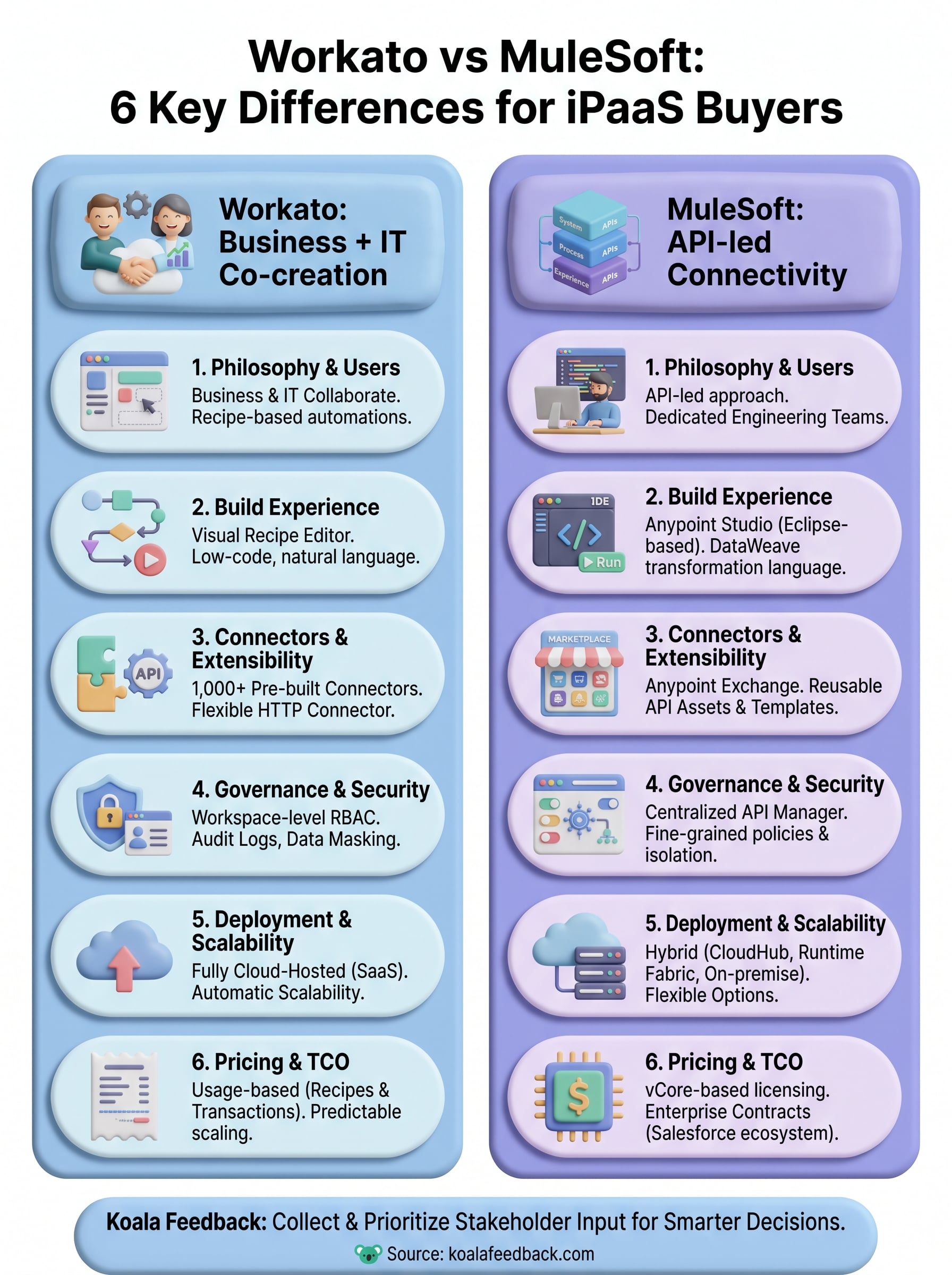
The workato vs mulesoft decision comes down to two questions: who owns your integrations, and how much architectural control your organization actually needs. If your team includes business users who need to move fast without bottlenecking on IT, Workato is the stronger fit. If you run a large engineering organization that requires hybrid deployment, centralized API governance, and deep reusability, MuleSoft justifies the added complexity and cost.
Before you sign anything, run both platforms against real scenarios from your own stack. Test connector coverage, build experience, and governance controls with the people who will actually use them day to day. The vendor who performs best on your specific workloads beats the vendor with the better marketing.
Once you finalize your shortlist, bring your key stakeholders into the process early. Koala Feedback helps you collect and prioritize input from every team that depends on your integration platform before you commit to a contract.

Start today and have your feedback portal up and running in minutes.

