When product teams evaluate new software, they rarely rely on vendor marketing alone. Instead, they turn to Gartner customer insights, peer reviews, analyst rankings, and "Voice of the Customer" reports, to see how real users rate the tools they depend on. These reports carry weight because they're built on verified feedback from actual practitioners, not curated testimonials.
For anyone researching customer experience platforms like Microsoft Dynamics 365 Customer Insights, Gartner's methodology offers a structured way to compare options. Their Peer Insights platform aggregates thousands of reviews across categories, while the annual Voice of the Customer reports distill those reviews into clear quadrant-style rankings. Understanding how Gartner scores and categorizes these platforms can save you months of trial-and-error during vendor selection.
At Koala Feedback, we build tools that help SaaS teams collect, organize, and prioritize user feedback, so we pay close attention to how industry analysts like Gartner approach the same challenge at scale. The principles behind their methodology (listening to real users, identifying patterns, and ranking based on authentic experience) mirror what every product team should be doing with their own customers. This article breaks down how Gartner's customer insights reports work, what the latest rankings reveal, and how to actually use that data when choosing your next customer experience platform.
Choosing enterprise software is one of the highest-stakes decisions a product or IT team makes. Vendor websites and feature comparison sheets tell you what a product can theoretically do, but they rarely tell you how it performs under real conditions, at your scale, with your team's technical skills. That gap between marketing claims and actual experience is exactly where Gartner customer insights fill a critical role.
Every software vendor controls the narrative on their own website. Case studies are hand-picked, pricing pages are deliberately vague, and demo environments show the best-case scenario. When you rely primarily on vendor-supplied content during a software evaluation, you are essentially letting a salesperson run your due diligence. That is not a criticism of vendors; it is just the nature of how software companies market their products.
Vendor-sourced content answers the question "what can this product do?" but peer-sourced reviews answer the more useful question: "what is it actually like to use this product?"
The risk grows as software complexity increases. Customer data platforms, CRM tools, and analytics software often require significant integration work, internal training, and ongoing configuration. A tool that looks clean in a demo can become a maintenance burden six months after deployment. Independent reviews catch those patterns before you commit.
Peer reviews work because reviewers have no financial incentive to oversell or undersell a product. When someone spends 20 minutes writing a detailed review of software they use every day, they are typically doing it to help peers avoid their mistakes or replicate their success. That motivation produces a different quality of insight than any marketing asset.
Patterns matter more than individual scores. If 30 reviews across a two-year period all mention slow support response times, that is a structural problem, not an outlier. Peer platforms allow you to filter by company size, industry, and deployment type, so you can find reviews from organizations that closely resemble yours. That level of filtering transforms raw ratings into genuinely actionable data.
Inside larger organizations, software procurement rarely happens without some form of analyst validation. Procurement teams, legal departments, and executive sponsors often want to see that a shortlisted vendor has been evaluated by a recognized third party. Gartner's rankings and reports serve that function: they give decision-makers a defensible reference point when justifying a purchase internally.
Beyond internal alignment, analyst rankings reflect aggregate behavior across the market. When a vendor consistently scores well on implementation support, product direction, and overall satisfaction, that pattern signals something real about how they operate. Rankings do not guarantee a good fit for your specific context, but they do surface vendors that consistently deliver for a broad range of customers.
Peer reviews and analyst reports also do something vendor content cannot: they reveal how a product evolves over time. Multi-year review histories show whether a vendor improves after complaints, ships promised features on schedule, and maintains quality as they scale. That trajectory is often more predictive of your future experience than any single benchmark score.
Gartner Peer Insights is a free, publicly accessible platform where technology buyers and end users submit structured reviews of the software they use in their organizations. Unlike a general-purpose review site, every review on the platform is tied to a verified professional identity, which means Gartner confirms the reviewer's role, company size, and industry before publishing their submission. That verification step is what separates Peer Insights from crowdsourced alternatives where anyone can post without accountability.
Gartner recruits reviewers through direct outreach, partner networks, and organic submissions from users who want to share their experience. Before a review goes live, Gartner validates the reviewer's employment and role using a combination of email domain verification, LinkedIn profile checks, and manual review. This process filters out vendor employees, consultants with financial ties to the vendor, and reviewers who cannot confirm they actively use the product.
The verification layer is what gives gartner customer insights reports their credibility: you are reading from practitioners who have no stake in how you interpret their experience.
Once verified, the review stays on the platform for as long as it reflects a reasonably current experience. Older reviews are flagged or weighted differently to ensure that ratings reflect how a product performs today, not how it performed three major versions ago.
Each review follows a consistent structured format that captures more than a single star rating. Reviewers score the product across specific dimensions, and they also provide written commentary that explains the reasoning behind each score. The standard dimensions typically include:

Written sections give reviewers space to describe what they would change, what works well, and what surprised them after going live. Those narrative sections are often more useful than the numeric scores because they surface specific workflow problems and integration challenges that a rating alone cannot capture. When you read across 40 or 50 reviews in a single category, the written themes become the real signal.
The Voice of the Customer report is one of the most referenced outputs from gartner customer insights, and it is worth understanding precisely what it measures before you rely on it during a software evaluation. Gartner publishes these reports across major technology categories, and they serve a different purpose than the traditional Magic Quadrant, which leans on analyst judgment. The Voice of the Customer report draws its conclusions directly from verified peer reviews, making it a data-driven complement to analyst-led research.
Gartner aggregates all verified reviews submitted to Peer Insights within a defined category over an 18-month window. They then apply two scoring dimensions to each vendor: overall rating (the average satisfaction score across all verified reviews) and user interest and adoption (a measure of how many reviews a vendor has received relative to the market). Vendors need a minimum number of reviews to qualify for inclusion, which filters out products with too little review data to produce a reliable signal.
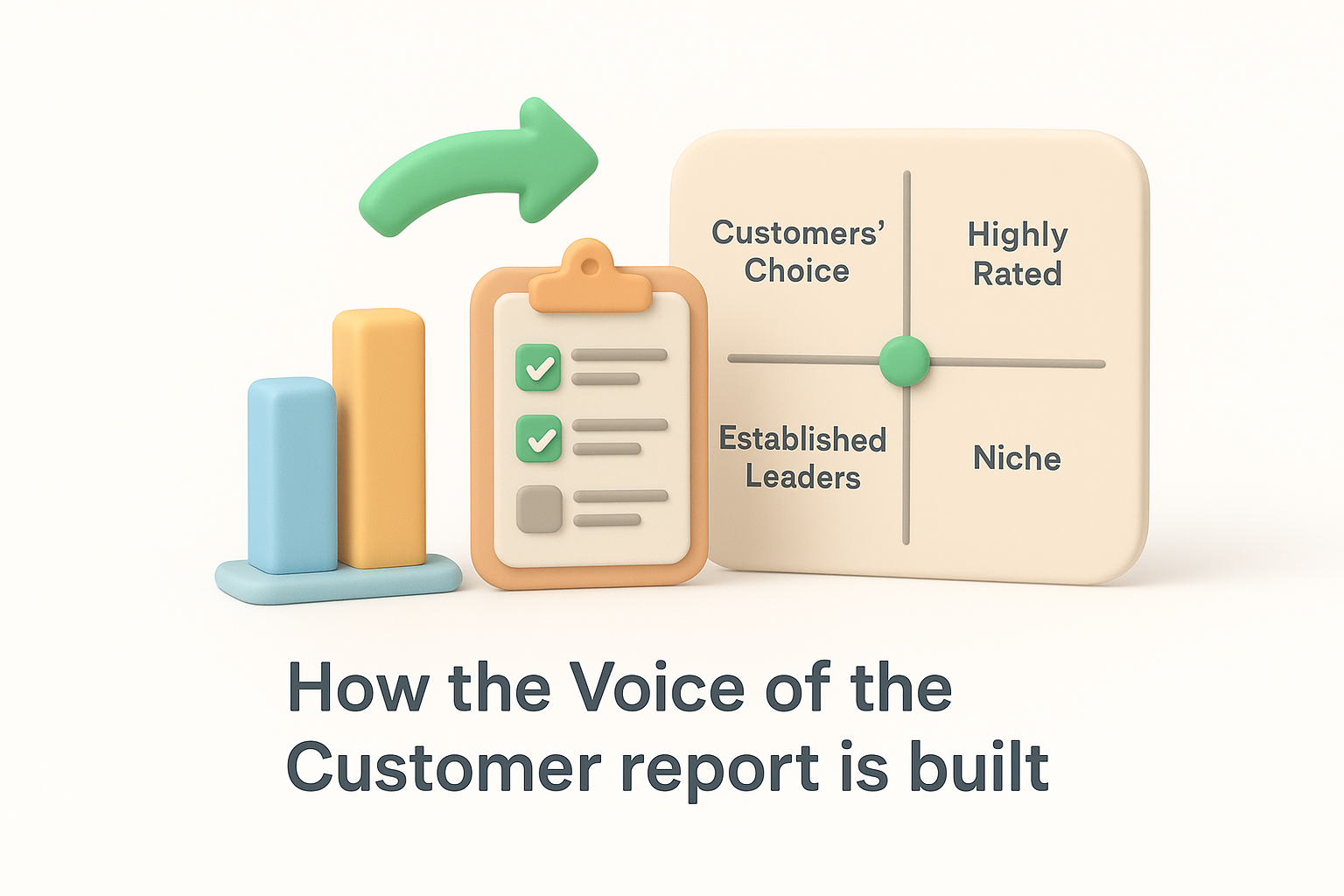
The output is a quadrant-style visual that places vendors across four zones: Customers' Choice (high rating, high adoption), Highly Rated (high rating, lower adoption), Established Leaders (lower rating, higher adoption), and Niche (lower on both dimensions). That structure lets you see at a glance which products earn consistent satisfaction at scale versus which ones perform well only in specific or limited deployments.
The quadrant placement tells you something different from a simple star rating: it shows whether a vendor earns high marks from a wide range of buyers or only from a narrow segment.
The Customers' Choice badge goes to vendors that land in the top quadrant of the Voice of the Customer report. To earn it, a vendor must clear both the rating threshold and the adoption threshold simultaneously. This makes the designation harder to achieve than a high average score alone, since a vendor with only a handful of glowing reviews will not qualify regardless of how positive those reviews are.
For you as a buyer, the Customers' Choice label is a useful starting filter, not a final answer. It tells you that a meaningful volume of verified practitioners rated a product highly within a recent time window. That narrows your initial longlist without requiring you to read hundreds of individual reviews before you have even defined your requirements.
The phrase "gartner customer insights" creates genuine confusion because it refers to two separate things that are easy to conflate. On one side, Gartner customer insights describes Gartner's entire ecosystem of peer reviews, Voice of the Customer reports, and analyst research. On the other side, Microsoft Dynamics 365 Customer Insights is an actual software product that Gartner evaluates within that ecosystem. Understanding the difference between the research methodology and the product being researched will save you real time when you start looking up either one.
Microsoft Dynamics 365 Customer Insights is a customer data platform (CDP) built inside the Microsoft ecosystem. It lets organizations unify customer data from multiple sources, such as CRM records, transaction data, and behavioral signals, into a single profile for each customer. The platform has two main components: Journeys, which handles marketing automation and engagement flows, and Data, which focuses on data unification and segmentation. Teams that already use Azure, Power BI, or the broader Dynamics 365 suite often evaluate it because the integration overhead is lower than adopting a standalone CDP.

The product's tight integration with the Microsoft stack is both its main advantage and its main constraint: it works extremely well inside that ecosystem and requires more effort outside it.
Gartner evaluates Microsoft Dynamics 365 Customer Insights within the Customer Data Platforms category on Peer Insights, and Microsoft has appeared in the Voice of the Customer report for that category. When you pull up the relevant Peer Insights page, you can read verified reviews from practitioners who have deployed the product in real organizations, filtered by company size, industry, and deployment type. Those reviews cover dimensions like integration complexity, support quality, and how well the product's capabilities match day-to-day needs.
What you will find in those reviews is that adoption patterns vary significantly depending on how deeply an organization uses other Microsoft products. Teams operating in an Azure-heavy environment tend to rate the platform higher on deployment and integration than organizations trying to connect it to non-Microsoft infrastructure. Reading those filtered reviews, rather than relying on an overall average score, gives you a much clearer picture of whether the product fits your specific context before you request a demo or start a formal evaluation.
The Gartner website is large enough that you can easily land on the wrong page and spend time reading research that does not answer your question. Before you start searching, it helps to know which part of the Gartner ecosystem you actually need. For gartner customer insights purposes, the two most useful destinations are Peer Insights and the Voice of the Customer reports, and each lives in a different section of the site.
Many buyers default to looking for a Magic Quadrant when they begin vendor research, but Magic Quadrant reports require a paid Gartner subscription to read in full. Peer Insights is free and publicly accessible at gartner.com/reviews, which makes it the faster starting point for most teams that do not hold an enterprise Gartner license. You can browse vendor profiles, read individual reviews, and filter by company size or industry without creating an account, though signing in unlocks additional filtering and comparison features.
If your organization has a full Gartner subscription, start with the Voice of the Customer report for your category rather than individual reviews, since the aggregate quadrant picture saves you time before you dig into specifics.
Peer Insights also lets you download individual reviews as PDFs, which is useful when you need to share evidence with stakeholders during an internal evaluation. Saving reviews from organizations that closely match your company size and industry gives you a focused set of evidence rather than a generic collection of scores.
Reaching the correct category page determines whether the reviews you read actually apply to the problem you are solving. Customer data platforms, CRM suites, and marketing automation tools all appear in separate categories on Peer Insights, and a product like Microsoft Dynamics 365 Customer Insights can appear in more than one. To find the right category, use the search bar on the Peer Insights homepage, type either the product name or a general category description, and follow the category link that appears in the results.
Once you land on a category page, look for the Voice of the Customer report link, which Gartner typically surfaces near the top of the page when one exists for that category. That report gives you the quadrant view alongside adoption data, while the underlying category page lets you sort vendors by overall rating, review volume, and market segment. Using both together gives you a structured shortlist faster than reading through vendor profiles individually.
A raw number tells you very little on its own. When you pull up gartner customer insights data for a vendor, the instinct is to sort by overall rating and move on, but that approach misses the structural information embedded in how those scores are distributed. A 4.4 average rating built on 200 reviews carries more weight than a 4.8 built on 12, and a vendor whose scores have improved steadily over 18 months tells a different story than one whose numbers have held flat.
Adoption and rating work together, not in isolation. A vendor with high adoption but a middling rating is one that many organizations chose but found imperfect in practice, which often signals strong sales capability paired with weaker post-sale execution. Conversely, a vendor with a high rating but low adoption may serve a narrow segment exceptionally well without having the scale or feature breadth to compete in larger deployments.
Filtering reviews by your company size and industry changes the picture significantly. If an enterprise vendor scores noticeably lower among mid-market buyers, that gap reveals something real about how the product is designed and supported at different tiers. Compare scores across segments rather than reading the global average as a universal truth, because averages flatten out the variation that actually matters to your context.
Numeric scores confirm satisfaction levels, but written review themes reveal why those scores exist. Read at least 15 to 20 written reviews and track which phrases and complaints repeat across different reviewers. When multiple independent practitioners mention the same onboarding gap or the same support response lag, you are looking at a documented pattern rather than an isolated complaint.
The written sections of peer reviews are where you find the real decision-making intelligence: specific workflow friction, integration problems, and feature gaps that never appear in a vendor's demo.
Pay close attention to recency when you scan for themes. A cluster of negative comments about data export limitations from two years ago may no longer reflect the current product if the vendor has shipped meaningful updates since then. Cross-reference the review date against the vendor's public release notes or changelog to decide whether a theme still applies before you carry it forward into your evaluation conversations.
Once you understand how gartner customer insights data is structured and what the scores actually measure, the next step is turning that data into a working vendor list. Most teams approach shortlisting by scanning product websites and booking demos before they have enough information to ask useful questions. Reversing that order saves time: build your shortlist from review evidence first, then use demos to confirm or challenge what the reviews revealed.
Start by setting two hard filters before you read a single review: company size match and deployment type. Use Peer Insights to surface only reviews from organizations in the same revenue tier or headcount range as yours. A product that earns strong marks from enterprise teams with dedicated implementation resources may perform differently for a 40-person company where a single product manager owns the rollout.
From that filtered view, look at how many vendors clear both a minimum rating threshold (aim for 4.2 or higher) and a minimum review count (at least 25 reviews in the past 18 months). Vendors that meet both criteria form your working shortlist. That process usually narrows a category of 20-plus vendors down to four or five candidates without requiring you to read a single marketing page.
Your shortlist should reflect how similar organizations rated vendors under real conditions, not how vendors describe themselves in comparison documents.
Once you have a shortlist, use the review themes you identified earlier to build a targeted validation question set for each vendor conversation. If multiple reviewers from mid-size companies flagged slow onboarding support, ask the vendor directly how long their average time-to-value runs for companies your size, and what dedicated resources they assign during deployment. Specific questions produce specific answers, which makes it much easier to compare vendor responses side by side after your discovery calls.
Reference the review evidence openly during those conversations. Telling a vendor that you read multiple reviews mentioning a specific integration problem signals that you have done real research and shifts the conversation away from rehearsed talking points. Most vendors will either address the issue directly, which gives you useful information, or deflect it, which also gives you useful information. Both responses tell you something about how that vendor handles accountability before you sign a contract.
Reading gartner customer insights data is useful, but the teams that get the most value from it do not stop at vendor selection. They carry the patterns they find in peer reviews back into their own product process, using what real practitioners say about competing tools to sharpen their internal feedback priorities and roadmap decisions.
When you read through a set of peer reviews for a tool your customers might also be evaluating, you are essentially reading a structured list of user expectations in that category. If multiple reviewers flag that a platform handles data segmentation well but makes reporting cumbersome, that tells you something your own users likely care about too, even if they have not articulated it yet.
External review themes act as a proxy for the feedback your own users have not found the words to give you yet.
Take the recurring complaints and praise points you extract from Peer Insights reviews and compare them directly against your existing feedback backlog. If the same friction points appear in both places, that overlap tells you which items on your backlog carry more strategic weight than their individual vote count suggests. Features that address widely documented pain points across your category deserve higher priority than features that only a few vocal users have requested.
Peer review data also reveals what users expect from a product roadmap over time. Reviewers frequently comment on whether a vendor ships promised features on schedule and whether the product direction aligns with what users actually need. Those comments give you a benchmark for how transparent and reliable your own roadmap communication needs to be.
When you understand what users in your category have come to expect from vendors, you can set clearer expectations inside your own roadmap communications. Publishing your planned, in-progress, and completed items in a structured public roadmap closes the gap between what your users assume you are building and what you are actually prioritizing. Tools like Koala Feedback let you share that roadmap directly with your users so they see progress in real time, which reduces the kind of frustration that shows up as negative review themes on peer platforms. Connecting external insights to your internal process turns passive research into a continuous feedback loop.
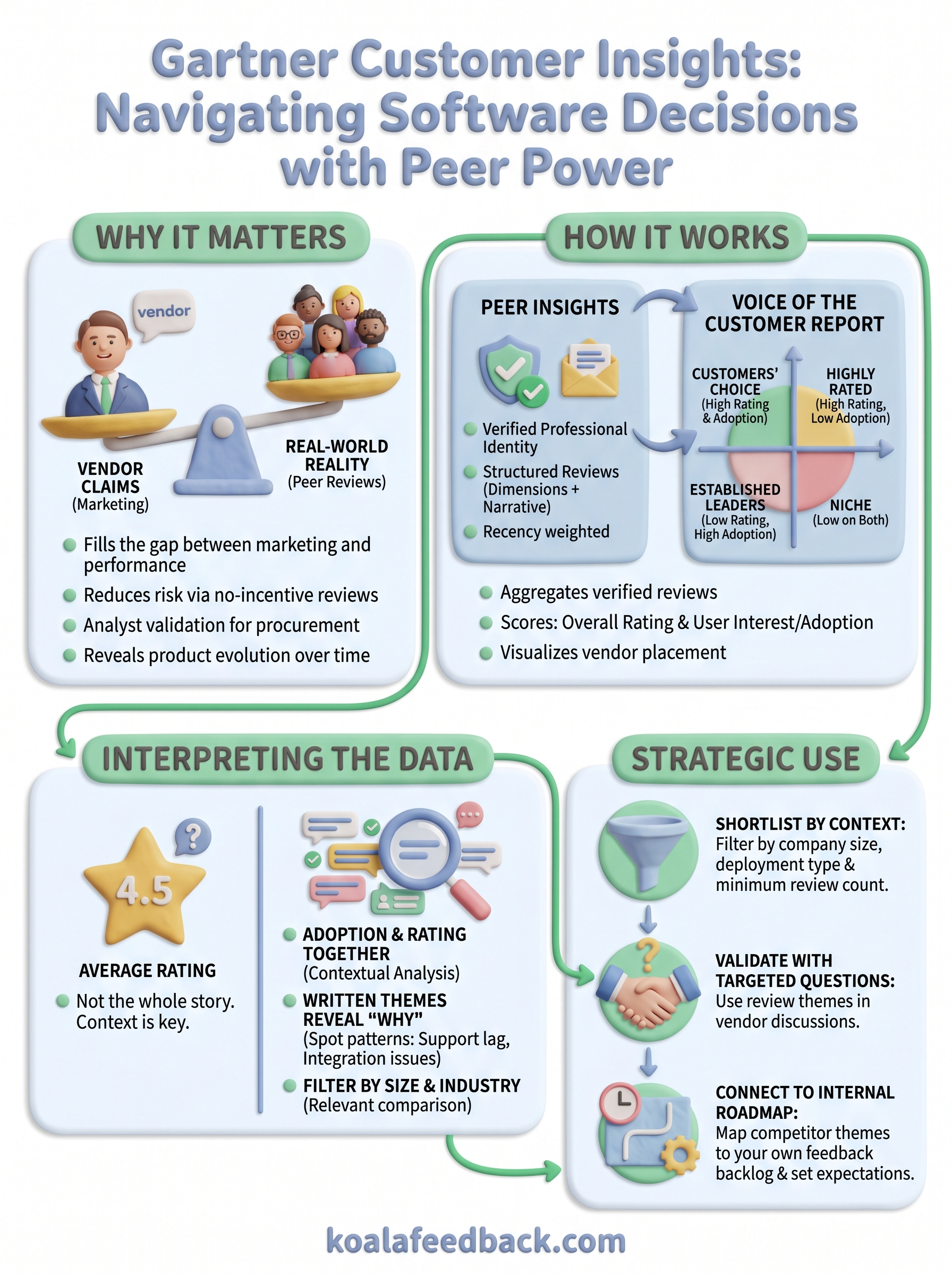
Gartner customer insights give you something vendor content cannot: a structured, verified record of how real practitioners experience software under real conditions. The Peer Insights platform, the Voice of the Customer report, and the Customers' Choice designation each answer a different question about vendor performance, and using all three together produces a shortlist that reflects actual outcomes rather than marketing promises. Reading filtered reviews from organizations your size, tracking written themes across multiple submissions, and carrying those patterns back into your own feedback process turns external research into a continuous internal advantage.
The same principles that make Gartner's methodology valuable apply directly to how you manage your own product feedback. Collecting structured input, surfacing patterns, and communicating progress transparently are habits that build user trust at every stage. If you want to put those habits into practice, start collecting and prioritizing user feedback with Koala Feedback today.

Start today and have your feedback portal up and running in minutes.

