Every product decision starts with a question: what do your users actually want? The answer rarely comes from gut feelings or internal brainstorming sessions. It comes from data, specifically, from customer insights tools that help you collect, organize, and interpret what your users are telling you. Without a reliable system for capturing that information, product and research teams end up guessing instead of building with confidence.
The problem is there are dozens of tools out there, each with a different angle on how to gather and act on customer data. Some focus on behavioral analytics, others on surveys, and others, like Koala Feedback, on collecting and prioritizing direct user feedback through voting boards and public roadmaps. The right choice depends on what kind of insight you need and how your team plans to use it.
This article breaks down 11 customer insights tools worth considering in 2026. For each one, you'll get a clear look at what it does, who it's built for, and where it fits in your research or product workflow. No fluff, no filler, just the details you need to pick the right tool for your team.
Koala Feedback is a feedback management platform built specifically for product teams that want to give their users a structured way to submit, vote on, and track feature requests. Instead of letting feedback scatter across emails, support tickets, and chat threads, it pulls everything into one organized system your team can actually act on.
Koala Feedback gives your users a dedicated feedback portal where they submit ideas, vote on existing requests, and leave comments. The platform automatically deduplicates and categorizes incoming submissions so your team spends time making decisions, not sorting spreadsheets. Because users can see what others have already submitted, the voting data quickly shows you which problems matter most.
This tool works best for SaaS product managers and development teams that want a direct line between user feedback and product planning. It fits teams that need a transparent, low-friction way to collect user input and communicate back to users about what gets built and when.
As one of the more focused customer insights tools on this list, Koala Feedback concentrates on collecting feedback, prioritizing it, and closing the loop with users.
The public roadmap is one of the most practical features here because it shows users exactly where their feedback lands, which builds real trust over time.
Koala Feedback's main strength is its focus. It does one job well: turning qualitative user feedback into a clear, prioritized signal for your product team. The key limitation is that it does not offer behavioral analytics or in-app usage tracking, so you will need a separate product analytics tool if you also want quantitative data.
Koala Feedback connects with tools your team already uses, keeping feedback data flowing into your existing workflow without manual effort. Check the official site for the current integration list, as it continues to expand.
Koala Feedback offers a free plan to get started. Paid plans scale with your team size and feedback volume, with details available directly on the Koala Feedback site.
Qualtrics is an enterprise-grade experience management platform that helps organizations collect and analyze data across customer, employee, and product touchpoints. It sits at the more sophisticated end of customer insights tools, combining survey design, data collection, and statistical analysis in a single system.
It captures insights primarily through surveys and structured research studies. You can build complex, branching questionnaires, run conjoint analysis, and segment responses by audience. The platform also supports longitudinal studies, so you can track how customer sentiment shifts over time rather than capturing a single snapshot.
This tool fits large enterprises and dedicated research teams that need rigorous, statistically valid data. It works well for organizations running formal research programs rather than ad hoc feedback collection.
The conjoint analysis feature is especially valuable when your team needs to prioritize features based on what customers would actually pay for, not just what they say they want.
The platform delivers deep analytical power and research-grade methodology that smaller tools cannot match. The trade-off is cost and complexity: the learning curve is steep, and the pricing puts it out of reach for most small teams.
You can connect Qualtrics to Salesforce, SAP, and Slack, among others, pushing survey data directly into your CRM or communication workflows.
Qualtrics does not publish standard pricing. You need to contact their sales team for a custom quote, which reflects its enterprise positioning.
Dovetail is a research repository and analysis platform that helps teams store, tag, and make sense of qualitative data. It sits in the category of customer insights tools focused on turning raw research into organized, searchable knowledge your whole team can reference.
Dovetail centralizes qualitative data from interviews, usability tests, surveys, and support tickets. You upload transcripts, videos, or notes, then tag and highlight key themes across all your sources. Over time, the platform builds a shared research library so findings do not get lost after a single project.
This tool works best for UX researchers and product teams that run regular customer interviews or usability studies. It suits organizations that want to move beyond one-off research sprints and build a cumulative knowledge base instead.
The ability to search across every past study makes Dovetail particularly strong for teams that need to pull relevant findings quickly without re-running research.
Dovetail handles qualitative synthesis better than most alternatives. Its main limitation is that it does not collect feedback directly from users, so it works as a companion to other research tools rather than a standalone solution.
Dovetail connects with Slack, Notion, and Confluence, letting you push insights directly into your team's existing documentation and communication tools.
Dovetail offers a free starter plan with limited storage. Paid plans scale based on team size and data volume, with current details on their website.
UserTesting is a user research platform that connects product and research teams with real people who complete tasks and share their reactions on video. It gives you on-demand access to human feedback at a speed that traditional research methods cannot match, making it one of the more practical customer insights tools for teams that need qualitative data fast.
UserTesting recruits participants from its large panel of contributors and records video sessions as they interact with your product, prototype, or concept. You define the tasks and questions, and participants speak their thoughts aloud while completing them. Your team then reviews the recordings to identify friction points and patterns that quantitative data alone would never surface.
This tool works best for UX and product teams that need unmoderated usability testing at scale. It fits teams that want to validate designs before launch or test specific user flows without scheduling lengthy moderated sessions.
The panel size and recruitment speed make UserTesting particularly useful when you need feedback within hours rather than weeks.
UserTesting delivers fast, rich qualitative feedback that reflects real user behavior better than surveys can. The primary limitation is cost, as the platform sits at the premium end of the pricing spectrum and can be difficult to justify for smaller teams with tighter research budgets.
UserTesting connects with Jira, Slack, and Adobe XD, letting you push research clips and findings directly into your existing product and design workflows.
UserTesting does not publish standard pricing. You need to contact their sales team for a quote, with plans typically structured around test volume and team size.
Hotjar is a behavioral analytics platform that shows you what users do on your website through heatmaps, session recordings, and on-site surveys. It fills a gap that most customer insights tools miss: the visual layer of how people actually navigate your product before they ever say a word.
Hotjar tracks user behavior directly on your site, recording mouse movements, clicks, scroll depth, and navigation paths. Combined with heatmaps that aggregate activity across thousands of sessions, it gives your team a clear picture of where users focus their attention and where they drop off without completing a task.
This tool fits product and UX teams at small-to-mid-sized companies that need behavioral data without the complexity of a full analytics platform. It works well for teams that want to diagnose conversion or usability problems quickly at the page level.
Session recordings are especially useful when your team disagrees about where a UX problem lives, since they show real behavior instead of assumptions.
Hotjar's main strength is its accessibility: the interface is straightforward, and your team can start pulling insights within hours of setup. Its primary limitation is depth, as it does not provide the event-level granularity that dedicated product analytics tools offer.
Hotjar connects with Google Analytics and HubSpot, making it easy to layer behavioral data alongside your existing traffic and marketing workflows without heavy technical setup.
Hotjar offers a free basic plan with limited session recordings. Paid plans start at $32 per month and scale based on daily session volume, with current details on their website.
Mixpanel is a product analytics platform that tracks how users interact with your application at the event level. It stands apart from most customer insights tools by letting your team ask precise questions about user behavior, then get answers without waiting for a data analyst to write a query from scratch.
It captures every user action in your product as a discrete event, such as a button click, page view, or feature activation. Your team can then build custom funnels, retention curves, and cohort analyses to understand exactly where users succeed, where they drop off, and which behaviors predict long-term retention.
This tool works best for product managers and growth teams at software companies that need granular behavioral data. It fits organizations that want to move beyond page-level traffic metrics and understand which specific user actions drive conversion and retention.
Retention reports are particularly valuable because they connect specific in-product actions to whether users return, giving you a direct signal on feature stickiness.
The event-based model gives your team far more precision than session-based tools. The main limitation is setup complexity: your developers need to instrument events correctly before you can pull meaningful data.
Mixpanel connects with Segment, Salesforce, and Slack, making it straightforward to pipe data from your existing stack without building custom integrations from scratch.
You can start with a free plan covering up to 20 million monthly events. Paid plans scale with event volume and team size, with current details available on their website.
Google Analytics 4 (GA4) is the current version of Google's web and app analytics platform. Unlike its predecessor, GA4 uses an event-based data model that tracks every user interaction as a discrete event rather than grouping behavior into sessions. For teams looking to understand how users arrive at and move through their product, it provides a foundational layer of data that most other customer insights tools do not replace.
GA4 collects data through a tracking tag placed on your site or app, logging events such as page views, scrolls, clicks, and conversions automatically. Your team can also define custom events to track specific actions that matter to your product, giving you flexibility beyond the default setup.
GA4 works best for product, marketing, and growth teams that need to understand traffic sources, user acquisition, and on-site behavior together. It fits teams that want a free, widely supported analytics baseline without committing to a paid platform.
The exploration reports give your team a flexible workspace to answer specific behavioral questions without needing pre-built dashboards.
GA4's biggest strength is cost: it is free for most teams. Its main limitation is data sampling, which can reduce accuracy in high-traffic reporting scenarios.
GA4 connects natively with Google Ads, Search Console, and BigQuery, making it a natural fit for teams already working within the Google ecosystem.
GA4 is free for standard use. The enterprise version, GA4 360, carries a cost that requires contacting Google's sales team directly.
Typeform is a form and survey platform known for its conversational interface that presents one question at a time. Among customer insights tools, it occupies a unique spot by making the survey experience feel less like a questionnaire and more like a natural exchange, which typically drives higher completion rates than traditional forms.
Typeform captures insights through interactive forms, surveys, and quizzes that guide respondents through one question at a time. This format reduces the intimidation of a long form and keeps users engaged from start to finish, so your team collects more complete responses with less drop-off.
Typeform works best for product and marketing teams that need qualitative feedback, NPS scores, or customer satisfaction data without the complexity of an enterprise research platform. It fits teams that want a polished, on-brand survey experience with minimal setup.
The conditional logic feature lets you collect more targeted responses by showing only relevant follow-up questions, which improves the quality of data your team actually acts on.
Typeform's design and completion rates are genuine strengths. Its main limitation is analytical depth: the built-in reporting is basic, so complex analysis requires exporting data to a separate tool.
Typeform connects with HubSpot, Slack, and Google Sheets, making it straightforward to route responses into your existing workflows automatically.
Typeform offers a free plan with limited responses per month. Paid plans start at $25 per month, with current details on their website.
Brandwatch is a consumer intelligence and social listening platform that monitors online conversations across social media, news sites, forums, and review platforms. Among customer insights tools, it occupies a distinct position by pulling insights from public data sources rather than surveys or direct user submissions.
Brandwatch collects data by crawling billions of online mentions across social networks, blogs, and news outlets. It then applies AI-powered analysis to surface trends, sentiment shifts, and emerging topics relevant to your brand or product category.
This tool works best for brand, marketing, and product teams that need to understand how customers talk about their product, competitors, or industry outside of direct feedback channels. It fits organizations with a strong need for market intelligence at scale.
Competitor benchmarking is particularly useful when your team needs to understand how your product's weaknesses compare to alternatives that customers are actively discussing online.
Brandwatch delivers unfiltered, unsolicited customer opinion at a volume no survey tool can replicate. Its main limitation is that the data reflects public sentiment only, which may not represent your actual user base accurately.
Brandwatch connects with Salesforce and Hootsuite, routing social intelligence into your existing CRM and social management workflows.
Brandwatch does not publish standard pricing. You need to contact their sales team directly for a custom quote.
Zendesk is a customer service and support platform that doubles as a source of product intelligence. While it is primarily built around ticketing and live chat, it sits on a rich vein of unsolicited customer feedback that product teams often overlook when building their stack of customer insights tools.
Zendesk captures insights by aggregating support tickets, chat conversations, and help center interactions into a centralized system. Every time a user reports a bug, asks how to complete a task, or requests a missing feature, that information lives in Zendesk and becomes raw material for product and research teams willing to mine it.
This tool fits product and support teams that want to extract patterns from high-volume customer conversations without running separate research studies. It works especially well for companies where the support inbox is already a major feedback channel.
Ticket volume trends often reveal product pain points faster than surveys because users report problems in real time, not weeks after the fact.
Zendesk's main strength is that the data already exists inside your support workflow with no additional collection effort. Its key limitation is that the insights require manual analysis or tagging discipline to be useful for product decisions.
Zendesk connects with Slack, Salesforce, and Jira, making it straightforward to route support trends directly into your product planning workflow.
Zendesk offers plans starting at $19 per agent per month, with higher tiers unlocking advanced reporting and AI features. Current details are available on their website.
Gong is a revenue intelligence platform that records, transcribes, and analyzes sales calls and customer conversations using AI. While most customer insights tools focus on surveys or behavioral data, Gong pulls insights from a channel that product teams often miss entirely: the live conversations your sales and customer success reps have every day.
Gong captures insights by recording and transcribing every sales call, demo, and customer meeting automatically. Its AI then analyzes the transcripts to identify which topics come up repeatedly, how prospects respond to specific messaging, and where deals stall. Your team gets a direct window into what customers say when they are evaluating your product in real time.
This tool works best for sales, revenue, and product teams that want to mine customer conversations for signals about unmet needs, competitive objections, and feature gaps. It fits organizations where sales calls represent a high-volume feedback channel that currently goes unanalyzed.
Searching calls by topic lets your product team find every instance where customers mentioned a specific pain point without sitting through hours of recordings manually.
Gong's primary strength is the volume and authenticity of the conversational data it captures. Its key limitation is that insights skew toward prospects and early-stage customers rather than your full user base.
Gong connects with Salesforce, HubSpot, and Zoom, routing conversation data directly into your CRM and meeting workflows.
Gong does not publish standard pricing. You need to contact their sales team directly for a custom quote based on team size and usage.
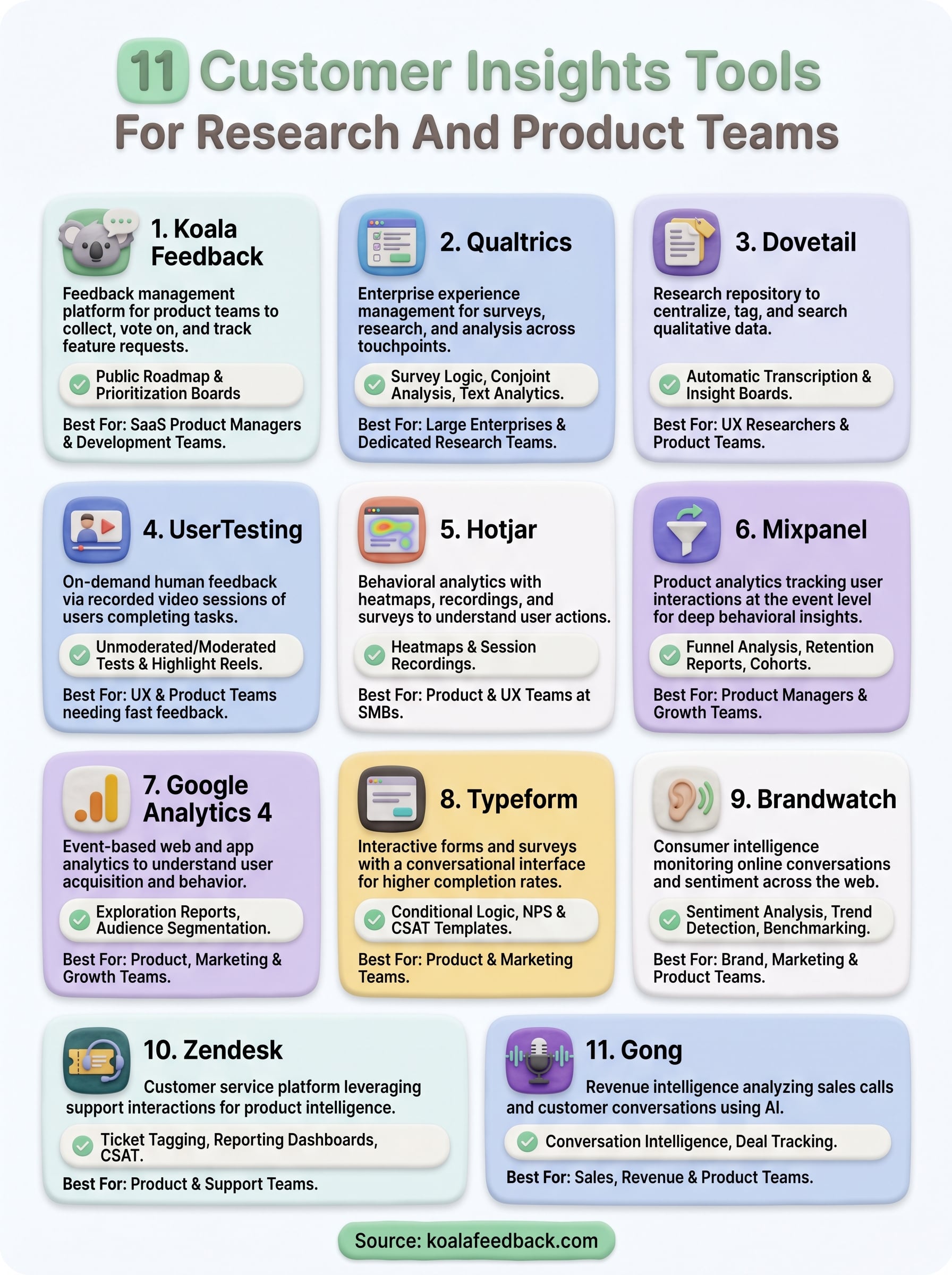
The eleven customer insights tools covered here each capture a different slice of the customer picture. Some track behavior, some analyze conversations, and some collect structured feedback directly from your users. No single tool covers everything, so the right move is to identify where your team currently has the biggest gap and start there rather than trying to adopt multiple platforms at once.
If you need a clear, organized way to collect user feedback and turn it into a prioritized product roadmap, Koala Feedback is built exactly for that. Your users get a place to submit ideas and vote on what matters most, and your team gets a structured signal to act on instead of scattered requests. The public roadmap feature also closes the loop by showing users where their feedback lands, which builds trust over time. Start collecting user feedback with Koala Feedback and give your product decisions a firmer foundation.

Start today and have your feedback portal up and running in minutes.

