Every product decision you make is a bet. Without real data from your users, you're guessing, and guessing gets expensive. Customer insights software helps you move past gut feelings by collecting, organizing, and analyzing what your users actually want, so you can build products people care about.
The challenge? There are dozens of tools out there, each with a different angle, some focus on behavioral analytics, others on survey data, and others (like us at Koala Feedback) on capturing and prioritizing direct user feedback through voting boards and public roadmaps. Picking the right tool depends on what kind of insights you need and how you plan to act on them.
We put together this comparison of 12 customer insights software tools for 2026 to help you cut through the noise. For each tool, we break down what it does best, where it falls short, and who it's built for, so you can find the right fit without spinning your wheels on free trials and demo calls.
Koala Feedback is a feedback management platform built for SaaS teams that want to bring user input directly into their product planning process. Unlike broad customer insights software platforms, it focuses on one clear goal: giving your users a place to share what they need and letting you act on it without the noise.
Koala Feedback excels at centralizing direct user feedback so your product team isn't hunting through Slack threads, support tickets, and spreadsheets. It gives users a dedicated portal to submit ideas, vote on existing requests, and leave comments, which means you get ranked, prioritized signal instead of scattered opinions.
When users vote on feature requests, you see exactly where demand clusters, so you stop building from assumption.
Your users submit ideas through a branded feedback portal you can customize with your domain, colors, and logo. Koala Feedback then automatically deduplicates and categorizes those submissions, so similar requests get grouped together rather than multiplying across hundreds of separate entries. This keeps your feedback organized from day one.
Once feedback is organized, you move requests across prioritization boards tied to your product areas. Teams use these boards to spot patterns, score requests by vote count, and decide what ships next. You then publish a public roadmap showing users what's planned, in progress, or complete, which closes the feedback loop and keeps your audience invested.
Koala Feedback's strongest points are its clean setup, built-in user voting, and roadmap communication features that surface real demand fast. Its focused scope is also its main constraint: if you need behavioral analytics or session recordings, you'll want to pair it with a dedicated product analytics tool.
Koala Feedback works best for SaaS product managers and founders who need a structured way to collect and act on user requests. It fits early-stage teams validating features and growth-stage teams managing a high volume of inbound requests without a bloated tool stack.
Koala Feedback offers a free plan to get started, with paid plans that unlock advanced customization, additional boards, and more team seats. Visit koalafeedback.com for current pricing details.
Microsoft Dynamics 365 Customer Insights is an enterprise-grade customer insights software platform that pulls data from across your business into a single, unified customer profile. It sits inside the broader Microsoft ecosystem, which makes it a natural fit for organizations already running on Azure, Power Platform, or other Dynamics products.
Dynamics 365 excels at breaking down data silos across sales, marketing, and service teams. It connects disparate sources into one coherent view of each customer, so your teams stop working from incomplete pictures.
The platform uses AI-powered identity resolution to match and merge records from multiple data sources, like CRM entries, transactional data, and behavioral signals, into a single customer profile. You get a 360-degree view that updates in real time as new data flows in.
This level of unification is where Dynamics 365 genuinely separates itself from lighter-weight tools.
Teams rely heavily on predictive analytics and segmentation to identify churn risk, lifetime value, and next-best actions. The built-in AI models score customers automatically, so your marketing and success teams can act before problems escalate.
Deep Microsoft integration and enterprise scalability are its clearest strengths. The tradeoff is a steep setup process and a learning curve that typically requires dedicated IT or implementation support to get right.
Dynamics 365 fits mid-to-large enterprises with complex data environments and existing Microsoft infrastructure. Smaller teams will likely find it over-engineered for their needs.
Microsoft prices Dynamics 365 Customer Insights per tenant per month, with separate tiers for data unification and journey orchestration. Check Microsoft's official pricing page for current figures.
Qualtrics is an enterprise experience management platform that many organizations use as their primary customer insights software for collecting and acting on voice-of-customer data at scale.
Qualtrics specializes in structured survey research and experience measurement. It lets you design surveys, distribute them across channels, and analyze results with built-in statistical tools that go deeper than most survey platforms offer.
The platform gathers feedback through email, SMS, web intercepts, and in-app surveys, then runs it through AI-driven text analysis to surface themes and sentiment. You get cross-channel reporting in one dashboard rather than stitching data together manually.
The combination of breadth and analytical depth is what separates Qualtrics from simpler survey tools.
Teams rely on NPS tracking, conjoint analysis, and closed-loop follow-up workflows to measure customer sentiment and respond quickly when scores drop. These features make it practical for programs that require ongoing, structured measurement rather than one-off surveys.
Qualtrics delivers enterprise-grade research tools and strong statistical rigor. The downside is its cost and complexity, as setup and administration take real time, and pricing puts it out of reach for most small teams.
It fits large enterprises and research-heavy teams in industries like financial services, healthcare, and hospitality that run ongoing customer experience programs at scale.
Qualtrics does not publish pricing publicly. You need to contact their sales team for a custom quote based on your use case and volume.
Medallia is an enterprise experience management platform that functions as a comprehensive customer insights software solution for organizations collecting feedback across dozens of customer touchpoints. It goes well beyond surveys to pull in signals from contact centers, social channels, and in-app interactions.
Medallia specializes in capturing experience signals at scale across the full customer journey. Its strength is connecting what customers say at every touchpoint into a single, actionable picture for your operations and CX teams.
The platform ingests structured and unstructured feedback from surveys, call transcripts, digital behavior, and third-party review sources. It then applies AI and natural language processing to detect patterns and flag emerging issues before they spread.
Medallia's ability to process unstructured data at volume is where it pulls ahead of basic survey tools.
Teams rely on real-time alerting and role-based dashboards to route actionable insights to the right people quickly. Closed-loop case management lets frontline staff follow up with dissatisfied customers directly from inside the platform.
Medallia's breadth of signal sources and enterprise scalability make it one of the most capable options available. The tradeoff is a long implementation timeline and pricing that sits firmly in the enterprise tier, which rules it out for most smaller teams.
Medallia fits large enterprises in retail, hospitality, and financial services that run complex, multi-channel customer experience programs and need insights tied directly to measurable business outcomes.
Medallia does not publish pricing publicly. You need to request a demo and custom quote through their sales team to get accurate figures for your organization.
Sprinklr is an enterprise customer experience management platform that functions as a unified customer insights software solution for teams tracking what customers say across social, digital, and traditional channels. Its core strength is pulling together signal from places most tools never reach.
Sprinklr specializes in monitoring and analyzing customer conversations at scale across social media, review sites, news, and messaging platforms. It gives large teams a way to understand brand perception and emerging sentiment shifts before they become visible problems.
The platform uses AI-powered listening and text analytics to process millions of mentions across channels in real time. It normalizes that data into structured insights, so your team sees themes and trends rather than raw noise.
Sprinklr's ability to unify social listening with care, marketing, and research in one platform is what sets it apart from point solutions.
Teams lean on smart alerting, competitive benchmarking, and unified dashboards to track customer sentiment alongside competitor activity. Its built-in care workflows also let support teams respond to issues flagged by the listening layer without switching tools.
Sprinklr's breadth across channels and enterprise scalability make it one of the most complete options for large organizations. That scope also means a steep learning curve and a price point that excludes most small and mid-size teams.
Sprinklr fits enterprise marketing, CX, and brand teams managing high-volume, omnichannel customer engagement programs across global markets.
Sprinklr does not list public pricing. You need to contact their sales team for a custom quote.
Mixpanel is a product analytics platform that serves as a focused customer insights software solution for teams that need to understand exactly how users engage with their digital products. Its core strength is turning raw event data into clear, actionable answers about user behavior.
Mixpanel excels at helping teams measure user actions inside a product rather than just page views. You get detailed answers to questions like which features users adopt, where they drop off, and which paths lead to conversion.
The platform is built around event-based tracking, where every user action in your product gets logged as a data point. You can then query those events using Mixpanel's interface without writing SQL, which keeps analysis accessible to non-technical product managers.
This event-driven model gives you far more granular insight into behavior than session-based analytics tools typically provide.
Teams rely heavily on funnel analysis, retention reports, and user cohort comparisons to understand where engagement breaks down and which user segments stick around. Flow reports show you the actual paths users take through your product rather than the paths you assumed they would take.
Mixpanel's self-serve interface and fast query speed make it one of the more accessible analytics platforms at this level. Its limitation is that it focuses on quantitative behavior data only, so you still need a separate tool to capture qualitative feedback.
Mixpanel fits product and growth teams at SaaS companies who need to measure feature adoption and retention with precision.
Mixpanel offers a free plan for up to 20 million monthly events, with paid Growth and Enterprise plans scaling by data volume and team size.
Amplitude is a digital analytics platform that works as a focused customer insights software solution for product teams tracking how user behavior connects to business outcomes. Where Mixpanel focuses on event queries, Amplitude builds its analysis around the full user journey and retention lifecycle.
Its North Star framework helps you align your entire team around a single metric that reflects real product value. Amplitude specializes in showing you which product experiences drive retention and revenue rather than just logging what users click, keeping roadmap decisions grounded in data rather than assumptions.
The platform maps individual user behavior to downstream outcomes like conversion, retention, and monetization. You can trace exactly which actions predict long-term engagement, which means your team stops optimizing for activity and starts optimizing for results.
This outcome-focused analysis model is what separates Amplitude from tools that only report what happened without explaining why it matters.
Teams use behavioral cohorts, impact analysis, and experimentation to test product changes and measure their effect on real retention curves. Amplitude's experiment feature lets you run A/B tests inside the same platform where you analyze results, which cuts the back-and-forth between tools.
Its depth of retention analysis and experimentation tools is hard to match at this price point. The main limitation is that setting up instrumentation correctly requires developer involvement upfront, which slows initial deployment for smaller teams without dedicated engineering support.
Amplitude fits growth-focused product teams at SaaS and consumer app companies that need to understand which features drive long-term retention and where to focus their next development sprint.
A free Starter plan is available for teams getting started, with paid Plus and Growth plans that scale by monthly tracked users and feature access.
Contentsquare is a digital experience analytics platform that helps teams understand not just what users do on their websites and apps, but why they behave that way. It functions as a specialized customer insights software tool focused on the visual and behavioral layer of the digital experience.
Contentsquare specializes in translating user behavior into visual, intuitive data that any team member can read without a data science background. It maps clicks, scrolls, hovers, and frustration signals directly onto your pages so you see exactly where users struggle or disengage.
The platform combines heatmaps, session replays, and zone-based analysis to show you the full picture of how users interact with each page element. You stop guessing why a conversion rate dropped and start seeing the specific interaction that caused it.
This behavioral context is what separates Contentsquare from tools that only show you traffic numbers without the underlying story.
Teams rely on frustration scoring and impact quantification to prioritize which UX issues to fix first based on their actual revenue impact, rather than gut feel.
Contentsquare's visual reporting and business impact scoring make insights accessible across product, marketing, and design teams. Its focus on digital experience means you will need a separate tool for direct user feedback collection.
It fits e-commerce and digital product teams optimizing conversion rates and on-site experience at scale.
Contentsquare does not publish pricing publicly. You need to request a demo through their sales team for a custom quote.
Zendesk is a customer service and support platform that doubles as a practical customer insights software tool for teams whose richest source of user data lives inside their support queue. It turns the volume of incoming tickets into structured, searchable intelligence your product and CX teams can actually use.
Zendesk excels at giving you visibility into what your users complain about, ask for, and struggle with across every support interaction. Rather than treating tickets as isolated service events, it aggregates them into patterns that tell you where your product or experience breaks down most.
The platform tags and categorizes tickets automatically using AI-powered triage and routing rules, so similar issues cluster together over time. You can then pull reporting dashboards that show ticket volume by category, resolution time, and recurring themes, turning raw support data into a feedback loop for your product team.
Your support queue is one of the most honest sources of user pain points you have, and Zendesk is built to surface it.
Teams rely on satisfaction ratings (CSAT), ticket trend reports, and keyword-based tagging to track which issues spike after product releases or policy changes.
Zendesk's deep support workflow tooling and reporting breadth make it hard to beat for service teams. Its limitation is that it is built around reactive feedback, so you will need a separate tool to capture proactive feature requests.
Zendesk fits SaaS and e-commerce support teams that handle high ticket volumes and want to feed service data back into product decisions.
Zendesk offers tiered plans starting at $19 per agent per month, with higher tiers unlocking advanced AI features and deeper analytics.
SentiSum is an AI-powered support analytics platform that functions as a specialized customer insights software tool for teams that want to extract structured intelligence from their support tickets, chat logs, and reviews automatically.
SentiSum's core strength is converting unstructured support conversations into tagged, categorized data your team can actually query. Instead of manually reading through tickets to find trends, you get a continuously updated picture of what is breaking, frustrating users, or generating the most volume.
The platform uses fine-tuned NLP models trained on support data to classify tickets by topic, sentiment, and severity without requiring manual tagging rules. It connects directly to your helpdesk, so classification happens automatically as new tickets arrive.
This automated tagging layer is what makes SentiSum practical at scale, where manual categorization simply cannot keep up.
Teams rely on real-time dashboards and trend alerts to catch spikes in specific issue categories immediately after a product release or policy change. The platform also surfaces root cause analysis by grouping related issues, so your team targets fixes at the source rather than the symptom.
SentiSum's classification accuracy and speed outperform manual tagging for most support teams. Its focus on reactive ticket data means you still need a separate tool to capture proactive user feature requests.
SentiSum fits support and product teams at SaaS companies handling high ticket volumes who want their support data to inform product decisions directly.
SentiSum does not publish pricing publicly. You need to contact their team directly for a custom quote based on your ticket volume and integrations.
Dovetail is a qualitative research repository and analysis platform that serves as a focused customer insights software tool for teams drowning in raw user research. It gives researchers and product teams a structured place to store, tag, and synthesize interviews, usability tests, and open-ended survey responses.
Dovetail specializes in making qualitative data searchable and shareable across your organization. Instead of research findings sitting in one person's notes, Dovetail centralizes them so any team member can query past studies and pull relevant insights without starting from scratch.
The platform lets you highlight and tag segments of transcripts, videos, and notes directly inside the interface. Over time, those tags accumulate into a structured insight library where patterns surface automatically across multiple studies.

This tagging layer is what transforms disconnected research sessions into a growing institutional knowledge base your whole team can access.
Teams rely on AI-assisted transcription, insight boards, and shareable highlight reels to communicate findings to stakeholders who were not in the research sessions.
Dovetail's research organization and collaboration features are genuinely strong for qualitative work. Its limitation is a narrow focus, so you will need a separate tool for quantitative analytics or direct feature request collection.
Dovetail fits UX researchers and product teams that run regular user interviews and need a centralized place to store and act on qualitative findings.
Dovetail offers a free plan for individuals, with paid team plans that unlock additional storage, advanced AI features, and collaboration tools. Check their website for current pricing tiers.
Gainsight is a customer success platform that doubles as a powerful customer insights software tool for SaaS companies focused on reducing churn and growing revenue from their existing user base. It connects product usage data, support signals, and health scores into a single view so your customer success team can act before accounts slip away.
Gainsight specializes in turning scattered account signals into a unified health score for every customer. Instead of your team manually piecing together who is at risk, Gainsight surfaces that picture automatically so you can prioritize outreach with confidence.
The platform pulls in product engagement data, CRM records, and support history to build a live risk profile for each account. When usage drops or key features go untouched, Gainsight flags the account and triggers a playbook for your team to follow.
This connection between product behavior and retention risk is where Gainsight delivers its clearest value over generic CRM tools.
Teams rely on health scorecards, automated playbooks, and timeline activity tracking to manage large account portfolios without letting at-risk customers fall through the cracks.
Gainsight's depth of customer success workflows is unmatched in its category. Its complexity and enterprise pricing make it a poor fit for early-stage teams without a dedicated customer success function.
Gainsight fits B2B SaaS companies with established customer success teams managing mid-market and enterprise accounts at scale.
Gainsight does not publish pricing publicly. You need to contact their sales team for a custom quote based on your account volume and feature requirements.
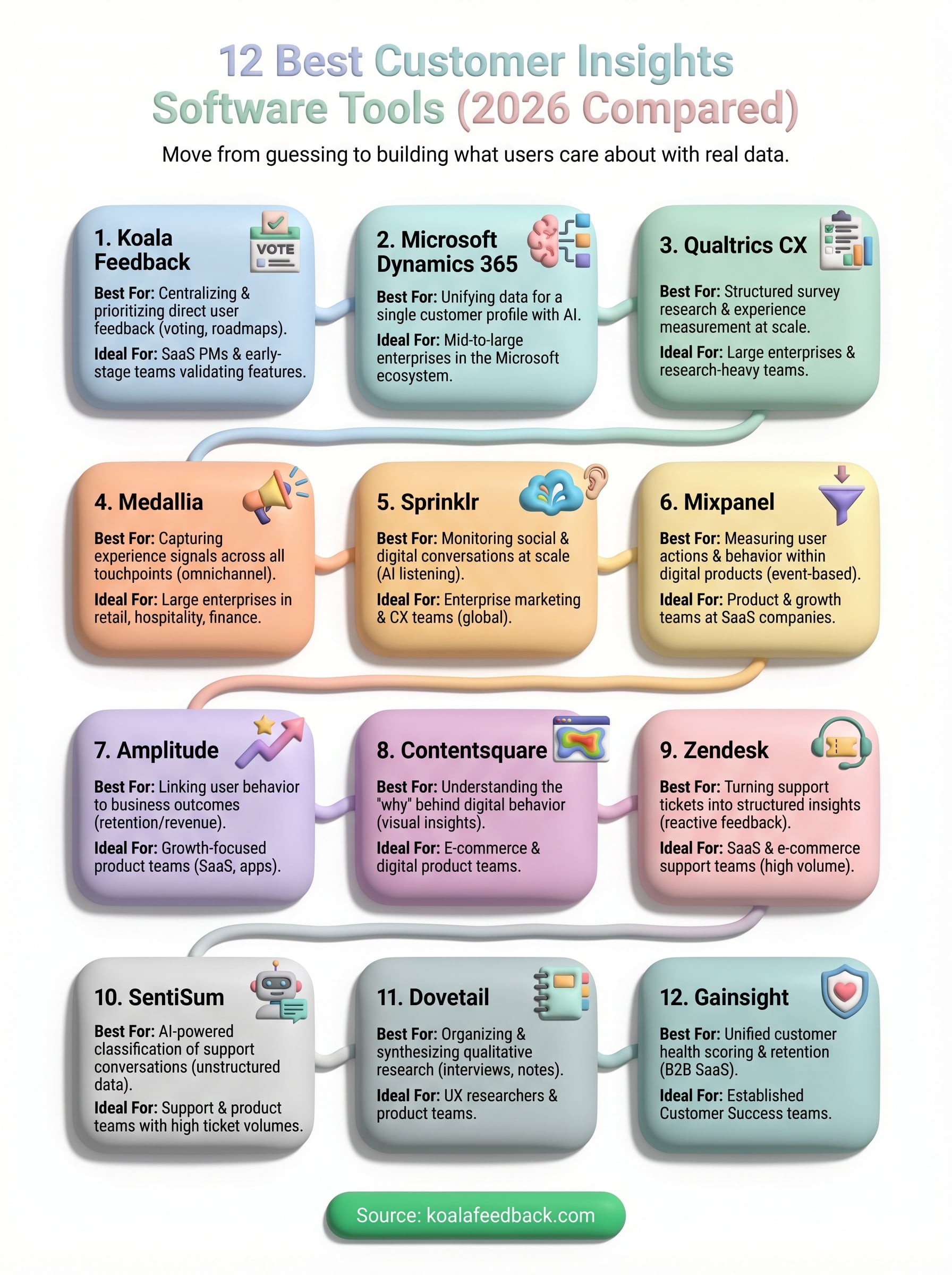
The right customer insights software depends on what kind of data you need most and where you plan to act on it. If you run a large enterprise with complex data infrastructure, tools like Dynamics 365, Qualtrics, or Medallia give you the depth and scale to match. If you need behavioral analytics to understand how users move through your product, Mixpanel and Amplitude are your strongest options.
But if your team needs to know what users actually want built next, and you need a fast, structured way to collect, prioritize, and communicate that feedback, Koala Feedback is where to start. You get a branded feedback portal, automatic deduplication, voting boards, and a public roadmap out of the box, without the complexity of an enterprise platform. It takes the guesswork out of your product roadmap decisions by putting your users directly in the process. Start collecting user feedback with Koala Feedback and build what your users are actually asking for.

Start today and have your feedback portal up and running in minutes.

