Picking the right user research tools can mean the difference between building features your users actually want and guessing your way through a product roadmap. But with dozens of platforms out there, each claiming to be the ultimate solution, choosing the right stack takes real homework.
Here's the thing: user research isn't one activity. It spans usability testing, surveys, interviews, feedback collection, analytics, and more. Most teams need a combination of tools to cover the full spectrum. Some platforms handle recruitment and moderation, others focus on analysis, and tools like Koala Feedback specialize in capturing ongoing user feedback and turning it into a prioritized, actionable product roadmap, which is a critical piece of any research operation.
The best tool for your team depends on what you're trying to learn, how your users prefer to communicate, and what stage your product is in. A pre-launch startup running discovery interviews has very different needs than an established SaaS company managing thousands of feature requests across multiple product lines.
We put together this list of 16 standout UX research tools and software for 2026, covering everything from usability testing platforms to feedback management systems. For each tool, we break down what it does well, where it falls short, and who it's best suited for, so you can stop browsing comparison pages and start making a decision.
Koala Feedback sits in a specific but essential corner of the user research tools landscape: it collects ongoing feedback from real users, helps you organize and prioritize what they're asking for, and then lets you communicate your roadmap back to them. If your goal is to understand what your users want built next, this tool was designed for exactly that job.
This platform tells you what your users want and how urgently they want it. Through a dedicated feedback portal, users submit ideas, vote on existing requests, and leave comments. Over time, you build a data-rich picture of which features matter most, which pain points keep surfacing, and where your product needs to go next. It works well alongside qualitative research methods that tell you why users struggle, while Koala Feedback tells you what they're actually asking you to build.
The combination of voting data and user comments gives you both quantitative signal and qualitative context in one place.
Koala Feedback automatically deduplicates and categorizes incoming feedback so your board doesn't fill up with overlapping requests. The prioritization boards let you sort input by product area or feature set, which is especially useful when you're managing a larger product with multiple workstreams running in parallel.
The public roadmap feature is a genuine differentiator here. You can share planned, in-progress, and completed items directly with your users, using customizable statuses that help you set accurate expectations. You can also brand the entire portal with your own domain, colors, and logo, so it fits naturally into your existing product experience rather than feeling like a bolted-on third-party tool.
Koala Feedback is focused squarely on structured feedback collection and roadmap communication. It isn't a usability testing platform, a session recording tool, or a behavioral analytics product, so you'll need to pair it with other tools if you want heatmaps, moderated interview capabilities, or click-path analysis. Think of it as a dedicated hub for capturing and acting on user input, not as a full research suite on its own.
Koala Feedback offers a free plan to get started, with paid tiers that unlock additional boards, custom domains, and expanded features. Pricing scales with your team's needs, making it accessible for early-stage startups and established product teams alike. Visit koalafeedback.com for the most current plan details and pricing.
Maze is a rapid prototype testing platform designed for product and UX teams who need design feedback before they commit to building. It integrates directly with tools like Figma, letting you run unmoderated usability tests on interactive prototypes without scheduling live sessions or managing recruitment logistics manually.

Maze tells you how users interact with your designs before a single line of code gets written. You can build task-based tests to see where users drop off, track click paths, and measure mission completion rates. Among user research tools focused on pre-launch validation, it returns quantitative usability data faster than most alternatives.
The Figma and InVision integrations remove a lot of setup friction. You import your prototype, build a test around specific tasks, and distribute it to participants in one workflow. Maze also includes a built-in participant panel, which helps when you don't have direct access to your target users and need to recruit quickly.
The mission completion rate metric gives you a clear, quantifiable signal on whether your design actually guides users where you intend.
Maze is built specifically for prototype and concept testing, so it doesn't give you much insight into how users behave inside a live product. If you rely on the built-in panel to supply all your participants rather than recruiting from your own user base, costs can climb quickly.
There's a free plan available with limited tests and responses per month. Paid plans start at around $99 per month, with team and enterprise tiers available for organizations that need more seats and higher response volumes.
UserTesting is one of the most established user research tools available, focused on getting real human feedback on your product, prototype, or concept through recorded video sessions. Participants narrate their experience as they complete tasks, which gives you direct access to their thought process in a way that click data alone never can.
UserTesting surfaces the "why" behind user behavior that behavioral analytics can't explain on its own. You see where users get confused, what language they use to describe your product, and how their expectations align with your actual design. It works well for testing live products, prototypes, and even competitor experiences to benchmark how you compare.
Watching a user talk through their confusion in real time is often more instructive than reviewing a month of heatmap data.
The platform includes a large, pre-screened participant panel that lets you filter by demographics, behaviors, and even software usage patterns. This means you can reach a relevant audience fast, without managing your own recruitment pipeline. UserTesting also provides AI-assisted analysis tools that help surface recurring themes across multiple sessions.
UserTesting carries a premium price point that puts it out of reach for smaller teams or early-stage startups on tight budgets. The platform is built for moderated and unmoderated video sessions, so if you need behavioral analytics, roadmap management, or structured feedback collection, you'll need separate tools to fill those gaps.
UserTesting does not publish standard pricing publicly. Plans are quote-based, and costs vary depending on session volume, panel access, and team size. You'll need to contact their sales team for a custom proposal.
Dscout is a mobile-first research platform built around diary studies and in-context user research. Instead of pulling users into a lab or a moderated session, it lets you observe them in their natural environment over days or weeks, capturing thoughts, behaviors, and reactions as they happen.
This platform surfaces longitudinal behavioral patterns that single-session testing misses entirely. You can track how users' attitudes toward your product shift over time, identify friction points that only appear during extended use, and collect rich multimedia responses including photos, videos, and text from real-world contexts. For teams building out their user research tools stack, this kind of in-context data adds a layer of insight that one-hour interviews rarely provide.
Diary studies routinely reveal usage habits and workarounds that users would never volunteer in a moderated session.
The platform's mobile app makes it easy for participants to respond to prompts throughout their day, rather than sitting down to fill out a survey at a scheduled time. Dscout also includes built-in recruitment and screening tools, so you can find and vet participants without managing a separate recruiting workflow.
Dscout requires longer study timelines than rapid testing tools, which makes it less suitable when you need fast feedback. Running diary studies also demands more participant commitment, which can lead to drop-off if your study design isn't compelling enough to sustain engagement over time.
Pricing for Dscout is entirely custom and quote-based rather than structured around published tiers. You'll need to contact their team directly to get a proposal based on your study scope and participant volume.
Lookback is a moderated research platform built for teams that prioritize live sessions and direct user observation. It functions as one of the more focused user research tools available, combining session recording with live streaming so you can watch participants in real time or review recordings afterward with your team.
This platform gives you direct insight into how users interact with your product during both moderated and self-guided sessions. You can watch participants navigate your interface, listen to their verbal reactions, and capture their screen and camera simultaneously, giving you rich qualitative data that reveals specific friction points and mental models.
The combination of screen capture, camera feed, and audio in a single recording makes it far easier to understand context than a screen recording alone.
One of Lookback's most useful capabilities is its live observer rooms, where teammates can watch sessions in real time without the participant knowing anyone else is present. This keeps the session natural while giving your entire product team access to direct user observation without crowding the call. Sessions are automatically recorded and stored for later review.
Lookback focuses on live and recorded session research, so it doesn't provide behavioral analytics, heatmaps, or structured feedback collection. If your research plan requires quantitative data at scale, you'll need to pair it with other tools in your stack to cover those gaps.
The platform offers a free trial to test core features before committing. Paid plans start at around $25 per month for individuals, with team plans available at higher price points depending on the number of seats and session volume you need.
Optimal Workshop is a dedicated information architecture research platform that helps you understand how users think about and navigate the content in your product. Among user research tools focused specifically on structure and navigation, it occupies a unique position with a tightly scoped but highly effective toolset.
Running studies in this platform tells you how users categorize information and whether your navigation structure matches their mental model. The card sorting tool lets participants group content into logical categories, while the tree testing tool reveals whether users can find specific items within your existing navigation hierarchy without visual design cues influencing their choices.
Tree testing is one of the most reliable methods for diagnosing navigation problems before you invest in a full redesign.
The platform bundles card sorting, tree testing, first-click testing, and a qualitative survey tool called Reframer into a single subscription. This makes it practical for teams focused on information architecture and content strategy research, rather than needing to stitch together multiple separate tools to cover those tasks.
Optimal Workshop is narrowly focused on IA and navigation research, which is simultaneously its strength and its limitation. You won't find session recording, behavioral analytics, or feedback collection here, so it works best as a specialist tool inside a broader research stack rather than as a standalone solution.
A free plan is available with limited responses per study. Paid plans start at approximately $208 per month when billed annually, with team plans available at higher tiers for organizations running studies at scale.
Lyssna (formerly UsabilityHub) is a lightweight design testing platform built for teams that need quick, structured feedback on visual concepts and early-stage designs. It sits among the more accessible user research tools available, letting you run unmoderated tests without a steep learning curve or a large budget.
This platform tells you how users perceive and respond to your designs at a glance. Through first-click tests, five-second tests, and preference tests, you can measure whether your visual hierarchy is working, which design variant resonates more, and whether users can identify the primary action on a screen within seconds of seeing it.
Fast perception tests like the five-second test often reveal whether your design is communicating its purpose clearly before users even begin navigating.
The platform bundles several distinct test types into one subscription, including card sorting, tree testing, prototype tests, and design surveys. You can recruit from Lyssna's built-in participant panel or send tests directly to your own users, which gives you flexibility depending on whether you need speed or precision in your sample.
Lyssna is built for quick, unmoderated feedback rather than deep behavioral research. You won't get session recordings, heatmaps, or analytics inside the platform, so you'll need other tools if you want to track how users navigate a live product over time.
A free plan covers basic test types with limited responses per month. Paid plans start at $75 per month, with team plans available at higher tiers for more seats and higher response volumes.
Loop11 is an unmoderated usability testing platform built for teams that need to test live websites and web applications at scale. It sits among the more task-focused user research tools available, letting you measure how real users complete specific goals inside your actual product rather than a prototype.
Loop11 tells you where users succeed and where they fail when navigating your live site. You can define specific tasks, set success criteria, and then measure completion rates, time-on-task, and navigation paths across a large sample of participants. This makes it practical for identifying structural usability problems that only become clear when you watch many users attempt the same task independently.
Task completion rate combined with time-on-task gives you a reliable benchmark for comparing design iterations against each other.
The platform supports both moderated and unmoderated testing, which gives you flexibility depending on how much direct observation you want. Loop11 also includes a built-in participant recruitment panel, so you can source testers quickly without managing a separate recruiting workflow. The reporting dashboard pulls task data, user paths, and survey responses into one view for straightforward analysis.
Loop11 is focused on structured task-based testing, so it doesn't offer session recording depth, heatmaps, or feedback collection features. If your research requires qualitative depth or ongoing feedback management, you'll need to supplement it with other tools in your stack.
Loop11 offers a free trial for new users. Paid plans start at $179 per month, with higher tiers available for teams that need more studies and participant volume.
Userlytics is a global usability testing platform that gives you access to both moderated and unmoderated sessions with participants from over 40 countries. Among the user research tools built for teams that need international reach, it stands out for combining a large participant panel with flexible study formats and AI-assisted analysis.
Userlytics helps you understand how users across different regions and demographics interact with your product, website, or prototype. You can set specific tasks, ask follow-up questions, and capture participants' screens and cameras simultaneously, giving you both behavioral data and verbal reactions in a single recording.
Testing with participants from multiple countries in the same study often reveals regional usability differences that single-market testing completely obscures.
The platform's AI-powered sentiment analysis automatically processes session recordings and flags moments where participants show frustration or confusion, which cuts down the time you spend manually reviewing footage. Userlytics also supports picture-in-picture recording, capturing screen activity and participant facial expressions together so you can read emotional responses alongside navigation behavior.
Userlytics is primarily a video-based research tool, so it doesn't include heatmaps, behavioral analytics, or feedback management capabilities. Recruiting exclusively from the built-in participant panel can add cost quickly if you're running studies at high volume, so testing with your own users keeps expenses more predictable.
Userlytics offers a pay-per-session model starting at around $49 per session, along with subscription plans for teams that run studies regularly. Enterprise plans are available with custom pricing based on volume and feature requirements.
Hotjar is a behavior analytics platform that combines heatmaps, session recordings, and on-site surveys into a single tool. Among the user research tools designed to reveal what users actually do inside your live product, Hotjar gives you a visual layer of behavioral data that complements both quantitative analytics and qualitative interview findings.

This platform shows you where users click, scroll, and drop off across your web pages and product screens. Heatmaps surface which elements attract attention and which get ignored, while session recordings let you watch individual user journeys from start to finish. You can identify specific friction points in your product without needing to recruit participants or schedule sessions in advance.
Watching a session recording where a user repeatedly clicks a non-interactive element tells you more about a UX problem than any survey ever could.
The platform includes embedded micro-surveys and feedback widgets that let you collect user sentiment directly within your product, without redirecting users to an external form. Hotjar also offers funnel analysis tools that show you exactly where users abandon a specific flow, which helps you prioritize fixes based on where the biggest drop-offs actually occur.
Hotjar is built for live product behavioral research, so it doesn't support prototype testing, participant recruitment, or structured usability tasks. The free plan caps session recording volume significantly, which means growing teams will hit the ceiling quickly and need to upgrade to access meaningful data.
A free plan covers basic heatmaps and limited recordings for smaller teams. Paid plans start at $32 per month, with higher tiers unlocking more sessions, advanced filters, and additional survey responses.
Microsoft Clarity is a free behavior analytics tool from Microsoft that gives you heatmaps and session recordings for your website or web application. Among user research tools available at no cost, it delivers a surprisingly capable feature set that helps you understand how users actually move through your product.
Clarity shows you where users click, scroll, and rage-click across your pages, along with recorded sessions that let you replay individual user journeys from start to finish. You can identify patterns like dead clicks and excessive scrolling that signal specific friction points in your design.
The platform also automatically flags problematic sessions based on behaviors like rage clicks and JavaScript errors, so you spend less time hunting for problem areas and more time resolving them.
Rage-click detection surfaces sessions where users repeatedly click an unresponsive element, making it straightforward to prioritize exactly which UX problems to investigate first.
The platform's AI-powered Copilot integration lets you ask natural language questions about your session data and receive summarized insights without manually scrubbing through hours of recordings. Clarity also integrates directly with Google Analytics, connecting behavioral session data to your existing traffic and conversion metrics within one workflow rather than across separate tabs.
Clarity is built strictly for web behavior analytics, so you won't find prototype testing, survey tools, participant recruitment, or feedback management anywhere in the platform. It also lacks native mobile app tracking, which means you'll need additional tools if your product extends beyond a browser-based experience.
Microsoft Clarity is completely free with no session recording caps or response limits, making it one of the most accessible behavioral analytics options available to teams at any stage.
Mixpanel is a product analytics platform built around event-based tracking, giving you a precise view of how users interact with your web and mobile applications. Among user research tools focused on quantitative product data, it delivers granular event tracking and funnel analysis that helps you connect specific user actions to broader engagement and retention trends.
Mixpanel tells you exactly which actions users take inside your product, in what sequence, and how often. You can track custom events, build funnels to measure drop-off between steps, and run cohort analysis to compare how different user segments behave over time. This makes it especially useful for identifying where users disengage during a specific workflow and which features actually drive retention.
Cohort analysis in Mixpanel lets you see whether users who complete a specific action in week one are more likely to stay active in week four, giving you a direct line between feature adoption and long-term retention.
The platform's funnel and retention reports are its strongest tools, letting you measure conversion and drop-off across any sequence of events you define. Mixpanel also includes A/B experiment analysis, so you can tie feature changes directly to measurable shifts in user behavior without relying on separate testing infrastructure.
Mixpanel is a quantitative analytics tool, not a qualitative research platform. You won't find session recordings, participant recruitment, or open-ended feedback collection here. Teams building a complete research stack will need to pair it with qualitative tools to understand the reasons behind the patterns Mixpanel surfaces.
Mixpanel offers a free plan covering up to 20 million monthly events. Paid plans start at $28 per month, with growth and enterprise tiers available for teams that need higher event volumes and advanced features.
SurveyMonkey is one of the most widely used survey platforms available, giving you a structured way to collect feedback from large audiences at scale. As part of a broader set of user research tools, it fits naturally into workflows where you need to run quantitative surveys quickly without building custom forms or managing a separate research infrastructure from scratch.
SurveyMonkey tells you what users think, prefer, and report about their experiences with your product. You can measure satisfaction using NPS surveys, gather demographic data, and run structured questionnaires that quantify attitudes across a large sample faster than any moderated research method allows. Common use cases include:
The platform includes a large question type library covering multiple choice, rating scales, open-text responses, and ranking questions. SurveyMonkey also provides a built-in audience panel that lets you purchase responses from targeted demographics when you don't have direct access to your own users.
The audience panel is useful when you need to benchmark your product against a specific market segment quickly, without running your own recruitment campaign.
SurveyMonkey is primarily a survey tool, so it doesn't offer session recordings, behavioral analytics, or structured feedback management. Response quality from the built-in panel can vary, and reaching a niche professional audience often costs significantly more than targeting a general consumer sample.
A free plan covers basic surveys with limited responses per month. Paid plans start at $25 per month, with team and enterprise tiers available for organizations that need advanced branching logic, integrations, and higher response volumes.
Typeform is a form and survey platform built around a conversational interface that presents one question at a time, keeping respondents engaged through what would otherwise feel like a standard survey. Among user research tools that prioritize response quality over raw volume, Typeform's format consistently produces higher completion rates than traditional multi-question forms.
Typeform helps you collect structured user input on attitudes, preferences, and experiences through surveys, onboarding flows, and research questionnaires. Because the one-question-at-a-time format reduces cognitive load, participants tend to give more thoughtful, complete answers than they would filling out a dense static form. This makes it particularly useful for post-launch feedback surveys and NPS collection.
The conversational format often produces higher-quality open-text responses than traditional surveys because respondents feel less overwhelmed by seeing the full question set at once.
The platform's conditional logic and branching lets you tailor follow-up questions based on previous answers, which keeps surveys relevant and concise for each individual respondent. Typeform also integrates with a wide range of tools including Slack, HubSpot, and Google Sheets, making it straightforward to route responses directly into the systems your team already uses without any manual data handling.
Typeform is a survey and form tool, not a full research platform. You won't find session recordings, behavioral analytics, or participant recruitment here, so plan to pair it with other tools to cover those research needs. Response volume caps on lower-tier plans can become a real constraint if you're running high-traffic surveys across a large user base.
Typeform offers a free plan with limited responses per month. Paid plans start at $25 per month, with higher tiers available for teams that need advanced logic, more integrations, and larger response volumes.
User Interviews is a participant recruitment and scheduling platform that removes one of the most time-consuming parts of running any research program: finding qualified people to talk to. If you've spent hours sourcing participants for studies, this platform directly addresses that bottleneck within your broader set of user research tools.
This platform doesn't generate research findings on its own. Instead, it gets the right participants in front of you so your interviews, usability tests, and diary studies can actually produce meaningful data. You can filter candidates by demographics, job title, industry, and behaviors, which means the quality of your sample improves significantly compared to ad-hoc recruiting through social media or personal networks.
A well-screened participant pool consistently produces more actionable research insights than a large but loosely defined sample.
The platform includes automated scheduling and incentive management, which reduces the administrative burden of coordinating sessions across multiple time zones. Its Research Hub feature also lets you build and manage your own panel of opted-in users from your existing customer base, so you can recruit from people who already know your product rather than relying entirely on a third-party pool.
User Interviews is a recruitment-only tool, so it doesn't record sessions, analyze responses, or store research findings. You'll need separate tools to handle the actual research and analysis once your participants are scheduled and sessions begin.
Paid plans start at $40 per month, with higher tiers for teams that need more recruiting credits and broader panel access. A free plan is also available for basic recruiting needs at lower volume.
Dovetail is a research analysis and repository platform that helps teams store, tag, and synthesize qualitative data from interviews, surveys, and usability sessions. As your collection of user research tools grows, Dovetail functions as the central place where raw findings become structured, searchable insights your whole team can access and build on.
Dovetail helps you identify recurring themes and patterns across large volumes of qualitative data. You can upload interview transcripts, session recordings, and survey responses, then tag and code them to surface common pain points, behavioral patterns, and unmet needs. The platform turns scattered research artifacts into a coherent body of evidence that supports product decisions with documented proof rather than memory and notes in personal folders.
The platform includes automatic transcription and AI-assisted tagging, which reduces the manual work of coding interviews significantly. Dovetail also provides a shared insights hub where your entire team can browse findings, search by theme, and link evidence directly to product decisions without requesting raw files from whoever ran the study.
Centralizing your research repository means your team builds on previous findings rather than repeating the same discovery work every product cycle.
Dovetail is a research synthesis and storage tool, not a data collection platform. It doesn't recruit participants, run surveys, or record sessions natively, so you'll need other tools to generate the raw data you bring into it.
Dovetail offers a free plan for individuals getting started. Paid plans begin at $29 per month, with team and enterprise tiers available for larger organizations that need more storage and collaboration features.
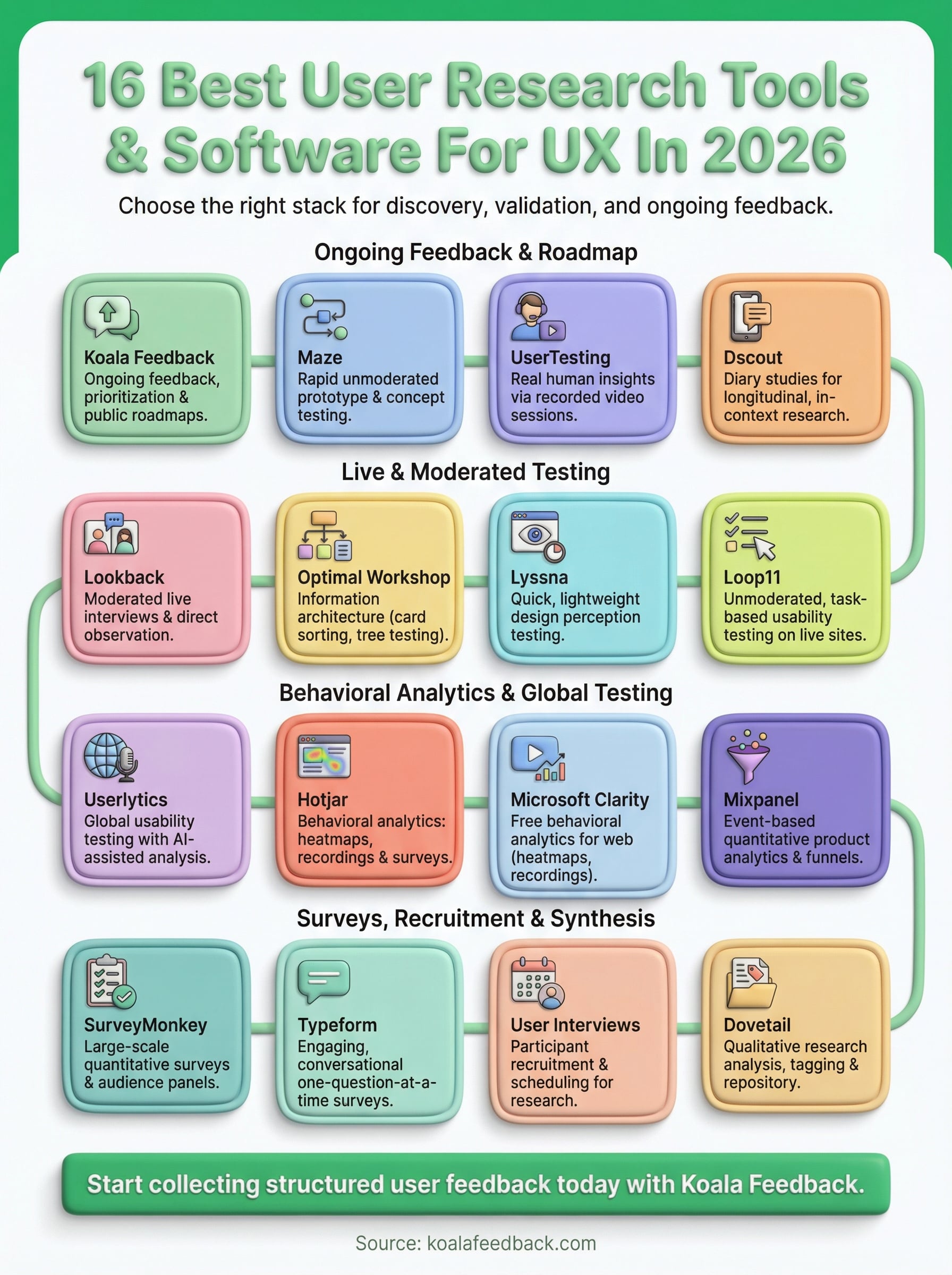
No single platform covers every research need, and the strongest user research tools stacks always combine several tools rather than betting on one. Your exact combination depends on what questions you're trying to answer right now, but most product teams benefit from pairing a behavioral analytics tool, a testing platform, and a feedback collection system to cover discovery, validation, and ongoing user input.
If you're missing that last piece, a dedicated feedback portal gives your users a direct channel to tell you what they want built next. Voting data and user comments together give you both the signal and the context to make confident roadmap decisions instead of guessing. A public roadmap also keeps your users informed and engaged between releases, which builds trust over time.
Start collecting structured user feedback today and turn it into a prioritized roadmap your whole team can rally around with Koala Feedback.

Start today and have your feedback portal up and running in minutes.

