Your users send feedback through email, social media, support tickets, and random Slack messages. You're drowning in scattered opinions while your team struggles to figure out which features actually matter. Without a proper user feedback tool, you're building in the dark, guessing which product decisions will resonate with your audience. The result? Wasted development time on features nobody wants, missed opportunities to fix what's broken, and frustrated users who don't feel heard or valued.
This guide breaks down 15 user feedback tools that help you capture, organize, and act on user input in one centralized place. You'll find options ranging from free solutions to enterprise platforms, each designed to solve different feedback challenges. Whether you need basic surveys, visual bug reports, or full feature voting systems with public roadmaps, we've covered the tools that product teams actually use in 2026. Each entry includes key features, pricing details, and who each tool works best for.
Koala Feedback gives you a centralized platform to capture user ideas, organize feature requests, and share your product direction. You get a customizable feedback portal where users submit ideas, vote on what matters most, and see exactly what you're building next through public roadmaps.
This user feedback tool automatically deduplicates and categorizes every piece of feedback your users submit. You won't waste time sorting through duplicate requests or manually organizing submissions. The platform creates prioritization boards based on your product areas, letting you see which features have the most demand. Users can comment on existing ideas and vote to push their favorites higher, giving you clear data on what to build next.
"When users see you're listening and taking action, they stick around longer and become advocates for your product."
The feedback portal comes with full white-labeling options, including your own domain, brand colors, and logo. Your public roadmap displays planned, in-progress, and completed features with customizable statuses that manage user expectations. The tool offers automatic categorization that groups similar feedback together without manual sorting. Built-in voting and commenting keeps users engaged while providing you with quantifiable demand data for each feature request.
Product managers running SaaS products get the most value from this platform when they need to prioritize development based on actual user demand. Development teams at startups and established companies use it to maintain transparency with their user base while collecting structured feedback. You'll benefit most if you're tired of scattered feedback across email, support tickets, and social media.
Koala Feedback offers flexible pricing plans designed for teams of different sizes and needs. The platform includes free trial options so you can test the full feature set before committing to a paid plan.
Canny consolidates your feature requests and user feedback into a single platform where customers vote on what they want most. You get a public roadmap that shows users exactly what you're building, which reduces repetitive support questions and builds trust with your user base.
This user feedback tool captures ideas from multiple channels and organizes them into feedback boards that make sense for your product structure. Your users can vote on features they care about, giving you quantifiable data on which requests deserve your development resources. The platform automatically groups similar ideas together, preventing duplicate submissions from cluttering your boards. Canny displays user profiles next to each request, letting you see which customer segments are asking for specific features.
The voting system creates engagement by showing users their voice matters when feature requests gain traction. Your team can publish a public roadmap that displays planned, in progress, and completed features with custom status labels. Built-in feedback boards let you organize requests by product area, priority level, or any categorization that fits your workflow. Canny integrates with Intercom, Slack, GitHub, HubSpot, Discord, Microsoft Teams, Google Workspace, Jira, and Google Analytics, connecting feedback directly to your existing tools.
"When users see their requests acknowledged and tracked, they feel invested in your product's success."
Product teams at SaaS companies benefit most when they need transparent communication about which features are coming next. Developers working on customer-facing applications use Canny to prioritize their backlog based on actual user demand rather than internal assumptions. You'll find this particularly valuable if you're spending too much time answering "when will you build X?" questions from users.
Canny starts with a free plan that covers basic feedback collection and voting features. Paid plans begin at $19 per month for teams needing advanced customization, private boards, and deeper integrations with development tools.
Frill combines feedback collection, roadmap planning, and product announcements in a single platform designed for small to medium-sized SaaS teams. You get a complete feedback loop that captures user ideas, displays your product direction, and keeps customers informed about new features you ship.
This user feedback tool creates customizable feedback boards where your users submit feature requests, vote on existing ideas, and engage with your product team. The platform automatically organizes submissions so you can spot trending requests without manual sorting. Frill publishes public roadmaps that show users what you're planning, building, and releasing, reducing the constant "when will you add this?" questions from your customer base.
"Transparency about your product direction turns passive users into active participants who feel invested in your success."
The embeddable widget lets you capture feedback directly inside your product without sending users to external forms. Your team gets feature voting tools that reveal which requests have the most demand from your user base. Built-in announcement capabilities push updates to users when you ship features they requested. Frill offers full translation support to localize your feedback portal for international users. The platform integrates with Trello, Jira, and Slack, connecting feedback directly to your development workflow.
Startups and growing SaaS companies benefit most when they need an affordable solution that covers feedback, roadmaps, and announcements without juggling multiple tools. Product managers working with limited budgets choose Frill when they want professional feedback management features at prices that don't require enterprise contracts.
Frill starts at $25 per month with the Startup plan covering Ideas, Roadmaps, and Announcements. The platform scales to $49 and $149 monthly plans that unlock unlimited ideas and white-labeling options for larger teams.
Userback specializes in visual feedback that captures exactly what users see when they report bugs or suggest features. You get annotated screenshots, screen recordings, and session data that eliminate the guesswork from understanding user issues, making it faster for your team to reproduce problems and ship fixes.
This user feedback tool embeds a feedback widget directly into your product, letting users highlight specific elements, draw annotations, and record their screen without leaving your application. The platform automatically captures technical metadata like browser version, screen resolution, and console logs alongside each submission. Your team receives complete context for every bug report or feature request, reducing back-and-forth communication to understand what users actually experienced. Userback collects feedback through multiple channels including in-app widgets, email surveys, and a public feature portal where users vote on requests.
The annotated screenshots let users circle, highlight, and markup exactly what they're seeing when they encounter issues or want new features. Built-in session replay shows you the exact steps users took before submitting feedback, helping developers reproduce bugs faster. Your team can create user surveys to gather targeted insights at specific points in the customer journey. The platform offers a feature portal where users suggest ideas and vote on existing requests, giving you quantifiable demand data for prioritization. Userback integrates with Jira, Slack, ClickUp, Intercom, Asana, Linear, Notion, GitHub, Microsoft Teams, and Zendesk, connecting feedback directly to your development and support workflows.
"Visual context removes the translation barrier between what users experience and what developers need to fix."
Development teams building web applications benefit most when they need to reduce the time spent reproducing bugs and understanding vague user reports. Product managers at SaaS companies use Userback when visual context matters more than just text descriptions of issues.
Userback starts at $7 per user per month with basic feedback collection features. The platform offers a free plan for small teams testing the visual feedback capabilities before committing to paid tiers.
Usersnap captures visual bug reports and feature requests with screenshots, annotations, and session data that give your development team complete context for every user submission. You get a user feedback tool that combines visual feedback collection with AI-powered analysis to spot trends and prioritize what matters most to your product roadmap.
This platform embeds in-app survey widgets directly into your product, letting users submit feedback without disrupting their workflow. The tool automatically captures technical details like browser information, console logs, and user session data alongside each submission. Your team receives categorized feedback that's already organized by AI, eliminating hours of manual sorting through similar requests. Usersnap creates a feedback board where users track the status of their submissions from submitted through completed, keeping them engaged with your product development process.
The visual feedback system lets users annotate screenshots with arrows, highlights, and text to show exactly what they mean. Built-in AI categorization groups similar feedback together and surfaces trending issues before they affect more users. Your product team gets guided scoring workflows that help prioritize feature requests based on impact, effort, and strategic alignment. The platform offers user segmentation tools for targeted follow-ups with specific customer groups. Usersnap integrates with Jira, Trello, Slack, Asana, and Azure DevOps, pushing feedback directly into your existing development workflow.
"Visual context paired with AI analysis turns scattered user input into clear action items your team can ship."
Product teams at software companies benefit most when they need visual bug reports that eliminate back-and-forth clarification with users. Development teams building web applications use Usersnap when traditional text-based feedback creates confusion about what users actually experienced.
Usersnap starts at €39 per month with basic feedback collection and visual reporting features. The platform scales up to €319 monthly for teams needing advanced analytics, more projects, and additional team seats.
UserVoice transforms scattered customer feedback into actionable product insights by connecting user submissions with behavioral data and account information. You get a customer intelligence platform that enriches every piece of feedback with context about who submitted it, what they've done in your product, and how valuable they are to your business.
This user feedback tool captures input from multiple channels including email, chat conversations, support tickets, and direct integrations with tools like Zendesk, Slack, and Gainsight. The platform automatically enriches each submission with user and account data, giving your product team complete context about who's requesting features and why their input matters. UserVoice creates a centralized hub where your team analyzes feedback patterns, identifies common requests across different customer segments, and prioritizes your roadmap based on actual business impact rather than just vote counts.
"Connecting feedback to customer value helps you build features that drive revenue, not just satisfy the loudest voices."
The centralized feedback hub consolidates all ideas and requests into one location where your team can track, analyze, and respond to user input. Your product managers get prioritization tools that weigh feedback against customer data to surface high-impact opportunities. Built-in status update capabilities keep users informed as their requests move from submitted through development to shipped. UserVoice integrates with Zendesk, Slack, and Gainsight, automatically pulling feedback from your existing communication channels into one unified view.
Product teams at enterprise SaaS companies benefit most when they need to connect feedback with customer value metrics and account data. Organizations with complex customer segments use UserVoice when prioritization requires more than simple vote counting.
UserVoice starts at $899 per month for the Engage plan with basic feedback management features. The Prioritize plan costs $1,349 monthly and adds advanced analytics and roadmapping capabilities. Custom Enterprise plans offer AI-powered insights and dedicated support.
SurveySparrow delivers conversational surveys that feel like natural interactions rather than boring questionnaires, increasing response rates and capturing higher-quality feedback from your users. You get a multi-channel feedback platform that reaches customers through WhatsApp, SMS, email, websites, and even offline kiosks, meeting them wherever they prefer to engage with your brand.
This user feedback tool transforms traditional surveys into conversational experiences that ask one question at a time, mimicking a chat interface that keeps users engaged. The platform captures feedback across multiple touchpoints in your customer journey, from trial signups through post-purchase satisfaction checks. Your team gets AI-powered analytics through CogniVue that automatically surfaces loyalty drivers, sentiment patterns, and experience metrics without manual data analysis. SurveySparrow automates follow-up actions based on responses, triggering support tickets when users report issues or routing positive feedback to your sales team.
"Conversational surveys feel personal and respectful of users' time, which dramatically improves completion rates and data quality."
The conversational survey builder creates engaging forms that adapt questions based on previous responses, eliminating irrelevant questions for each user. Your team can deploy WhatsApp surveys that reach customers on their preferred messaging platform with real-time engagement. Built-in NPS, CSAT, and CES tracking measures key satisfaction metrics automatically across different customer touchpoints. SurveySparrow integrates with Gmail, Google Sheets, Slack, Microsoft Teams, Salesforce, HubSpot, Zendesk, Jira, NetSuite, Pipedrive, QuickBooks Online, and Mailchimp, connecting feedback data to your existing business systems.
Customer experience teams at service-based companies benefit most when they need higher survey response rates through conversational interfaces. SaaS businesses running global operations use SurveySparrow when they need multi-lingual surveys and diverse distribution channels.
SurveySparrow offers custom pricing based on your team size and feature requirements. The platform provides multiple tiers with all plans including surveys, AI insights, and automation capabilities.
Survicate captures user feedback through targeted surveys that appear at the right moment in your customer's journey, achieving response rates up to 30% compared to the typical 5% from generic surveys. You get a user feedback tool that distributes surveys across email, web, mobile apps, and in-product touchpoints to meet users where they already spend their time.
This platform creates context-aware surveys that trigger based on specific user actions, page visits, or events within your product. The tool uses targeting rules to show relevant questions to the right customer segments at optimal times, eliminating survey fatigue from irrelevant questionnaires. Your team receives real-time feedback data that flows into dashboards showing satisfaction trends, feature requests, and pain points across different user cohorts. Survicate measures standard metrics like NPS, CSAT, and CES automatically, tracking how customer sentiment changes over time and across touchpoints.
The survey templates cover common use cases from customer satisfaction checks to product-market fit assessments, letting you launch campaigns in minutes. Your team gets AI-powered features that help create surveys faster and analyze open-ended responses for common themes. Built-in targeting capabilities ensure surveys reach specific user segments based on behavior, demographics, or account properties. Survicate integrates with ActiveCampaign, Drip, Amplitude, HubSpot, Intercom, Mailchimp, Salesforce, FullStory, Zendesk, and Microsoft Teams, syncing feedback data with your existing customer tools.
"Showing the right survey at the right time turns interruptions into valuable conversations that users actually want to complete."
Product teams at SaaS companies benefit most when they need to measure satisfaction at specific points in the user journey rather than sending batch surveys. Marketing teams running growth experiments use Survicate when they need quick feedback on new features, messaging, or onboarding flows.
Survicate starts at $55.99 per month with core survey features and basic integrations. The platform offers a 10-day free trial so you can test targeting rules and survey distribution before committing to a paid plan.
GetFeedback captures customer sentiment through mobile-optimized surveys that integrate directly with Salesforce, connecting every piece of feedback to your CRM data. You get a user feedback tool that delivers real-time alerts when customers respond, letting your team act immediately on critical feedback before issues escalate.
This platform distributes surveys across websites, mobile apps, chat conversations, and online communities, meeting customers wherever they interact with your brand. The tool automatically maps survey responses to Salesforce fields, updating customer records without manual data entry. Your team receives instant notifications when users submit feedback, triggering automated workflows in connected tools based on response patterns or satisfaction scores. GetFeedback segments responses by customer attributes, letting you analyze feedback trends across different user groups and tailor follow-up actions accordingly.
The branded survey builder creates mobile-friendly questionnaires that match your company's visual identity without requiring design skills. Your team gets pre-built templates for NPS, CSAT, and CES surveys that launch in minutes rather than hours. Built-in advanced targeting sends surveys via SMS and email based on customer behavior or specific triggers in your workflow. GetFeedback integrates with Salesforce through native connections that sync data bidirectionally, plus standard integrations for routing feedback to other business systems.
"Connecting feedback directly to CRM records transforms scattered opinions into actionable customer intelligence your entire team can use."
Customer success teams at Salesforce-using companies benefit most when they need feedback data flowing directly into existing customer records. Organizations running omnichannel experiences use GetFeedback when survey distribution needs to span web, mobile, email, and chat touchpoints seamlessly.
GetFeedback starts around $50 per month for basic survey features and limited responses. Higher pricing tiers add more users, increased response limits, and deeper Salesforce integration capabilities.
Qualaroo delivers in-context surveys that appear while users actively engage with your product, capturing feedback at the exact moment experiences happen rather than days later through email follow-ups. You get a user feedback tool that asks targeted questions to specific user segments based on their behavior, location, or actions within your application.

This platform triggers contextual surveys that appear on specific pages or after particular user actions, catching feedback when experiences are fresh in users' minds. The tool uses targeting rules to show relevant questions only to users who meet specific criteria, eliminating survey fatigue from irrelevant questionnaires. Your team receives responses immediately as users submit them, letting you spot emerging issues or validate new features while they're still in active use. Qualaroo captures both quantitative ratings and qualitative explanations through various question types that adapt to your research goals.
"Asking users questions at the moment of experience captures honest reactions before memory fades or emotions settle."
The survey nudges appear as non-intrusive overlays that don't block content or force responses before users can continue. Your team gets advanced targeting based on visitor attributes, browsing behavior, time on page, or custom events you define. Built-in question branching adapts follow-up questions based on previous answers, creating personalized survey flows for each respondent. Standard integrations connect Qualaroo with your analytics platforms and CRM systems to enrich feedback with customer data.
Product teams building web applications benefit most when they need immediate feedback about specific features or page experiences. UX researchers conducting usability studies use Qualaroo when they want to intercept users at critical decision points without scheduling formal interviews.
Qualaroo offers custom pricing based on your monthly visitor volume and feature requirements. Contact their sales team for specific quotes tailored to your traffic levels and survey needs.
Hotjar reveals how users actually behave on your website through heatmaps, session recordings, and surveys that capture both actions and opinions. You get a user feedback tool that combines quantitative behavior data with qualitative insights, showing not just what users do but why they do it, helping you fix conversion issues and improve experiences.
This platform records real user sessions as visitors navigate your website, letting your team watch exactly where people click, scroll, and struggle. The tool generates heatmaps that visualize aggregate behavior patterns across hundreds or thousands of sessions, highlighting which elements get attention and which get ignored. Your team can trigger in-app surveys that appear at specific moments during the user journey, capturing feedback while experiences are happening rather than relying on memory later. Hotjar tracks conversion funnels to identify where users drop off, combining drop-off data with session replays to understand why visitors abandon your product at critical moments.
"Watching actual user sessions removes the guesswork from understanding why conversion rates stay stuck or features go unused."
The session replay feature lets you watch individual user experiences from start to finish, including rage clicks, confused scrolling, and navigation patterns. Your team gets attention heatmaps that show which page elements draw focus and which areas users skip entirely. Built-in funnel tracking identifies exact steps where users abandon your conversion process. Hotjar integrates with Slack, Jira, and Google Analytics, connecting behavior insights to your existing workflow and analytics stack.
Product teams at SaaS companies benefit most when they need to understand why users struggle with specific features or abandon signup flows. UX designers working on websites and web applications use Hotjar when qualitative feedback alone doesn't explain low conversion rates.
Hotjar offers a free plan covering up to 200,000 monthly sessions with basic features. The Growth plan starts at $49 per month and adds advanced analytics, unlimited heatmaps, and priority support.
Mouseflow combines session recordings with heatmap analytics and automated friction detection to show you where users struggle on your website. You get a user feedback tool that pairs behavioral data with AI-powered insights, identifying usability problems before they cost you conversions or drive users to competitors.
This platform records every user session on your website, capturing clicks, scrolls, and navigation patterns that reveal how visitors interact with your content. The tool automatically detects friction points like rage clicks, error messages, and form abandonment, flagging issues your team should investigate first. Your product team receives AI-generated insights that explain behavior patterns across thousands of sessions without watching hours of recordings. Mouseflow creates conversion funnels that track user paths from landing through checkout, showing exactly where potential customers drop off and why they abandon your site.
The AI-powered behavior analytics surface patterns and anomalies in user behavior that manual analysis would miss. Your team gets heatmaps displaying aggregate click and scroll data across your entire website. Built-in funnel tracking maps complete user journeys from first visit through conversion goals. Mouseflow integrates with 30+ platforms including major CMS, eCommerce, analytics, and marketing tools that connect behavior insights to your existing tech stack.
"Automated friction detection saves you from watching hundreds of sessions to find the handful where users actually struggle."
Marketing teams at eCommerce companies benefit most when they need to understand why product pages or checkout flows underperform. Web designers working on conversion optimization use Mouseflow when heatmap data helps explain why certain layouts or calls-to-action fail to engage visitors.
Mouseflow offers a free plan for basic session tracking and limited recordings. The Premium plan starts at $319 per month, adding full-funnel insights, unlimited heatmaps, and advanced friction detection.
Typeform creates conversational surveys that ask one question at a time in an engaging interface, turning boring forms into interactive experiences that boost completion rates. You get a user feedback tool that prioritizes visual design and user experience, making respondents actually want to finish your surveys rather than abandoning them halfway through.
This platform transforms traditional forms into conversational flows that feel like natural interactions rather than interrogations. The tool presents questions one at a time with smooth transitions and engaging visuals that keep users focused on the current question. Your surveys adapt in real-time using logic jumps that show or hide questions based on previous answers, creating personalized paths for each respondent. Typeform captures responses as users submit them, giving your team immediate access to feedback data without waiting for batch exports or manual processing.
"Conversational design removes the intimidation factor from long surveys, keeping users engaged through completion."
The drag-and-drop builder creates professional surveys without design skills, offering multiple question types from multiple choice to file uploads. Your team gets answer piping that references previous responses in follow-up questions, making surveys feel personalized. Built-in multimedia support lets you embed images, videos, and GIFs that make questions more engaging. Typeform integrates with Google Sheets, Slack, Notion, Microsoft Teams, Salesforce, Mailchimp, Intercom, and Zapier, connecting feedback data to your existing workflow.
Marketing teams running customer research benefit most when survey completion rates matter more than collecting basic contact information. Product managers conducting user research choose Typeform when they need engaging surveys that feel less corporate and more human.
Typeform starts at $29 per user per month with core survey features and basic integrations. The platform offers a free plan covering limited responses for testing the conversational interface.
Google Forms delivers free survey creation that works immediately without setup, training, or technical knowledge required. You get a user feedback tool that integrates seamlessly with Google Workspace, automatically saving responses to spreadsheets where your team can analyze data using familiar tools like Sheets and Data Studio.
This platform creates basic surveys and forms through a straightforward interface that anyone on your team can use within minutes. The tool collects responses in real-time, updating connected Google Sheets automatically as users submit feedback. Your team can share forms through direct links, email, or embedded widgets on your website. Google Forms validates responses automatically based on rules you set, ensuring you collect clean data without manual cleanup later.
The response summary feature generates automatic charts and statistics that visualize feedback patterns without spreadsheet formulas. Your team gets customizable themes and question types ranging from multiple choice to file uploads. Built-in collaboration tools let multiple team members edit forms simultaneously, seeing changes in real-time. Google Forms integrates natively with Google Workspace products including Sheets, Drive, and Gmail for seamless data flow.
"Free doesn't mean limited when basic feedback collection is all your team actually needs to make better product decisions."
Small teams and bootstrapped startups benefit most when budget constraints eliminate expensive feedback platforms. Organizations already using Google Workspace choose Forms when they need simple surveys without learning new tools or paying additional subscriptions.
Google Forms is completely free for personal use with a Google account. Business users pay $12 per user monthly for Google Workspace, which includes Forms plus the full suite of collaboration tools.
Productboard centralizes customer feedback and connects it directly to your product strategy, letting you validate which features deserve development resources before your team writes code. You get a user feedback tool that transforms scattered opinions into strategic roadmaps backed by actual customer demand and business objectives.
This platform consolidates feedback from multiple sources including customer conversations, support tickets, sales calls, and user research into one central repository. The tool automatically analyzes trends across all submissions, surfacing patterns that reveal which problems affect the most users or carry the highest revenue impact. Your product team can link feedback directly to strategic initiatives and company objectives, ensuring development work aligns with business goals rather than just feature requests. Productboard creates scoring workflows that help you prioritize features based on customer impact, implementation effort, and strategic value rather than gut feelings or internal politics.
The centralized feedback hub captures input from customers and internal teams, organizing everything into logical categories. Your team gets prioritization frameworks that weigh features against multiple criteria including customer segments affected, revenue potential, and strategic alignment. Built-in roadmapping tools let you publish plans that show stakeholders what you're building and why each feature matters. Productboard integrates with development, CRM, and communication platforms, though specific integrations vary by plan tier.
"Connecting feedback to business objectives stops you from building features users ask for but won't actually pay for."
Product managers at mid-size to enterprise companies benefit most when they need to justify roadmap decisions with data rather than opinions. Organizations with complex stakeholder environments use Productboard when product strategy requires alignment across sales, support, engineering, and executive teams.
Productboard starts with a free plan for basic feedback collection and roadmapping. The Essentials plan costs $19 per month, while Pro scales to $59 monthly for advanced prioritization features. Custom Enterprise pricing covers teams needing dedicated support and advanced security.
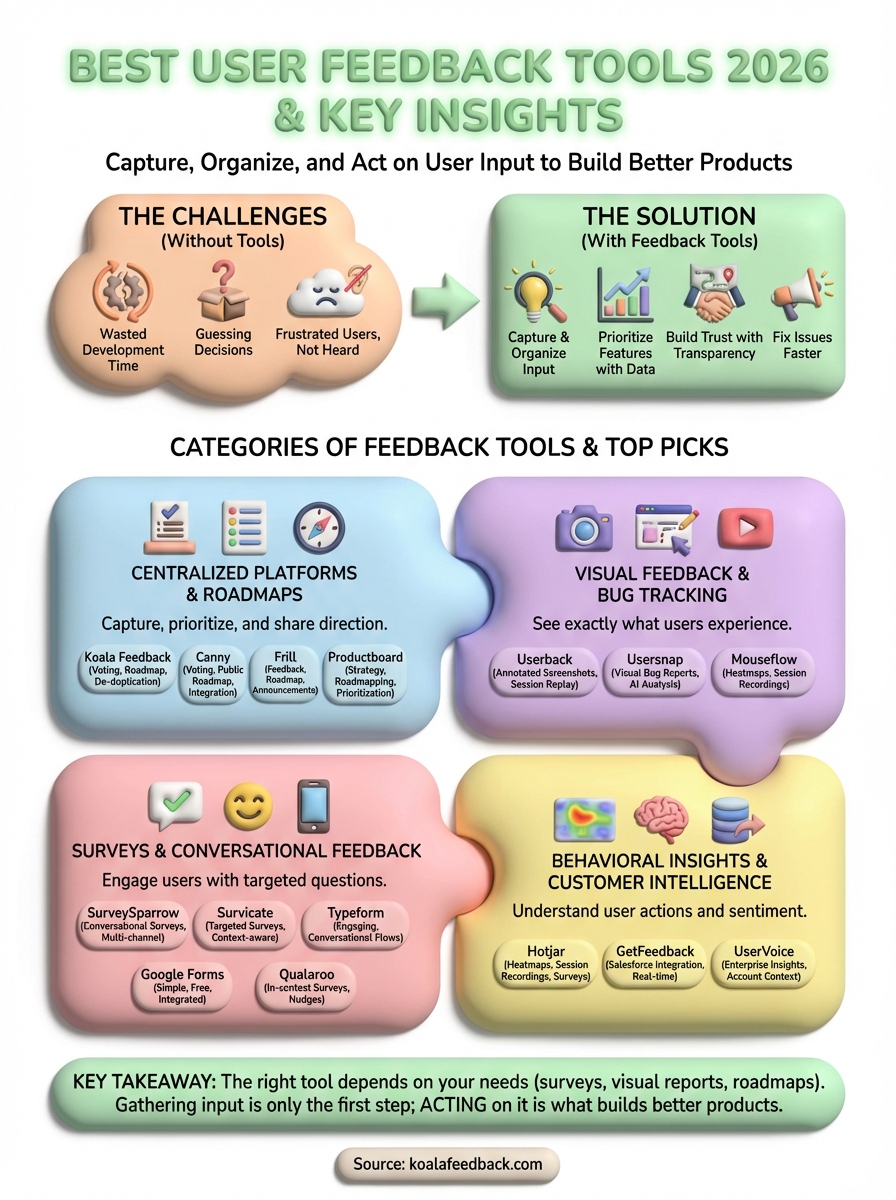
You now have 15 user feedback tools that solve different problems across various budgets and team sizes. The right choice depends on whether you need basic surveys, visual bug reports, or complete feedback management with public roadmaps. Free options like Google Forms work for simple data collection, while comprehensive platforms like Koala Feedback, Canny, and Productboard handle the full cycle from capture through prioritization to public communication.
The tool matters less than what you do with the feedback you collect. Gathering input means nothing if it sits in a database without action or analysis. Choose a platform that fits your existing workflow, makes data analysis straightforward, and keeps users informed about the features you ship based on their requests.
Ready to centralize your feedback and build what users actually want? Start using Koala Feedback to capture ideas, prioritize features with voting, and share your product roadmap with complete transparency.

Start today and have your feedback portal up and running in minutes.

