Your customers are already telling you what they want, through support tickets, feature requests, social media comments, and survey responses. The challenge isn't getting feedback. It's making sense of it all. That's exactly where voice of customer software comes in: it helps you collect, organize, and act on feedback instead of letting it scatter across a dozen disconnected channels.
Picking the right tool matters more than most people think. The wrong choice means your team wastes hours on manual sorting, loses track of critical requests, and ends up building features nobody asked for. The right one turns raw feedback into clear product decisions, and that's something we think about constantly while building Koala Feedback, our own platform designed to centralize user feedback, prioritize what matters, and share transparent roadmaps.
We reviewed and compared 16 voice of customer software tools available right now, looking at their core features, pricing, strengths, and trade-offs. Whether you're a product manager at a startup or leading development at a larger SaaS company, this breakdown will help you find the tool that fits your workflow and actually improves how you listen to customers.
Koala Feedback is a voice of customer software built specifically for SaaS teams that want a clean, centralized place to collect user feedback, prioritize features, and share a public roadmap. It removes the scattered feedback problem entirely by giving your users one place to submit ideas and your team one place to act on them.
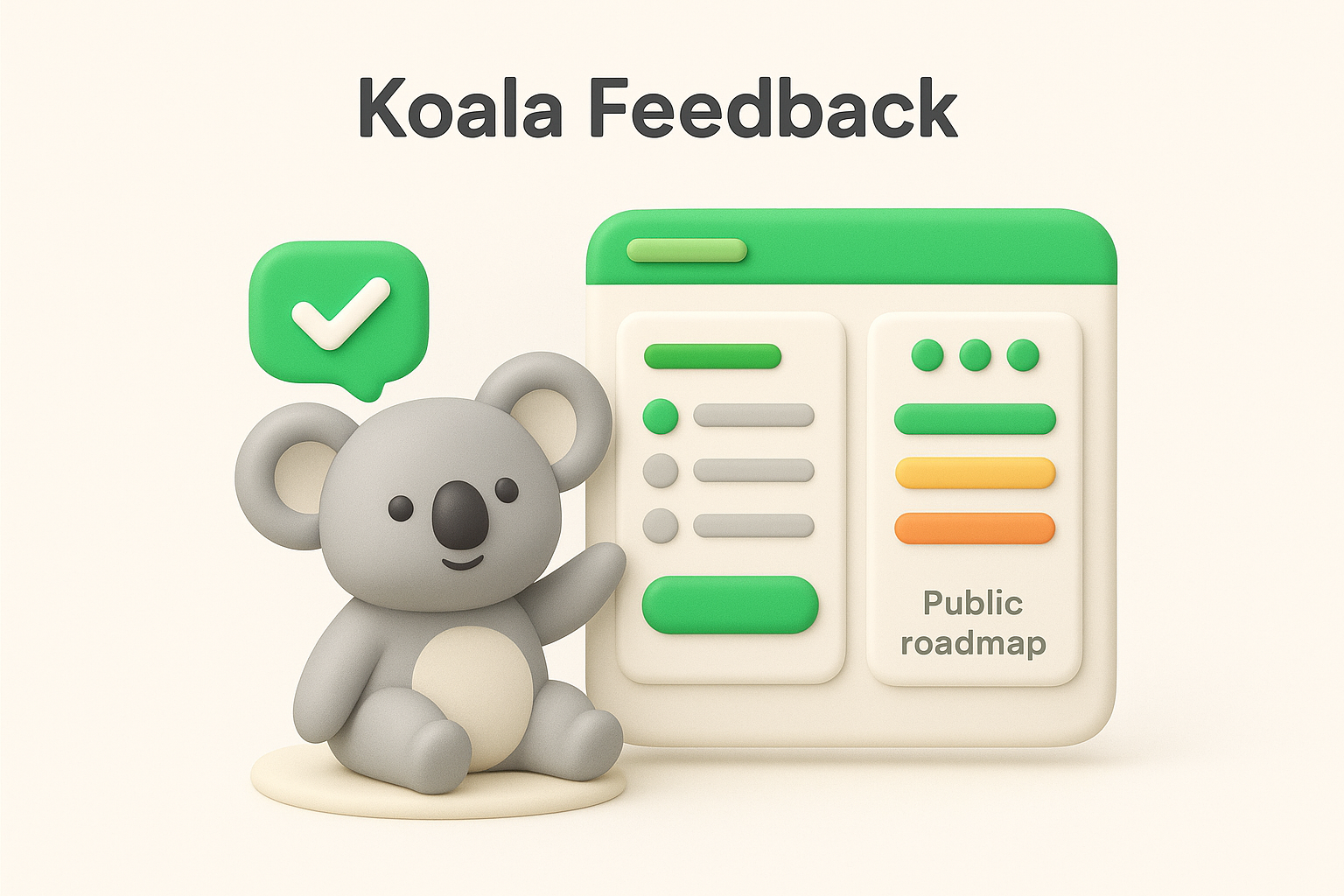
Product managers and SaaS teams who want to involve users directly in the product development process without dealing with enterprise-level complexity. If your priority is building a transparent feedback loop where users feel heard and informed, this tool fits that workflow well.
Koala Feedback gives your team a branded feedback portal where users can submit ideas, vote on existing requests, and leave comments. Automatic deduplication and categorization handle the sorting for you, so your inbox stays organized without manual work.
Users submit feedback through your branded portal, and Koala Feedback automatically groups similar requests so your team never double-counts the same idea. You review prioritized boards, update roadmap statuses, and users receive updates on the features they voted for. The feedback loop closes itself without your team chasing anyone down.
Keeping users informed about what you're building increases their trust in your product and directly reduces churn.
Koala Feedback connects with the core tools your team already uses, making it easy to bring feedback data into your existing workflow. Current integrations focus on keeping your product and support pipelines aligned without requiring custom development work on your end.
| Pros | Cons |
|---|---|
| Clean, intuitive interface your team will actually use | Fewer native integrations than enterprise platforms |
| Public roadmap keeps users engaged and informed | No built-in AI sentiment analysis |
| Automatic deduplication saves significant time | Less suited for very large enterprise deployments |
| Affordable pricing for growing SaaS teams | Reporting features are more basic than heavyweight tools |
Koala Feedback offers a free plan so you can test it with real users before committing. Paid tiers scale as your team grows, and pricing stays transparent without hiding core features behind expensive enterprise tiers.
Qualtrics is an enterprise-grade voice of customer software platform that combines survey tools, analytics, and experience management into one system. Large organizations use it to run complex feedback programs across multiple customer touchpoints simultaneously.
Enterprise companies and research teams that need advanced survey logic, sophisticated analytics, and cross-departmental feedback programs. If your organization runs large-scale customer experience initiatives and has the budget to match, Qualtrics fits that scope well.
Qualtrics covers a wide range of data collection and analysis capabilities, giving large teams significant control over how they gather and interpret customer feedback.
You build surveys inside the platform, distribute them across multiple channels, and Qualtrics routes responses into its analytics engine automatically. Teams then use dashboards to identify trends and share findings across departments.
Qualtrics works best when you have dedicated resources to manage and interpret the volume of data it produces.
Qualtrics connects with Salesforce, ServiceNow, and Slack, along with hundreds of other enterprise tools through native integrations and its API, making it practical for teams running complex tech stacks.
| Pros | Cons |
|---|---|
| Extremely powerful analytics | High cost, often enterprise-only pricing |
| Wide integration library | Steep learning curve for new users |
| Scales across large organizations | Overkill for small teams |
Standard pricing is not published publicly. You need to contact their sales team directly for a custom quote, and costs typically run high for smaller or mid-size teams.
Medallia is an enterprise voice of customer software platform built around capturing feedback across every customer interaction point, from in-store visits to digital experiences. It targets companies that need deep, real-time signal collection across complex customer journeys rather than point-in-time survey results.
Large enterprises in retail, hospitality, financial services, and telecoms that operate across multiple channels and need to understand the customer experience at scale. If your organization handles millions of customer interactions and needs cross-channel feedback consolidation, Medallia is designed for that scope.
Medallia pulls feedback from surveys, social media, call transcripts, and digital behavior into a single platform, giving your team a unified view of the customer experience.
Your team configures feedback collection across the channels that matter most to your business, and Medallia aggregates responses automatically. Its AI engine scores sentiment and surfaces trends, then routes alerts to the right people so your team can act on problems before they escalate.
Closing the feedback loop quickly, by following up with dissatisfied customers, is one of the strongest drivers of customer retention.
Medallia integrates with Salesforce, ServiceNow, Microsoft Teams, and other enterprise platforms through native connectors and an open API.
| Pros | Cons |
|---|---|
| Comprehensive cross-channel feedback capture | Enterprise-only pricing |
| Strong AI analytics | Complex setup requires dedicated resources |
| Closed-loop resolution tools | Not practical for small teams |
Medallia does not publish pricing publicly. You need to contact their sales team for a custom quote, and costs reflect its enterprise positioning.
InMoment is an enterprise voice of customer software platform that separates itself from competitors by combining AI-driven analytics with professional consulting services. Instead of just giving you a tool and leaving you to figure it out, InMoment pairs its technology with human expertise to help your team actually act on what the data shows.
Mid-to-large enterprises in healthcare, financial services, and retail that want both a software platform and strategic guidance to run their feedback programs effectively. If your team lacks internal experience intelligence resources, InMoment's consulting layer fills that gap directly.
InMoment centers on its XI Platform, which pulls feedback from multiple channels into a single view your team can work from.
Your team collects feedback across digital, physical, and social channels through the XI Platform. InMoment's AI engine processes the responses, surfaces sentiment trends, and routes case alerts to the right people so follow-ups happen quickly rather than getting buried.
Pairing technology with consulting support works well for teams that need help translating feedback data into actual process changes.
InMoment connects with Salesforce and Microsoft Dynamics, along with other enterprise tools through its API, keeping your feedback data aligned with your CRM and support workflows.
| Pros | Cons |
|---|---|
| Combines software with expert consulting | Enterprise-only pricing |
| Strong AI-powered analytics | Complex initial setup |
| Industry benchmarking included | Not practical for small teams |
InMoment does not publish pricing publicly. You need to contact their sales team for a custom quote, and costs reflect the platform's enterprise positioning and consulting component.
Verint is an enterprise voice of customer software platform built around customer engagement and workforce optimization. It sits at the intersection of feedback collection and operational data, giving large contact center teams a way to connect what customers say with how agents respond.
Large enterprises with high-volume contact centers that need to tie customer feedback directly to workforce performance. If your team manages thousands of customer interactions daily across phone, chat, and digital channels, Verint is built for that operational scale.
Verint brings together feedback collection and workforce analytics under one platform, giving your team a broader operational picture than most feedback tools offer.
Verint captures feedback across every channel your customers use and routes it through its AI analytics engine. Sentiment scores and trends surface automatically, and your team can connect those insights to agent performance data to pinpoint exactly where the customer experience breaks down.
Linking customer feedback directly to frontline workforce data gives your team a clearer view of what's driving satisfaction than surveys alone can provide.
Verint integrates with Salesforce, Microsoft Teams, and other enterprise platforms through native connectors and an open API, fitting into complex existing tech stacks without requiring significant custom development on your end.
| Pros | Cons |
|---|---|
| Strong contact center analytics | Enterprise-only pricing |
| Connects feedback to workforce data | Steep learning curve |
| Omnichannel coverage | Complex setup for smaller teams |
Verint does not publish pricing publicly. You need to contact their sales team for a custom quote, and costs reflect its enterprise-focused positioning, making it impractical for smaller teams without large budgets.
SentiSum is an AI-powered voice of customer software platform built specifically for support and CX teams that handle large volumes of unstructured customer feedback. Rather than relying on manual tagging, it uses natural language processing to automatically categorize and analyze feedback across multiple channels.
Support teams and CX managers at mid-to-large companies who receive thousands of customer interactions and need to surface key themes driving satisfaction and churn without spending hours on manual sorting.
SentiSum focuses on converting raw, unstructured feedback into actionable data your team can act on immediately.
You connect SentiSum to your existing support channels, and its NLP engine automatically tags and categorizes every incoming message. Your team gets dashboards that surface the most common themes and urgent issues, so you can prioritize fixes based on real customer signal rather than guesswork.
Automatic tagging at scale removes the manual bottleneck that keeps most support teams from acting on feedback quickly.
SentiSum connects with Zendesk, Intercom, and Salesforce, pulling feedback data directly from your existing support tools without requiring your team to change their workflows.
| Pros | Cons |
|---|---|
| Strong AI tagging accuracy | Pricing not published publicly |
| Handles high feedback volumes efficiently | Less suited for small teams with low ticket volumes |
| Supports custom taxonomy | Initial category training takes time |
SentiSum does not publish pricing publicly. Your team needs to contact them directly for a quote, with costs scaling based on the volume of feedback you process.
Enterpret is an AI-driven voice of customer software platform built to help product teams analyze large volumes of unstructured feedback without relying on manual tagging. What separates it from generic sentiment tools is that Enterpret trains custom machine learning models on your specific feedback data, so the categories and insights it produces actually match how your customers talk about your product.
Product teams at high-growth SaaS companies that receive feedback across multiple channels and need a structured way to connect that signal to actual product decisions. If your team is struggling to identify which customer problems are most widespread or accelerating fastest, Enterpret targets that gap directly.
Enterpret gives your team a granular, accurate picture of what customers want and where friction exists across the product experience.
Your team connects Enterpret to your existing feedback sources, and its ML engine builds a custom taxonomy based on your product context. From there, the platform automatically classifies incoming feedback and surfaces the themes that appear most frequently or are growing fastest across your customer base.
Custom-trained models consistently outperform generic classifiers when it comes to understanding product-specific customer language accurately.
Enterpret connects with Zendesk, Intercom, Salesforce, and Slack, along with app store reviews and additional feedback sources through its open API.
| Pros | Cons |
|---|---|
| Custom ML models improve accuracy | Pricing not published publicly |
| Handles multi-source feedback efficiently | Requires initial setup time to train taxonomy |
| Strong fit for SaaS product teams | Less practical outside of software companies |
Enterpret does not publish pricing publicly. Your team needs to contact them directly for a quote, with costs scaling based on feedback volume and team size.
Chattermill is an AI-powered voice of customer software platform built specifically for CX teams that want to turn unstructured feedback into clear, quantified insights. It uses deep learning models to analyze customer feedback at scale and connects those insights directly to revenue and retention metrics, giving your team a sharper picture of what's actually driving customer behavior.
E-commerce brands and consumer-focused companies that collect feedback across multiple channels and need to connect CX data to business outcomes. If your team wants to move beyond generic sentiment scores and understand exactly which product or experience issues cost you customers, Chattermill targets that problem directly.
Chattermill focuses on giving your team granular, accurate analysis of customer feedback without requiring manual effort to sort or tag responses.
You connect Chattermill to your existing feedback sources, and its deep learning engine automatically classifies and scores every response. Your team then uses the dashboards to identify the themes that appear most frequently and track how sentiment shifts over time across different customer segments.
Linking CX data to revenue metrics gives your team the business case it needs to prioritize fixes that directly reduce churn.
Chattermill connects with Zendesk, Salesforce, and Intercom, along with app store reviews and additional feedback channels through its API.
| Pros | Cons |
|---|---|
| Strong deep learning accuracy | Pricing not published publicly |
| Revenue impact analysis built in | Better suited for larger teams |
| Handles multi-source feedback well | Setup requires time and data volume |
Chattermill does not publish pricing publicly. Your team needs to contact them directly for a quote, with costs scaling based on feedback volume and team size.
Thematic is a voice of customer software platform that specializes in analyzing open-ended survey responses using natural language processing. Where most tools focus on quantitative scores, Thematic extracts qualitative themes from text feedback so your team understands the reasoning behind those numbers.
Customer insights teams and researchers at mid-to-large companies that run frequent surveys and need to make sense of large volumes of open-ended text responses without manual coding. If your team regularly collects NPS, CSAT, or CES survey data and struggles to analyze the written comments at scale, Thematic targets that specific problem directly.
Thematic focuses on turning unstructured text into structured insight your team can act on right away.
You connect Thematic to your survey platform, and its NLP engine automatically identifies recurring themes across your open-ended responses. Your team then reviews a dashboard that shows which themes appear most often and calculates their impact on your key satisfaction scores.
Understanding why customers gave a specific score matters more than the score itself.
Thematic connects with Qualtrics, Zendesk, and SurveyMonkey, along with other survey and support tools through its API, keeping your existing feedback pipeline intact without extra configuration work.
| Pros | Cons |
|---|---|
| Strong qualitative text analysis | Pricing not published publicly |
| Impact scoring tied to NPS and CSAT | Less suited for non-survey feedback sources |
| Custom theme editing included | Narrower focus compared to all-in-one platforms |
Thematic does not publish pricing publicly. Your team needs to contact them directly for a quote, with costs based on the volume of survey responses you process monthly.
AskNicely is a voice of customer software platform built around frontline feedback, specifically designed to help service-driven businesses collect NPS, CSAT, and CES scores right after customer interactions happen.
Service businesses and franchise operations in industries like hospitality, home services, and retail that need to capture feedback immediately after each customer touchpoint. If your business depends on frontline staff delivering a consistent experience, AskNicely connects individual performance data to customer satisfaction scores at the team level.
AskNicely keeps its feature set focused on collecting timely feedback and coaching the people responsible for delivering the experience.
Your team sets up automated survey triggers that fire after a customer interaction ends, and AskNicely sends a short survey through email or SMS. Responses flow into dashboards where managers can see individual and team performance scores, then use built-in coaching tools to address gaps before they compound.
Collecting feedback immediately after an interaction captures the most accurate signal your customers can give you.
AskNicely connects with Salesforce and HubSpot, along with other CRM tools, keeping your customer satisfaction data aligned with your existing contact and pipeline records.
| Pros | Cons |
|---|---|
| Fast, lightweight survey setup | Narrower focus than all-in-one platforms |
| Frontline coaching tools built in | Pricing not published publicly |
| Works well for service-heavy businesses | Less suited for SaaS product feedback |
AskNicely does not publish pricing publicly. Your team needs to contact them directly for a quote, with costs based on your team size and feedback volume.
SurveyMonkey is one of the most widely recognized voice of customer software platforms available, offering a straightforward survey builder that works for teams at nearly any size. Its broad template library and simple interface make it a common starting point for businesses collecting structured customer feedback.
Small-to-mid-size businesses and marketing teams that need to run quick surveys without a steep learning curve. If your team wants to collect NPS, CSAT, or product satisfaction data through pre-built templates and doesn't need advanced analytics out of the box, SurveyMonkey fits that use case cleanly.
SurveyMonkey keeps its core feature set accessible, covering the feedback collection basics most teams need without overwhelming new users.
You build a survey inside the platform, distribute it through email, link, or embedded web widget, and SurveyMonkey collects responses automatically. Your team then reviews results in the built-in dashboard, applying filters to break down responses by audience segment.
SurveyMonkey works best as a quick feedback collection tool rather than a full-scale customer insights platform.
SurveyMonkey connects with Salesforce, HubSpot, and Slack, along with other common business tools through its native integration library.
| Pros | Cons |
|---|---|
| Easy to set up and use | Advanced analytics require higher-tier plans |
| Large template library | Limited qualitative analysis capabilities |
| Widely recognized and trusted | Free plan has significant restrictions |
SurveyMonkey offers a free plan with limited responses. Paid plans start at a published monthly rate and scale up based on features and team size, with pricing available directly on their website.
QuestionPro is a versatile voice of customer software platform that combines survey creation, research tools, and CX measurement into one system. It covers a broader range of use cases than most survey tools, making it a solid option for teams that want both research capabilities and customer feedback collection without paying for two separate platforms.
Market researchers and mid-size businesses that need advanced survey logic alongside standard NPS and CSAT measurement. If your team runs both internal research studies and ongoing customer satisfaction programs, QuestionPro handles both workflows within a single account.
QuestionPro gives your team a wide toolkit that goes beyond basic survey collection.
Your team builds surveys inside QuestionPro's editor, distributes them through email, web embeds, or SMS, and responses feed directly into the reporting dashboard. From there, you filter results by segment, apply cross-tabulation to spot patterns, and export findings to share with stakeholders.
Combining research-grade survey logic with CX measurement tools in one platform reduces the overhead of managing separate tools for each use case.
QuestionPro connects with Salesforce and HubSpot, along with Slack and other common business platforms through native connectors and its API.
| Pros | Cons |
|---|---|
| Wide range of survey and research tools | Interface can feel dense for new users |
| Community panel feature is unique | Advanced features locked behind higher tiers |
| Competitive pricing for mid-size teams | Reporting less polished than enterprise tools |
QuestionPro offers a free plan with basic features. Paid plans are published on their website and scale based on features and team size, making costs reasonably transparent compared to most enterprise alternatives.
SurveySparrow is a voice of customer software platform that replaces traditional form-based surveys with a conversational, chat-style format, making it easier to keep respondents engaged through the full survey experience. Higher completion rates are its core value proposition.
Small-to-mid-size businesses and product teams that want to run surveys with higher response rates than traditional form layouts deliver. If your team collects NPS, CSAT, or recurring feedback and finds that standard surveys get ignored or abandoned early, SurveySparrow's conversational format addresses that problem directly.
SurveySparrow keeps its feature set focused on making feedback collection feel natural rather than transactional.
Your team builds a survey inside SurveySparrow's editor, selects a conversational or traditional layout, and distributes it through email, web embed, or mobile. Responses collect in real time, and the dashboard surfaces completion rates alongside your key satisfaction metrics so you can track trends without extra manual work.
Conversational survey formats consistently outperform static forms when it comes to completion rates, especially on mobile devices.
SurveySparrow connects with HubSpot, Salesforce, and Slack, along with other common tools through native connectors and a Zapier integration that extends compatibility with your existing stack.
| Pros | Cons |
|---|---|
| Higher completion rates from conversational format | Advanced analytics require higher-tier plans |
| Recurring survey scheduling built in | Limited qualitative analysis compared to AI-driven tools |
| Solid white-label customization | Free plan is fairly restricted |
SurveySparrow offers a free plan with basic features. Paid plans are published on their website and scale based on responses and team size, keeping costs transparent compared to enterprise-only platforms.
GetFeedback is a Salesforce-native voice of customer software platform built for CX teams that want to collect customer feedback and surface it directly inside their existing Salesforce workflows. Its core strength is making feedback data available where your sales and support teams already spend their time.
CX and customer success teams at mid-to-large companies that run their operations inside Salesforce and need feedback collection to fit that environment without extra configuration overhead. If your team already depends on Salesforce as its system of record, GetFeedback removes the gap between feedback data and customer relationship management.
GetFeedback keeps its focus on clean survey design and direct Salesforce data flow rather than trying to cover every possible feedback use case.
Your team builds surveys inside GetFeedback's editor, triggers them automatically based on Salesforce workflow rules, and responses sync back into Salesforce records in real time. Managers then review feedback alongside contact and account data without switching between platforms.
Connecting feedback data directly to CRM records gives your team immediate context about which customers are dissatisfied and why.
GetFeedback integrates natively with Salesforce as its primary connection, with additional support for Slack and other common business tools.
| Pros | Cons |
|---|---|
| Deep native Salesforce integration | Less useful outside Salesforce environments |
| Clean, mobile-friendly survey design | Pricing not published publicly |
| Pre-built CRM dashboards | Narrower scope than all-in-one platforms |
GetFeedback does not publish pricing publicly. Your team needs to contact them directly for a quote, with costs based on team size and feedback volume.
Hotjar is a behavioral analytics and voice of customer software platform that combines heatmaps, session recordings, and on-site surveys to show your team not just what customers say but also what they actually do on your site. That combination makes it different from most feedback tools that only capture opinions without any behavioral context.

UX designers and product teams at small-to-mid-size companies that want to pair behavioral data with direct user feedback. If your team wants to understand why users drop off specific pages or where friction exists in your product flow, Hotjar gives you both the qualitative feedback and the behavioral evidence to confirm it.
Hotjar covers both feedback collection and behavioral analytics in one platform, giving your team a fuller picture of the user experience.
You install Hotjar's tracking script on your site, and it immediately starts capturing sessions and generating heatmaps from real user interactions. Your team then layers in short on-site surveys to collect direct feedback at the exact moments users encounter friction, connecting what users experience with what they actually say about it.
Combining behavioral data with direct user feedback gives your team stronger evidence for product decisions than either source provides alone.
Hotjar connects with HubSpot, Slack, and Google Analytics, along with other common tools through a Zapier integration that extends compatibility with your existing stack.
| Pros | Cons |
|---|---|
| Behavioral data paired with on-site surveys | Limited analytics depth vs. enterprise tools |
| Easy to install and configure | Free plan has session and response caps |
| Strong visual feedback tools | Less suited for large enterprise deployments |
Hotjar offers a free plan with limited sessions and responses. Paid plans are published on their website and scale based on traffic volume and feature access, keeping costs transparent for teams at any size.
Brandwatch is a social intelligence and voice of customer software platform that focuses on monitoring what customers say about your brand across social media, forums, news sites, and review platforms. Rather than collecting feedback through surveys, it captures unsolicited opinions from public conversations happening around your brand at any moment.
Enterprise marketing and brand teams that need to track public sentiment, monitor brand reputation, and understand how customers talk about their products outside of controlled feedback channels. If your organization operates at scale and wants to capture organic customer conversations rather than relying solely on survey responses, Brandwatch fits that need directly.
Brandwatch gives your team a broad view of public customer sentiment without requiring anyone to fill out a form.
You configure keyword and topic trackers inside Brandwatch, and its data engine continuously scans public channels for mentions matching your brand, product, or competitors. Your team reviews dashboards that surface sentiment trends and emerging topics in real time, allowing you to respond before a problem grows.
Listening to unsolicited customer feedback often reveals issues your surveys never surface because customers never bother to fill them out.
Brandwatch connects with Salesforce, HubSpot, and Slack through native integrations, keeping social intelligence data aligned with your existing marketing and CRM workflows.
| Pros | Cons |
|---|---|
| Deep social listening capabilities | Pricing not published publicly |
| Real-time sentiment monitoring | Less suited for structured feedback collection |
| Strong competitor tracking | High cost for smaller teams |
Brandwatch does not publish pricing publicly. Your team needs to contact their sales team for a custom quote, with costs reflecting its enterprise positioning and data volume requirements.
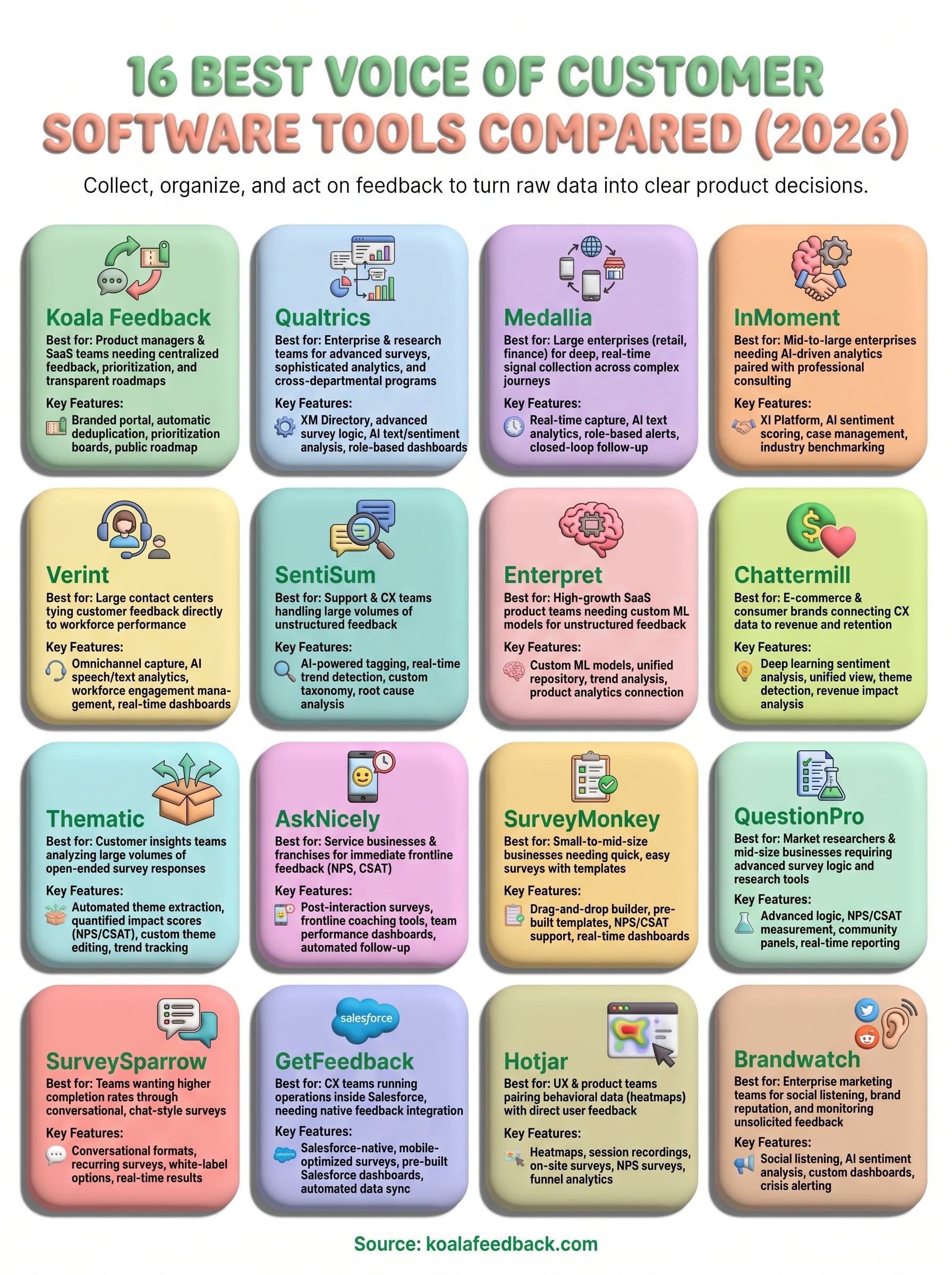
Choosing the right voice of customer software comes down to knowing what your team actually needs today, not what sounds impressive in a feature list. If you run a large contact center or enterprise CX program, tools like Qualtrics, Medallia, or Verint give you the scale and analytics depth to match that complexity. If you're a SaaS product team that wants users directly involved in shaping what you build next, a focused tool works far better than an enterprise platform you'll only use at 20% capacity.
For product managers who want to centralize feedback, prioritize features, and share a transparent roadmap without the enterprise overhead, Koala Feedback was built specifically for that workflow. Your users get a clear voice in what gets built, and your team gets the organized signal it needs to make confident decisions. Start your free plan with Koala Feedback and see how quickly the feedback loop closes when everything lives in one place.

Start today and have your feedback portal up and running in minutes.

