Most newsletters get ignored. They land in the inbox, sit there unopened, and eventually get archived, or worse, trigger an unsubscribe. The difference between a newsletter people actually read and one they trash comes down to customer newsletter best practices that prioritize value over volume. When done right, a newsletter becomes one of the strongest retention tools in your stack.
The challenge isn't just writing good emails. It's knowing what your customers actually care about, which features they're waiting on, what pain points keep coming up, and what progress you've made. That's where tools like Koala Feedback fit in: when you're actively collecting and organizing user feedback, you have a constant stream of relevant content to share in every send. Product updates, feature launches, roadmap changes, all driven by what your users told you they wanted.
This article breaks down 14 practical newsletter best practices that help you write emails your customers open, read, and act on. Whether you're running a SaaS product or managing a growing user base, these tips cover everything from subject lines and send frequency to personalization and feedback loops that keep subscribers engaged long-term.
When a user submits a feature request or reports a friction point, they're making a small investment in your product. If they never hear what happened to that input, that investment feels wasted. Sharing roadmap updates in your newsletter closes that loop and reminds customers that their feedback drives real decisions. It's one of the most underused customer newsletter best practices for SaaS teams.
Users who see their ideas reflected in your product roadmap feel ownership over the product rather than just being passive subscribers. That sense of involvement increases loyalty because they have a reason to stick around and watch what gets built. Customer churn often traces back to feeling ignored, and roadmap updates directly counter that by showing visible, concrete progress.
When customers see the feature they requested move from "planned" to "shipped," they become advocates, not just users.
Pick two to three roadmap items per newsletter: one recently shipped, one in progress, and one planned based on top-voted requests. Keep each update to two or three sentences with a clear link to your full roadmap. If you use a tool like Koala Feedback, you can pull the highest-voted features directly from your prioritization board and reference them by name so users recognize their own requests.
Avoid listing every small update or bug fix in the roadmap section. Burying the main feature in a long changelog trains readers to skim past the whole block. Also, don't commit to hard dates unless you're confident, since a missed deadline damages trust more than a vague "coming soon" ever would.
Track the click-through rate on roadmap links as your primary signal. If readers click through to your public roadmap, the content is landing. Secondary signals include direct replies that mention specific features, which tell you exactly which updates resonate most with your audience and deserve more prominent placement next time.
Before you write a single subject line, you need to know who you're writing for and what you're promising them. A newsletter without a clear audience and purpose becomes a scattered mix of updates that serves nobody well. This is one of the foundational customer newsletter best practices that separates a high-retention program from inbox noise.
When readers know exactly what to expect from your newsletter, they make an active choice to stay subscribed. A clear promise builds anticipation, and anticipation drives opens. Subscribers who signed up for product tips don't want company news, and users who want weekly updates won't tolerate daily sends. Aligning your content with what people signed up for is the simplest way to keep your list healthy.
Your newsletter promise is a contract with your reader: break it consistently, and they unsubscribe.
Write a one-sentence newsletter promise before your next issue. For example: "Every two weeks, we share product updates, feature tips, and user stories." Then check your last three issues against that sentence. If they don't match, adjust the content to align, not the promise.
Avoid writing a promise so broad it covers everything. "News, tips, and updates" tells subscribers nothing about why they should care. Vague promises attract the wrong subscribers and inflate your list with people who churn fast.
Track your unsubscribe rate per issue as the clearest signal that your content misses the mark on the promise you made to readers.
Sending on a predictable schedule is one of the most reliable customer newsletter best practices you can follow. When readers know your newsletter arrives every other Tuesday, they start to expect it. That expectation builds habit, and habit drives opens far more reliably than clever subject lines alone.
Consistency signals stability to your subscribers. A newsletter that shows up on schedule tells users that your product and team are organized and dependable. Readers who feel that reliability carries over to their perception of your product itself, which reinforces their decision to stay subscribed and stay as customers.
Pick one send day and stick to it for at least eight consecutive issues before evaluating. Then add a frequency preference center to your email footer so subscribers can choose weekly, biweekly, or monthly sends. Most ESPs support this natively, and giving readers control reduces unsubscribes sharply.
Letting users choose their own cadence removes the most common reason people unsubscribe: too many emails.
Avoid switching your send day repeatedly based on open rate experiments. Small day-of-week differences rarely outweigh the confusion that comes from an unpredictable schedule. Also, don't skip issues without notice, since a sudden gap after a consistent run makes subscribers assume they were removed or that something went wrong.
Track your list growth rate and unsubscribe rate side by side over a 90-day window. A stable or declining unsubscribe rate after you introduce frequency options is a strong signal that giving readers control is working.
Sending the same newsletter to every subscriber treats a new trial user the same as a long-term power user. Segmentation is one of the most effective customer newsletter best practices because it matches your message to where the reader actually is in their journey with your product.
Users at different stages need different content. A customer in week one needs onboarding tips and quick wins, while an 18-month paid user needs roadmap updates and advanced features. Relevant content keeps subscribers reading, clicking, and renewing.
Sending the right content to the right person at the right time is the biggest lever most teams ignore.
Start with three core segments: new users (under 30 days), active users by plan tier, and subscribers who haven't opened in 60 days. Most ESPs let you set up dynamic content blocks so you maintain one template but vary the message by segment.
Avoid building too many micro-segments before your list is large enough to support them. Unreliable engagement data from small segments will mislead your content decisions. Watch for these warning signs:
Track click-through rate and unsubscribe rate per segment separately. If your disengaged segment responds to re-engagement sends, you'll see it in open rate recovery within two to three issues.
Also watch segment size trends each month. A shrinking engaged segment signals that your content has drifted from what that group actually needs from you.
The "From" field is the first thing subscribers see, and it shapes their decision to open before they even read your subject line. A sender name that readers recognize cuts through inbox noise faster than any subject line trick. This is one of the customer newsletter best practices that costs nothing to get right but loses you opens every time you ignore it.
People open emails from people or brands they trust. A consistent sender name trains subscribers to associate your newsletter with reliable, useful content. When your voice is also consistent across issues, readers build familiarity with how you write, which lowers the cognitive effort of reading and makes them more likely to return next time.
Familiarity in your inbox is the fastest shortcut to a loyal subscriber.
Use a human name paired with your brand in the sender field, such as "Alex at Koala Feedback," rather than a generic address like "[email protected]." Write every issue in the same tone, whether that's direct and practical or conversational and warm. Document your voice in a one-page style guide so anyone on your team can write a consistent issue without drifting off brand.
Avoid switching sender names between issues, since even one change triggers second-guessing from subscribers who no longer recognize the source. Sending from a no-reply address signals that you're broadcasting, not communicating, which undercuts any trust you've built.
Track open rate trends over 60 days after you standardize your sender name. A steady increase tells you that recognition is building in your subscribers' inboxes and your identity is becoming a reliable signal worth opening.
Your subject line gets the open, but your preheader seals it. These two elements work as a team, and when they contradict or repeat each other, you waste valuable inbox real estate. Following this customer newsletter best practices principle costs nothing but attention, yet it directly affects whether subscribers click through or scroll past.
When your subject line and preheader tell a consistent story, subscribers instantly understand what they're getting. That clarity builds trust over time because readers learn that your emails deliver on the promise made before the open. Mismatched or vague preheaders train subscribers to second-guess your sends, which quietly erodes your open rate across every future issue.
A subject line earns the open; a preheader earns the click.
Write your subject line first, then treat the preheader as a second sentence that extends the thought rather than repeating it. Keep subject lines under 50 characters so they display fully on mobile, and keep preheaders between 85 and 100 characters.
Avoid leaving your preheader blank, since most email clients pull the first line of body text instead, which often renders as a navigation link or an unsubscribe notice. Also avoid clickbait subject lines that promise something your email simply does not deliver.
Track your open rate against click-through rate together. A high open rate paired with a low click-through rate signals that your subject line overpromises what's actually inside the email.
Over 60% of emails are opened on mobile devices, yet most newsletter templates are designed on desktop first and squeezed down afterward. Building a mobile-first, accessible template is one of the customer newsletter best practices that directly affects whether subscribers read your full email or abandon it after the first scroll.
A template that loads cleanly on a phone removes friction from the reading experience. When subscribers open your newsletter and the layout breaks or the text is too small to read, they close it and rarely return. Accessibility features like alt text on images and sufficient color contrast also ensure you're not excluding readers who use assistive technology.
A broken layout on mobile tells subscribers your newsletter is not worth their time, regardless of what's inside.
Use a single-column layout with a minimum font size of 16px for body text. Test every issue across iOS Mail, Gmail on Android, and at least one desktop client before sending. Add alt text to every image so subscribers who block images still understand the content.
Avoid multi-column designs that collapse poorly on small screens. Side-by-side content blocks often stack in the wrong order on mobile, which confuses your narrative and buries your CTA before readers ever reach it.
Track your mobile open rate and click-through rate separately from desktop. A significant gap between mobile clicks and desktop clicks points to a layout or formatting issue worth fixing before your next send.
Most subscribers decide whether your newsletter is worth reading in the first three seconds after opening. If your top section is cluttered or buries the most important information, readers scroll past it or close the email entirely. Following this customer newsletter best practices principle means treating the top of your email like front-page news: your most valuable content goes first, every time.
The top section sets the reader's expectation for the entire email. When your most relevant update or offer appears immediately, subscribers learn that opening your newsletter delivers value without requiring effort. That pattern builds habitual opens over time because readers trust they won't have to hunt for the good stuff.
The first 200 pixels of your email determine whether the rest gets read at all.
Lead with your single most important story or update, then follow with secondary content lower in the email. A clear top section includes a short headline, two to three sentences of context, and one direct link or button. Treat everything below that fold as supporting material, not equal-weight content.
Avoid filling the top section with company logos, large hero images, or navigation bars that push your actual content below the fold. Decorative headers look polished in design tools but they consume the prime real estate your message needs to land quickly on mobile.
Track your top-link click-through rate separately from clicks further down the email. A strong ratio between the two tells you that your top section is earning attention before readers lose interest mid-scroll.
Long emails lose readers fast. Every extra sentence you add is another opportunity for a subscriber to decide the email is not worth finishing. One of the simplest customer newsletter best practices you can apply is treating your newsletter as a preview, not a complete document: give readers enough to understand what's valuable and a direct link to learn more.
Subscribers read newsletters in short windows, often between tasks or on a phone. Tight copy respects that time constraint and signals that you value your reader's attention. When readers consistently find your emails quick to scan and easy to act on, they open the next issue without hesitation because they know the effort-to-value ratio is worth it.
The job of your newsletter copy is to earn the click to the full story, not to tell the full story itself.
Limit each content block to three to five sentences, then follow it with a clear link to your docs, changelog, or help center. Write your full draft first, then cut every sentence that does not add new information.
Avoid pasting full blog posts or release notes into the email body. Reproducing entire articles inside a newsletter trains readers to skip your links entirely, which removes the traffic benefit and bloats the send unnecessarily.
Track your click-to-open rate on resource links as your primary signal. A strong rate tells you that your short copy is driving curiosity rather than leaving subscribers satisfied with a surface-level summary and no reason to click through.
Every extra link or button you add to your newsletter splits your reader's attention. Multiple competing calls-to-action push subscribers toward indecision, and indecision almost always means no action at all. Following this customer newsletter best practices principle means designing every send around a single outcome you want the reader to take.
When your email has one clear next step, subscribers know exactly what you want them to do and why it matters. That clarity reduces friction and increases the likelihood they complete the action. Readers who regularly take action inside your emails build a stronger connection with your product, which directly supports long-term retention.
A newsletter with five CTAs doesn't get five times the clicks; it gets a fraction of what one focused CTA would have earned.
Choose one primary action per issue, whether that's reading a new guide, trying a feature, or voting on a roadmap item. Then make that action visually dominant with a button rather than a plain text link. If you need to include secondary links, place them lower in the email and style them as plain text so they don't compete visually with your main button.
Avoid adding social media icons, multiple resource links, and a feedback survey in the same email. Each added element dilutes the primary CTA and lowers your overall click-through rate, regardless of how useful each individual item might be on its own.
Track your click-through rate on the primary CTA as your core metric. A rising rate over several issues confirms that removing distractions is working in your favor.
Sending the same content to every subscriber ignores the clearest signal you have: what users actually do inside your product. Behavior-based content blocks let you tailor sections of your newsletter based on actions like recent logins, features used, or support tickets submitted. This is one of the customer newsletter best practices that turns a generic broadcast into a relevant, personal message.
Subscribers who see content that reflects their actual behavior with your product pay closer attention because the email feels written for them specifically. That relevance shortens the distance between reading and acting, which is exactly what retention-focused newsletters need to accomplish.
Personalization based on behavior outperforms demographic personalization because it reflects what users actually do, not just who they are.
Start with two or three dynamic content blocks triggered by simple behavioral signals. Users who haven't logged in for 14 days get a re-engagement block with a one-click login prompt. Users who recently tried a new feature get a tips block that shows the next step for getting more value from it.
Avoid over-personalizing with too many conditional blocks in a single email. More than three dynamic sections creates maintenance complexity and makes it hard to QA the email reliably before sending.
Track click-through rate by content block variant to confirm that behavioral targeting is outperforming your baseline non-personalized sends.
Not every subscriber uses your product to its full potential. Many users activate, do the bare minimum, and never discover the features that would make them stick around. One of the most effective customer newsletter best practices you can follow is using your newsletter to surface small, actionable wins that remind users why they subscribed to your product in the first place.
Users who regularly experience value inside your product are far less likely to churn. A value nudge is a short prompt that shows subscribers one specific thing they can do right now to get more out of what they already pay for. These nudges work because they lower the activation barrier for underused features without requiring users to go looking for them on their own.
The best retention emails don't sell harder; they make the product feel more useful.
Pick one feature or workflow your most active users rely on that newer subscribers often miss. Write two sentences explaining what it does, then add a direct link to try it. Keep the framing around what the user gains, not what the feature does technically.
Avoid stacking three or more nudges in a single email. When you give users too many things to try, they try none of them. Pick one quick win per send and let it stand on its own.
Track the feature adoption rate for the specific item you nudged alongside your click-through rate. Rising adoption over two to three issues confirms your nudges are converting reads into action inside the product.
Most subscribers want to share their opinion, but they won't fill out a five-minute survey inside a newsletter. A micro-feedback request, one that takes no more than 10 seconds to complete, removes that friction entirely and gives you a steady stream of user input without asking for more than readers are willing to give.
Subscribers who feel heard stay subscribed longer. When you ask a simple question and act on the responses, users see that their input shapes your product. That loop of input and action is one of the most underrated customer newsletter best practices for building loyalty, because it turns passive readers into active participants.
Readers who shape your product are far less likely to leave it.
Include a single-question poll or a thumbs-up/thumbs-down rating directly in the email body. Link each option to a separate URL so you can track responses through your ESP or a feedback tool like Koala Feedback's portal.
Avoid embedding long survey forms or asking multiple questions in the same send. Each additional question drops completion rates sharply, and a low response rate gives you data too thin to act on reliably.
Track your response rate per feedback prompt and compare it across different question formats. Rising response rates confirm that your micro-ask format is landing, and the answers themselves become direct input for your next roadmap decision.
Your newsletter can follow every customer newsletter best practices tip in this list and still fail if it never reaches the inbox. Deliverability is the foundation all your content decisions rely on, and the metrics you track after each send tell you whether your retention strategy is actually working.
Consistent inbox placement ensures your subscribers have the chance to read what you send in the first place. When your emails land in spam, none of your retention efforts reach the people they are designed to keep. Tracking meaningful metrics lets you catch list health problems early, before a small dip compounds into a pattern that costs you subscribers at scale.
Start by authenticating your sending domain with SPF, DKIM, and DMARC records, which signal to inbox providers that your sends are legitimate. Then keep your list clean by following these steps:
Avoid tracking open rate as your primary success metric. Since Apple Mail Privacy Protection inflates open rates for iOS users, that number is less reliable than it once was, and optimizing for it alone causes you to overlook the signals that actually predict churn.
The metrics you ignore are often the ones that predict churn before it happens.
Focus on click-through rate, unsubscribe rate, and list growth rate as your core health indicators. These three signals together give you a complete picture of whether your newsletter is reaching, engaging, and retaining the right subscribers over time.
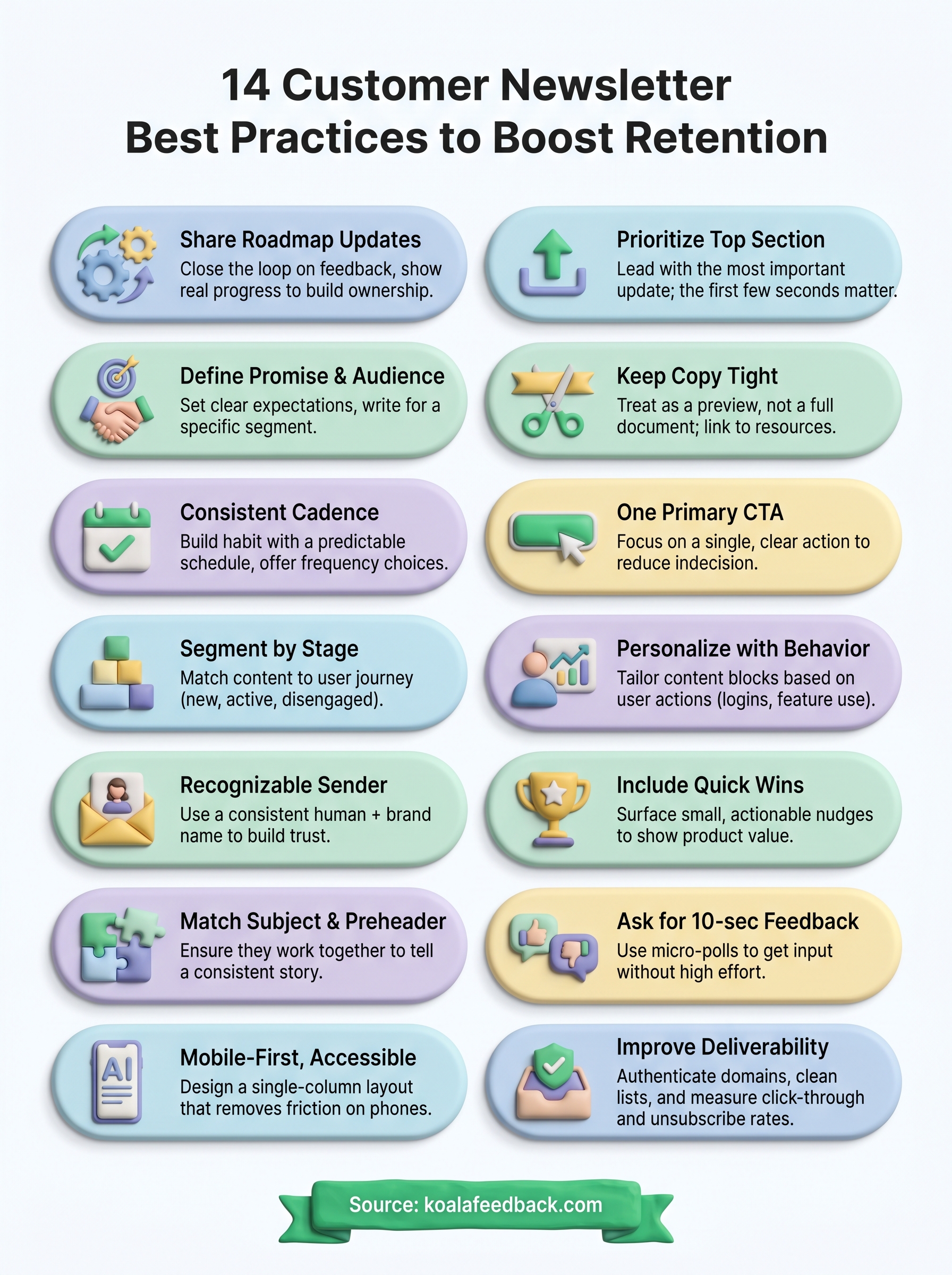
These 14 customer newsletter best practices give you a clear path from a newsletter that gets ignored to one that keeps subscribers engaged and coming back. Each tip works on its own, but the biggest retention gains come when you combine them: strong segmentation, tight copy, a clear CTA, and a consistent feedback loop running together.
Start with the practices that address your biggest current gap. If your open rates are low, focus on sender name and subject lines first. If subscribers open but never click, tighten your copy and cut competing CTAs. Pick two or three to implement before your next send, then layer in more once those stick.
The one practice that ties everything together is closing the loop with your users. When you know what your customers want, your newsletter practically writes itself. Start collecting and acting on user feedback with Koala Feedback so every send reflects what your audience actually cares about.

Start today and have your feedback portal up and running in minutes.

