Sifting through hundreds of support tickets, survey replies, and app reviews by hand doesn't scale, and most product teams know it. That's why so many are turning to ai feedback collection to catch patterns humans miss, summarize sentiment in seconds, and flag the feature requests that actually move revenue. If you're evaluating options for 2026, you want tools that do more than store comments in a spreadsheet.
This list answers a specific question: which of the best AI feedback tools for 2026 actually use AI to automate feedback collection and analysis, not just slap a chatbot on top of an old form. We looked at how each tool handles automatic categorization, sentiment scoring, and duplicate detection, since those are the features that save real hours every week. We also weighed pricing, integrations, and how well each tool fits teams that need to act on feedback fast, not just archive it.
Below you'll find ten tools worth your shortlist, including where Koala Feedback fits for teams that want AI-assisted deduplication paired with public roadmaps and prioritization boards. Each entry covers what it does best, who it's built for, and where it falls short, so you can pick the right fit without another month of trial signups.
Koala Feedback is built specifically for product teams who want a single home for user requests, votes, and a public roadmap, all without hiring an analyst to sort through the noise. The platform uses AI-assisted categorization to group similar submissions automatically, so a feature request phrased ten different ways by ten different users still lands in one bucket instead of ten scattered tickets. That matters because ai feedback collection only pays off when duplicate detection actually works, and Koala Feedback's engine flags likely duplicates as soon as someone submits a new idea, cutting down the manual triage that eats a product manager's Monday morning.
The real win with AI-driven deduplication isn't the AI itself, it's getting your afternoon back.
Beyond deduplication, Koala Feedback gives you a branded feedback portal where users submit ideas, vote, and comment directly. Prioritization boards let you sort requests by product area or release cycle, much like other tools for prioritizing your roadmap, and a public roadmap with customizable statuses keeps users updated on what's planned, in progress, or shipped. You can whitelabel the portal with your own domain, colors, and logo, so it feels like part of your product rather than a bolted-on form.
Koala Feedback suits SaaS product managers and small-to-midsize development teams who need to collect feedback, prioritize it with actual data, and close the loop publicly. It fits teams tired of feedback dying in spreadsheets or Slack threads with no visible follow-through.
Koala Feedback offers tiered monthly plans that scale with the number of active boards and team members, starting with a plan built for early-stage products and moving up to plans with custom domains, SSO, and priority support for larger teams. You can check current tiers and what's included on the Koala Feedback pricing page.
| Plan tier | Best for |
|---|---|
| Starter | Solo founders, early-stage products |
| Growth | Small product teams needing multiple boards |
| Business | Larger teams needing custom branding, SSO |
Koala Feedback connects with tools teams already run their workflow through, including Slack for real-time notifications, Jira for pushing prioritized items into sprints, and single sign-on options for enterprise access control. An open API also lets teams pull feedback data into internal dashboards or connect it to other customer feedback systems already in place.
Google Forms itself doesn't do much with AI natively, but paired with add-ons like Form Publisher, MonkeyLearn, or Google's own Sheets AI functions, it becomes a surprisingly capable option for teams already living inside Google Workspace. Sentiment analysis and basic categorization happen through connected scripts or third-party add-ons rather than built-in intelligence, so you're stitching together a workflow instead of buying a finished product. That tradeoff makes it a budget-friendly entry point, but not a long-term home for serious ai feedback collection at scale.
Add-ons extend Forms with response scoring, keyword tagging, and export pipelines into Sheets, where formulas or connected AI scripts can flag negative sentiment or repeated themes. Conditional logic lets you branch questions in a Google Forms survey based on prior answers, and Google's autosave and offline support mean nothing gets lost mid-survey.
Free tools cost you time instead of money, and time is the expensive part.
This setup fits small teams or solo founders running occasional surveys who already trust Google Workspace and don't want another subscription. It's a reasonable stopgap before you outgrow spreadsheets and need dedicated customer feedback management.
Google Forms is free. Add-ons vary, with most sentiment or automation tools charging $10 to $50 monthly depending on response volume, billed separately from your Google account.
Forms connects natively to Sheets, Google Analytics, and Zapier, which opens the door to hundreds of downstream tools, though every AI capability depends on which add-on you bolt on rather than anything native to Google itself.
Typeform built its name on conversational, one-question-at-a-time surveys, and it's leaned into AI to make those forms smarter rather than just prettier. Its AI-powered follow-up questions adjust based on how someone answers, so a frustrated response about pricing triggers a deeper probe instead of a generic thank-you page. That responsiveness makes Typeform less about mass ai feedback collection and more about squeezing richer detail out of every single respondent who bothers to click through.
A form that asks better follow-up questions gets you the answer you actually needed, not just the one you asked for.
Typeform's AI features include auto-generated survey questions from a simple prompt, logic jumps that adapt in real time, and built-in analytics that summarize open-text responses into themes without manual tagging. Video and voice question formats also let respondents answer in ways plain text can't capture.
Marketing teams and researchers running customer satisfaction surveys, NPS campaigns, or onboarding feedback loops get the most out of Typeform. It suits anyone who cares more about response quality and completion rate than sheer volume of submissions.
Typeform starts free for basic forms with limited responses, then moves to paid tiers running roughly $25 to $83 monthly depending on response volume and team seats, with custom enterprise pricing for larger deployments.
Typeform connects to Slack, HubSpot, Mailchimp, and Google Sheets natively, plus Zapier for broader automation. It also pushes data into Airtable and Notion, which helps teams that already centralize customer feedback notes outside a dedicated feedback platform.
SurveyMonkey built its AI layer, Genius, directly into its survey creation flow, and it shows in how the tool nudges you while you write. Instead of building a survey blind and hoping for good response rates, Genius scores your draft questions against a massive historical database of survey performance and suggests edits before you ever hit send. That kind of predictive guidance sets it apart from tools that only analyze responses after the fact, making it useful for teams who want ai feedback collection to start improving quality at the question-writing stage, not just the reporting stage.
The best time to fix a bad survey question is before anyone answers it, not after.
Genius flags leading or confusing questions, predicts completion rates before launch, and benchmarks your results against industry data so you know if a 12% response rate is normal or a red flag. Built-in sentiment analysis processes open-ended answers automatically, and text analytics surfaces recurring themes without manual coding.
Market researchers and product teams running frequent customer satisfaction or NPS surveys benefit most, especially those who need benchmarking against industry norms rather than just internal trends. It also suits teams without a dedicated data analyst who still want statistically sound survey design.
SurveyMonkey's paid plans run from about $39 to $99 monthly per user for individuals, with team and enterprise pricing scaling based on seats and advanced features like custom branding and SSO.
SurveyMonkey connects with Salesforce, HubSpot, Slack, and Tableau natively, plus Zapier for extending into hundreds of other apps. Its Eventbrite and Marketo integrations also make it a common pick for teams tracking feedback around events or campaigns.
Hotjar takes a different angle on ai feedback collection by pairing session recordings and heatmaps with AI-generated summaries of what users actually struggle with. Rather than asking people to fill out a form, Hotjar watches how they behave on your site or app, then uses AI to cluster rage clicks, dead clicks, and abandoned flows into readable insights. Product teams who want to know why a feature confuses users, not just that it does, tend to reach for Hotjar first.
Watching what users do tells you things they'd never think to type into a survey box.
Hotjar's AI Insights summarize open-ended survey responses and feedback widget comments into themes automatically, saving hours of manual read-throughs. Heatmaps and session recordings show exactly where users hesitate or rage-click, and its feedback widget collects in-the-moment reactions without redirecting users away from the page, once you know how to set up and customize it. Combined, these features give you both quantitative behavior data and qualitative customer feedback in one dashboard.
UX researchers, product designers, and growth teams who need to understand friction points on websites or web apps get the most value here. It's a strong complement to a dedicated feedback portal rather than a replacement, since Hotjar excels at behavior but doesn't manage feature requests or roadmaps.
Hotjar offers a free plan with limited sessions, then paid tiers starting around $32 monthly and scaling up based on session volume, with business and enterprise plans priced for higher traffic sites.
Hotjar connects with Slack, HubSpot, Google Analytics, and Segment, plus Zapier for broader workflows. Its integration with tools like Jira lets teams push identified friction points straight into a development backlog.
Qualtrics XM sits at the enterprise end of ai feedback collection, one of several voice of customer tools for product teams built for organizations that need to connect feedback from surveys, support tickets, and social channels into one experience management system. Its iQ engine applies machine learning to predict which customers are at risk of churning based on sentiment trends, then recommends specific actions before a small complaint turns into a lost account. That predictive layer separates Qualtrics from tools that only report on feedback after the fact.
Predicting churn from sentiment data beats reacting to a cancellation email every time.
Qualtrics XM offers text iQ for automatic theme and sentiment extraction across open-ended responses, statistical modeling that flags which drivers most affect satisfaction scores, and role-based dashboards that route insights to the right team automatically. Its predictive intelligence also suggests survey questions based on what's driving negative sentiment elsewhere in your data.
Enterprise customer experience teams and researchers managing feedback across multiple business units benefit most from Qualtrics. It suits organizations with dedicated CX staff who need deep statistical rigor, not smaller teams looking for a quick setup.
Qualtrics doesn't publish flat pricing. Costs depend on modules, seats, and response volume, with most enterprise contracts running into the tens of thousands annually, quoted directly through their sales team.
Qualtrics connects with Salesforce, ServiceNow, Slack, and Tableau natively, alongside a broad API for custom builds. Its Workday and SAP integrations make it a common choice for large companies already running enterprise resource systems.
UserVoice built its reputation on feature request boards long before AI became a buzzword, and what its software offers today adds machine learning on top of that foundation rather than starting from scratch. Its AI-powered categorization groups similar requests together automatically, and a newer summarization layer condenses long threads of comments into a short digest so a product manager doesn't have to scroll through fifty replies to understand consensus. For teams already deep into ai feedback collection as part of a public roadmap workflow, UserVoice competes directly with tools built for that exact use case.
A hundred comments on one request mean nothing until someone summarizes what they actually agree on.
UserVoice combines feedback forums, voting, and AI-generated summaries of feedback threads, plus a scoring system that weighs requests by customer value, not just vote count. Its Aha! Ideas-style prioritization matrix helps teams rank requests against business impact, and integrations with support tools pull ticket data into the same view as feature requests, which is worth weighing when you compare feature request management platforms.
Mid-market SaaS companies with established support teams who want feedback tied to actual account value, not anonymous votes, get the most from UserVoice. It suits teams that already run a knowledge base or help desk and want feedback data connected to that same customer record.
UserVoice doesn't list public pricing; plans are quoted based on team size and feature needs, with most mid-market deployments running several hundred dollars monthly.
UserVoice connects with Zendesk, Salesforce, Slack, and Microsoft Teams natively, plus an API for custom builds into internal tools already tracking customer feedback and account data.
Delighted keeps things simple: it's built around one-question surveys, mainly NPS, CSAT, and CES, delivered by email, SMS, in-app, or link. Instead of drowning teams in dashboards, it uses AI-powered text analysis to tag open-ended comments with themes and sentiment automatically, so a one-word answer like "support" or "pricing" gets grouped with dozens of similar replies without anyone touching a spreadsheet. For teams that want ai feedback collection without the learning curve of an enterprise CX suite, Delighted trades depth for speed.
Sometimes the best feedback tool is the one your team actually opens every morning.
Delighted's sentiment tagging runs on every open-text response, sorting comments into categories like pricing, bugs, or support without manual setup. Trend reports track score changes over time, and its benchmarking feature compares your NPS against industry averages pulled from thousands of Delighted accounts. Multi-channel survey delivery means you can catch feedback right after a purchase, support ticket close, or app session.
Delighted suits lean product and customer success teams who need a fast pulse on customer satisfaction without building out a full research program, and it sits alongside other customer satisfaction survey software worth comparing. It works especially well for subscription businesses tracking NPS trends month over month.
Delighted offers a free plan capped at 30 responses monthly, with paid plans starting around $224 monthly for higher volume and advanced segmentation, billed annually for better rates.
Delighted connects with Salesforce, Slack, Intercom, and Segment natively, plus Zapier for extending survey triggers into nearly any app already collecting customer data.
Feedback Fish takes the opposite approach from Qualtrics or UserVoice: it's one of the lightweight widget tools you drop into your app or site, and it uses AI-driven tagging to sort incoming messages the moment they land. Rather than building a research program, small teams get a simple inbox where bug reports, feature requests, and praise separate themselves automatically, which makes ai feedback collection feel less like a chore and more like checking email. It skips dashboards and benchmarking in favor of speed, so what you lose in depth you gain back in setup time, often under ten minutes.
A feedback tool that takes ten minutes to set up gets used; one that takes a week gets abandoned.
Feedback Fish tags each submission by type and sentiment using built-in AI categorization, screenshots attach automatically so bug reports come with visual context, and a public roadmap option lets you show users what's shipped without building a separate page. Voting on requests helps surface what matters most without extra configuration.
Solo developers, indie SaaS founders, and small teams shipping fast without a dedicated product ops person get the most value here. It suits anyone who wants customer feedback flowing in without managing a heavyweight platform.
Feedback Fish charges a flat monthly rate per project rather than per seat, starting around $19 monthly for small teams and scaling to roughly $99 monthly for unlimited team members and multiple projects.
Feedback Fish connects with Slack, Trello, and Zapier for routing new submissions into existing workflows, plus a simple embed script that works on nearly any website or web app without custom development.
Canny built its name on public feature request boards, and its feedback features and pricing now layer AI on top to handle the sorting work that used to fall on a product manager. Its AI-powered duplicate detection flags similar posts as users submit them, merging votes and comments into one thread instead of splitting attention across five near-identical requests. Teams already running ai feedback collection through a roadmap-style workflow often compare Canny directly against Koala Feedback, since both center on boards, votes, and public status updates rather than one-off surveys.
A merged thread with fifty votes tells you more than five scattered posts ever could.
Canny's autopilot feature groups duplicate submissions using AI, then suggests merges for a human to confirm before anything changes. Its prioritization scoring weighs votes against customer revenue data pulled from Salesforce or Stripe, and, like other tools for sharing your product plans publicly, a roadmap shows users what's planned, in progress, or shipped with customizable statuses.
Canny suits SaaS product teams that want feedback tied to account value and a public-facing roadmap in the same tool. It fits companies with a sales or customer success team feeding revenue data into prioritization decisions.
Canny's paid plans start around $79 monthly for small teams, scaling to $359 monthly and higher for larger organizations needing custom domains, SSO, and advanced analytics. A limited free plan exists but caps boards and admin seats tightly.
Canny connects with Slack, Jira, Salesforce, Intercom, and Zapier, plus an API for pulling customer feedback data into internal dashboards or connecting it to existing support and revenue systems.
Picking between ten tools gets easier once you know what actually matters for your team. Ai feedback collection platforms fall into two broad camps: dedicated feedback and roadmap tools like Koala Feedback or Canny, and survey or research tools like Typeform or Qualtrics that focus on structured data collection. Start by asking whether you need to manage ongoing feature requests publicly, or whether you just need periodic pulse surveys with smart analysis layered on top. Those are different jobs, and buying the wrong type wastes budget no matter how good the AI is.
The best feedback tool is the one that matches your workflow, not the one with the longest feature list.
Budget matters too, but so does implementation time. A tool that takes three weeks to configure properly rarely gets adopted by a busy team, no matter how strong its sentiment analysis turns out to be compared to dedicated sentiment analysis software. Weigh these factors before you commit:
Once you've answered those questions, the shortlist narrows fast, and you'll spend less time comparing feature lists and more time making sense of what your customers are telling you.
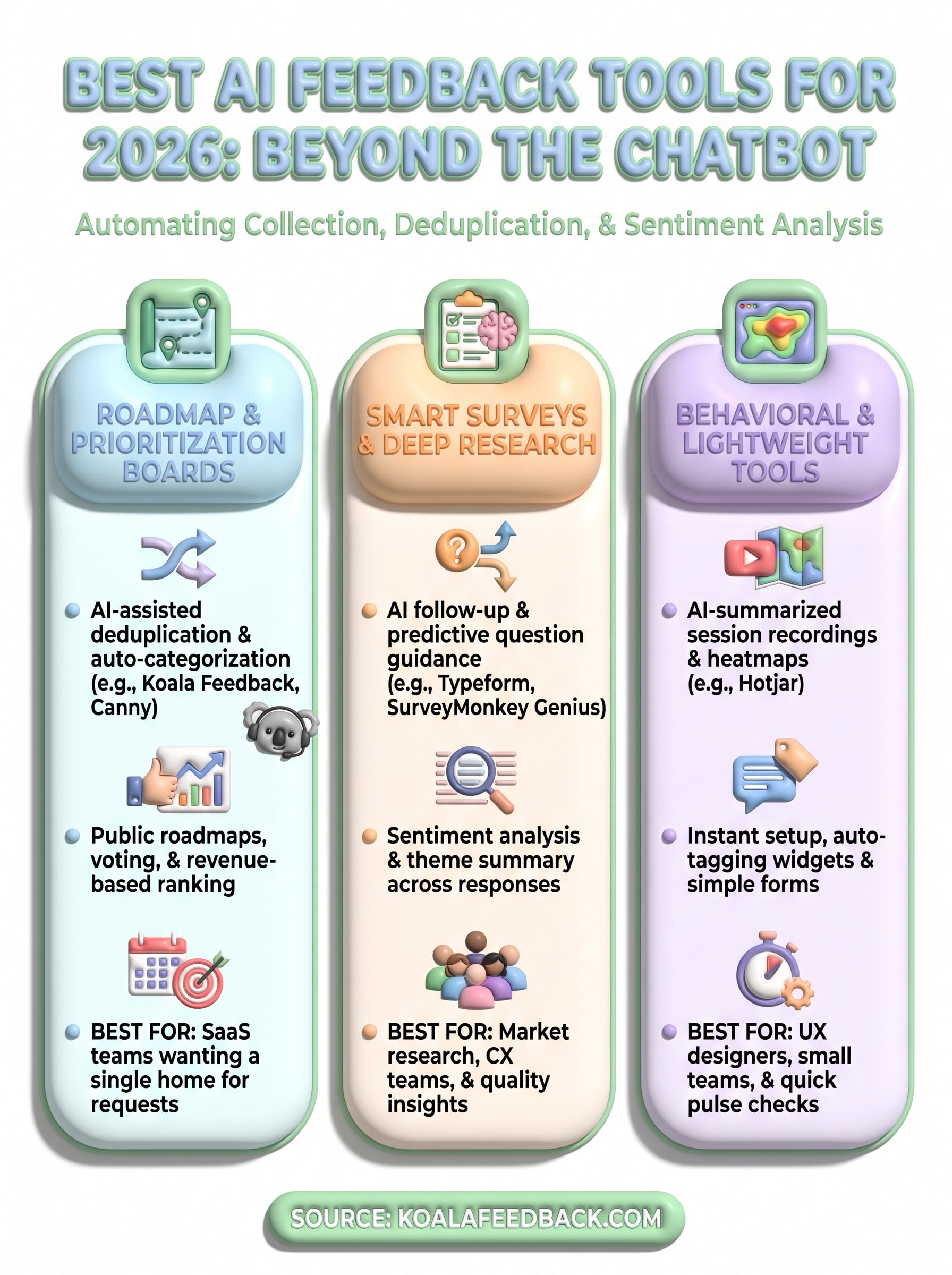
Every tool on this list solves a piece of the puzzle, but the real payoff comes from picking one that matches how your team actually works. AI feedback collection only earns its keep when it cuts the manual sorting that used to eat your week, whether that's through duplicate detection, sentiment tagging, or automatic theme summaries. Skip the tools built for survey researchers if what you really need is a public roadmap that keeps users updated on shipped features. Match the tool to the job, not the other way around.
Getting this right means fewer scattered spreadsheets and more decisions backed by what users are actually asking for. If you're ready to cut duplicate noise and show customers a real roadmap instead of a black box, bring every user request into one place with Koala Feedback and see how much faster prioritization gets once the busywork disappears.

Start today and have your feedback portal up and running in minutes.

