Most users won't email you when something bugs them about your product. They'll just leave. A feedback widget for website makes it easy for visitors to share what they think, right where they already are, without jumping through hoops. That small change turns silent users into active contributors who shape your product direction.
But not all feedback widgets work the same way. Some just collect comments and dump them into a messy inbox. Others, like Koala Feedback, go further by letting you organize submissions, track votes, and prioritize what to build next, all from a centralized platform. The difference between these approaches directly impacts how useful the feedback actually is once you've collected it.
In this guide, we break down 12 of the best feedback widget tools available in 2026. We cover what each tool does well, where it falls short, pricing, and which type of team it fits best. Whether you're running a SaaS product, an ecommerce store, or a content site, you'll walk away knowing exactly which widget matches your needs and how to get it running.
Koala Feedback is built for product teams that want more than a raw comments box. Instead of capturing input and leaving you to sort through it alone, it helps you centralize, organize, and act on what users tell you. If you're looking for a feedback widget for website that connects directly to your product development workflow, this is one of the strongest places to start.
Koala Feedback collects feature requests, bug reports, and general user ideas through a dedicated feedback portal embedded on your site. Users submit their thoughts in plain language, and the platform automatically deduplicates and categorizes incoming submissions so you don't end up with 40 variations of the same request piling up on your board. Other users can vote on and comment on existing submissions, which gives you a measurable signal of what actually matters to your audience rather than relying on gut instinct.
The platform gives you a customizable feedback portal that you can brand with your own domain, logo, and color scheme. You embed it directly on your site or link to it from within your product interface. Targeting is straightforward: you control who sees the portal and under what conditions, which keeps submissions relevant to the right user segments instead of mixing inputs from trial users and long-term paying customers.
A branded portal that visually matches your product increases user trust and meaningfully raises submission rates compared to generic third-party forms.
Once feedback arrives, Koala Feedback organizes it into prioritization boards grouped by product area or feature set. You assign statuses, move items through development stages, and publish a public roadmap that shows users exactly what's planned, what's in progress, and what's shipped. That transparency reduces repetitive support tickets asking when a feature is coming.
Your team manages submissions, tracks vote counts, and updates the roadmap from one centralized dashboard rather than juggling spreadsheets or scattered documents across multiple tools. This keeps everyone aligned without adding unnecessary process overhead.
Koala Feedback offers a free plan that covers the core feedback portal and basic roadmap features, which makes it accessible for early-stage products and small teams that aren't ready to commit budget. Paid plans unlock custom domains, advanced board management, and deeper customization options, with pricing structured around team size and usage. You can start without a financial commitment and upgrade when your product and user base justify it.
Canny is a feedback management platform built around feature request tracking. It's widely used by SaaS teams that want to collect user input, see what earns the most votes, and feed that signal directly into planning discussions. It covers similar ground to Koala Feedback but takes a different approach to how submissions surface and get prioritized.
Canny captures feature requests and product feedback submitted through an embeddable portal. Users can upvote existing posts, which helps your team identify what the majority of your audience actually wants rather than reacting to the loudest individual voices. It also supports admin-created posts on behalf of users, which is useful when your sales or support team hears requests during calls and wants to log them in one place.
Canny gives you a hosted feedback board that you can embed as a standalone page or link to from within your app. You can segment feedback by user type or company, which helps larger teams separate enterprise requests from individual user input and makes this a functional feedback widget for website environments with mixed user bases. Customization options exist but are more limited on lower-tier plans.
Segmenting feedback by user type lets you weight requests from your highest-value customers more deliberately during prioritization.
Canny connects with tools like Jira, Linear, GitHub, and Slack, so your development team can push approved requests directly into their existing project management setup without double-entering data. The platform also includes a public changelog where you post product updates and keep users informed after features ship.
Canny's free plan is limited to a small number of tracked users, which becomes restrictive as your product grows. Paid plans start at $99 per month and scale based on monthly tracked users, making costs harder to predict for fast-growing teams.
Featurebase is a product feedback platform that combines a feature request board, changelog, and roadmap in a single tool. It targets product managers at growing SaaS companies who want to capture user input and close the feedback loop without switching between multiple platforms.
Users can submit feature requests, bug reports, and general product ideas through an embeddable portal that sits directly inside your product or on your site. Submissions support tags, categories, and priority labels, which keeps incoming data organized from the moment it arrives rather than dumping everything into a flat list. Other users can vote on existing requests, giving you a clear, measurable signal of what your audience actually wants built next.
The platform provides an in-app widget and a standalone feedback board that you can deploy as a feedback widget for website use, making it straightforward to install on most web products. You control visibility and access settings to make sure the right users see the right boards, which reduces noise from irrelevant submissions submitted by anonymous visitors.
Limiting board access to active authenticated users rather than all visitors significantly improves the quality of submissions you receive.
Built-in connections with Jira, Linear, Slack, and several other common product tools let your team push approved requests into their existing workflow without extra manual steps. The platform also includes a public changelog that announces shipped features and automatically notifies users who voted on those specific requests, which closes the loop without extra outreach on your end.
Featurebase's free plan covers core feedback collection and the public roadmap, making it a workable starting point for smaller teams without upfront cost. Paid plans begin at $49 per month and add custom domains, private boards, and deeper integrations as your product scales.
Userback is a visual feedback tool designed for teams that need more than text submissions. Instead of asking users to describe a bug or layout issue in words, it lets them annotate screenshots and record short video clips directly from within your product. This makes it particularly effective for design teams, developers, and QA testers who need precise visual context alongside written descriptions to act on.

The tool captures annotated screenshots, screen recordings, and written comments from users or internal testers. When a visitor clicks the widget, they can draw on the screen, highlight problem areas, and automatically attach metadata like browser version and operating system. This visual and technical context eliminates the back-and-forth that typically follows when a user tries to describe a problem they're seeing purely in words.
The platform offers a customizable side-tab widget that you embed as a feedback widget for website use, with options to control when and where it appears based on page URL or specific user properties. You can restrict visibility to authenticated users or particular product sections, which keeps submissions focused and reduces noise from casual visitors who aren't deeply engaged with your product.
Pairing URL-based targeting with authenticated user data gives you cleaner, more actionable feedback tied directly to the product areas that matter most.
Built-in connections with Jira, Trello, Asana, GitHub, and Slack push submitted feedback directly into your team's existing task management setup without extra manual steps. Each submission arrives with a full activity log and session metadata, so developers can reproduce issues quickly without sending follow-up questions back to the user.
Paid plans start at $49 per month, covering core visual feedback features for small teams. Higher tiers unlock custom branding, advanced integrations, and higher submission volume, with pricing that scales based on the number of active users and projects your team manages.
Usersnap is a customer feedback platform that blends visual annotation with structured survey collection. It suits teams that need both bug reporting from internal testers and satisfaction tracking from real users within a single embeddable widget.
The tool captures annotated screenshots, NPS scores, CSAT ratings, and open-ended text responses directly from users on your site or product. It automatically attaches browser metadata and console logs to every visual submission, giving your developers the technical context they need to reproduce and resolve issues without sending follow-up questions back to the user who reported them.
Usersnap provides a floating button widget, in-app survey triggers, and targeted microsurveys that you configure as a feedback widget for website deployments. You set display conditions using URL rules, user attributes, and event-based triggers, so prompts appear at moments that actually make sense in the user journey rather than interrupting every visitor indiscriminately.
Triggering a short satisfaction survey right after a user completes a key action captures feedback when their experience is freshest and most accurate.
Built-in connections with Jira, GitHub, Slack, Zendesk, and Asana push submissions directly into your team's existing tools without extra copy-paste steps. Each report arrives with a full activity trail and tagged metadata, so your team can filter, assign, and act on feedback without digging through disorganized lists or chasing down missing context.
A 15-day free trial is available across all plans so you can test the full feature set before committing. Paid tiers start at $69 per month, covering core feedback and screenshot functionality for small teams. Higher plans unlock unlimited projects, API access, and advanced targeting rules, with costs scaling based on team size and monthly active users.
Qualaroo is a targeted survey platform that specializes in contextual micro-surveys delivered at specific moments in the user journey. Rather than offering a general feedback box, it focuses on asking the right question at the right time, which tends to produce higher response rates and more specific insights than passive feedback forms waiting silently on a page.

The tool captures NPS scores, CSAT ratings, multiple-choice responses, and open-ended text answers through small survey prompts called Nudges. These prompts appear inline on your site without disrupting the full page experience. You can also combine question types within a single survey flow to gather layered context from users in one sitting rather than sending separate follow-up surveys.
Its core widget is a small slide-out Nudge that appears in a corner of the page, functioning as a lightweight feedback widget for website deployments. You configure display rules based on time on page, scroll depth, specific URLs, or user attributes, so prompts appear at moments that match actual user behavior rather than firing randomly across every page your visitors land on.
Targeting users who have spent more than 60 seconds on a pricing page gives you feedback from visitors who are genuinely evaluating your product.
Built-in connections with HubSpot, Salesforce, Slack, and Zapier push response data into your existing marketing and support stack without manual exports. The platform includes a built-in AI analysis layer that summarizes open-ended responses and surfaces common themes, which saves significant time when you're reviewing large volumes of qualitative input from active users.
Qualaroo offers a 15-day free trial across its paid tiers so you can test targeting and survey logic before committing. Plans start at $69 per month and scale based on tracked responses and access to advanced features like AI summarization and custom branding.
Hotjar is a behavior analytics platform that combines heatmaps, session recordings, and feedback collection in one tool. It targets teams that want to understand not just what users say, but how they actually behave on a page, making it useful for product managers and UX designers who need both qualitative and quantitative signals from the same platform.

The platform captures on-page feedback ratings, open-ended responses, and incoming survey answers through embedded widgets. Users submit a quick thumbs up or down alongside a written comment, and Hotjar automatically links that feedback to session recordings so you can watch exactly what that user did on the page before they rated their experience.
Hotjar offers a floating feedback button and in-page survey widgets that you configure as a feedback widget for website use. You set display conditions using page URL rules, scroll depth, exit intent, and time on page, so prompts appear at moments relevant to what your user is actually doing rather than firing indiscriminately on every page load.
Combining exit-intent targeting with a single open-ended question captures honest input from users who are about to leave without converting.
Built-in connections with Slack, HubSpot, Segment, and Google Analytics let you route feedback data into the tools your team already uses. Session recordings tied to each submission give your developers and designers full visual context without requiring extra follow-up from the user who submitted the feedback.
Hotjar offers a free plan that covers basic heatmaps and limited session recordings. Paid plans start at $32 per month and scale based on daily sessions and access to advanced features like survey logic, user attribute targeting, and API integrations for larger teams.
Survicate is a survey and feedback platform built for teams that want to capture user sentiment at multiple points across their product and marketing funnel. It focuses on structured survey delivery rather than open-ended bug reporting, making it a strong fit for product managers who need consistent, measurable data from their users over time.
Survicate collects NPS scores, CSAT ratings, CES responses, and open-ended text answers through targeted surveys embedded across your site or product. You can build multi-step survey flows that ask follow-up questions based on how a user answered the previous one, which gives you richer context than a single static form ever could.
The platform delivers surveys through a slide-in widget, embedded in-page form, and full-page survey link, each of which works as a feedback widget for website deployments. You configure display rules using URL conditions, scroll depth, time on page, and user attributes, so your surveys reach the right users at the right moment rather than interrupting every visitor without context.
Triggering a CSAT survey immediately after a user completes onboarding captures satisfaction data when their first impression is still fresh and reliable.
Survicate connects directly with HubSpot, Intercom, Segment, Slack, and ActiveCampaign, pushing response data into your CRM or messaging tools automatically without manual exports. The platform's built-in response dashboard aggregates answers across all active surveys so your team can track trends over time without switching between separate reports.
Survicate offers a free plan that supports a limited number of monthly responses and basic survey types, which works well for smaller teams validating their setup before scaling. Paid plans start at $99 per month and unlock higher response volumes, advanced targeting logic, and full integration access.
Mopinion is a digital feedback platform built for enterprise and mid-market teams that need structured, multichannel feedback collection. It focuses on converting raw user input into actionable data through customizable forms and real-time dashboards that surface patterns across large volumes of responses.
The tool captures NPS scores, CSAT ratings, open-ended text responses, and custom form inputs directly from your website or product interface. You can build multi-metric surveys that combine several question types within a single form, giving you layered context from each user without requiring them to complete multiple separate surveys at different points in their session.
Mopinion delivers feedback through a slide-in button, embedded form, and modal overlay, each configurable as a feedback widget for website deployments. You set targeting rules based on URL patterns, scroll behavior, time on page, and custom data attributes, so your forms appear to the right users at the right moment rather than firing randomly across every page on your site.
Layering URL-based rules with user attribute targeting gives you granular control over who sees each survey, which significantly improves both response rates and the quality of data you collect.
The platform connects with Slack, Jira, HubSpot, Google Analytics, and several other common tools to route feedback data into your existing workflow without manual exports. Built-in real-time dashboards and text analytics automatically group open-ended responses by theme, which saves your team considerable time when reviewing large volumes of qualitative input from active users.
Mopinion does not publish its pricing publicly. You need to contact their sales team for a custom quote, which typically means the platform targets mid-market and enterprise buyers rather than early-stage startups or small teams working within a tight budget.
Qualtrics is an enterprise experience management platform used by large organizations to collect, analyze, and act on feedback across multiple touchpoints. It goes well beyond a simple feedback widget for website use, offering advanced research-grade survey capabilities and predictive analytics that most smaller platforms don't come close to matching.
The platform captures NPS scores, CSAT ratings, CES data, and complex multi-branching survey responses from users across web, mobile, and email channels. You can build sophisticated survey logic with skip patterns, embedded data, and quota management, which makes it far more powerful than standard feedback tools but also significantly more complex to configure and maintain.
Qualtrics delivers surveys through site intercepts, embedded forms, and pop-up overlays that you configure using its dedicated intercept builder. Targeting rules draw on behavioral data, URL patterns, cookie values, and custom user attributes, giving your team precise control over who sees each prompt and under what conditions.
Site intercept targeting at the individual user level lets you run controlled feedback experiments across specific user segments without affecting your broader audience.
Native connections with Salesforce, SAP, Marketo, Slack, and a wide range of enterprise platforms are available through both prebuilt integrations and an open API. Its built-in statistical analysis and text analytics tools surface patterns in large volumes of qualitative data automatically, which reduces the manual effort your team would otherwise spend reviewing raw responses.
Qualtrics does not publish pricing publicly. You need to contact their sales team for a custom quote, and the platform is clearly positioned for enterprise buyers with dedicated research teams, substantial budgets, and complex feedback programs that smaller tools simply cannot support.
Typeform is a form and survey platform known for its conversational, one-question-at-a-time format. It suits teams that want to embed structured surveys into their site and collect user responses in a way that feels less like filling out a form and more like a real exchange.
Typeform collects open-ended text answers, multiple-choice responses, NPS scores, rating scales, and file uploads through its signature conversational survey format. Instead of presenting all questions at once, it walks users through one question at a time, which reduces friction and tends to produce higher completion rates compared to traditional long-form surveys that front-load every question on a single screen.
You can embed Typeform as a popup, slider, or inline element directly on your site, making it a usable feedback widget for website deployments where you want something visually polished. Display options include time-based triggers and scroll-based conditions set through its embed configuration, though advanced behavioral targeting requires combining it with third-party tools rather than relying on native features alone.
Embedding a Typeform popup on a specific product page rather than site-wide keeps responses focused on the experience you actually want to improve.
Typeform connects with Slack, HubSpot, Google Sheets, Zapier, and Airtable, pushing response data into your existing tools automatically. It does not include a built-in feedback board or roadmap feature, so your team needs to route submissions into a separate system if you want to prioritize and act on them alongside other product feedback.
Typeform offers a free plan that supports a limited number of responses per month and basic form logic. Paid plans start at $25 per month and scale based on response volume and access to advanced features like custom branding, conditional logic jumps, and priority support for larger teams.
Marker.io is a visual feedback tool built primarily for web development teams and agencies that need to capture bug reports and client feedback during the build and QA process. It sits between a traditional feedback widget and a project management tool, making it particularly effective when multiple stakeholders need to comment on a live website without opening a separate reporting system.
The tool captures annotated screenshots and written comments directly from your browser without requiring the user to install any additional software. Each submission automatically includes technical metadata such as browser type, screen resolution, and operating system, giving your developers the context they need to reproduce issues immediately without chasing down extra details from the person who reported them.
Marker.io installs as a floating side-button widget on your site, which makes it a practical feedback widget for website deployments during development and QA phases. You can restrict widget visibility to specific team members or client reviewers, so only the right people see the reporting button rather than every visitor who lands on your page.
Limiting widget access to authenticated reviewers during a client review phase keeps your feedback queue clean and prevents irrelevant submissions from outside your project team.
Built-in connections with Jira, Trello, Asana, GitHub, GitLab, and Linear push each submission into your team's active project as a formatted ticket. Every report arrives with a visual annotation and full session metadata attached, so your developers can act on it immediately without requesting more information from the submitter.
Paid plans start at $39 per month and scale based on the number of team members and active projects, with higher tiers unlocking custom branding and additional integration options. A free trial is available so your team can test the core workflow before committing to a plan.
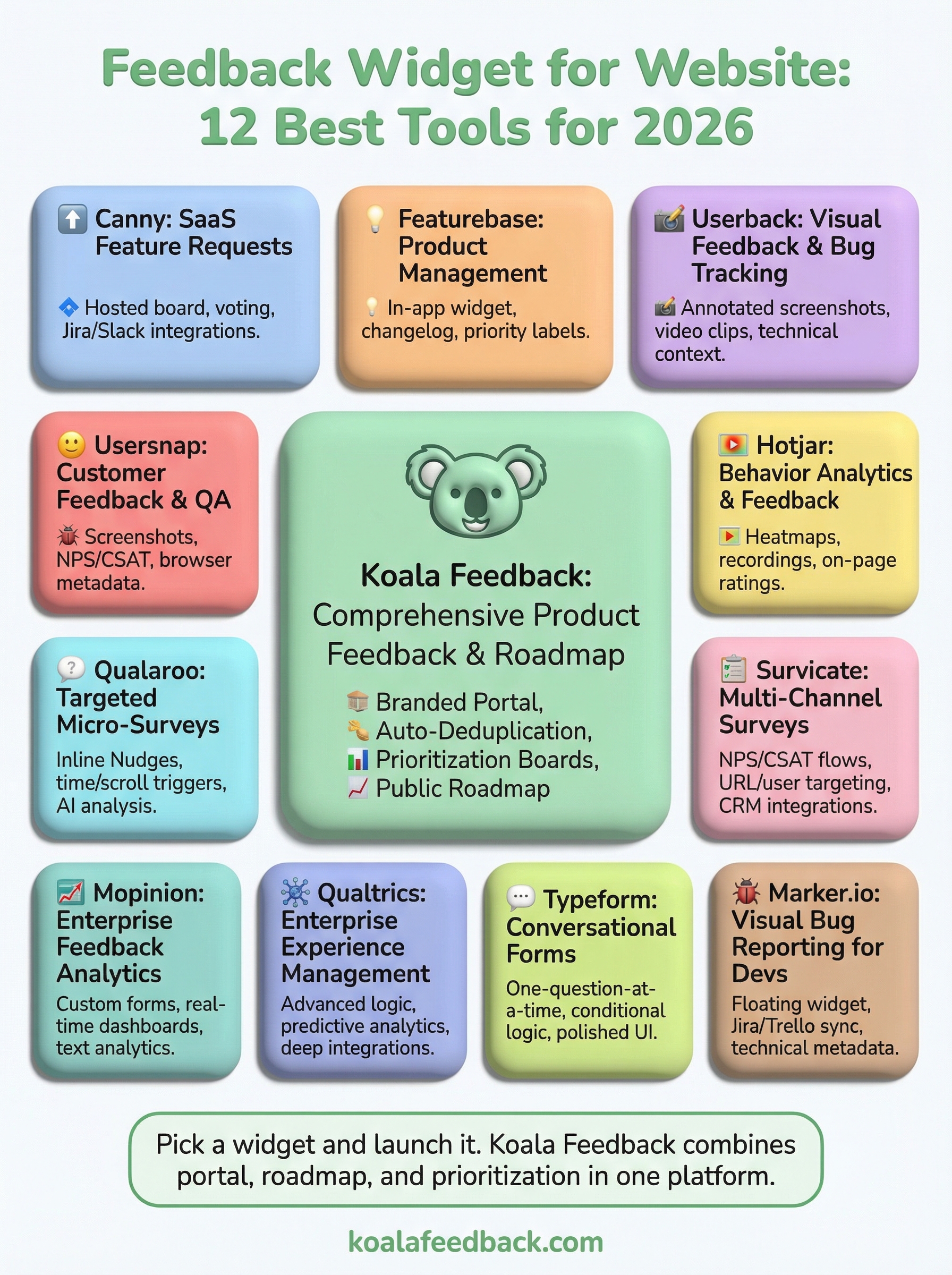
Every tool on this list solves a real problem, but they don't all solve the same one. If you need visual bug reporting during development, Marker.io or Userback fit that job well. If you want targeted micro-surveys at specific moments in the user journey, Qualaroo or Survicate are strong choices. But if your goal is to build a product your users actually want, you need a feedback widget for website use that does more than collect raw input. You need one that helps you organize, prioritize, and act on what users tell you.
That's exactly where Koala Feedback stands out. It combines a branded feedback portal, automatic deduplication and categorization, a public roadmap, and a prioritization board in one platform. Start on the free plan today and turn user feedback into your next product decision.

Start today and have your feedback portal up and running in minutes.

