Every week you get another batch of feature requests, support tickets, and survey responses, and no human team can read all of it fast enough to spot what actually matters. That's why so many product and support teams are turning to an ai feedback tool to do the heavy lifting: sorting comments, tagging sentiment, and surfacing patterns before they turn into churn.
If you're comparing options right now, you're probably trying to solve one of two problems: getting AI to analyze and prioritize customer or user feedback, or getting AI to generate feedback on writing, code, or design work. Both use cases matter, and the right tool depends on which one you're actually solving for. This list separates the two so you don't waste time evaluating a writing-feedback app against your product feedback workflow.
Below you'll find 11 tools worth trying in 2026, covering everything from dedicated feedback management platforms built for SaaS teams to AI writing assistants and education-focused grading tools. We'll cover what each one does best, who it's built for, and where it falls short, so you can pick the one that fits your actual workflow instead of just the flashiest demo.
Koala Feedback is built for teams who need a single, organized home for every idea, complaint, and feature request that comes in from users. Instead of feedback scattered across support tickets, Slack threads, and sales calls, you get one feedback portal where users submit ideas, vote on what matters to them, and comment on existing requests. The AI layer sits underneath that portal, quietly doing the sorting work that used to eat up a product manager's Monday morning.
Users submit feedback directly through your branded portal, and Koala Feedback's AI automatically detects duplicate submissions and groups related requests together, so you're not staring at fifty variations of the same feature idea. That engine categorizes feedback by theme, tagging each item by topic and product area, then routes it into prioritization boards you set up around your actual roadmap structure, whether that's by product line, customer segment, or release cycle. From there, your team scores requests using upvotes, comment volume, and whatever weighting matters to your business, then pushes the winners onto a public roadmap with statuses like Planned, In Progress, and Completed so users can see their input actually went somewhere.
When users can see their feedback turn into a shipped feature, they keep giving you feedback instead of quietly churning.
That visibility loop is the real value here. Most feedback tools stop at collection. Koala Feedback closes the loop by connecting what users asked for to what you actually built and shipped.
Koala Feedback fits SaaS companies, product teams, and startups that need a lightweight, dedicated system for capturing and prioritizing user input, not a full enterprise experience-management suite. It's a strong match if you already have decent volumes of user requests but no clean way to organize them, and if you want customers to see your roadmap without digging through a spreadsheet or a support ticket queue. Teams that value transparency with users and want a branded feature request portal they can put their own logo and domain on will get the most out of it. If your primary need is analyzing open-ended survey text or call transcripts at enterprise scale, some of the tools further down this list are a better fit; Koala Feedback is purpose-built for structured feature request management and roadmap communication.
Koala Feedback keeps its pricing straightforward with tiered plans based on the number of boards and team members you need, starting at a rate accessible to small teams and scaling up for larger organizations with more complex portal and roadmap needs. Every plan includes the core feedback portal, voting, categorization, and public roadmap features, so you're not paying extra to unlock basic functionality. A free trial lets you test the full workflow with your own users before committing.
Zonka Feedback started as a survey tool and has grown into a full customer experience platform, with AI now doing most of the analysis work that used to require a data analyst. If your feedback lives in NPS scores, CSAT surveys, and post-support ratings rather than feature requests, Zonka is built for that world instead of the roadmap-and-portal model Koala Feedback covers above.
Zonka Feedback lets you build surveys across channels, email, SMS, web, in-app, and kiosk, then uses AI-powered text analytics to read every open-ended response and tag it by sentiment, topic, and emerging trend. Its AI also flags at-risk customers based on response patterns and can auto-generate summaries of what respondents are actually saying, so a support lead doesn't have to read a thousand raw comments to know that shipping delays are the week's top complaint.
Sentiment scores only matter if you can trace them back to the exact comment that caused them.
That traceability is where Zonka earns its keep, since every tag links straight back to the original response.
Zonka Feedback suits customer experience and support teams that run high volumes of transactional surveys and need automated sentiment analysis to keep up, particularly retail, hospitality, and healthcare organizations tracking CSAT and NPS across many touchpoints. It's less suited to teams whose main need is organizing feature requests into a public roadmap.
Zonka Feedback offers a free plan for basic survey volume, with paid tiers moving from a starter plan for small teams up through professional and enterprise plans priced per response volume and feature access, including advanced AI text analytics on higher tiers. Enterprise pricing requires a custom quote based on survey volume and integrations.
Qualtrics XM is the enterprise heavyweight in experience management, and its AI capabilities reflect that scale. Rather than a single feedback channel, it pulls in survey data, call center transcripts, chat logs, and social mentions into one experience management platform, then applies AI to make sense of all of it at once. Companies pick Qualtrics when they need to connect customer feedback to employee experience data and broader business metrics, not just tag a batch of comments.
Qualtrics XM's AI engine, called iQ, runs text and sentiment analytics across every open-ended response you collect, automatically detecting themes, emotion, and effort scores without you building a single tag manually. Predictive analytics then flag which drivers most affect metrics like NPS or churn risk, and the platform can trigger automated follow-up actions, like alerting a manager the moment a detractor response comes in. Role-based dashboards mean an executive sees a rollup while a frontline manager sees the specific comments behind their team's score.
A tool that only tells you your NPS dropped is less useful than one that tells you why, and who to notify.
That combination of detection and automated action is what separates Qualtrics from a basic survey tool.
Qualtrics XM fits large enterprises with dedicated CX or research teams, complex data sources, and budget for a full experience management deployment. It's overkill for a startup that just wants users to submit and vote on feature ideas, which is squarely Koala Feedback's territory instead.
Qualtrics doesn't publish public pricing. You'll need to request a quote, and costs typically scale into the tens of thousands annually depending on modules, seats, and response volume, with implementation support usually bundled into enterprise contracts.
Chattermill positions itself as a customer intelligence platform built specifically for unifying feedback that would otherwise sit in disconnected tools: reviews, support tickets, NPS surveys, and social comments. Instead of treating each channel as its own silo, Chattermill pulls everything into one place so a customer intelligence platform approach replaces the usual spreadsheet-stitching product teams do to get a full picture of what users think.
Chattermill's AI engine reads unstructured text from every connected channel and applies deep learning sentiment analysis to classify feedback by theme, emotion, and root cause, going beyond simple positive or negative tagging into specific complaint categories like "shipping delay" or "checkout bug." It also correlates these themes against revenue and churn data, so a spike in a particular complaint category can be tied directly to its business impact rather than just its comment volume.
Knowing that a theme is trending matters less than knowing which trending theme is actually costing you customers.
That revenue correlation is the feature that separates Chattermill from tools that stop at theme detection.
Chattermill suits mid-market and enterprise teams that already have feedback flowing in from multiple channels and need a unified feedback platform to make sense of the volume, particularly consumer brands and marketplaces tracking reviews at scale. It's a poor fit for early-stage teams whose main need is a simple portal for collecting and voting on feature requests, since Chattermill assumes you already have substantial multi-channel data flowing in.
Chattermill doesn't list public pricing on its site. Plans are quoted based on data volume, number of connected sources, and team seats, and prospective customers go through a sales demo before receiving a quote. Expect enterprise-level costs comparable to Qualtrics rather than a self-serve monthly rate.
Enterpret was built by former product managers who got tired of manually tagging feedback in spreadsheets, and it shows in how the tool handles messy, unstructured data. Instead of forcing you into pre-set categories, Enterpret's AI builds a custom taxonomy from your own feedback data, learning the specific language your users use rather than applying a generic sentiment model built for retail reviews or hotel surveys.
Enterpret ingests feedback from surveys, support tickets, app store reviews, sales calls, and community forums, then uses AI-driven theme extraction to cluster comments into categories that reflect your actual product, not a canned taxonomy borrowed from an unrelated industry. You can query the results in plain English, asking something like "what are churned users saying about onboarding" and getting a themed breakdown with source quotes attached. The system also tracks how theme volume shifts over time, so a spike in complaints about a specific feature shows up before it turns into a support fire drill.
A generic sentiment tag tells you less than a taxonomy trained on your own users' words.
That custom taxonomy is what most reviewers point to as Enterpret's real differentiator over off-the-shelf feedback analysis tools.
Enterpret fits product and insights teams at mid-size to large SaaS companies who already collect feedback across many channels and want AI to unify it without losing product-specific nuance. It's less useful for a small team that just needs users to submit and vote on feature ideas in one place, since Enterpret assumes you're already drowning in raw qualitative data across tools.
Enterpret doesn't publish pricing publicly. You'll go through a demo and sales conversation, with quotes based on data volume and connected sources, landing in a similar enterprise range as Chattermill and Qualtrics rather than a self-serve monthly plan.
Thematic built its name on turning messy open-text feedback into structured themes without forcing teams to hand-build a taxonomy first. It's aimed at research and insights teams who need to explain why a metric moved, not just that it moved, and who deal with feedback coming from surveys, reviews, and support tickets all at once. Where some tools stop at sentiment tagging, Thematic pushes further into root-cause explanation.
Thematic's AI reads unstructured feedback and automatically clusters it into themes, then layers a theme scoring system on top that tells you which themes have the strongest statistical relationship to your outcome metric, whether that's NPS, CSAT, or churn. Analysts can edit or merge themes the AI generates, which keeps the output accurate without starting from a blank taxonomy. A conversational query feature lets you ask plain-language questions about the data and get a themed answer with supporting quotes pulled straight from the source comments.
A theme that correlates with churn deserves more attention than one that's just mentioned often.
That scoring layer is what separates Thematic from tools that only count mentions.
Thematic suits research and insights teams inside mid-size to large companies who need rigorous, statistically grounded analysis of qualitative feedback rather than a simple dashboard of top complaints. It's a strong fit if you already run structured research programs and want AI to speed up analysis, not replace the analyst. Teams looking for a lightweight feature request portal will find it more analytical firepower than they need.
Thematic doesn't publish pricing publicly. Plans are quoted after a demo, based on feedback volume and number of connected sources, and typically land in the same enterprise range as Chattermill and Enterpret rather than offering a self-serve monthly tier.
Lumoa markets itself as the CX platform built for teams that want answers, not dashboards full of charts nobody reads. It pulls feedback from surveys, reviews, and support interactions into one place, then uses AI to translate raw comments into a small number of priorities an executive team can actually act on. Where some of the enterprise tools above lean into research depth, Lumoa leans into simplicity and speed to insight.
Lumoa's AI reads open-ended feedback and automatically tags it by topic, sentiment, and impact, then rolls those tags up into a single feed that highlights what's driving your experience metrics up or down this week. Its standout feature is a plain-language summary function that reads like a briefing memo: instead of a chart, you get a written explanation of what changed and why. You can also ask the AI direct questions about your data and get a conversational answer with source comments attached, which makes it useful alongside other customer insight tools for teams that don't have a dedicated analyst on staff.
A weekly written summary gets read by more executives than a dashboard ever will.
That plain-language output is Lumoa's biggest differentiator against denser analytics platforms.
Lumoa fits CX and product teams at small to mid-size companies who want AI-generated insight without hiring a data analyst to interpret it. It suits leaders who need a fast, readable summary of customer sentiment rather than a fully customizable research platform. Teams needing deep statistical modeling or a public roadmap portal for feature requests will find better fits elsewhere on this list.
Lumoa publishes tiered pricing starting with a package aimed at smaller teams, moving up to plans with higher data volume and more integrations. Enterprise pricing requires a custom quote, and a free trial lets you test the summary feature before committing.
SentiSum focuses on one job: turning support tickets into a clean, actionable tagging system without months of manual setup. It's built for support and CX teams drowning in tickets who need automated ticket tagging instead of an agent manually picking a category from a dropdown on every close. Where Zonka and Qualtrics cover surveys broadly, SentiSum goes narrow and deep on support conversations specifically.
SentiSum connects to your helpdesk, Zendesk, Intercom, and similar tools, then reads every ticket and applies AI-driven tagging that groups issues by root cause rather than the generic categories agents tend to default to under time pressure. The system builds its taxonomy from your actual ticket history, so tags reflect real recurring problems like "refund delay" or "login bug" instead of broad buckets like "other." A trending-issues dashboard then surfaces which categories are spiking week over week, giving support leads an early warning before a small bug turns into a flood of tickets.
A support tag that matches how your team actually talks about a problem gets used; a generic one gets ignored.
That self-built taxonomy is the reason teams switch to SentiSum instead of relying on their helpdesk's built-in tagging.
SentiSum suits support operations and CX teams handling high ticket volume who need customer feedback analysis methods rooted specifically in support conversations rather than surveys or reviews. It's a strong pick if your biggest blind spot is not knowing why tickets are spiking until a manager notices manually. Teams whose primary need is a public roadmap or feature voting portal should look at Koala Feedback instead, since SentiSum doesn't handle that side of feedback management.
SentiSum doesn't publish pricing publicly. Plans are quoted after a demo based on ticket volume and number of connected helpdesk sources, with costs typically scaling toward mid-market and enterprise budgets rather than a self-serve monthly rate.
MagicSchool AI shifts the conversation entirely. Everything above this point analyzes customer or user feedback; MagicSchool AI generates feedback on student writing, built specifically for teachers who need to grade and comment on stacks of essays without losing every evening to it. If you landed on this list because you're an educator searching for an ai feedback tool rather than a product manager, this is where the list actually starts answering your question.
MagicSchool AI gives teachers a library of purpose-built tools, and its writing feedback generator reads a student's submitted draft against a rubric you set, then produces specific, actionable comments on grammar, structure, argument strength, and clarity. Teachers paste in an essay or upload a document, choose the grade level and rubric criteria, and get back feedback written in a tone appropriate for the student rather than a generic AI response. Because it's built inside a broader suite of over 60 education tools, the same platform also handles lesson planning and rubric generation, so feedback generation sits alongside the rest of a teacher's actual workflow instead of living in a separate app.
Feedback that arrives the same day a student submits work gets read; feedback that arrives two weeks later gets ignored.
That speed is the whole point. Teachers report cutting grading time significantly because the AI drafts the first pass of comments for them to review and adjust.
MagicSchool AI fits K-12 teachers and school districts looking to cut down grading time on writing assignments without handing over the entire grading process to AI. It's not built for SaaS teams managing customer feedback at all, so skip it if that's your use case.
MagicSchool AI offers a free tier with limited monthly usage, plus paid plans for individual teachers and school-wide or district-wide licenses priced per seat, with volume discounts for larger deployments.
Flint is a chatbot-style AI teaching assistant built by education nonprofit ISTE, and its writing feedback tool works differently than MagicSchool AI's rubric-driven grader. Instead of producing a finished comment set for the teacher to hand back, Flint chats directly with the student, asking questions about their draft and pointing them toward what to fix themselves. Teachers who want students to actually engage with feedback on writing rather than just read it and move on tend to gravitate toward this conversational model.
A teacher builds a custom Flint bot around a specific assignment, feeding it the rubric, grade level, and any guardrails on what the AI should and shouldn't say. Students paste their draft into the chat, and Flint responds with guided questions and prompts rather than a red-pen edit, nudging a student to notice a weak thesis or a missing transition instead of just rewriting the sentence for them. Teachers can review the full chat transcript afterward, so nothing happens outside their view.
Feedback a student has to think through sticks longer than feedback they just read and dismiss.
That transcript visibility is what makes Flint usable in a classroom setting instead of a black-box tool.
Flint suits teachers who want an ai writing feedback tool that builds student revision skills rather than one that just outputs a grade-ready comment list. It fits classrooms with time built in for drafting and revising, less so a teacher who needs fast turnaround on a stack of finished essays.
Flint is free for teachers and students, funded through ISTE as part of its nonprofit mission to expand access to AI tools in education, with no paid tier currently required to unlock the writing feedback bot.
Knowt started as a flashcard and study-notes app for students, and its AI writing feedback generator grew out of that same study-tool DNA rather than a teacher-facing grading suite. Students paste in an essay, short answer, or even a lab report, and the tool hands back a quick feedback pass built for self-study rather than classroom submission. It's aimed less at teachers managing a class set of essays and more at students who want a second opinion before they turn something in.
Students drop their draft into Knowt's feedback generator, select the type of writing, and the AI scans it for clarity, structure, and grammar issues, returning suggestions in plain language a student can act on without a teacher translating the comments first. The tool also flags weak topic sentences and unclear arguments, similar to what a writing center tutor might circle in red pen. Because Knowt already stores a student's notes and study material, the feedback tool sits inside the same account as flashcards and practice quizzes, so revising an essay and studying for the related exam happen in one place instead of two separate apps.
A student who can get feedback the night before a deadline is more likely to actually revise than one who has to wait for office hours.
That self-serve speed is the whole appeal for students working independently.
Knowt fits students looking for an ai feedback tool they can use on their own time, outside a formal classroom workflow, particularly high schoolers and college students drafting essays without built-in teacher review. It's a weaker fit for teachers who want to control the rubric or review a transcript of AI-student interaction, since Knowt is built around the student's own study session rather than teacher oversight.
Knowt offers a free tier that includes basic writing feedback alongside its flashcard and note tools, with a paid subscription unlocking higher usage limits and additional AI features for heavier use.
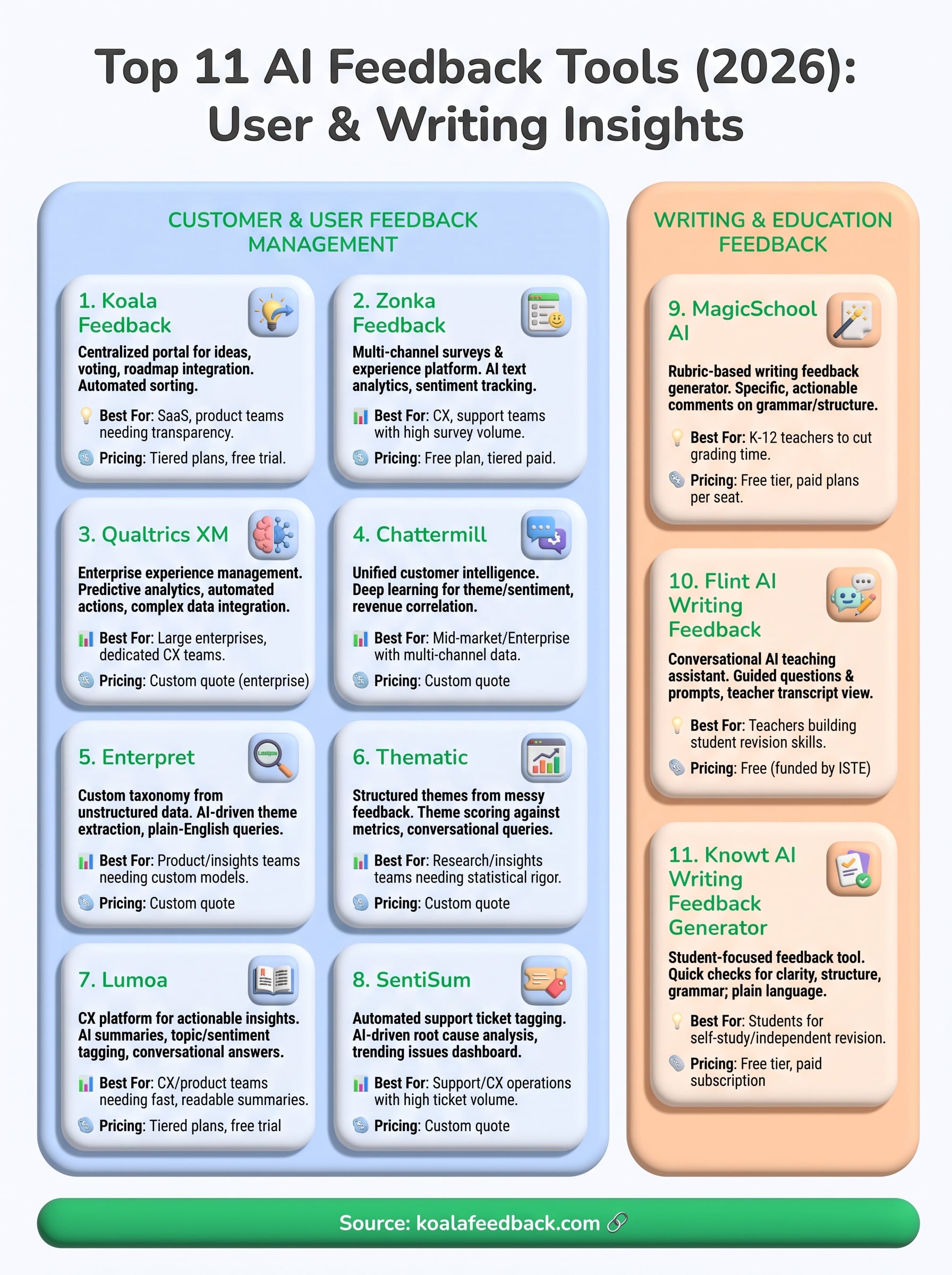
Eleven tools, two very different jobs. If you're managing customer or user feedback, the right pick depends on scale and complexity: enterprise CX teams need Qualtrics or Chattermill's depth, support teams need SentiSum's ticket focus, and research teams need Thematic's statistical rigor. If you're grading or coaching writing, MagicSchool AI, Flint, and Knowt each serve a different classroom moment, from fast rubric-based comments to student-driven revision.
But most SaaS teams reading this aren't drowning in enterprise-scale data yet. You just need a centralized feedback portal where users submit ideas, vote on what matters, and see their input reflected on a real roadmap. That's a narrower, more practical problem than what most of the tools above are built to solve, and it's exactly where an ai feedback tool built for product teams earns its keep instead of sitting unused.
If that's your situation, capture and prioritize user feedback in one portal with Koala Feedback and see how quickly your feedback backlog turns into a roadmap users actually trust.

Start today and have your feedback portal up and running in minutes.

