You're collecting feedback from users. Support tickets, feature requests, survey responses, Slack messages, social media comments, it's coming in from everywhere. The problem isn't volume. The problem is that none of it is structured. So when someone asks which features to build next, you're digging through spreadsheets, sticky notes, and half-forgotten email threads. Knowing how to organize user feedback is the difference between guessing and making informed product decisions.
Most teams hit this wall around the same time: feedback starts piling up, patterns get buried, and prioritization becomes a gut-feel exercise. Without a clear system of themes, tags, and priority levels, valuable insights slip through the cracks. Duplicate requests go unnoticed, and your roadmap reflects internal opinions instead of real user demand.
This guide walks you through a practical framework for turning messy feedback into something you can actually act on. You'll learn how to categorize input using themes, apply tags for quick filtering, and assign priority levels that reflect user impact. These are the same principles we built into Koala Feedback, a platform designed to centralize, categorize, and prioritize feedback so product teams can stop sorting and start building.
When you know how to organize user feedback, the result isn't just a tidier spreadsheet. It's a system where every piece of input has a home, a label, and a clear relationship to your product decisions. Organized feedback is structured, searchable, and tied to outcomes rather than stored in a pile waiting for someone to dig through it on a deadline. Think of it as the difference between a filing cabinet with labeled folders versus a cardboard box in the corner of the office.
Every feedback entry in an organized system carries more than just the raw text. It includes context about who submitted it, what part of your product they were using, and what outcome they were trying to achieve. Without that context, a request like "make it faster" tells you almost nothing. With context, you know it came from three enterprise users on the dashboard load screen, and it keeps happening on slower connections.
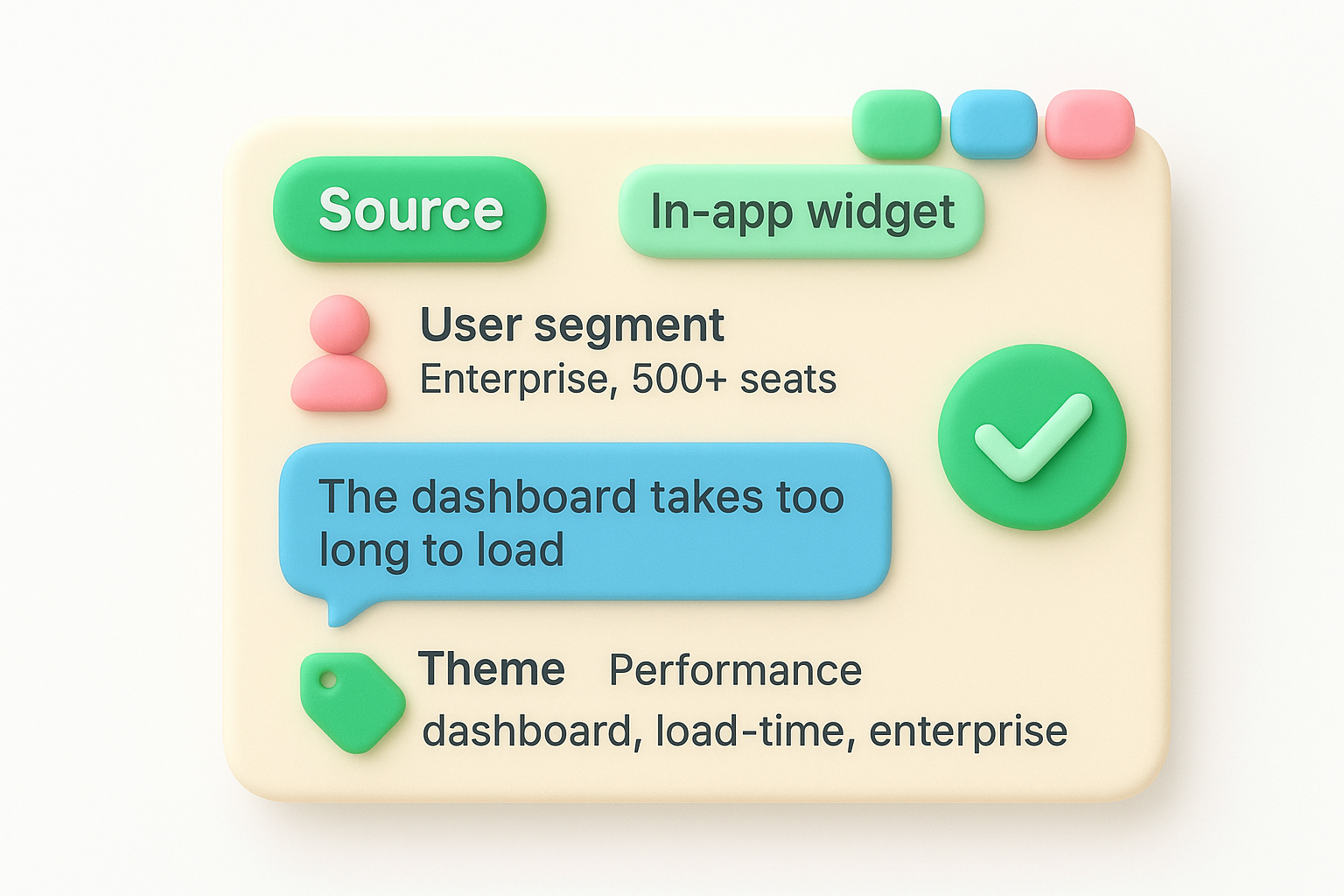
Here's what a complete, organized feedback entry looks like:
| Field | Example |
|---|---|
| Source | In-app widget |
| User segment | Enterprise, 500+ seats |
| Raw feedback | "The dashboard takes too long to load" |
| Theme | Performance |
| Tags | dashboard, load-time, enterprise |
| Priority | High |
| Status | Under review |
| Linked requests | 4 similar submissions |
When you can see that four enterprise users reported the same performance issue, the prioritization decision practically makes itself.
Most teams underestimate the real cost of disorganized feedback. It's not just the time spent searching. It's the feature you built based on the loudest voice instead of the most common request. It's the bug that three users reported across three different channels and nobody connected the dots. Poor organization creates a direct gap between what users need and what you actually ship, and that gap compounds over time.
You also lose trust. When users submit feedback and never see any response or progress, they stop submitting. The feedback loop breaks, and you end up making decisions in a vacuum. User engagement in the product development process depends on your ability to show that feedback leads somewhere, and that only happens when you have a system that tracks, surfaces, and closes the loop on patterns over time.
An organized feedback system gives you a clear view across all incoming input at any given moment. You can filter by theme to see everything related to onboarding, sort by vote count to identify the most-requested features, and trace a roadmap item all the way back to the original user submissions that justified building it in the first place.
Practically, good organization means your weekly product review takes minutes instead of hours. You pull up a prioritized list of themes, check which ones carry the highest volume and user impact, and move the top items into your planning cycle. Nothing gets lost in a Slack thread. Nothing gets built on a hunch. The work you ship reflects what your users actually asked for, and you can prove it.
Before you can tag, theme, or prioritize anything, all your feedback needs to live in one place. Right now, you probably have requests scattered across support tickets, email inboxes, Slack channels, sales call notes, and maybe a spreadsheet someone started six months ago. The first step in learning how to organize user feedback is to stop adding to that pile and start routing everything into a single system.
Your central feedback hub can be a dedicated tool, a structured database, or a board, but it has to be one location your entire team agrees to use. The moment you allow parallel systems, you create blind spots. Choose your primary collection point, then redirect every other source into it. That means setting up an in-app widget for direct user submissions, forwarding relevant support tickets manually or via automation, and training your sales and customer success teams to log requests they hear on calls.
The goal is not to capture every piece of noise, but to ensure that every signal has a single place to land.
Here are the core sources most product teams need to connect:
Raw feedback without context is nearly useless. "Make it easier to use" tells you nothing on its own. You need to know who said it, what they were trying to do, and where they were in your product when they said it. Build your collection process around capturing that information upfront, not after the fact.
Use a consistent intake template for manually logged feedback. This keeps every entry structured and comparable from day one:
| Field | What to capture |
|---|---|
| Source | Where the feedback came from |
| User segment | Plan tier, company size, or role |
| Raw feedback | Exact words the user used |
| Product area | Which part of the product it relates to |
| Date received | When it was submitted |
Fill this in at the moment of capture. The more complete your intake data, the easier every downstream step becomes.
Once your feedback is centralized, you need a consistent way to classify it. That's where themes and tags come in. Themes are your broad categories that map to areas of your product or user experience. Tags are the specific labels that let you drill down into sub-topics within those themes. Together, they give you a two-level system for filtering and grouping feedback without turning every entry into a manual sorting project.
Themes should reflect the areas of your product that matter most to your users and your team. Keep the list short and stable, typically between five and ten themes. If you create too many, they lose meaning. If you change them constantly, your historical data becomes inconsistent and comparison across time periods breaks down.
Here are common themes that work well for most SaaS products:
Defining your themes before you start tagging saves you from having to re-categorize hundreds of entries later.
Each feedback entry gets one theme. That constraint forces clarity. If a piece of feedback seems to touch two themes, assign it to the one that captures the primary pain point the user expressed.
Tags sit below themes and give you the flexibility to get specific. Unlike themes, tags can overlap, and a single feedback entry can carry multiple tags. This lets you cross-reference issues across themes. For example, you might see the "dashboard" tag appearing under both Performance and UI/UX, which tells you the dashboard needs attention from two different angles.
A simple tag structure for how to organize user feedback looks like this:
| Theme | Example Tags |
|---|---|
| Performance | dashboard, load-time, mobile, export |
| Onboarding | setup-wizard, tooltips, email-flow |
| Integrations | Zapier, API, CSV-import |
| Core features | bulk-edit, filters, notifications |
Build your tag list from the bottom up. Start by reading through your first batch of feedback and pulling out the recurring nouns and concepts users mention. Add new tags only when a concept appears at least twice. That keeps your system grounded in real patterns rather than speculative categories you may never use.
You now have a centralized, themed, and tagged feedback database. The next part of how to organize user feedback is finding what repeats and what connects. Duplicates are common because users submit the same request in different words across different channels. If you don't merge them, you undercount the real demand for a feature and end up making weaker prioritization decisions based on incomplete data.
When multiple users describe the same underlying need, those entries should live under one parent item. Deduplication is not about deleting feedback, it's about grouping submissions so you can count the true number of users affected. A single feature request that ten users submitted separately carries far more weight than one that only one person mentioned, but only if you've connected the dots.
To spot duplicates, scan entries within the same theme for overlapping language. Look for entries that describe the same workflow, mention the same product area, and point toward a similar solution. Here's a repeatable process you can follow each week:
The total user count on a parent item becomes one of your strongest signals for prioritization once you deduplicate consistently.
With duplicates merged, patterns become visible across your feedback system. A pattern isn't just one theme getting a lot of entries. It's a specific combination of signals: high submission volume, multiple user segments reporting the same friction, and a consistent description of the problem.
Pull a report grouped by theme once a week. Look at which themes have the fastest-growing entry counts, not just the highest totals. A theme that doubled in submissions over two weeks is more urgent than one sitting at the same number for months. That rate of change tells you something is getting worse for your users right now.
Track these two metrics per theme on a regular cadence:
| Metric | What it tells you |
|---|---|
| Total linked submissions | How many users are affected |
| Submission rate (last 30 days) | How quickly the problem is growing |
Both metrics together give you a clear picture of which problems are widespread and which ones are accelerating, so you can act before they become critical.
With your feedback deduplicated and patterns surfaced, you have the data you need to make defensible prioritization decisions. This is where learning how to organize user feedback pays off directly: instead of debating which features feel important, you walk into your planning cycle with evidence behind every item on the list.
Gut feel is a poor substitute for a repeatable scoring method. Apply a consistent scoring formula to every parent item in your feedback system before you compare them. This removes personal bias from the conversation and gives your team a shared frame of reference.
A simple prioritization matrix combines three inputs:
| Factor | What to measure | Weight |
|---|---|---|
| User impact | Number of unique users affected | High |
| Submission rate | New requests in the last 30 days | Medium |
| Effort estimate | Rough build complexity (1-5 scale) | Low |
Score each item by multiplying user impact by submission rate, then dividing by effort. Higher scores float to the top automatically, and you can sort your entire backlog in under a minute. Adjust the weights to match your current business priorities, but keep the formula stable so results stay comparable across planning cycles.
Once you have a scored backlog, the conversation shifts from "what do we think users want" to "what does the data say users need."
After scoring, take the top-ranked items and push them directly into your roadmap with a status that reflects where they stand. Planned, In Progress, and Completed are the three baseline statuses you need. Add custom statuses if your workflow requires more granularity, but keep the total count low so users reading your public roadmap can understand it at a glance.
For each item you promote, link it back to the original feedback entries that justified the decision. This creates a traceable record you can reference in product reviews and share with users who submitted the original request. Closing that loop by notifying those users when their requested feature moves into progress turns passive feedback submitters into engaged participants who trust that their input actually shapes what you build.
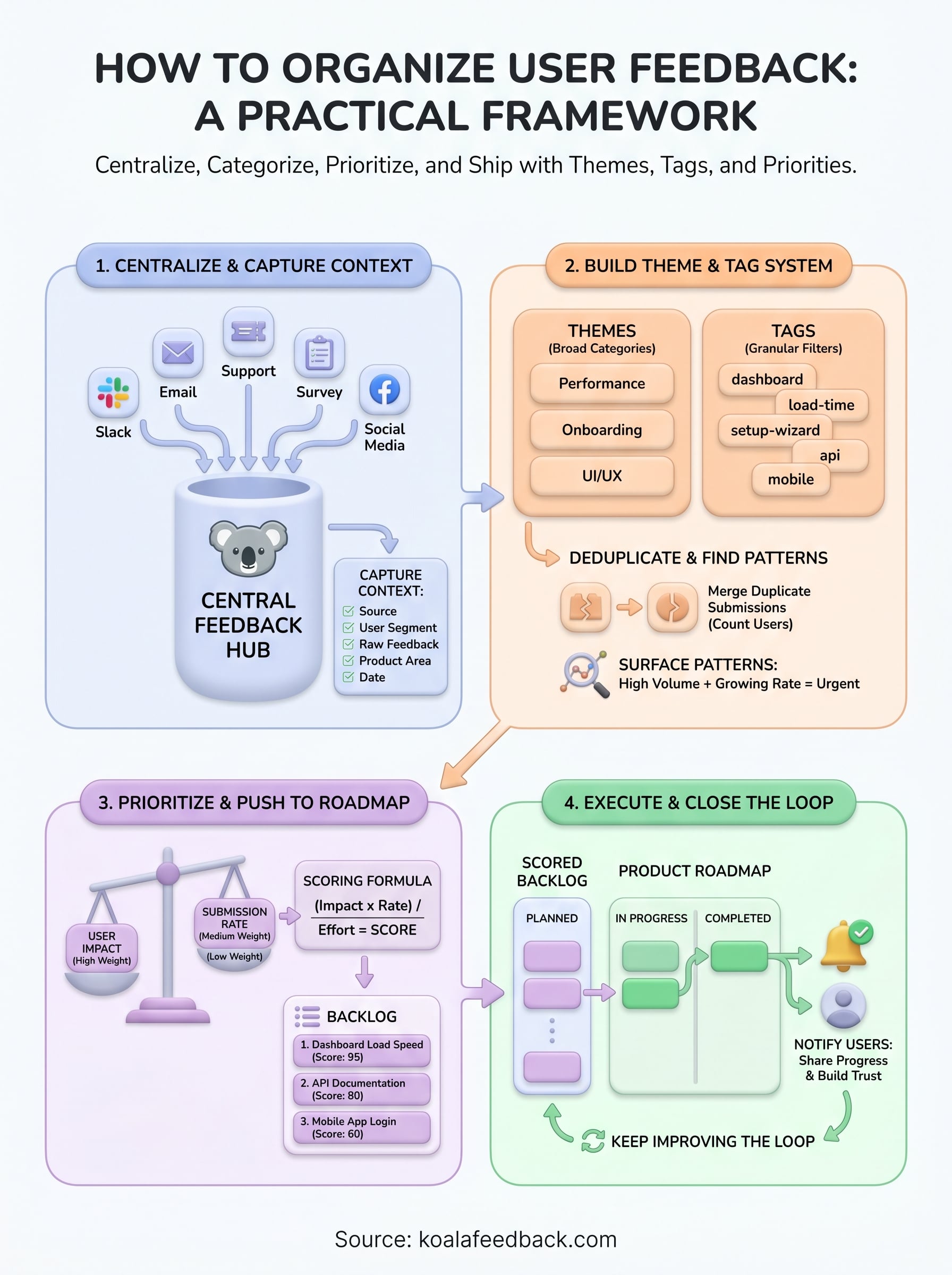
A feedback system only stays useful if you maintain it. Review your theme list every quarter and retire any tags that haven't been used in 90 days. Add new tags only when you see a clear pattern emerging across multiple entries. The goal is a system that stays lean and relevant, not one that grows into another version of the disorganized pile you started with.
Knowing how to organize user feedback is not a one-time project. The real payoff comes from running the full cycle continuously: collect, categorize, deduplicate, prioritize, ship, and notify. Each completed loop builds trust with your users and sharpens your next round of prioritization. When users see their requests move from submitted to shipped, they submit more feedback and better feedback. Start building that loop with Koala Feedback, a platform built to centralize, categorize, and prioritize feedback so your team can stop sorting and start shipping what users actually need.

Start today and have your feedback portal up and running in minutes.

