So, what is user experience research? It is the systematic study of the people who use, or might use, a product, so that design and product decisions rest on evidence about their behavior, needs, and goals instead of opinion. Researchers gather that evidence through interviews, usability tests, surveys, observation, and analytics. The result is not a pile of data. It is a clear answer to a question your team has to decide, such as which version of a signup flow to build.
You do not need a large company or a dedicated researcher to do it. Any team that ships software can run user experience research at a small scale, and the habit pays off quickly. At Koala Feedback we build tools that help product teams collect, organize, and act on user feedback, which is one form of ongoing research, so this topic sits close to our work.
This guide explains why research matters, how to run a study step by step, the types and methods you can choose from, how to match research to each stage of a product, how it differs from neighboring fields, and how a small team can start with about two weeks of effort.
User experience research matters because it replaces assumptions with evidence before you spend build time. Teams that research user experience early ship fewer features nobody wants and catch usability problems while they are still cheap to fix.
Everyone close to a product suffers from false consensus, the belief that other people think and behave the way you do. You know where every setting lives and what every label means. A new user does not. Watching one stranger try to finish a task often exposes problems that months of internal review missed.
Imagine a team that spends six weeks building an advanced filtering feature because three loud customers asked for it. Five interviews might show that most users never get past the first screen and would have preferred a faster search. That is the difference between building from requests and building from understanding.
Cost is the second reason. Changing a prototype takes hours. Changing a shipped feature takes engineering time, support work, and sometimes a data migration. Research cannot prevent every mistake, but it moves the discovery of mistakes earlier, when a fix is a design edit instead of a release.
Research is cheapest when it happens before the code does.
The payoff shows up in four places:
None of this requires a large budget. A handful of sessions, run well, gives a team a sharper picture of its users than any amount of internal debate. The value comes from asking the right question, which is where the next section starts.
Run a study in five moves: define the decision, choose a method, recruit the right people, collect evidence, and turn it into a recommendation. Keep the first study small, because a focused study with five participants beats a sprawling one that never finishes.
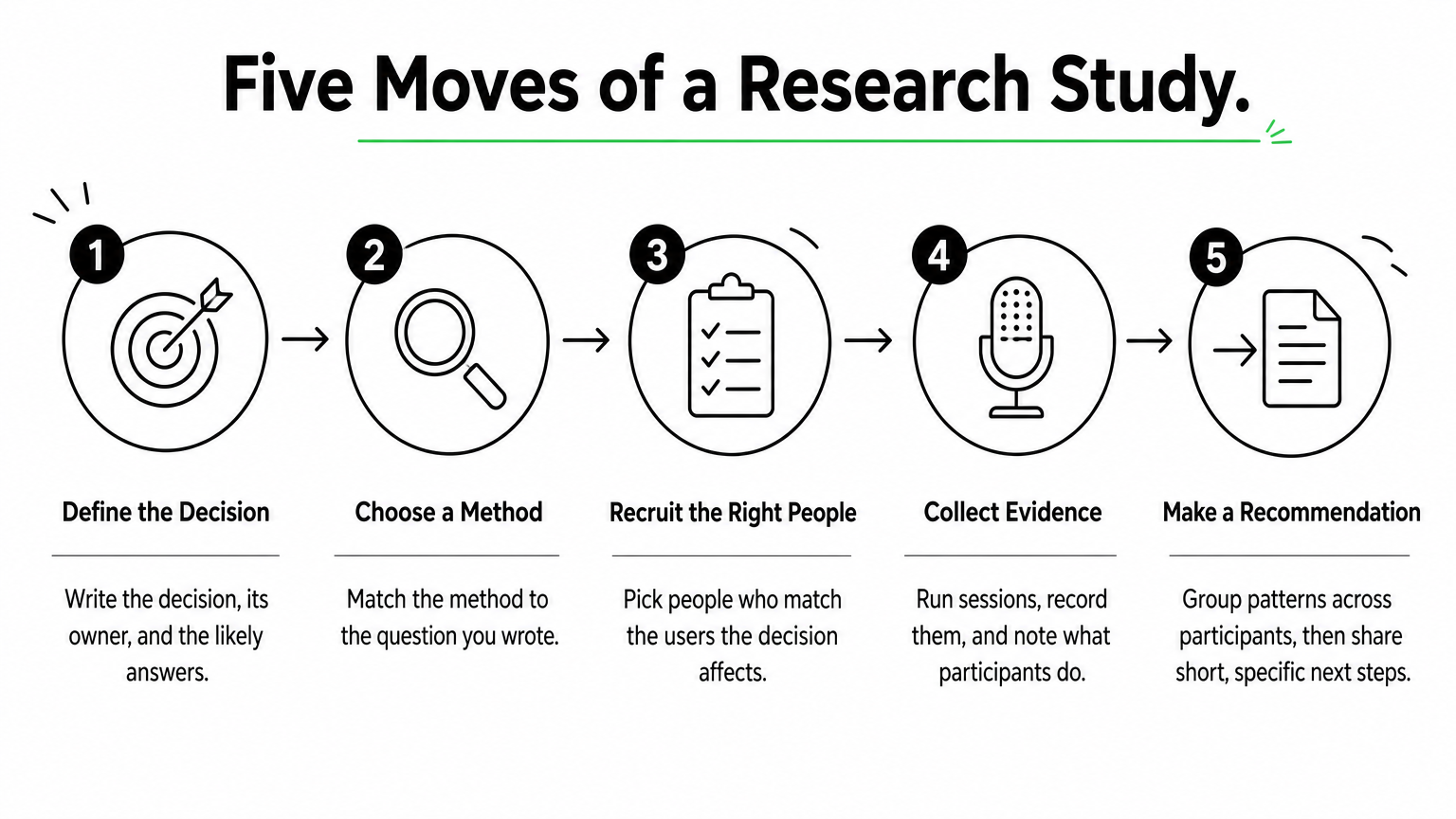
A topic is "onboarding". A decision is "should we replace the setup checklist with a guided tour?" Decisions force useful research, because you can tell when you have enough evidence to make them. Write down the decision, who owns it, and what you will do under each likely answer.
Then turn the decision into research questions that start with what, how, or why. "What do new users try first after signing up?" teaches you more than "Do users like the checklist?" Yes-or-no questions invite polite answers and reveal little. Limit yourself to three or four questions per study.
Recruit people who match the users affected by the decision, not whoever is easiest to reach. Colleagues and friends know too much and are too kind. For qualitative work, five to eight participants per distinct user group is a common starting point, and you can add a round if the answers keep changing.
Record every session, with permission. Notes capture what seemed important in the moment, while recordings let you check what actually happened when you analyze.
Analysis means looking for patterns across participants, not collecting memorable quotes. Put each observation on a sticky note or a spreadsheet row, group similar ones, and count how many participants showed each. One person struggling is an anecdote. Four of five is a finding.
Write each finding in a format that makes the next step obvious:
Observation: 4 of 5 participants skipped the setup checklist.
Evidence: Session 2 at 06:40, Session 3 at 11:15, Session 5 at 04:55.
Insight: They did not see the checklist as part of getting started.
Recommendation: Put the first checklist step on the welcome screen, then retest with 5 users.
Confidence: Medium (small sample, one user segment).
Share a one-page summary and two or three short clips within days of the last session. Long reports get skimmed and forgotten, while short, specific recommendations get scheduled.
A study is finished when someone changes a decision because of it, not when the report is written.
User experience research splits along four independent lines: qualitative or quantitative, attitudinal or behavioral, generative or evaluative, and moderated or unmoderated. Any single study sits on all four at once, so naming where yours falls makes the choice of method much easier.
| Split | What it describes | Question it answers |
|---|---|---|
| Qualitative | Non-numerical insight into motives and feelings | Why did users struggle with this step? |
| Quantitative | Numbers from many users | How many finished the task, and how long did it take? |
| Attitudinal | What people say they think or want | How do users feel about the new pricing page? |
| Behavioral | What people actually do | Where do users click first? |
| Generative | Exploration before a solution exists | What problems do our users have? |
| Evaluative | Testing a design or product | Does this design let users reach their goal? |
| Moderated | A researcher is present during the session | Why did you hesitate there? |
| Unmoderated | Participants complete tasks alone, usually through a tool | Can 100 people finish the task without help? |
Qualitative versus quantitative is the split people mention most. Qualitative work explains why, and quantitative work counts how often. The other three splits concern timing (generative before a design, evaluative after), source (words versus actions), and whether a researcher is in the room.
Most methods can land on either side. Usability testing can be qualitative when you watch five people think aloud and quantitative when you measure completion rates across hundreds. A survey can be attitudinal and evaluative at the same time.
Take a product where analytics shows that 40% of new accounts stop at step three of setup. That number is quantitative and behavioral. It tells you what happens and where, but not why. Five interviews and a few observed sessions, which are qualitative, might reveal that step three asks for a billing detail users do not have at hand. An A/B test of the fix then returns to quantitative work to confirm that the change helped.
The same logic applies to what people say and what they do. Participants often describe their own behavior inaccurately, so stated opinions need checking against observed behavior. Do not discard the opinions either. When words and actions disagree, the gap itself is a finding worth exploring in follow-up questions.
Numbers show you where the problem is. Conversations and observation show you what it is.
Eight methods cover most product questions: interviews, usability tests, field studies, diary studies, card sorting, surveys, analytics, and A/B tests, with tree and first-click tests for navigation. Each answers a different kind of question, so the skill is matching the method to the question you wrote in your plan.
These methods produce small, rich data sets. Use them when you do not yet understand a behavior.

Use these when you know what to look at and need to size it, track it, or compare options.
Let the state of your knowledge decide. If you do not understand the problem, run interviews or observation. If you know the problem exists and need to know how big it is, use analytics or a survey. If you already have a design, run a usability test with five or so participants. Nielsen Norman Group's long-standing guidance is that a small round like that surfaces most major problems, and the answer is to run more rounds, not bigger ones.
Then check your constraints. Unmoderated surveys and tests are faster and cheaper per participant, while moderated sessions let you probe. Involve stakeholders early, because they know the business constraints and are more likely to act on findings they watched come in.
Choose the method that fits the question first, and the budget second.
Research belongs at every stage: discovery before you build, testing while you design, and listening after launch. The questions change at each stage, and the methods follow the questions.
| Stage | Core question | Typical methods | You walk away with |
|---|---|---|---|
| Discover (before design) | Who are our users, and what problem do they have? | Interviews, field studies, diary studies, stakeholder interviews | A clear problem statement and a picture of user goals |
| Test (during design) | Does this design work, and where does it fail? | Usability tests, tree tests, first-click tests, A/B tests, accessibility checks | A ranked list of usability issues |
| Listen (after launch) | Is the product still meeting needs? | Surveys, analytics, support tickets, user feedback | Trends and newly emerging problems |
Do not wait for a polished product before you test. Sketches and wireframes can go in front of users, and early feedback on a rough idea costs far less than feedback on a finished one. Showing a few different directions, including one that feels risky, tells you more than showing a single safe option.
Teams often treat launch as the finish line. But a prototype test with five people does not show how the product behaves in the wild, and user needs shift over time. A design that worked well a year ago may now cause friction. Ongoing listening catches this before it appears in churn numbers.
A practical cadence is light and regular. Review support tickets and written feedback monthly, watch key funnels in analytics, and schedule a round of interviews when a metric moves unexpectedly. Keep going until you reach diminishing returns, then spend the time on features that matter more.
Launching a product starts the second half of the research, not the end of it.
User experience research is the evidence-gathering core of user experience design. It overlaps with usability testing, market research, analytics, and UI design, but each of those answers a narrower question.
You will also see "user research" and "UX research" used as synonyms. In practice they mean nearly the same thing, so treat the labels as interchangeable unless a job description defines them differently.
A UX researcher plans studies, recruits participants, runs sessions, analyzes results, and presents recommendations to designers, product managers, and engineers. The job is as much about communication and persuasion as it is about method. A finding that nobody acts on has not changed the product.
There is no single path into the role. Researchers come from psychology, human-computer interaction, statistics, anthropology, design, and computer science. Many learn by running small studies, volunteering their skills, and building a portfolio of real work.
Pay varies widely by employer, seniority, and region, so check current salary surveys and job postings for your area instead of trusting one average. As for difficulty, the methods can be learned in months. The harder parts are avoiding bias and influencing decisions when findings contradict a plan someone loves.
AI tools already help with transcription, tagging, and summarizing sessions. They do not replace talking to real people. A model repeats patterns from existing data and cannot surprise you with a user who behaves in a new way. Use AI to speed up synthesis, and keep humans in the sessions.
AI can speed up the paperwork of research, but the insight still comes from people.
A small team does not need a research department. A lean cycle of about ten sessions plus a standing feedback channel gives most product teams enough evidence to make better decisions.
Say a small SaaS team sees that many new accounts never create a first project. Here is a plan that fits in two weeks:
That is 6.25 hours of live sessions in total, plus note-taking, grouping, and write-up time. It costs far less than a sprint spent building the wrong fix. If the second round still shows problems, run a third small round instead of a bigger one.
Between studies, you still hear from users, and a structured channel keeps that signal from getting lost in email and chat. A feedback portal such as Koala Feedback lets users submit ideas, vote, and comment, while the platform deduplicates and categorizes the posts and sorts them into boards by product area. A public roadmap with statuses then shows users what is planned, in progress, and done.
The free Starter plan gives you 3 boards, 5 statuses, 1 admin, unlimited users, and up to 100 active posts, and a portal can be set up in minutes. Be clear about what this gives you. A portal collects attitudinal data, meaning what users ask for, so pair it with interviews and observation to learn the reasons behind the requests.
User experience research is the habit of finding out how people really use your product before and after you decide what to build. It matters because it replaces assumptions with evidence and catches problems while they are cheap. The method is simple to start: pick a decision, ask open questions, watch real users, and look for patterns across participants.
Mix approaches, because numbers show where the problem is and conversations show why. Match the method to the stage you are in, keep studies small, and keep listening after launch. Then share short, specific findings so that someone acts on them.
You can begin this week with a single decision and five users. To capture ongoing feedback between those sessions, set up a free Koala Feedback portal and let your users vote on and discuss the ideas that matter most to them.

Start today and have your feedback portal up and running in minutes.