You've scheduled the interview, opened your notebook, and now you're staring at a blank page trying to figure out what to actually ask. Bad user research questions waste a good session, leading users toward answers they think you want instead of surfacing what they really think. Ask the wrong thing and you'll walk away with polite nods and no usable insight.
This list fixes that problem directly. Below you'll find 40 tested questions organized by the moment they work best, from opening an interview to digging into a specific pain point to closing out a usability test. Each one is built to get past surface-level answers and into the actual behavior and motivation driving your users.
But a good question list means nothing without context, so we'll also cover how to sequence these questions, when to follow up versus move on, and how to avoid leading the conversation. If you're running discovery calls, validating a new feature, or just trying to understand why signups drop off, you'll leave with questions you can use in your very next session, and a clearer sense of how that feedback should shape your product roadmap.
Feature requests pile up fast, and without a system for weighing them, you end up building whatever the loudest customer asked for last week. These user research questions help you separate genuine demand from a single vocal request, so your roadmap reflects what actually moves the needle for most users rather than what's fresh in your inbox.
Ask these during roadmap planning cycles, right before a quarterly prioritization meeting, or whenever a feature request shows up more than once in your feedback inbox. They also work well in follow-up interviews with users who've already submitted an idea through a feedback portal, since you're confirming and deepening a signal you've already spotted rather than starting from zero. Timing matters here: run these questions too early and you'll get speculation, run them too late and you've already committed engineering time to something nobody actually needed.
Ask what a user does today without the feature, not just whether they'd want it, because workarounds reveal real cost while wish lists reveal wishful thinking.
Don't just count votes. Cluster the responses by the underlying problem, not the literal feature name, since three users describing three different "features" might all be pointing at the same root pain. Score each cluster against effort to build, and weigh that against how many users hit real friction (not mild annoyance) from the gap.
| Signal | Weak demand | Strong demand |
|---|---|---|
| Workaround exists | Simple, low cost | Manual, error-prone, or skipped entirely |
| Frequency | Occasional edge case | Daily or weekly friction |
| Business impact | Minor inconvenience | Lost revenue, churn risk, or blocked deal |
| Who's asking | One vocal account | Multiple unrelated accounts |
Once you've scored the clusters, feed the strongest ones into a prioritization board where you can tag them by product area and track vote counts alongside the qualitative notes from your interviews. That combination, structured votes plus real quotes, gives you something far more defensible than a spreadsheet of raw request counts when you're explaining a roadmap decision to your team or your customers.
Before you can validate anything, you need to know what's actually broken. Discovery and pain point questions strip away the assumptions you've built up from internal meetings and support tickets, and put you face to face with how a user actually experiences the problem you think you're solving. These user research questions work best when you resist the urge to jump straight to your product and instead let the user describe their world without you steering.
Run these early, ideally before you've written a single line of a spec or mockup. They fit naturally into discovery calls with prospects, onboarding interviews with new customers, or churn interviews with people who just canceled. You'll also get strong results asking these during casual check-ins with power users, since they've usually built the most elaborate workarounds and can describe the pain in vivid, specific terms.
A user describing their workaround in detail is telling you exactly where the real pain lives, so listen for the workaround, not just the complaint.
Write down the exact language users use to describe the problem, not your paraphrase of it. Those phrases become your feedback portal categories and your marketing copy later, because they're proof your team speaks the same language as the people you're building for. Group answers by root cause rather than by feature request, then check whether the pain shows up across multiple customer segments or just one, since that distinction should shape how high it climbs on your roadmap.
You can't build a good persona from guesses about job titles and demographics alone. These user research questions dig into how someone actually works, what tools sit on their desktop, and what pressures shape their day, so your persona describes a real behavior pattern instead of a fictional character your team invented in a workshop.
Ask these during early discovery interviews, before you've segmented your user base into any formal groups. They also work well when you suspect your product serves two very different types of users who need different features, since the answers will show you where the split actually happens. Run a batch of these every few quarters too, because roles, tools, and pressures shift, and a persona built two years ago may no longer match who's actually logging in today.
A persona built on job titles alone will mislead you; build it on daily behavior and constraints instead.
Look for patterns in tools, goals, and constraints across interviews, not individual quirks. If five out of eight users mention the same approval bottleneck, that belongs in the persona; if only one does, it's an anecdote. Turn the recurring patterns into two or three named personas with specific goals and blockers, then map your feature requests and feedback against them. That mapping shows you fast whether a request serves your core audience or a narrow edge case worth deprioritizing.
Watching what someone clicks tells you less than hearing how a task fits into their broader workflow. Product usage and workflow questions uncover the steps happening before and after your product touches their day, which is usually where the real friction hides. These user research questions help you spot the moment a user gives up, switches tools, or asks a coworker for help instead of figuring it out themselves.
Schedule these during usage-pattern research, right after you've noticed a drop in a specific feature's engagement metrics, or when support tickets keep referencing the same confusing step. They also pay off during onboarding reviews, since new users haven't yet built the muscle memory that hides friction from your veteran customers. Pair these questions with screen sharing whenever possible, because watching someone hesitate reveals gaps their words alone won't mention.
The step a user skips or fumbles through in silence usually matters more than the one they complain about out loud.
Map the full workflow on a whiteboard or diagram, including the tools and steps happening outside your product, not just inside it. Circle the handoffs, the moments where a user leaves your app for a spreadsheet or another tool, since those transitions are where redesigns pay off fastest. Feed the recurring friction points into your feedback portal as tagged issues tied to a specific workflow stage, so your team can see whether a fix touches onboarding, a core task, or a rarely used edge case before committing engineering time to it.
A polished mockup can make almost any idea sound good, which is exactly the trap concept validation questions help you avoid. Before you commit a sprint to building something new, these user research questions test whether the idea solves a real problem or just sounds clever in a meeting. Skip this step and you risk shipping a feature that scores well in a demo but gets ignored once it's live.
Run these before writing production code, ideally with a clickable prototype or even a rough sketch, since you want reactions to the idea, not a critique of visual polish. They fit naturally into concept tests scheduled after a feature clears your prioritization board but before it hits a sprint. Repeat the exercise with a handful of new users if the first round surfaces confusion, since one confused tester might be an outlier, but three tell you the concept itself is unclear.
If a user can't explain your feature back to you in their own words, it's not ready to build yet.
Pay closer attention to confusion than to enthusiasm, since polite excitement is common and rarely predicts adoption. Note the exact moment someone hesitates or asks a clarifying question, then revise the concept description or scope before it moves further down your roadmap. If multiple testers independently suggest the same tweak, treat that as a specification change, not an optional nice-to-have.
Watching someone struggle in silence tells you more than any survey ever will. Usability testing questions pair with observation to catch the moments a user hesitates, misreads a label, or clicks the wrong button three times before finding the right one. These user research questions work alongside a live session, not instead of it, since the point is to hear their reasoning out loud while you watch their hands move.
Schedule these during moderated usability sessions, right after you've shipped a redesign or before you release a feature to your full user base. They also fit well when a specific screen has a high drop-off rate in your analytics but you can't tell why from the numbers alone. Run them in short rounds of five or six users rather than one big batch, since usability issues tend to repeat quickly, and a smaller round leaves you time to fix and retest before launch.
If you have to explain how a feature works, the interface already failed the test.
Separate the confusion caused by wording from confusion caused by layout, because the fixes for each look nothing alike. Tag every stumble with the exact screen and step where it happened, then rank issues by how many of your five or six testers hit the same one. Fix the shared stumbles before your next release, and hold the rare ones for a later polish pass.
Money conversations reveal more than any feature discussion, because a user's willingness to pay exposes what they actually value versus what they merely like. Pricing and value questions dig into the gap between perceived worth and stated worth, which matters most when you're setting a price tier or deciding whether a feature belongs in your free plan or your paid one. These user research questions work best when you ask them indirectly, since a direct "would you pay for this" question almost always gets a polite yes that doesn't hold up at checkout.
Run these before you finalize a pricing page or restructure your plan tiers, ideally with a mix of current customers and prospects who churned over cost. They also fit well right after a concept validation session, once you know the feature solves a real problem and you're ready to test what it's worth. Avoid asking these too early, before a user has felt the pain firsthand, since abstract pricing questions about a problem they haven't lived through produce guesses, not commitments.
Ask what someone pays today to solve the problem, not what they'd pay for your solution, because current spending is a fact and future willingness is a guess.
Compare answers against your actual plan tiers and flag any feature that users consistently say they'd drop first, since that's a signal it belongs in a lower tier or gets cut entirely. Watch for patterns in how users justify cost internally, and mirror that language in your sales and onboarding materials.
A high NPS score tells you almost nothing about why someone gave that score, which is the whole problem with relying on ratings alone. Customer satisfaction and sentiment questions get underneath the number and into the specific moment that shaped how a user feels about your product right now. These user research questions work best paired with a quantitative score, since the number tells you who to talk to and the follow-up question tells you what actually happened.
Send these right after an NPS or CSAT survey closes, while the experience that shaped the score is still fresh in the user's mind. They also work well on a quarterly cadence with your highest-value accounts, since sentiment shifts quietly long before it shows up as a cancellation. Trigger a short version automatically after a support ticket closes too, since that moment often carries stronger emotion than a scheduled check-in ever will.
A score tells you where someone stands, but only the follow-up question tells you why they stand there.
Tag every response by theme, not by score, since a 9 and a 4 can both point to the same root issue expressed differently. Route detractor comments straight to your support and product teams as tagged items in your feedback portal, and route promoter comments to marketing for testimonials. Track theme frequency over time, since a sentiment shift usually shows up in language weeks before it shows up in churn.
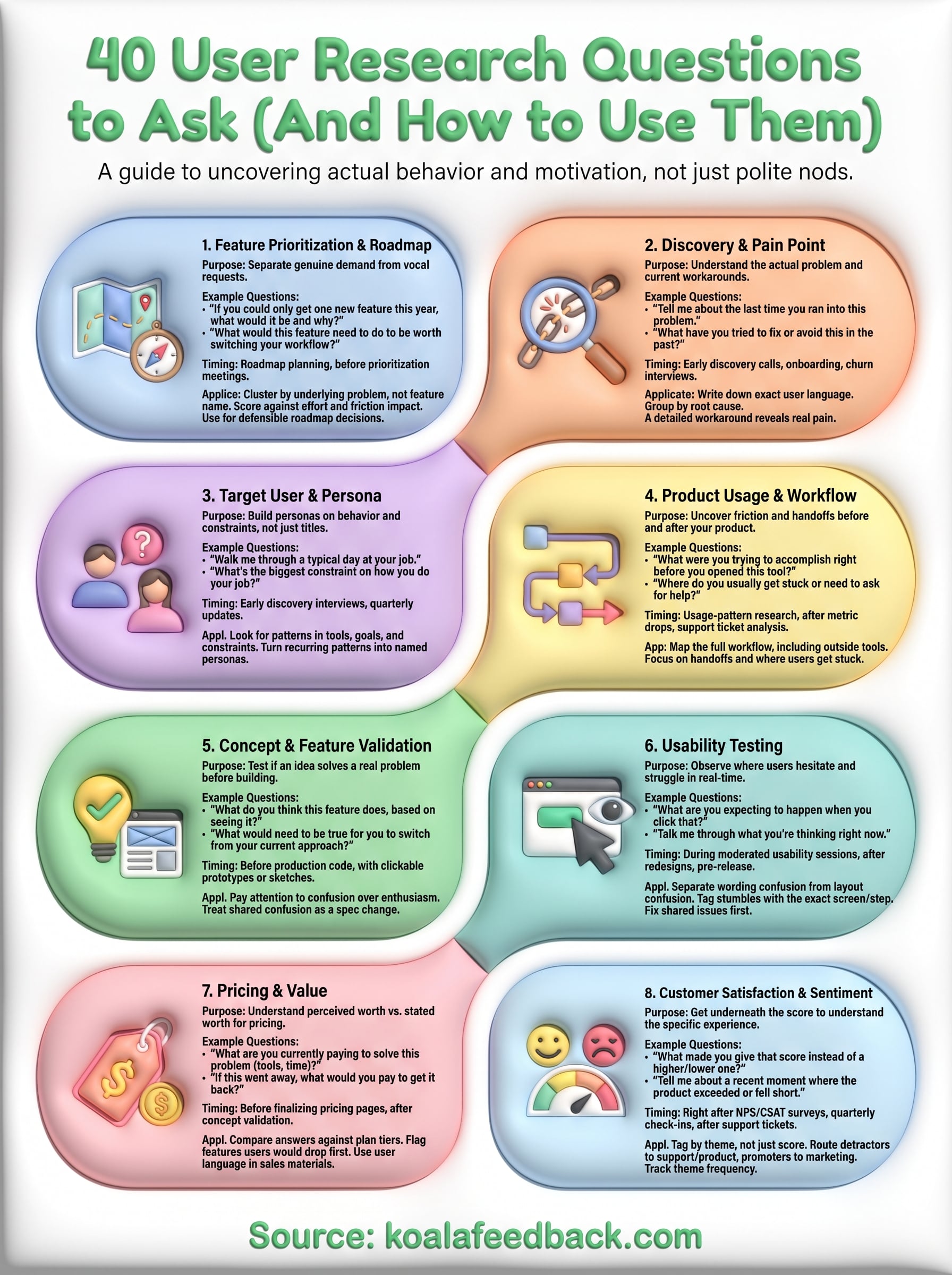
Good user research questions only pay off when you match them to the moment you're in. Pick from the roadmap and validation sets when you're deciding what to build, lean on discovery and persona questions when you're still figuring out who you're building for, and reach for usability and sentiment questions once something's already live. Trying to cram all eight categories into one session just tires out your user and muddies your notes.
Whatever you ask, the real value shows up after the interview ends, when you turn quotes and patterns into decisions your team can act on. That's where a structured feedback portal beats a folder of call recordings, since it lets you tag responses, track votes, and connect what you heard directly to your roadmap. If you're ready to turn these questions into a repeatable habit instead of a one-off exercise, start collecting and organizing that feedback with Koala Feedback.

Start today and have your feedback portal up and running in minutes.

