You need to know why customers churn, what feature they actually want, and whether your product still matches their expectations. Guessing wastes engineering time and frustrates the people you're trying to keep. A voice of customer survey gives you a structured way to ask directly instead of relying on support tickets and hallway conversations to fill in the gaps.
At its core, a voice of customer survey is a set of targeted questions designed to capture what voice of customer really means: how customers think, feel, and talk about your product, in their own words whenever possible. Done right, it tells you what to build next, what's broken, and what's actually driving satisfaction or frustration, replacing assumptions with real data from real users.
This article walks through what these surveys measure, the question types and templates that actually get useful answers, and the best practices that separate surveys people ignore from ones that shape your roadmap. We'll also cover how to turn survey responses into prioritized action, something tools like Koala Feedback are built to help with once the feedback starts rolling in.
Most product teams operate on partial information. You see support tickets, a handful of sales calls, maybe a Slack channel where your most vocal users complain. That's not a representative sample, it's a noisy filter that overweights whoever shouts loudest. A structured voice of customer survey fixes this by asking the same questions to a broad, consistent group of users, so you're comparing responses instead of guessing at patterns, which is exactly why surveys and feedback drive retention.
Teams often believe they know what customers want because they've read a few reviews or sat in on a couple of interviews. Reality check: those anecdotes rarely represent your full user base. Running voice of customer surveys on a regular cadence surfaces what's actually true across hundreds or thousands of users, not just the ones who happened to email support last week. This matters most when a roadmap decision is expensive to reverse, like committing a quarter of engineering time to a feature nobody asked for.
A single survey question, asked consistently, beats a dozen assumptions dressed up as insight.
By the time churn hits your dashboard, the customer has already decided to leave. Voice of the customer surveys, especially ones that track satisfaction or effort scores over time, flag dissatisfaction while there's still time to act. A dip in a recurring customer satisfaction score or a spike in negative sentiment on a specific feature gives your team a warning window that raw churn data never provides. You can reach out, fix the issue, or adjust messaging before the cancellation button gets clicked.
Engineering, sales, and support often pull in different directions because they're each working from a different slice of feedback. Survey data creates a shared reference point. When everyone can see the same responses, ranked by frequency and severity, arguments about "what customers really want" get replaced by a shorter conversation about tradeoffs. This is where feeding survey results into a prioritization board pays off, because raw comments become sortable, comparable data points instead of scattered opinions.
| Feedback source | Sample size | Bias risk | Best used for |
|---|---|---|---|
| Support tickets | Small, self-selected | High (only unhappy users write in) | Spotting bugs, urgent issues |
| Sales calls | Very small | High (prospects, not existing users) | Messaging, objection handling |
| Social media mentions | Variable | High (extreme opinions dominate) | Brand sentiment |
| Voice of customer survey | Large, structured | Low, if sampled well | Roadmap decisions, satisfaction tracking |
Surveys aren't just a data collection tool, they're also a signal to customers that you're listening. When you follow up on survey results with visible changes, whether that's a new feature, a fixed bug, or an updated roadmap status, customers notice. That visibility is exactly why pairing survey data with a public product roadmap works so well: respondents can see their input reflected in what you build next, which increases the odds they'll respond to your next survey instead of ignoring it.
Ultimately, the value of a voice of customer survey isn't the survey itself, it's what you do with the answers. Teams that treat survey results as a one-time report miss most of the benefit. The ones that route responses into a feedback board, organize user feedback by theme, and revisit them during planning are the ones that actually ship what customers are asking for.
Building a voice of customer survey starts before you write a single question. Skip straight to drafting and you'll end up with a generic list that doesn't map to any decision you actually need to make. Instead, work backward from the decision, then design the survey to produce an answer.
Decide what you're trying to learn before you open a survey tool. "Understand our customers better" isn't a goal, it's a wish. A real goal looks like "find out why trial users don't convert to paid" or "measure satisfaction with the new onboarding flow." Each goal points to a different set of questions, a different audience segment, and a different moment to send the survey. Write the goal down in one sentence and keep it visible while you draft, because it's the filter that keeps the survey short.
If a question doesn't serve the one goal you wrote down, cut it.
How you send the survey, and which survey format you choose, shapes your response rate as much as what you ask. In-app surveys triggered by specific behavior (like using a feature five times) get higher completion rates than cold emails, because the context is fresh. Email works better for longer surveys or when you need responses from users who aren't currently logged in. Match the method to the goal:
Word choice matters more than most teams expect. "How much do you love our new dashboard?" already assumes a positive answer and skews your data. Neutral phrasing, like "How would you rate the new dashboard?", gets you an honest distribution instead of a flattering one. Keep each question focused on a single idea, avoid double-barreled questions that ask two things at once, and put open-ended fields at the end so they don't derail structured answers earlier in the survey.
Different goals call for different question sets, and reusing one generic survey across every use case is why so many surveys underperform. Below are the four situations product teams ask about most often, along with question examples you can adapt directly. Match the questions to the goal from the previous section, not the other way around.
Satisfaction tracking works best as a short, recurring pulse of questions that measure CSAT rather than a long annual survey. Keep it to two or three questions so it's fast enough to run monthly without fatiguing your users.
A satisfaction score only means something if you track it the same way, at the same interval, every time.
Exit surveys capture information you'll never get once the account is closed, so timing matters more here than almost anywhere else. Send it during the cancellation flow itself, before the user has fully disengaged, and keep the tone neutral rather than defensive.
Feature-focused questions should surface both what customers want and how badly they want it, since demand without urgency doesn't tell you much about sequencing. Pairing these with a prioritization board for collecting and ranking feature requests turns raw answers into a list your team can actually plan around.
Early-stage questions catch friction before it becomes a churn statistic, which makes onboarding one of the highest-leverage places to survey. Trigger these a few days after signup, while the experience is still fresh.
Notice the pattern across all four sets: each question ties back to a decision someone on your team will actually make, whether that's a fix, a feature, or a follow-up call.
Writing a voice of customer survey from scratch every time wastes effort you could spend analyzing responses instead. Start with one of the templates below, or one of these 10 satisfaction survey templates, then trim or adjust the wording to match your product's voice. Each one maps to a goal from the previous section, so pick the template that matches what you're actually trying to learn.
Use this when you need a quick, comparable loyalty metric you can track quarter over quarter. It's short enough to run without annoying your user base.
1. On a scale of 0-10, how likely are you to recommend [product] to a colleague?
2. What's the main reason for your score?
3. What's one thing we could do to improve your experience?
This works well right after a support interaction or a feature release, when the experience is still fresh in the customer's mind, and there are 13 feedback form examples covering the other moments.
1. How satisfied are you with [feature/interaction]? (Very unsatisfied to Very satisfied)
2. What worked well?
3. What would you change?
Send this to a segment of active users when you're deciding what to build next. Pairing responses with a prioritization board turns raw votes into a ranked list your team can plan sprints around.
1. Which of these features matters most to you? (list options)
2. How disappointed would you be if we never built it? (Very / Somewhat / Not at all)
3. Is there a feature not listed here that you'd add?
A template only works if you actually use the answers, otherwise it's just a form nobody reads.
Trigger this during cancellation, not after the account is already closed, so you capture the real reason while it's still fresh.
1. What's the main reason you're canceling?
2. Was there a specific gap or limitation that pushed this decision?
3. What would have changed your mind?
Every one of these voice of customer survey templates feeds the same downstream process: collect responses, route them into a shared feedback portal, and let your team vote and comment on what surfaces. That's the difference between a template that generates a report nobody opens and one that shapes next quarter's roadmap.
Getting responses to a voice of customer survey is only half the battle. A 40% response rate on badly worded questions gives you worse data than a 15% response rate on a tight, well-timed survey. The practices below, along with these eight rules for designing satisfaction surveys, focus on the mechanics that actually move both numbers at once: how many people respond, and how much you can trust what they say.
Length kills completion rates faster than almost anything else. Every question you add past the fifth one costs you respondents, especially on mobile. Cut anything that doesn't map directly to the goal you wrote down before drafting, and resist the urge to "ask while you have them." A three-question survey with a 60% completion rate beats a fifteen-question survey with a 12% completion rate, because you actually get a representative sample instead of just the most patient users.
Every extra question is a tax on your response rate, so spend that budget carefully.
Sending surveys is a timing problem as much as a wording problem. Trigger requests around specific events instead of blasting your whole user base on a fixed calendar date:
Timing like this raises both response rates and accuracy, because people describe what just happened far better than what happened three months ago.
Nothing tanks future response rates faster than a survey that visibly goes nowhere. Users remember when they answered a question and nothing changed. Publishing what happened with the feedback, through a changelog, a status update, or a public roadmap, tells respondents their input mattered and makes them more likely to answer next time.
Averaging all responses together hides the story. A satisfaction score of 7 might mean everyone's mildly happy, or it might mean your power users love the product and your trial users are ready to leave. Break results down by plan tier, tenure, or usage level before you draw conclusions, and route the tagged responses into a feedback portal you can set up quickly, where patterns by segment are easy to spot rather than buried in a spreadsheet.
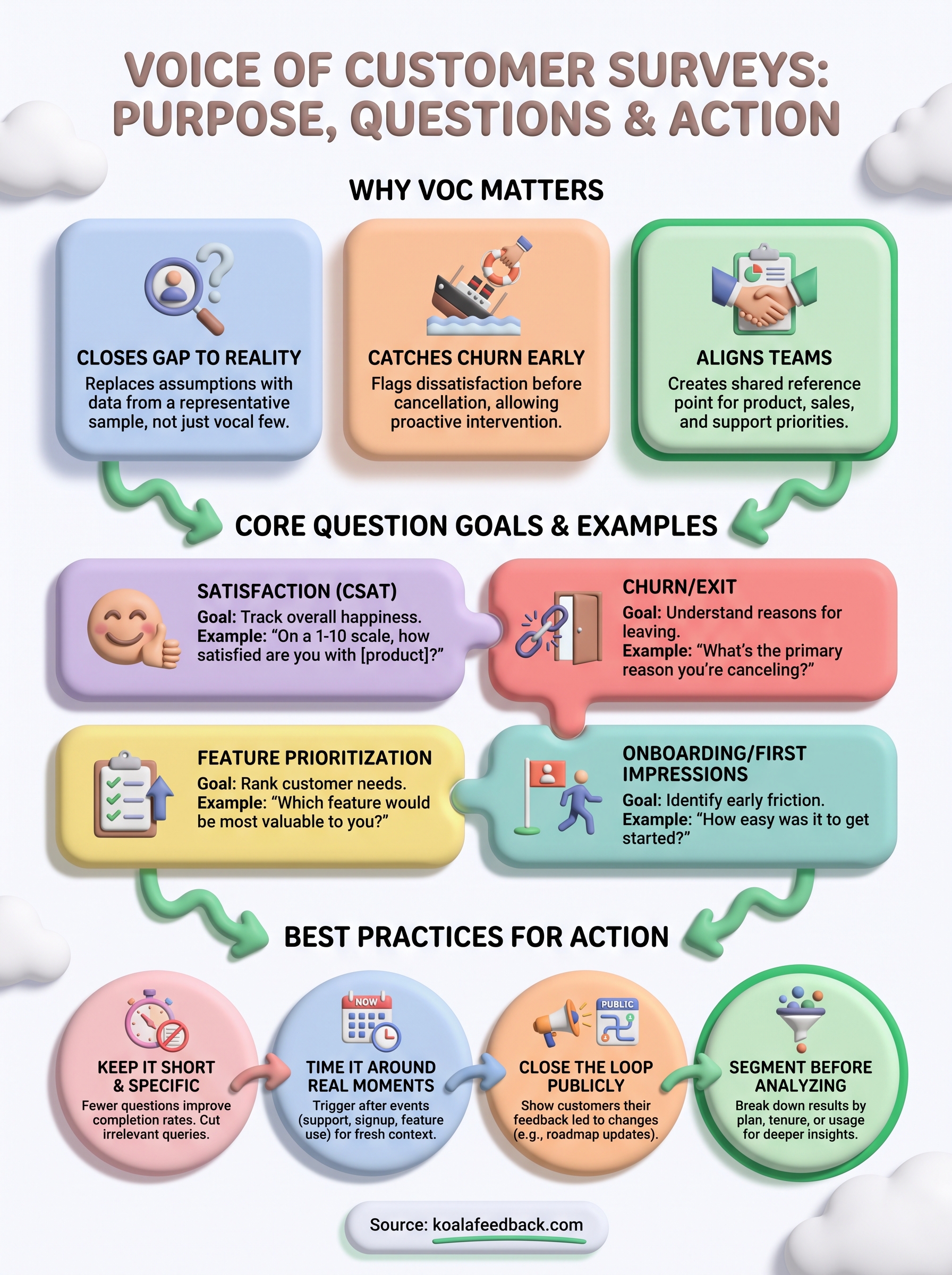
A voice of customer survey only pays off when the answers change something. Write the goal first, ask fewer questions than you think you need, and time each send around a real moment in the customer's experience rather than an arbitrary calendar date. That's what separates a survey people actually finish from one they abandon at question three.
Collecting responses is the easy part. The harder, more valuable work is routing them into a shared board where your team can vote, tag by theme, and see which requests show up again and again, then closing the loop so customers see their input reflected in what ships next.
That's the exact workflow Koala Feedback is built for: capture survey responses and prioritize them in one place, then publish a roadmap that shows customers you were listening. Start there, and your next survey gets better answers than this one did.

Start today and have your feedback portal up and running in minutes.

