Most product launches fail not because the product is weak, but because nobody mapped out what happens between "it's ready" and "customers are using it." You build something your users have been asking for, then scramble to write announcement emails and update your homepage the week before release. A solid strategy for product launch replaces that scramble with a repeatable process.
This guide gives you a product launch strategy framework you can actually follow, not just theory about market positioning. You'll get the specific steps for planning a product launch, from setting goals and segmenting your audience to sequencing your messaging across support, sales, and marketing channels so everyone says the same thing at the same time.
We'll also cover something most launch guides skip: how the feedback you've already collected from users should shape what you launch and how you talk about it. If you're planning to launch a new product built on customer requests, your launch messaging practically writes itself once you know which features people actually asked for and voted on.
A product launch is not a marketing event, it's a coordination problem. Every team, from support to sales to marketing, needs to say the same thing at the same time, and they need to say it to the right audience. When you skip the planning phase, you end up with a support team fielding questions nobody briefed them on, a sales team pitching a feature that isn't even live yet, and a homepage banner that goes up three days after your most engaged users already found out through a random tweet. None of that is a product problem. It's a strategy for product launch problem, and it's entirely avoidable.
A launch without a strategy isn't a launch, it's an announcement you hope people notice.
Companies that treat launches as an afterthought tend to repeat the same mistakes: rushed messaging, mismatched expectations, and a spike in support tickets from users who don't understand what changed or why. Research from McKinsey on new product introductions has repeatedly found that cross-functional alignment, not product quality alone, is what separates launches that hit their revenue targets from those that quietly underperform. If your teams are guessing at what to say, your customers will notice the inconsistency before your competitors do.
Below is what tends to happen when a team launches without a documented plan versus when they follow a product launch strategy framework from day one:
| Situation | No strategy | Documented strategy |
|---|---|---|
| Messaging | Different pitch from every team | One consistent value proposition everywhere |
| Timing | Reactive, tied to whenever engineering finishes | Deliberate, tied to market and customer readiness |
| Feedback | Collected but ignored until it's a crisis | Built into positioning and roadmap decisions upfront |
| Metrics | Vanity numbers, unclear success criteria | Defined KPIs tied to business goals |
| Internal teams | Learn about the launch from customers | Briefed and equipped before go-live |
Getting this right doesn't require a 40-page document nobody reads. It requires answering a handful of questions before you write a single line of announcement copy: who is this for, why should they care, how will you know it worked, and who internally needs to know before your customers do. Planning a product launch this way turns your release from a single event into a sequence you can repeat for every future feature, which matters more than most teams realize, because you'll do this again next quarter.
Here's the part most launch advice misses: if you're running a feedback portal where users vote on requests, you already have the raw material for your strategy sitting in your data. The features with the most votes tell you exactly who's excited and why, which shortcuts the audience and positioning work most teams do from scratch. A public roadmap that shows a feature moving from "planned" to "shipped" is also a built-in audience of people who are primed to care the moment you announce. Ignoring that data and starting your launching strategy for a new product from a blank page is the single most common mistake we see, and it's the one this framework is built to fix.
The eight steps that follow walk through exactly how to turn that raw material, plus market research, positioning work, and internal alignment, into a launch plan you can execute with confidence rather than guesswork.
Before you write a single roadmap ticket, confirm that people actually want what you're planning to build. Too many teams skip this step because they're confident in their own vision, then launch to silence. Validating demand early is the cheapest insurance you can buy against a failed launch, and product demand validation should happen months before your strategy for new product launch takes final shape.
If you can't point to evidence that customers want it, you're not launching a product, you're launching a guess.
Go back through your feedback portal before you run a single survey. Look at which requests have the most votes, which comments show real frustration, and which threads keep resurfacing month after month. This is first-party demand data, and it's more reliable than a focus group because it comes from people already using your product, not strangers answering hypothetical questions. Sort by vote count and comment activity, then shortlist the top three to five requests that align with your business goals. If you're using a tool like Koala Feedback, this categorization work is already done for you through automatic deduplication, so you're not digging through duplicate tickets to find the real signal.
Once you've got a shortlist, test it cheaply before you commit engineering time. A few methods that work well:
Each of these should take days, not weeks. The goal isn't certainty, it's reducing risk enough that you're not betting your entire product launch strategy framework on a hunch.
Decide in advance what counts as enough signal to proceed. That might be a vote count threshold, a minimum number of confirmed use cases, or a specific revenue opportunity size. Without a threshold, it's easy to talk yourself into building something because you already started, even when the demand data says otherwise.
Once you know demand exists, figure out exactly who it exists for. Skipping this step means your marketing team writes copy for "everyone," which in practice reaches no one. Defining your target audience with real specificity, not just a vague industry label, is what lets every downstream decision in your strategy for launching a new product actually land with the right people.
A launch aimed at everyone convinces no one.
Generic personas built around company size or industry rarely tell you what someone actually needs from your product. Instead, segment by the role someone plays and the problem they're trying to solve. A product manager evaluating your feedback portal cares about prioritization data; a support lead cares about ticket deflection. Segmenting by role surfaces the specific pain point each group has, and a customer needs analysis tells you which one your messaging should actually speak to.
Rather than guessing at persona details, pull them from the same feedback portal you used to validate demand. Look at who voted for a feature, what job title they listed if you collect that, and what language they used in their comments. That language is gold: it's the exact phrasing your future customers will search for and respond to. A quick way to structure this:
Five personas built this way beat fifty built from assumptions.
Not every persona deserves equal weight at launch. Pick the one or two segments most likely to adopt early and advocate loudly, then design your initial messaging around them specifically. You can widen the net in later phases once the core group is engaged. This is also where a public roadmap pays off again: the people who voted on a feature are already segmented for you, sorted by the exact problem they wanted solved, which makes planning a product launch around a primary audience far faster than starting from a market research report.
With demand confirmed and your audience defined, write down the single sentence that explains why this feature matters to that audience. This is your value proposition, and it's the foundation every piece of launch content will build on. Skip this step and you'll end up with a homepage headline that lists features instead of outcomes, which is the fastest way to lose a prospect's attention in the first five seconds.
Customers don't buy a "categorization engine," they buy "less time sorting duplicate tickets." Translate every feature into the outcome it produces for the persona you prioritized in Step 2. A simple test: if your positioning statement could apply to any product in your category, it's not specific enough yet. Try this template to force the specificity:
For [persona], who struggle with [problem],
[product/feature] provides [outcome]
unlike [alternative], because [proof point].
Fill in the proof point with something concrete, a vote count, a customer quote, or a measurable time saved. Vague claims read as marketing fluff; specific numbers read as evidence.
If your positioning statement could describe a competitor's product just as easily, it isn't positioning yet.
Rather than inventing phrasing from scratch, mine the same feedback threads you used to validate demand and build personas. Customer language beats internal jargon every time, because it's already proven to resonate, someone wrote it in their own words when they were frustrated enough to ask for the fix. If three different users described the problem as "losing track of what customers actually want," that phrase belongs in your announcement copy, not a rewritten corporate version of it.
Don't lock in your messaging the day before launch. Share your draft value proposition with a handful of the users who requested the feature and ask if it matches how they'd describe the problem themselves. This step for launching new product strategy work takes an afternoon and prevents the awkward scenario where your announcement doesn't match how your most engaged users actually talk about their own pain point. If the reaction is lukewarm, that's a signal to revise before your sales and marketing teams build entire campaigns around language that doesn't land.
With your positioning locked, decide what "success" actually means before you go live, not after. Too many teams launch, wait a few weeks, then argue about whether it went well because nobody defined the target in advance. Setting launch goals upfront forces you to pick the two or three numbers that actually matter and decide how to measure product success, instead of drowning in every metric your analytics tool happens to track.
Start with the business reason for the launch, then work backward to the metric that proves it. A feature meant to reduce churn should be measured by retention among the segment that requested it, not by total sign-ups. A feature meant to win competitive deals should be measured by how often sales reps reference it in closed-won calls. Choosing KPIs this way keeps you from celebrating vanity numbers, like page views, instead of the product value metrics that actually tell you whether the launch achieved anything.
A launch metric that doesn't tie back to a business goal is just a number you'll forget by next quarter.
You can't measure improvement without knowing where you started. Pull your current numbers, support ticket volume on the related topic, feature adoption metrics for the persona you targeted, vote count on the original request, before launch day so you have something to compare against 30 and 90 days out. This is also where your feedback portal earns its keep again: you can watch whether the people who originally voted for the feature actually adopt it once it ships.
Keep the list short enough that everyone on the team can recite it from memory:
| Metric | What it tells you | Target timeframe |
|---|---|---|
| Adoption rate among requesters | Whether the people who asked for it actually use it | 30 days |
| Support tickets on the topic | Whether messaging and documentation are clear | 2 weeks |
| Feature-related churn or retention shift | Whether it moved the business needle you built it for | 90 days |
| Sales mentions or win-rate impact | Whether it's helping close deals | 90 days |
Five metrics or fewer keeps everyone focused, and it makes the post-launch review in Step 8 a lot faster to run.
Now that you know what you're saying and how you'll measure it, map out exactly where and when you'll say it. A go-to-market plan is the calendar and channel list that turns your positioning into actual touchpoints, emails, in-app messages, blog posts, sales decks, in the weeks around your launch. Without this step, even great messaging arrives late, out of order, or through the wrong channel for the audience you prioritized in Step 2.

A great value proposition nobody sees on time is just a document sitting in a folder.
Different audiences need different proof at different moments. Someone who voted for the feature needs a direct "it's here" email. A prospect evaluating your product for the first time needs a landing page that explains the outcome, not the changelog. Break your content into three buckets: awareness content for people who don't know the feature exists, consideration content for people comparing it to alternatives, and adoption content, like docs and in-app walkthroughs, for people who already have access. Content mapping this way keeps you from writing one generic announcement and hoping it works for everyone.
Staggering your channels lets you catch messaging problems before they reach your widest audience. A workable sequence:
Keep a simple checklist so nothing slips through during product launch planning:
[ ] Announcement email to requesters/voters
[ ] Roadmap status updated to "Shipped"
[ ] In-app changelog or notification
[ ] Blog post published
[ ] Help docs updated
[ ] Sales one-pager drafted
[ ] Social posts scheduled
Assign an owner and a date to each line before launch week, not during it. A plan that only lives in someone's head isn't a plan, it's a hope that they remember.
Your customers will not be the first to notice a gap in your launch, your own team will. Support reps get asked about a feature before they've seen a demo. Sales reps promise a release date nobody confirmed. Internal alignment is the step most teams treat as an afterthought, but it's what keeps your strategy for launching a new product from falling apart the moment real users start asking questions.
Give your support team a short brief at least a week before launch, not the morning of. They need the same value proposition your marketing team is using, a list of likely questions, and a clear answer for what happens to users who requested the feature but haven't gotten access yet. Hand them a simple document:
- What shipped and why
- Who requested it (persona, not names)
- Known limitations at launch
- Top 5 anticipated support questions + answers
- Escalation contact if something breaks
Skipping this step means your support queue becomes the place where inconsistent messaging gets exposed first, usually within hours.
Sales needs something more specific than a link to the blog post. Build a one-pager with the outcome-focused positioning from Step 3, a couple of proof points, and honest guidance on which deals this feature actually helps close. Sales enablement done well means reps stop improvising their own explanation, which protects the consistent story you built in Step 3.
If support and sales are learning about your launch from customers, your launch strategy has already failed internally before it fails externally.
Hold one short meeting, 20 minutes is plenty, where every team hears the same rollout plan at the same time. Cover the launch date, the audience you prioritized, the metrics from Step 4, and who owns each item on the content checklist from Step 5. Include whoever manages your feedback portal too, since they'll field the first wave of comments and votes once the feature goes live. Teams that skip this meeting tend to find out about launch delays or scope changes through a Slack message forwarded three times, which is exactly the kind of inconsistency your product launch strategy framework is supposed to prevent.
Timing a launch wrong can undo months of positioning work in a single week. Launching the same day as a competitor's announcement, during a holiday week, or right before your team's busiest support period buries your message under noise nobody controls. Timing your launch deliberately, instead of defaulting to "whenever engineering finishes," is one of the cheapest improvements you can make to any strategy for new product launch, and it costs nothing but a look at the calendar.

The best launch content in the world still fails if nobody's paying attention the week it goes out.
Before you lock a date, check it against a short list of conflicts that sink launches quietly. Watch for industry conferences that pull your audience's attention elsewhere, fiscal quarter-end crunches when your buyers are heads-down on budgets, and internal conflicts like a separate marketing campaign already scheduled the same week. Tuesday through Thursday mornings tend to outperform Monday chaos and Friday afternoon fatigue for email opens and in-app engagement, though you should confirm that against your own historical data rather than take it on faith.
Not every feature deserves a full press push, and treating a minor update like a flagship release burns credibility with your audience over time. Size your tactics to the actual weight of what you're shipping:
| Launch tier | Example | Core tactics |
|---|---|---|
| Minor | Small UI improvement, requested by a handful of users | Changelog entry, in-app notification |
| Major | New feature tied to top-voted roadmap items | Email to requesters, blog post, roadmap update, sales one-pager |
| Flagship | Core product shift, new pricing tier, major integration | Full sequence from Step 5, press outreach, webinar, social campaign |
Mapping tier to tactics keeps your team from over-investing in a minor update or under-investing in something that deserved a bigger push.
Once you've checked the calendar and sized the launch, commit to a specific date and communicate it internally right away. A tentative date lets every deadline in your content checklist slip quietly; a locked date forces owners to actually finish their piece on time. Share the date in the same all-hands from Step 6 so support, sales, and marketing are all counting down to the same day, not three slightly different ones.
Launch day itself should feel anticlimactic if you did the first seven steps right. Every team already knows their role, the content checklist from Step 5 is queued, and the metrics from Step 4 are ready to track from hour one. Launching a new product at this point is mostly execution, not decision-making, which is exactly the point of building a strategy instead of winging it.
The launch isn't the finish line, it's the point where the real data starts arriving.
Treat the first two days as a monitoring sprint, not a victory lap. Check adoption among the requesters and voters you identified in Step 2, scan support tickets for confusion patterns, and read every comment landing on your feedback portal in real time, leaning on basic customer feedback analysis to spot repeat themes. Monitoring launch results this early lets you catch a broken onboarding flow or a confusing changelog entry before it snowballs into a support backlog. If something's off, fix the messaging or the bug fast, don't wait for the 30-day review to notice a problem everyone already saw on day one.
Go back to the scorecard you built in Step 4 and actually pull the numbers at the 2-week, 30-day, and 90-day marks. Don't skip this because the launch felt like it went well; feelings aren't data. A quick structure for the review:
Skipping the review because the launch felt fine is how the same mistakes repeat every quarter.
Go back to the original requesters on your feedback portal and tell them the feature shipped because of their input, then ask directly what's working and what isn't. This closes the loop that started back in Step 1, and it turns a one-time launch into an ongoing product feedback loop instead of a single event. Update the roadmap status publicly, respond to the comment thread, and use what you hear to shape the next item on your roadmap. A product launch strategy framework isn't complete until the feedback from this launch feeds directly into the next one.
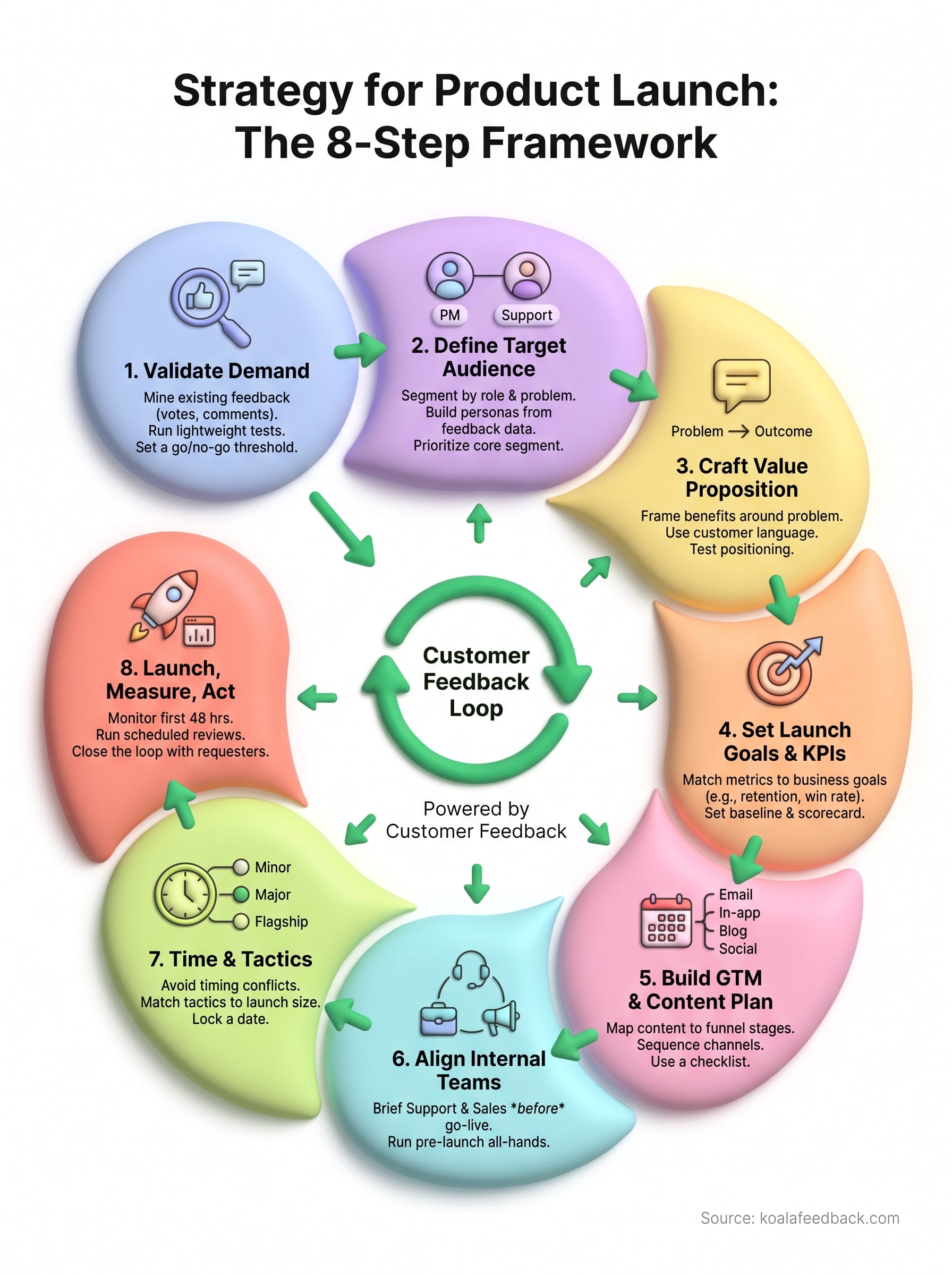
A winning strategy for product launch isn't a document you write once and file away. It's eight repeatable steps: validate demand, define your audience, sharpen your positioning, set real metrics, plan your content, align your teams, time it well, then measure and act on what you learn. Skip any one of them and you're back to scrambling the week before release, hoping your homepage banner and your sales team happen to say the same thing.
Notice how many of those steps lean on customer feedback you've already collected. Votes, comments, and roadmap activity aren't just data you glance at after launch, they're the raw material for your entire plan, from the first validation check to the final closing-the-loop email. Teams that skip this step are rebuilding from scratch every quarter.
If you want that feedback loop working before your next launch, see how Koala Feedback lets you centralize votes, comments, and your public roadmap in one place.

Start today and have your feedback portal up and running in minutes.

