You need to ship release notes today, not spend the afternoon designing a document from scratch. If you searched for a release notes template word, you're probably staring at a blank page while your product update sits ready to go and nobody outside your team knows what changed. That's a familiar spot for anyone who owns a changelog.
This article gives you exactly that: ready-to-copy formats you can paste into Word, Google Docs, or Excel and fill in within minutes. Whether you need a software release notes document template for a major version bump or something leaner for weekly agile sprints, you'll find a structure that fits, along with notes on what to include (and what to cut) so your updates stay clear to both technical and non-technical readers.
Below are 10 formats covering everything from simple bug-fix logs to detailed technical release notes, plus a few tips on when a product release notes template in a document beats a spreadsheet, and when a dedicated changelog tool saves you the copy-paste altogether.
Before you open Word at all, consider whether a release notes template word document is even the right tool for the job. A static file works fine for an internal changelog that five people read once. It breaks down the moment your user base grows, because nobody remembers to check a shared drive for updates. Koala Feedback's changelog and roadmap solve that by turning your release notes into a live, hosted page that updates itself every time you publish, no formatting, no version control on a document, no emailing the latest copy to whoever asks.

A changelog that lives on your site gets read; a Word doc buried in a shared drive doesn't.
The live changelog pairs naturally with a public roadmap, so users see what shipped and what's coming next in one place. Each entry supports rich text, images, and tags, which means you can show a screenshot of a new dashboard right next to the bullet point describing it, something a plain release notes template word document can't do without bloating the file size. You also get built-in categorization (feature, improvement, bug fix) and the ability to link an entry directly to the feedback board item that inspired it, closing the loop for the users who requested it.
This format suits SaaS teams shipping updates weekly or biweekly who need customers, not just internal stakeholders, to actually see what changed. If your support team keeps fielding "did you fix that yet" tickets, a public changelog cuts that traffic down fast because the answer is one click away. Product managers who already run their feedback and prioritization through a board benefit most, since the changelog entry can pull straight from a completed roadmap item instead of requiring a separate write-up. Teams that outgrew a software release notes template word free download, because keeping it updated across multiple stakeholders became its own part-time job, tend to land here next.
Setting up your live changelog takes less time than formatting a Word template correctly. Here's the basic flow:
1. Move a completed item on your roadmap board to "Done"
2. Open the changelog editor and start a new entry
3. Write the update in plain language: what changed, why it matters
4. Add a screenshot or short GIF if the change is visual
5. Tag it (New, Improved, Fixed) and set the publish date
6. Publish, it appears instantly on your public changelog page
Unlike a document template, you're not fighting with heading styles or table borders. Custom domains mean the changelog can live at updates.yourproduct.com instead of a generic subdomain, and your logo and brand colors carry through automatically. If you still want a document version for internal archiving or for a board update, you can export or copy the same text into any of the Word formats below. That gives you the best of both: a polished public-facing page for users, and a backup file for your own records. For teams evaluating whether to keep hand-rolling a release notes template docx every cycle, running it side by side with a live changelog for one release usually settles the question, since the time saved on formatting alone pays for itself within a month or two.
A major release means new version numbers, marketing attention, and often a price or plan change. This is the moment to reach for a full software release notes template word document, the kind with a cover section, a table of contents if the list runs long, and enough structure to cover everything from headline features to deprecated functionality. Unlike a quick changelog entry, a major release note has to work as a standalone document that sales, support, and customers all read without needing extra context.
Major releases deserve a document that can stand alone, because it's often the only thing a customer reads before deciding to upgrade.
A solid product release notes template for a major version covers more ground than a weekly update. Structure it like this:
Keep the breaking changes section near the top. Burying it in paragraph six is how you end up with angry tickets the day after launch.
This format fits product managers and marketing teams coordinating a launch that touches multiple departments. If your major release ships alongside a blog post, an email campaign, and a sales deck, this template becomes the source document everyone else pulls from. It also suits companies with compliance or contractual obligations to document version history formally, since a technical release notes template this detailed doubles as an audit trail. Teams searching for a release notes template agile approach usually skip this one for routine sprints and save it for the quarterly or annual releases where the stakes are higher.
Start by trimming sections that don't apply. Not every major release has breaking changes, and forcing that heading in with "None" looks sloppy. Adjust the level of technical detail based on your audience split, if half your readers are non-technical customers, move the engineering-heavy details (API changes, database migrations) into a linked technical appendix instead of the main body. Swap in your own heading styles and brand colors in Word's Design tab so the document matches your other customer-facing materials. If you find yourself rebuilding this same structure every quarter, that repetition is usually a sign it's time to move the customer-facing half over to a live changelog and keep the document version for internal or compliance records only.
Minor updates happen far more often than major releases, and they don't need the ceremony of a cover page or executive summary. A release notes template word document for this tier should be short enough to write in ten minutes and skimmable enough that a busy user reads it in thirty seconds. Think small feature additions, UI tweaks, and quality-of-life improvements that don't change how the product fundamentally works.
Minor release notes should take ten minutes to write and thirty seconds to read.
A minor update doesn't need the full structure of a major release. Keep it to the essentials:
Skip the executive summary and migration steps entirely unless something genuinely changed for the user. If every section header from the major release template shows up here too, you're overbuilding a document that should read more like a quick memo than a report.
This format suits SaaS teams pushing updates every one to two weeks, where each release is a handful of small changes rather than a headline feature. It also works well for internal tools teams who need to keep stakeholders informed without turning every Tuesday deploy into a production. If you're searching for a release notes template for software development that won't slow down a fast-moving team, this is closer to what you actually need than the major release format. Support teams also lean on this version because it gives them a quick reference to check against incoming tickets without wading through pages of context.
Build this one as a simple table in Word rather than a formatted document with headers and subheaders. A three-column layout, version, category, description, keeps entries consistent and easy to scan:
| Version | Category | Description |
|---|---|---|
| 4.1.2 | New | Added dark mode toggle in settings |
| 4.1.2 | Improved | Faster load time on the dashboard |
| 4.1.2 | Fixed | Resolved export button not responding on Safari |
Append new rows at the top each release so the newest changes stay visible without scrolling. If you're publishing these externally, consider whether typing them into Word every week is worth the time compared to logging the same entries directly in a changelog tool, where tagging and formatting happen automatically and the history builds itself.
A hotfix release note has one job: tell people exactly what broke, what got fixed, and whether they need to act right now. This isn't the place for feature highlights or roadmap teasers. A release notes template word document built for hotfixes should be short, urgent, and stripped of anything that slows down the reader from getting to the fix.
A hotfix note exists to answer one question fast: do I need to do something right now?
Keep this template narrow and factual. Security patches especially need a consistent structure so support and customers know exactly where to look:
Security releases often reference a CVE identifier from the National Vulnerability Database, so leave room for that reference even if you don't need it every time. Skip marketing language entirely here. Nobody reading a hotfix note wants to hear that a critical vulnerability patch "enhances the user experience."
This format fits engineering and security teams who need to communicate urgent, narrow fixes without waiting for the next scheduled release. It also suits companies with compliance requirements around vulnerability disclosure, where a documented, timestamped record of what was patched and when matters as much as the fix itself. If your support team fields calls asking "is this the update that fixes the login bug," a hotfix template answers that before the phone even rings. Teams searching for a technical release notes template built for speed rather than polish usually land here, since a hotfix note that takes an hour to format is an hour too slow.
Strip formatting to the minimum. Bold the severity level and required action so they're impossible to miss on a skim, and skip the cover page, table of contents, or executive summary you'd use for a major release. If your hotfix affects multiple products or plans, add a short table listing which ones are impacted instead of writing it out in paragraph form. And if hotfixes happen often enough that you're rebuilding this document every few weeks, publish them through a live changelog tagged "Fixed" instead, so the history and severity tags stay searchable without extra formatting work on your end.
Agile teams ship on a cadence that doesn't match the quarterly rhythm of a major release doc. If you're running two-week sprints, you need a release notes template agile teams can fill out during the last hour of the sprint, not something that requires a separate meeting to compile. This template ties directly to sprint numbers and story points instead of version numbers, which makes it easier to trace a release note back to the ticket that produced it.
An agile release note should map to your sprint board, not force you to translate it into a different format after the fact.
Build this around your sprint structure rather than a traditional version scheme:
Skip the executive summary and marketing tone entirely. This document is a working record, closer to meeting notes than a customer announcement.
This format suits development teams and scrum masters who already run sprint retrospectives and need a lightweight artifact to show what shipped, without adding overhead to an already packed sprint calendar. Product managers doing biweekly stakeholder updates lean on this one too, since it doubles as a status report they can forward without rewriting. Teams searching for a software release notes template docx that plugs into an existing agile workflow generally want this version over the major or minor release formats, because it speaks the same language as the standups and retros already happening. If your organization runs a hybrid of Scrum and Kanban, this template still works since it tracks completed work by date rather than requiring strict sprint boundaries.
Set up a Word table with columns for ticket ID, story title, status, and category, then export it straight from your sprint board if your tool supports CSV export. That saves you from retyping ticket titles by hand every two weeks. Add a filter column for "customer-facing" versus "internal only" so whoever compiles the external changelog later can pull just the relevant rows instead of reading the whole sprint log. If your team ships customer-visible changes every sprint, consider publishing the customer-facing subset directly to a live changelog instead of waiting to batch it into a monthly summary. That way the update reaches users while it's still relevant, and your internal sprint notes stay separate from what customers actually see.
Developers reading a release note don't want prose, they want to know exactly which endpoints changed and whether their integration breaks tomorrow. A technical release notes template built for APIs and SDKs has to lead with specifics: endpoint paths, parameter changes, and version numbers a developer can diff against their own code. This is the format that belongs in a docs site or developer portal, not a marketing email.

Developers don't read release notes for context, they read them to find out if their code still works.
Structure this one like a changelog a machine could almost parse, because the humans reading it will be scanning for exact strings:
Code blocks matter more here than in any other format. A quick before-and-after snippet answers a question faster than three paragraphs of explanation:
// Before
GET /v1/users/{id}

// After (v2)
GET /v2/users/{id}?include=metadata
Engineering teams maintaining a public or partner-facing API are the obvious fit, but internal platform teams need this just as much when other teams inside the company depend on their services. If your support tickets increasingly sound like "the integration stopped working after your last update," this format catches that before it happens. Anyone searching for a release notes template software development teams can hand to external developers, rather than end users, should build from this structure instead of the SaaS or enterprise formats covered next.
Formatting in Word works, but a Markdown file or a docs platform that renders code blocks properly, much like the Shopify changelog, serves developers better than a .docx ever will. If you're stuck exporting from Word, keep code samples in a monospaced font and avoid smart quotes, which break copy-pasted code more often than you'd expect. Group changes by version number strictly, never mix v1 and v2 changes in the same section, and link directly to full API reference docs instead of repeating parameter definitions you've already documented elsewhere.
Most SaaS teams ship something every week, and the audience reading about it is a mix of power users, casual users, and account managers who need a quick summary to relay to their clients. A software release notes template excel or a simple Word table works well here because you're not writing an essay, you're logging a stream of small, frequent updates that need to stay organized over months. This template sits between the minor update format and the live changelog: structured enough to track trends, casual enough to publish without a review cycle.
A SaaS update note should read like a quick status update from a teammate, not a press release.
Build this template around frequency and categorization rather than formal version milestones:
Plan-tier callouts matter more in SaaS than in almost any other format, since a feature announcement that isn't available to every reader creates support tickets fast if you don't flag it upfront.
This format fits subscription-based software companies running continuous delivery, where release notes best practices matter more than a formal document process that can't keep pace. Customer success teams lean on it heavily because it gives them a ready answer when a client asks what's new on their plan. Companies searching for a release notes template word document that scales from a two-person startup to a fifty-person product team usually start here, since the structure stays useful even as release volume grows. It also suits teams still deciding between a document and a hosted solution, since the categories map directly onto tags you'd use in a public changelog later.
Add a plan column if your product has tiered pricing, so Free, Pro, and Enterprise rows sit clearly apart instead of forcing readers to guess access. Color-code rows by category (green for new, blue for improved, red for fixed) if you're keeping this in Excel, since a quick visual scan beats reading every line. Once you're publishing weekly, retyping this into Word starts costing real time. That's usually the point where teams move the customer-facing version into Koala Feedback's changelog and keep the spreadsheet purely as an internal log for account management and support reference.
Enterprise buyers rarely read a release note the same way a startup customer does. They forward it to IT, security, and procurement, and each of those readers is scanning for something different. A release notes template word document built for enterprise software has to serve compliance officers checking for regulatory impact just as well as it serves the admin who has to schedule a maintenance window. This format leans formal, because enterprise contracts often require documented change history whether anyone reads it that day or not.
Enterprise release notes get filed before they get read, so structure matters more than tone.
Build this template with sections that map to the concerns of IT, legal, and operations rather than a single end user:
Admins scheduling maintenance windows care about exact timestamps, so avoid vague language like "early morning" and give a specific time range instead.
This format suits vendors selling to regulated industries, healthcare, finance, government, where a technical release notes template alone won't satisfy a security review. IT departments managing the rollout across hundreds of seats need the maintenance window and rollback plan spelled out before they'll approve a change ticket. Account managers handling enterprise renewals also pull from this document when a customer asks what changed since their last contract review, since it's often the only artifact that ties a release date to a specific compliance claim.
Add a signature or approval line if your internal change management process requires sign-off before a release note goes external. Keep a version history table at the bottom so auditors can trace every prior release without digging through email threads:
| Version | Date | Approved By |
|---|---|---|
| 6.2.0 | 2026-06-01 | J. Ramirez |
| 6.2.1 | 2026-07-15 | J. Ramirez |
If your enterprise customers are technical enough to want the granular detail, link out to the full technical release notes rather than duplicating them here, and keep this document focused on business impact instead.
Sometimes you don't need a document at all, you need a database you can filter, sort, and pivot. A release notes template excel setup works when your history spans dozens of releases and you want to answer questions like "how many bugs did we ship in Q2" without reading every past note. Word is built for reading top to bottom; Excel is built for slicing data sideways, and once your release log gets long enough, that difference starts to matter more than formatting.
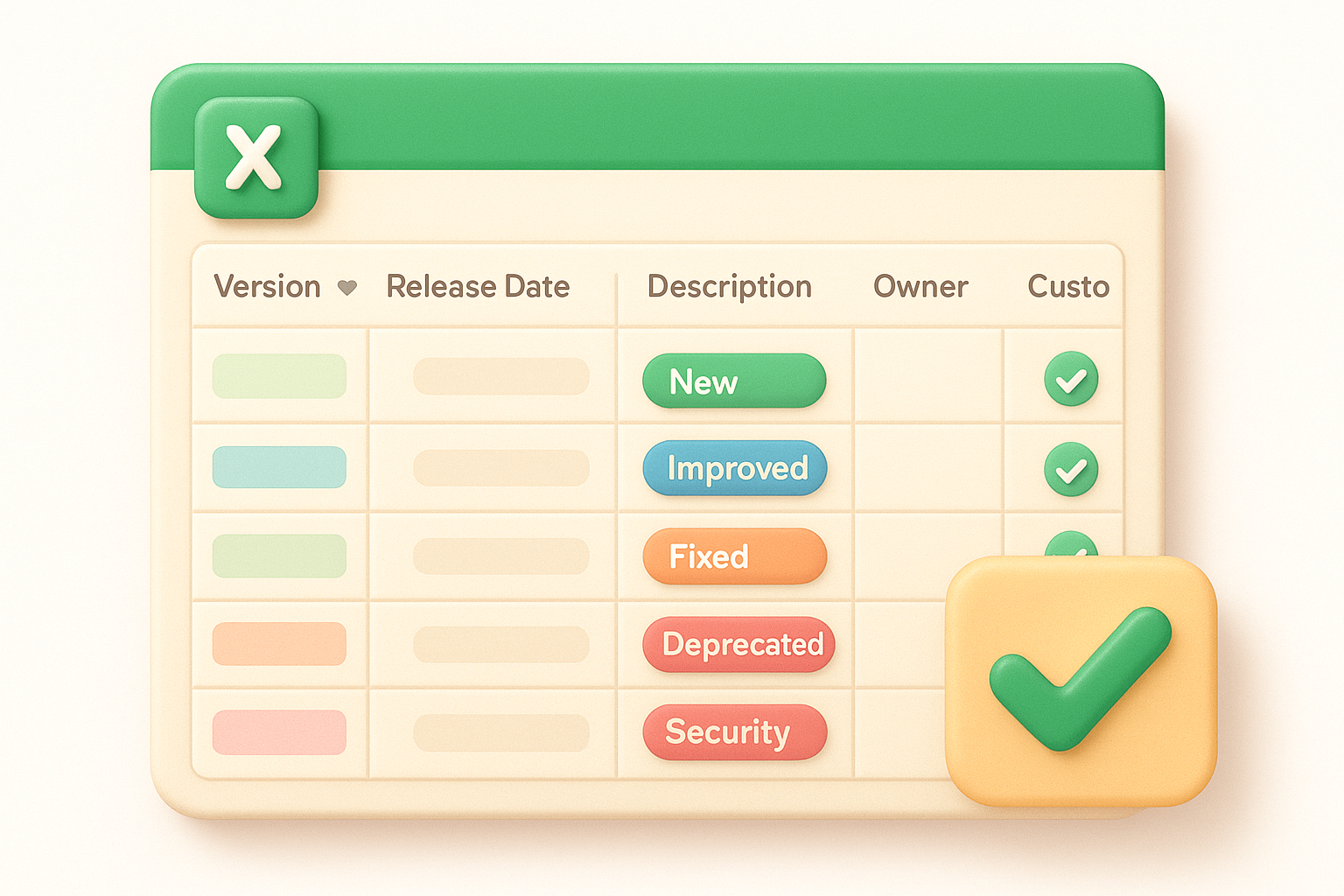
Once your release history is too long to read, it's time to make it something you can filter instead.
Set this up as a single flat table, one row per change, not one row per release, so filtering actually works:
Turn the range into an actual Excel Table (Insert > Table) rather than leaving it as plain rows. That gives you built-in filter arrows on every column header for free.
This format fits product and engineering leads who need to report release velocity to leadership, how many fixes shipped last quarter, how many features were customer-facing versus internal. It also suits teams juggling multiple products in one workbook, since a pivot table can summarize by product line without duplicating the tracking effort. Anyone searching for a software release notes template docx but actually needing to answer "how often do we ship security fixes" is looking for the wrong file format; that question belongs in a spreadsheet, not a document.
Add a pivot table on a second sheet summarizing counts by category and month, so you get a release velocity chart without building one manually. Use data validation dropdowns on the Category and Customer-facing columns so entries stay consistent instead of drifting into "bugfix" versus "bug fix" versus "Fixed." Conditional formatting works well here too, highlight Security rows in red so they never get lost in a long list. Once the sheet is filtered down to customer-facing rows, that subset is exactly what you'd publish externally, which makes it a natural feeder into a public changelog rather than a replacement for one.
Open source projects answer to a different audience than a SaaS product. Contributors want to see their pull requests credited, and maintainers want a format that generates itself from commit history instead of requiring a separate writing session. A release notes template word document doesn't fit this workflow well, since GitHub Releases, tags, and Markdown files are where this audience already lives. Still, having a Word or Markdown version ready helps when you need to paste the same notes into a project wiki or a mailing list announcement.
Open source release notes should credit contributors as clearly as they list features, since the changelog is often the only thanks a contributor gets.
Build this around what GitHub's release page already expects, following a structure similar to the Keep a Changelog format, so you can copy straight into a tag description:
Semantic versioning matters here more than in almost any other format, since developers decide whether to upgrade based on whether the version bump is major, minor, or patch. The Semantic Versioning specification is worth linking directly in your repo's contributing guide if your team hasn't standardized on it yet.
This format suits maintainers of open source libraries and CLI tools where the audience reads Markdown daily and expects issue numbers, not prose explanations. It also fits internal engineering teams publishing changes to shared packages or design systems, where crediting the contributor matters for team morale as much as for the record. A release notes template for software development built this way rarely needs customer-facing polish, since the reader is another developer deciding whether to run an upgrade command.
Most Git hosting platforms can automate release notes by drafting from merged pull requests and issue labels, so start there and edit rather than writing from scratch. Keep contributor credit lines even for small fixes, since that's often the only recognition volunteers get. Tools like git log --oneline between two tags give you a fast draft list to trim down manually before publishing.
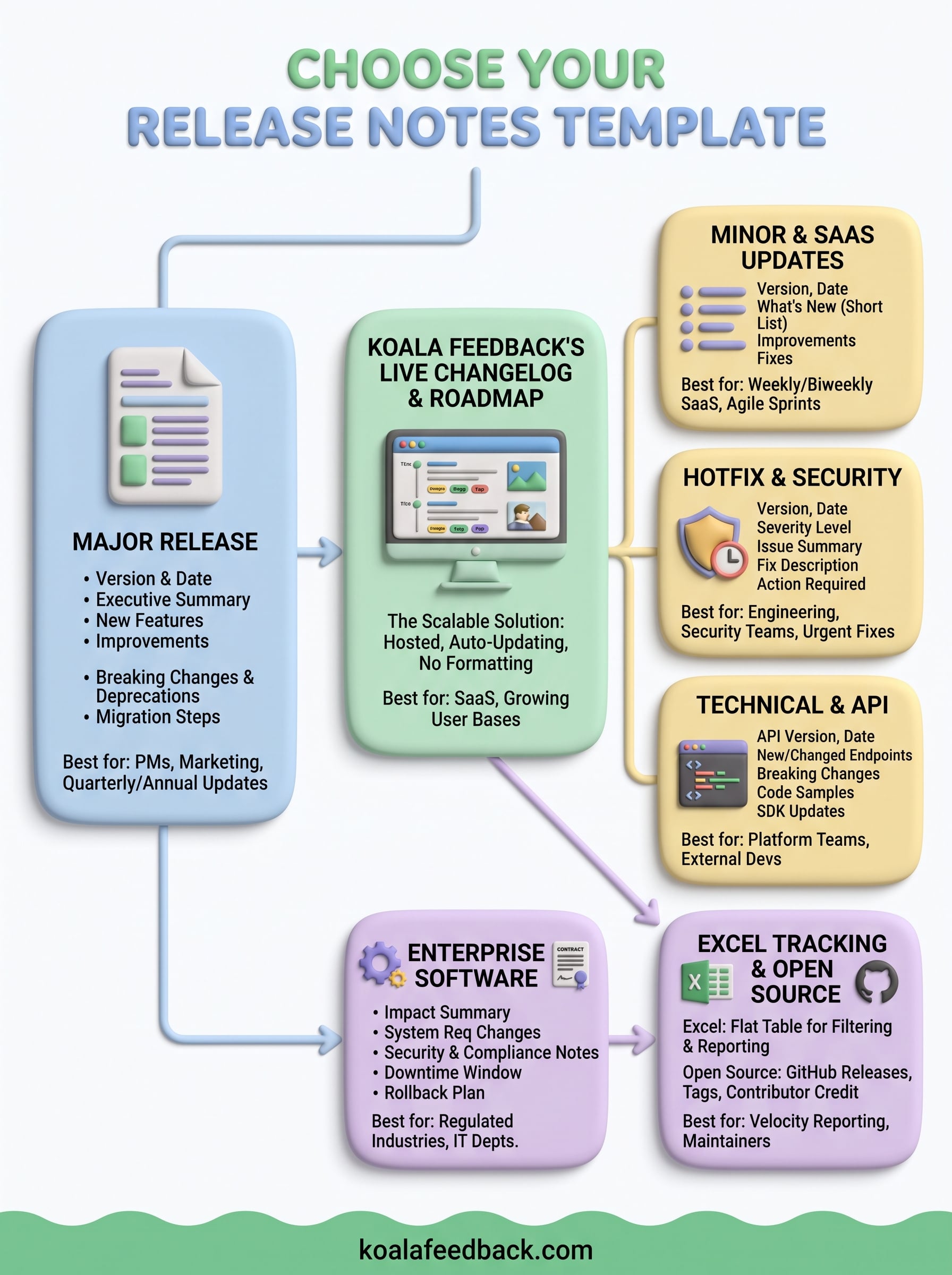
Pick based on frequency, not preference. A team shipping monthly or quarterly leans on the major release format, while weekly SaaS updates fit better in a lean table you can fill out in ten minutes. Security teams need the hotfix structure, agile teams need something that maps to sprints, and open source maintainers already have GitHub doing half the work for them. None of that changes the core problem: every release notes template word document eventually becomes a version-control headache once more than one person edits it.
That's the ceiling every format in this list eventually hits. Copying and pasting into a fresh document each cycle works until your release cadence outpaces your patience for formatting. When that happens, move the customer-facing half of your notes into a system built for it. Try Koala Feedback's changelog and roadmap and publish your next update without opening Word at all.

Start today and have your feedback portal up and running in minutes.

