Getting real user feedback on your product shouldn't require scheduling dozens of calls and watching hours of recordings. Unmoderated usability testing tools let participants complete tasks on their own time, without a researcher present, giving you authentic insights at scale without the logistical headache of live sessions.
But picking the right tool matters. Some focus on prototype testing, others on live website analytics, and a few try to do it all. Pricing models vary wildly too, from per-response fees to flat monthly rates, making it tough to compare options side by side. The wrong choice can mean overspending or, worse, collecting data you can't actually act on.
At Koala Feedback, we help teams collect, organize, and prioritize user feedback to build better products. Unmoderated usability testing is one of the best ways to generate that feedback in the first place, so we put together this guide to help you find a tool that fits your workflow and budget. Below, you'll find 13 unmoderated usability testing tools broken down by features, pricing, and what they're best suited for, so you can make a confident decision without trial-and-erroring your way through half the market.
UserTesting is one of the most recognized names among unmoderated usability testing tools, and for good reason. The platform combines a large, opt-in participant panel with video-based session recording, so you can watch real users work through your product without scheduling a single live call.
UserTesting lets you build a test by writing tasks and questions, then either recruit from its panel of over one million participants or push the test to your own users via a shareable link. Participants complete the tasks on their own devices while the platform records their screen, audio, and in some cases their camera. You get back a set of timestamped video clips you can review, tag, and share with your team. The platform also offers AI-powered highlights that surface moments of friction automatically, which cuts down the time you spend scrubbing through footage.
The AI highlight reel is genuinely useful when you're running tests with ten or more participants and can't watch every session in full.
UserTesting suits mid-size to enterprise product teams that need a reliable participant panel and want a polished, end-to-end workflow. It works well for teams running frequent, high-stakes tests on websites, mobile apps, or prototypes where video evidence helps convince stakeholders.
UserTesting does not publish its pricing publicly. All plans require you to contact sales for a quote, and costs scale based on the number of users, responses, and features you need. Based on publicly available reports, annual contracts typically start in the range of $30,000 for smaller team plans, making this one of the more expensive options on this list. A limited free trial is available so you can test the interface before committing.
The main friction point is cost. If you're an early-stage startup or running infrequent tests, UserTesting's pricing is hard to justify. The platform is also built around video sessions, so if you only need quick click-path or preference data, you'll pay for capabilities you won't use. Turnaround time from the panel is generally fast, but response quality can vary, and filtering for highly specific participant profiles sometimes limits your pool more than expected.
Maze is a prototype and design-testing platform that prioritizes fast, quantitative results over video-based sessions. It integrates directly with tools like Figma, making it a natural fit for teams running design-driven workflows who need answers before handing off to development.
Maze lets you build tests around clickable prototypes, live websites, or written questions, then share a link with participants or recruit from its built-in panel. Participants complete tasks independently, and Maze captures click paths, heatmaps, time-on-task, and task completion rates automatically. Results appear in a clean visual report you can share with stakeholders the same day without extra formatting work.
Maze is one of the few unmoderated usability testing tools that combines heatmaps and completion metrics in a single, shareable report without requiring manual analysis.
Maze works best for UX designers and product managers validating designs before development starts. It suits teams that need:
Maze offers a free plan with limited monthly responses. Paid plans start at $99 per month (billed annually) for the Starter tier, with Team and Organization plans available at higher price points. Panel responses cost extra per participant on top of your subscription.
Maze leans heavily toward prototype testing, so it's less effective for evaluating live products in real-world conditions. Its built-in participant panel is notably smaller than dedicated research platforms, which can slow recruitment when you're targeting specific audience segments or niche user profiles.
Lookback is a qualitative research platform that supports both moderated and unmoderated sessions. While many teams use it for live interviews, its self-test feature makes it a legitimate option among unmoderated usability testing tools, particularly for teams that want rich video data without moderator involvement.
Lookback's unmoderated mode, called Self-Test, lets you write a set of tasks and send participants a link to complete on their own. The platform records their screen, microphone, and front camera simultaneously, giving you the same visual richness you'd get in a moderated session without you needing to be present. You can review recordings inside the platform, add timestamped notes, and share clips directly with teammates for collaborative analysis.
Lookback's self-test recordings feel closer to a real interview than most unmoderated tools, which makes it easier to spot the hesitation and confusion that click data alone misses.
Lookback suits small research teams and freelance UX researchers who run a mix of moderated and unmoderated studies and want a single tool to cover both. It works well when video depth matters more than volume, and you're testing with your own recruited participants rather than relying on a built-in panel.
Lookback offers a free trial with limited sessions. Paid plans start at $25 per month for individual researchers, with team plans available at higher tiers depending on the number of seats and sessions needed.
Lookback has no native participant panel, so you need to recruit your own testers. It also skews toward qualitative depth, meaning you won't get quantitative metrics like task completion rates or heatmaps out of the box.
Loop11 is a task-based unmoderated usability testing platform built to test live websites and prototypes without requiring any code installation or browser plugins. It focuses on quantitative behavioral data, making it a solid choice for teams that want clear metrics rather than video-heavy qualitative research.
Loop11 lets you write tasks and questions, attach them to any live URL or prototype link, and send participants a test link to complete on their own schedule. The platform records task completion rates, time on task, navigation paths, and error rates automatically. It also supports tree testing and first-click testing natively, which sets it apart from tools that only handle standard task flows.
Loop11's ability to benchmark results across multiple rounds makes it particularly useful when you're tracking usability improvements over time, not just running one-off studies.
Loop11 works well for UX researchers and product teams who need reliable behavioral metrics on live products. It suits teams that run repeat benchmark studies and want to measure progress between design iterations with consistent data.
Loop11 offers subscription plans starting at $179 per month (billed annually) for the Rapid Insights tier. The Professional plan runs $359 per month, and enterprise pricing is available on request. All plans include unlimited questions and participants.
Loop11 has no built-in participant panel, so you need to supply your own testers or use a third-party recruitment service. The interface also feels dated compared to newer unmoderated usability testing tools, and the reporting options offer less visual polish than some competitors at similar price points.
Lyssna, previously known as UsabilityHub, is a lightweight unmoderated usability testing tool built around quick, focused research methods. It covers a range of test types that give you fast, directional answers on design decisions without needing a large research operation behind you.
You build tests using five-second tests, click tests, preference tests, card sorts, and prototype tests, then share a link or recruit from Lyssna's built-in panel. Participants complete each task independently, and results come back as aggregated visual data, including click maps and response distributions, so you can spot patterns quickly without reviewing hours of video.
Lyssna is one of the few unmoderated usability testing tools that lets you run a five-second test and get results within hours, which is useful when you need fast input before a design review.
Lyssna suits designers and product managers who need quick, low-effort feedback during early design stages. It works well for teams running rapid, iterative testing rather than deep behavioral research across full user flows.
The platform offers a free plan with limited responses per month. Paid plans start at $75 per month (billed annually) for the Basic tier, with Pro and Enterprise plans available at higher price points. Panel responses cost extra per participant on top of your subscription.
Its test types are intentionally narrow, so Lyssna won't replace a full usability platform if you need task-flow testing or session recordings. The panel size is smaller than enterprise-focused tools, which can slow recruitment when you're targeting niche audience segments.
Userfeel is a pay-per-video unmoderated usability testing platform that gives you access to real users from a global panel covering over 40 languages. It removes subscription pressure by letting you pay only when you need responses, which suits teams that test occasionally rather than on a continuous basis.
You write tasks and questions inside Userfeel's test builder, then either recruit from its multilingual panel or send the test link to your own participants. Testers complete tasks independently while the platform records their screen, audio, and webcam, giving you video footage you can review, annotate, and share with your team. Sessions run up to 20 minutes, and results typically arrive within a few hours when you draw from the built-in panel.
Userfeel's multilingual panel is a genuine differentiator when you need feedback from non-English-speaking users without running separate recruitment campaigns.
Userfeel works well for UX researchers and product teams who test infrequently and want to avoid a recurring subscription. It also suits teams that need to validate designs with:
The platform charges $60 per tester when you recruit from its panel, with bulk credit discounts available. If you supply your own participants, the cost drops to $30 per session. There is no subscription required.
Userfeel delivers limited quantitative metrics compared to tools like Loop11 or Maze. You get video recordings, but the platform lacks built-in heatmaps, task completion rates, or click-path analytics, so any quantitative analysis falls on you to do manually.
Userlytics is a full-featured unmoderated usability testing platform that combines video session recording with a broad set of quantitative metrics, giving you both the qualitative "why" and the behavioral "what" in one place. Its participant panel spans over 150 countries, which makes it one of the more globally accessible options on this list.
You build tests using Userlytics's task builder, then recruit from its international participant panel or share a link with your own users. The platform records participants' screens, audio, and webcams as they work through your tasks independently, and it also captures quantitative data like task completion rates, time on task, and System Usability Scale scores, so you get a richer picture than video alone provides.
Userlytics's combination of video footage and SUS scores in a single report cuts down the work of correlating qualitative observations with quantitative benchmarks.
This tool suits mid-size product and research teams that want both video depth and behavioral metrics without stitching together multiple platforms. It works well for teams running tests with globally distributed audiences across multiple languages and regions.
Userlytics offers a pay-per-session model starting at roughly $49 per participant when you supply your own users. Recruiting from its built-in panel costs more per session. Subscription plans are available for teams running frequent or high-volume studies, with specific pricing provided on request.
The interface has a steeper learning curve than simpler tools on this list, and your first study setup takes more time upfront. Pricing transparency is limited on the public site, so you'll often need to contact the team directly to confirm recruitment costs.
PlaybookUX is a full-service user research platform that supports both moderated and unmoderated sessions, combining a built-in participant panel with automated transcription and highlight reel creation to reduce the manual work that typically follows a research session.
PlaybookUX lets you build a test using tasks, questions, and prototype links, then recruit from its panel of over 200,000 participants or send the test to your own users. Participants complete sessions independently while the platform records their screen, audio, and webcam. Once sessions finish, PlaybookUX automatically generates transcripts and lets you clip and tag key moments, making it easier to share findings without first compiling everything manually.
The automatic transcription and clip-tagging features save meaningful time when you're pulling together a research readout for stakeholders who won't sit through full session recordings.
PlaybookUX suits product managers and UX researchers who want video-based unmoderated usability testing tools without spending hours on post-session analysis. It works well for teams that regularly need to share research findings quickly with non-research stakeholders who expect polished summaries rather than raw footage.
PlaybookUX charges $83 per month (billed annually) for the Starter plan. Pro plans run higher, and panel recruitment costs extra per participant on top of your subscription fee.
The built-in panel is smaller than enterprise-grade platforms like UserTesting, which can limit recruitment speed when you're targeting niche audience profiles. PlaybookUX also provides fewer quantitative metrics than tools like Maze or Loop11, so it fits better when your research goals lean qualitative rather than data-driven.
UXtweak is a comprehensive usability research platform that covers session recording, card sorting, tree testing, and prototype testing under one subscription. It gives you a broad range of study types without forcing you to pay for separate tools to cover each research method.
UXtweak lets you build tasks around live websites, prototypes, or specific UI components, then share a link with your own participants or recruit from its built-in panel. The platform captures click paths, heatmaps, session recordings, and task completion metrics automatically as participants work through your test on their own schedule. It also supports eye-tracking studies at standard plan pricing, which sets it apart from most unmoderated usability testing tools that reserve this capability for enterprise tiers.
UXtweak's eye-tracking is included without an enterprise contract, making it accessible for smaller teams running attention-based research on a tighter budget.
UXtweak suits UX researchers and product teams that want a wide range of research methods in one platform. It works particularly well for teams running both quantitative and qualitative studies across navigation, information architecture, and interface usability without juggling multiple subscriptions.
UXtweak offers a free plan with limited monthly responses. Paid plans start at $59 per month (billed annually) for the Plus tier, with Team and Enterprise plans at higher price points. Panel recruitment costs extra per participant on top of your base subscription.
The volume of features can feel overwhelming if your team only needs one or two study types. You may also find that the built-in panel is smaller than enterprise-grade platforms, which slows recruitment when targeting niche audience profiles.
Userbrain is a subscription-based platform that focuses on delivering a steady stream of participant feedback rather than one-off research bursts. It's built around the idea that testing should happen continuously as a regular part of your product cycle, not just before a major launch.
You build a test by recording tasks as video instructions or writing them out as text, then send the test link to your own participants or recruit from Userbrain's global panel of pre-screened testers. Participants complete tasks independently while the platform records their screen and audio. Sessions run up to 20 minutes, and results arrive in your dashboard as reviewable video recordings with timestamps you can annotate and share with your team.
Userbrain's subscription model is designed specifically for teams that want ongoing feedback rather than running studies in isolated sprints.
Userbrain suits product teams and solo researchers who want to build continuous testing into their regular workflow without managing large-scale study setups each time. It works well for teams testing the same product repeatedly across development cycles who need a low-friction way to keep feedback flowing between major releases, making it one of the more practical unmoderated usability testing tools for sustained research habits.
Plans start at $99 per month for a set number of participant sessions, with higher tiers available for larger session volumes. You can also purchase one-time session credits without a subscription if continuous testing doesn't fit your current workflow.
The platform captures video and audio only, so you won't get heatmaps, click-path analytics, or task completion metrics without manual review. Its panel is smaller than enterprise-grade platforms, which can limit recruitment speed when you need participants with very specific demographic profiles.
Trymata, formerly known as TryMyUI, is a video-based unmoderated usability testing platform that records participants as they work through your tasks and provides written transcripts alongside the footage. It positions itself as a budget-friendly alternative to enterprise-grade unmoderated usability testing tools without stripping out the core features most research teams rely on.
The platform lets you build a test with written tasks and post-task questions, then recruit from its built-in participant panel or share a link with your own users. Participants complete the test independently while the platform records their screen, audio, and webcam. You receive video recordings with written transcripts automatically attached, and you can annotate and clip key moments directly inside the platform for easier sharing with stakeholders.
Trymata's automatic transcription pairs well with its annotation tools, making it easier to pull specific moments from sessions without reviewing full recordings.
Small teams and independent researchers who want video-based usability testing at a lower price point than enterprise platforms will find Trymata a practical fit. It works well when your primary research output is qualitative video evidence rather than quantitative metrics like click-path data or automated heatmaps.
Plans start at $183 per month (billed annually) for the Basic tier, with higher plans available for larger teams and greater session volume. Recruiting from the built-in panel costs extra per participant on top of your subscription.
Without native heatmaps or task completion analytics, Trymata delivers limited quantitative data compared to tools like Maze or UXtweak. Its participant panel is also smaller than enterprise-grade platforms, which can slow recruitment when you need participants with specific demographic profiles.
Useberry is a prototype-focused unmoderated usability testing platform that lets you test designs from tools like Figma, Adobe XD, and InVision without requiring a live product. It gives you quantitative behavioral data alongside visual reporting, making it a practical option for design teams that want hard numbers before handing work off to developers.
The platform connects directly to your design tool of choice, letting you import prototypes and wrap them in tasks participants complete on their own time. Useberry captures click paths, heatmaps, first-click data, and task completion rates as participants work through your prototype independently, then populates the results into a visual dashboard you can share with stakeholders without additional formatting work.
Useberry's native prototype integrations make it one of the faster unmoderated usability testing tools to set up when your designs already live in Figma or Adobe XD.
Useberry suits product designers and UX researchers who spend most of their testing time evaluating prototypes rather than live products. It fits teams that need clear visual metrics like heatmaps and click paths without investing in a broader, more expensive research platform.
The tool offers a free plan with limited monthly responses. Paid plans start at $99 per month (billed annually), with higher tiers available for larger teams and greater response volumes.
Useberry works best with prototypes, so it's a poor fit if you primarily test live websites or native mobile apps in production. The built-in participant panel is limited, meaning you'll likely need to recruit your own testers when targeting niche or highly specific audience profiles.
UserZoom is an enterprise-grade research platform that covers a wide spectrum of study types, from unmoderated usability testing to surveys and card sorting. It targets large organizations that need scalable research infrastructure with robust governance and reporting capabilities built in.
The platform lets you build task-based tests and distribute them to your own participants or recruit from its panel of screened testers. Participants complete sessions independently while the platform captures screen recordings, task completion rates, click-path data, and satisfaction metrics in a centralized dashboard. It also includes built-in benchmarking tools that let you track usability performance over time across multiple product versions.
UserZoom's benchmarking capabilities give enterprise teams a structured way to measure usability progress across quarterly releases without rebuilding their tracking framework each time.
UserZoom suits enterprise research teams and large organizations that run high-volume, ongoing usability studies and need centralized data management across multiple product lines or regional markets.
UserZoom does not publish pricing publicly. All plans require a sales conversation, and contracts are typically structured annually. Based on publicly available reports, entry-level enterprise contracts start well above $30,000 per year, placing it firmly in the premium tier of unmoderated usability testing tools.
The platform's complexity and cost make it a poor fit for smaller teams or companies running occasional studies. Onboarding takes significant time, and you'll need dedicated research operations support to get consistent value from the full feature set.
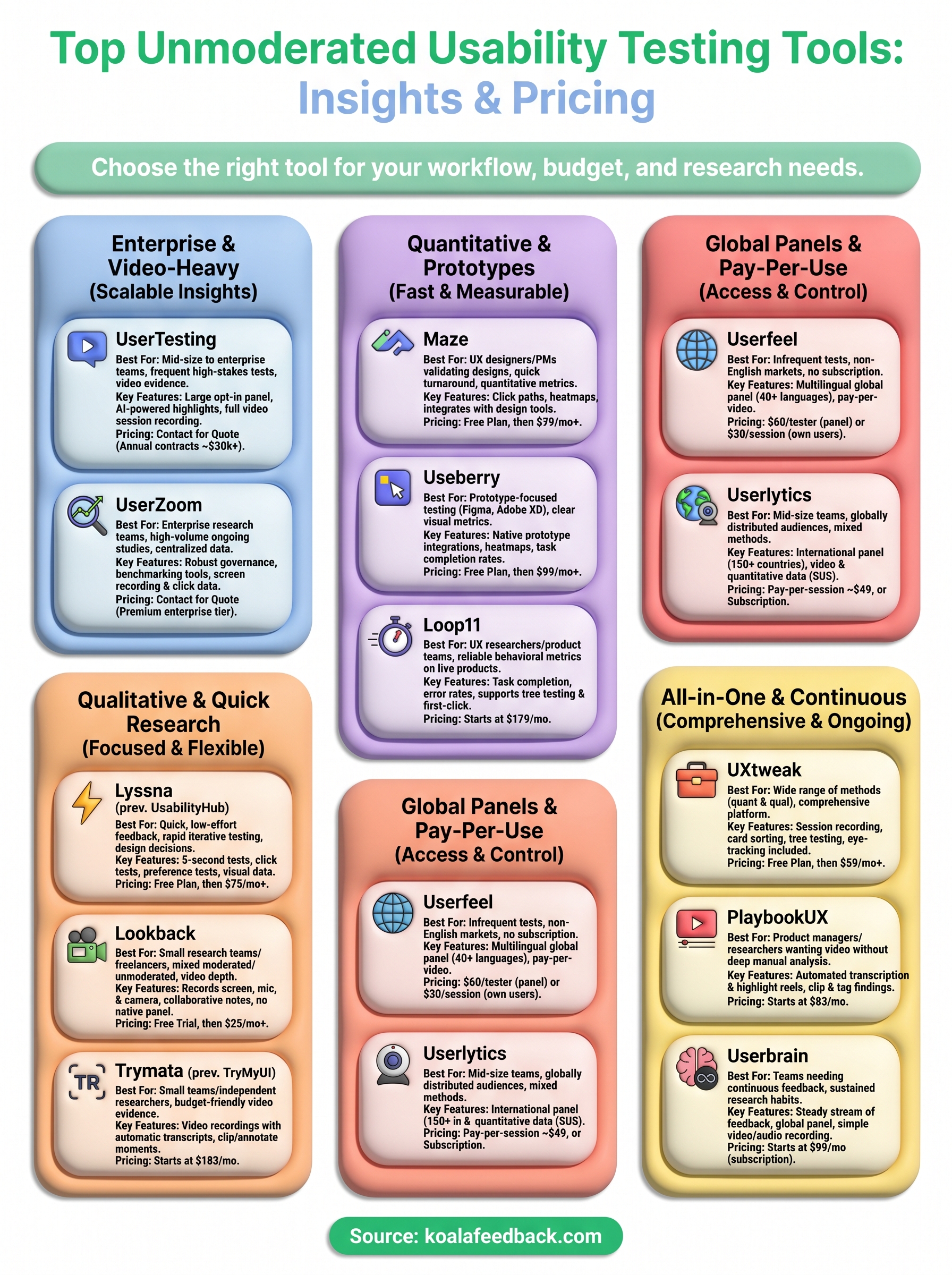
The right pick depends on what you're actually trying to learn. If you need video-based qualitative depth, tools like UserTesting, Lookback, or Trymata give you footage and transcripts to understand the "why" behind user behavior. If you want quantitative metrics on prototypes, Maze or Useberry integrate directly with design tools and return click data you can act on immediately.
Budget shapes this decision as much as features do. Enterprise platforms like UserTesting and UserZoom require significant annual contracts, while tools like Lyssna, Userfeel, and Lookback let smaller teams run studies without committing to five-figure spending. Pick the tier that matches how often you actually test, not your aspirational research schedule.
Once you've gathered insights from your unmoderated usability testing tools, you still need a structured way to act on what users tell you. Koala Feedback helps you collect, prioritize, and communicate that feedback so nothing gets lost between research and your roadmap.

Start today and have your feedback portal up and running in minutes.

