Guessing what your website visitors want is a losing game. They bounce, they get confused by a checkout flow, they spot a typo on your pricing page, and most of them never say a word. That's the gap a good feedback tool for websites closes: it gives people a simple way to tell you what's broken, what's missing, and what they'd pay more for, right where they're already browsing.
If you're comparing options, you're probably trying to solve one of two problems: collecting ongoing visitor feedback and feature requests, or running structured design reviews with your team and clients. Some tools handle both. This roundup covers the best website feedback tools for each use case, from lightweight widget tools built for SaaS to full prioritization boards that turn raw comments into a real product plan.
Below, you'll find 12 tools, including a few solid free website feedback tool options for teams testing the waters. For each one, I'll break down what it does well, where it falls short, and who it actually fits, whether you're a solo designer gathering annotations or a SaaS team building a public roadmap around user votes.
Koala Feedback is built for a different job than most tools on this list. Instead of annotating a live page or capturing bug screenshots, it gives you a dedicated feedback portal where visitors, customers, and internal teams submit ideas, vote on what matters, and watch features move from "planned" to "shipped." It's the tool to reach for when your real problem isn't finding bugs, it's figuring out which of the 200 feature requests in your inbox are worth building next.
A website feedback tool only pays off if it turns scattered opinions into a prioritized, shareable plan, not just a longer list of complaints.
Every submission lands in one place, gets automatically deduplicated, and is sorted into prioritization boards by product area, so you're never scrolling through the same request typed five different ways. Visitors can upvote and comment on existing ideas, which naturally surfaces what your audience actually cares about instead of whoever emailed loudest. Koala Feedback also ships with a public roadmap you can embed or link to, complete with customizable statuses like "Under Review," "Planned," and "Completed" so users stop asking "whatever happened to that feature I requested." On top of that, the whole portal, including your domain, colors, and logo, can be branded to match your product rather than looking like a bolted-on third-party widget.
Koala Feedback keeps pricing straightforward, with tiered monthly plans based on the number of boards, admin seats, and how much customization you need, plus a free trial so you can test the portal with real users before committing. There's no charge based on how many end users submit or vote on feedback, which matters once your portal picks up traffic, since some competitors quietly meter you on visitor volume instead of team seats. You can see current tiers and what's included at each level on the Koala Feedback pricing page.
Product managers and SaaS teams who need more than a suggestion box are the clearest fit here. If you're already drowning in feature requests scattered across support tickets, sales calls, and app store reviews, software for managing feature requests like Koala Feedback gives you one place to collect them and a public-facing way to show customers you're listening. It's less suited to agencies doing one-off visual design reviews on a client's homepage; for that job, an annotation tool later in this list will serve you better. But for anyone running an ongoing product with a growing user base, this is the kind of website feedback tool that turns feedback collection into an actual roadmap instead of a graveyard of unread suggestions.
Marker.io flips the script from Koala Feedback: instead of collecting feature requests, it's built for catching bugs and design issues on a live site before they ship to production. Anyone on your team or client roster clicks a browser extension, draws directly on the page, and the tool auto-captures a screenshot along with console logs, network requests, and browser metadata. It's a popular web design feedback tool for agencies and dev teams that need visual context, not another vague email saying "the button looks off."

The core workflow is annotation first: reviewers mark up a live page, and Marker.io bundles that markup with technical details developers actually need to reproduce the issue.
A bug report without a screenshot and console log is just a guess; Marker.io removes the guessing.
Marker.io charges per number of projects and seats rather than end-user volume, which keeps costs predictable if you're inviting lots of client reviewers. Plans typically start in the range of $39 to $69 per month when billed annually, scaling up for agencies running multiple client sites at once, with a free trial available to test the annotation workflow before you commit. Because pricing shifts periodically, check their site directly for current tiers rather than relying on older screenshots floating around the web.
Agencies and product teams doing frequent visual QA are the best match for Marker.io. If your bottleneck is developers chasing down what a client meant by "it looks weird on mobile," this tool solves that specific pain. It's not built for gathering feature ideas or running a public roadmap, so if you need both bug capture and long-term feedback prioritization, expect to pair it with product prioritization tools like Koala Feedback rather than asking one tool to do both jobs.
BugHerd works like a digital sticky note stuck directly onto your live website. Clients and testers click the browser extension, pin a comment to the exact element that's broken, and BugHerd turns that pin into a task card with a screenshot, browser details, and a CSS selector attached. It's one of the more approachable website design feedback tools on this list, built specifically so non-technical clients can flag issues without learning a project management system first.

The fewer steps between spotting a bug and reporting it, the more bugs actually get reported.
Pinned feedback is the whole point here: every comment sticks to a specific pixel on the page rather than floating in a generic form.
BugHerd prices by number of projects and users rather than by visitor traffic, which keeps it predictable for agencies juggling several client sites. Plans generally start around $39 per month for a small team on one or two projects, moving up toward $150 or more per month for agency-level plans with more projects and users included. A free trial lets you test the pinning workflow with a real client site before you commit to a paid tier, and because pricing tiers get adjusted occasionally, it's worth confirming current numbers directly on their site.
Design agencies and freelancers handling client-facing website builds get the most out of BugHerd. If your typical week involves collecting scattered feedback from a client who isn't comfortable with technical tools, the pin-and-comment model removes friction that kills adoption elsewhere. It's not built for gathering feature requests or running a public roadmap, so once your project moves past launch into ongoing product growth, you'll likely want a dedicated feedback tool for websites and a real playbook for handling feature requests rather than bug squashing.
Usersnap takes a broader approach than pure bug-catching tools, combining visual feedback widgets with in-app surveys and micro-survey campaigns. Teams embed a small feedback button on their live site or product, and visitors can leave annotated screenshots, star ratings, or answer targeted questions without leaving the page. It positions itself as a customer feedback tool for websites that also doubles as a QA tool, which makes it a reasonable middle ground if you don't want to run two separate platforms for bugs and sentiment.
Usersnap bundles several collection methods under one roof rather than forcing you to pick a single format.
Combining bug reports and sentiment surveys in one widget saves you from juggling two disconnected tools for two related jobs.
Usersnap prices its plans by number of projects and monthly responses rather than seats alone, which means high-traffic sites with lots of survey activity will climb tiers faster than a quiet internal tool would. Paid plans generally start in the range of $69 to $129 per month when billed annually, with higher tiers unlocking more projects, integrations, and survey volume. A free trial is available, though Usersnap doesn't offer a permanently free plan the way some smaller widget tools do, so budget for a subscription once your trial ends.
Product and marketing teams that want survey data alongside bug reports fit Usersnap well. If you're trying to measure satisfaction after a redesign while also catching the layout issues that redesign introduced, one widget covering both jobs beats maintaining separate tools. It's overkill if all you need is a simple way to collect feature requests, and it doesn't offer the public roadmap or voting structure that a dedicated feedback portal website owners use for prioritization would provide.
Userback combines visual bug reporting with a lighter customer feedback layer, aiming to sit between pure QA tools like BugHerd and broader customer feedback tools for websites like Usersnap. Visitors and testers click a widget, annotate a screenshot, and Userback automatically attaches session replay, console logs, and browser metadata to the report. It also lets you run simple in-widget surveys, so you can catch a layout bug and ask "how satisfied are you with this page" in the same breath.
A feedback widget that only captures bugs misses half the picture; pairing bug reports with sentiment data tells you what to fix and whether it matters.
Userback leans on session context to save your team the back-and-forth of asking "what were you doing when this happened."
Userback prices by number of users and features included rather than end-visitor traffic, with paid plans generally starting around $79 per month when billed annually and scaling toward $200-plus for larger teams needing session replay and survey add-ons. A limited free plan exists for very small teams testing the annotation workflow, though it caps projects and users tightly enough that most growing teams outgrow it within a few weeks. As with most tools on this list, confirm current tiers directly on their site since add-ons like session replay sometimes carry separate pricing.
Product teams that want bug capture and lightweight sentiment surveys without running two subscriptions get the most value from Userback. It suits SaaS companies mid-build, still shipping frequent fixes but also curious how users feel about recent changes. Userback isn't built for public roadmaps or vote-based prioritization, so once your feedback volume shifts from "fix this" to "build this next," you'll want a dedicated web feedback tool and a product feedback strategy focused on organizing requests rather than just collecting them.
MarkUp.io strips visual feedback down to its simplest form: point at a live page, drop a comment, and share the link. There's no account wall for reviewers, no browser extension to install, just a URL that opens the page inside MarkUp's viewer with commenting enabled. It's built for teams who want a web design feedback tool that clients can use in under a minute, without a tutorial or a login screen getting in the way.

Sharing a reviewable link is the whole workflow here, and MarkUp.io keeps every piece of that link-based review lightweight.
The best feedback tool is the one your client actually opens; a link beats an extension every time adoption is on the line.
MarkUp.io runs on a free website feedback tool plan for a single user with limited projects, which covers freelancers testing the waters before committing to anything paid. Paid tiers start around $8 to $16 per user per month when billed annually, scaling up for teams that need more active projects, storage for recordings, and priority support. There's no visitor-based metering, so a review link that gets shared widely with a client's whole team won't push you into a higher tier unexpectedly.
Freelancers and small agencies doing quick visual reviews with non-technical clients get the most out of MarkUp.io. Once a client resists any tool that asks them to sign up or install something, this removes that objection entirely. It's a poor fit if you need deep technical capture like console logs or CSS selectors, or if you're managing feedback across dozens of active projects, where the lighter feature set starts to feel thin compared to a more structured website feedback tool built for scale.
Ruttl works a lot like MarkUp.io on the surface, dropping pins on a live page for instant commenting, but it pushes further into actual design collaboration. You can leave comments on a live site or an uploaded design file, and Ruttl also lets reviewers make live edits, like swapping a font size or color, that developers can accept or reject with one click. That extra layer makes it less of a pure website feedback tool and more of a lightweight design-to-dev handoff tool wearing a feedback widget's clothes.
Letting reviewers propose the actual fix, not just describe the problem, cuts out a whole round of back-and-forth guessing.
Ruttl's pin-and-comment workflow covers the basics you'd expect, then adds editing capabilities most annotation tools skip entirely.
Ruttl offers a free plan capped at a small number of projects, useful if you're testing the workflow on a single client site before paying anything. Paid plans start around $25 per month per workspace when billed annually, with higher tiers unlocking more projects, storage, and team seats rather than charging based on visitor volume. Because Ruttl adjusts its tiers periodically, confirm current pricing on their site before budgeting for a full team rollout.
Design teams and agencies that need feedback plus quick visual edits, not just comments, get the most value here. If your reviewers constantly suggest small tweaks that a developer then has to interpret and rebuild by hand, Ruttl's inline editing shortcuts that whole exchange. It's not built for collecting feature requests from a broad user base or running a public roadmap, so product teams looking for that kind of ongoing feedback tool for websites should look elsewhere on this list, particularly toward Koala Feedback.
Hotjar takes a step back from pixel-level annotation and focuses on understanding behavior across your whole site. Instead of pinning comments to a button, it records session replays, generates heatmaps of clicks and scrolls, and drops on-page surveys through the Hotjar feedback widget to ask visitors what they think while they're still browsing. Teams researching a redesign or trying to figure out why a signup form leaks users lean on Hotjar more than any pure bug-catching tool on this list.

Hotjar's strength is watching real behavior rather than waiting for someone to file a report.
Heatmaps tell you where people got stuck; surveys tell you why. Hotjar is built to give you both without switching tools.
Hotjar's free plan covers a limited number of sessions per day, enough for a small site to start spotting patterns before paying anything. Paid plans scale by monthly session volume rather than seats, starting around $39 per month and climbing well past $150 per month once your traffic grows, which means a sudden spike in visitors can push you into a higher tier without warning. Because pricing is tied directly to traffic, it's worth modeling your expected session count before committing to an annual plan.
Product and UX teams trying to understand behavior at scale, not just collect individual bug reports, get the most from Hotjar, and it's worth weighing against other options in a product analytics tools comparison. Marketing teams optimizing a landing page or checkout flow also lean on it heavily, since heatmaps expose friction that no comment widget would catch. It's a weak fit if what you actually need is a structured feedback tool website owners use to collect and vote on feature requests, since Hotjar has no roadmap or prioritization layer built in, that job still belongs to something like Koala Feedback.
Qualaroo takes a research-first approach that sets it apart from the annotation and bug-catching tools earlier on this list. Instead of pinning comments to a page, it drops targeted Nudges, small survey popups triggered by behavior, time on page, or exit intent, to ask visitors specific questions while their experience is still fresh. It's less about catching a broken button and more about understanding why someone abandoned checkout or hesitated on a pricing page, which makes it one of the more research-heavy ways to collect customer feedback among customer feedback tools for websites.
A survey asked at the right moment beats a feedback form nobody fills out later.
Qualaroo's Nudges rely on targeting logic to decide who sees a question and when, rather than showing the same static widget to every visitor.
Qualaroo prices by number of monthly survey responses rather than seats, so a low-traffic site pays far less than a busy one running Nudges across every page. Paid plans typically start around $80 per month when billed annually, moving toward $200-plus for higher response volumes and features like sentiment analysis and branching logic. There's no permanent free plan, but a trial period lets you test targeting rules on real traffic before committing, and it's worth mapping your expected monthly visitor volume first since response-based pricing can climb faster than seat-based tools.
Marketing and product research teams trying to understand visitor intent, not just catch bugs, get the most value from Qualaroo. It suits mid-size to larger sites running conversion research on pricing pages, onboarding flows, or checkout abandonment. Among the best website feedback tools for pure research, Qualaroo stands out, but it offers no roadmap, voting, or prioritization layer, so pair it with a dedicated tool like Koala Feedback once research turns into an actual backlog of features to build.
Mopinion positions itself as an all-in-one feedback analytics platform, built for teams that want to collect feedback across a website, mobile app, and email campaigns from one dashboard. Instead of a single widget type, it offers customizable forms, surveys, and feedback buttons that you can trigger by page, behavior, or exit intent, then roll all the responses into visual reports. It's a heavier lift than a simple widget tool, which makes it a better match for larger organizations already juggling feedback across multiple digital channels rather than a single website.
Feedback scattered across five channels is only useful once someone forces it into one dashboard, and that's the job Mopinion is built to do.
Mopinion's dashboard is where it earns its keep, turning raw responses into something a product or marketing team can actually act on.
Mopinion doesn't publish flat self-serve pricing the way smaller widget tools do; instead, it quotes based on the number of channels, monthly feedback volume, and features like text analytics you need. Based on publicly available information, plans generally start in the range of $259 per month for smaller teams and scale up considerably for enterprise deployments across multiple sites and apps. There's no permanent free plan, though a demo and trial period let you test the dashboard against your own data before signing a contract, and given the custom quoting, it's worth budgeting time for a sales conversation rather than expecting instant checkout.
Larger marketing and product teams managing feedback across several digital properties get the most out of Mopinion. If you're already running separate surveys on your website, app, and email newsletter and drowning in disconnected spreadsheets, consolidating everything into one system for managing customer feedback across channels solves a real reporting headache. It's overkill and pricier than necessary if you only need a single website feedback widget, and it still lacks the voting and roadmap structure that turns feedback into a prioritized backlog, so pair it with a tool like Koala Feedback once you're ready to act on what the reports tell you.
Typeform takes a completely different shape than most tools on this list, trading widgets and pixel annotations for beautifully designed, conversational forms. Instead of pinning a comment to a broken button, you build a standalone survey, embed it on your site, or send it as a link, and visitors answer one question at a time in a format that feels more like a chat than a form. It's less a web feedback tool built for bug capture and more a flexible feedback tool for websites that happens to work well for customer feedback form templates, feature request intake, and even customer research interviews.
A form that feels like a conversation gets finished; a wall of text fields gets abandoned halfway through.
Typeform's design-first approach is what sets it apart from more utilitarian survey tools, and that polish shows up in every part of the builder.
Typeform offers a limited free plan capped at 10 responses per month, which is enough to test the builder but not much else for a live site collecting real feedback. Paid plans start around $25 per month when billed annually and climb toward $80-plus per month for higher response limits, custom branding, and advanced logic features, with pricing scaling mainly by monthly response volume rather than seats. Since response caps change how usable the free tier actually is, check current limits directly on their site before assuming it'll cover an active feedback campaign.
Marketing teams and researchers who need a polished survey experience, not a bug-catching widget, get the most from Typeform. It suits one-off customer satisfaction surveys, post-purchase feedback, or lead qualification forms embedded on a website. It's a poor fit if you need live-page annotation, voting on feature requests, or a public roadmap, since Typeform has no structure for prioritizing what comes back; that job still belongs to a dedicated website feedback tool like Koala Feedback.
UserVoice closes out this list as one of the original user voice software platforms built around public voting and roadmaps, the same core idea behind Koala Feedback but aimed more squarely at large enterprise support teams. Companies embed a widget or standalone portal where customers submit ideas, upvote existing ones, and track status changes, while internal teams route that same feedback into help desk and product tools they already run. It's been around since the early 2010s, so you'll find it baked into a lot of established SaaS companies' support workflows.
A voting portal only earns trust if the votes actually shape what gets built next, not just what gets acknowledged.
UserVoice pairs its public roadmap with deep integrations into support platforms, which is where it tries to differentiate from lighter feedback widgets.
UserVoice doesn't publish flat self-serve pricing on its site, instead quoting based on team size, number of portals, and integration needs, which typically pushes plans into enterprise territory starting in the hundreds of dollars per month. There's no permanent free tier, and smaller teams often find the sales-driven pricing process slower than simply signing up for a self-serve website feedback tool free trial elsewhere. Budget time for a demo call before you get real numbers, since nothing is listed for instant checkout.
Larger, established SaaS companies with existing enterprise support contracts get the most value from UserVoice, particularly those already running Zendesk or Salesforce and wanting feedback data routed straight into those systems. Smaller teams and startups usually find the pricing and sales process heavier than necessary compared to a leaner, self-serve alternative like Koala Feedback, which delivers the same voting and roadmap core without the enterprise overhead.
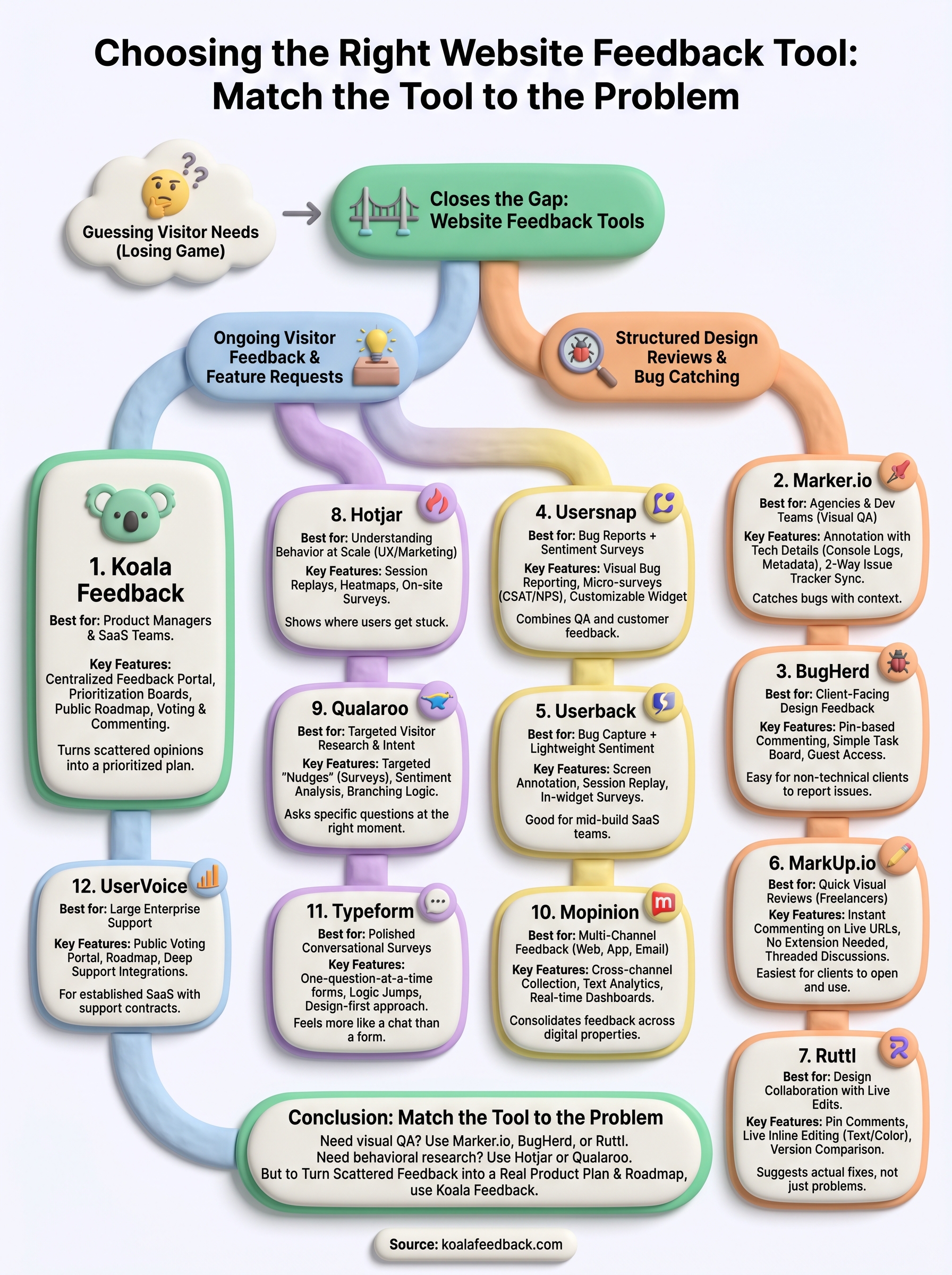
Match the tool to the actual problem, not the other way around. Need to catch bugs and design issues before launch? Marker.io, BugHerd, or Ruttl will fit that visual QA workflow better than anything else here. Trying to understand behavior across your whole site? Hotjar and Qualaroo give you the research layer. But if your real bottleneck is a growing pile of feature requests with no system for deciding what to build next, none of those tools solve that.
That's the gap Koala Feedback fills. It centralizes ideas, lets your users vote on what matters, and shows progress on a public roadmap so people stop asking what happened to their suggestion. If that's the problem you're actually trying to solve, start collecting and prioritizing user feedback with Koala Feedback and see how quickly scattered feedback turns into a real product plan.

Start today and have your feedback portal up and running in minutes.

