Picking the wrong tool for talking to customers costs you more than a subscription fee. It costs you churn, confused users, and support tickets that never needed to happen. If you're evaluating customer communication platforms right now, you already know the market is crowded with overlapping features and vague pricing pages that make comparison shopping a chore.
This guide cuts through that noise. You'll find 12 platforms worth considering in 2026, broken down by what each one actually does best, whether that's live chat, email automation, in-app messaging, or feedback collection and roadmapping. No filler descriptions copied from marketing pages, just practical notes on where each tool fits and where it falls short.
We built this list with product managers and SaaS teams in mind, since choosing among customer communication software tools usually means balancing budget, team size, and how much customization you need. You'll see where a platform like Koala Feedback fits into the picture too, particularly for teams that want customer input to directly shape their product roadmap rather than just log support conversations.
A customer communication platform is software that centralizes every conversation you have with customers, whether that's a support ticket, a live chat message, an email campaign, or a comment on a feature request. Instead of juggling five different inboxes and a shared spreadsheet, your team works from one system that tracks who said what, when, and what happened next. The category has grown fast because customers now expect to reach you through whatever channel is convenient for them: chat widget, social DM, email, or an in-app message, and they expect a fast, consistent reply regardless of the channel they picked.
A customer communication platform only earns its keep if it turns scattered conversations into decisions your team actually acts on.
Not every tool in this space does the same job, even though vendors often blur the lines in their marketing. When you're comparing customer communication software tools, it helps to know which bucket a product actually falls into:
Buyers today compare vendors before they ever talk to a salesperson, and they judge a company partly on how responsive and transparent it is in public. A slow or inconsistent support experience shows up in reviews within days. According to the U.S. Bureau of Labor Statistics, customer service representative roles remain one of the largest occupations in the country, which tells you how much volume companies are still handling manually even with automation on the rise, a gap platforms in this space are built to close (bls.gov/ooh/office-and-administrative-support/customer-service-representatives.htm).
Growing companies typically end up needing more than one type of tool from the list above. A SaaS business might run Zendesk for support tickets, Intercom for in-app nudges, and a separate feedback tool to manage the product roadmap. That overlap is exactly why the rest of this guide breaks down what each platform does best, so you can build a stack that actually fits your team instead of paying for features you'll never touch.
Koala Feedback takes a different approach than the helpdesk and chat tools on this list. Instead of managing individual support conversations, it gives you a public feedback portal where customers submit ideas, vote on what matters most, and watch their requests move through your roadmap. If your biggest communication gap isn't answering tickets fast enough but rather knowing what to build next, this is the tool built for that job.
The loudest support queue doesn't always tell you what to build next, a well-run feedback board does.
Customers post ideas directly into a branded portal, and the platform automatically groups similar submissions so your team isn't sorting duplicates by hand.
Product managers and SaaS teams that want customer input to shape the actual product roadmap, not just resolve one-off complaints. It suits companies that already have a support tool for day-to-day tickets but lack a structured way to collect and prioritize feature requests. Teams that value transparency with users about what's coming next, rather than staying quiet until launch day, get the most out of it.
Koala Feedback offers tiered monthly plans that scale with the number of tracked users and boards, along with a free trial so you can test the portal before committing. Pricing sits well below most full helpdesk suites, since it solves one job well instead of bundling ticketing, chat, and automation you may not need.
Zendesk has been the default answer to "what helpdesk should we use" for over a decade, and it still holds that spot for a reason. It started as a ticketing system and has since grown into a full customer service suite that handles email, chat, phone, and social messaging from one shared inbox. Larger support teams lean on it because it scales past a handful of agents without falling apart, something smaller helpdesk tools often struggle with once ticket volume climbs.
A helpdesk only proves its worth when a customer never has to repeat their problem twice, no matter which channel they used.
Zendesk bundles a lot into one platform, which is exactly what draws in bigger support organizations.
Growing support teams with real ticket volume, meaning ten or more agents fielding requests daily across multiple channels. It's also a strong fit for companies that need detailed reporting to prove SLA compliance to leadership or customers. Teams that outgrow simpler tools like Help Scout usually land here next.
Zendesk's Suite plans start in the range of $55 per agent per month on annual billing, climbing past $115 per agent for advanced features like custom analytics and workflow automation. Costs add up fast for larger teams, so budget carefully before committing, since the per-agent model can get expensive once your support headcount grows past a dozen people.
Intercom built its name on in-app messaging before "conversational support" became a buzzword, and it still leads that space today. The platform combines a live chat widget, help center, and AI chatbot into one system that meets customers inside your product rather than waiting for them to open a support email. Sales teams often adopt it too, since the same chat widget that answers a support question can also qualify a lead before a human ever gets involved.
The best in-app message answers a question before the customer even has to type it out.
Intercom leans heavily on automation to cut down repetitive agent work, which is where most of its recent development has gone.
SaaS companies that want support and sales conversations happening in the same widget, especially product-led businesses where in-app guidance drives activation. Teams already investing in customer communication software tools for onboarding will find Intercom's behavior-based messaging fits naturally into that workflow. It's less suited to companies that mainly handle email-based support, since that's not where the platform's strengths sit.
Intercom prices its Essential plan starting around $39 per seat per month, but the features most teams actually want, like Fin AI or advanced automation, sit behind higher tiers with usage-based add-ons. Costs can climb quickly once you add resolution-based AI pricing on top of your seat count, so model your expected chatbot volume before signing an annual contract.
HubSpot Service Hub makes sense the moment your support team already lives inside the HubSpot CRM for sales and marketing. Rather than bolting on a separate helpdesk, you get ticketing, live chat, and a knowledge base that all share the same customer records your sales team already built. That shared data means an agent answering a support ticket can see the exact deal history, past emails, and website activity for that customer without switching tabs. For companies running HubSpot as their central hub, adding Service Hub often beats stitching in a standalone tool from outside the ecosystem.
Support gets faster when the agent already knows the customer's history instead of asking them to repeat it.
Service Hub pulls its strength from how tightly it connects to the rest of HubSpot rather than from flashy standalone features.
Companies already running HubSpot CRM or Marketing Hub get the most value here, since the payoff comes from unified customer data rather than any single support feature. It suits small to midsize teams that want support, sales, and marketing working from the same contact timeline instead of three disconnected systems. Businesses without existing HubSpot infrastructure will likely find better value elsewhere on this list.
HubSpot offers a limited free tier, with paid Service Hub plans starting around $20 per month per seat on the Starter tier and climbing past $150 per seat for Professional features like automation and custom reporting. Enterprise pricing requires a custom quote, and costs scale quickly once you add multiple Hubs together.
Kustomer takes a customer-centric approach that ditches the traditional ticket queue in favor of a unified timeline view, showing every interaction a customer has ever had with your company on one screen. Facebook acquired the company in 2020 to power its own customer service tools, and that backing pushed Kustomer's development toward deep automation and CRM-style data instead of just chat and email. If your support team gets frustrated hopping between systems to piece together a customer's history, this is one of the more thoughtful customer communication platforms built specifically to solve that problem.
Support stops feeling fragmented once every past order, chat, and email lives on one customer timeline instead of five separate tabs.
Kustomer treats each customer as a single record rather than a stream of disconnected tickets, which shapes most of what it offers.
Ecommerce and subscription businesses with high support volume tied to order and account data get the most out of Kustomer, since its timeline view was built around that use case. Companies already running heavily on Facebook or Instagram for customer contact also benefit from the tighter integration Meta's ownership brings. Smaller teams without complex order histories to track will likely find the platform more than they need.
Kustomer's pricing starts around $89 per user per month for its Enterprise tier, with custom quotes required for larger deployments. There's no cheap entry tier here, so budget-conscious teams evaluating customer communication software tools on a tight budget should look elsewhere on this list first.
Freshdesk built its reputation as the budget-friendly alternative to Zendesk, and it still wins that comparison for teams that don't need every enterprise bell and whistle. The platform covers ticketing, live chat, and phone support in one dashboard, with a free tier that actually works for small teams instead of functioning as a stripped-down trial. Freshworks, the parent company, has pushed hard on AI features recently, adding a chatbot layer called Freddy that handles first-response duties before a human agent gets involved.
A helpdesk that a five-person team can actually afford to run beats a feature-rich one that sits half-configured.
Freshdesk packs a surprising amount into its lower-priced tiers compared to competitors on this list.
Small to midsize support teams watching their budget will get the most value here, especially companies that outgrew a shared inbox but aren't ready for Zendesk's per-agent pricing. It also suits teams evaluating customer communication software tools for the first time, since the interface has a shorter learning curve than most enterprise helpdesks. Larger organizations with complex routing needs may eventually outgrow it.
Freshdesk offers a genuinely usable free plan for small teams, with paid tiers starting around $15 per agent per month and climbing to roughly $79 per agent for the Pro tier with advanced automation. Enterprise pricing runs higher but still undercuts most comparable platforms on this list.
Help Scout skips the ticket-number clutter that makes most helpdesks feel impersonal, opting instead for a shared inbox that looks and feels like plain email. Customers never see a case ID or a portal login unless you want them to, which matters for companies that pride themselves on a personal, human tone rather than an obviously automated support experience. Small teams that tried Zendesk and found it overbuilt for their needs often land here, since Help Scout trades enterprise routing complexity for simplicity that a five-person team can set up in an afternoon.
A support inbox that feels like a real conversation keeps customers from ever noticing they're talking to a system at all.
Help Scout keeps its feature set tight, focusing on what small support teams actually use daily.
Small businesses and startups that want support to feel personal rather than processed fit Help Scout well, especially teams under 25 agents. Companies choosing between customer communication platforms for the first time often appreciate how little setup time it demands compared to bigger suites. It's a weaker fit for larger operations needing complex SLA reporting or multi-department routing rules.
Help Scout's Standard plan starts around $22 per user per month, with a Plus tier near $44 adding advanced permissions and reporting. There's no permanent free tier, though a free trial lets you test the inbox before committing your team.
Front handles email at scale the way most people wish their own inbox worked, with shared team inboxes that let multiple agents collaborate on the same message thread without stepping on each other's replies. Unlike a traditional helpdesk that forces customers into a ticket format, Front keeps the experience looking like regular email while giving your team internal comments, assignment rules, and analytics behind the scenes. Companies that run high email volume across sales, support, and account management often pick Front because it treats every channel, including SMS and social messages, the same way it treats email.
A shared inbox only works if your team can tell at a glance who's already replied, not just who's supposed to.
Front's strength comes from making collaborative email management feel effortless rather than bolted on.
Sales, account management, and support teams that live in their inbox rather than a ticketing dashboard get the most value from Front. It suits companies that want the informality of email combined with the accountability of a shared system, particularly teams under 50 people who find dedicated helpdesk software too rigid. Larger support operations needing deep SLA reporting will likely outgrow Front's lighter feature set.
Front's Starter plan begins around $19 per seat per month, with the Growth tier landing near $59 per seat for teams needing more automation and integrations. Enterprise pricing requires a custom quote and adds advanced security and dedicated support, which pushes the total cost up quickly for larger teams.
Microsoft Teams started as an internal chat and video tool but has crept into customer-facing communication for a lot of B2B companies, especially those already running Microsoft 365. External access lets you invite customers, partners, or vendors into a channel or call without them needing a paid license, which makes it a practical stand-in for account management conversations that don't fit neatly into a support ticket. It's not a helpdesk and never will be, but plenty of teams use it as the default channel for ongoing client relationships that need a mix of chat, file sharing, and video.
A tool built for internal meetings only earns its place on this list when it can also hold a real conversation with the people outside your company.
Teams leans on the broader Microsoft 365 ecosystem more than it does standalone customer service tooling.
Companies already standardized on Microsoft 365 that need a lightweight way to keep recurring client conversations organized outside of email get the most value here. It suits account managers and consultants running regular calls with a defined set of clients rather than support teams fielding high ticket volume from anonymous users. Businesses without existing Microsoft licensing will find little reason to adopt Teams purely for customer communication.
Microsoft Teams comes bundled with most Microsoft 365 Business plans, starting around $6 per user per month, with a free tier available for basic chat and video needs. There's no separate customer-communication pricing tier, since Teams was never built as a dedicated support product.
Zoom became the default video call tool for millions of teams almost overnight, and it has since expanded well past meetings into a broader customer communication platform. Beyond the video call product most people know, Zoom now bundles webinars, Zoom Phone for voice, and a chat client, which lets support and sales teams run onboarding calls, demos, and check-ins without switching software. Companies that need face-to-face conversations with customers, not just text-based tickets, often keep Zoom as the go-to for anything that benefits from a live, visual walkthrough.
A support ticket can explain a problem, but a screen share usually solves it faster.
Zoom's customer-facing strength sits in real-time video and voice rather than asynchronous messaging.
Sales, customer success, and onboarding teams that rely on live calls to close deals or walk customers through setup get the most value from Zoom. Businesses running frequent training sessions or webinars for their customer base also lean on it heavily. Support teams needing a full ticketing system should still pair Zoom with a dedicated helpdesk, since it was never designed to log or organize conversation history the way Zendesk or Help Scout do.
Zoom offers a free tier with 40-minute meeting limits, while paid plans start around $13.33 per user per month for Pro and climb past $21 per user for Business features like larger meeting capacity. Zoom Phone pricing runs separately, often starting around $10 per user per month depending on calling regions.
Twilio takes a completely different route than every other tool on this list, since it's not really an app your support team logs into. It's communication infrastructure that developers wire directly into your own product, powering SMS, voice calls, WhatsApp messages, and email at scale. Companies build things like appointment reminders, two-factor authentication codes, or automated delivery updates on top of Twilio's APIs rather than expecting agents to type replies manually. If you need customer notifications baked into your own app instead of a separate inbox, Twilio is usually the answer.
The best customer message is sometimes the one your customer never has to open a support app to receive.
Twilio's value comes from flexibility rather than a polished dashboard, since most of the work happens through code.
Development teams building automated, high-volume notifications directly into their own product get the most out of Twilio, especially companies sending millions of transactional messages monthly. It suits engineering-led organizations more than support teams, since there's no built-in agent workspace or ticket queue here. Teams comparing customer communication software tools for a standalone helpdesk should look elsewhere on this list; Twilio solves a different problem entirely.
Twilio prices per message, call minute, or verification, starting at fractions of a cent for SMS in the US and climbing based on destination country and channel. There's no flat monthly seat fee, so costs scale directly with your message volume, which makes budgeting trickier without usage forecasting up front.
Drift popularized the idea of conversational marketing, using live chat as a sales tool rather than just a support channel. The platform sits on your website and qualifies visitors in real time, routing hot leads straight to a sales rep while handling routine questions with a bot. Salesloft acquired Drift in 2024, folding it into a broader revenue platform, which shifted its focus even more toward pipeline generation than customer support. Teams evaluating customer communication platforms for marketing and sales alignment, rather than ticket resolution, tend to land on Drift before anything else on this list.
A chat widget that qualifies a lead before a rep ever joins the conversation saves your sales team hours every week.
Drift's feature set leans toward revenue generation more than day-to-day support work.
Marketing and sales teams running account-based strategies get the most value from Drift, particularly B2B companies with longer sales cycles where qualifying leads early matters more than fielding support tickets. It suits businesses that already treat their website as a top-of-funnel sales channel rather than just a help center. Support-focused teams looking for ticketing or a shared inbox should look elsewhere on this list, since Drift was never built for that job.
Drift no longer publishes self-serve pricing, requiring a custom quote through Salesloft's sales team since the acquisition. Expect costs to sit closer to enterprise sales tools than to budget-friendly helpdesk software, since Drift positions itself around pipeline value rather than per-agent support pricing.
Start with the problem you actually have, not the feature list a vendor hands you. A support team drowning in tickets needs a helpdesk like Zendesk or Freshdesk, while a product team that can't figure out what to build next needs a feedback and roadmapping tool like Koala Feedback instead. Mixing up those two jobs is the most common reason companies end up paying for software nobody uses six months later.
The right customer communication platform matches the job you're solving, not the longest feature list on the pricing page.
Next, map your team size and budget against the pricing model each platform uses. Per-agent pricing punishes you the moment your support team grows, while usage-based pricing like Twilio's rewards low volume but gets unpredictable at scale. Run the math on your actual headcount and message volume before you sign an annual contract, since a plan that looks cheap at 5 seats can double at 20.
Consider these questions before you commit to any of the customer communication software tools on this list:
Finally, resist the urge to consolidate everything into one tool just to simplify billing. Most growing companies run two or three platforms from this list at once, one for support tickets, one for real-time chat, and one for collecting product feedback, because forcing a single tool to do every job usually means it does none of them particularly well.
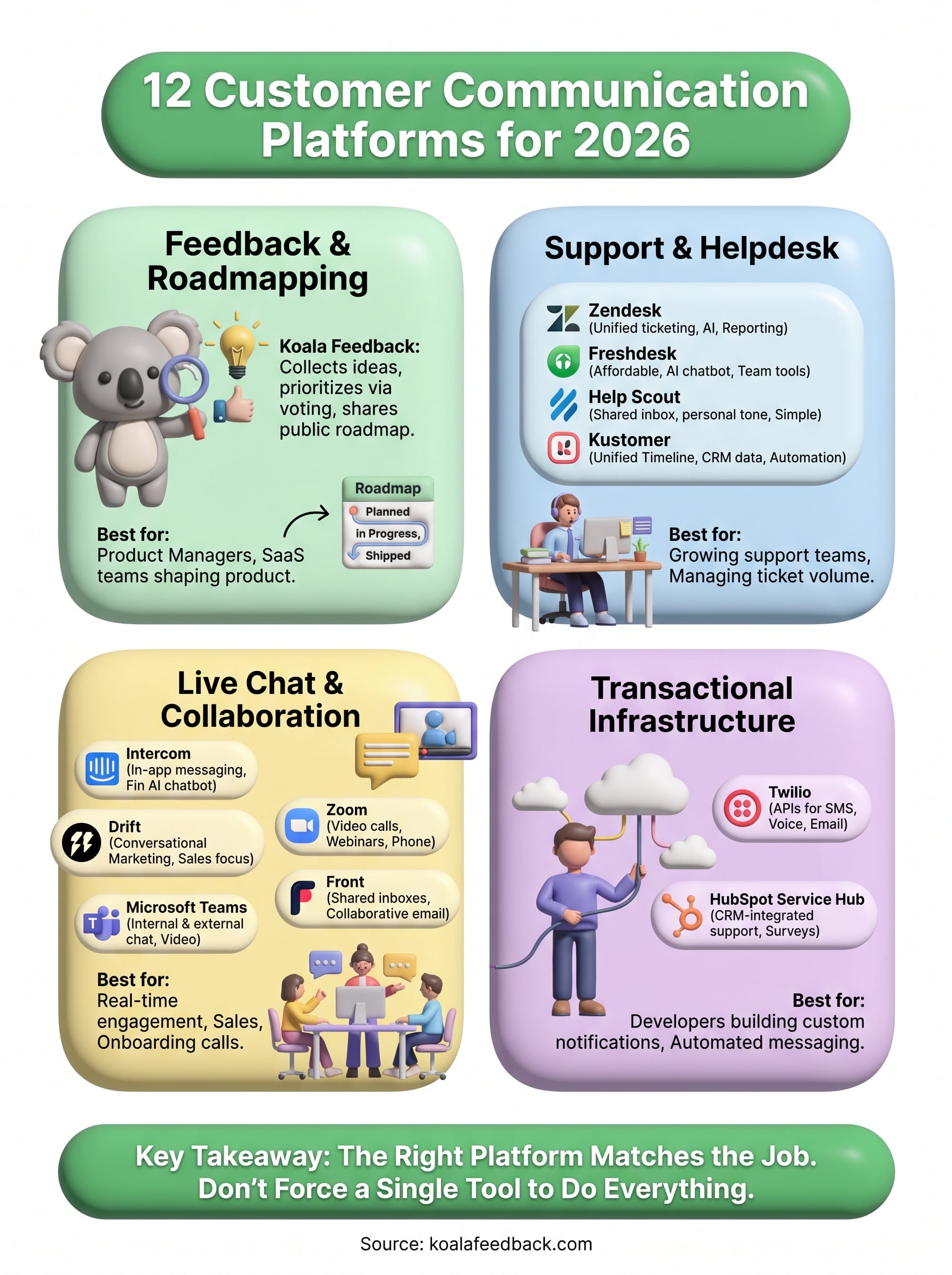
Every platform on this list solves a different piece of the same puzzle: talking to customers without losing track of what they actually need. Customer communication platforms like Zendesk and Front keep support running smoothly, Zoom and Teams handle the live conversations, and Twilio powers the automated ones. But none of that matters if you can't turn those conversations into decisions about what to build next.
That's the gap feedback and roadmapping tools fill, and it's worth treating as its own line item in your stack rather than an afterthought bolted onto a helpdesk. Customers who feel heard stick around longer, and a public roadmap does more to build trust than another canned support reply ever will.
If you're ready to stop guessing what to prioritize, try Koala Feedback free and see how a real feedback portal changes what your team builds next.

Start today and have your feedback portal up and running in minutes.

