Your customers are already talking, through support tickets, feature requests, social media messages, and chat widgets. The question is whether you're actually hearing them. Customer communication software brings all of those scattered conversations into one place, so nothing slips through the cracks and your team can respond faster and more consistently across every channel.
But picking the right tool isn't straightforward. Some platforms focus on live chat and helpdesk workflows. Others, like our own product Koala Feedback, zero in on collecting and organizing user feedback so you can prioritize what to build next and keep customers in the loop with a public roadmap. The right choice depends on where your biggest communication gaps are, and what kind of relationship you want to build with your users.
We put together this list of 13 tools that cover the full spectrum, from omnichannel messaging platforms to feedback-driven communication tools. For each one, you'll get a clear look at what it does best, who it's built for, and where it falls short, so you can make a confident decision without signing up for a dozen free trials first.
Koala Feedback takes a different approach to customer communication software than most tools on this list. Rather than focusing on support tickets or live chat, it centers on collecting structured feedback, organizing feature requests, and keeping users informed about what you're building next.
Built specifically for product teams and SaaS businesses, Koala Feedback is a feedback management platform that gives your users a dedicated portal to submit ideas, vote on requests, and track what you're actually working on. It automatically deduplicates and categorizes incoming feedback, so your team spends less time triaging and more time shipping.
When users can see their suggestions move through a public roadmap, they stay engaged with your product rather than quietly churning.
Product managers, SaaS founders, and development teams get the most value from this tool. It's the right fit if your current process involves sifting through email threads, Slack messages, and spreadsheets to figure out what customers want, and you're ready to replace that chaos with something structured and transparent.
The platform gives you a customizable feedback portal you can brand with your own domain, colors, and logo. Here's what's included:
Each of these features is designed to close the loop between your users and your product team, turning scattered input into a clear signal you can act on with confidence.
Koala Feedback offers a free plan to help you get started without a financial commitment upfront. Paid plans scale with your team size and feedback volume, so you're not forced into an expensive enterprise contract before you've had a chance to validate whether the tool fits your workflow.
Front is a shared inbox and customer communication software platform that pulls email, SMS, social media messages, and chat into a single interface your whole team can work from. It's built for teams that need to handle high volumes of customer conversations without losing the personal feel of a one-on-one email.
Think of Front as a team email client with built-in collaboration features. Your team can assign conversations, leave internal comments, and set up automated workflows without the customer ever seeing behind the scenes. Every message, regardless of channel, lands in one place.
When your support and sales teams share the same inbox, handoffs become faster and context never gets lost.
Front works best for customer-facing teams at mid-size companies that handle large volumes of email-based support or sales conversations. If your team relies on shared email aliases like support@ or sales@, Front gives you structure and visibility that a standard email client simply cannot match.
The platform covers the core communication workflows that high-volume teams depend on every day. Here's what you get:
Front's Starter plan begins at $19 per seat per month, billed annually. Higher tiers unlock more advanced analytics, integrations, and automation rules. There is no permanent free plan, but Front does offer a free trial so you can test it before committing.
Intercom built its reputation as a conversational support and messaging platform that blends live chat, automated bots, and product tours into a single system. It sits at the intersection of marketing, sales, and customer support, making it one of the more versatile customer communication software tools available today.
Intercom lets you reach customers inside your product through targeted messages, live chat, and AI-powered automated responses. The platform connects your support team to users at the exact moment they need help, without requiring them to leave your app or navigate to a separate help center.
When you meet customers where they already are inside your product, resolution times drop and satisfaction scores climb.
Intercom fits SaaS companies and digital-first businesses that want to combine support, onboarding, and proactive messaging in one platform. If your team needs to run automated campaigns alongside reactive support, Intercom gives you both without forcing you to stitch together separate tools.
The platform packs a lot into one interface. Here's what you get with Intercom:
Intercom's Essential plan starts at $29 per seat per month. Advanced plans covering automation and reporting run significantly higher, and costs scale quickly as your team and contact list grow.
Zendesk is one of the most widely recognized names in customer communication software, built to handle support operations at scale. It combines a robust ticketing system with multichannel messaging, a self-service knowledge base, and reporting tools that give support leaders a clear picture of team performance.
Built as a cloud-based customer service platform, Zendesk centralizes support interactions from email, chat, phone, social media, and messaging apps into a unified agent workspace. Rather than juggling multiple tabs and tools, your team works from a single interface that tracks every customer touchpoint and full ticket history in one place.
When your support team has full context on every conversation, they resolve issues faster without asking customers to repeat themselves.
This platform is the right fit for mid-size to enterprise businesses with dedicated support teams that handle high ticket volumes. If your organization needs advanced reporting, SLA management, and multi-department routing, Zendesk gives you the infrastructure to run a structured support operation without stitching together separate tools.
Zendesk packs a wide range of tools into its agent workspace, covering the full support lifecycle from first contact to resolution. The platform's core features include:
The Suite Team plan starts at $55 per agent per month, billed annually. Enterprise plans with advanced customization and AI features run considerably higher. Zendesk offers no free plan, though new accounts can access a free trial before committing.
Freshdesk is a cloud-based helpdesk platform from Freshworks that gives support teams a structured way to manage customer interactions across multiple channels. It sits in the same category as Zendesk but tends to attract teams that want strong core features without the enterprise price tag.
Freshdesk converts incoming support requests from email, phone, chat, and social media into trackable tickets within a single agent workspace. The platform includes built-in automation to route and prioritize tickets, freeing your team from manual triage so they can focus on resolving issues instead.
When your team stops sorting tickets by hand and lets automation handle routing, average response times drop noticeably within the first few weeks.
Freshdesk is a solid fit for small to mid-size businesses looking for reliable customer communication software without the steep learning curve or cost that comes with larger enterprise platforms. If your team is scaling its support operation and needs better structure than a shared inbox can provide, Freshdesk gives you a clear upgrade path.
The platform covers the essential helpdesk workflows your support team needs to run efficiently. Here's what you get:
Freshdesk offers a free plan for up to 10 agents, which is genuinely useful for small teams getting started. Paid plans begin at $15 per agent per month, billed annually, and scale up with more advanced automation and analytics.
Help Scout is a customer communication software platform built around simplicity and a personal touch. It gives support teams a shared inbox experience that feels closer to email than a traditional helpdesk, making it easier for agents to hold natural, one-on-one conversations with customers at scale.
Help Scout centers on a shared inbox model where your team handles email and live chat through a clean, straightforward interface. The platform also includes a self-service knowledge base called Docs and a customer data sidebar so agents always have full context when they respond.
When your agents can see a customer's full history in one panel, they spend less time digging and more time actually helping.
This tool works best for small to mid-size support teams that want personal, email-style communication without the complexity of an enterprise helpdesk. If tools like Zendesk feel like overkill for your current operation, Help Scout gives you the essential features without the overhead.
The platform keeps its feature set focused rather than overwhelming you with options you won't use. Here's what's included:
Help Scout's Standard plan starts at $50 per month for up to 3 users, billed annually. Higher tiers add more users and advanced reporting features. There is no permanent free plan, but a 15-day free trial lets you test the platform before committing.
Zoho Desk is a context-aware helpdesk platform that sits within the broader Zoho ecosystem, making it a natural choice for teams already running other Zoho tools. It brings multichannel support, automation, and AI-powered features into one workspace without the price tag of larger enterprise platforms.
Zoho Desk handles customer interactions from email, phone, live chat, social media, and web forms through a unified agent interface. The platform's standout capability is its context engine, which surfaces relevant customer data, past tickets, and account information alongside every conversation so your agents never start a reply without the full picture.
When agents have complete context before they type a single word, resolutions come faster and customers don't have to repeat themselves.
This platform is the right fit for small to mid-size businesses that want a capable customer communication software solution and already use other Zoho products like CRM or Projects. If your team needs tight integration across sales, support, and operations without managing multiple vendors, Zoho Desk removes that friction.
The platform covers the workflows that support teams rely on daily. Here's what's included:
Zoho Desk offers a free plan for up to 3 agents, which gives small teams a real starting point. Paid plans begin at $14 per agent per month, billed annually, with higher tiers unlocking advanced AI features and deeper customization options.
Salesforce Service Cloud is an enterprise-grade customer communication software platform built on top of the Salesforce CRM ecosystem. It connects your support operations directly to your sales and marketing data, giving your agents the most complete view of each customer available in any tool on this list.
Service Cloud handles customer interactions across email, phone, chat, and social media through a unified agent workspace called the Lightning Console. Because it sits inside Salesforce, every support conversation ties directly to the customer's full CRM record, including purchase history, open opportunities, and account details your sales team has collected.
When your support agents work from the same data your sales team uses, they can resolve issues faster and spot upsell opportunities without switching tools.
This platform fits large enterprises and growing companies that already run Salesforce CRM and need their support operation to work as a natural extension of that system. If your team needs deep customization, complex automation, and cross-departmental data sharing, Service Cloud delivers all of that within a single platform you already manage.
Service Cloud packs a broad set of enterprise tools into its agent workspace. Here's what you get:
Salesforce Service Cloud's Starter Suite begins at $25 per user per month, billed annually. Enterprise and Unlimited tiers run significantly higher, and most teams require paid add-ons to access advanced AI and automation features.
HubSpot Service Hub is a customer communication software platform built directly on top of HubSpot's CRM, connecting your support operations to the same contact records your marketing and sales teams already use. It turns customer conversations into structured data your entire organization can act on.
Service Hub gives your support team a shared inbox, ticketing system, and live chat tool that pull customer history straight from HubSpot's CRM. Every conversation your team has ties back to a full contact profile, so agents always know who they're talking to and what that person has done across your product or website before they type a single reply.
When your support data lives inside the same CRM as your sales pipeline, your team stops working in silos and starts solving problems with full context.
This platform works best for businesses already using HubSpot for marketing or sales who want their support operation to run inside the same system. If you're looking to avoid managing a separate helpdesk tool and want tight alignment between your customer-facing teams, Service Hub removes that friction entirely.
Service Hub covers the core workflows your support team needs to run efficiently without jumping between platforms. Here's what's included:
HubSpot Service Hub offers a free plan with basic ticketing and live chat included. Paid plans start at $15 per seat per month, billed annually, with higher tiers unlocking advanced automation, reporting, and AI-powered features.
Twilio is a cloud communications platform that gives developers the building blocks to add messaging, voice, and video capabilities directly into their own products. Unlike most tools on this list, Twilio is not a prebuilt customer communication software interface. It's a programmable infrastructure layer your engineering team uses to build exactly what your business needs.
Twilio provides APIs for SMS, voice calls, email, WhatsApp, and video that developers can wire into any application or workflow. Rather than using an out-of-the-box helpdesk, your team writes the logic that controls how, when, and where messages get sent and received.
When your communication requirements are too specific for off-the-shelf tools, Twilio gives you the raw infrastructure to build the exact solution you need.
Twilio is built for engineering teams and technical organizations that need full control over their communication stack. If your business has unique workflows or compliance requirements that packaged tools cannot accommodate, Twilio's API-first approach gives you that flexibility without compromise.
The platform covers a wide range of programmable communication channels through its API suite:
Twilio runs on a pay-as-you-go pricing model, so you pay only for what you use. SMS messages start at $0.0079 per message in the US, with voice and other channels priced separately based on usage volume.
Podium is a messaging-focused customer communication software platform built specifically for local and brick-and-mortar businesses. It centralizes text-based conversations, online reviews, and payment collection into a single dashboard your team can manage from a desktop or mobile device.
Podium gives your business one inbox for SMS conversations, Google review requests, and webchat messages, all tied to a platform your team uses without switching between apps. It connects to your existing contact list and lets you reach customers on the channel they actually use, which for most local customers is their phone.
When you meet local customers over text instead of email, your response rates climb and conversations close faster.
Podium fits local service businesses, auto dealerships, healthcare practices, and retail shops that want to modernize how they communicate with customers. If your current process relies on phone calls and email follow-ups, Podium gives you a faster, text-first alternative that customers respond to more reliably.
The platform focuses on the communication and conversion workflows that local businesses use most. Here's what's included:
Podium does not publish standard pricing publicly. Plans are customized based on your business size and the features you need, so you'll need to contact their sales team for an accurate quote.
Slack is a team messaging and collaboration platform that most companies already use internally, but it has expanded its capabilities to support external communication with customers and partners through shared channels and Slack Connect. It's not traditional customer communication software, but for certain teams, it functions as one.
Slack organizes communication into channels, direct messages, and threads, giving your team a structured way to collaborate without relying on email. With Slack Connect, you can extend those same channels to external partners, customers, and vendors so conversations happen in real time without switching platforms.
When your customers are already active Slack users, bringing them into a shared channel cuts response times dramatically compared to email-based support.
Slack fits B2B SaaS companies and technical teams that support enterprise clients who prefer working inside Slack over submitting formal support tickets. If your customer base is made up of technical or business professionals who live in Slack all day, meeting them there builds stronger relationships than routing every interaction through a helpdesk.
The platform covers the collaboration and messaging workflows that keep internal and external teams connected. Here's what you get:
Slack offers a free plan with limited message history. Paid plans start at $7.25 per user per month, billed annually, with higher tiers adding more integrations, compliance features, and administrative controls.
Microsoft Teams is a collaboration and communication platform built into the Microsoft 365 ecosystem. While most teams use it for internal meetings and messaging, it also functions as a customer communication software tool for organizations that work closely with enterprise clients and partners through its external access and guest user features.
Teams gives your organization a centralized workspace for chat, video calls, file sharing, and collaboration that integrates directly with Microsoft 365 apps like Outlook, SharePoint, and Word. You can invite external guests into dedicated channels, allowing customers or partners to collaborate with your team without needing a full Microsoft 365 license.
When your customers already operate inside the Microsoft ecosystem, pulling them into a shared Teams channel creates a faster feedback loop than any email thread could.
Teams works best for enterprise-focused businesses and B2B organizations whose clients already rely on Microsoft 365 daily. If your customers are mid-size or large companies running Windows environments, inviting them into a shared Teams workspace feels natural rather than disruptive.
The platform covers a wide range of collaboration and communication features your team can use internally and externally:
Teams offers a free plan with basic chat and calling features included. Paid plans start at $6 per user per month as part of Microsoft 365 Business Basic, billed annually.
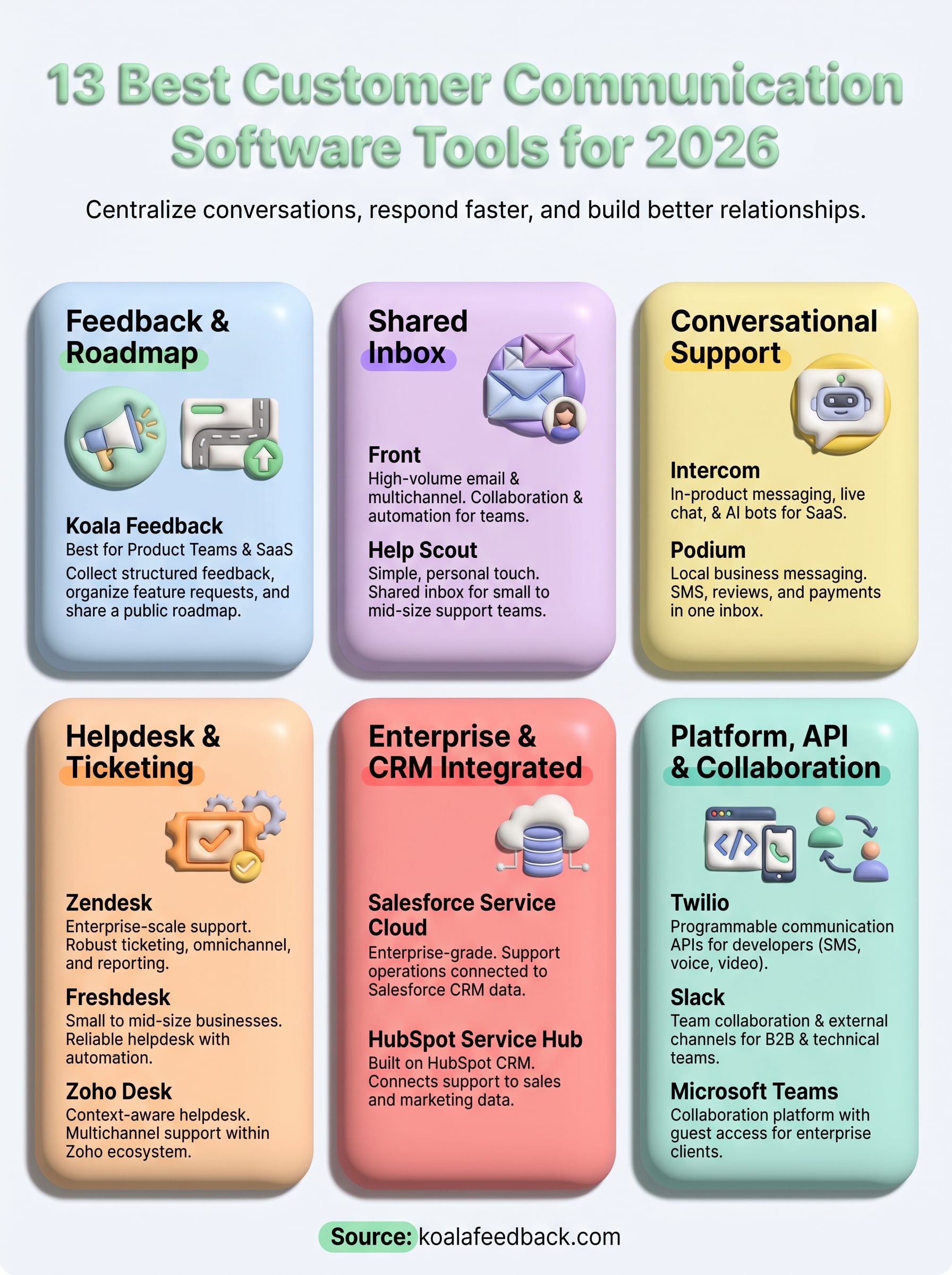
Every tool on this list solves a different communication problem, so the right starting point depends on where your biggest gap is right now. If your team is drowning in support tickets, start with Zendesk, Freshdesk, or Help Scout. If you need programmable messaging at scale, Twilio gives you that foundation. And if your customers are already asking for features through email threads, spreadsheets, or Slack messages, you need a better system before those requests get lost.
That last problem is exactly what Koala Feedback solves. It gives your users a dedicated space to submit ideas, vote on feature requests, and follow along as you build, turning scattered input into a clear signal your team can actually act on. It's the customer communication software built specifically for product teams that want to build with their users, not just for them. Start collecting structured feedback with Koala Feedback and see how much clearer your roadmap decisions become.

Start today and have your feedback portal up and running in minutes.

