You're drowning in feedback threads, roadmap questions, and status updates, and you know AI could take some of that off your plate if you picked the right tool. The problem is that half the products calling themselves ai product management software are just a chatbot bolted onto an old dashboard, and the other half genuinely change how you prioritize and plan.
This list cuts through that noise. We tested and researched nine platforms that use AI to do real work: summarizing customer feedback, drafting specs, spotting duplicate requests, and even suggesting what to build next based on demand patterns, the kind of work AI product discovery is built for. Each entry covers what the tool actually does well, where it falls short, and who it fits best, whether you're a solo founder or running a product team at a growing SaaS company.
You'll find options built for roadmap communication, others focused on research and discovery, and a few that handle the whole feedback-to-launch cycle. By the end, you'll know which tool matches how your team actually works, not just which one has the flashiest AI demo.
Managing feature requests without a system usually means digging through spreadsheets, Slack threads, and support tickets trying to remember who asked for what. Koala Feedback fixes that by giving you a feature request portal where users submit ideas, vote on what matters, and watch progress happen in real time. The AI layer sits underneath the whole workflow, scanning incoming submissions and flagging duplicates before they clutter your board, so you spend less time triaging and more time deciding what to build.
The real value isn't the AI writing your roadmap for you, it's the AI clearing the noise so you can write a better one yourself.
What separates Koala Feedback from a basic suggestion box is how much manual work it removes from the process. You get:
Product managers and small teams who need to close the loop between hearing feedback and shipping something users actually asked for will get the most out of this. It's built for SaaS companies that already have users generating requests but lack a structured way to organize, rank, and communicate around them. If your team is tired of feature requests dying in a support inbox, this is the fix.
Koala Feedback keeps its plans straightforward, starting with a free trial so you can test the portal before committing. Paid tiers scale by the number of active boards and team members, which means a five-person startup and a fifty-person product org both pay for what they actually use rather than a bloated enterprise package. Full details, including current plan breakdowns, are on the Koala Feedback pricing page, and you can spin up a working portal in under ten minutes to see how it fits your workflow.
Writing a product requirements document from scratch eats a whole afternoon, especially when you're translating messy customer conversations into something engineers can actually build from. ChatPRD works like a specialized writing partner trained on PRD structure, asking you clarifying questions about scope, edge cases, and success metrics until it produces a document that reads like a senior PM wrote it. It's less about generic AI writing and more about forcing the rigor that a rushed spec usually skips.
A PRD is only useful if it forces you to answer the hard questions before engineering does, and that's exactly what ChatPRD is built to do.
The tool focuses narrowly on one job, and it does that job well:
Solo product managers and small teams without a dedicated technical writer benefit most here. If you're the only PM at your company and specs keep going out half-finished, this closes that gap fast.
ChatPRD offers a free tier with limited generations, and paid plans run in the range of $20 to $50 per month depending on usage volume and team seats.
Competitive research used to mean opening fifteen browser tabs and manually cross-referencing what competitors shipped last quarter. Perplexity cuts that down by answering research questions directly, with citations, so you can verify claims instead of taking a chatbot's word for it. It's built for search, not just conversation, which means it pulls from current web sources rather than relying only on training data that might be a year stale.
Good market research isn't about generating an answer fast, it's about generating one you can actually trust and cite.
Perplexity's strength is speed paired with source transparency, which matters when you're building a business case:
Product managers doing competitive analysis or validating a market opportunity before pitching a new feature will get the most value. It's also a solid fit for anyone who needs to back up a roadmap decision with actual data rather than a hunch, since every claim comes with a source attached.
Perplexity offers a free tier with limited daily searches, and Perplexity Pro runs $20 per month, unlocking unlimited Pro searches and access to more advanced underlying models.
User interviews and customer calls generate gold, but only if you actually remember what was said instead of scribbling half-notes while trying to keep the conversation flowing. Granola sits quietly in the background of your calls, transcribing everything and then turning that transcript into a structured summary of pain points, feature requests, and direct quotes you can drop straight into a ticket. Unlike generic transcription tools, it's built specifically for the messy, tangent-heavy way real product conversations actually happen.
A call you don't have to re-listen to is a call you actually get value from.
Granola works across whatever calling tool you already use, which matters if your team is split between Zoom and Meet:
Product managers who run frequent user interviews or sales calls and need to extract feedback themes without hiring a research assistant will find this indispensable, especially alongside other customer insights tools. It also suits teams that feed customer quotes directly into a feedback portal or backlog for prioritization.
Granola offers a free plan with limited monthly transcription hours, and paid plans start around $18 per month per user for unlimited transcription and summary history.
Sometimes you don't need a specialized tool, you just need a smart pair of eyes on a pile of raw text. ChatGPT and Claude both handle unstructured feedback analysis well, letting you paste in hundreds of support tickets or survey responses and get back themes, sentiment breakdowns, and even suggested priority rankings, much like dedicated AI-powered feedback analysis software. Neither tool was built specifically for product managers, but their general reasoning ability makes them surprisingly good at spotting patterns a human would take hours to find manually.
The fastest way to find the signal in a thousand feedback comments is to stop reading them one at a time.
Both tools overlap heavily, but each has strengths worth knowing:
Product managers doing one-off deep dives, like analyzing a churn survey or a batch of app store reviews, get the most mileage here. It's less suited to ongoing feedback tracking since neither tool stores or organizes requests over time.
Both offer usable free tiers, with paid plans (ChatGPT Plus and Claude Pro) each running $20 per month for higher usage limits and access to their most capable models.
Gut feelings about which features drive retention only get you so far, and eventually you need actual usage data to back up a roadmap decision. Amplitude AI layers a natural-language assistant on top of its analytics platform, so instead of building complex funnels manually, you can ask a plain question like "which onboarding step causes the most drop-off" and get a chart back in seconds. It's built for teams that already track product usage events and want AI to speed up the analysis instead of replacing the underlying data.
Data only changes decisions when someone actually looks at it, and Amplitude AI's whole job is making that look-up instant.
Amplitude's AI additions sit on top of a mature analytics core, which is why the outputs feel grounded rather than speculative:
Product managers at companies with meaningful volume across their product analytics tools, meaning thousands of active users generating trackable events, get the most from this. It's overkill for an early-stage product with a handful of users, but essential once you need to prioritize based on real behavior instead of anecdotes.
Amplitude offers a free Starter plan with capped monthly tracked users, and paid Plus and Growth plans scale based on data volume, typically starting in the low hundreds of dollars per month.
Most issue trackers make you fill out ten fields before you can even save a ticket. Linear strips that friction away, and its AI features push further by writing issue summaries, suggesting labels, and even drafting sub-tasks based on a one-line description you type in a hurry. It works because Linear was built for speed from day one, so the AI additions feel like an extension of that philosophy rather than a bolted-on gimmick.
Fast issue tracking isn't about fewer clicks, it's about never breaking your train of thought to file a ticket.
Linear's AI tools focus on cutting the busywork around issue tracking, not replacing your judgment about what to build:
Engineering-heavy product teams who live inside their tracker all day will notice the difference fastest. It suits PMs working closely with developers on sprint planning, where speed of logging and triaging issues matters more than heavyweight reporting, though you may still want tools for ranking an agile backlog alongside it.
Linear offers a free plan for small teams with limited issue history, and paid plans start at $8 per user per month, scaling up to $14 for Business tier features like advanced workflows and SAML.
Explaining a feature idea in a doc rarely convinces stakeholders the way a clickable version does. Lovable lets you type a plain-language description of an app or feature and get back a working prototype, complete with a real interface and basic logic, in minutes instead of weeks. You skip the usual handoff to a designer or engineer just to test whether an idea holds together, which matters most in the early stage when you're still deciding if something is worth building at all.
A prototype you can click through settles more debates in five minutes than a slide deck settles in an hour.
Lovable's whole pitch is compressing the distance between an idea and something tangible:
Product managers who need to validate an idea with stakeholders or early users before committing engineering resources get the most value here. It also suits founders and PMs at small teams who want to test a concept themselves without waiting on a design sprint.
Lovable offers a free tier with limited monthly credits for generating projects, and paid plans start around $20 per month, scaling higher for teams that need more generation credits and collaboration features.
Product docs scatter fast: specs in one doc, meeting notes in another, and old decisions buried three pages deep in a wiki nobody updates. Notion AI works inside the docs you're already writing, summarizing long pages, drafting first passes of a spec, and answering questions about content buried across your workspace instead of making you search page by page. If your team already lives in Notion for product documentation, this is the fastest way to make that existing habit pay off more.
A wiki only helps if people can find what's in it, and that's the exact gap Notion AI closes.
Notion AI works as a layer across your existing pages rather than a separate tool you have to open:
Teams already using Notion as their documentation hub get the most value, since the AI features build directly on content you're creating anyway. It suits PMs juggling specs, meeting notes, and roadmap docs across a growing team, especially once the workspace gets too large for anyone to search manually.
Notion's core plans start free for personal use, with team plans from $10 per user per month. The AI add-on costs an extra $10 per member per month on top of any paid plan, or comes bundled at a higher rate on Notion's Business and Enterprise tiers.
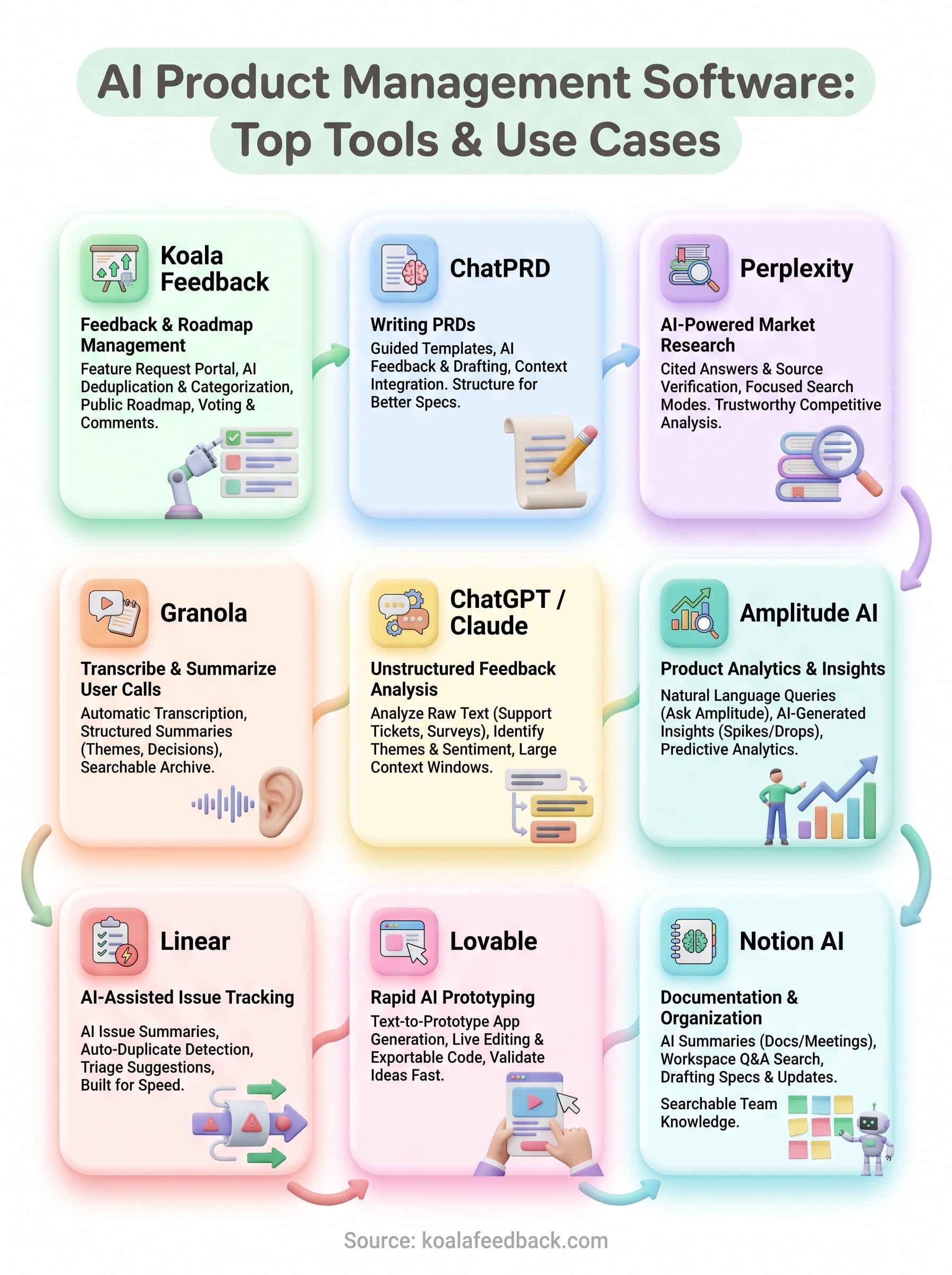
No single tool on this list does everything, and that's fine. The best ai product management software stack is usually three or four tools stitched together: one for capturing feedback, one for research, one for documentation, and one for turning ideas into something clickable. Trying to force one platform to cover every job just means you end up fighting its weak spots instead of leaning on its strengths.
Start with the piece that fixes your biggest bottleneck right now. If that bottleneck is scattered feature requests and a roadmap nobody trusts, that's the gap Koala Feedback was built to close. You get a portal for collecting ideas, AI-assisted deduplication so nothing gets buried, and a public roadmap that keeps users in the loop without extra meetings. Start collecting and acting on user feedback in one portal for free, and see how much noise it clears from your next planning cycle.

Start today and have your feedback portal up and running in minutes.

