Your backlog is overflowing. Stakeholders want everything yesterday. And your team keeps asking, "What should we build next?" Without the right agile prioritization tools, you're stuck making gut-feel decisions that frustrate users and waste development cycles.
The best product teams don't just collect feature requests, they systematically rank and prioritize them using proven frameworks and purpose-built software. Whether you lean on MoSCoW, RICE, WSJF, or a combination, having the right tool to organize and score your backlog makes the difference between shipping what matters and chasing every shiny object that lands in your inbox.
This guide covers eight tools that help agile teams prioritize backlogs effectively. Some focus on scoring frameworks, others on collecting and organizing user feedback, like Koala Feedback, which centralizes feature requests and lets users vote on what they actually want. By the end, you'll know which tool fits your workflow and helps you build products your users care about.
Koala Feedback sits at the intersection of user feedback management and backlog prioritization. Instead of making product decisions in a vacuum, you collect feature requests from actual users, let them vote on what matters most, and use that data to rank your backlog. This approach eliminates the guesswork that plagues many agile teams and gives you quantifiable evidence of what to build next.
Koala Feedback is a feedback management platform that captures user ideas, organizes them into logical boards, and surfaces the most requested features through voting and commenting. You embed a feedback portal on your site or share a standalone link, and users submit requests that automatically deduplicate and categorize. The platform tracks every piece of feedback in one place, so you're not juggling Slack messages, email threads, and spreadsheets to understand what your users actually want.
You prioritize your backlog by seeing which features have the most votes, comments, and discussion. Koala Feedback's voting system acts as a built-in prioritization framework where users signal demand through upvotes. Features with high engagement rise to the top, giving you a clear view of what to tackle first. The platform also lets you organize feedback into customizable boards based on product areas, making it easier to match user requests to your sprint planning cycles.
"The best agile prioritization tools don't just organize tasks, they connect you directly to the people who use your product."
Koala Feedback works best for product teams that value user-driven development and want to build transparency into their roadmap. If you're running a SaaS product or software company where user feedback directly influences your backlog, this tool gives you both the collection mechanism and the prioritization signal you need. Teams that struggle with stakeholder alignment find value here because votes and comments provide objective data to back up prioritization decisions.
Koala Feedback doesn't include effort estimation or scoring frameworks like RICE or WSJF out of the box. You still need to layer in development complexity and business impact manually. Teams that require deep integration with existing project management systems may find the connections limited compared to full-featured agile prioritization tools like Jira or Azure DevOps.
Koala Feedback offers a free plan with unlimited feedback and voters, making it accessible for small teams and early-stage products. Paid plans start at $25 per month and add features like custom domains, advanced customization, and priority support. This pricing structure works well for bootstrapped teams that need prioritization signals without enterprise-level budgets.
Jira is an enterprise-grade project management platform that powers agile workflows for thousands of software teams. You get built-in backlog management, sprint planning, and customizable workflows that integrate directly with your development tools. While it started as a bug tracker, Jira evolved into one of the most widely adopted agile prioritization tools on the market.
Jira is Atlassian's flagship project management software designed for agile teams using Scrum, Kanban, or hybrid methodologies. You create issues, organize them into backlogs, and move them through customizable workflows that match your team's process. The platform connects to over 3,000 integrations, including GitHub, Slack, and Confluence, making it a central hub for technical teams.
You prioritize work using drag-and-drop ranking in the backlog view, custom fields for scoring frameworks like RICE or WSJF, and filters that surface high-priority items. Jira's roadmap feature visualizes your backlog across sprints and releases, helping you balance short-term delivery with long-term strategy. Teams use labels, story points, and custom priority fields to create multi-dimensional prioritization that accounts for both urgency and impact.
Jira works best for technical teams that need deep integration with development tools and want granular control over their agile process. If you're running multiple Scrum teams, managing complex dependencies, or need audit trails for compliance, Jira handles the complexity without breaking down.
The platform has a steep learning curve, especially for non-technical stakeholders who just want to submit feedback or see what's planned. You'll spend time configuring workflows, permissions, and custom fields before the system matches your process. Pricing escalates quickly as your team grows.
Jira offers a free tier for up to 10 users. Paid plans start at $8.15 per user per month for the Standard plan and scale to Premium at $16 per user per month, with enterprise pricing available for larger organizations.
Azure DevOps Boards brings Microsoft's enterprise infrastructure to agile backlog management. You get native integration with the entire Azure DevOps ecosystem, including repos, pipelines, and test plans. Teams that already run on Microsoft's stack find this tool seamlessly fits their workflow without forcing them to adopt yet another platform.
Azure DevOps Boards is Microsoft's work tracking system designed for agile teams building software in cloud or hybrid environments. You create work items, organize them into backlogs, and track progress through customizable boards that support Scrum, Kanban, or mixed methodologies. The platform connects directly to Azure services and integrates with GitHub, making it a natural choice for development teams already committed to the Microsoft ecosystem.
You prioritize using drag-and-drop ranking in the backlog view combined with custom fields for effort, business value, and risk assessment. Azure DevOps Boards supports weighted scoring where you assign numeric values to multiple criteria and calculate priority scores automatically. The query builder lets you filter work items by any combination of fields, surfacing high-priority items that match your specific prioritization framework.
"The most effective agile prioritization tools integrate directly with your development pipeline, eliminating handoffs between planning and execution."
Azure DevOps Boards fits enterprise teams that need robust security, compliance controls, and tight integration with Microsoft services. If you're managing complex dependencies across multiple teams or require detailed audit trails for regulated industries, this platform handles the scale without requiring third-party add-ons.
The interface feels dated compared to modern alternatives, and non-technical stakeholders struggle with the complexity of setup and navigation. You'll invest significant time configuring work item types, workflows, and permissions before the system matches your process.
Azure DevOps Boards offers a free tier for up to five users with unlimited stakeholders. Paid plans start at $6 per user per month for the Basic plan, with additional costs for test plans and parallel jobs.
Productboard positions itself as a product management system that connects customer feedback with strategic roadmapping. You collect insights from multiple sources, score features using custom frameworks, and align your team around what to build next. Unlike basic agile prioritization tools that focus solely on task management, Productboard emphasizes the strategic layer of product decisions.
Productboard is a product management platform that centralizes user feedback, competitive intelligence, and internal ideas into a unified workspace. You import feedback from support tickets, sales calls, user interviews, and direct submissions, then link those insights to features in your backlog. The platform provides a visual interface for organizing product initiatives and communicating strategy to stakeholders.
You prioritize using Productboard's scoring system that combines multiple weighted criteria like user impact, strategic alignment, effort, and confidence. The platform calculates priority scores automatically based on the weights you assign to each criterion. You see which features have the most customer demand tied to them through linked feedback, giving you quantifiable evidence to support prioritization decisions beyond just internal opinions.
"Effective prioritization requires both strategic context and tactical execution, not just a ranked list of tasks."
Productboard works best for product teams that need to balance customer feedback with strategic goals and want to communicate roadmaps across departments. If you're managing multiple product lines or need to align engineering, marketing, and sales around a unified product strategy, this platform provides the framework.
The platform requires significant setup to match your workflow and doesn't include built-in sprint planning or development tracking. You'll need separate tools for execution, making Productboard more of a strategy layer than an end-to-end agile management system.
Productboard offers tiered pricing starting at $20 per maker per month for the Essentials plan, with Scale and Enterprise plans available at custom pricing based on team size and feature requirements.
Aha! Roadmaps combines strategic planning with tactical backlog management in a platform designed for product teams that need to connect high-level strategy with day-to-day execution. You map your product vision to specific features, score initiatives using built-in frameworks, and communicate roadmaps to stakeholders without switching between multiple tools. This approach appeals to product managers who want to maintain strategic context while managing the details of sprint planning.
Aha! Roadmaps is a strategy-first product management platform that helps you define goals, capture ideas, prioritize features, and share visual roadmaps. You build your product strategy using frameworks like objectives and key results (OKRs), then link features directly to strategic goals. The platform includes scoring capabilities for multiple prioritization frameworks and connects to development tools like Jira and Azure DevOps for execution tracking.
You prioritize features using customizable scoring cards that evaluate criteria like strategic value, effort, and customer impact. Aha! calculates weighted scores automatically based on your framework preferences, whether you use RICE, weighted shortest job first (WSJF), or a custom model. The platform shows you which features contribute most to your strategic objectives and surfaces gaps where your backlog doesn't align with your stated goals.
"Prioritization frameworks only work when they connect tactical decisions to strategic outcomes."
Aha! Roadmaps fits product organizations that need executive-level visibility into product strategy and want to ensure backlog decisions support business objectives. Teams managing multiple products or complex feature sets benefit from the hierarchical structure that connects strategy to execution.
The platform carries a higher price point than most agile prioritization tools and requires significant upfront investment in defining your strategy and goals. Teams that just need basic backlog ranking may find the strategic layer unnecessary overhead.
Aha! Roadmaps starts at $59 per user per month for the Essentials plan, with Advanced and Enterprise tiers offering additional features and customization at higher price points.
Linear brings speed and simplicity to backlog management without sacrificing the features agile teams need. You get a streamlined interface that loads instantly, keyboard shortcuts that eliminate clicking, and workflows designed around how modern development teams actually work. Built by former engineers from Uber and Airbnb, Linear prioritizes performance and user experience over feature bloat.
Linear is a modern issue tracking platform designed for software teams that want the functionality of traditional project management tools without the complexity. You create issues, organize them into projects and cycles (Linear's term for sprints), and track progress through a clean interface that emphasizes speed. The platform integrates with GitHub, GitLab, and Figma, connecting your backlog directly to your development workflow.
You prioritize work using manual ranking within each project view, custom labels for urgency and impact, and filters that surface high-priority items based on multiple criteria. Linear's roadmap feature shows how issues map to cycles and releases, helping you visualize what ships when. Teams assign priority levels (urgent, high, medium, low) and use estimates to balance workload across cycles.
"The best agile prioritization tools get out of your way and let you focus on building, not managing the tool itself."
Linear works best for engineering teams that value speed and modern design over enterprise features. If your team moves fast, deploys frequently, and wants a tool that matches the pace of modern development, Linear delivers without the overhead of traditional platforms.
The platform lacks advanced scoring frameworks and doesn't include built-in voting or feedback collection mechanisms. You'll need separate tools to gather user input and may need to build custom fields to implement frameworks like RICE or WSJF.
Linear offers a free plan for unlimited viewers and up to 250 issues. Paid plans start at $8 per user per month for the Standard plan, with Plus and Enterprise tiers available at higher price points.
Trello strips backlog management down to its visual essentials using boards, lists, and cards that anyone can understand in seconds. You drag cards across columns, add labels for priority, and attach due dates without reading a manual. Originally built for personal task management, Trello expanded into team workflows where simplicity matters more than sophisticated frameworks.
Trello is a visual collaboration tool based on the Kanban methodology where you organize work on boards divided into customizable lists. You create cards for individual tasks or features, move them across lists that represent workflow stages, and assign team members to specific items. The platform connects to over 200 power-ups (Trello's term for integrations) including Slack, Google Drive, and Jira.
You prioritize work by manually ranking cards within your backlog list and using color-coded labels to signal urgency or importance. Trello's voting power-up lets team members vote on cards, giving you a simple mechanism to surface popular items. Custom fields allow you to add priority scores or effort estimates, though you'll need to calculate rankings manually since Trello doesn't include automated scoring frameworks.
"Sometimes the simplest agile prioritization tools create the most alignment because everyone actually understands how to use them."
Trello works best for small teams that need visual backlog management without complex project management features. If your process relies more on collaboration and less on sophisticated prioritization frameworks, Trello provides enough structure to keep work organized.
The platform lacks native scoring capabilities for frameworks like RICE or WSJF and doesn't handle dependencies well. You'll outgrow Trello quickly if you need advanced reporting or manage multiple teams with interconnected backlogs.
Trello offers a free plan with unlimited cards and up to 10 boards per workspace. Paid plans start at $5 per user per month for Standard and $10 per user per month for Premium, with Enterprise available at $17.50 per user per month.
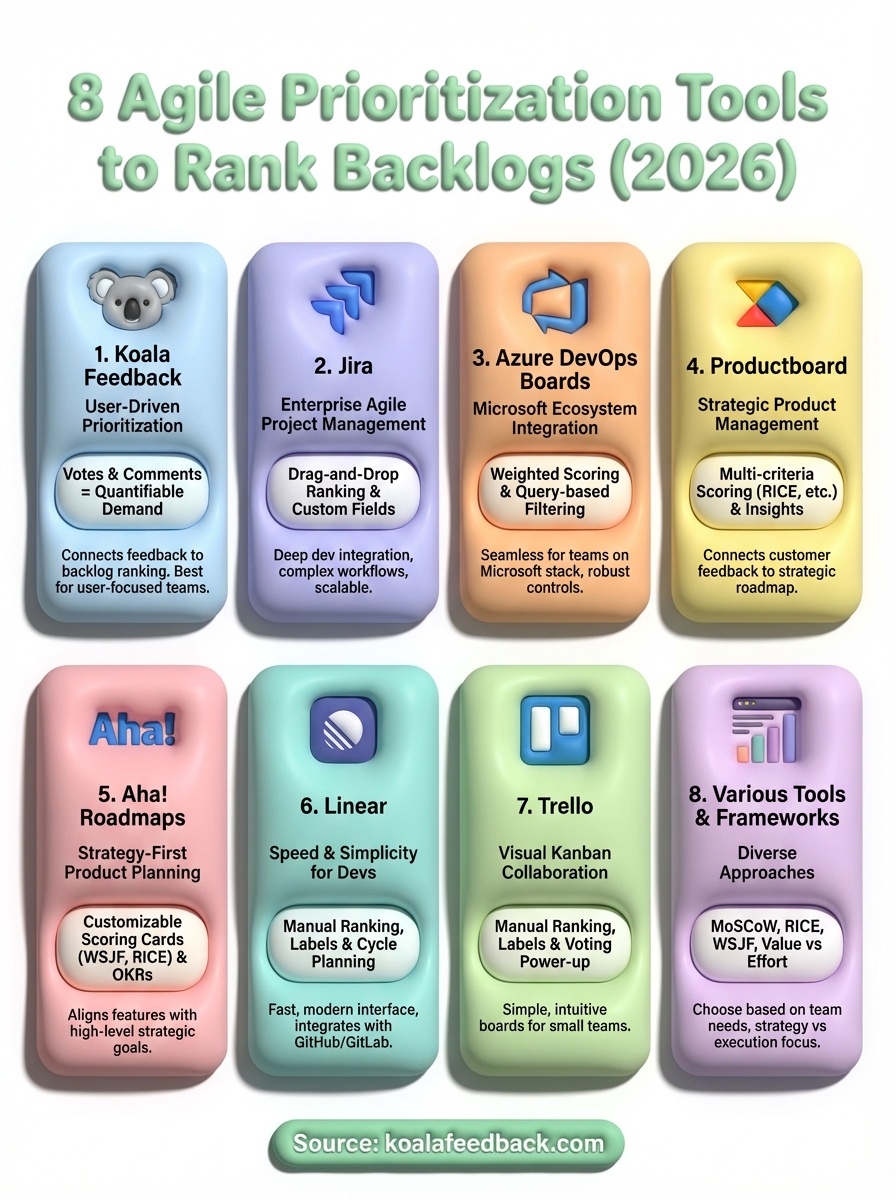
You now have eight agile prioritization tools that handle everything from user feedback collection to enterprise-grade backlog management. The right choice depends on whether you need strategic planning features, simple visual boards, or direct user input to drive your decisions. Teams that build what users actually want start by collecting feedback systematically rather than guessing at priorities.
Pick one tool and implement it this sprint. If you're looking to connect backlog decisions to real user demand, Koala Feedback gives you both the collection mechanism and the voting signals you need without the complexity of enterprise platforms. You'll see which features your users care about most through quantifiable data rather than stakeholder opinions.
The best prioritization system is the one your team actually uses. Start small, measure whether your decisions improve, and adjust your framework as you learn what drives the most value for your users.

Start today and have your feedback portal up and running in minutes.

