Your backlog is overflowing with feature requests from users, stakeholders, and your own team. Everyone wants their idea built first, but you can't ship everything at once. Without a structured way to evaluate and rank these requests, you risk building features that sound good but don't move the needle for your business or users.
This guide walks you through 15 feature prioritization tools and templates that help you make smarter decisions about what to build next. You'll find dedicated platforms designed specifically for product teams, free templates you can start using immediately, and adaptable solutions that work for teams of any size. Each option includes details on key features, ideal use cases, and pricing so you can quickly identify which tool fits your workflow and budget. Whether you need sophisticated scoring frameworks or simple voting systems, you'll discover practical options that bring clarity to your product planning process.
Koala Feedback positions itself as a centralized feature prioritization tool that connects feedback collection with roadmap planning. You can capture user ideas through a customizable portal, organize requests into boards, and share your product direction publicly. The platform focuses on keeping users engaged in your development process while giving your team structured ways to evaluate which features deserve attention first.

You get a complete system that handles feedback from submission to roadmap visibility. The platform automatically deduplicates similar requests and groups them into categories, saving you hours of manual sorting. Users vote on features they want most, comment with additional context, and track the status of their requests through your public roadmap. Your feedback portal can match your brand with custom domains, colors, and logos, making it feel like a natural extension of your product rather than a third-party tool.
The prioritization boards let you organize feedback by product area or feature set, giving you multiple views into what users want. You can see which requests have the most votes, review comments for deeper context, and move items through customizable statuses as you work on them. The voting system creates a natural ranking mechanism where user demand becomes immediately visible. Your public roadmap shows planned, in-progress, and completed features, setting clear expectations about what's coming next and reducing duplicate requests.
When users see their feedback acknowledged and tracked, they feel invested in your product's success.
This tool works well for product managers and SaaS teams who want user input to guide their development priorities. You'll benefit most if you're building software where customer feedback directly influences your roadmap and you value transparency with your user base. Small to medium-sized teams get the most value since the platform offers essential prioritization features without overwhelming complexity.
Koala Feedback offers a free plan for teams getting started with feedback management. Paid plans start with additional features for growing teams who need more customization and capacity.
Canny stands out as a customer feedback and feature prioritization tool that brings multiple frameworks into one platform. You can collect ideas from users, apply scoring systems like RICE or MoSCoW, and keep everyone informed through public roadmaps. The platform adds AI capabilities that reduce manual work by automatically organizing duplicate submissions and generating responses to user comments.
The platform gives you a centralized hub where users submit feature requests and vote on what matters most to them. You gain access to multiple prioritization frameworks built directly into the interface, letting you switch between RICE, ICE, MoSCoW, and Impact-Effort Matrix depending on your needs. Canny's AI features identify duplicate feedback and summarize long comment threads, saving you from reading through every submission manually. You can build public change logs to share product updates and close the feedback loop with your users.
Custom scoring formulas let you assign percentage weights to different costs and benefits that matter to your business. You can evaluate features across criteria like strategic alignment, customer impact, and implementation feasibility, then compare them objectively. The platform supports quantitative scoring that removes guesswork from decisions and helps you justify priorities to stakeholders. Users see where their requests stand on your roadmap, reducing repetitive submissions for the same feature.
When you apply consistent scoring criteria across all requests, you remove personal bias from the prioritization process.
This tool fits product teams and customer experience managers who need flexible prioritization methods. You'll get the most value if your team debates different frameworks or wants to test multiple approaches before settling on one. Companies that prioritize transparency with users benefit from the public roadmap and change log features.
Canny offers a free plan for small teams getting started. Paid plans begin at $19 per month with expanded features for larger organizations.
Userback combines feedback collection with user behavior analysis to give you a complete picture of what features your customers actually need. The platform captures screen recordings, annotations, and session replays alongside feature requests, helping you understand not just what users want but why they want it. This context-rich approach sets it apart from tools that only collect text-based suggestions.
You get multiple ways to capture feedback including widgets, surveys, and video recordings that show exactly what users experience. The platform records session replays that let you watch how people interact with your product before submitting requests. Screen annotation tools allow users to mark specific areas where they want changes or new features. Your feedback portal displays all requests in one place where users vote on features and track their status through your public roadmap.
The voting system on your feedback portal creates a natural ranking mechanism where demand becomes visible without complex scoring systems. You can view which features have the most votes, read user comments for additional context, and see session recordings that validate the need. Automated feedback management tools categorize and deduplicate similar requests, reducing the time you spend organizing submissions.
When you combine voting data with actual user behavior recordings, you validate feature requests with real usage patterns.
This feature prioritization tool works well for product teams who need visual context behind feature requests. You'll benefit most if you're building software where understanding the user's current experience helps you design better solutions. Teams that value behavior-driven prioritization over pure vote counting find this approach valuable.
Userback offers a free plan to start collecting feedback. Paid plans begin at $7 per user per month with additional features for larger teams.
Productboard serves as a modular product management platform that connects customer feedback directly to your prioritization decisions. You can gather insights from multiple sources, apply data-driven scoring, and visualize your roadmap in formats that work for different audiences. The platform emphasizes customer-centric prioritization by scoring features based on how many users want them and the business value they deliver.
The platform aggregates feedback from emails, support tickets, sales calls, and user interviews into one centralized location. You can link customer insights to specific feature ideas, showing exactly which users requested each capability. Productboard transforms scattered feedback into structured information that supports your prioritization process. Your team can build multiple roadmap views tailored to different stakeholders, whether they need technical details or high-level strategic timelines.
You score features using customer impact metrics that show how many users want each capability and how strongly they need it. The platform calculates priority scores automatically based on your custom criteria, removing manual calculation work from your process. You can apply frameworks like RICE or weighted scoring directly within the interface, then adjust weights as your strategy evolves. Visual prioritization matrices help you identify quick wins versus long-term strategic bets.
When you connect customer insights to feature scores, you build roadmaps grounded in actual user needs rather than internal assumptions.
This feature prioritization tool fits product managers in mid-sized to enterprise teams who collect feedback from multiple channels. You'll benefit most if you need to justify priorities to stakeholders with customer data and want flexibility in how you present roadmaps. Organizations focused on customer-driven development find value in the insight-to-feature connection.
Productboard requires custom pricing based on team size and features needed. Contact their sales team for specific rates.
Aha! positions itself as a comprehensive product development platform that extends beyond basic feature ranking. You can align internal strategic goals with customer requests, then execute using agile methodologies like Kanban or Scrum. The platform gives you scorecard-based prioritization that removes subjective bias by scoring features against measurable business objectives.

The platform handles the complete product lifecycle from strategy through execution. You can crowdsource feedback from users, analyze trends across your customer base, and transform those insights into actionable product strategies. Aha! provides visual whiteboards for team collaboration and planning sessions. Your team works within a clean interface that makes navigating complex projects straightforward rather than overwhelming. The platform connects strategy directly to development work, ensuring every feature you build supports defined business goals.
The product value scorecard stands out as the core prioritization mechanism. You assign points to each feature based on custom criteria that reflect your strategic objectives and desired customer experience. This scoring system eliminates personal preferences from decisions and creates objective rankings. You can evaluate features against multiple dimensions simultaneously, whether that's revenue potential, user retention impact, or strategic alignment. The scorecard approach helps you justify priorities to stakeholders with quantifiable metrics rather than gut feelings.
When you score features against consistent business criteria, you build roadmaps that serve company goals instead of individual opinions.
This feature prioritization tool fits product managers at growing companies who need to balance strategic planning with execution. You'll benefit most if your team struggles with aligning product decisions to business objectives or needs structured ways to evaluate competing priorities. Organizations that value comprehensive product management tools over single-purpose solutions find Aha! valuable.
Aha! starts at $59 per user per month. The platform offers both free trials and live demos.
ProdPad operates as a modular project management system that helps you build and execute your product roadmap with visual clarity. The platform saves you time by integrating with your existing tools and creating visual representations of your data for better decision making. You can add features, organize them according to your needs, and rank tasks using their impact versus effort chart.
The platform delivers a clean interface that lets you oversee multiple projects simultaneously without confusion. You can integrate ProdPad with your development tools to automatically sync data and reduce manual updates. The system provides modular functionality, meaning you select only the components your team needs rather than paying for features you won't use. Your team gains visual clarity through charts and boards that make complex prioritization decisions more straightforward.
The impact versus effort chart stands out as ProdPad's core prioritization mechanism. You plot features on this matrix to identify quick wins that deliver high impact with minimal effort. This visual approach helps you spot patterns across your backlog and makes it easy to explain priorities to stakeholders. Your team can add goals, organize them by preference, and maintain a growing list of features that evolves with your product.
When you visualize features on an impact-effort matrix, you quickly separate strategic investments from low-value work.
This feature prioritization tool fits product managers who value visual planning over complex scoring systems. You'll benefit most if you want a straightforward way to organize features without getting buried in spreadsheets. Teams that need modular flexibility appreciate paying only for the capabilities they actually use.
ProdPad starts at $24 per user per month. The platform offers separate pricing for individual modules and provides free trials lasting between 7 and 30 days.
Roadmunk operates as a cloud-based project management system that helps you build customer-driven roadmaps. The platform focuses on collecting user feedback and collaborating with your team to prioritize which features get built next. You can tailor your roadmaps to different audiences, whether you're presenting to internal teams or external stakeholders.
The platform gives you a flexible framework for creating roadmaps that adapt to various viewing needs. You can mark milestones to track progress and create different view types depending on who's looking at your roadmap. Roadmunk excels at organizing user feedback through a dedicated user portal where customers submit ideas directly. The system integrates with Azure DevOps and Jira, connecting your prioritization decisions to your development workflow.
You gain access to templates based on RICE and Kano models that structure how you evaluate features. The platform lets you collect customer feedback systematically and use that input to rank feature releases. Your team can collaborate within the interface to debate priorities and reach consensus. Roadmunk's flexibility allows you to adjust your prioritization approach as your product strategy evolves without forcing you into rigid frameworks.
When you connect customer ideas directly to your roadmap, you build features that solve real problems instead of assumed ones.
This feature prioritization tool fits product managers who present roadmaps frequently to different audiences. You'll benefit most if you need flexible visualization options that work for technical teams and non-technical stakeholders. Companies that value customer input in their development process find the feedback portal valuable.
Roadmunk starts at $19 per user per month when billed annually. The platform offers a 14-day free trial to test features before committing.
Pendo functions as a product experience platform that combines user behavior analytics with feature prioritization and roadmap planning. The platform helps you understand how customers navigate your product while collecting their feedback through polls and voting systems. You can build transparent roadmaps that update in real time as your priorities and resources shift, keeping everyone aligned on what gets built next.
The platform delivers analytics that show exactly how users interact with your product, revealing which features get the most engagement and where people struggle. You can launch in-app polls to collect feedback directly from users while they're working in your product. Pendo connects these insights to your roadmap, creating a link between user behavior and development priorities. Your team gains visibility into usage patterns that validate or challenge assumptions about which features matter most.
The roadmapping tool lets you link product feedback to specific features and assign them values based on multiple criteria. Your team can vote on which initiatives deserve attention, with each item carrying values that reflect business impact and customer need. This voting system creates a democratic prioritization process where different perspectives get heard before decisions finalize. You present your initiatives to team members and stakeholders who can then vote based on the assigned values and long-term potential of each feature.
When you connect user behavior data to feature requests, you validate priorities with actual product usage rather than opinions.
This feature prioritization tool fits product teams who need analytics alongside roadmap planning. You'll benefit most if you want to see how users currently interact with your product before deciding what to build next. Teams that value data-driven decisions appreciate the combination of usage insights and feedback collection.
Pendo offers custom pricing based on your needs. The platform provides a free plan with limited capabilities and a 14-day free trial.
FigJam operates as a digital whiteboard tool that brings visual collaboration to your feature prioritization process. The platform transforms abstract discussions about priorities into concrete visual layouts where your team can map features, vote on ideas, and reach consensus together. You can use FigJam to organize your product roadmap, rank features based on team input, and document the reasoning behind your decisions in one shared space.

The platform gives you a flexible canvas where you can create prioritization matrices, impact-effort grids, or custom frameworks that fit your team's needs. You work in real-time with remote team members, eliminating the need for separate meetings to gather everyone's input. FigJam stores your prioritization sessions as visual records that you can reference later when stakeholders question why certain features took precedence. The platform integrates with Figma, Trello, Confluence, and Productboard, connecting your prioritization work to your broader product development workflow.
The voting plugin stands out as FigJam's core prioritization mechanism. Your team members vote on features remotely without seeing each other's choices until the voting session ends. This hidden voting approach prevents groupthink and ensures everyone forms independent opinions before the results appear. You can set up multiple voting rounds to narrow down options progressively or run single votes to make quick decisions.
When votes stay hidden until the final tally, you get authentic input from each team member instead of influenced responses.
This feature prioritization tool fits distributed product teams who need visual collaboration methods. You'll benefit most if your team prefers interactive workshops over spreadsheet-based scoring or wants to document prioritization decisions visually. Teams already using Figma for design work find FigJam integrates naturally into their existing workflow.
FigJam starts at $3 per editor per month for the Professional plan. The platform offers a free plan that includes 3 FigJam files and unlimited personal files.
ClickUp operates as a project management platform that brings feature prioritization tools into a broader workflow system. The platform helps you speed up your team's work through templates and automation while flagging features that need immediate attention. You can create an extensive backlog, rank items by importance, delegate tasks across your team, and execute on time through integrated project tracking.
The platform combines prioritization with full project execution, letting you move from deciding what to build to actually building it within one system. You get customizable views that display your backlog as lists, boards, or timelines depending on what works best for your team. ClickUp allows team members to comment on tasks directly, reducing miscommunication about feature requirements. Your team can use automation rules to update priorities, move items through stages, and notify stakeholders when statuses change.
You can flag features that demand immediate attention based on importance levels you define. The platform lets you create custom fields for scoring features against your specific criteria, whether that's customer impact, revenue potential, or technical complexity. Your team views priorities across multiple formats including Gantt charts, Kanban boards, and calendar views. You can establish dependencies between features to ensure your team builds foundational capabilities before advanced ones.
When you flag urgent features and create visible dependencies, your team understands both what to build and the required sequence.
This feature prioritization tool fits product teams who need project management alongside prioritization. You'll benefit most if you want one platform that handles feature ranking and execution rather than switching between separate tools. Teams that value customization appreciate the flexibility to adapt ClickUp's interface to their specific workflow.
ClickUp offers a free plan with limited features. Paid plans start at $7 per user per month when billed annually.
monday.com operates as an open platform that creates a central location for your development and collaboration tools. The software offers high customization levels, allowing you to create a personalized product development process unique to your product strategy. You can manage sprints, create product roadmaps, and use automation to reduce time to market while keeping your team aligned on priorities.
The platform provides hundreds of workflow templates designed for various teams, including dedicated options for developers. You can create product roadmaps that visualize your strategy, plan and manage sprints within the interface, and leverage automation features to increase efficiency. Your team gains access to real-time notifications that keep everyone updated on progress without constant check-ins. monday.com consolidates your tools into one workspace, reducing the context switching that slows down product teams.
You can prioritize tasks directly within the platform, create dependencies between features, and track your team's progress with visual boards. The system lets you organize work using multiple views including timelines, Kanban boards, and calendar formats. Your team can apply custom fields and formulas to score features against your specific criteria, whether that's user impact, development effort, or strategic alignment. Automation rules update priorities and move items through stages automatically based on triggers you define.
When you combine prioritization with sprint planning in one platform, you eliminate gaps between deciding what to build and executing those decisions.
This feature prioritization tool fits product teams who need comprehensive project management beyond basic ranking capabilities. You'll benefit most if you want customizable workflows that adapt to your team's specific process rather than forcing you into rigid frameworks. Teams that value visual planning appreciate the multiple view options.
monday.com starts at $9 per user per month when billed annually. The platform offers a 14-day free trial and a free plan with limited functionality.
airfocus functions as a modular product management platform that adapts to your team's specific prioritization needs. The platform brings together customer feedback, scoring frameworks, and visual roadmaps in a system you can configure to match your workflow. You can plan work across your team and prioritize features based on structured criteria rather than intuition or internal politics.
The platform delivers flexible prioritization through customizable scoring models that you adjust to reflect your business priorities. You can capture feedback from customers, organize it systematically, and connect those insights to your roadmap planning. airfocus provides multiple visualization options including priority charts, roadmap timelines, and portfolio views. Your team works within a modular interface where you activate only the capabilities you need, avoiding cluttered dashboards packed with unused features.
You apply custom scoring frameworks that evaluate features against dimensions you define, whether that's customer value, strategic fit, or implementation complexity. The platform supports popular methods like RICE scoring while also letting you build proprietary scoring models unique to your organization. Visual priority matrices help you identify which features deliver the most value relative to their effort. Your team can collaborate on scores, discuss trade-offs, and document the reasoning behind each priority decision.
When you customize scoring criteria to your business context, you get priorities that serve your specific strategy instead of generic best practices.
This feature prioritization tool fits product teams who need flexibility in how they evaluate features. You'll benefit most if standard frameworks don't capture what matters to your business or if different product lines require different prioritization approaches. Teams that value modular platforms appreciate paying only for components they actually use.
airfocus requires custom pricing based on your team size and selected modules. Contact their sales team for specific rates and available plans.
Notion serves as a flexible workspace that transforms into a feature prioritization tool through customizable templates. The platform lets you build databases that track feature requests, score them against your criteria, and visualize priorities through various view types. You can adapt pre-built templates from the Notion community or create custom prioritization systems that match your team's exact workflow without needing separate software.
The platform provides a blank canvas where you build prioritization systems using databases, boards, and tables. You can create custom properties for scoring features against impact, effort, customer demand, or any criteria relevant to your business. Notion supports multiple views of the same data, letting you see features as Kanban boards, tables, timelines, or galleries. Your team collaborates directly within pages, leaving comments and updates that maintain context around prioritization decisions.
You define custom scoring fields that calculate priority scores automatically based on formulas you create. The platform supports RICE scoring, weighted scoring, or completely custom frameworks you design from scratch. Your team can filter and sort features by any property, making it easy to identify top priorities. Notion's flexibility means you adapt your prioritization system as your strategy evolves without migrating to new tools.
When you build prioritization systems in Notion, you create exactly the workflow your team needs instead of adapting to someone else's framework.
This feature prioritization tool fits small teams who need customization without complex software. You'll benefit most if you already use Notion for documentation and want to consolidate tools. Teams that value flexibility over pre-built features appreciate the ability to design their ideal prioritization system.
Notion offers a free plan for individuals. Team plans start at $8 per user per month when billed annually.
Miro operates as a visual collaboration workspace that transforms into a feature prioritization tool through ready-made templates. The platform provides interactive boards where your team can arrange features, vote on priorities, and document decisions visually. You can use pre-built frameworks like impact-effort matrices, RICE scoring boards, or Kano model templates that structure your prioritization process without starting from scratch.
The platform delivers an infinite canvas where you add sticky notes, draw connections between ideas, and create prioritization matrices that map features visually. You work in real-time with your team, watching as members add votes, move features across quadrants, or add comments directly on the board. Miro stores your prioritization sessions as permanent records you can revisit when stakeholders question decisions or when you need to review past reasoning. The platform integrates with tools like Jira, Asana, and Slack, connecting your visual planning to execution systems.
You access template libraries with frameworks built by product teams and prioritization experts. The voting features let team members place dots or reactions on features to indicate preferences, creating visible rankings without complex scoring. Your team can create custom frameworks by drawing matrices, adding scoring criteria, and building evaluation systems that match your specific needs. Miro's flexibility means you adapt templates to your context rather than forcing your process into rigid structures.
When you visualize priorities on shared boards, your team builds consensus through collaborative discussion instead of top-down mandates.
This feature prioritization tool fits product teams who think visually and prefer interactive workshops over spreadsheets. You'll benefit most if your team needs flexible collaboration spaces that support various prioritization methods. Teams conducting remote workshops find value in the real-time collaboration features.
Miro offers a free plan for small teams. Paid plans start at $8 per user per month when billed annually.
A spreadsheet serves as a free and accessible feature prioritization tool that requires no software subscription or learning curve. You can download templates pre-configured with RICE or weighted scoring formulas, customize them to match your criteria, and start ranking features immediately. Spreadsheets give you complete control over your prioritization logic without forcing you into frameworks designed for other companies' needs.
You work with familiar spreadsheet software like Google Sheets or Microsoft Excel that your team already knows how to use. Templates include pre-built formulas that calculate RICE scores (Reach × Impact × Confidence ÷ Effort) or weighted scores based on criteria you define. Your team enters data for each feature, and the spreadsheet automatically calculates priority scores that rank features from highest to lowest value. You can share spreadsheets with stakeholders who review your logic and provide input without needing special software access.
The formulas handle score calculations automatically once you input raw data for each feature. You customize scoring criteria by adjusting column headers and formula weights to reflect what matters most to your business. Spreadsheets let you sort and filter features by score, implementation effort, or any other dimension you track. Your team creates multiple sheets within one workbook to test different prioritization approaches side by side before finalizing decisions.
This approach fits small teams with tight budgets who need structured prioritization without monthly software costs. You'll benefit most if your team prefers working in spreadsheets or needs a simple system to get started before investing in dedicated platforms.
Spreadsheet templates are completely free when you use Google Sheets or existing Microsoft Excel licenses your team already owns.
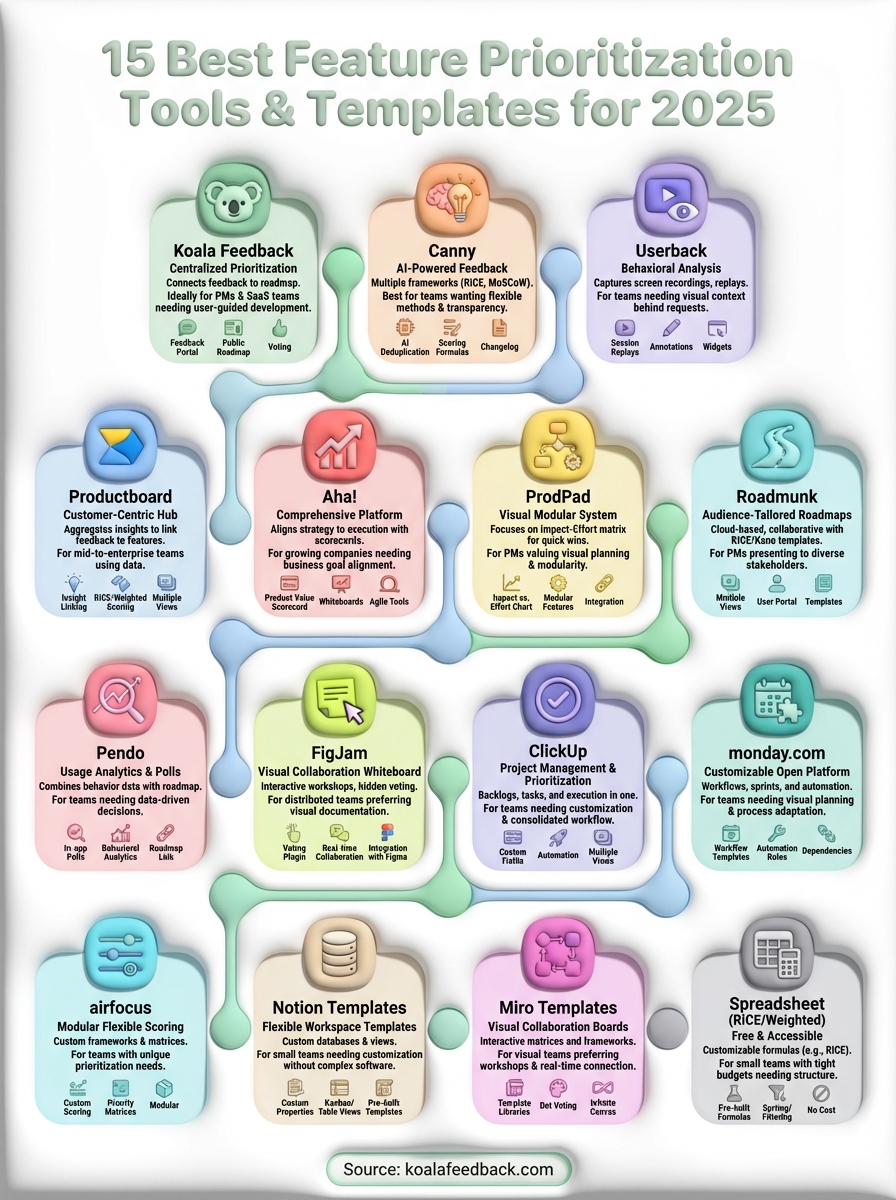
You now have 15 proven options for bringing structure to your feature prioritization process, from comprehensive platforms like Productboard to free spreadsheet templates. The right choice depends on your team size, budget, and workflow, but any of these tools beats prioritizing features based on whoever shouts loudest in meetings.
Start by testing one or two options that match your current needs. Most platforms offer free trials or free plans, giving you time to evaluate whether their approach fits your team. If you need a straightforward way to collect feedback, let users vote on features, and share your roadmap publicly, try Koala Feedback to see how centralized prioritization transforms your product decisions.

Start today and have your feedback portal up and running in minutes.

