You have a backlog filled with feature requests, bug reports, and ideas from your team. Users keep asking what you're building next. Stakeholders want to know why certain features are moving forward while others sit untouched. Without a clear system to evaluate what matters most, you end up making decisions based on who shouted loudest or what felt urgent that day.
This guide walks you through 13 product prioritization software options that can help you make smarter decisions about what to build. You'll find tools designed specifically for feedback management, platforms that combine analytics with roadmaps, and work management systems that can be configured for prioritization. Each section breaks down how the tool handles prioritization, who it works best for, and what you can expect to pay. Whether you need something lightweight to gather votes or a comprehensive platform to score features against strategic goals, you'll find options that match your team's workflow and budget.
Koala Feedback offers a centralized platform where you can collect user feedback, organize feature requests, and share what you're building through public roadmaps. The tool focuses on simplifying the feedback loop between your team and users while keeping everyone aligned on product priorities. You get a feedback portal where users submit ideas, a system that groups similar requests together, and customizable boards that reflect your product structure.
Koala Feedback gives you tools to capture feedback from multiple sources and turn scattered user input into organized, actionable insights. The platform automatically deduplicates similar requests so you don't waste time sorting through duplicate ideas. Users can vote on features they care about, comment on requests, and track progress through your public roadmap. You can customize the portal with your brand colors, logo, and domain to maintain a consistent user experience.
The platform lets you organize feedback into prioritization boards based on product areas or feature categories. You see which requests have the most votes and engagement, making it easier to identify what users want most. The voting system shows you clear signals about feature demand, while comments reveal the reasoning behind requests. This combination helps you make decisions backed by actual user interest rather than assumptions.
When users submit feedback, Koala Feedback's automatic categorization system groups similar ideas together. This saves you hours of manual work sorting through requests to find patterns. The platform highlights duplicate submissions so you can merge them and see the true level of demand for each feature. Users who submitted similar ideas get notified when their requests are combined, keeping them engaged in the process.
Centralizing feedback in one place prevents valuable user input from getting lost across email threads, support tickets, and scattered documents.
You can share a public roadmap that shows users what's planned, in progress, and completed. Customizable status labels let you communicate progress in language that makes sense for your product. Users who voted on features get automatic updates when status changes, reducing "when will this ship?" questions in your support queue.
This product prioritization software works well for small to mid-sized SaaS teams that want to involve users in the development process. You'll benefit most if you value transparency with your user base and want a straightforward way to collect, organize, and act on feedback without complicated scoring systems.
Koala Feedback offers flexible pricing based on your team size and needs. You can start with their basic plan to test the core feedback collection features, then upgrade as your feedback volume grows or you need advanced customization options.
Canny positions itself as a customer feedback and product prioritization software that helps you collect, analyze, and act on user input through a single platform. The tool stands out for its flexible scoring systems that let you apply multiple prioritization frameworks to the same set of feature requests. You can gather feedback through boards, let users vote on ideas, and keep everyone informed through public roadmaps and changelog updates.
Canny supports several prioritization frameworks including RICE, ICE, MoSCoW, and Impact-Effort matrices. You can build custom scoring formulas that match your team's specific criteria for evaluating features. The platform calculates scores automatically based on the factors you define, helping you make objective decisions about what to build next. AI features assist with deduplicating similar requests and summarizing comment threads, reducing the manual effort involved in feedback management.
You organize feedback into dedicated boards for different product areas or feature categories. Users submit ideas, vote on requests they care about, and add comments to explain their needs. The voting system gives you clear signals about feature demand while comments provide context about why users want specific functionality. Change logs let you announce new features and product updates, closing the feedback loop with users who requested them.
This tool works best for product teams that want structured prioritization methods without building custom systems. You'll benefit if you need to evaluate features against multiple criteria and want the flexibility to adjust your scoring approach as your product matures.
The multiple framework support gives you flexibility in how you evaluate requests. AI-powered deduplication saves time sorting through similar feedback. However, the interface can feel overwhelming when you're managing numerous boards with different scoring systems active simultaneously.
Teams that rely heavily on quantitative scoring appreciate having multiple frameworks available without switching between different tools.
Canny offers a free plan for basic feedback collection. Paid plans start at $19 per month and unlock advanced features like custom scoring formulas, integrations with development tools, and priority support.
Productboard combines feedback management with strategic prioritization tools designed for product teams that need to align feature decisions with customer insights and business objectives. The platform captures user feedback from multiple channels, organizes it with customer data, and provides scoring systems to evaluate what should make it onto your roadmap. You get research tools, customizable prioritization frameworks, and roadmaps that connect directly to your strategic goals.
The platform uses a weighted scoring system where you define custom drivers (criteria) and assign each one a weight based on importance to your strategy. You score features against these drivers, and Productboard calculates priority scores automatically. This approach helps you move beyond gut feeling decisions to data-backed prioritization. The system surfaces which features align best with your strategic objectives while accounting for factors like customer value, revenue potential, and development effort.
Productboard connects feedback to customer profiles so you can see which segments are requesting specific features. The insights board aggregates feedback from support tickets, sales calls, user interviews, and other sources into a central repository. You can tag insights with customer metadata, then use this information to score features based on who's asking and how valuable those customers are to your business. This connection between feedback and customer data helps you prioritize features that matter most to your target segments.
Product teams that segment their user base by plan type or industry benefit from seeing exactly which customer groups are driving feature demand.
This product prioritization software works best for mid-sized to enterprise product teams that manage complex products with multiple customer segments. You'll find it valuable if you need to balance input from sales, support, and users while applying consistent evaluation criteria across all feature requests.
The customer-centric scoring approach helps you tie feature decisions directly to business outcomes. Research tools keep all feedback organized in one place. However, the platform carries a steeper learning curve than simpler alternatives, and smaller teams might find the feature set more comprehensive than necessary for their current needs.
Productboard starts at higher price points than basic feedback tools, reflecting its enterprise-focused feature set. You'll need to request custom pricing based on team size and required features, though they do offer a free trial to test the platform before committing.
airfocus delivers a modular prioritization platform where you can apply different scoring frameworks to your feature backlog and visualize priorities through customizable views. The product prioritization software lets you switch between methods like RICE, Value vs. Effort, and Weighted Scoring depending on what your team needs to evaluate. You can collaborate with stakeholders using Priority Poker sessions and build roadmaps that reflect your scoring decisions directly.
The platform offers pre-built prioritization templates based on proven frameworks alongside the flexibility to create your own custom scoring system. You define the criteria that matter to your product strategy, assign weights to each factor, and score features against those dimensions. airfocus calculates priority scores automatically and updates your backlog view in real time as you adjust criteria or weights.
You can run Priority Poker sessions where team members privately score features, then reveal and discuss differences to reach consensus. This collaborative approach surfaces diverse perspectives before finalizing priorities. The 2x2 matrix views let you visualize where features land on dimensions like value versus effort, making it easier to identify quick wins and strategic bets worth the investment.
Teams that struggle with subjective prioritization debates benefit from Priority Poker's structured approach to building alignment through transparent scoring.
This tool works well for product teams that need flexibility in how they evaluate features across different planning cycles. You'll find value if you want to experiment with multiple prioritization frameworks or need to present feature priorities to stakeholders through visual representations they can understand quickly.
The framework flexibility lets you adapt your prioritization approach as your product matures. Priority Poker builds team alignment through structured collaboration. However, the learning curve can feel steep when you're configuring custom scoring systems, and smaller teams might not need the full range of features available.
airfocus offers tiered pricing starting with a free plan for basic prioritization needs. Paid plans unlock advanced features like Priority Poker, custom integrations, and additional user seats as your team grows.
Aha! provides a comprehensive product management platform that connects strategy to execution through goal-setting, feature scoring, and visual roadmaps. This product prioritization software emphasizes strategic alignment by requiring you to define business objectives first, then evaluate features against those goals using customizable scorecards. You get tools for capturing ideas, scoring them against your strategy, and building roadmaps that communicate priorities to stakeholders and development teams.
The platform uses a value scorecard approach where you create custom scoring frameworks based on criteria that matter to your business. You define the scoring dimensions (like strategic value, customer impact, and development effort), assign weights to each factor, and score features accordingly. Aha! calculates priority scores automatically and ranks your backlog based on which items align best with your strategic goals. The system lets you apply different scoring models to different feature sets, giving you flexibility when priorities shift between product areas.
You start by setting strategic goals and initiatives that define what your product team aims to achieve. Features map directly to these strategic elements, creating a clear line of sight from high-level objectives to specific development work. Visual roadmaps show stakeholders what you're building and why it matters, with the ability to create different roadmap views for different audiences. The platform connects feedback from users directly to features on your roadmap, helping you justify prioritization decisions with real customer data.
Teams that need to demonstrate strategic thinking to executives benefit from roadmaps that explicitly connect features to business goals.
This tool works best for established product teams in mid-sized to enterprise companies that need to balance multiple stakeholder interests while maintaining strategic focus. You'll find value if your organization requires formal product planning processes or if you need to communicate priorities across departments with different perspectives on what matters most.
The strategy-first approach helps you maintain focus on business objectives rather than building features because they seem popular. Comprehensive roadmapping capabilities give you presentation-ready views for any audience. However, the platform's depth means you'll spend time on setup and training, and smaller teams might find the feature set overwhelming for their current maturity level.
Aha! starts at $59 per user per month on annual plans. The pricing reflects the platform's enterprise positioning and comprehensive feature set. You can request a free trial and product demo to evaluate whether the investment matches your team's planning needs.
Jira Product Discovery serves as Atlassian's dedicated prioritization and roadmapping tool designed to work alongside Jira Software. This product prioritization software helps you capture product ideas, score them against custom criteria, and share roadmaps with stakeholders while maintaining a direct connection to development work tracked in Jira. You get a flexible workspace where ideas flow from discovery through to delivery without switching between disconnected systems.
The platform lets you create custom scoring fields where you define the factors that matter to your prioritization approach. You can score ideas on dimensions like customer value, strategic alignment, development effort, and revenue potential. Effort ratings help you estimate the work required for each idea, making it easier to identify high-value features that won't consume excessive resources. Views can be configured to sort by score, filter by status, or display ideas on a matrix that plots them against two dimensions simultaneously.
You capture ideas in a centralized repository where each entry holds descriptions, customer feedback links, and supporting context. The insights feature connects customer feedback and pain points directly to specific ideas, helping you track which problems each potential solution addresses. Multiple view types let you examine your backlog from different angles, whether you need a list sorted by priority score, a matrix view showing value versus effort, or timeline views that show when ideas might ship.
Ideas in Jira Product Discovery can be linked directly to epics and issues in Jira Software. This native integration means your development team sees context from discovery conversations when they start building features. Status updates flow between both tools, keeping everyone informed about progress without duplicate data entry or manual syncing.
Teams already using Jira Software benefit from keeping discovery and delivery work connected in the same ecosystem without forcing developers to learn a separate prioritization system.
This tool works best for teams already invested in the Atlassian ecosystem who want tight integration between product planning and engineering work. You'll find value if your developers already use Jira Software and you need a prioritization layer that feels native to their workflow.
Jira Product Discovery offers a free plan for up to 10 users. Paid plans start at $10 per user per month for the Standard tier, with Premium and Enterprise options available for larger organizations that need advanced governance and security features.
Roadmunk offers visual roadmapping software with built-in support for common prioritization frameworks. This product prioritization software lets you collect customer feedback through a dedicated portal, evaluate ideas using RICE or Kano scoring models, and build timeline-based roadmaps that show stakeholders what you're shipping and when. You can customize roadmap views for different audiences while keeping prioritization decisions grounded in structured evaluation methods.
The platform provides pre-built templates for RICE scoring (Reach, Impact, Confidence, Effort) and Kano model analysis that you can apply to your feature backlog. You score items against these frameworks directly within the tool, and Roadmunk calculates priority rankings based on your inputs. Custom fields let you add your own evaluation criteria beyond the standard templates, giving you flexibility to adapt the scoring approach to your specific product strategy.
When you apply the RICE template, you assign values for how many users each feature will reach, the impact it will have, your confidence level in the estimates, and the development effort required. The platform calculates a RICE score automatically based on these inputs. The Kano model template helps you categorize features as basic needs, performance features, or delighters by analyzing how users respond to their presence or absence.
Teams that want structured prioritization without building custom scoring systems benefit from having proven frameworks ready to use immediately.
This tool works well for product managers who need to present roadmaps to executives or customers while backing up their feature selections with recognized prioritization frameworks. You'll find value if you need timeline views that show when features will ship alongside the scoring rationale that informed those decisions.
The framework templates save setup time compared to building scoring systems from scratch. Visual roadmaps communicate priorities effectively to non-technical stakeholders. However, the platform focuses primarily on roadmap presentation rather than deep prioritization capabilities, so teams that need advanced scoring flexibility might find the options limiting.
Roadmunk starts at $19 per user per month when billed annually. The pricing includes access to prioritization templates, customer feedback collection, and roadmap creation tools. You can test the platform through a 14-day free trial before committing to a paid plan.
ProdPad delivers a modular product management platform where you can collect ideas, evaluate them using impact versus effort analysis, and build roadmaps that reflect your prioritization decisions. This product prioritization software stands out for its clean, uncluttered interface that keeps your focus on decision-making rather than navigating complex features. You can purchase modules individually based on what your team needs, whether that's feedback collection, roadmapping, or both.
The platform centers its prioritization approach around visual representations of your product data. You score ideas based on their potential impact and the effort required to build them, then ProdPad displays these scores through intuitive charts and matrices that make patterns obvious. The system integrates with tools your development team already uses, pulling in context from platforms like Jira, GitHub, and Azure DevOps without forcing you to recreate information across multiple systems.
Your idea backlog serves as a central repository where all potential features and improvements live. ProdPad's impact versus effort chart plots each idea visually, helping you identify which features deliver high value without consuming excessive resources. You can adjust scoring criteria as your product strategy evolves, and the visual representation updates automatically to reflect your new priorities.

Teams that prefer visual decision-making tools benefit from seeing their entire backlog plotted on a single chart that highlights both quick wins and strategic investments.
This tool works well for product managers who want straightforward prioritization without overwhelming feature sets. You'll find value if you need clean visual representations of priorities that stakeholders can grasp immediately.
The simple interface reduces the learning curve compared to more comprehensive platforms. Modular pricing lets you pay only for features you use. However, teams that need complex scoring systems with multiple weighted criteria might find the prioritization options less flexible than specialized alternatives.
ProdPad starts at $24 per user per month when you purchase individual modules. You can test the platform through a free trial lasting up to 30 days before committing to a paid plan.
Userback combines visual feedback capture with prioritization tools to help you understand what users need through screenshots, video recordings, and session replays. This product prioritization software focuses on collecting rich, contextual feedback that shows you exactly what users experience rather than relying solely on written descriptions. You get in-app widgets that users can activate to report bugs or suggest features, automated feedback organization, and a public portal where users vote on requests.
The platform captures feedback with full visual context including screenshots, screen annotations, and session replays that show what users were doing when they encountered problems. You organize this feedback into a feature portal where users vote on requests and see what others have submitted. The voting system reveals which features matter most to your user base, while the visual evidence helps you understand the severity and scope of reported issues. Automated categorization groups similar feedback together, reducing the time you spend sorting through duplicate requests.
Users activate in-app feedback widgets directly within your product to report bugs, suggest features, or share feedback without leaving their workflow. Screen annotation tools let them highlight specific elements or areas that need attention. Session replay captures the exact steps users took before submitting feedback, giving your team the full context needed to understand and prioritize issues accurately.
Teams that struggle to reproduce reported bugs benefit from session replays that show exactly what users experienced without requiring detailed written explanations.
This tool works best for SaaS teams that need to combine bug tracking with feature prioritization while maintaining rich visual context for all feedback. You'll find value if your users report complex issues that benefit from visual documentation.
The visual feedback capture provides context that text-only systems miss. Session replays help reproduce and fix bugs faster. However, teams focused purely on feature voting might find the bug tracking capabilities more comprehensive than needed for their prioritization process.
Userback starts at $7 per user per month. The platform offers a free plan for basic feedback collection, with paid tiers unlocking advanced features like increased feedback volume and priority support.
Pendo combines product analytics with feedback management and prioritization tools to help you understand how users interact with your product while collecting their input on what to build next. This product prioritization software connects usage data with feature requests, giving you quantitative behavior insights alongside qualitative feedback. You get in-app polls, roadmapping tools, and analytics that reveal which features users actually engage with compared to what they say they want.
The platform lets you link feedback directly to roadmap items and assign values to features based on criteria you define. You create scoring systems that evaluate potential features against factors like strategic alignment, user demand, and development complexity. Team members and stakeholders can vote on initiatives based on their assigned values and long-term potential, helping you build consensus around priorities rather than making decisions in isolation.
You collect feedback through in-app polls that appear while users work within your product, capturing input at the moment when context is fresh. Usage analytics show you which features users engage with most frequently and where they encounter friction. This combination of behavioral data and direct feedback helps you spot gaps between what users request and how they actually use your product, informing more balanced prioritization decisions.
Teams that want to validate feature requests against actual usage patterns benefit from having analytics and feedback collection in a single platform.
This tool works best for SaaS product teams that need to combine user behavior analysis with traditional feedback collection. You'll find value if you want to verify that requested features align with how users actually interact with your product.
The analytics integration helps you prioritize based on both stated preferences and revealed behavior patterns. In-app feedback collection captures input from active users. However, the platform requires custom pricing discussions rather than transparent tier options, and the analytics features add complexity that teams focused purely on feedback voting might not need.
Pendo offers custom pricing based on your user volume and feature requirements. You can access a free plan with limited capabilities and request a demo to explore the full platform before committing to paid tiers.
Reveall focuses on product discovery and prioritization by analyzing customer feedback with AI-powered sentiment analysis and opportunity scoring. This product prioritization software helps you identify which features will increase customer satisfaction by evaluating feedback sentiment, market size, and competitive positioning. You collect customer input through surveys and feedback forms, then Reveall processes this data to show you where gaps exist between customer expectations and current offerings.
The platform uses sentiment analysis algorithms to score customer feedback and reveal which features users want most. You see organized visual interfaces that display feedback data in charts and graphs, making it easier to spot trends and identify improvement areas. Reveall applies AI-powered technology to analyze feedback automatically, reducing the manual effort required to extract meaningful insights from raw customer input.
You access detailed insights across multiple dimensions including market size, competitive landscape, and customer satisfaction levels. The platform helps you understand how users interact with your product by monitoring satisfaction over time. Opportunity scoring reveals which features will have the greatest impact on customer satisfaction by identifying areas where importance is high but current performance falls short.
Teams that want to prioritize based on customer satisfaction gaps benefit from seeing exactly where their product underperforms relative to user expectations.
This tool works well for product teams conducting extensive discovery work who need to analyze qualitative feedback at scale. You'll find value if you collect large volumes of customer input and need automated analysis to identify patterns.
The sentiment analysis capabilities help you understand emotional context behind feedback. Opportunity scoring identifies high-impact improvements. However, smaller teams with limited feedback volumes might not need the advanced analytics capabilities the platform offers.
Reveall starts at €49 per month with pricing in Euros. You can test the platform through a 14-day free trial before committing to a paid subscription.
ClickUp provides a work management platform that you can configure for product prioritization through custom fields, multiple view types, and flexible workflows. This product prioritization software wasn't built exclusively for product teams but offers enough customization options to handle feature prioritization alongside your other work management needs. You get task tracking, backlog management, and automation features that help you flag high-priority items and move them through your development pipeline efficiently.
The platform lets you create custom fields for scoring features against criteria like customer impact, revenue potential, or development effort. You assign priority levels (urgent, high, normal, low) to tasks and filter your backlog based on these designations. Automation rules can flag features that meet specific criteria as high priority or route them to designated team members based on the values you've assigned. Views can be sorted by priority score, custom field values, or any combination of filters that reveals which work matters most.
You build your prioritization system using custom fields that track whatever metrics matter to your product strategy. List views let you sort features by priority or custom scores, while board views organize items into columns based on status or priority level. Table views display all your custom field data in a spreadsheet format, making it easier to compare features side by side. Templates help you establish consistent workflows for evaluating and routing feature requests through your backlog.
Teams already using ClickUp for project management benefit from adding prioritization workflows without introducing a separate specialized tool.
This tool works well for small to mid-sized teams that need work management capabilities beyond just product prioritization. You'll find value if you want to consolidate multiple workflows into one platform rather than maintaining separate tools for different functions.
The customization flexibility lets you build prioritization systems that match your specific needs. Multiple view types accommodate different working styles. However, the platform's breadth means you'll spend time on configuration, and teams wanting purpose-built prioritization features might find the setup process more involved than specialized alternatives.
ClickUp offers a free plan for basic functionality. Paid plans start at $5 per user per month on annual billing, with higher tiers unlocking advanced features like custom fields, automations, and increased storage limits.
monday.com delivers a visual work operating system that you can configure for product prioritization through customizable boards, templates, and automation rules. This product prioritization software gives you a flexible canvas where you can track feature requests, apply scoring systems, and visualize priorities through multiple view types. You build your prioritization workflow using the platform's building blocks rather than working within a fixed structure designed specifically for product teams.

The platform lets you create custom columns that track whatever scoring criteria matter to your prioritization approach. You can add numeric fields for impact scores, effort estimates, or strategic alignment ratings, then use formulas to calculate composite priority scores automatically. Multiple board views show your backlog as a list, kanban board, timeline, or chart, letting you examine priorities from different angles. Color-coding and status labels make it easy to spot high-priority items at a glance.
You start with pre-built templates designed for product development or build your own board structure from scratch. Automation rules can flag features as high priority when they meet specific conditions, notify team members when priorities shift, or update status fields based on score changes. Integration capabilities connect monday.com to tools like Jira, Slack, and GitHub, keeping prioritization decisions synced with your development workflow.
Teams that manage multiple workflows beyond product prioritization benefit from consolidating work management into a single platform rather than maintaining separate specialized tools.
This tool works best for small to mid-sized teams that need flexibility to design their own prioritization system while managing other types of work in the same platform. You'll find value if you want to experiment with different scoring approaches without being locked into a specific framework.
The visual interface makes prioritization decisions obvious to stakeholders who prefer graphical representations over lists. Automation reduces manual updating. However, you'll invest time configuring boards and formulas to match your needs, and teams wanting purpose-built prioritization features might find the setup process more involved than specialized alternatives.
monday.com offers a free plan for up to two users. Paid plans start at $9 per user per month on annual billing, with higher tiers unlocking advanced features like automations, integrations, and additional storage capacity.
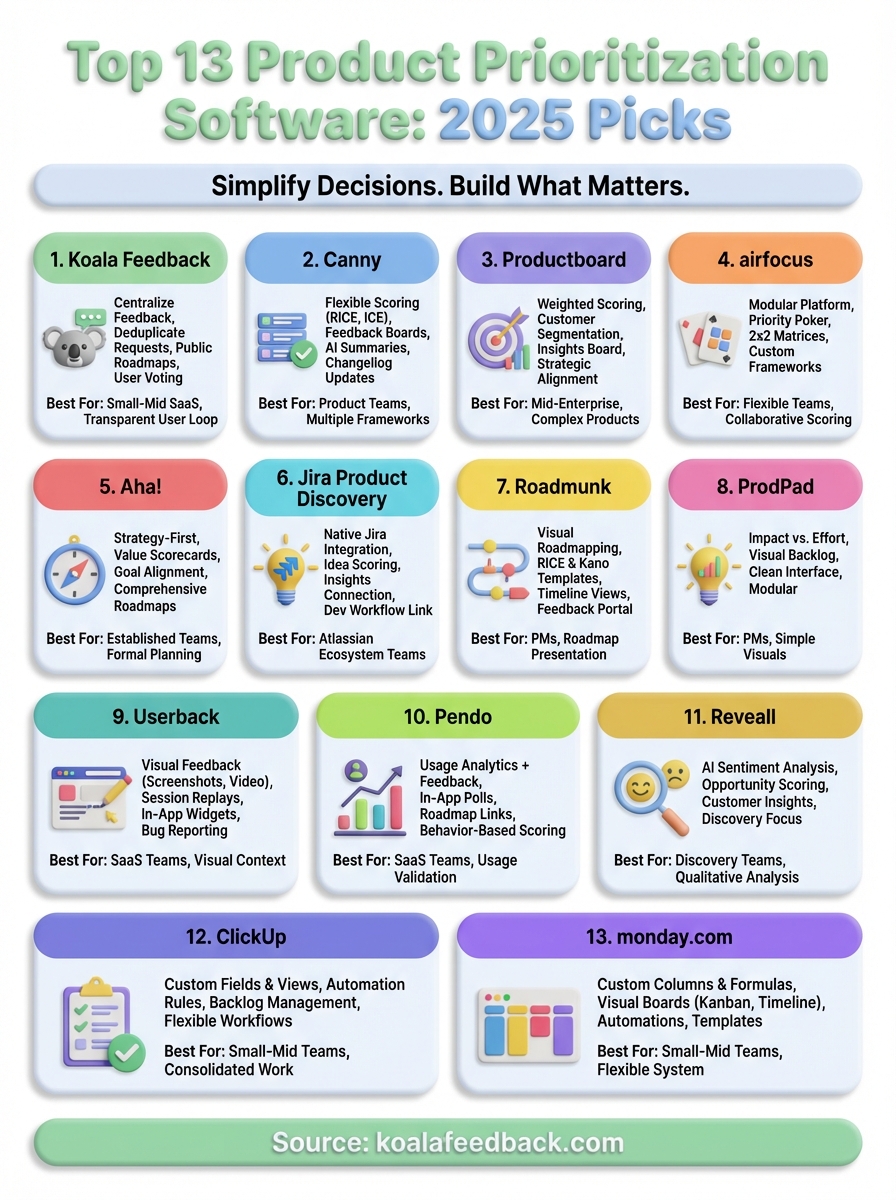
You now have a clear picture of 13 different product prioritization software options that can help you make better decisions about what to build. Each tool brings its own strengths, whether you need lightweight voting systems, comprehensive analytics integration, or flexible frameworks that adapt to your team's specific evaluation criteria.
Start by identifying which features matter most to your workflow. Consider whether you need deep customer insights, multiple scoring frameworks, or simple feedback collection with public roadmaps. Match these needs against the tools you've reviewed here, then test a few options through free trials before committing to paid plans.
If you want a straightforward approach to collecting feedback, organizing feature requests, and sharing roadmaps with your users, try Koala Feedback. The platform gives you everything needed to capture user input, prioritize based on demand, and keep your community informed about what you're building without unnecessary complexity.

Start today and have your feedback portal up and running in minutes.

