You have 47 feature requests, 12 bug reports, and a team asking what to build next. Without a clear system, you end up guessing, and guessing wastes time and resources. A prioritization matrix tool solves this by giving you a structured way to score and rank competing ideas.
These frameworks help you evaluate options based on criteria like impact, effort, urgency, or strategic alignment. Instead of debating in circles, you get a visual method to make faster decisions and align your team around what actually matters. The result? A ranked list of priorities based on logic rather than opinions.
This guide covers how prioritization matrices work, the most popular frameworks (Eisenhower Matrix, Impact-Effort Matrix, and more), and step-by-step instructions to apply them. Whether you're sorting through product features, project tasks, or strategic initiatives, you'll walk away with a practical system to turn chaos into clarity.
At Koala Feedback, we built our platform around this exact problem, helping teams collect user feedback and prioritize features based on real demand. The scoring principles you'll learn here apply whether you use a spreadsheet, a downloadable template, or a dedicated prioritization tool like ours.
A prioritization matrix tool transforms subjective opinions into objective rankings by assigning numerical scores to each option. You define the criteria that matter (like impact, effort, or risk), weight those criteria based on importance, and then score each idea against them. The tool calculates a total score for every option, giving you a ranked list that shows exactly what deserves attention first.
Every matrix contains three essential elements: options (the ideas you're evaluating), criteria (the factors you care about), and scores (the ratings you assign). Options sit in rows, criteria sit in columns, and the intersection holds your score for how well each option performs against each criterion. You might score a feature request as 8 out of 10 for customer impact but only 3 out of 10 for ease of implementation.
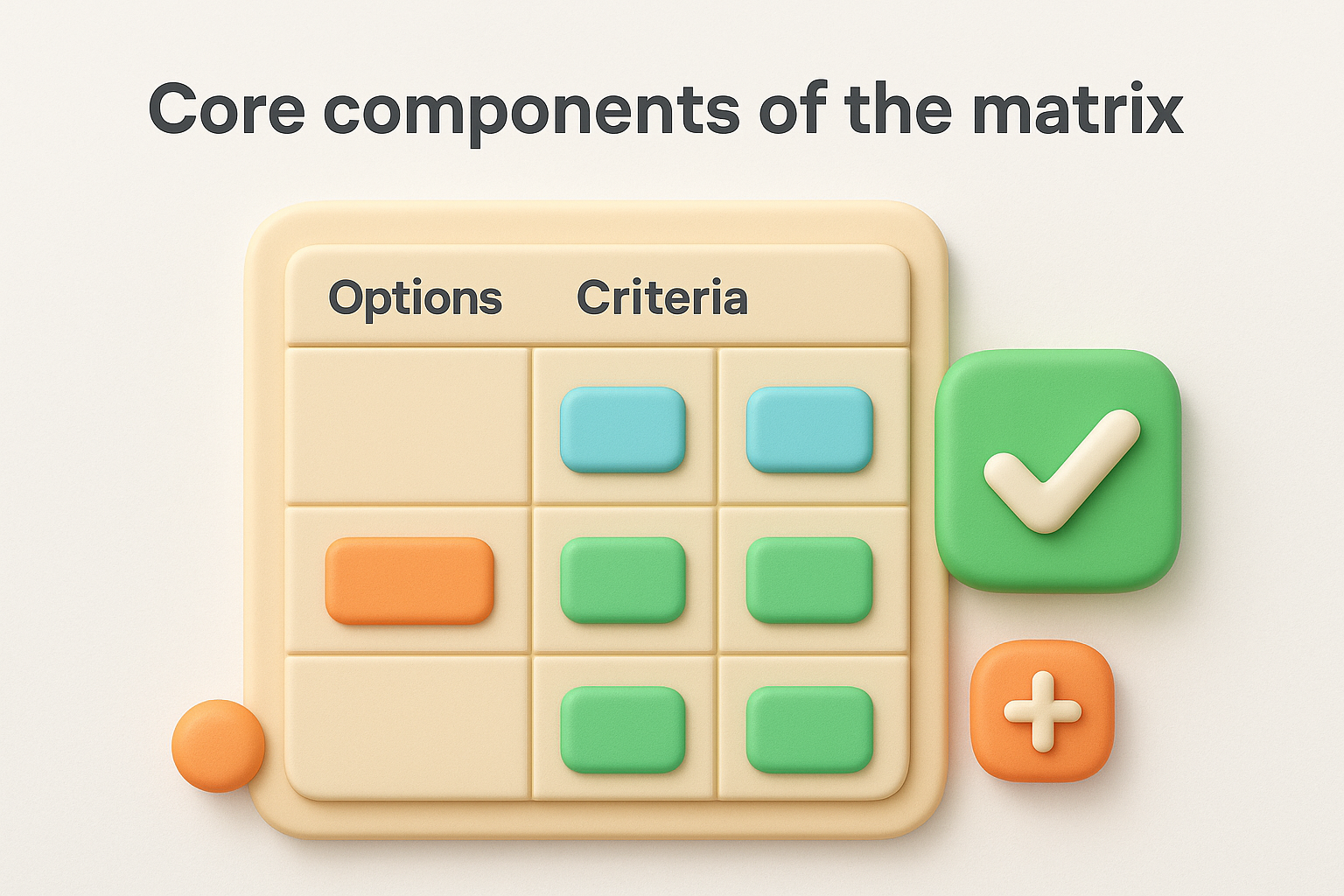
Weights add another layer by letting you emphasize what matters most. If strategic alignment is twice as important as cost, you multiply those scores by 2 before calculating the final total. This prevents every criterion from having equal influence when they shouldn't.
A weighted matrix ensures your most critical factors drive the final decision, not just the ones that are easiest to measure.
The matrix forces you to evaluate every option consistently using the same criteria. This eliminates the problem where you judge idea A based on cost while judging idea B based on speed. You apply identical logic to every row in your matrix, which removes bias and makes comparisons fair.
After scoring, you multiply each score by its weight and sum across the row. The option with the highest total score wins the top priority slot. You can then work down your ranked list, allocating resources to the ideas that deliver the best combination of benefits relative to your criteria. Some teams add a threshold (like "anything scoring below 50 is automatically deprioritized") to quickly eliminate weak options without debate.
This systematic approach works for any decision type. Product teams use matrices to rank feature requests. Project managers use them to sequence deliverables. Marketing teams use them to choose campaign ideas. The framework stays the same even when your options and criteria change.
You cannot rank ideas until you clearly state what decision you need to make. Start by writing a single sentence that describes the problem you're solving and the timeframe involved. For example: "Which three features should we build in Q2 to improve user retention?" This boundary keeps your matrix focused and prevents scope creep during evaluation.
Your decision statement should specify the outcome you need and any constraints that limit your choices. Include budget limits, deadlines, team capacity, or strategic goals that affect what's realistic. A product team might write: "Select the top five customer requests to address before our annual conference in June, given our two-person engineering team."
Vague statements like "improve the product" lead to comparing incomparable options (new features versus bug fixes versus technical debt). Specific statements like "reduce onboarding drop-off by adding three new tutorial features" give you a clear lens for evaluation. The tighter your statement, the easier your scoring becomes later.
A precise decision statement eliminates options that don't belong in your matrix, saving you from wasting time scoring irrelevant ideas.
Document every option you're considering in a simple numbered list. Each item should be specific enough that anyone on your team understands what it means. Instead of writing "improve search," write "add filters for date range, status, and category to the search results page."
Options to evaluate:
1. Add real-time collaboration features to the editor
2. Build an export-to-PDF function
3. Implement two-factor authentication
4. Create onboarding tooltips for new users
5. Add email notification preferences
6. Build a mobile responsive version of the dashboard
This list becomes the rows in your prioritization matrix tool. Limit yourself to 15 options maximum, otherwise scoring becomes overwhelming and you lose decision-making speed.
Your criteria define what makes an option valuable, and your weights control how much each criterion influences the final ranking. Most teams use three to five criteria to keep the matrix manageable while still capturing what matters. Common choices include customer impact, implementation effort, strategic alignment, revenue potential, and technical risk. You want criteria that differentiate between options rather than factors where everything scores similarly.
Select criteria that reflect your organization's current priorities and the specific decision you're making. A product team prioritizing features might use customer demand (based on request volume), development effort (measured in engineering days), and strategic fit (alignment with quarterly goals). A marketing team choosing campaigns might use expected ROI, creative resources required, and brand alignment.
Avoid vague criteria like "importance" or "priority" because they're subjective and hard to score consistently. Instead, define measurable or observable factors. Replace "importance" with "number of customers affected" or "revenue at risk if not addressed." The more concrete your criteria, the easier your scoring becomes in Step 3.
Example criteria set for feature prioritization:
- Customer demand: Number of unique user requests received
- Implementation effort: Estimated engineering hours required
- Revenue impact: Projected increase in monthly recurring revenue
- Strategic alignment: How well it supports our annual product vision (1-10 scale)
Give each criterion a weight from 1 to 10 based on its relative importance to your decision. A weight of 10 means the criterion is critically important, while a weight of 1 means it's a minor consideration. You multiply scores by these weights later, so a high-weight criterion dominates the final ranking even if other factors vary.
Your weights should total something consistent (like 30 or 100) to make comparison across matrices easier. If customer demand deserves twice the influence of implementation effort, assign it a weight of 10 while effort gets 5. Document your reasoning for each weight so stakeholders understand why certain factors matter more.
Weights encode your strategic priorities into the matrix, ensuring your rankings reflect what leadership actually cares about, not just what's easiest to measure.
You now have your options, criteria, and weights ready. The next step is to score each option against every criterion and let the math reveal your priorities. This process transforms your subjective opinions into numerical rankings that your team can act on immediately. Most teams complete this step in a single focused session, working through the matrix row by row.
Define a consistent scoring scale that everyone understands before you start rating options. A 1-10 scale works well for most decisions because it offers enough granularity to differentiate between options without overwhelming evaluators. You might use 1-5 if your team prefers simpler choices, but avoid scales larger than 10 because they create false precision and slow down scoring.
Document what each number means for your criteria. For "customer demand," a score of 10 might mean "100+ user requests," while a 5 means "10-25 requests," and a 1 means "fewer than 3 requests." For "implementation effort," flip the scale so lower numbers mean more work (1 = six months of development, 10 = one day of work). This ensures high scores always indicate better options.
Clear scoring definitions prevent debates about whether something deserves a 7 or an 8, keeping your team moving through the matrix efficiently.
Build a table with your options as rows and criteria as columns. Score each intersection by asking: "How well does this option perform on this criterion?" Multiply each score by its weight, then sum across the row to calculate a total weighted score. The option with the highest total becomes your top priority.
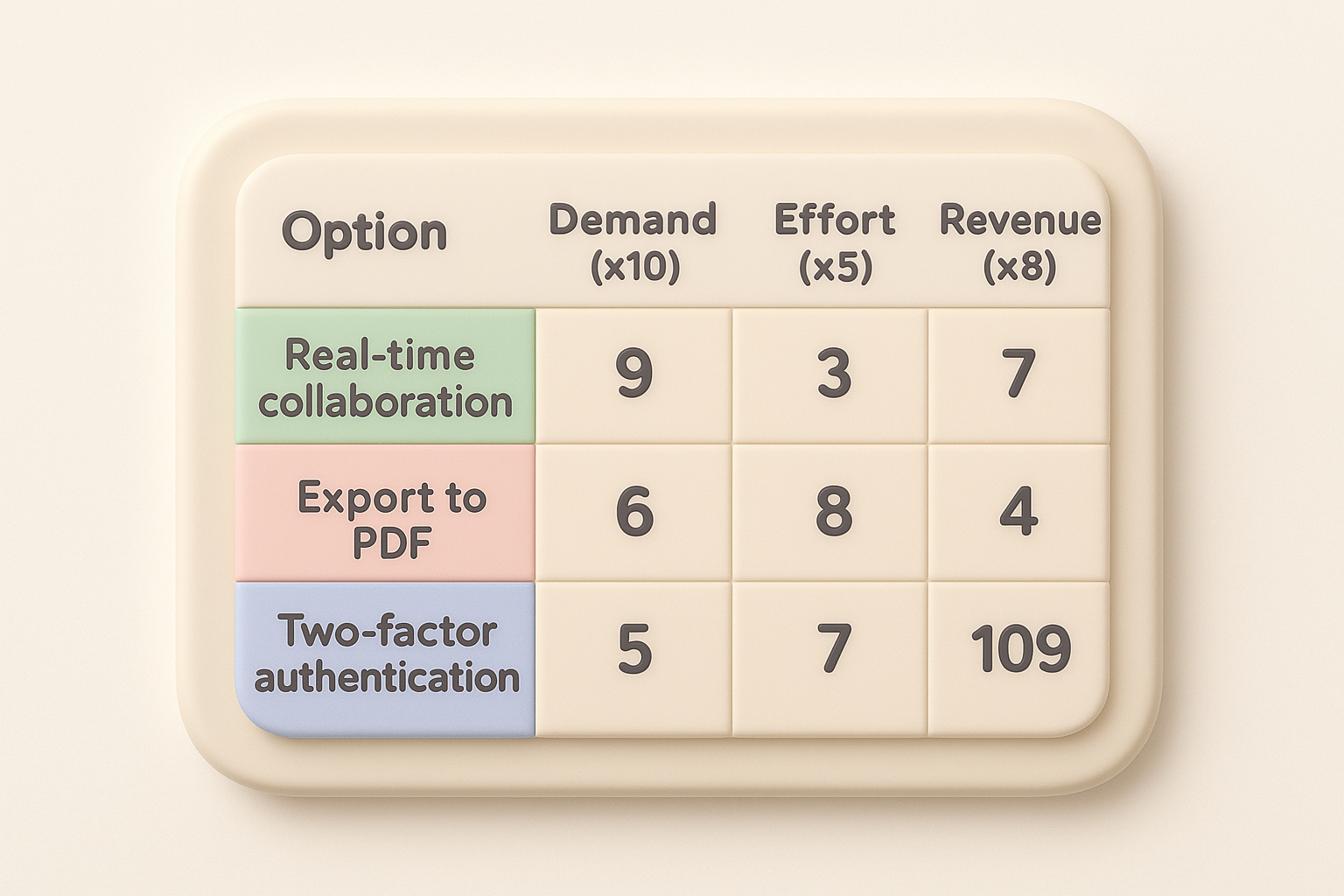
Option                    | Demand (×10) | Effort (×5) | Revenue (×8) | Total
--------------------------|--------------|-------------|--------------|------
Real-time collaboration   | 9 (90)       | 3 (15)      | 7 (56)       | 161
Export to PDF             | 6 (60)       | 8 (40)      | 4 (32)       | 132
Two-factor authentication | 5 (50)       | 7 (35)      | 3 (24)       | 109
Your prioritization matrix tool now shows real-time collaboration scores highest at 161 points, making it your first priority despite requiring significant development effort.
Your matrix shows a ranked list, but numbers alone don't make the decision final. You need to validate your scores with stakeholders and check if the results align with reality. This step catches scoring errors, surfaces hidden constraints, and builds team buy-in before you commit resources. Most teams discover at least one adjustment needed during validation, whether it's recalibrating a weight or reconsidering how they scored a particular option.
Share your completed matrix with the people who will execute the work or be affected by the decision. Ask them to challenge scores that seem off, question weights that don't reflect current priorities, and flag options that might have hidden dependencies or risks. Engineering might point out that your top-ranked feature requires infrastructure work you didn't account for. Sales might reveal that a lower-ranked option is actually critical for closing a major deal.
Validation transforms your prioritization matrix tool from a solo exercise into a shared agreement that everyone understands and supports.
Create a simple summary document or message that explains what you decided and why. Include your final ranked list, the criteria and weights you used, and any context that helps people understand the logic. You might write: "We're building real-time collaboration next because it scored 161 points based on high customer demand (90 points) and strong revenue impact (56 points), despite the development effort required."
Decision summary template:
- Decision made: [Top 3 priorities from your matrix]
- Evaluation criteria: [List criteria and weights used]
- Key factors: [What drove the top scores]
- Timeline: [When work begins and expected completion]
- Next review: [When you'll reassess priorities]
This transparency prevents confusion and gives your team clear direction on what's happening next.
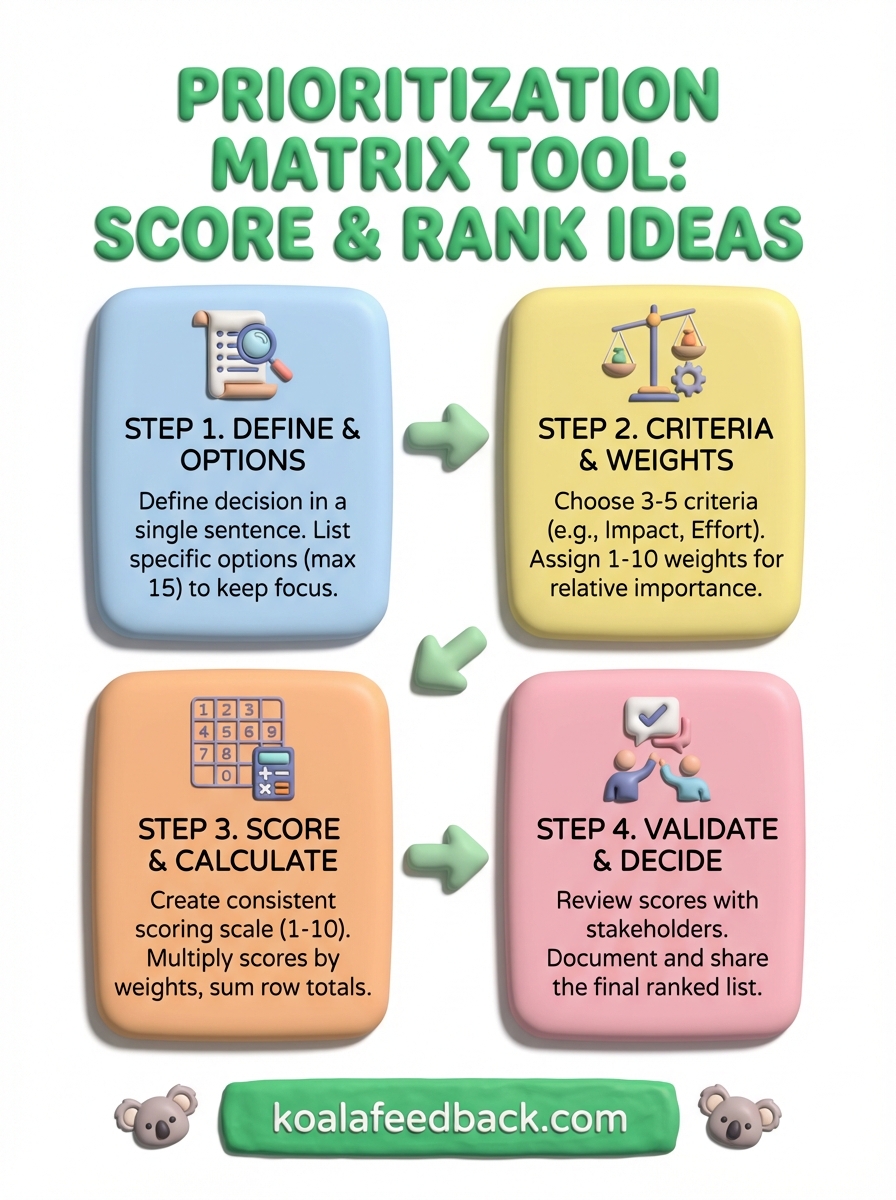
You now have a complete system to score and rank ideas using a prioritization matrix tool. The four-step process works whether you're sorting feature requests, project tasks, or strategic initiatives. Define your decision clearly, choose criteria that reflect your priorities, score consistently using weights, and validate results with your team before committing resources.
The hardest part isn't building the matrix itself but maintaining it as new options appear and priorities shift. Your next prioritization session will go faster because you've documented your criteria, weights, and scoring logic. Teams that build this habit make better decisions with less debate, turning weeks of discussion into hours of focused evaluation.
If you're managing feature requests from users, Koala Feedback centralizes feedback collection and helps you prioritize based on real customer demand. You get voting, categorization, and roadmap sharing built into one platform, eliminating spreadsheets and scattered input. Start building what matters most to your users instead of guessing which ideas deserve attention first.

Start today and have your feedback portal up and running in minutes.

