Most product launches fail not because the feature was weak, but because nobody had a real plan for telling users it existed. You built something people asked for, then watched it sit unused because the launch was an afterthought, a single changelog entry buried under a dozen others. A solid launching product strategy fixes that gap between shipping and product adoption.
This guide walks through exactly how to plan and execute a product launch strategy that gets noticed and gets used, from setting goals and segmenting your audience to timing your announcement and measuring what actually happened after release. No fluff about "generating buzz", just the concrete steps that separate a launch users notice from one they scroll past.
We'll also cover why your existing feedback loop is your best launch asset. If you already know which requests came from your most engaged users, you can build anticipation before release and turn those same people into your first wave of advocates. By the end, you'll have a repeatable new product launch strategy you can apply to every release, not just the big ones.
A real product launch strategy is not a single document or a launch-day checklist. It is a set of decisions made weeks (sometimes months) in advance, much like the ones you make when you create a product strategy from evidence, and they all point toward the same outcome: the right people know your product exists, understand why it matters to them, and take action. Skip any one piece and the rest wobbles. You can have brilliant messaging and still flop if you never defined who you were talking to. You can nail the audience and still underperform if you have no way to track whether the launch actually worked.
Every launch strategy of a product worth following breaks down into the same handful of components, whether you're launching a startup's first release or a fortieth feature update at an established SaaS company.
| Component | What it answers | Where it shows up later |
|---|---|---|
| Goals and metrics | What does success look like, in numbers? | Step 1 |
| Audience segmentation | Who needs to hear about this first? | Step 1 |
| Market positioning | Why does this matter compared to alternatives? | Step 2 |
| Go-to-market channels | How and where will you reach people? | Step 3 |
| Feedback loop | How will you know it's working, and adjust? | Step 4 |
| Timeline and owners | Who does what, and by when? | Steps 1-4 |
Treat this table as your planning skeleton. If you can't fill in a row with something specific, that's the gap that will bite you later.
Here's the piece teams consistently underweight: the feedback you already collected is launch fuel, not just a backlog. If a feature came from twenty upvotes on a public request board, those twenty people are your warmest possible audience. They asked for this. Telling them it shipped, by name, before you tell anyone else, does more for adoption than any blog post.
The fastest way to a successful launch is to tell the people who asked for it first.
This is where a tool like Koala Feedback earns its keep well before launch day. When feature requests live on a customer feedback portal with voting and comments, you already know who's invested. When you move that request onto a shared product roadmap with a status like "Planned" or "In Progress," you're quietly building anticipation without lifting a finger for a separate campaign.
Not every release deserves the same weight. A new product launch strategy for your flagship product needs press outreach, a dedicated landing page, and a multi-week rollout. A smaller feature update might just need a changelog entry, an in-app notification, and a direct message to the users who requested it. Scale the four steps that follow to match the release, not the other way around.
Start by writing down what a win actually looks like, in numbers, not vibes. "Get people excited" is not a goal you can measure on day 30. A working launching product strategy ties every launch to a specific target, the same way measurable product objectives and KPIs work: 500 signups in the first two weeks, a 15% activation rate among existing users who requested the feature, or 50 upvoted requests marked "Shipped" on your roadmap. Pick one primary metric and two supporting ones, then write them down before you touch messaging or channels.
Goals only make sense once you know who you're launching to. Most teams default to "everyone," which means the message ends up generic enough to move no one. Break your audience into at least three groups and treat each differently:
Every product release strategy should assign a different message and channel to each of these groups instead of blasting one email to your whole list.
If your feedback lives on a public board instead of scattered across support tickets and spreadsheets, this step takes minutes instead of days. A platform like Koala Feedback lets you filter by who voted on or submitted a specific request, so you can export that list and message them directly the moment the feature ships.
Know your goal number before you write a single line of launch copy.
Skipping this step is the single most common reason launches feel scattered. Teams jump straight to designing a landing page or drafting a tweet without ever deciding who that page or tweet is actually for, and the copy shows it.
Once you know your audience, figure out what else is competing for their attention, not just rival products but the status quo they're already using to solve the problem. Look at how competitors write release notes for similar features in their own changelogs and marketing pages, then note where their language is vague. That vagueness is your opening. A sharp product release strategy doesn't just announce a feature, it explains why this version of the solution beats what people were doing before, in terms they already use.
Write a single sentence before you write anything else: "For [audience], [product/feature] helps you [outcome] without [pain point], unlike [alternative]." This forces you to pick one outcome instead of listing five. Test the sentence on a teammate who wasn't involved in building the feature. If they can't repeat it back accurately after hearing it once, simplify it further.
If your positioning needs a paragraph to explain, it's not positioning yet, it's a description.
Here's where research gets fast instead of theoretical: read the actual comments on the feature request. Users describing their own pain points hand you your messaging almost word for word. If ten comments on a request mention "manual exports" or "switching between tools," that phrase belongs in your launch copy, not a generic phrase like "streamlined workflow." This is another place a public feedback tool pays off twice, first for prioritization, then for messaging your launch strategy for a new product in language that already resonates because it came from the people you're launching to.
Once you have the sentence and the language, apply it consistently everywhere:
Consistency here matters more than cleverness. A plain sentence repeated everywhere beats five different clever ones scattered across channels.
With positioning locked, turn to the mechanics: which channels, in what order, saying what. A launch product strategy without a channel plan turns into whoever remembers to post that day, and the timing ends up random instead of deliberate. Map each audience segment from Step 1 to a specific channel and a specific piece of copy, then write the send dates on a calendar before launch week starts.

Don't spread the same message across every channel at once. Match the channel to how much convincing each group needs:
| Audience | Primary channel | Message focus |
|---|---|---|
| Requesters | Direct email or in-app DM | "You asked, we built it" |
| Active users | In-app announcement, changelog | How it fits their workflow |
| Cold prospects | Landing page, social, paid ads | Full pitch and outcome |
Requesters get told first, always, which is the simplest version of communicating your roadmap to users. Reaching them directly, by name, from a filtered list on your feedback portal, costs almost nothing and converts better than any broad announcement.
Tell your requesters first, everyone else second.
Sequencing beats simultaneity. Spread the reveal across a few days so each group hears the news in the format built for them:
This order matters because your warmest audience validates the launch before it hits a cold one, and their early comments or shares become social proof for everyone who sees it later.
Writing a launch strategy for a new product this way means nobody on the team wonders what happens next. Every channel, message, and date is already assigned, so launch week becomes execution, not improvisation.
Go-live day is not the finish line, it's the point where your product launch strategy starts producing data instead of predictions. Watch the numbers you set in Step 1 daily for the first week, not just once at the end of the month. A launch that looks quiet on day one can still hit its target by day fourteen if requesters are slowly telling their teams, so resist the urge to declare victory or failure too early.
A launch isn't a moment, it's the first week of a feedback loop.
Track a short list instead of drowning in dashboards. Focus on:
Once these numbers are moving, decide fast whether to double down on a channel or pull back on one that's underperforming.
Since you already know who requested the feature, follow up with them specifically instead of waiting for unprompted feedback to trickle in. Mark the request "Shipped" on your public roadmap, reply in the original thread, and ask directly whether it solved what they described, the way a healthy customer feedback loop works.stripped This single step does double duty: it confirms your launch new product strategy actually delivered, and it surfaces the next round of requests before competitors even notice the gap.
Running this loop inside Koala Feedback keeps the conversation attached to the original request instead of scattered across support inboxes and social replies, so nothing gets lost between shipping and the next iteration. Every comment on a shipped item is either validation to repeat or a correction to make before your next release.
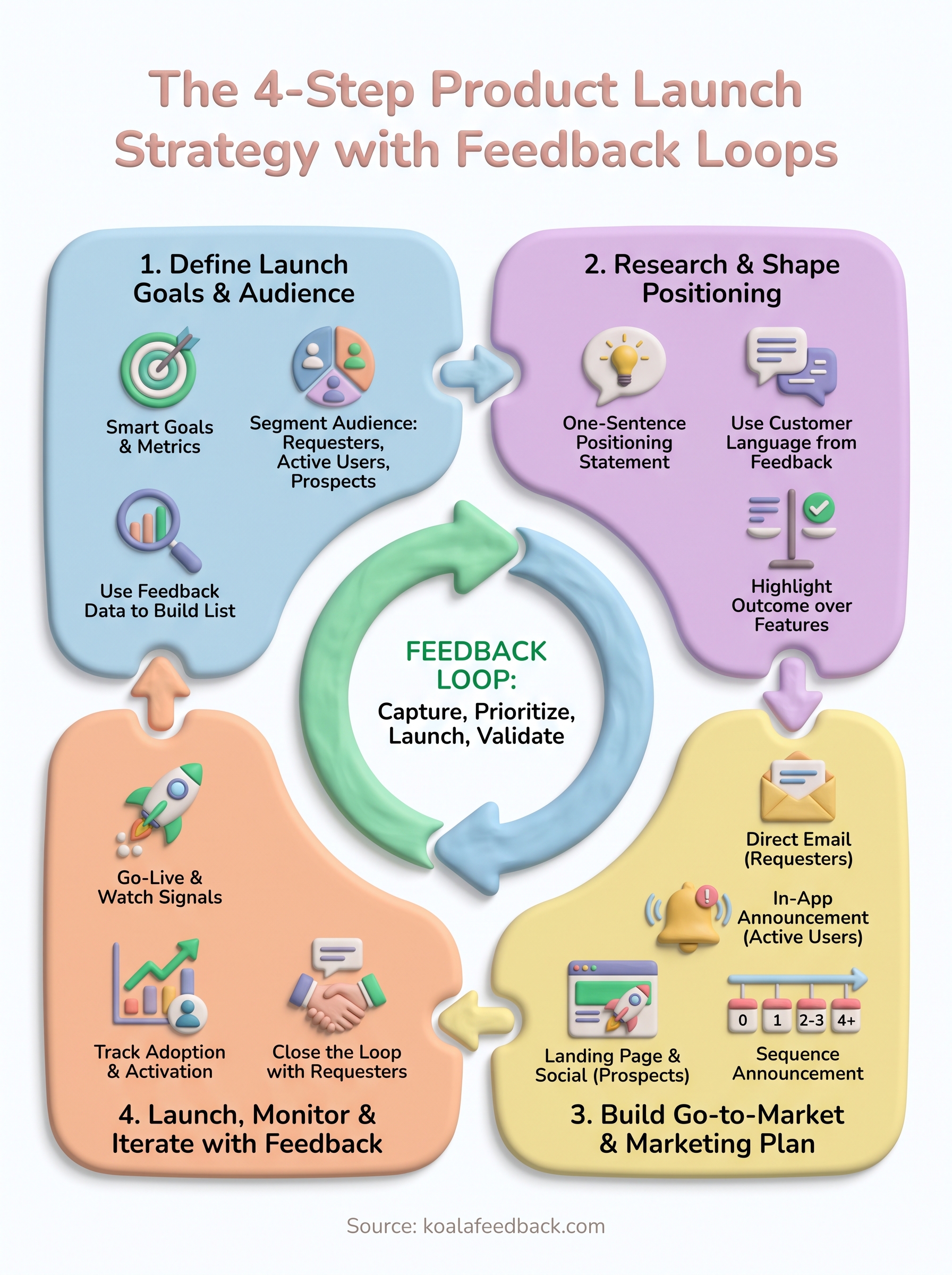
A launch that ends when the confetti settles was never really a strategy, just an announcement. The four steps here, goals and audience, positioning, go-to-market, and monitoring, work because each one feeds the next release instead of standing alone. Your best product launch strategy next quarter starts with the comments and requests coming in from this week's launch, not a blank page.
Build the habit now: every shipped feature should open a new round of feedback, not close a chapter. Requesters who see their idea shipped and acknowledged become the people who submit your next great idea, and vote loudest on everyone else's. That loop, not any single launch day, is what actually compounds.
If you're still tracking requests across spreadsheets and support tickets, you're rebuilding this work from scratch every time. Start capturing user feedback in one place with Koala Feedback, so the whole loop, from first request to shipped feature, lives in one place.

Start today and have your feedback portal up and running in minutes.

