The best customer feedback survey template is short, tied to one moment in the customer journey, and pairs a rating question with an open-ended one. Choose by situation. A product feedback form suits software teams, a CSAT survey suits anyone judging a purchase or service, and a support survey suits help desks. NPS suits companies tracking loyalty, a post-purchase survey suits online stores, an onboarding survey suits new customers, and a client feedback form suits B2B service firms.
Most free templates fail in the same way. They ask 20 generic questions, go out at the wrong time, and return a pile of vague answers nobody acts on. A survey that is too long gets abandoned, and one that is too broad tells you nothing you can fix.
Below are seven ready-to-use templates, written out in full so you can paste them into any form tool. Each one says when to send it and how to adapt it. We build Koala Feedback, a feedback portal for product teams, so the first template covers always-on product feedback. The last section covers format, timing, and delivery for your survey form.
A feature request form is the right choice when customers have product ideas all the time and a periodic survey would catch only a slice of them. It suits product managers, SaaS owners, and development teams.
Use this form when you want customers to submit ideas whenever they have them, not only when you ask. It works as a permanent page rather than a campaign, and the volume of requests becomes a ranked list of what customers want.
A feature request form works best as a permanent page, not a one-off campaign.
Koala Feedback turns this form into a portal where users submit ideas, vote, and comment. It deduplicates and categorizes posts, groups them into boards by product area, and lets you publish a public roadmap with statuses. A portal can be live in minutes, a custom domain takes a few more, and signing up is free. The free Starter plan includes 3 boards, 5 statuses, 1 admin, unlimited users, and 100 active posts.
Set these fields up as your submission form. Name your boards after real product areas, so the dropdown in question 2 matches how customers think.
What would you like us to build or improve?

1. Describe your idea or problem in one or two sentences. (open text)
2. Which part of the product does it relate to? (dropdown of your boards)
3. What are you trying to get done when this comes up? (open text)
4. How important is this to your work? (Nice to have / Important / Critical)
5. May we contact you with follow-up questions? (Yes / No)
An overall satisfaction survey gives you a baseline score for how customers feel about your business. It suits any company that has never measured satisfaction and wants one number to track, usually called CSAT.
Send it after a purchase, a delivery, or any completed interaction, while the experience is still fresh. Sending it right after the event gets more accurate answers than a quarterly blast, because customers remember what happened.
A CSAT survey only means something when it follows a specific moment, not a calendar date.
To score it, count the 4 and 5 ratings and divide by total responses, then multiply by 100. If 200 customers respond and 150 give a 4 or 5, your CSAT is 75%. Track that figure over time, and read the open-ended answers to learn why it moves.
Replace the bracketed items with your company name and product. Keep both open-ended questions at the end so the ratings come first.
Tell us how we did

1. Overall, how satisfied are you with [Company]? (1 Very dissatisfied to 5 Very satisfied)
2. How well does [product or service] meet your needs? (1 Not at all to 5 Completely)
3. How would you rate the quality of [product or service]? (1 Poor to 5 Excellent)
4. What is the main reason for your score? (open text)
5. What is one thing we could do better? (open text)
A support survey measures how well your team solved the problem, not how customers feel about your brand in general. It suits help desks, success teams, and any business where one conversation can make or break a relationship.
Trigger it when a ticket closes or a chat ends. Keep it to a handful of questions, because the customer has just spent time on their problem and has little patience left. Asking whether the issue was resolved separates a friendly agent from an effective one.
Ask whether the problem was solved before you ask whether the customer was happy.
The ease question is a customer effort score. Average the 1 to 5 answers, and treat a drop as an early warning of friction in your support process. If many customers answer "Partly" to the first question, look at your knowledge base and handoffs before you look at agent behavior.
Use this customer survey feedback form as a pop-up, an email, or a link in the closing chat message.
How was your support experience?

1. Was your issue resolved? (Yes / Partly / No)
2. How satisfied are you with the help you received? (1 Very dissatisfied to 5 Very satisfied)
3. How easy was it to get the help you needed? (1 Very difficult to 5 Very easy)
4. How long did it take to get your issue resolved? (Under an hour / Same day / A few days / Still waiting)
5. What could we have done better? (open text)
An NPS survey measures loyalty with a single question, how likely a customer is to recommend you. It suits companies that want a long-term health metric and a way to compare periods, rather than feedback on one interaction.
Send it at a steady interval, such as every quarter, to customers who have used your product long enough to have an opinion. Do not mix it into a transaction survey. The score is about the overall relationship, so timing it to a single purchase skews the result.
NPS tells you how loyal customers are. The follow-up question tells you why.
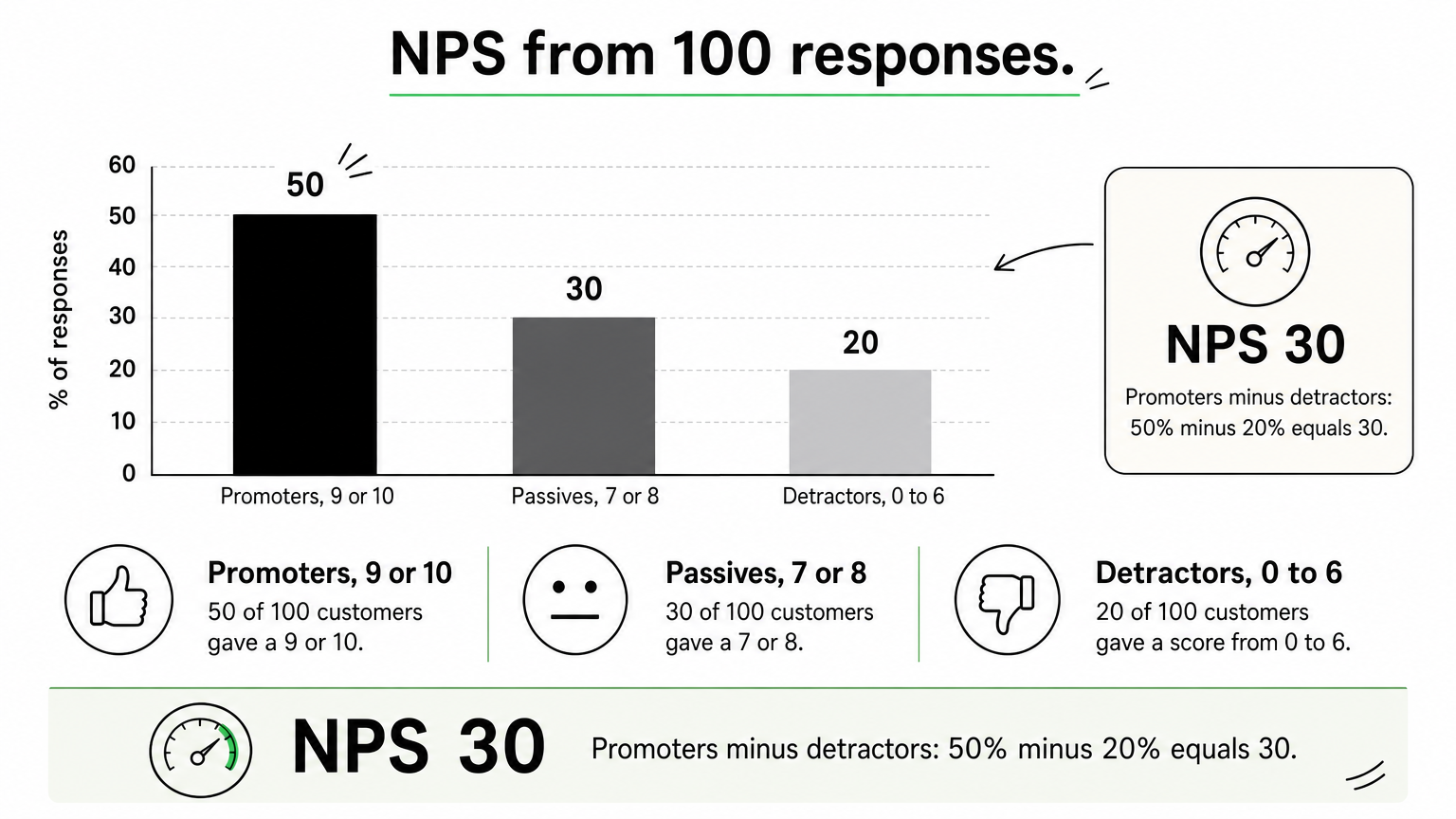
Scoring works like this: answers of 9 or 10 are promoters, 7 and 8 are passives, and 0 to 6 are detractors. NPS equals the percentage of promoters minus the percentage of detractors, so it ranges from -100 to +100. With 100 responses, 50 promoters, 30 passives, and 20 detractors, your NPS is 30.
Keep the first question word for word, then add the open-ended follow-ups.
Quick question

1. How likely are you to recommend [Company] to a friend or colleague? (0 Not at all likely to 10 Extremely likely)
2. What is the main reason for your score? (open text)
3. What is the one thing we could change that would make you more likely to recommend us? (open text)
A post-purchase survey covers the whole buying experience, from finding the product to receiving it. It suits online stores and retailers who want to know whether the website, checkout, and delivery helped or hurt the sale.
Send it after the order arrives, not after the payment. A customer who has not yet opened the box cannot judge the product or the delivery. Waiting until the item has been in their hands for a short time gives you better answers on both.
Send a post-purchase survey after delivery, because only then can customers judge the whole experience.
Use the results by section. If the browsing score is low and checkout scores are fine, fix product search or navigation. If the product scores well but delivery does not, the problem is fulfillment, not what you sell.
This customer feedback survey form works for any physical product. Drop question 4 if you sell services.
Tell us about your order

1. How easy was it to find what you were looking for on our website? (1 Very difficult to 5 Very easy)
2. How would you rate the checkout process? (1 Poor to 5 Excellent)
3. Did your order arrive when you expected it? (Early / On time / Late)
4. Does the product match what you expected from the listing? (Better / As expected / Worse)
5. How likely are you to buy from us again? (1 Very unlikely to 5 Very likely)
6. Is there anything else you would like to tell us? (open text)
An onboarding survey shows whether new customers got started without trouble. It suits SaaS companies, subscription services, and any business where the first days decide whether a customer stays.
Send it after the customer finishes setup or reaches a first milestone, such as completing a first project. That keeps the questions concrete. Asking about a step they just completed gets more useful answers than asking about "onboarding" in general.
The most valuable onboarding answer is the one that names the step that confused the customer.
Read the open-ended answers first, because they point at specific screens or instructions to fix. Then look at the help-resources question. If many people answer "Didn't look," your help content is hard to find, which is a different problem from content that is poor.
Keep it short, since new customers are still busy learning your product.
How was getting started?

1. How satisfied are you with the setup process? (1 Very dissatisfied to 5 Very satisfied)
2. How easy was it to get started? (1 Very difficult to 5 Very easy)
3. Was there a step that confused you or slowed you down? (open text)
4. Did you find the help resources you needed? (Yes / No / I didn't look)
5. What goal brought you to us, and do you feel closer to it? (open text)
A client feedback survey reviews a working relationship rather than a transaction. It suits agencies, consultancies, and B2B software vendors that manage projects or accounts and want to catch problems before a client leaves.
Send it at the end of a project or at a quarterly account review. Address it to the person who ran the project day to day, as well as the budget holder, since the two often see different problems. Follow up personally on any low score instead of leaving it in a spreadsheet.
With B2B clients, a low score deserves a phone call, not just a data point.
The "work with us again" question is the most telling one. Compare it with the scope and communication ratings to see which part of the relationship drives repeat business. A client who rates the results highly but communication poorly is a renewal risk you can still fix.
Use this as a form or as the agenda for a feedback call.
Client feedback

1. How well did our team understand your goals? (1 Not at all to 5 Completely)
2. How satisfied are you with our communication? (1 Very dissatisfied to 5 Very satisfied)
3. How closely did we keep to the agreed scope and timeline? (Ahead / On track / Slightly behind / Well behind)
4. How likely are you to work with us again? (1 Very unlikely to 5 Very likely)
5. What should we start, stop, and keep doing? (open text)
To turn any of these templates into a live survey, pick one goal, trim the questions to what serves it, and send the form at the moment the experience is fresh. The free customer feedback survey templates above work in any form builder, such as Google Forms or Microsoft Forms.
A good survey form follows a simple format: a one-line intro, rating questions first, one or two open-ended questions last, and a thank-you message. Keep the survey to three to five minutes and no more than ten questions, since completion drops as surveys get longer.
If you would not change anything based on the answer, delete the question.
A good set of example questions mixes types: a 1 to 5 satisfaction rating, a yes or no check, a multiple-choice question, a 0 to 10 recommendation score, and one open-ended "why." Every template above uses that mix.
Use this table to decide which survey to send and which number to watch.
| Template | Best time to send | Main metric |
|---|---|---|
| Product feedback form | Always open | Votes and requests per board |
| Overall satisfaction | After a purchase or interaction | CSAT percentage |
| Support feedback | When a ticket closes | Resolution rate and effort score |
| NPS | At a regular interval, such as quarterly | NPS from -100 to +100 |
| Post-purchase | After delivery | Repurchase intent |
| Onboarding | After setup or a first milestone | Setup satisfaction |
| B2B client feedback | End of project or quarterly review | Likelihood to work with you again |
Email is the most common delivery method, and an in-app pop-up works well for feedback on a specific screen. A chat message suits support surveys. Whichever you choose, close the loop: reply to unhappy respondents and tell customers what changed because of their answers.
The best customer feedback survey template is the one that matches a single moment and asks only what you will act on. Start with the situation that worries you most, whether that is a confusing product, slow support, or churn after onboarding, and send that survey first. Keep it short, score it the same way each time, and read the open-ended answers before the averages.
If your feedback is about the product itself, a one-off survey will always miss some of it. Set up a free feedback portal with Koala Feedback, let customers submit and vote on ideas, and use the survey templates above for the moments when you want to ask.

Start today and have your feedback portal up and running in minutes.