Collecting customer ideas is one thing. Turning them into actionable product decisions is another challenge entirely. That's where Salesforce idea management comes in, a built-in feature within Salesforce Communities that lets you gather, organize, and prioritize user suggestions in one place. For teams already invested in the Salesforce ecosystem, it can be a natural extension of their existing workflow.
But here's the reality: not every team uses Salesforce, and not every Salesforce setup includes the right configuration for idea management. Whether you're evaluating Salesforce's native capabilities or exploring dedicated feedback tools like Koala Feedback, understanding how idea management works will help you make smarter decisions about your product development process.
This article breaks down what Salesforce idea management is, how it works, and when it makes sense to use it. You'll also learn about its core limitations and what to look for if you need a more focused feedback solution.
Your customers share feedback through multiple channels every day: support tickets, emails, sales calls, social media comments. Without a centralized system, these valuable insights scatter across different tools and get lost in the noise. Salesforce idea management addresses this by creating a single destination where users can submit suggestions, vote on features they care about, and track progress on requests that matter to them.
When your team operates without a structured feedback system, you end up with ideas buried in support threads, Slack channels, and random email exchanges. Product managers waste hours digging through disconnected data sources just to understand what users actually want. This fragmentation makes it nearly impossible to identify patterns or prioritize effectively.
Salesforce idea management gives you a dedicated space where users submit ideas directly. You can see which suggestions appear most frequently, track voting patterns, and spot trends that might otherwise go unnoticed. Instead of sifting through ticket notes or meeting transcripts, you have a searchable repository that surfaces the most requested features automatically.
Centralizing feedback isn't just about organization. It's about making sure good ideas don't disappear because they arrived through the wrong channel.
Product teams often rely on internal assumptions about what features to build next. You might hear from a few vocal customers and assume their needs represent the entire user base. This approach leads to misallocated resources and features that don't move the needle for most users.
With voting mechanisms built into salesforce idea management, you get quantifiable data on user preferences. When customers can upvote ideas they support, you see clear patterns emerge about which features would deliver the most value. This democratic approach reduces guesswork and helps you justify roadmap decisions with concrete evidence.
If your team already uses Salesforce for customer relationship management, you don't need to introduce another platform that creates data silos. Idea management ties directly into the customer records you've already built, letting you see which accounts submitted which ideas and how those requests align with renewal dates or expansion opportunities.
This integration means you can segment feedback by customer tier, industry, or product usage patterns without manual data matching. Sales teams can reference submitted ideas during renewal conversations, and support teams can link submitted suggestions to related cases. Your entire organization gets visibility into what customers request, all within the tools they already use daily.
Customers want to know their feedback matters. When they submit ideas into a black hole and never hear back, they stop bothering to share input. You lose valuable insights, and they lose confidence that you're listening.
A visible idea management system shows users their suggestions are tracked, reviewed, and considered. They can see how many others voted for the same feature, read updates from your team, and understand where requests stand in your development process. This ongoing dialogue transforms feedback from a one-way complaint box into a collaborative relationship where users feel invested in your product's direction.
Salesforce idea management operates through the Ideas feature within Experience Cloud (formerly known as Communities). This functionality gives you a structured framework for collecting user suggestions, tracking engagement, and managing the entire feedback lifecycle. Understanding what comes included helps you determine whether this setup meets your team's needs without additional customization or third-party tools.
The Ideas feature provides several foundational elements right out of the box. You get a submission form where users describe their suggestions, add categories, and attach relevant details. Each idea becomes a dedicated record in your Salesforce database, complete with fields for status tracking, implementation dates, and internal notes that remain hidden from public view.
Users can browse existing ideas through search and filter options that help them find similar suggestions before submitting duplicates. The system includes basic categorization capabilities that let you organize ideas by product area, feature type, or custom labels you define. Your team can merge duplicate submissions to prevent fragmentation and maintain accurate vote counts across consolidated ideas.
The platform includes a voting system that lets users upvote ideas they support. You control whether users get unlimited votes or a fixed allocation they distribute across their preferred suggestions. This voting mechanism generates popularity scores that help you identify which features resonate most with your user base.
When users can see vote counts and comment threads, they understand how their feedback compares to broader community priorities.
Comments enable ongoing discussion around each idea, creating threaded conversations where users clarify requirements, share use cases, or suggest modifications. You can enable or disable various engagement features based on how much interaction you want to encourage.
Behind the scenes, you access moderation tools that let you review submissions before they go live, edit idea titles for clarity, and update statuses to reflect development progress. The admin interface shows you which users submitted which ideas, complete with links to their customer records for additional context. You can assign ideas to specific team members, set priority levels, and track everything through standard Salesforce reports and dashboards.
Setting up Ideas in Experience Cloud requires admin access to your Salesforce instance and an existing Community or Experience Cloud site. The configuration process involves enabling the feature, defining access permissions, and customizing how ideas appear to your users. You don't need custom code to get started, but you'll need to make several configuration decisions that affect how users interact with the system.
Navigate to Setup in Salesforce and search for "All Communities" to access your Experience Cloud sites. Select the community where you want to enable idea management, then click Workspaces and choose Administration. Look for the Features section and toggle on the Ideas option. This activates the core functionality but doesn't automatically make it visible to users yet.
After enabling Ideas, you'll need to add the Ideas components to your community pages. Go to Builder mode, select the page where you want ideas to appear (usually a dedicated feedback page), and drag the Ideas List component onto your layout. You can also add related components like Featured Ideas or Recent Ideas to highlight specific submissions.
Your next step involves defining who can submit ideas and who can only view or vote. Under Community Management, access the Members section to set permissions for different user profiles. You control whether guests can browse ideas anonymously or if you require authentication for all interactions. Most teams restrict idea submission and voting to authenticated users to prevent spam and maintain accountability.
Properly configured permissions ensure your feedback stays focused while preventing unwanted submissions from reaching your team.
Add custom categories that match your product structure or feature areas through the Ideas Settings menu. These categories help users submit feedback to the right team and enable you to filter requests by product line or department. You can also customize field labels, voting rules, and status values that reflect your internal workflow stages rather than generic defaults.
Managing ideas from submission to implementation requires a structured workflow that keeps your team organized while showing users their feedback matters. Salesforce idea management provides the foundation, but you need to establish clear processes that move ideas through each stage of your product development cycle. Without defined steps, valuable suggestions sit in limbo while your team struggles to maintain momentum.
When ideas arrive, your first step involves reviewing submissions for clarity and completeness. Assign a team member to review new ideas daily, checking whether they include enough detail for evaluation. You can request additional information from submitters, merge duplicate suggestions, or reject ideas that fall outside your product scope. This initial screening prevents your backlog from becoming cluttered with vague or irrelevant requests.
Set up automatic notifications that alert relevant product owners when ideas arrive in their category. This ensures feedback reaches the right decision-makers without manual routing. You can also create custom fields that capture technical complexity estimates or customer impact scores during this triage phase.
Create a status progression that reflects how ideas move from consideration to completion. Common stages include Under Review, Planned, In Progress, Delivered, and Not Planned. Update statuses regularly so users see movement on their suggestions. When you change an idea's status, add a comment explaining why you made that decision or when users can expect the next update.
Transparent status updates show users you actively consider their feedback rather than letting it disappear into a backlog.
When you ship a requested feature, update the corresponding idea to Delivered status and share details about what you built. Link to release notes, documentation, or video demos that help users understand the implementation. This final communication completes the cycle and demonstrates that user feedback directly influences your product roadmap.
While Salesforce idea management provides a solid foundation for collecting feedback, you'll encounter specific constraints that affect how efficiently you can operate. These limitations become apparent as your feedback volume grows or when your team needs capabilities beyond basic idea tracking. Understanding where the platform falls short helps you decide whether workarounds solve your problems or whether you need alternative solutions.
The Ideas interface offers minimal flexibility for customization unless you have Apex or Lightning component developers on your team. You can't easily adjust the layout, add custom workflows, or modify how voting displays without writing code. Teams wanting to add automated notifications for status changes or create conditional logic based on vote thresholds need custom development work that extends beyond standard configuration.
Simple workarounds include using Process Builder or Flow to automate basic tasks like assigning ideas to specific queues based on category selections. You can also leverage Salesforce reports to create custom dashboards that surface insights the standard Ideas interface doesn't provide. However, these solutions require familiarity with Salesforce automation tools and still leave gaps in user-facing customization.
Standard Salesforce reports struggle to answer common product management questions about idea trends over time or voting patterns across customer segments. You can't easily create reports showing which customer tiers submit the most ideas or how vote counts correlate with renewal likelihood without building custom report types. The default reporting also lacks visual analytics that help you spot emerging themes or track idea velocity through your pipeline.
Creating meaningful insights from your feedback data shouldn't require advanced reporting skills or custom development work.
Your workaround involves exporting idea data regularly and analyzing it in external tools like spreadsheets or business intelligence platforms. This manual approach creates extra work and introduces delays between feedback collection and actionable insights.
Connecting Ideas to your existing product management stack requires custom API work or third-party middleware. You can't automatically sync ideas to tools like Jira, Linear, or Productboard without building integrations yourself. This disconnect forces teams to maintain duplicate records across systems or manually transfer information when ideas progress to development.
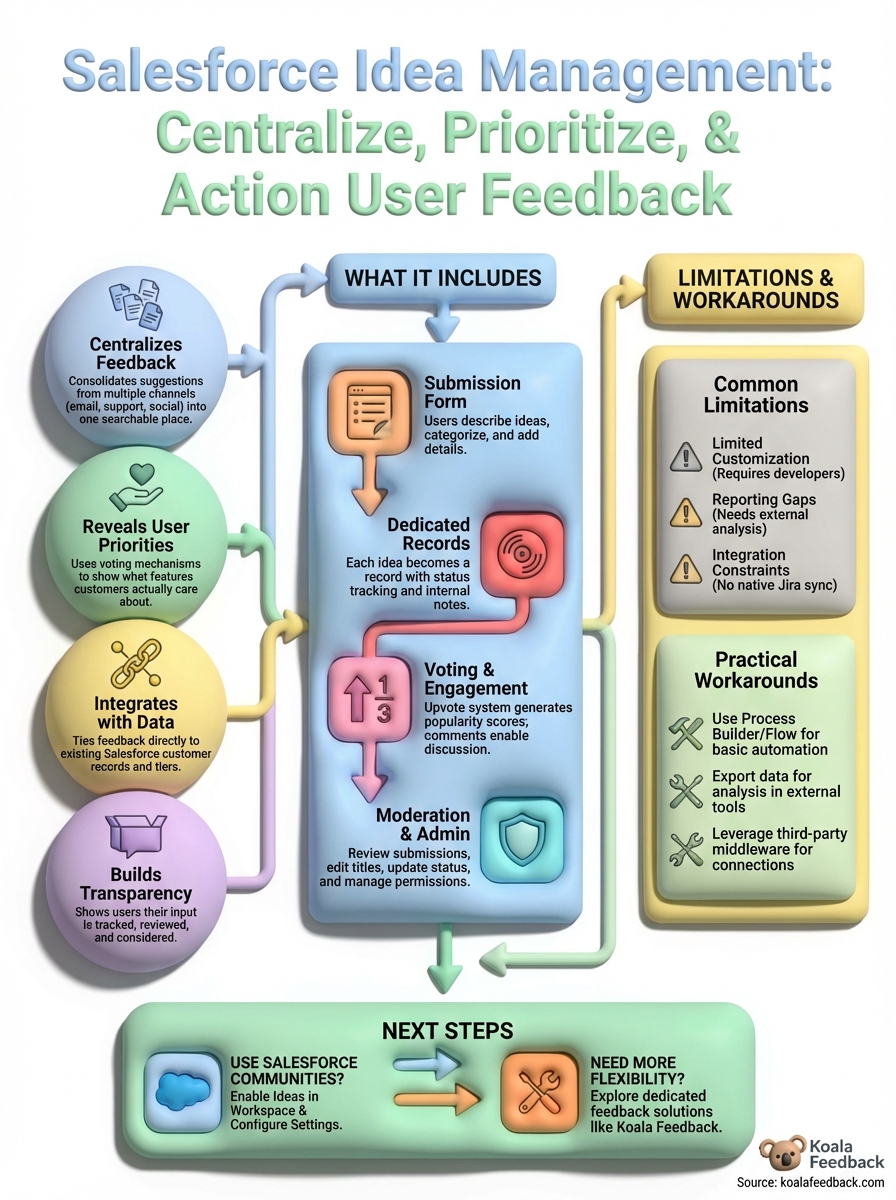
Salesforce idea management gives teams a centralized way to capture user feedback within their existing CRM ecosystem. You get voting capabilities, status tracking, and integration with customer records without introducing another platform. However, the customization constraints, reporting limitations, and integration gaps mean you'll likely need developer resources or workarounds to build the experience your team needs.
Your next step depends on your current setup. If you already use Salesforce Communities and have technical resources available, enabling Ideas makes sense as a starting point. Teams without existing Salesforce investments or those wanting a purpose-built feedback solution should explore dedicated platforms designed specifically for product feedback and roadmap management.
Koala Feedback offers a focused alternative built specifically for collecting, organizing, and acting on user feedback. You get customizable feedback portals, public roadmaps, and prioritization tools without requiring developer resources or Salesforce licensing. Start your free trial to see how a dedicated feedback platform compares to repurposing your CRM.

Start today and have your feedback portal up and running in minutes.

