Collecting product feedback from your users shouldn't feel like searching for needles in a haystack. A Salesforce Ideas Portal gives your customers a structured way to submit suggestions, vote on features, and see what's coming next, all within an ecosystem many businesses already use daily. But here's the thing: setting one up isn't always straightforward, and you might be wondering whether Salesforce's native tools are the right fit for your needs.
This guide breaks down what a Salesforce Ideas Portal actually is, how to enable and configure it, and what alternatives exist if you need more flexibility. You'll learn the step-by-step process to get your portal running, plus tips for making it work effectively for both your team and your users.
Whether you're exploring Salesforce's built-in Ideas feature or considering a dedicated feedback management platform like Koala Feedback, the goal remains the same: give your users a voice and turn their input into product decisions that matter.
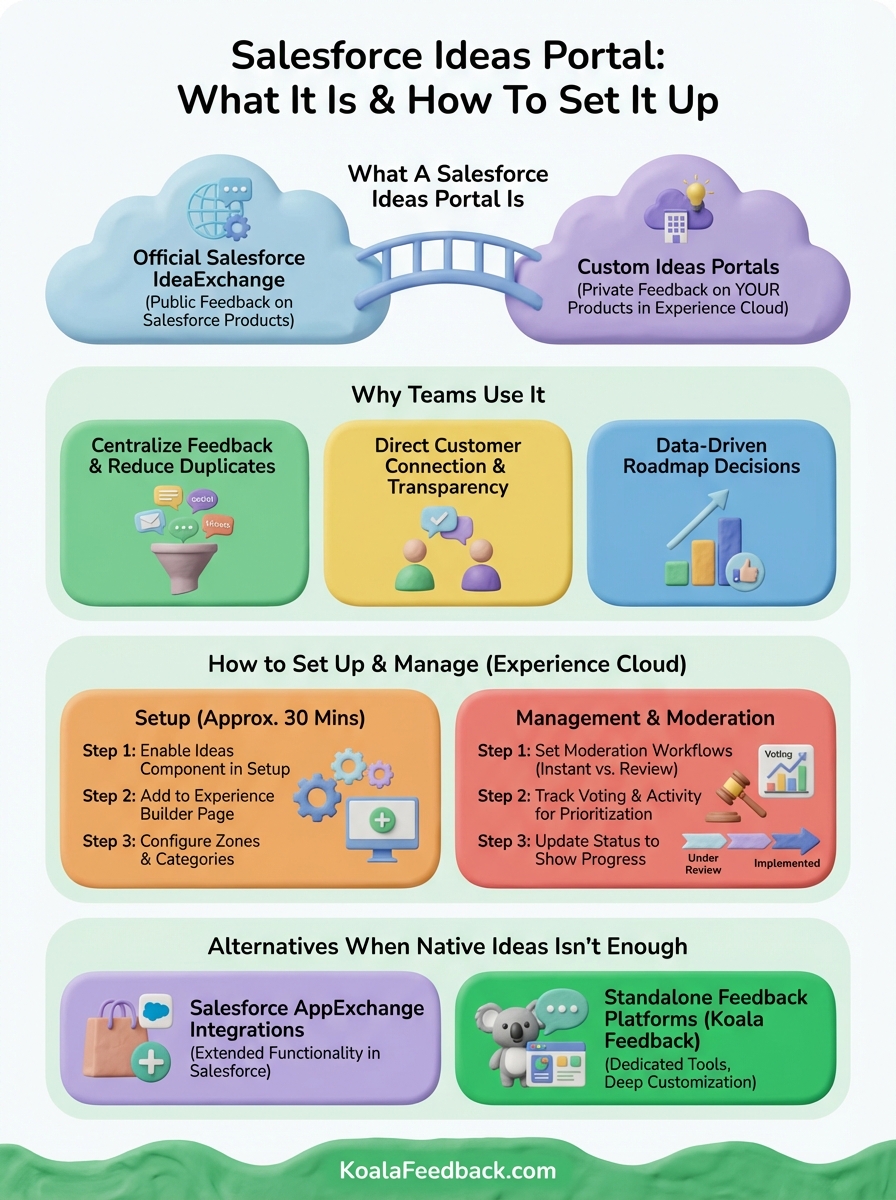
A Salesforce ideas portal is a feedback collection system that lets your customers or employees submit product suggestions, vote on existing ideas, and track which features make it onto your roadmap. The term actually refers to two different things: Salesforce's official IdeaExchange where users suggest improvements to Salesforce products, and the Ideas feature you can enable within your own Salesforce Experience Cloud sites to gather feedback from your community.
Salesforce runs its own public ideas portal called IdeaExchange where customers can propose new features, enhancements, or changes to Salesforce products. You can submit ideas, vote on suggestions from other users, and see which requests Salesforce has implemented. This portal helps Salesforce prioritize development based on actual customer demand rather than internal assumptions alone.
When you understand what users want most, you build products that actually solve their problems instead of guessing in the dark.
The second meaning refers to the Ideas component you can add to your own Salesforce Experience Cloud site (formerly called Community Cloud). This feature lets you create a dedicated feedback space where your customers submit suggestions specific to your products or services. Users can vote on ideas, comment with additional context, and watch as your team moves ideas through different stages like "Under Review" or "Implemented." Your organization controls the look, categories, moderation rules, and how visible the portal is to different user groups.
Teams use a Salesforce ideas portal to centralize feedback from scattered channels like email, support tickets, and social media into one organized space. When you give users a dedicated place to submit suggestions, you reduce duplicate requests because people can see existing ideas and vote on them instead of creating new ones. This visibility helps product teams understand which features matter most.
A portal creates transparent communication between your team and your users. Customers see you're listening when you respond to ideas, update statuses, or explain why certain features won't happen. You build stronger relationships by showing users their input shapes your product direction, which increases loyalty when people feel heard.
When customers see their suggestions implemented, they become advocates who tell others about your product.
Voting data shows you which features solve problems for the most users rather than guessing based on conversations with a few voices. Your product managers can justify roadmap choices with concrete numbers instead of subjective opinions, making it easier to align stakeholders around priorities.
Setting up a Salesforce ideas portal in your Experience Cloud site requires enabling the Ideas feature and configuring how users interact with it. You'll need administrative access to your Salesforce org and an existing Experience Cloud site where you want the portal to live. The setup process takes about 30 minutes once you understand the key steps.
Navigate to Setup in Salesforce, search for "Ideas," and toggle the feature on for your organization. Once enabled, go to your Experience Builder and add the Ideas component to a page within your site. You'll find this component in the component menu under the Community section. Make sure you configure visibility settings so the right user profiles can access the ideas submission form and voting features.

When you enable Ideas correctly, users can start submitting feedback within minutes of launch.
Ideas uses zones (topic areas) and categories (specific groupings) to organize submissions. Create zones that match your product structure, like "Mobile App" or "Billing Features," which helps users find relevant ideas quickly. Categories provide another level of organization within zones, letting you separate feature requests from bug reports or improvement suggestions. Your moderation settings determine whether ideas publish immediately or wait for approval.
Managing your Salesforce ideas portal means controlling how ideas flow through approval, how users interact with submissions, and which suggestions rise to the top based on votes. You need clear workflows that balance open participation with quality control, ensuring spam doesn't overwhelm genuine feedback while keeping the submission process simple for users.
Configure moderation rules in your Experience Cloud settings to decide whether ideas publish instantly or require review before appearing publicly. Instant publication encourages participation but risks low-quality submissions, while pre-moderation ensures quality but creates delays that frustrate users. Your moderators can edit ideas for clarity, merge duplicates, or reject submissions that violate guidelines.
Voting data shows you which ideas resonate most with your user base, helping you prioritize features that solve widespread problems. You can sort ideas by vote count, recency, or activity level to identify trending suggestions before they gain massive traction. Monitor the comments section on popular ideas because users often refine requests through discussion, revealing implementation details your team needs to consider.
When you act on highly voted ideas and update their status, users see their participation creates real change.
Salesforce's native Ideas component works well for basic feedback collection, but you might need more advanced features that the built-in tool doesn't provide. Many teams find limitations around customization, reporting depth, or integration with product management workflows that force them to look beyond what's included in Experience Cloud.
The AppExchange marketplace offers apps that extend Ideas functionality with additional features like advanced analytics, automated workflows, or better moderation tools. These integrations typically connect directly to your Salesforce environment, letting you keep feedback data within your existing system while adding capabilities the native feature lacks. You'll pay extra for these apps, but they solve specific gaps without forcing you to manage feedback outside Salesforce.
Dedicated feedback management tools like Koala Feedback give you complete control over your feedback portal with features built specifically for product teams. You get customizable voting systems, roadmap sharing, automatic deduplication, and deeper analytics that help you make product decisions faster. These platforms operate independently of your Salesforce ideas portal, which means you can customize every aspect of the user experience without Salesforce's constraints.
When your feedback needs grow beyond basic collection, a specialized platform often delivers better results than trying to force Salesforce to do everything.
Setting up a salesforce ideas portal gives you a structured way to collect user feedback, but success depends on choosing the right approach for your needs. Salesforce's native Ideas feature works when you already use Experience Cloud and need basic voting functionality, though you'll face limitations around customization and reporting depth. Your team should evaluate whether the built-in tools provide enough features or if you need a more robust solution.
Managing feedback effectively requires clear moderation workflows, organized categories, and regular updates that show users their input matters. When you keep your portal active and respond to suggestions consistently, you build trust with your user base and gather better quality feedback over time.
If you need more flexibility than Salesforce provides, consider a dedicated platform like Koala Feedback that gives you complete control over your feedback portal with advanced prioritization, automatic deduplication, and roadmap sharing built for product teams who want to turn user input into actionable decisions.

Start today and have your feedback portal up and running in minutes.

