You have a stakeholder meeting in two days and nothing but a messy spreadsheet to show for your product plan. Building product roadmap slides from scratch eats up hours you don't have, and generic templates rarely fit how your team actually communicates progress. If you're searching for a shortcut, you're in the right place.
This article rounds up the best options when you need a product roadmap template powerpoint users can actually edit without fighting the software. We looked for slides that handle quarterly views, feature timelines, and status tracking, so you can drop in your own initiatives and present something polished within the hour.
Below you'll find seven picks, including several free product roadmap ppt templates alongside our wider set of roadmap template downloads for Excel and PPT, ranked by how easy they are to customize and how well they hold up in front of executives or customers. We'll also point out where a static slide falls short and where a live product roadmap, like the one you can build and share with Koala Feedback, keeps your audience updated automatically instead of waiting for the next slide deck.
Every slide deck goes stale the moment you export it. Koala Feedback flips that problem by giving you a public roadmap that updates in real time, so instead of rebuilding a PowerPoint every quarter, you share a link that always reflects what your team is actually working on. It pulls directly from the same feedback board where users vote on ideas, which means the roadmap you present is backed by real demand data, not guesswork pasted into a slide.
A live roadmap never goes out of date the way a slide deck does the moment you hit export.
The platform is built around three connected pieces: collecting feedback, prioritizing it, and then broadcasting the plan.
Generally, teams that present roadmap updates more than once and are tired of manually syncing a static slide with reality will get the most value here. Koala Feedback suits product managers and SaaS founders who want stakeholders and customers checking a live page, built along the lines of these public roadmap examples and best practices, instead of waiting for the next quarterly deck. If your roadmap changes weekly based on customer votes or shifting priorities, a slide simply can't keep up, but a shared board can. It also works well for teams that want to close the loop with users by showing them their feedback led directly to a shipped feature.
Koala Feedback keeps its plans straightforward, with no hidden per-seat traps that punish growing teams.
| Plan | Starting Price | Good For |
|---|---|---|
| Startup | $49/month | Small teams launching their first public roadmap |
| Professional | $99/month | Growing products needing more boards and customization |
| Enterprise | Custom | Larger organizations with advanced security needs |
All plans include a free trial, so you can test whether a live roadmap actually saves you the prep time a slide deck demands. Check the pricing page for the current details before you commit.
Canva has become the default stop for anyone who needs a product roadmap presentation template without opening a design program. Its drag and drop editor lets you swap colors, fonts, and icons in minutes, and the library includes dozens of timeline layouts built specifically for quarterly and yearly planning. Because everything runs in the browser, you can hand off editing to a teammate without worrying about compatibility.
Canva trades depth for speed, which is exactly the trade most teams want the night before a meeting.
Canva's roadmap section includes swimlane layouts, Gantt-style timelines, and icon-driven feature grids. You get:
Small teams and solo product managers who need a product roadmap slide template fast will find Canva hard to beat. It suits anyone building a one-off presentation for a board meeting or sales pitch rather than a roadmap they'll update weekly, though it helps to start from proven roadmap planning template examples.
Canva's free tier covers most roadmap templates, though some premium layouts sit behind Canva Pro, which runs about $15/month per user. Teams needing shared brand controls should look at Canva for Teams, priced per seat. Check Canva's pricing page for current numbers.
Aha! roadmap software built its name on roadmap planning, and its presentation templates reflect that pedigree. Rather than generic timeline shapes, these product roadmap templates powerpoint files mirror the same swimlane and epic structure product teams already use inside Aha!'s planning tools, so the export actually matches how you think about strategy. If your team already lives in Aha! for backlog planning, exporting a polished slide deck feels like a natural extension instead of a separate task.
A roadmap slide works best when it mirrors the planning structure your team already uses, not a generic timeline shape.
Aha! focuses on strategic alignment more than pure visual flair. Expect:
Product teams already using Aha! for roadmap planning get the most value, since the export skips manual rebuilding entirely. It also suits product managers who need to show how individual features tie back to strategic themes rather than just a list of dates, which matters most when you're communicating a roadmap to executives who care about the why behind the timeline.
Aha! Roadmaps starts around $59 per user per month on the Premium plan, with higher tiers unlocking more integrations and reporting. There's no permanently free plan, though a trial lets you test the export before committing. See Aha!'s pricing page for current tiers.
Miro started as a whiteboard tool, and that heritage shows in how its roadmap templates work. Instead of a rigid slide grid, you get an infinite canvas where you can drag sticky notes, timelines, and swimlanes around until the structure matches how your team actually plans. Once the board looks right, exporting it into a product roadmap slide template for a stakeholder meeting takes just a couple of clicks.
A whiteboard canvas lets the roadmap take shape organically before you ever format a single slide.
Miro's roadmap boards are built for collaborative planning first, presentation second. You get:
Distributed teams that plan roadmaps collaboratively, rather than one person building a deck alone, get the most out of Miro. It suits product managers running live workshops where stakeholders help shape the timeline in real time, then need a clean export afterward for anyone who missed the session.
Miro's free plan covers basic roadmap boards for small teams, and it's one of several free roadmap software options worth comparing. Paid tiers start around $8 per user per month on the Starter plan, with Business and Enterprise tiers adding advanced permissions and integrations. Check Miro's pricing page for current rates.
Slidesgo takes a different angle than Canva or Miro: it's built entirely around free, downloadable product roadmap ppt template files organized by theme rather than a live editor you build inside. You browse a huge library of infographic-style decks, pick one that matches your brand's tone (minimalist, corporate, playful), and download the PPTX or Google Slides version straight away. This makes it a fast option when you need a product roadmap presentation template that already looks designed, not just a bare timeline shape you have to dress up yourself.
A template library saves the most time when the design work is already done and you're just swapping in your own milestones.
Slidesgo organizes its roadmap collection by visual style rather than by feature set, which makes browsing quick. Highlights include:
Marketing and product teams who want a product roadmap template ppt free option with strong visual polish, and who don't need collaborative editing, will get the most mileage here. It also suits anyone building a single presentation who'd rather browse finished designs than start from a blank canvas.
Most templates download free with attribution, or without attribution on a Slidesgo Premium subscription, priced around $7.49/month billed annually. Check Slidesgo's site for current template availability and pricing tiers.
Adobe Express brings the polish you'd expect from Adobe's design lineage into a lighter, browser-based tool built for people who don't want to open Photoshop or Illustrator just to make a timeline. It's a solid pick if you want a powerpoint product roadmap template that looks like it came from a design agency but only takes a few minutes to customize. The template library skews toward clean, modern layouts with strong typography, which reads well on a projector screen where cheaper templates often look flat, and pairs nicely with the principles behind creating and sharing a visual product roadmap.
Good typography and spacing do more for a roadmap slide's credibility than any extra icon or color ever will.
Adobe Express ties its roadmap templates into the broader Adobe Creative Cloud ecosystem, which shows in the polish. You get:
Design-conscious product managers and marketing teams who want their roadmap slide to match a broader brand system will appreciate Adobe Express most. It suits anyone already paying for Creative Cloud who wants roadmap templates that feel consistent with their other marketing materials.
Adobe Express offers a free plan with limited premium templates and assets. Premium unlocks the full library for about $9.99/month. Check Adobe's pricing page for current details.
SlideModel takes the opposite approach from Slidesgo's infographic style: it specializes purely in PowerPoint product roadmap templates built for corporate and enterprise presentations, with a catalog deep enough that you'll find a layout for nearly any planning method your team uses. Instead of browsing by mood or color, you search by structure, like quarterly timelines, Gantt charts, or now/next/later boards, which saves time when you already know the format your stakeholders expect.
Searching by structure instead of style gets you to the right slide faster when you already know what your stakeholders expect.
SlideModel's library leans heavily on native PowerPoint editing rather than a separate browser tool. Expect:
Enterprise product managers and consultants who need a product roadmap template powerpoint file that plugs directly into existing corporate slide decks will find SlideModel's depth useful. It also suits anyone building recurring board presentations who wants a library of proven roadmap formats and examples rather than starting from scratch each quarter.
SlideModel offers limited free downloads, with full access through an annual subscription running around $99.99/year. Check SlideModel's site directly for current template counts and pricing tiers before subscribing.
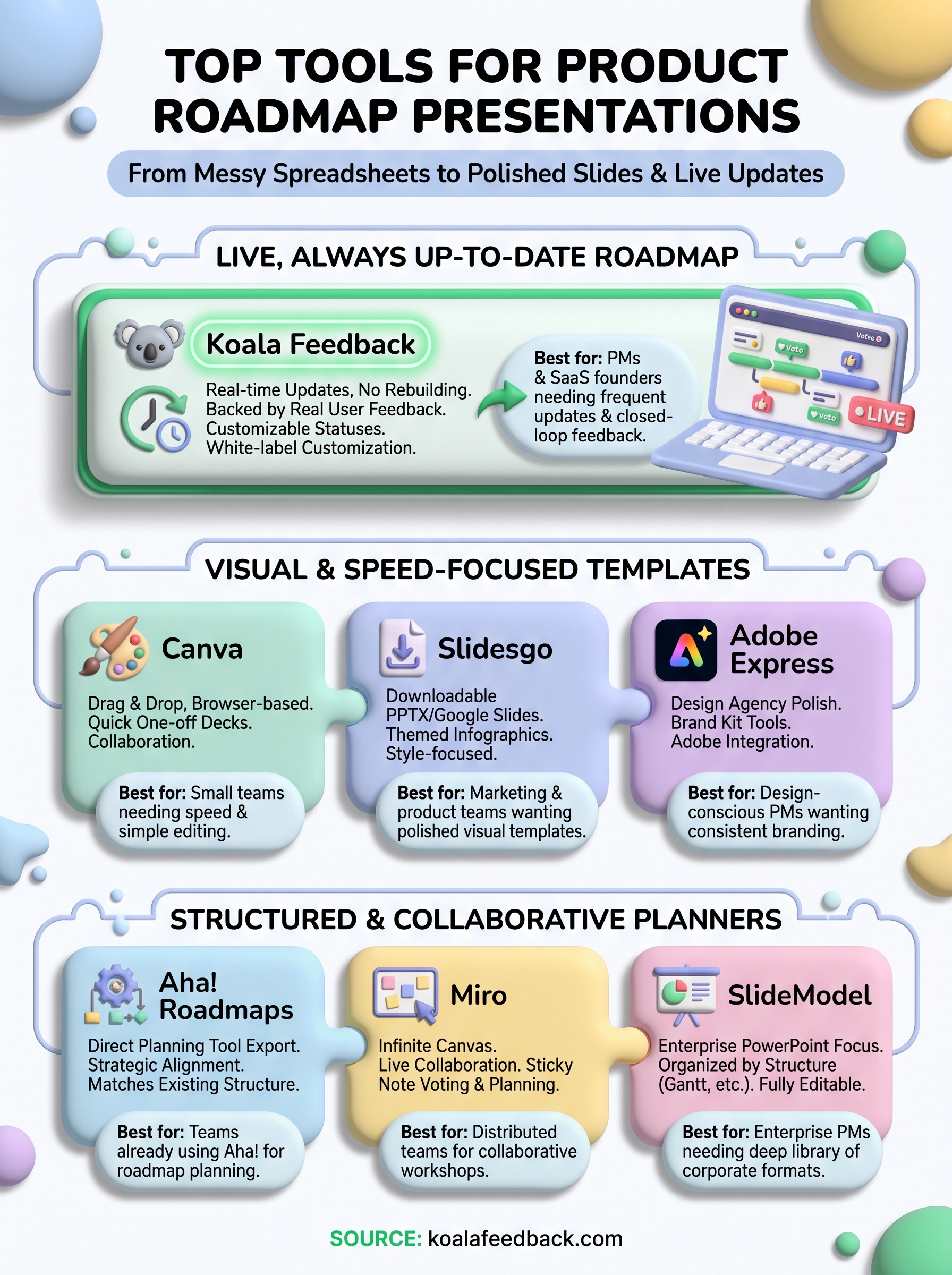
Most of the tools above solve a one-time problem: you need a polished deck for Thursday's meeting, and any of these seven options will get you there faster than starting from a blank slide. Canva and Slidesgo win on speed, Aha! and SlideModel win on structure, and Miro wins on collaborative planning before you ever format a single shape.
Question, though, is whether that same deck will still be accurate next month. Static product roadmap slides capture a moment in time, and every stakeholder meeting after that first one means updating dates, statuses, and priorities by hand again. That's the gap a live roadmap closes.
If you're tired of rebuilding the same presentation every quarter, it's worth testing a board that updates itself. See how Koala Feedback's roadmap feature works and what it feels like to share a roadmap once and never rebuild the slide again.

Start today and have your feedback portal up and running in minutes.

