Your users are talking, through support tickets, social media, emails, and in-app messages. Without the right product feedback management software, that valuable input gets scattered and lost, making it nearly impossible to prioritize what to build next.
A centralized feedback system changes everything. It lets you collect user input in one place, identify patterns, and make data-driven decisions about your roadmap, instead of guessing what features matter most.
At Koala Feedback, we've built our platform around this exact challenge, helping teams turn messy feedback into clear product direction. But we know we're not the only option, and the right tool depends on your specific workflow and goals.
This guide covers 10 of the best product feedback management tools for 2026. You'll find features, pricing, strengths and weaknesses, and guidance on what types of teams each tool serves best, so you can choose with confidence and start building what your users actually want.
Koala Feedback takes a straightforward approach to product feedback management software, focusing on the core workflows teams actually need without overwhelming you with unnecessary features. The platform centers on three main capabilities: collecting feedback in one place, helping you decide what matters most, and keeping users informed about your progress.
You'll find Koala Feedback particularly effective if you're a small to mid-sized SaaS team looking to establish a structured feedback process without enterprise complexity. The platform works best when you need a public-facing feedback portal that encourages user participation while giving your team the tools to organize and act on that input systematically.
Teams using Koala Feedback typically value transparency with their users and want to build products based on actual demand rather than assumptions. The tool shines when you need to demonstrate that you're listening to customers and taking their input seriously, which helps improve retention and user satisfaction.
Your users submit feedback through a customizable portal that can match your brand's look and feel, including your own domain, colors, and logo. The system automatically deduplicates similar requests, so you don't waste time sorting through identical suggestions from multiple users.
Feedback gets organized into logical boards that align with your product areas or feature sets. Users can vote on requests they care about and add comments to provide additional context. This voting system gives you a clear signal about which features have genuine demand versus which ones are nice-to-haves from a vocal minority.
The categorization happens as feedback comes in, keeping your boards clean and making it easy for your team to spot patterns without manual cleanup work.
Koala Feedback includes a public roadmap feature that lets you share your product direction with users transparently. You can showcase what's planned, in progress, and completed, giving customers visibility into where their feedback stands in your development queue.
The platform uses customizable statuses within the roadmap to manage user expectations effectively. When you move a feature request forward, users who voted on it get notified, which keeps them engaged with your product's evolution.
Koala Feedback connects with common tools through webhooks and API access, allowing you to push feedback data into your existing project management systems. The platform fits naturally into workflows where product teams want a dedicated space for user input separate from their internal planning tools.
You can embed the feedback widget directly in your application or link users to a standalone portal. Both options give you flexibility in how you collect feedback based on where your users are most likely to share their thoughts.
Koala Feedback offers a free plan for teams just getting started, which includes unlimited feedback submissions and basic portal customization. Paid plans start at $25 per month and add features like custom domains, priority support, and advanced roadmap controls. The pricing scales based on the number of admin users and additional features you need, making it accessible for bootstrapped startups while remaining viable as you grow.
Canny positions itself as a comprehensive feedback solution built for product teams that want deeper insights into customer requests. The platform combines feedback collection with analytics capabilities that help you understand not just what users want, but why they want it and how strongly they feel about specific features.
Canny works particularly well for B2B SaaS companies that need to track feedback across multiple customer accounts and understand which requests come from their highest-value users. The platform excels when you need to segment feedback by customer type or revenue impact, letting you weigh feature requests based on business priorities rather than just vote counts.
Your users submit feedback through a public board where they can search existing requests before posting duplicates. Canny's system lets you create multiple boards for different product areas or user types, and administrators can merge similar posts to keep everything organized.
The platform includes autopilot features that automatically sort and tag incoming feedback based on keywords and patterns. Users receive notifications when their requests get status updates, which keeps them engaged without requiring manual outreach from your team.
Canny's automatic detection helps you spot trending topics before they become major issues, giving you an early warning system for customer concerns.
Canny provides a scoring system that combines user votes, customer value data, and your team's internal assessments to rank feature requests. You can publish a roadmap showing planned and completed work, with customizable privacy settings that let you control what information different user groups can see.
The platform connects with project management tools like Jira and Asana, automatically syncing feedback to your development workflow. Canny also integrates with analytics platforms and customer data tools, letting you enrich feedback with usage patterns and account information.
Canny starts at $400 per month for their Growth plan, which includes unlimited boards and basic integrations. Their Business plan runs $800 monthly and adds advanced analytics and private boards. Enterprise pricing requires custom quotes and includes features like single sign-on and dedicated support channels.
UserVoice brings enterprise-grade capabilities to product feedback management software, targeting larger organizations that need sophisticated feedback workflows and advanced security features. The platform combines customer feedback collection with in-depth analytics and reporting tools designed for teams managing complex product portfolios across multiple departments.
UserVoice serves enterprise teams and established companies that handle feedback at scale, particularly those needing detailed reporting for stakeholders and executive leadership. The platform works best when you need to track feedback across multiple products or services while maintaining separate workflows for different business units.
Organizations with strict compliance requirements find UserVoice especially valuable because it includes enterprise security features and audit trails. You'll benefit most from this tool if you need to demonstrate ROI from feedback initiatives to leadership teams who want quantitative proof of customer input driving product decisions.
Your customers submit feedback through branded portals that you can customize to match your company's design standards. UserVoice includes smart suggestion engines that recommend existing posts when users start typing, reducing duplicate submissions before they happen.
The platform automatically categorizes incoming feedback using machine learning algorithms that learn from your team's manual classifications. Internal teams can add custom tags and link feedback to specific customer accounts, making it easier to track requests by company size or industry segment.
UserVoice's AI-powered organization means your team spends less time sorting feedback and more time acting on insights that move the needle.
UserVoice provides impact scoring that weighs factors like customer value, vote counts, and strategic alignment when ranking feature requests. You can create multiple roadmaps for different audiences, controlling which features appear in public versus internal views.
The platform connects with enterprise tools including Salesforce, Azure DevOps, and ServiceNow, creating bi-directional data flow between your feedback system and existing workflows. UserVoice offers SSO capabilities and API access for custom integrations with your internal systems.
UserVoice pricing starts at $799 per month for their Essentials plan supporting basic feedback collection and roadmaps. Professional plans begin at $1,399 monthly and include advanced analytics. Enterprise pricing requires custom quotes based on user volume and specific feature needs.
Userback specializes in visual feedback collection through screenshots and screen recordings, making it particularly effective when your users need to show exactly what they're experiencing rather than just describe it. The platform combines in-app feedback widgets with bug tracking capabilities, bridging the gap between user suggestions and technical issue reporting.
You'll find Userback most valuable if you're managing a web application or SaaS product where visual context matters for understanding user feedback. The platform works exceptionally well for teams that need to capture technical issues alongside feature requests, particularly when those issues involve UI problems or workflow confusion that screenshots can clarify quickly.
Development teams appreciate Userback when they need detailed context about reported issues without multiple back-and-forth conversations with users. The visual nature of feedback collection reduces miscommunication and speeds up bug fixes.
Your users click a feedback button embedded in your application and immediately capture annotated screenshots or screen recordings showing exactly what they're experiencing. Userback automatically collects technical metadata including browser version, screen resolution, and console logs alongside the visual feedback.

The platform's visual capture reduces the guesswork in understanding user feedback, giving your team concrete evidence of reported issues.
All feedback flows into a centralized dashboard where your team can tag, categorize, and assign items to specific team members. The system detects duplicate submissions and lets you merge related feedback automatically.
Userback includes voting capabilities that let users support existing feedback items, helping you identify which requests have the strongest demand. You can create status categories to track feedback through your workflow, from initial submission through completion.
The platform connects with development tools like GitHub, Jira, and Trello, automatically creating tickets from feedback submissions. Userback integrates with Slack and Microsoft Teams, pushing notifications about new feedback directly into your team's communication channels.
Userback starts at $59 per month for their Startup plan, which includes unlimited feedback submissions and basic integrations. Their Company plan costs $149 monthly and adds advanced features like custom branding. Enterprise pricing requires custom quotes and includes dedicated support.
Sprig takes a research-focused approach to product feedback management software by combining in-product surveys with session replays and AI-powered analysis. The platform prioritizes qualitative insights over simple vote counting, helping you understand not just what users want but the underlying motivations driving their feedback.
You'll get the most value from Sprig if you're a product team that needs to validate assumptions and understand user behavior beyond feature requests. The platform serves teams wanting to conduct continuous user research without interrupting workflows or scheduling lengthy interview sessions.
Sprig works particularly well when you need to connect feedback to actual user behavior, combining what people say they want with how they actually use your product. Organizations focused on user experience optimization find the platform valuable for identifying friction points and testing design decisions in real time.
Your users encounter targeted surveys that appear at specific moments within your product, triggered by behaviors or user attributes you define. Sprig captures responses alongside session replays showing exactly what users were doing when they provided feedback.
The platform's AI analysis automatically identifies themes and patterns across responses, surfacing insights without requiring manual review of every submission.
Feedback gets organized into study-based collections rather than traditional voting boards, letting you group insights by research question or product area. The system tags responses with user segments and behavioral data, making it easy to filter by customer type or usage patterns.
Sprig provides insight summaries that highlight recurring themes and sentiment trends across your feedback data. You can track how user satisfaction changes over time as you ship features, giving you quantitative proof that your decisions address real pain points.
The platform connects with analytics tools like Amplitude and Mixpanel, enriching feedback with behavioral data. Sprig integrates with Slack and project management systems, pushing research insights directly into your team's existing workflows.
Sprig offers a free plan for teams running up to 100 survey responses monthly. Paid plans start at $175 per month for their Starter tier with 500 responses. Enterprise pricing requires custom quotes based on response volume and advanced features.
Pendo combines product analytics with feedback collection, creating a platform that connects user behavior data directly to feature requests and feedback submissions. The tool focuses on product-led growth strategies, helping you understand which features drive adoption and retention while collecting structured input from users about what they want next.
You'll find Pendo most effective if you're a product team that needs to correlate feedback with actual usage patterns and user behavior data. The platform serves organizations wanting to make decisions based on combined qualitative and quantitative insights rather than feedback votes alone.
Pendo works particularly well for mid-sized to enterprise SaaS companies that need analytics capabilities alongside feedback management. Teams focused on improving user onboarding and feature adoption benefit from seeing which requested features might actually solve usage problems.
Your users submit feedback through in-app prompts and survey tools that Pendo triggers based on specific behaviors or user segments. The platform automatically connects feedback to usage data, showing you which features are being requested by active users versus those who rarely engage with your product.
Pendo's behavioral context helps you prioritize feedback from users who actually represent your target market, rather than treating all votes equally.
Feedback gets organized into topic collections that you can filter by user segment, account value, or engagement level. The system lets you tag submissions and link them to specific product areas.
Pendo provides impact scores that combine feedback volume with usage analytics and revenue data from requesting accounts. You can publish roadmaps showing planned features and track which requests convert into shipped functionality, helping users see their input driving product decisions.
The platform connects with development tools including Jira and Azure DevOps, automatically syncing feedback items into your existing project management systems. Pendo integrates with CRM platforms, enriching feedback data with customer information and contract values.
Pendo requires custom pricing quotes based on your monthly active users and feature requirements. Plans typically start in the several thousand dollars monthly range for mid-market companies. The platform bundles product feedback management software capabilities with analytics and user engagement tools rather than offering standalone feedback pricing.
Usersnap functions as visual feedback and bug tracking software that captures screenshots with annotations, making it easier for your team to understand exactly what users experience when they report issues or suggest features. The platform positions itself between traditional product feedback management software and technical bug tracking tools, serving teams that need detailed visual context alongside user opinions.
You'll benefit from Usersnap if you're managing a web-based product where visual feedback significantly improves communication between users and your development team. The platform serves teams that struggle with vague bug reports or feature requests lacking context, particularly when users need to show rather than tell what they're experiencing.
Development teams appreciate Usersnap when they need to reduce back-and-forth conversations about reported issues. The visual nature of feedback collection eliminates confusion about which button users clicked or what screen they were viewing when problems occurred.
Your users access a feedback widget embedded in your application that lets them capture annotated screenshots showing exactly what needs fixing or improving. Usersnap automatically collects browser information and console logs alongside visual feedback, giving your technical team the data they need without asking users for details they can't easily provide.
The platform's automatic metadata collection means you get technical context without requiring users to understand browser versions or JavaScript errors.
Submissions land in a centralized inbox where your team can label, assign, and track items through resolution. The system lets you create custom workflows matching how your team already handles feedback and bugs.
Usersnap includes voting features that let users support existing submissions, helping you identify which issues affect multiple people. You can set custom statuses tracking feedback through your development process, keeping users informed about progress on their submissions.
The platform connects with development tools including Jira, GitHub, and Azure DevOps, automatically creating tickets from user submissions. Usersnap integrates with Slack and Trello, pushing new feedback into your team's existing communication channels.
Usersnap offers a free plan supporting up to 100 feedback items monthly. Paid plans start at $69 per month for their Startup tier with increased limits. Company plans cost $129 monthly and include advanced features like custom branding and priority support.
Survicate approaches product feedback management software through survey-first methodology, specializing in collecting structured feedback across multiple channels including email, website, in-product, and mobile apps. The platform prioritizes quantitative data collection through targeted surveys rather than open-ended feedback boards, making it particularly effective when you need measurable insights from specific user segments.
You'll find Survicate most valuable if you need to measure customer satisfaction through structured surveys like NPS, CSAT, or CES scores rather than collecting feature requests. The platform serves teams wanting to track satisfaction trends over time and segment results by customer type or behavior patterns.
Survicate works particularly well for product and customer success teams that need to gather feedback at specific moments in the customer journey, such as after onboarding, feature adoption, or support interactions. Organizations focused on improving retention benefit from the platform's ability to identify dissatisfied users before they churn.
Your users receive targeted surveys delivered through email, in-app widgets, or website popups based on triggers you define. Survicate supports multiple question types including multiple choice, rating scales, and open-ended responses, letting you structure feedback collection for easier analysis.
The platform's multi-channel approach means you can reach users wherever they interact with your product, increasing response rates without forcing everyone through a single feedback portal.
Responses flow into a unified dashboard where you can segment data by user attributes, behavior, or survey campaign. The system automatically categorizes open-ended responses and identifies sentiment trends across submissions.
Survicate provides analytics dashboards showing satisfaction trends and response patterns rather than traditional feature voting. You can identify which product areas receive the lowest satisfaction scores, helping you prioritize improvements based on user pain points.
The platform connects with CRM and analytics tools including HubSpot, Salesforce, and Segment, enriching survey responses with customer data. Survicate integrates with Slack and email platforms, distributing survey results to relevant team members automatically.
Survicate offers a free plan supporting up to 100 responses monthly. Paid plans start at $89 per month for their Essential tier with increased response limits. Business plans cost $299 monthly and include advanced targeting and unlimited surveys.
Featurebase delivers all-in-one product feedback management software that combines feedback collection with changelog publishing and help documentation, creating a unified platform for user communication. The tool emphasizes simplicity and speed, making it accessible for smaller teams that want professional feedback management without overwhelming complexity or enterprise pricing.
You'll find Featurebase particularly effective if you're a startup or small SaaS team that needs to establish a complete user feedback system quickly. The platform serves teams wanting a polished public presence for feedback collection without dedicating significant time to setup and configuration.
Featurebase works best when you need to consolidate multiple communication tools into one platform, replacing separate systems for feedback, changelogs, and basic help content. Teams valuing clean design and user experience appreciate the platform's attention to visual polish.
Your users submit feedback through a branded portal that matches your product's design language, maintaining consistency across your user-facing tools. Featurebase includes automatic duplicate detection that suggests existing posts when users start typing, reducing redundant submissions before they happen.
The platform organizes feedback into customizable boards that you can structure around product areas or user types. Users vote on submissions and receive notifications when status changes occur, keeping them engaged throughout the development process.
Featurebase's streamlined organization means your team spends less time managing feedback infrastructure and more time building features users actually want.
Featurebase provides voting-based prioritization showing which features have genuine user demand, combined with internal scoring tools that let your team weight strategic importance. You can publish a public roadmap displaying planned and shipped features, managing user expectations about upcoming releases.
The platform connects with common development tools including Linear, GitHub, and ClickUp, syncing feedback into your existing project management workflow. Featurebase integrates with Slack, pushing notifications about new high-priority feedback directly to your team.
Featurebase offers a free plan supporting basic feedback collection and roadmaps. Paid plans start at $49 per month for their Startup tier with custom branding and advanced features. Their Scale plan costs $99 monthly and includes priority support and additional customization options.
ProdPad positions itself as a complete product management platform rather than standalone product feedback management software, combining feedback collection with product strategy tools, roadmapping, and idea validation frameworks. The platform targets product managers who need end-to-end workflows for managing their product lifecycle, from initial ideas through execution and delivery.
You'll find ProdPad most valuable if you're a dedicated product manager or product team that needs a comprehensive toolkit covering your entire workflow, not just feedback collection. The platform serves teams wanting to connect feedback directly to strategic product planning and OKRs, creating clear lines between user requests and business objectives.
ProdPad works particularly well for established product teams that need to manage multiple stakeholders and demonstrate how user feedback aligns with company strategy. Organizations requiring formal product management processes benefit from the platform's structured approach to idea evaluation and roadmap planning.
Your users submit ideas through a feedback portal that captures suggestions alongside your team's internal product ideas. ProdPad uses an idea inbox where all submissions land before your team validates and organizes them into your product backlog.
The platform includes custom tagging systems that let you categorize feedback by product area, customer segment, or strategic theme. You can link multiple feedback submissions to single product ideas, tracking demand across different sources.
ProdPad's idea management connects scattered feedback to consolidated product concepts, helping you see patterns across multiple input channels.
ProdPad provides scoring frameworks like RICE and ICE built directly into the platform, helping you evaluate ideas consistently based on reach, impact, confidence, and effort. You can create multiple roadmap views for different audiences, from high-level strategy timelines to detailed feature plans.
The platform connects with development tools including Jira, Azure DevOps, and Trello, syncing validated ideas into your team's execution workflow. ProdPad integrates with Slack and communication platforms, keeping stakeholders informed about roadmap changes.
ProdPad starts at $20 per editor monthly on their Roadmap plan, which includes basic feedback collection and roadmapping. Their Product Management plan costs $65 per editor monthly and adds prioritization frameworks and idea management. Enterprise pricing requires custom quotes for larger teams.
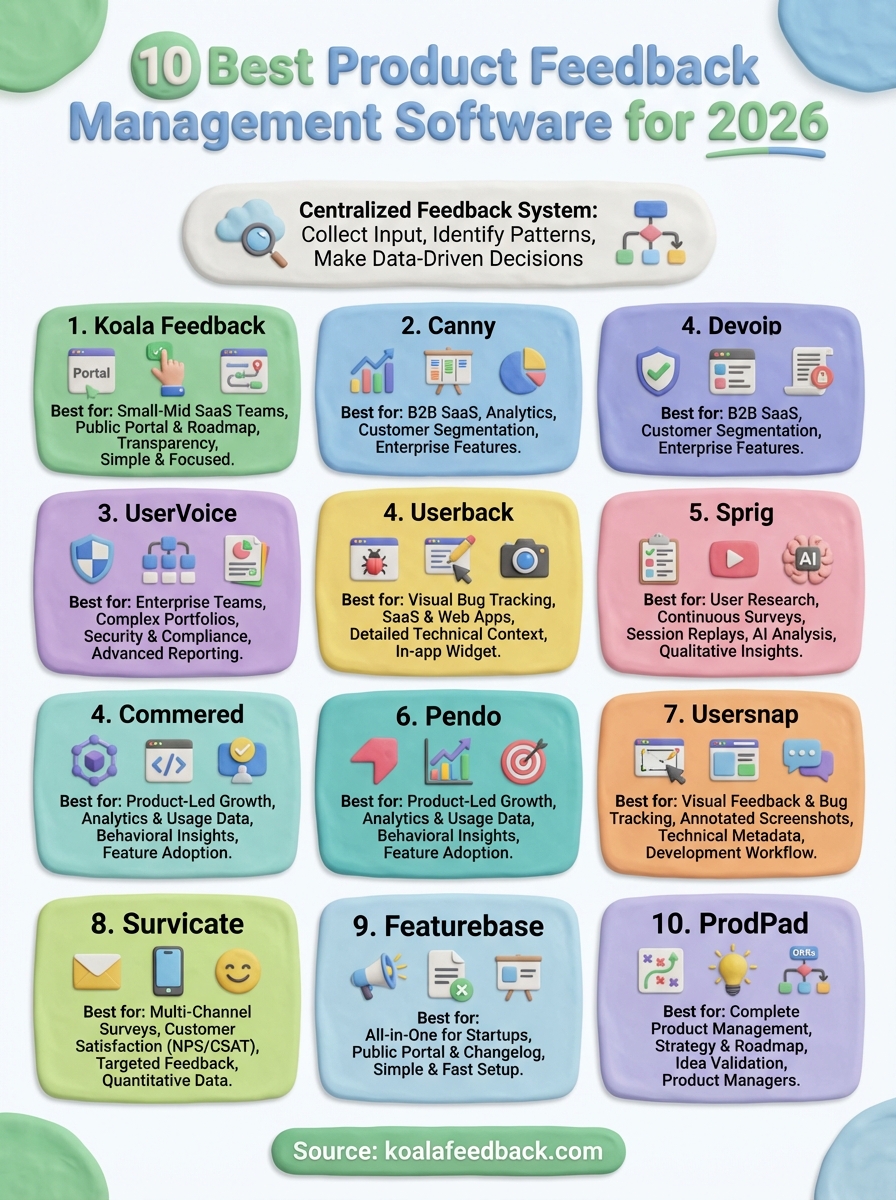
You now have a clear view of 10 product feedback management software options that can help you centralize user input and build better products. Each platform brings different strengths to the table, from visual bug tracking to enterprise analytics suites, but they all solve the same core problem of scattered feedback drowning out valuable insights.
Your choice depends on your team size, workflow complexity, and whether you need basic feedback collection or comprehensive product management capabilities. Smaller teams benefit from straightforward tools that get you collecting and acting on feedback quickly, while larger organizations might need advanced segmentation and reporting features.
If you're looking for a simple, effective way to start capturing user feedback and sharing your roadmap transparently, try Koala Feedback for free. The platform gives you everything you need to collect votes, organize requests, and keep users informed about what you're building, without forcing you through enterprise complexity you don't need yet.

Start today and have your feedback portal up and running in minutes.

