You need a roadmap for your next release, and your team keeps asking where things stand. Before you sign up for another tool, you want to know if a spreadsheet can actually do the job. A software roadmap template excel works fine for this, as long as you set it up with the right columns, colors, and structure from the start.
This guide shows you exactly how to build one. You'll get a working excel product roadmap template with timelines, status colors, and milestone tracking, plus the formulas that turn a plain grid into something your team will actually check each week. Whether you're planning one product or juggling a multiple product roadmap template excel setup across several teams, the same structure scales, and you can compare it against other roadmap planning template formats.
We'll walk through the columns you need, how to build a Gantt-style timeline with conditional formatting, and how to organize features by priority and quarter. We'll also cover where Excel breaks down, since spreadsheets get messy fast once your product managers, developers, and customers all need visibility into the same plan. If you hit that wall, we'll show you what a purpose-built tool like Koala Feedback does differently for sharing a live, public roadmap.
A solid software development roadmap template excel file needs more than a list of features and dates. It needs a structure that answers three questions at a glance: what are we building, when is it landing, and how confident are we in that date. Skip any of these and your roadmap turns into a wish list nobody trusts. Get the structure right once, and you can reuse the same product roadmap excel template for every release cycle without rebuilding it from scratch, or start from one of these free roadmap templates for Excel and PowerPoint.
Start with a single sheet and these columns before you touch any formatting. This is the backbone of any excel template for product roadmap work, and it's the same set you'd map into a dedicated tool later if you outgrow the spreadsheet.
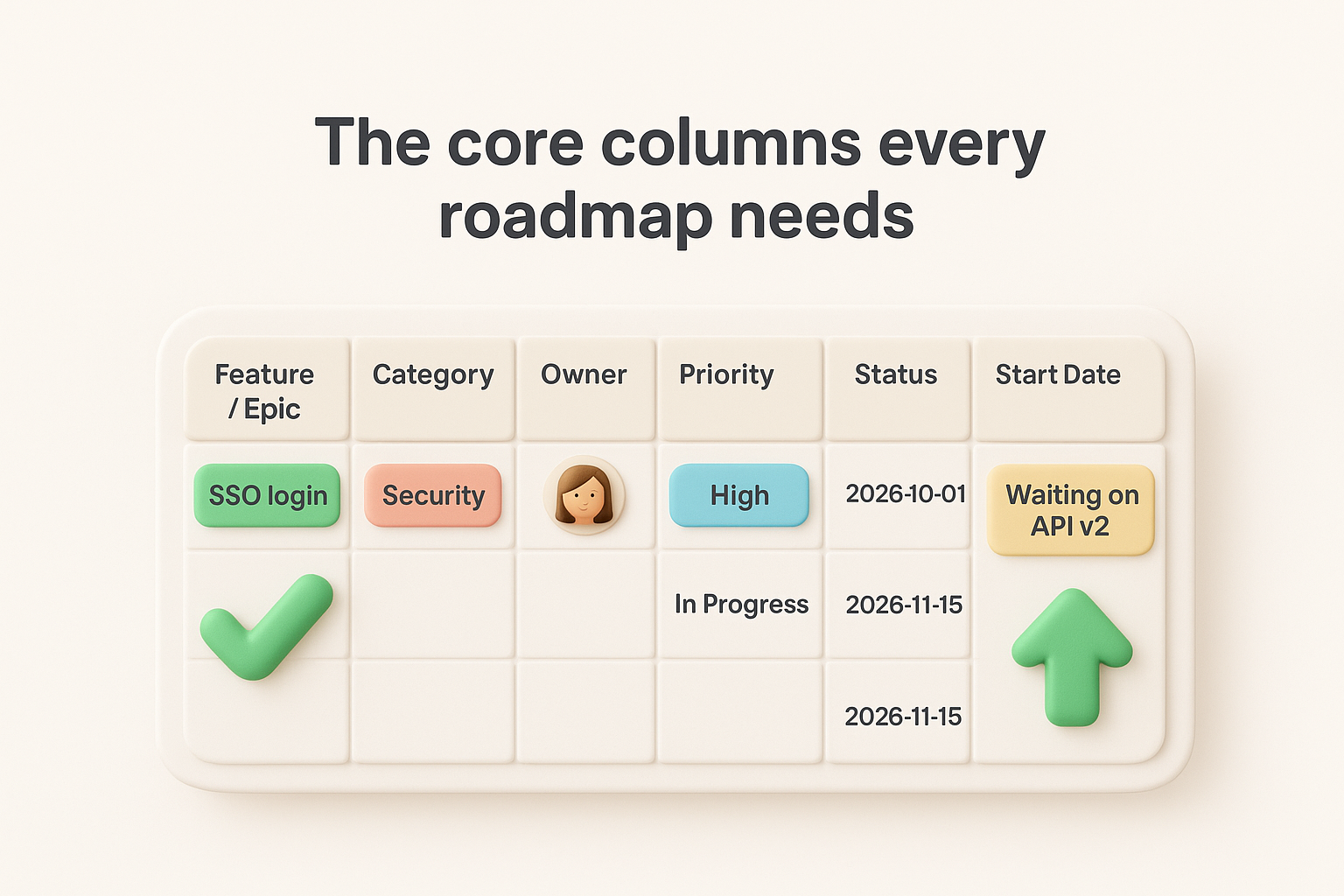
| Column | Purpose | Example |
|---|---|---|
| Feature / Epic | The item being built | "SSO login" |
| Category | Groups related work | "Security" |
| Owner | Who's accountable | "Dana, Backend" |
| Priority | High / Medium / Low | "High" |
| Status | Current stage | "In Progress" |
| Start Date | When work begins | "2026-10-01" |
| End Date | Target completion | "2026-11-15" |
| Quarter | Rollup period | "Q4 2026" |
| Notes | Context, blockers, links | "Waiting on API v2" |
A roadmap that only shows dates and no ownership or status will always feel out of date.
Decide upfront whether you're tracking by week, sprint, or quarter, because this decision drives how many columns you'll need for your timeline bars later. Teams shipping continuously often plan in two-week sprints, so a product development roadmap template excel file for them needs weekly columns stretching across the sheet. Teams doing quarterly releases only need four or five quarter columns total, and a guide to planning a roadmap in 90-day cycles covers that cadence in depth. Mixing granularities on one sheet is the fastest way to make a roadmap unreadable, so commit to one before you add a single row.
Group features under broader themes or epics so stakeholders can scan the roadmap without drowning in ticket-level detail. If you're mapping a product launch roadmap template excel for a specific release, this might mean a "Launch Readiness" theme with rows for marketing assets, documentation, and QA sign-off nested underneath it. Executives care about themes; engineers care about tasks, which is why different types of product roadmaps exist for different audiences. A good template lets both zoom to the level they need, usually by using an indent or a separate "Theme" column that you can filter or group in Excel's outline view.
Every date on a roadmap is a guess, and pretending otherwise erodes trust fast. Add a simple "Confidence" column with values like Confirmed, Estimated, or Speculative, so anyone reading the sheet knows which dates are locked and which might shift. Reserve a separate tab, or a filtered view, for items that are still speculative so they don't clutter the main roadmap view your stakeholders check weekly.
If you manage more than one product line, don't wait until things get messy to restructure. A multiple product roadmap template excel setup works best as either separate tabs per product feeding a master summary tab, or a single sheet with a "Product" column you can filter and pivot on. The second approach scales better if you eventually want cross-product reporting, since Excel's PivotTable feature can summarize status and timelines across products without manual copying. Whichever approach you pick, keep the column structure identical across products so comparisons stay easy and nobody has to relearn the layout for each team.
Open a fresh sheet and reserve the top rows for your date headers before you type a single feature name. This becomes the spine of your excel template product roadmap, and every timeline bar you draw later will line up against these columns, so getting the increments right now saves you from re-dragging bars across the whole sheet next quarter.
Decide on your granularity from the previous section, then lay out the header row using formulas instead of typing each date by hand. Column B might hold your first date, and every column after it references the one before, so a single change at the start cascades across the entire timeline. For a weekly cadence, put this in column C and drag it right:
=B1+7
For a quarterly view, use EDATE instead so Excel handles month-end dates correctly:
=EDATE(B1,3)
Format the whole header row with a custom date format like mmm d or "Q"q yyyy depending on your cadence, so the columns read cleanly instead of showing raw serial numbers.
Your timeline is only as trustworthy as the header row it's built on, so get the date math right before anything else.
Once your headers stretch across dozens of columns, scrolling right means losing track of which feature you're looking at. Select the cell just below and to the right of your last static column (typically where your Feature and Owner columns end), then go to View > Freeze Panes. This keeps your feature names and status columns visible on the left no matter how far you scroll into future quarters, which matters most on a product roadmap template xls file that's grown past a single screen.
Add a thin visual marker showing today's date so anyone opening the sheet immediately knows what's already shipped versus what's still ahead. A simple approach is a helper row with a single conditional formatting rule checking =C$1=TODAY(), filling that column with a light gray to act as a "you are here" line. This small detail turns a static grid into something that actually orients the reader, and it's one of the easiest wins when you're building a product roadmap template excel free download version that other teams will reuse without your guidance sitting next to them.
With the timeline headers locked in, move down to row 2 and start populating the left-hand columns from your product roadmap excel template structure. Type your epics first, since these are the big buckets stakeholders scan for, then nest the individual features and tasks underneath each one using indentation or Excel's Group feature under Data > Outline. This lets anyone collapse the sheet down to just epic-level rows for a leadership review, then expand it back out when engineering needs the detail.
Grouping matters more than most people expect once a roadmap grows past twenty rows. An epic like "Onboarding Redesign" might break into features such as "New signup flow," "Email verification," and "Welcome checklist," each with its own start date, owner, and status. Nest these directly under the epic row and use the outline grouping so a single click hides the sub-rows. This structure is what makes a software development roadmap template excel file usable for both a VP skimming quarters and a developer checking their own task list.
Resist the urge to sort your rows alphabetically or by the order features occurred to you. Sort by Priority first, then by Start Date, so the most urgent, soonest-starting work sits at the top where reviewers actually look, using whatever method you rely on for deciding which features come first. Use Excel's Data > Sort with multiple levels so this stays consistent even as you add rows later:
If someone has to scroll to find what matters most, your sort order is working against you.
Not every task belongs on the roadmap sheet your stakeholders see weekly. Reserve a separate tab for granular subtasks, bug tickets, and internal checklist items, and only roll the parent feature up to the main sheet once it's ready for broader visibility. Product managers building a product development roadmap template excel file often make the mistake of dumping every Jira ticket onto the roadmap, which buries the strategic view under noise nobody outside engineering needs. Use a simple link, like a hyperlink formula pointing to the detail tab, so anyone curious can drill down without cluttering the main list:
=HYPERLINK("#DetailTab!A5", "View subtasks")
This keeps your top sheet readable while still giving people a path to the full picture when they need it.
Now that your epics and features sit in rows and your date headers stretch across the top, it's time to turn plain cells into visual bars. This is the step that makes a software roadmap template excel file actually look like a roadmap instead of a spreadsheet, the same principle behind building and sharing a visual roadmap, and it relies entirely on conditional formatting rather than manually shading cells one by one.
Select the full timeline range for your first feature row, then open Home > Conditional Formatting > New Rule and choose "Use a formula to determine which cells to format." The formula checks whether each column's date falls between that row's start and end date:
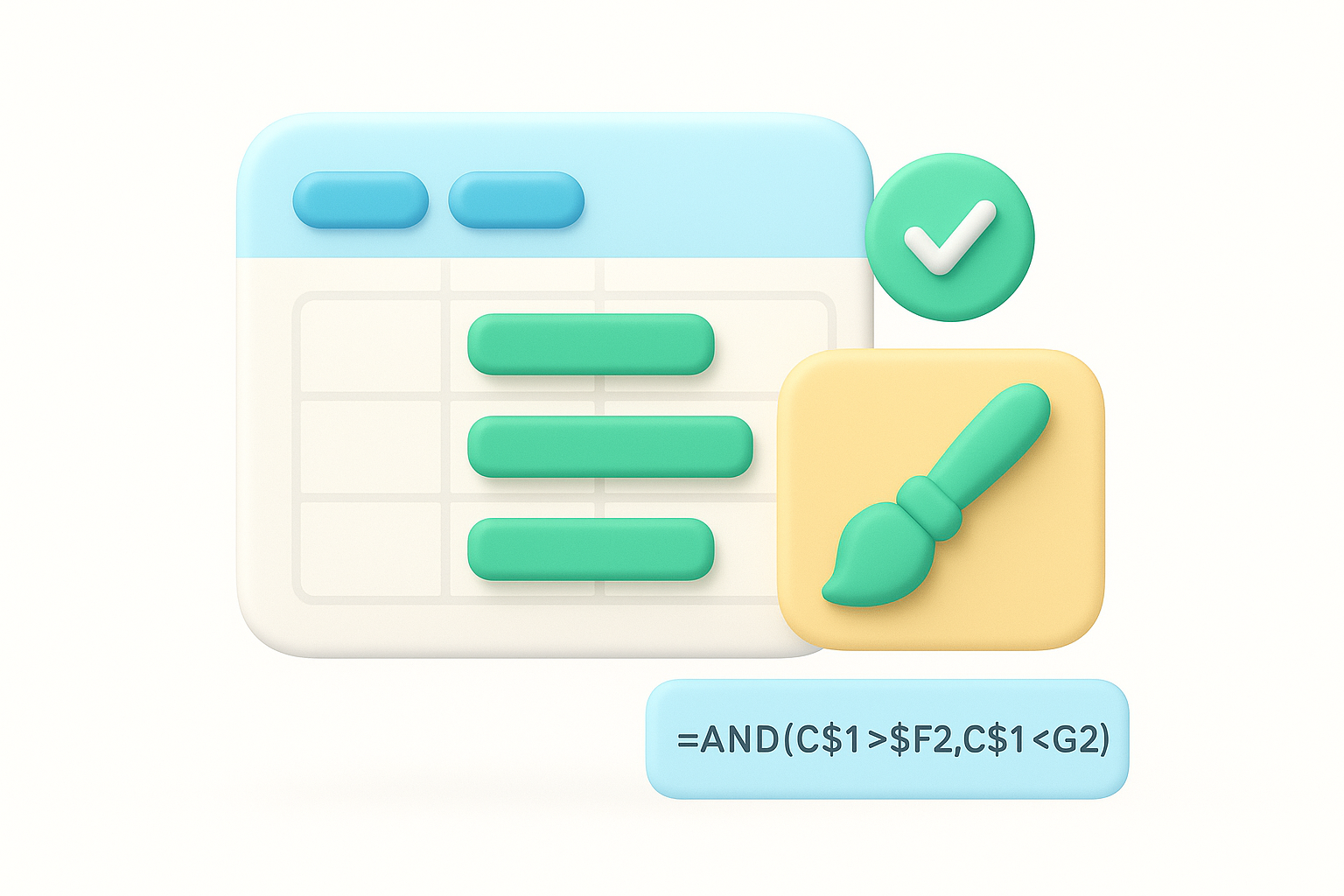
=AND(C$1>=$F2,C$1<=$G2)
Here, F2 and G2 are the Start Date and End Date columns, and C$1 is the date in the header row. Set the fill to a solid color, apply it, then copy the formatting down to every feature row using the Format Painter. This single rule is what makes an excel product roadmap template self-updating: change a date in column F or G, and the bar moves without you touching a single cell manually.
A roadmap bar that updates itself when a date changes will always be more trusted than one you have to redraw by hand.
Dates move constantly on a real roadmap, so build your sheet expecting it. Because your bars are driven by formulas referencing the Start Date and End Date columns, adjusting a timeline is as simple as typing a new date, no repainting cells or dragging borders required. This matters most on a product roadmap template excel free download file that gets passed between several people, since nobody has to understand conditional formatting rules to push a milestone back a week.
When two features run in parallel, stack them on separate rows rather than cramming them into one, since Excel bars can't overlap cleanly on a single row. For dependencies, add a "Depends On" column referencing the feature name, and use a simple text note or arrow shape drawn manually if you need to show sequencing visually. Excel won't auto-draw dependency arrows the way dedicated roadmap software tools do, so keep dependency logic in the Notes column instead of trying to force the grid to show something it wasn't built for.
Color is what turns your Gantt bars from a wall of gray blocks into something a reader can scan in five seconds. Once your software roadmap template excel file has bars driven by conditional formatting, layer in status colors so a glance at the sheet tells anyone whether work is on track, stalled, or done, without reading a single date.
Go back to your Status column and build a color scheme that stays consistent across every sheet you create, since switching colors between quarters just confuses returning readers. A simple four-status system works for most teams:
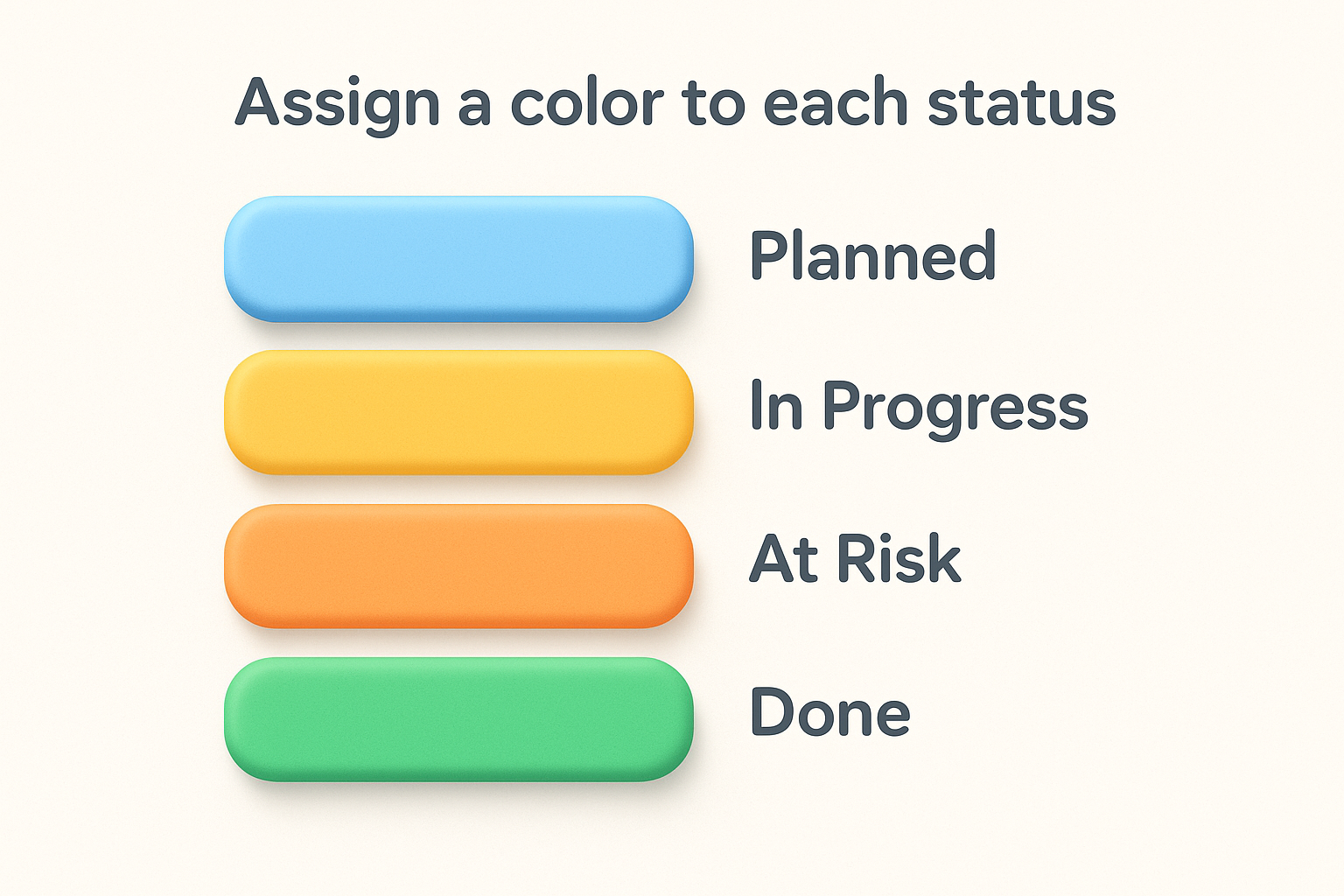
| Status | Color | Meaning |
|---|---|---|
| Planned | Light blue | Not started, dates may shift |
| In Progress | Yellow | Actively being worked |
| At Risk | Orange | Behind schedule or blocked |
| Done | Green | Shipped and verified |
Apply this by adding a second conditional formatting rule to your timeline bars, one that checks the Status column instead of just the date range:
=AND(C$1>=$F2,C$1<=$G2,$D2="At Risk")
Stack one rule per status on top of your original date-range rule, and Excel will paint each bar according to whichever status is currently set in column D. Change the status dropdown, and the bar color updates immediately, no manual repainting needed.
A roadmap where color tells the story is one your team will actually glance at during a standup instead of ignoring.
Add a small key in an unused corner of the sheet, four colored cells with labels next to them, so anyone opening the file for the first time understands the scheme without asking you. This matters most once you start sharing a product roadmap template excel free version outside your immediate team, where new readers won't have the context you carry in your head. Keep the legend visible by placing it above your frozen pane row, not buried below the timeline where scrolling hides it.
Color-coding only works if everyone picks from the same status list, so lock the Status column down with a dropdown. Select the column, open Data > Data Validation, choose
Building the sheet is only half the job. A software roadmap template excel file earns its keep only if people actually open it, trust what they see, and know how to keep it current. This step covers how to share it safely, how to keep it accurate week over week, and how to avoid the version chaos that kills most spreadsheet roadmaps within a quarter.
Export a read-only copy for anyone outside your core planning group, since a stray keystroke in a shared editable file can wipe out a conditional formatting rule in seconds, which is one reason some teams move to a Google Sheets product roadmap template instead. Use File > Share > Share with People, or save a PDF snapshot for stakeholders who only need to glance at the current state, following the same habits that work for communicating a roadmap to teams and users. If you're distributing a product roadmap template excel free version to multiple teams, protect the sheet (Review > Protect Sheet) and unlock only the Status and Date cells so editors can update progress without touching the underlying formulas.
Pick one person, usually the product manager, who owns updating Status and dates every week, and put that responsibility on a calendar reminder rather than hoping it happens. A roadmap that goes three weeks without an update stops being a roadmap and turns into a historical document nobody trusts.
A roadmap nobody updates is worse than no roadmap at all, because it actively misleads people.
Build a short checklist so the update takes five minutes instead of thirty:
Name each saved copy with a date stamp, something like Roadmap_2026-Q4_v3.xlsx, so nobody accidentally edits an outdated version and presents it in a meeting. Keeping a simple archive folder also gives you a record of how estimates shifted over time, which is genuinely useful when a stakeholder asks why a feature slipped two quarters. Once you're juggling several archived versions and a growing list of editors, you'll start feeling exactly where a spreadsheet stops scaling, which is the problem the next section tackles directly.
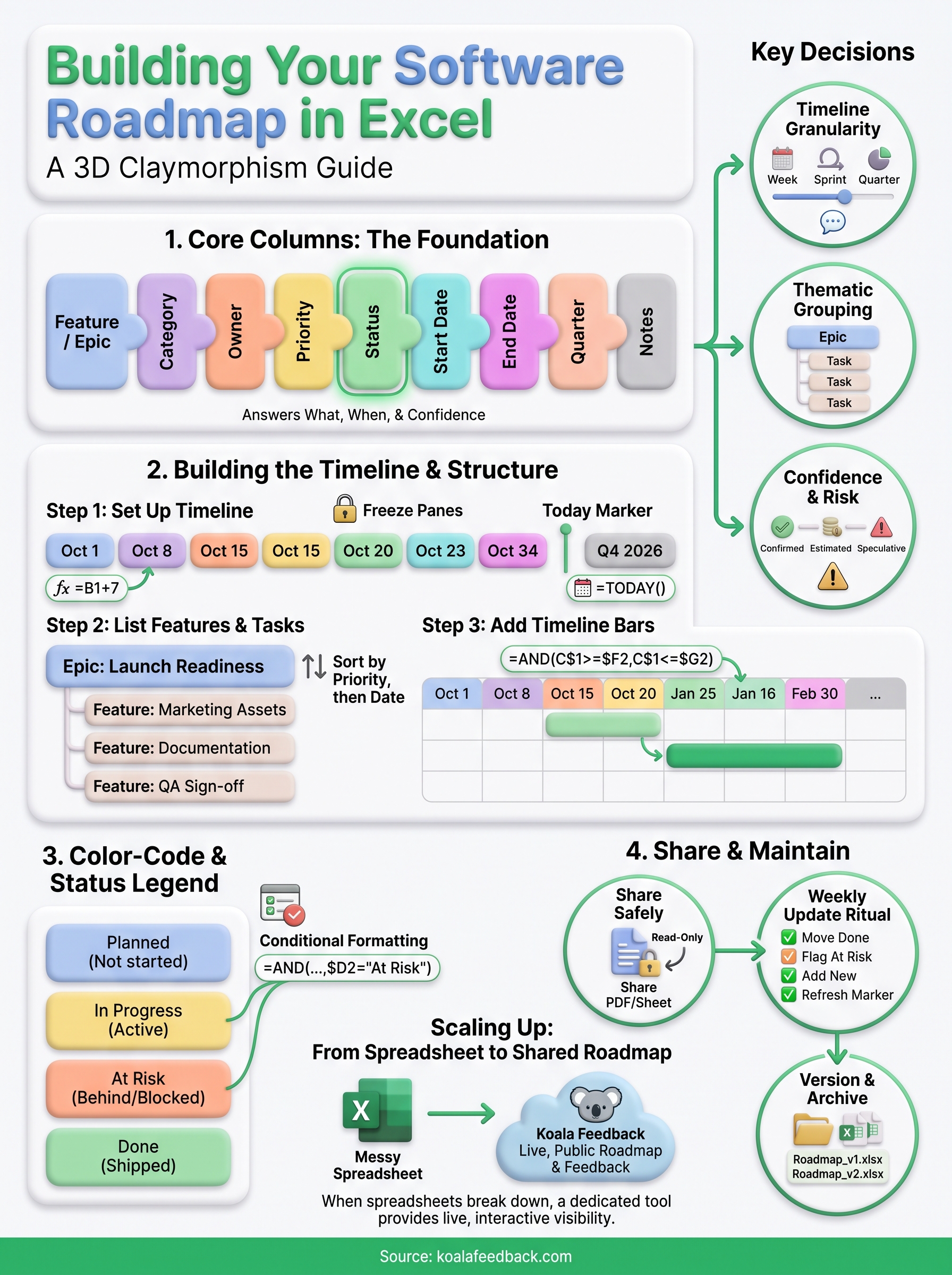
You now have everything you need to build a working software roadmap template excel file, from timeline headers to color-coded status bars that update themselves. That structure will carry you through a quarter or two, maybe longer if your team is small and disciplined about weekly updates. But every spreadsheet roadmap eventually hits the same wall: customers can't vote on features, stakeholders can't comment without editing access, and someone always opens an outdated copy by mistake.
When that happens, you don't need to abandon the thinking you just did, you need a place to put it that scales past one file and one owner. Koala Feedback takes the same columns, statuses, and prioritization logic you built here and turns them into a live, public roadmap your users and team can actually interact with. If you're ready to stop emailing spreadsheet versions around, see how a shared roadmap your users can follow in Koala Feedback gives your plan a home it won't outgrow.

Start today and have your feedback portal up and running in minutes.

