Product vision boards are one-page canvases, created by Roman Pichler, that capture a product's vision and strategy in five boxes: vision, target group, needs, product, and business goals. They answer two questions in one view. Where is the product heading, and what is the plan to get there? The top box holds the destination. The four boxes below it hold the strategy: who you serve, which problem you solve, which features matter, and why the company should invest.
Teams like the board because vision and strategy are easy to discuss and hard to write down. A strategy document runs long and few people read it. The board forces you to be brief, and every box holds an assumption you can test later. At Koala Feedback, we build software that helps product teams collect and prioritize user feedback. The board is where that work starts, because it names the assumptions about users that feedback should confirm or challenge.
This guide explains why the board matters, how to fill in each box, and two worked examples with a text template you can paste into your own document. It also covers how to run the meeting, how the board changes as you learn, what the extended version adds, and the mistakes to avoid.
Product vision boards matter because they give an agile team one shared, visible answer to what you are building, for whom, and why, before the first sprint starts. Without that answer, people pull in different directions and the backlog turns into a pile of unconnected features.
Most teams have a roadmap and a backlog but no written strategy behind them. What gets called strategy is often a feature wishlist with dates attached. The board fixes this by putting vision and strategy on a single page that sits above the roadmap. Anyone can check a proposed feature against it and see whether it serves a named need for a named group.
Notice what the board leaves out. It holds no personas, user stories, or design sketches, because product details belong in the product backlog. Pichler describes the board as the simplest thing that could possibly work, and the limits are deliberate: five boxes, a few words each. That brevity is what gets people to read it and to argue about the right things in a meeting.
The board is not a plan for the next sprint. It is the reason behind every sprint.
The person in charge of the product leads the board. In Scrum that is the product owner, and in other setups it is the product manager. The product owner leads creating, validating, reviewing, and updating the board, but does not write it alone. Invite key stakeholders and representatives of the development team, because people support a strategy they helped shape.
The board comes before the first sprint and feeds everything after it. Its vision and strategy supply the context for the product goal your Scrum team works toward. The roadmap is derived from the validated board, and the product backlog is derived from the roadmap. During sprints the board stays visible on a wall or in your wiki, so sprint planning and refinement conversations can point back to it.
Make a board whenever the answer to "who is this for and why?" is still open. Typical triggers are:
The board is not limited to software. Pichler has used it for physical products and services, and it works for internal products too, where the business goals are about cost or capability instead of revenue. A small bug fix or minor tweak does not need one.
Fill in the board from the top down: vision, target group, needs, product, then business goals. Keep every entry short and treat each one as an assumption you will test, not a fact you already know.
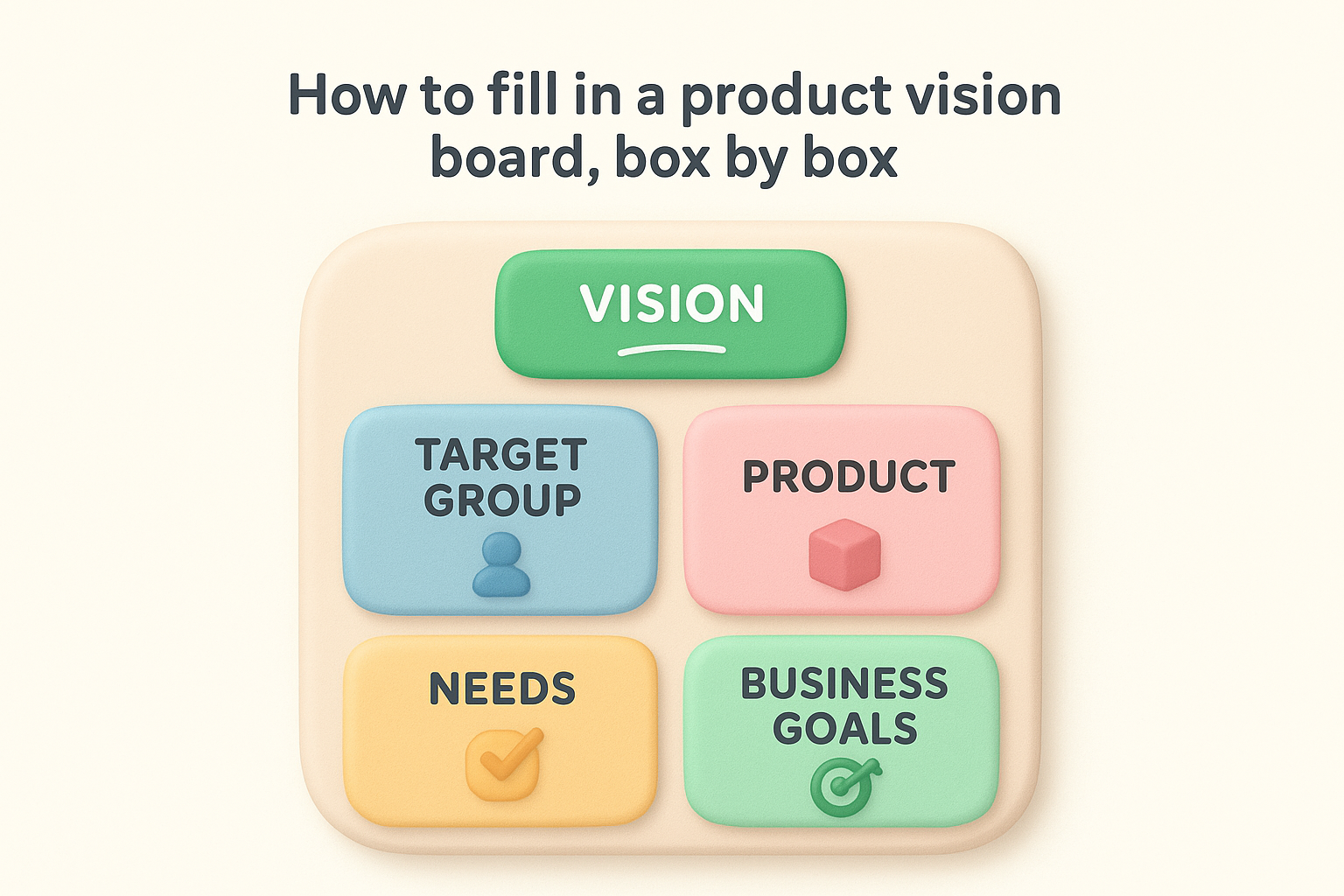
Each box answers one question, and the bottom four together form your strategy. The table shows the question and the rule of thumb for each box, so you can keep your entries honest while you write.
| Box | Question it answers | Rule of thumb |
|---|---|---|
| Vision | Why does the product exist, and what positive change should it create? | One brief statement or slogan that everyone shares |
| Target group | Who benefits, and who uses and buys? | One clear-cut segment, with separate entries for users and customers |
| Needs | Which problem or primary benefit makes people use or pay? | Prioritize when there are several |
| Product | Which features make the product stand out? | Three to five, never more |
| Business goals | Why is the investment worthwhile for the company? | Prioritized, with targets where possible |
The vision is the overarching goal, the ultimate reason for creating the product, and the positive change you want to bring about. Write it as a brief, inspiring statement and keep it free of assumptions about the solution, so it could guide the product for five to ten years. "Help small teams build what their users actually need" tells you what changes for people. It does not tell you which feature ships.
Target group comes next. It describes the market or segment you serve, including both users and customers. Choose a cohesive, clear-cut group so you can tell whether a given person belongs to it or not. When users and customers are different people, give each its own entry and put the priority group on top. A radiologist uses an X-ray machine and a hospital buys it. As a rule, favor the users, because a product rarely succeeds if it fails the people who work with it. Stakeholders inside your company do not belong on the board.
Needs describe your value proposition: the main problem the product addresses or the primary benefit it offers. They should make clear why people will use the product or pay for it, and what success looks like for them. Write needs from the user's viewpoint, such as "decide what to cook in five minutes", not as features such as "recipe search". If you find several needs, prioritize them so the product box has something to aim at.
The product box lists the three to five features that make your product stand out and are critical to its success. They should address the needs you just wrote down. Stick to a maximum of five, because a long list means you are describing a backlog and not a strategy. Here is a test that works well in practice: if you cannot name the need that a feature serves, take it off the board.
Business goals explain why the investment is worthwhile for your company. Typical goals are revenue, entering a new market, reducing cost, building the brand, or gaining valuable knowledge. Non-financial goals count. When Toyota shipped the Prius in 1997, the car was not earning money, but it built the "green car company" brand and an early lead in hybrid technology.
Prioritize the goals, and keep them to two or three. Eight goals mean no goal. Add a target where you can, for example how much revenue you expect in the first two years after launch, because without targets you cannot pick the right KPIs. If you cannot quantify a goal yet, state it anyway and refine it as you learn.
Every feature on the board should trace back to a need, and every need to a named group.
Below are two filled boards, one for a consumer app and one for a business product with separate users and buyers. Both are illustrative, so replace the content with your own research. After them you get a plain-text template that you can paste into any document.
This board is for a meal-planning app. Notice that the vision never mentions an app, and that each feature maps to a need. The plan generator and kid-friendly filter serve the five-minute decision. The shopping list and pantry suggestions serve food waste. A reader can trace every feature back to a need in seconds.
| Box | Entry |
|---|---|
| Vision | Make home cooking the easy choice on a busy weeknight |
| Target group | Working parents in households of three to five who cook most dinners at home |
| Needs | Decide what to cook in under five minutes; waste less food; keep dinners varied without extra effort |
| Product | Weekly plan generator; one-tap shopping list; suggestions based on what is already in the pantry; kid-friendly filter |
| Business goals | 1. Paid subscriptions: 20,000 paying households within 24 months. 2. Learn which meal types keep households active after month three |
Here the product is a shift-swap tool for restaurants. The split target group is the point. Servers and line cooks use the product, while owners and general managers pay for it, so each group gets its own entry and its own need. The users come first, because a tool that staff avoid will not renew.
| Box | Entry |
|---|---|
| Vision | Give every hourly worker a say in their schedule |
| Target group | 1. Servers and line cooks at independent restaurants (users, priority). 2. Owners and general managers (customers) |
| Needs | Users: swap shifts without chasing managers by text. Customers: fewer uncovered shifts and less time spent on scheduling |
| Product | Shift swap requests with manager approval; availability calendar; instant notifications when a schedule changes |
| Business goals | 1. Recurring revenue from monthly per-location subscriptions. 2. Reach 500 paying locations within two years |
If a user and a buyer want different things, give each their own line on the board.
The template below is a text version of the five boxes plus one addition of my own: a line for the riskiest assumption. Paste it into a document, wiki page, or whiteboard tool and fill it in during your meeting. The board design itself is Roman Pichler's, and he shares his templates under a Creative Commons license, so credit him when you publish your own variant.
PRODUCT: [name]
OWNER: [product owner or product manager]
LAST REVIEWED: [date]

VISION
Why do we exist, and what positive change do we want to create?
[One brief statement]

TARGET GROUP
Users: [who uses the product]
Customers: [who pays, if different]
Priority: [which group comes first]

NEEDS
Users: [main problem or primary benefit]
Customers: [main problem or primary benefit, if different]
What success looks like: [outcome]

PRODUCT (three to five features, no more)
1.
2.
3.

BUSINESS GOALS (two or three, with targets)
1.
2.

BIGGEST RISK TO TEST FIRST
Assumption: [what we believe but have not checked]
How we will test it: [interviews, observation, data]
Run the meeting as a facilitated workshop of about two and a half hours, led by the product owner, with key stakeholders and development team members in the room. Fill the board top to bottom, then end by choosing the riskiest assumption to test.
Invite the people who hold knowledge about users, the business, and the build: the product owner, two or three key stakeholders, and representatives from design and development. Keep the group to six to eight people so everyone speaks. Before the meeting, the product owner should collect whatever evidence already exists, such as support tickets, interview notes, and analytics. Teams that run a feedback portal can bring the most-voted requests, since votes show which needs come up again and again.
The timings below add up to 150 minutes. A small internal team may finish faster, and a new product with several customer groups may need more.
Start each box with silent writing. Give everyone three minutes to write entries on sticky notes alone, then cluster them on the board. Silent writing prevents the loudest voice from setting the answer, and it gives the quieter developers and designers an equal say.
A good meeting ends with one assumption to test, not a finished board.
Yes, ChatGPT or a similar tool can draft a board. It is handy for wording options for a vision or a first-pass list of possible needs. But a chatbot only guesses at your users. Treat AI output as a prompt for discussion, not as the board, and replace every guessed need with something you heard from a real person.
A better use is as a sparring partner after the meeting. Paste in your finished board and ask which assumptions look riskiest or where the features fail to match the needs. The answers can sharpen your test plan, but you still decide how to test, and real users give the evidence.
Yes, the product vision board changes. Your first version is a set of assumptions, and each round of research should update it. The extended version adds business model boxes for new products and bigger strategic shifts.
Start by marking the greatest risk or biggest uncertainty on the board. This creates focus and a fail-fast habit: you find out quickly which assumptions hold and which do not. Pichler's own example shows how it works. While exploring a software version of his product canvas tool, he judged the biggest risk to be misunderstanding user needs. So he ran problem interviews, which are structured conversations about a person's problems and goals that never mention the solution, plus a few direct observation sessions. Only then did he look at features, and he updated the board to match what he learned.
If you already have users, existing feedback is a cheap source of evidence for needs. A feedback portal such as Koala Feedback collects submitted ideas, votes, and comments and groups them on boards by product area, so you can see which needs repeat. Repeated, voted-for requests are stronger evidence than anyone's opinion in a meeting.
Update the board after each round of research. A fresh board is worth creating when an update targets a new market segment, addresses additional needs, or changes the business model. Otherwise, edit the existing one, and note the review date so readers know it is current.
Test the biggest risk first, then change the board to match what you learned.
A validated board is the start of the planning chain, not the end. Pichler's sequence is:
Skipping step two is the usual failure. A team that goes straight from a fresh board to a roadmap builds on unchecked assumptions, and the first sprints become the expensive experiment.
The standard board does not say how the business goals will be achieved. The extended board, inspired by the business model canvas, adds that layer with competitors, partners, channels, revenue sources, and cost factors. Use it for a brand-new product or a bigger change, such as taking an existing product to a new market segment.
You can also keep the simple board and pair it with a separate business model canvas. Either way, do not skip the business model for a new product. Pichler treats his templates as starting points, so reorder and customize the boxes to suit your team.
The most common mistakes are writing a solution instead of a vision, listing too many features, and never touching the board again. Check your board against the table and the checklist below before you share it.
Most of these mistakes come from the same habit: filling the board with answers instead of assumptions. The fixes in the right column push you back to evidence.
| Mistake | Fix |
|---|---|
| The vision names a solution, such as "build the best scheduling app" | Describe the positive change for people and drop assumptions about the solution |
| The target group is "everyone" | Choose one cohesive segment and split users from customers |
| Needs are written as features | Rewrite them from the user's viewpoint and rank them |
| More than five features | Keep the three to five that matter and move the rest to the backlog |
| Eight business goals | Keep two or three and add a target to each |
| The board is filled in from imagination alone | Mark the riskiest assumption and test it with real users |
| The board is never reviewed | Review it after each round of research and record the date |
Pichler publishes a checklist for the vision and target group boxes. Use it, then apply the same discipline to the rest. Read each line as a yes-or-no question and fix every "no" before the board goes to stakeholders.
A board you cannot explain in two minutes is a board you have not finished.
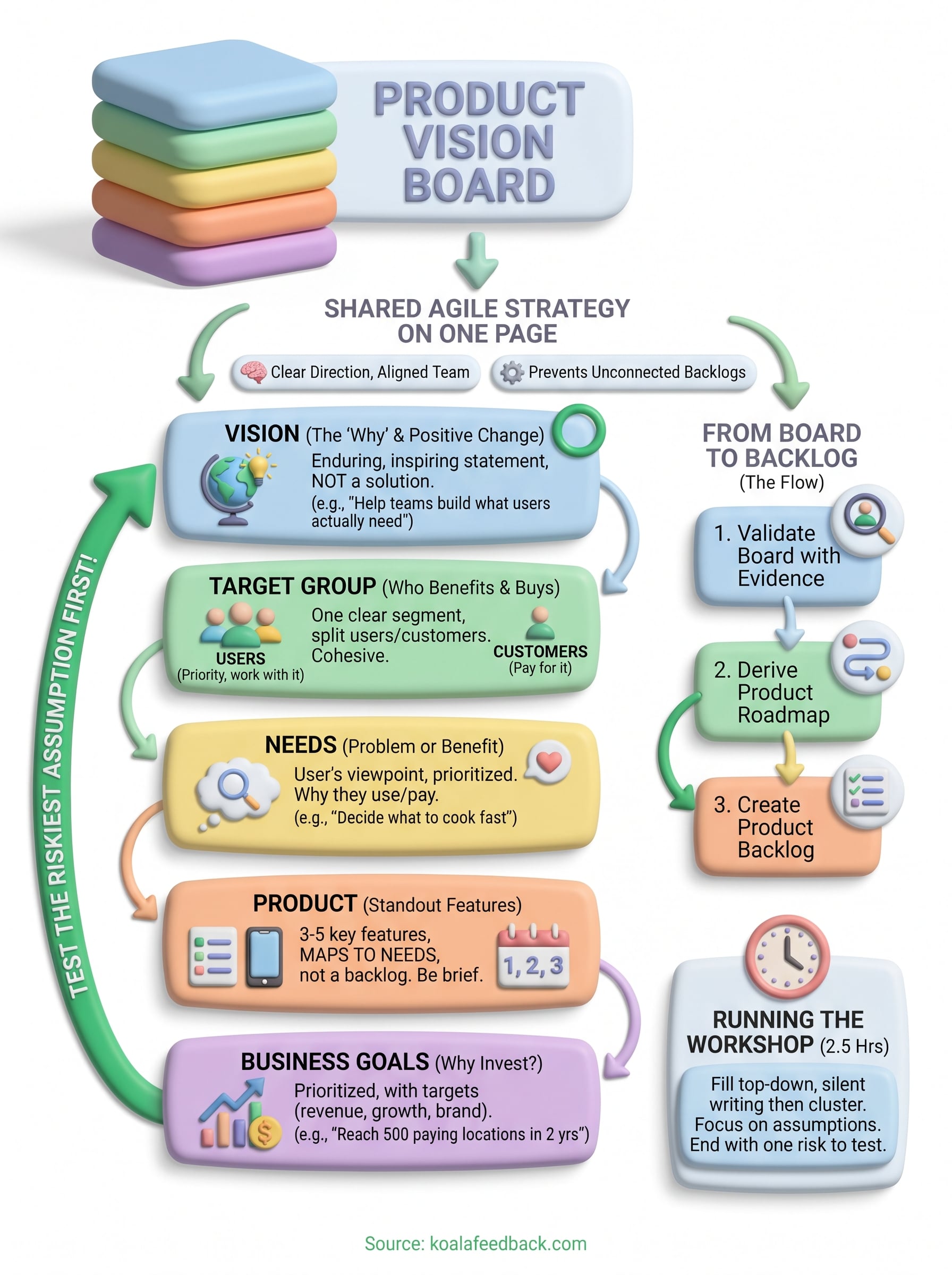
A product vision board gives your agile team one page that holds the vision and the strategy behind it. Fill in the five boxes from the top down, keep each one short, and treat every entry as an assumption. Run a workshop with stakeholders and developers, pick the riskiest assumption, and test it before you build a roadmap.
The board only stays useful if you keep it honest, and that takes evidence from the people you serve. If you want a simple way to collect the user feedback that tests your board, Koala Feedback lets you set up a portal in minutes, and signing up is free. Fill in your first draft this week, then let real feedback tell you what to change.

Start today and have your feedback portal up and running in minutes.