Your users want to know what's coming next. A Jira public roadmap gives them visibility into your product direction, but setting one up isn't always straightforward. Jira excels at project management and issue tracking, yet sharing that information externally requires some workarounds, or additional tools.
Whether you're exploring Atlassian's own roadmap features or trying to create a customer-facing roadmap from your Jira data, you have options. Some teams use Jira's built-in timeline views with careful permission settings. Others connect third-party apps or dedicated roadmap tools like Koala Feedback, which lets you collect user feedback, prioritize features based on actual demand, and share your roadmap publicly, all without the complexity of configuring Jira for external visibility.
This guide walks you through the different approaches to building and sharing a public roadmap with Jira. You'll learn what works natively, where the limitations are, and how to choose the right solution for your team and users.
You need to understand the difference between Atlassian's product roadmaps for Jira itself and the customer-facing roadmap you want to build for your own product. These serve completely different purposes, and confusing them can send you down the wrong path.
Atlassian publishes their own public roadmaps for Jira, Confluence, and other products. These show what features they're building for their tools, organized by quarter and status (planned, in progress, launched). You can view these on their website to see what's coming to the Jira platform itself. This helps you understand future Jira capabilities, but it doesn't solve your problem of sharing your product's roadmap with your users.
Your roadmap serves a different audience with different expectations. You need to show your customers what features you're building for your product, not what Atlassian is building for Jira. This means pulling data from your Jira projects (epics, issues, timelines) and presenting it in a format that makes sense to external users who don't have Jira access. Your roadmap should communicate upcoming features, development status, and delivery timelines without exposing internal project management details or sensitive information.
The key distinction: Atlassian's roadmaps inform Jira users about the platform's evolution. Your roadmap informs your customers about your product's direction.
Building your own jira public roadmap requires either configuring Jira's native features for external visibility or connecting external tools that translate your Jira data into a customer-friendly format. The next sections cover both approaches and help you choose what fits your workflow.
You have two main paths for creating a jira public roadmap: using Jira's native timeline features with permission adjustments, or connecting a dedicated roadmap tool that pulls from your Jira data. Your choice depends on how much control you need over presentation, what information you want to expose, and how technical your audience is. Each approach has different tradeoffs in setup complexity and customization options.
Jira's Advanced Roadmaps (formerly Portfolio) and basic timeline view let you visualize epics and issues on a timeline. You can create a separate Jira project specifically for external roadmap items, then grant view-only access to external users through careful permission settings. This approach keeps everything in Jira but requires you to manage user accounts and permissions for everyone who wants to see your roadmap. It works best when your audience is small and technically savvy enough to navigate Jira's interface.
Tools like Koala Feedback connect to your Jira instance and transform your data into a customer-friendly roadmap without requiring Jira access. These tools typically pull epic status, timelines, and descriptions from Jira, then present them on a public URL you can share with anyone. This approach gives you better control over presentation, lets you hide internal details, and eliminates the need to manage external user permissions in Jira.
Choose native Jira if you want minimal setup and your audience already uses Jira. Choose a dedicated tool if you need customer-friendly presentation and broader public access.
Once you've chosen your approach, you need to configure Jira to capture and display the right information. This step focuses on structuring your Jira project for roadmap purposes and populating it with items that translate into customer-facing features. The setup varies depending on whether you're using native Jira or a connected tool, but the core principles remain the same.
Set up a dedicated Jira project specifically for roadmap items, separate from your internal development work. This gives you clean separation between what users see and internal task tracking. Create epic-level issues for each major feature or initiative you want to display on your roadmap. Keep epic titles and descriptions customer-friendly, avoiding internal code names or technical jargon that won't make sense to external audiences.
Add custom fields to track information your audience cares about: release quarter, feature category, and customer impact. Set up custom statuses that map to roadmap stages like Planned, In Progress, In Review, and Launched. Configure your timeline view to show start and end dates for each epic, giving users realistic expectations about delivery.
Your Jira structure should mirror how you want to communicate with users, not how your development team tracks work internally.
Before you expose any Jira data to external users, you need to audit what information appears in your roadmap items and restrict access to sensitive details. Your jira public roadmap should show enough to build user trust without revealing internal priorities, resource constraints, or competitive information that could harm your business.
Set up guest access or anonymous viewing through Jira's permission schemes if you're using native timeline views. Create a separate permission level for roadmap viewers that grants read-only access to specific issues or projects while hiding comments, attachments, and internal fields. Remove or anonymize assignee names, time estimates, and story points that expose team capacity or development effort.
Strip internal comments and private labels from roadmap epics before making them visible. Remove references to customer names, contract details, or pricing that shouldn't be public knowledge. Configure your field configuration scheme to hide custom fields like priority ranking, revenue impact, or technical debt scores that serve internal decision-making.
Lock down permissions at the project level first, then audit individual issues to catch sensitive details that escaped your initial filters.
Test your roadmap visibility by logging out or using an incognito browser to verify what anonymous users actually see. Review each epic's description and custom fields to confirm you're only sharing feature benefits and timelines, not internal strategy or resource allocation.
Your jira public roadmap becomes valuable only when users can access it and trust that the information stays current. This step covers the technical mechanics of making your roadmap publicly available and establishing a maintenance routine that keeps information accurate without overwhelming your team with update work.
Create a shareable link that requires no login or Jira credentials. If you're using native Jira, configure your anonymous access settings through Administration → System → General Configuration → Allow Public Signup. Enable the "Public" option on your roadmap project, then grab the direct URL to your timeline or board view. Test the link in an incognito browser to confirm external users see exactly what you intended. For tools like Koala Feedback, you'll get a custom subdomain or the option to use your own domain that automatically syncs with your Jira data.
Set a weekly cadence to review and update epic statuses in Jira so your public roadmap reflects current progress. Assign one team member as the roadmap owner responsible for moving items between Planned, In Progress, and Launched stages. When features ship, update completion dates and add brief release notes that explain what users gain.
Outdated roadmaps damage trust faster than no roadmap at all, so build updates into your existing sprint ceremonies.
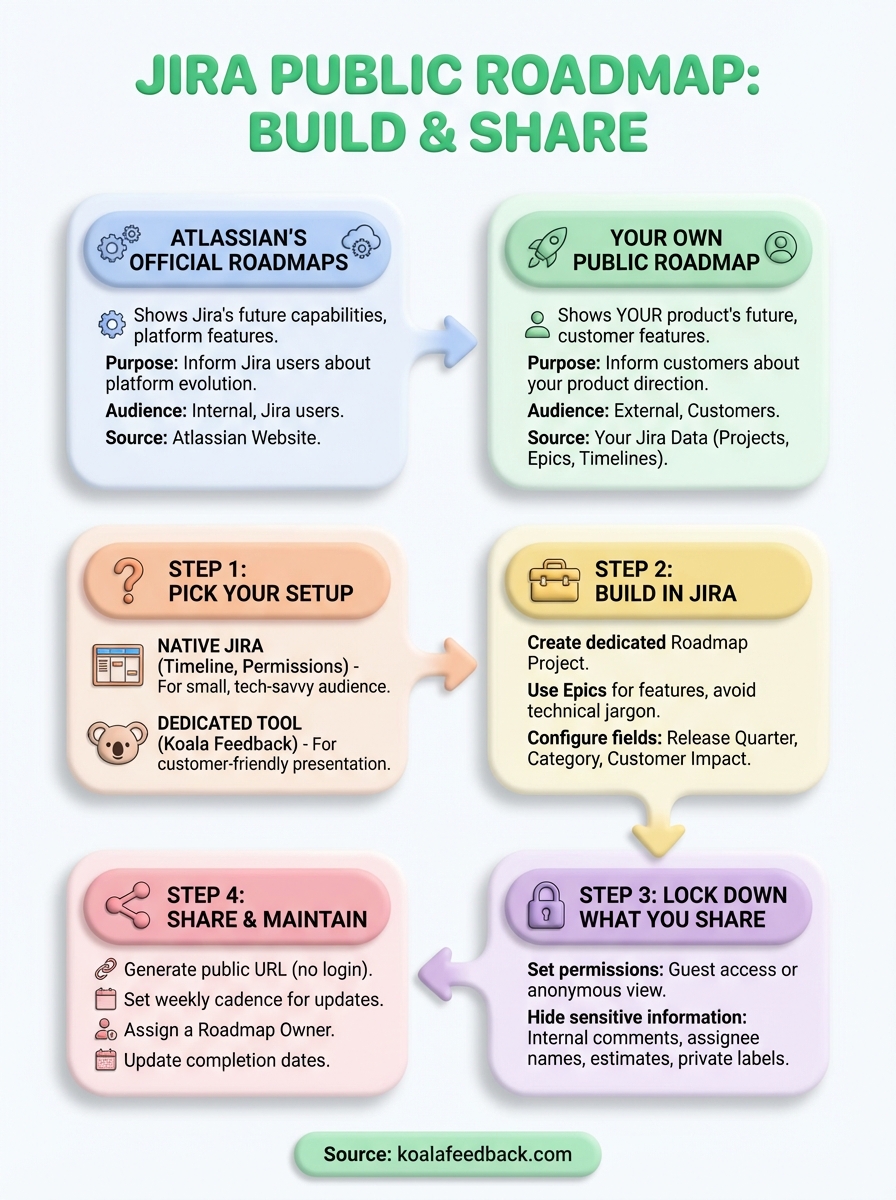
You now have a clear path to building and sharing your jira public roadmap with users who want visibility into your product direction. Start by choosing between native Jira timeline views or a dedicated roadmap tool that fits your team's workflow and audience expectations. Set up your Jira project structure with customer-friendly epics, lock down permissions to hide sensitive internal information, and create a shareable URL that requires no login credentials from external users.
The real work begins after you launch your roadmap publicly. Assign a roadmap owner who updates epic statuses weekly and communicates feature progress transparently. Test your public URL regularly using incognito browsers to catch permission issues or sensitive data that shouldn't be visible to external audiences.
If managing Jira permissions and maintaining external visibility feels overwhelming, Koala Feedback handles the technical complexity for you. It pulls from your Jira data, transforms it into a customer-friendly roadmap, and lets you collect user feedback on what features matter most to your product direction.

Start today and have your feedback portal up and running in minutes.

