Aha! is one of the most popular product management platforms out there, and its strategy module gives teams a structured way to connect high-level vision with day-to-day execution. But setting up an aha product strategy that actually drives decisions, not just fills in fields, takes more than clicking through the default templates. You need to understand how goals, initiatives, and releases work together inside the platform.
This guide walks you through building a product strategy in Aha! step by step, from defining your vision down to creating actionable initiatives tied to measurable goals. Whether you're setting up Aha! for the first time or reworking a strategy that's gone stale, you'll get a clear framework to follow. We'll also cover how to keep your strategy grounded in real user needs, something that requires a reliable feedback loop between your team and your customers.
That's where tools like Koala Feedback come in. A solid product strategy doesn't exist in a vacuum, it's shaped by what your users actually ask for, vote on, and care about. Pairing a strategy platform like Aha! with a dedicated feedback tool ensures your goals and initiatives reflect genuine user demand, not just internal assumptions. Let's get into it.
Before you touch a single goal or initiative in Aha!, you need a few key things in place so your strategy setup actually sticks. Jumping straight into the interface without preparation often produces a strategy layer that looks complete on the surface but lacks the context your team needs to make real decisions. Taking 30 minutes to gather inputs and check your workspace settings will save you hours of rework later. This section walks you through exactly what to prepare.
Your Aha! account organizes work around workspaces, and each workspace holds its own strategy, goals, and initiatives. If you're working on a single product, one workspace is enough. For multiple products or product lines, create separate workspaces and consider using a workspace line to group them under a shared company strategy. Getting this structure right before you build prevents the common problem of initiatives sitting in the wrong workspace with no clear owner or accountability.
To configure your workspace before you start:
A strong aha product strategy starts with raw inputs, not blank templates. Before you open the goals screen, pull together the following data:
| Input | Where to get it |
|---|---|
| Company vision statement | Leadership docs or existing strategy materials |
| Business objectives for the year | OKR documents or board materials |
| Top user pain points | Support tickets, sales calls, or NPS feedback |
| Feature request patterns | Feedback tool voting data and top requests |
| Competitor positioning notes | Market research or win/loss reports |
The most effective product strategies are built on real user data. Pulling in feedback trends before you define goals makes your initiatives far more grounded in what users actually need.
Without this data, you'll write goals that sound reasonable but miss what your users care about most. If you collect feedback with a dedicated tool, export your top-voted feature requests and identify recurring themes before opening Aha!. Those themes often map directly to the initiatives you'll create in the next steps.
Aha! uses a specific four-level hierarchy for strategy, and knowing it upfront saves you significant rework. The structure runs like this:
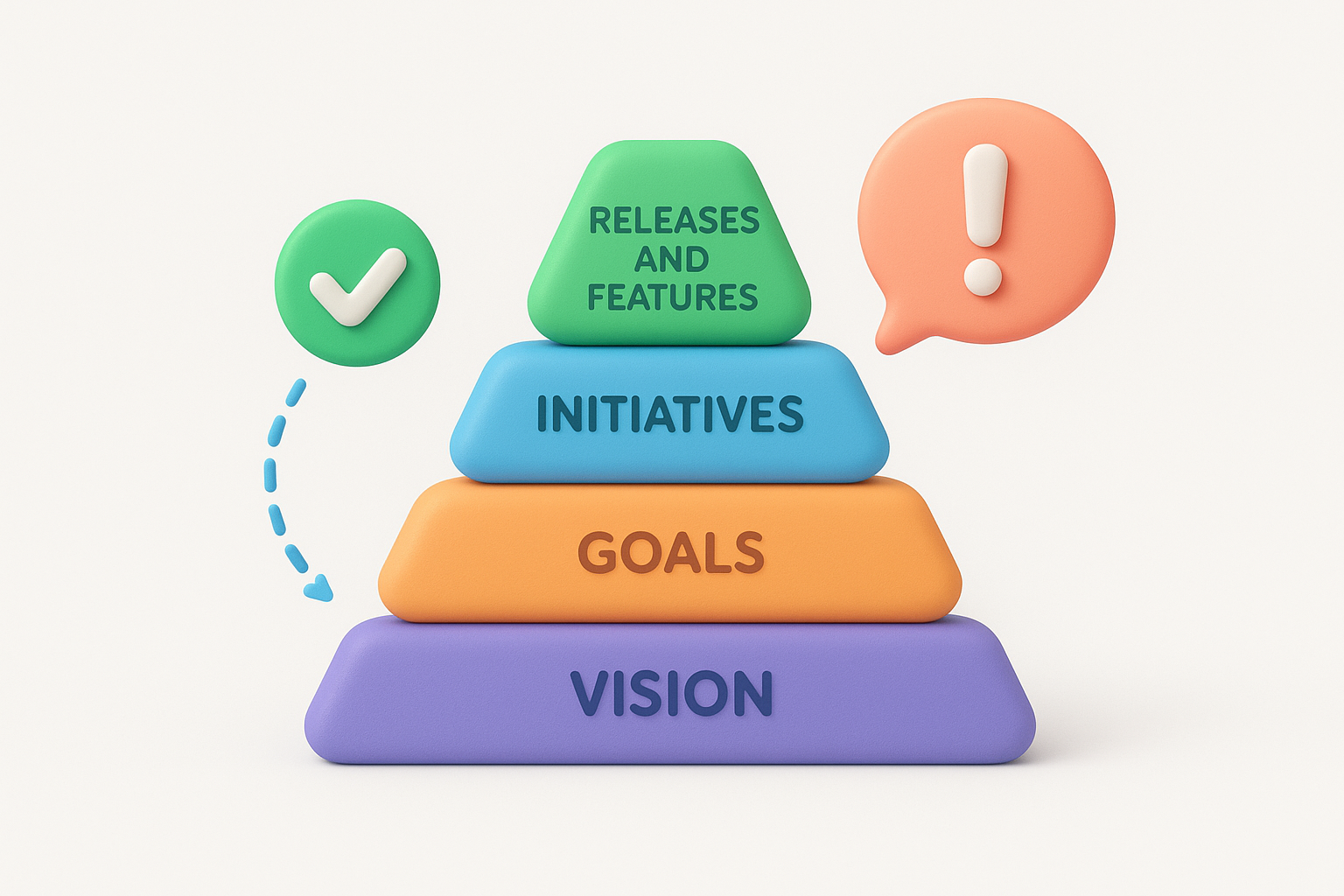
Each level feeds the one below it. Goals without linked initiatives stay theoretical, and initiatives without attached features never move the needle. Understanding this chain before you start means you'll fill in each level with the right kind of information, rather than treating each screen as a separate form to fill out independently.
The vision field in Aha! is the foundation for everything else you'll build in your strategy. Before you write a single goal or initiative, you need a clear, specific vision statement that tells your team where the product is heading and why. A weak vision like "become the best platform in our space" gives no direction. A strong vision anchors every downstream decision and makes it easier to evaluate whether a goal or initiative actually fits your product's direction.
Aha! stores your vision under Strategy > Vision inside your workspace. This is a short, forward-looking statement that describes the change your product creates for users. Aim for two to three sentences maximum. Here's a simple template to follow:
Vision statement template:
We help [target user] achieve [outcome] by [how your product does it],
so that [long-term impact].
For example: "We help product teams at growing SaaS companies capture and act on user feedback faster, so they build features that drive retention instead of guessing at priorities."
Once you write it, paste the statement into the Vision field in Aha! and save it. Every team member who accesses the workspace will see it when they navigate to the strategy layer.
A vision statement only works if it's specific enough to rule things out. If your vision could describe any product in your category, rewrite it until it can't.
Your aha product strategy needs a clear market definition to function alongside your vision. Aha! lets you document your target market under the Vision section in the body text or in custom fields your admin configures. Write two to four sentences that describe who your users are, what problem they face, and what makes them a distinct segment worth focusing on.
Pull this directly from the inputs you gathered before starting: support ticket patterns, sales call themes, and feedback voting data all point to who actually uses your product and what they need most. Grounding your market definition in real user behavior rather than demographic assumptions keeps your strategy connected to actual demand from day one.
Goals in Aha! sit directly below your vision and define what success looks like for a specific time period. Most teams set goals on an annual or quarterly cadence, then review them at the start of each planning cycle. A goal that isn't measurable isn't a goal, it's a wish, so each one needs a clear metric and a target you can track.
Aha! stores goals under Strategy > Goals in your workspace. When you create a new goal, you'll fill in a name, description, and time frame. Beyond the defaults, the most effective goal entries follow a tight structure that forces clarity. Use this template when writing each goal:
Goal name: [Verb] + [metric] + [target] + [time frame]
Description: Why this goal matters and how it connects to the vision.
Success metric: [Specific number or percentage]
Time frame: [Q1 2026 / FY2026]
Example goal entry:
Goal name: Increase 90-day user retention by 15% in Q3 2026
Description: Retention directly impacts revenue. Improving it by 15%
confirms that new onboarding changes are driving lasting engagement.
Success metric: 90-day retention rate tracked in product analytics
Time frame: Q3 2026
Your aha product strategy works best when every goal connects back to the vision you wrote in Step 1. If a goal doesn't move the product toward that vision, cut it or rewrite it.
Limit yourself to three to five goals per time period. A long list of goals dilutes focus and makes it impossible to link initiatives meaningfully.
Writing goals in isolation from user feedback is a fast way to misdirect your team's work. Before you finalize each goal, cross-reference it against your top-voted feature requests and recurring pain points from support or feedback channels. If your users consistently request better reporting and your goal ignores it entirely, your team will build toward a target that doesn't reflect real demand. Adjust the metric or scope until the goal reflects both business priorities and what users are actually asking for.
Initiatives are the strategic themes that sit between your goals and your actual product work. In Aha!, each initiative groups the features, releases, and epics that move you toward a specific goal. Without this layer, your team ends up building features that don't connect to any measurable outcome, and your aha product strategy becomes a document people reference once and ignore.
Aha! stores initiatives under Strategy > Initiatives in your workspace. When you create one, you link it directly to a goal so the hierarchy stays intact. Use the template below to fill in each initiative with enough detail to guide your team's planning decisions:
Initiative name: [Strategic theme in plain language]
Description: What this initiative does and why it matters now.
Linked goal: [Goal name from Step 2]
Owner: [Product manager or team lead]
Time frame: [Q3 2026 / H2 2026]
Success criteria: [How you'll know this initiative delivered]
Example initiative entry:
Initiative name: Improve onboarding experience for new accounts
Description: Reduce time-to-value for new users by redesigning
the first-run setup flow and adding in-app guidance.
Linked goal: Increase 90-day retention by 15% in Q3 2026
Owner: Sarah M.
Time frame: Q3 2026
Success criteria: 70% of new accounts complete setup within 24 hours
An initiative without a linked goal is just a project. Always connect the two before you start assigning features to it.
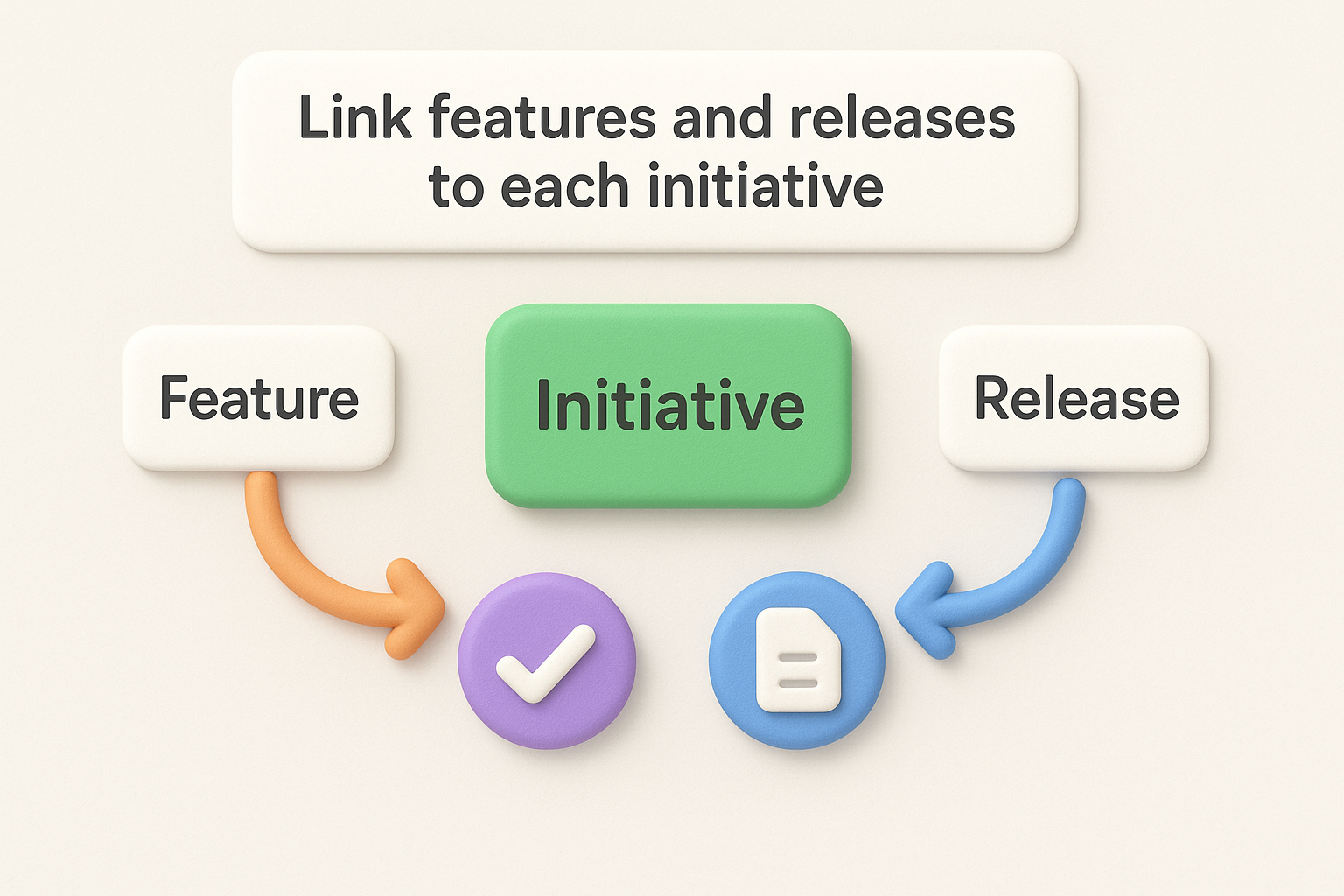
Once your initiatives exist, open each one and use the "Link features" option to attach the specific features and epics that execute on it. Aha! lets you view these links in a visual roadmap, so your team sees exactly which work supports which strategic theme. If a feature can't be linked to any initiative, that's a signal to either create a new initiative or cut the feature from the current planning cycle.
Pull your top-voted user requests from your feedback tool at this stage. Map each request to the initiative it supports, then create features in Aha! with those requests attached. This keeps user demand directly visible inside your strategy layer, not buried in a separate tool.
A strategy that sits in a tool nobody opens doesn't drive decisions. Once your goals and initiatives are set, you need to publish your aha product strategy where your team can see it, build a review cadence to keep it accurate, and update it when priorities shift. This step is the one most teams skip, which is exactly why most strategies go stale within a single quarter.
Aha! lets you share your strategy through two main channels: internal workspace access and shareable roadmap views. For internal stakeholders, go to Settings > Team and invite the right people with "viewer" or "contributor" roles so they can see goals, initiatives, and linked features without accidentally editing core strategy fields.
For external sharing with customers or stakeholders, use Aha!'s Roadmap Presentations feature to create a shareable view that hides internal notes but shows strategic direction and progress. You control what's visible, so you can expose high-level initiatives without revealing every feature detail.
Sharing your roadmap with users builds trust and reduces support noise. When users see their requests reflected in planned initiatives, they feel heard and stop asking for the same thing repeatedly.
Your strategy only stays useful if you treat it as a living document rather than a quarterly deliverable. Build a recurring review cadence into your team calendar using this schedule:
| Review type | Frequency | Focus |
|---|---|---|
| Goal progress check | Monthly | Are metrics moving? Any blockers? |
| Initiative status update | Bi-weekly | Are linked features on track? |
| Full strategy review | Quarterly | Are goals still relevant? Adjust or close. |
During each review, open Aha! and update the status of each goal and initiative to reflect real progress. Archive completed goals and close initiatives that no longer apply. Keeping your workspace clean makes it far easier for your team to trust what they see and act on it without second-guessing whether the data is current.
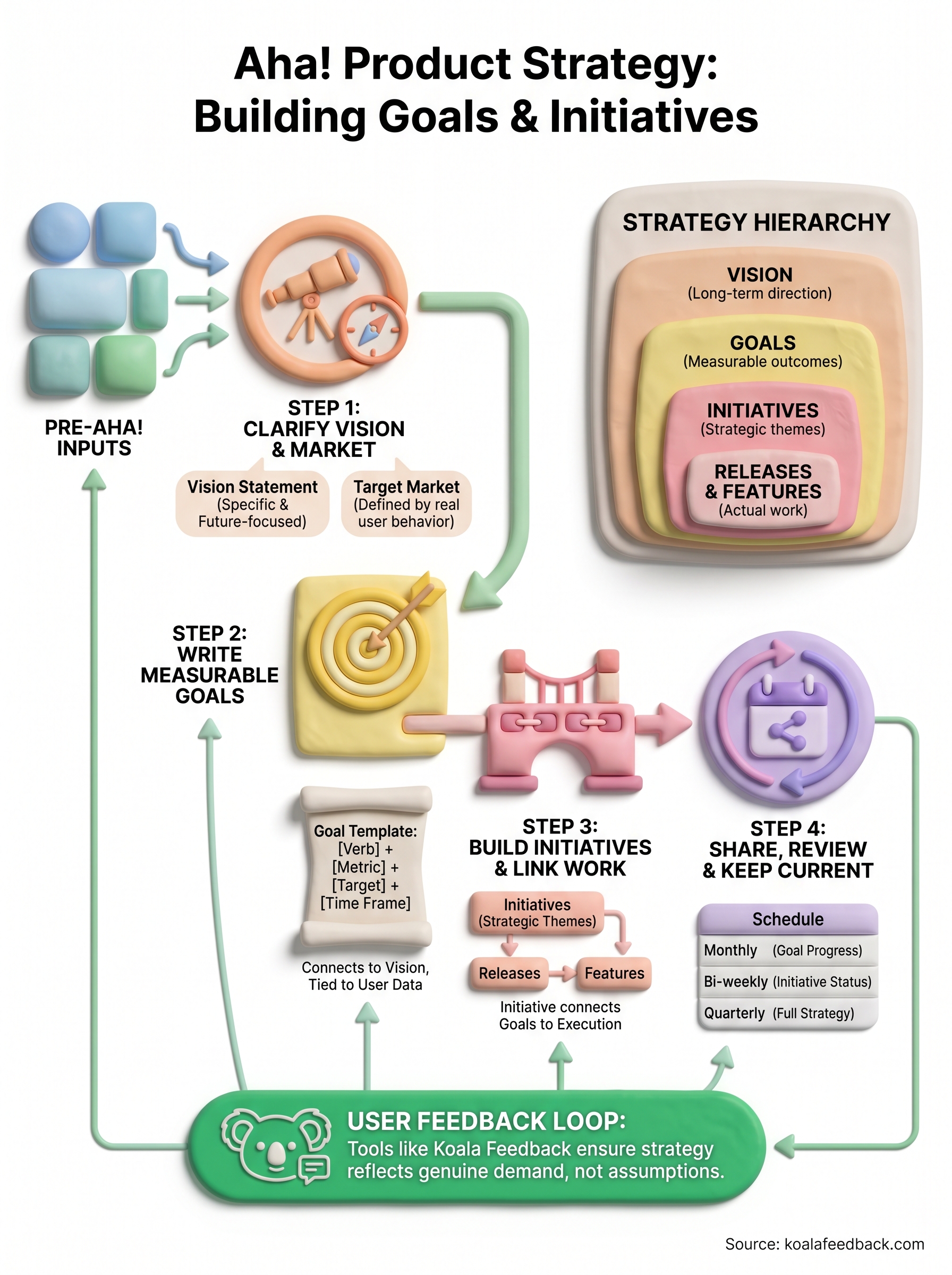
Building an aha product strategy in Aha! comes down to four connected steps: clarify your vision and market, write measurable goals tied to real outcomes, create initiatives that link directly to features, and review the whole system on a consistent schedule. Each step feeds the next, so skipping any one of them weakens the entire structure. The teams that get the most out of Aha! treat their strategy layer as a living system, not a one-time setup task.
None of it works, though, if your goals and initiatives are built on guesswork. User feedback is what keeps your strategy grounded in actual demand rather than internal assumptions. When you know which features your users vote on most and what problems they keep raising, your initiatives reflect reality. Pair your Aha! strategy with a dedicated feedback tool to close that loop. Start collecting and prioritizing user feedback with Koala Feedback and build a strategy your users will actually recognize.

Start today and have your feedback portal up and running in minutes.

