Google Workspace updates roll out constantly, new features, admin changes, API tweaks, deprecations. If you manage a team or build products that integrate with Google's ecosystem, missing a critical update can mean broken workflows or overlooked opportunities. The problem is that Google Workspace release notes are scattered across multiple channels, and no single source gives you the full picture. Knowing where to look saves you from playing catch-up.
Whether you're a product manager tracking platform changes that affect your roadmap or an IT admin keeping your organization current, you need reliable sources that deliver updates as they happen, not weeks later. At Koala Feedback, we help teams collect user feedback and share product roadmaps, so we understand how important it is to communicate changes clearly to the people who depend on your product. Google does this across several channels, each with a different focus and level of detail.
This article breaks down the five best sources for staying on top of Google Workspace updates in 2026. We've evaluated each one based on how quickly it publishes changes, the depth of information provided, and who it's most useful for, whether that's end users, admins, or developers.
The Google Workspace Updates blog is the most widely used source for tracking changes across the product suite. Google publishes new posts every few business days, covering feature rollouts for Gmail, Drive, Meet, Calendar, and every other app in the suite. If you want a single starting point for google workspace release notes, this is it.
Each post on the Updates blog focuses on a specific feature or change, explaining what's changing, who it affects, and when it rolls out. Google typically includes the rollout type (Rapid Release or Scheduled Release), the editions affected, and whether admin controls are involved. You get enough context to understand the scope of each change without digging through multiple docs.
Posts also link out to Admin Help Center articles, so you can jump straight to detailed setup instructions when a change requires action on your end.
The blog uses category tags and labels that let you filter by product (like Gmail or Meet) or by audience (admin, end user, or developer). You can subscribe via RSS feed or email to receive updates automatically, which removes the need to check the blog manually. Sorting by tag is the fastest way to cut through unrelated posts.
This source works best for admins and product managers who need a reliable, near-real-time feed of changes across the entire Workspace suite. It gives you enough operational detail to plan internal communications before a feature lands for your users.
The blog does not cover API or developer-specific changes in depth, and older posts can be hard to search through. If you need to audit changes over a specific date range, the filtering tools on the blog are limited.
The Google Workspace release calendar gives you a visual timeline of upcoming feature rollouts, so you can see exactly when changes are scheduled to reach your users. Unlike blog posts that announce changes after they're already in motion, this calendar lets you plan ahead rather than react.
The calendar maps out scheduled release dates across both the Rapid Release and Scheduled Release tracks, showing which features are coming and when they land for each track. It covers the full suite, so a single view tells you what is arriving across all Workspace apps in a given period.
Cross-reference the calendar with your internal communication schedule before a feature goes live. If something significant drops next week, you have enough lead time to prepare your team.
Pairing this calendar with google workspace release notes from the Updates blog gives you both timing and full context in one workflow.
This source works best for IT admins and operations teams who need to coordinate rollouts and get ahead of user questions before a change appears in their tools.
The calendar does not include detailed feature descriptions or admin configuration steps, so you will always need a secondary source for the full picture.
The What's new in Google Workspace page in the Admin Help Center provides a structured, searchable log of recent changes organized by release date. Unlike the Updates blog, this source is built specifically for admins who need to verify what has shipped and confirm rollout status for their organization.
This page lists feature launches and updates with details on rollout pace, affected editions, and whether admin action is required. Each entry links directly to a dedicated Help Center article with step-by-step configuration instructions, so you can act without hunting for documentation elsewhere.
Check this source when you need to verify whether a specific feature from the google workspace release notes has reached your domain. Each entry shows the rollout track and current percentage, so you know if a change is still rolling out gradually or fully deployed.
This is the fastest way to answer user reports about features appearing before you have made an official announcement.
This source works best for IT admins and operations managers who need to confirm deployment status before communicating changes internally to their teams.
The page does not cover developer-facing API changes or deep technical detail beyond admin configuration steps, so developers will need to look elsewhere for that information.
The Google Workspace developer release notes are the dedicated source for API changes, SDK updates, and technical deprecations across the full suite. If you build integrations or automate workflows on top of Workspace, this is the source you check before any other.
This source documents breaking changes, new API endpoints, and deprecated methods for Gmail, Drive, Calendar, and other Workspace APIs. Each entry includes the affected API version, the nature of the change, and any migration guidance you need to update your code before a cutoff date.
Subscribe to the RSS feed for the developer release notes and review it on a set schedule, at minimum weekly. Cross-reference these entries against the broader google workspace release notes from the Updates blog to understand whether a technical change also has a user-facing component.
Missing a deprecation notice can break your integration silently, so treating this feed as a mandatory check rather than an optional one protects your users from disruption.
This source works best for developers and technical leads who build or maintain applications that connect to Workspace APIs.
This source covers only developer-facing changes and does not address admin configuration, rollout schedules, or end-user features.
The Google blog publishes product news and major announcements for Google Workspace, giving you a high-level view of where the platform is heading. This source is less granular than the google workspace release notes on the Updates blog, but it gives you the narrative behind big launches.
Google uses this channel to announce significant product milestones, partnerships, and strategic feature releases. Posts here typically accompany major launches like new AI features, pricing changes, or platform-wide improvements that carry broader business implications beyond a single app.
Posts on this blog are usually longer and include executive context or product vision, which signals that a change is substantial. If you see a post here that you have not already seen on the Updates blog, treat it as a high-priority item worth communicating to your team quickly.
When a release appears on both this blog and the Updates blog on the same day, that overlap signals a launch Google considers significant enough to announce through multiple channels.
This source works best for product managers and business leaders who track strategic direction rather than day-to-day feature rollouts.
This blog publishes infrequently compared to other sources and skips routine updates entirely, so you cannot rely on it as your primary tracking tool.
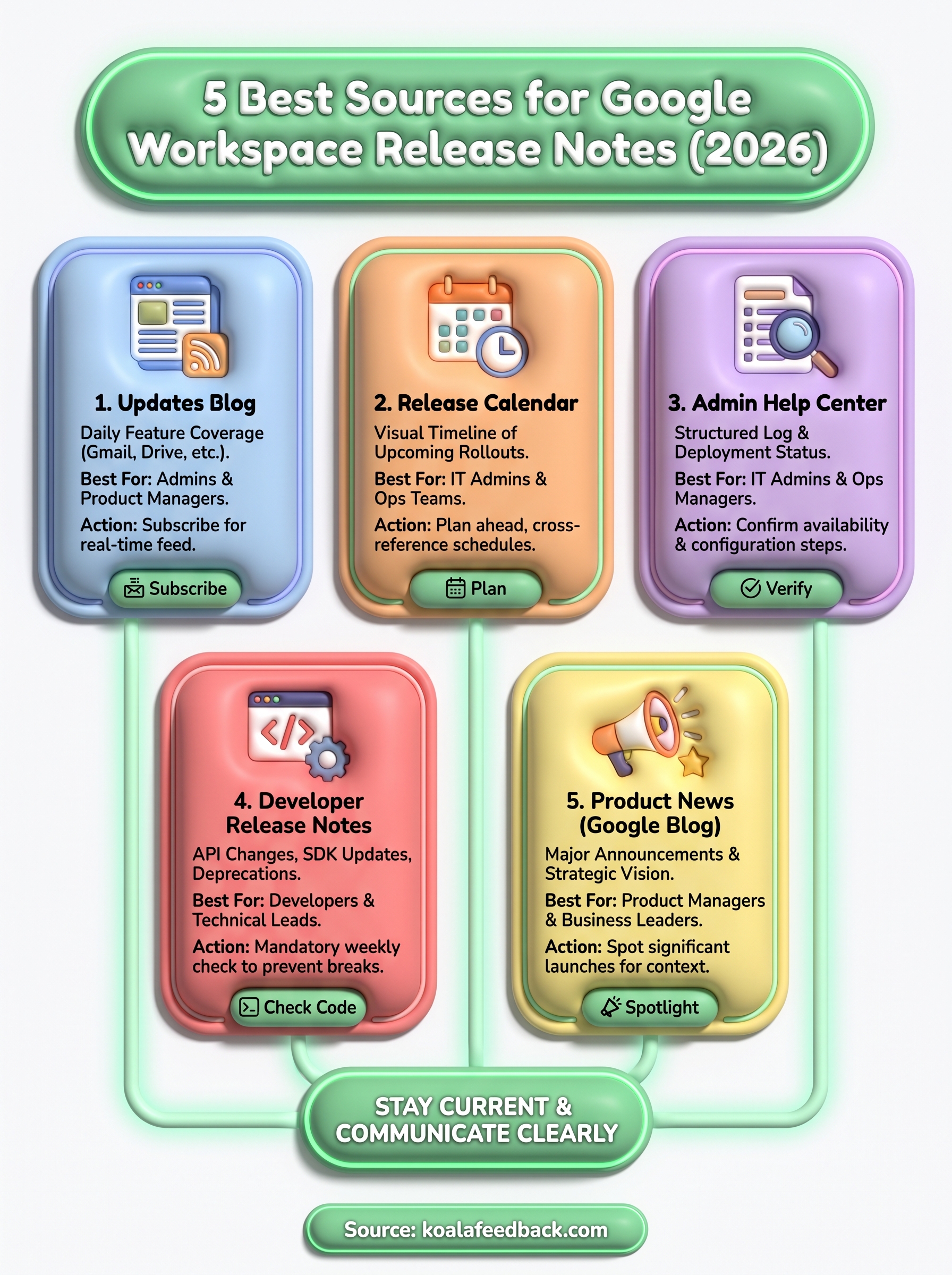
Staying current with google workspace release notes doesn't require checking a dozen different pages. Each source covered here serves a distinct purpose: the Updates blog for daily feature coverage, the release calendar for timing, the Admin Help Center for deployment status, the developer release notes for API changes, and the Google blog for major strategic announcements.
Your best approach is to combine two or three of these based on your role. Admins get the most value from the Updates blog and Admin Help Center, while developers need the developer release notes as a non-negotiable weekly check.
Tracking platform changes is only half the work. Communicating those changes clearly to your users matters just as much. If you need a better way to collect feedback and keep users informed about your product direction, Koala Feedback gives your team the tools to do both in one place.

Start today and have your feedback portal up and running in minutes.

