Pivotal Tracker works well for agile project management, but when it comes to building a pivotal tracker roadmap, you'll quickly notice the platform lacks native roadmap visualization. This leaves product teams scrambling to find workarounds, usually through third-party integrations or manual exports that create more work than they solve.
The situation gets more complicated. Pivotal Tracker is approaching end-of-life, which means teams relying on it for roadmap planning need to think about long-term solutions now, not later. Whether you're trying to extend Pivotal Tracker's capabilities today or preparing for an eventual migration, understanding your options matters.
This guide walks you through how to build a roadmap using Pivotal Tracker data, which integrations actually work, and what alternatives exist when integrations fall short. If you're looking for a dedicated solution that combines feedback collection with public roadmaps, something Pivotal Tracker was never designed to do, tools like Koala Feedback offer a more direct path to keeping users informed while you prioritize what to build next.
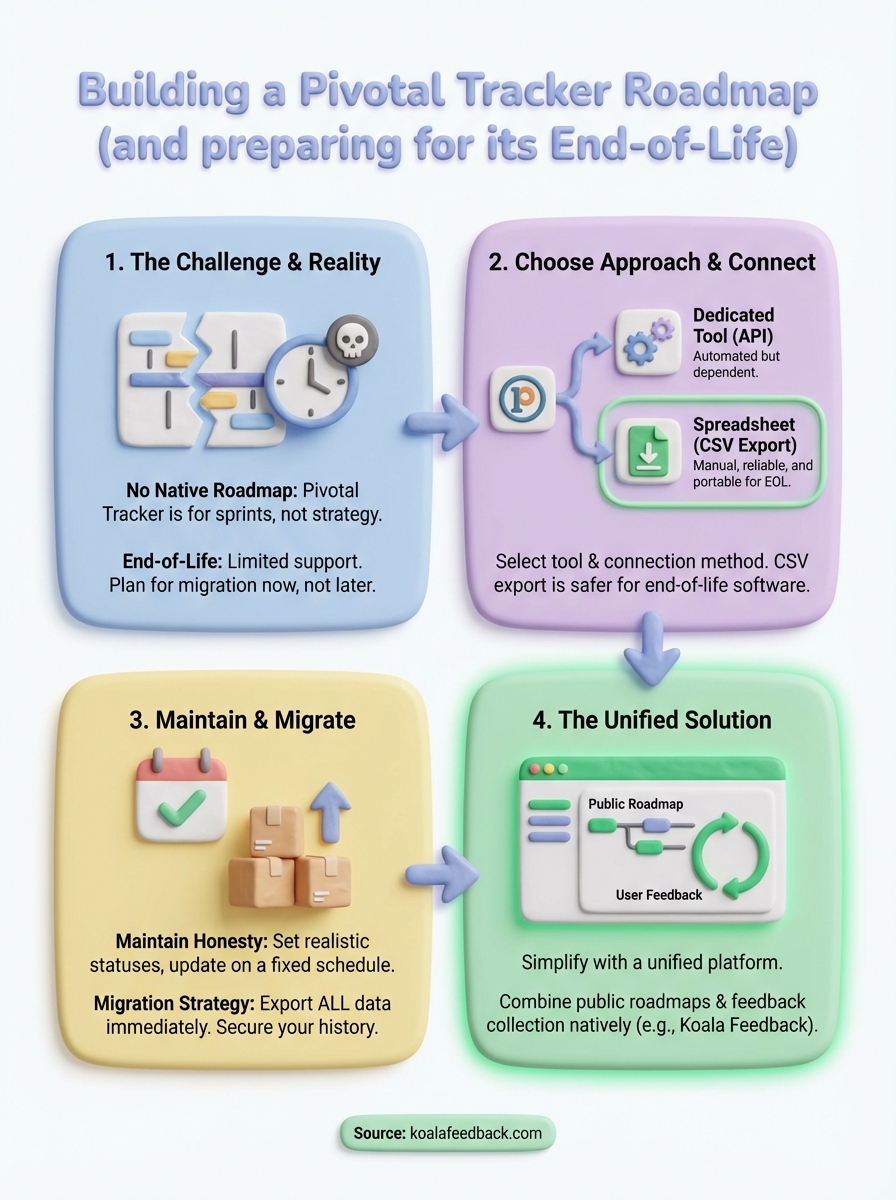
Pivotal Tracker was built for sprint planning and backlog management, not for creating strategic roadmaps that stakeholders and customers can understand. When you try to build a pivotal tracker roadmap, you're essentially forcing a tactical tool to serve a strategic purpose it wasn't designed for. The platform tracks stories, epics, and iterations well, but translating that granular data into a timeline of meaningful product milestones requires manual work or external tools.
The situation changed dramatically when VMware acquired Pivotal and announced that Tracker would reach end-of-life. While the platform still functions in 2026, you're working with software that has limited support and no future development planned. This creates an uncomfortable position for teams that need both current roadmap capabilities and a sustainable long-term solution.
Pivotal Tracker provides iteration panels and backlog views, but these aren't roadmaps in any strategic sense. You can see what stories fall into which iteration, but you can't visualize themes, dependencies, or timing in a format that makes sense to non-technical stakeholders. The tool shows you the trees but gives you no way to show the forest.
Teams need roadmaps to communicate direction, not just to track implementation details.
When you need to show quarterly objectives or feature releases on a timeline, Pivotal Tracker offers nothing native. You'll find yourself exporting CSV files, building spreadsheets, or relying on third-party integrations that add complexity and potential points of failure. The data exists in Tracker, but extracting it into a roadmap format becomes a recurring maintenance task rather than an automatic output.
VMware announced Pivotal Tracker would transition to maintenance mode with eventual shutdown, though specific dates have shifted. As of 2026, you can still access the platform, but new feature development stopped and support becomes increasingly limited. This means any gaps in functionality, including roadmap visualization, will never be addressed by the Pivotal team.
Planning around a dying tool creates specific problems. If you invest time building integrations or workflows that depend on Pivotal Tracker, you're building on quicksand. Your roadmap process needs to account for eventual migration, which means choosing approaches that can transfer to whatever tool you adopt next. Data portability becomes as important as current functionality.
Your engineering team lives in Pivotal Tracker, tracking every story and iteration there. But your stakeholders, customers, and leadership need to see the bigger picture without diving into sprint-level details. This gap between where the work happens and where strategy gets communicated is exactly why you need a roadmap built from Tracker data.
Product teams face pressure to show what's coming, when it's coming, and why it matters. Marketing needs feature launch dates. Sales needs commitment timelines for prospect conversations. Customers want visibility into whether their requested features are actually being worked on. All of this information technically exists in your Pivotal Tracker backlog, but in a format that only makes sense to the people who touch it daily. Building a roadmap bridges this communication gap without requiring everyone to become Tracker experts.
Before you connect any data from Pivotal Tracker, you need to decide what format your roadmap will take and what tool will host it. This choice affects everything else: how you'll extract data, how often you'll update it, and whether your roadmap can survive the eventual Pivotal Tracker shutdown. Your decision should balance current team needs with the reality that you're working with a platform that won't exist indefinitely.
Roadmap-specific tools give you timeline visualizations and stakeholder-friendly formats that Pivotal Tracker never provided. These platforms typically offer API integrations or CSV import capabilities, letting you pull story data from Tracker and translate it into strategic milestones. The trade-off is that you're adding another subscription to your stack and creating a dependency on yet another tool.
Common options include:
Dedicated tools work best when you need polished, customer-facing roadmaps that multiple departments will reference.
Building your pivotal tracker roadmap in Google Sheets or Excel gives you complete control and zero additional cost. You'll export data from Tracker as CSV files and manually organize it into a timeline format. This approach requires more maintenance but eliminates integration dependencies and makes migration to a new project management tool simpler since your roadmap lives independently.
Your spreadsheet roadmap needs these elements to function:
The manual work becomes sustainable if you establish a weekly or bi-weekly update cadence rather than trying to keep it real-time. Spreadsheets work particularly well for internal roadmaps where polish matters less than accuracy.
Getting your Pivotal Tracker stories into roadmap format requires choosing between automated API connections and manual CSV exports. The method you pick depends on your technical resources and how often you need updates. API integrations provide real-time synchronization but require development time, while CSV exports give you control without technical dependencies but demand regular manual updates.
Your roadmap tool may offer Pivotal Tracker API integration directly, or you'll need to build custom scripts that pull story data and transform it into roadmap entries. Pivotal Tracker's API provides programmatic access to projects, stories, and epics, though you'll need developer resources to implement the connection properly. This approach works best when you need frequent updates and have technical team members who can maintain the integration.

Here's a basic API request structure to retrieve project stories:
curl -X GET "https://www.pivotaltracker.com/services/v5/projects/{PROJECT_ID}/stories" \
  -H "X-TrackerToken: YOUR_API_TOKEN"
You'll need to filter the returned JSON data for stories tagged as roadmap-worthy features, typically by custom labels or story types. Most teams create a specific label like "roadmap" in Tracker and use it to flag which items should appear in strategic planning documents. The API returns story names, descriptions, current states, and owners, which you can then map to your roadmap tool's data structure.
Exporting stories as CSV files from Pivotal Tracker gives you a manual but reliable data transfer method that survives tool changes. You navigate to your project, access the export function, and download all stories as a spreadsheet. This file contains every field Tracker tracks, including story names, statuses, labels, and iterations, which you'll then filter and format for your roadmap.
Manual exports work better than broken integrations, especially when working with end-of-life software.
Your export workflow should follow these steps each update cycle:
Your pivotal tracker roadmap becomes useless the moment stakeholders stop trusting it. This happens when you promise features that slip repeatedly or when statuses remain "in progress" for months without explanation. Honest roadmaps require discipline in how you categorize work and consistency in keeping information current, not aspirational timelines that ignore your actual capacity.
You need clear status definitions that reflect reality rather than wishful thinking. Many teams create too many statuses, which creates confusion about what each actually means. Stick to three or four categories that anyone can understand without explanation.
Use these standard statuses:
Your status changes should trigger updates across all places where the roadmap appears. When you move a feature from planned to in progress in Pivotal Tracker, your roadmap needs that change reflected within your update cycle. Stale statuses destroy credibility faster than delayed features.
Stakeholders forgive delays when you communicate them, but they stop trusting roadmaps that pretend everything is on track.
Pick a weekly or bi-weekly update cadence and stick to it regardless of whether much changed. Consistent updates build trust even when the news is "no progress this week." Your team should know exactly when roadmap changes appear, which prevents constant questions about whether information is current.
Block 30 minutes on your calendar specifically for roadmap maintenance. During this time, you export fresh data from Pivotal Tracker, update statuses, adjust timelines if needed, and add brief notes explaining any significant changes. This regular rhythm prevents the roadmap from becoming another forgotten document that nobody checks.
Vague feature names like "improved performance" or "better user experience" tell stakeholders nothing useful. Your roadmap descriptions need specific outcomes that non-technical readers can picture. Replace generic labels with concrete explanations of what users will be able to do differently.
Write descriptions that answer "what changes for the user" rather than "what we're building technically." For example, "Export reports to Excel" communicates more than "data export functionality." Specific descriptions also help you validate whether features are truly roadmap-worthy or just internal technical work that doesn't need public visibility.
Pivotal Tracker's shutdown timeline means you need an exit strategy for both your project data and your roadmap process. Waiting until VMware announces a final shutdown date leaves you scrambling to migrate years of work under deadline pressure. Start your data extraction now while the platform still functions reliably and support remains available, even if limited.
Your first priority is getting a complete backup of all project data before access disappears. Pivotal Tracker lets you export projects as CSV files, but you'll want multiple formats to ensure nothing gets lost in translation. Each project requires its own export, and larger projects may take time to generate the export file.
Follow this export process for each project:
Store these exports in a secure location separate from Pivotal Tracker itself. Cloud storage services like Google Drive or Dropbox work well, but keep local copies as backup. Your exports contain story descriptions, comments, attachments, and history that you'll need when setting up your new project management tool.
Data you don't export today may not exist tomorrow when you actually need it.
You need a permanent home for both project management and roadmap visualization, preferably in a single platform rather than maintaining integrations between multiple tools. Look for software that can import CSV data from Pivotal Tracker and offers native roadmap features that eliminate the integration headaches you've been managing.
Consider platforms that combine project tracking with public roadmaps, such as Koala Feedback, which lets you share what you're building while collecting user feedback in the same place. Your pivotal tracker roadmap workflow should actually improve after migration, not just replicate the workarounds you've been using. Focus on tools that treat roadmaps as core features rather than afterthoughts requiring third-party integrations.
Your pivotal tracker roadmap doesn't need to be complicated, but it does need to exist in a form that survives Tracker's shutdown. Start by exporting your data this week, then pick a roadmap tool that matches how your team actually works. If you're tired of managing integrations between multiple platforms, consider switching to software that handles both feedback and roadmaps natively.
Koala Feedback gives you public roadmaps and feedback collection in one place, eliminating the integration overhead you've been dealing with. Your users can submit ideas, vote on features, and see what you're building without requiring technical setup. You'll spend less time maintaining connections between tools and more time building what actually matters to your customers. The platform works particularly well for teams moving away from Pivotal Tracker because it centralizes product planning rather than fragmenting it across multiple subscriptions.

Start today and have your feedback portal up and running in minutes.

