The best in-app feedback tools ask the right user the right question at the right moment, then make the answers easy to act on. Koala Feedback suits teams that want a permanent portal for feature requests, votes, and a public roadmap. Formbricks suits teams that want open-source control, and Amplitude suits teams already tracking behavior there. Userpilot fits product teams that also want onboarding flows, and Qualaroo fits teams that want quick contextual micro-surveys.
Most teams do not have a shortage of opinions. They have feedback scattered across support tickets, emails, and Slack threads, and the users who respond are rarely the ones in the middle of using the product. A good app feedback tool captures input inside the product, where context is fresh. It also gives you a way to sort and prioritize that input.
This article compares five options for web and mobile apps. Each entry covers how the tool works, who it suits, and what it costs. You will also see where each tool is weak, since a feature request portal and a pop-up survey solve different problems.
Koala Feedback is a feedback portal for collecting, ranking, and publicly tracking feature requests. It is not a pop-up survey widget, so treat it as the home base that you link to from inside your app.
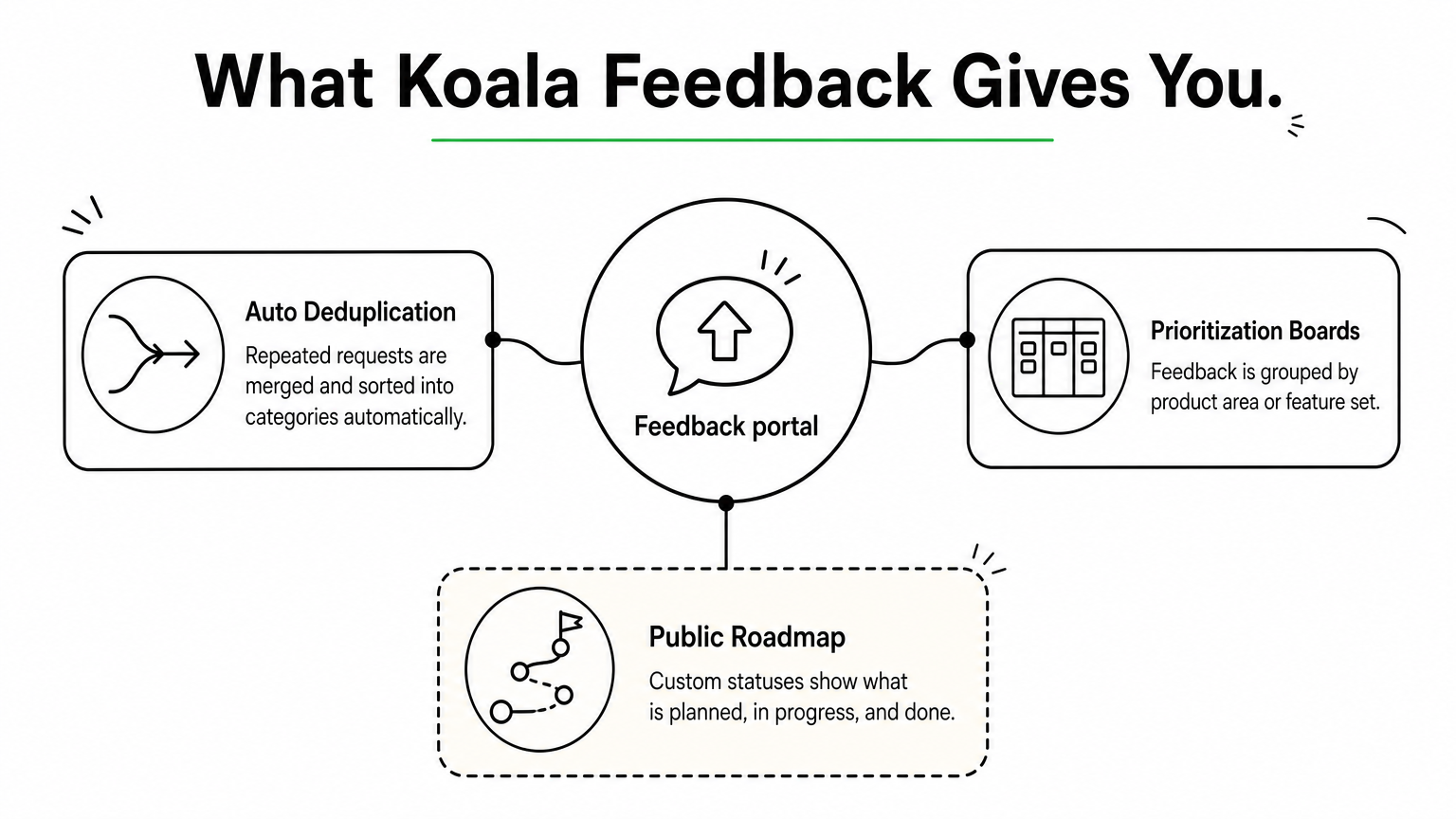
You set up a portal where users submit ideas, vote, and comment. You can link to it from your app's menu, settings page, or help center. The portal can be up and running in minutes, and a custom domain takes a few more.
It suits product managers and SaaS teams who want vote counts to guide the backlog. It also suits teams that want users to see their input turn into shipped features. Pair it with a micro-survey tool if you also need in-the-moment ratings.
Signing up is free. Plans are billed annually:
| Plan | Price | Boards | Admins | Active posts |
|---|---|---|---|---|
| Starter | Free | 3 | 1 | 100 |
| Growth | $29/month | Unlimited | 5 | Unlimited |
| Business | $89/month | Unlimited | 5 | Unlimited |
The Starter plan allows unlimited users. Statuses go from 5 on Starter to 6 on Growth and unlimited on Business.
A feedback portal tells you what users want built, and a survey tells you how they feel right now.
Formbricks is an open-source survey platform built for in-app surveys, and it is the most flexible pick here if you want control over your data. It works as one of the few mobile feedback tools you can self-host.
You add an SDK to your web or mobile app, define a survey, and choose when it appears. Triggers can be based on user actions, and you can target by user attributes. You can run it on the hosted cloud version or on your own servers.
It suits engineering-led teams, privacy-sensitive products, and anyone who dislikes vendor lock-in. Expect to spend some developer time on setup, since this is less of a click-and-go tool than some rivals.
The self-hosted community edition is free, and the cloud version has a free plan. Paid tiers add higher response limits and more features, so check the current pricing page before you commit.
If your data must stay on your own servers, Formbricks is the shortlist's obvious answer.
Amplitude's Guides and Surveys feature lets product teams build no-code, targeted in-app surveys and guides inside their analytics platform. Its edge is that it targets by behavior you already track.
You build a survey in a visual editor and show it to a segment, such as users who just completed checkout. Responses sit next to your product analytics. You can connect an answer to what the same user actually did.
It suits teams that already run Amplitude Analytics, because setup and targeting reuse existing events. If you do not use Amplitude, adopting a full analytics platform just for surveys is more than most teams need.
Amplitude offers a free Starter plan, with paid tiers above it. Confirm which Guides and Surveys limits apply to your plan on Amplitude's pricing page.
Survey answers get far more useful once you can see what the same user did before answering.
Userpilot is a product growth platform that includes in-app surveys alongside onboarding flows, tooltips, and checklists. It covers more ground than a survey-only customer feedback survey app, and it costs more.
You build experiences with a no-code editor on top of your web app. Surveys such as NPS can trigger after meaningful actions, which is when users are most likely to respond. Segmentation decides who sees what.
It suits product teams that want one tool for guiding users and asking them questions. Small teams that only need feedback will pay for features they never open.
Userpilot has no free plan. Entry pricing starts in the hundreds of dollars per month, which makes it the most expensive pick on this list. Check its pricing page for current tiers.
Buy a growth platform only if you will use the growth features, not just the surveys.
Qualaroo specializes in contextual micro-surveys, short questions that appear on a page or screen at a chosen moment. It markets AI-powered analysis of responses on top of that.
You write one or two questions and place them on specific pages or in-app states. Targeting rules decide who sees them, so a question about checkout can appear only to users who have reached it. Short surveys usually get more completed answers than long forms.
It suits teams that want fast answers to specific questions, such as why users abandon a screen. It is a weaker fit if you need public voting or a roadmap, since it does not organize feature requests the way a portal does.
Plans are paid and tiered. Compare them on Qualaroo's pricing page before you pick one.
Short, well-timed questions beat long surveys sent days later.
Pick by the question you need answered. Use a micro-survey tool such as Formbricks, Amplitude, Userpilot, or Qualaroo for how users feel right now. Use a portal for what they want built next. Many teams end up using one of each, and that combination works well.
If you want a central place for requests, votes, and a public roadmap, start with Koala Feedback. Signing up is free, so you can see how it works with your own users before you spend anything.

Start today and have your feedback portal up and running in minutes.