A stakeholder communication plan template is a table that records, for every person or group tied to your project, what they need to know, how you will tell them, how often, who sends it, and how they can answer back. To use one, list your stakeholders, score their interest and influence, fill in the channel and frequency for each, add feedback and escalation rules, then review the plan on a schedule. You will find a blank template, a filled-in sample, and copy-ready update and escalation formats below.
Most projects don't stumble for lack of updates. They stumble because the right update reaches the wrong person, or reaches nobody. The sponsor learns about a slipped date in a hallway chat. Support hears about a release the night before it ships. A customer who asked for a feature never learns whether it is planned. Ad hoc messages feel fast, but they leave no record of who was told what, and nobody owns the gaps.
This guide walks you through four steps, and each one ends with something you can paste into a doc or spreadsheet. At Koala Feedback we build tools for collecting user feedback and sharing product roadmaps, so keeping the right people informed is the center of our work. The same discipline applies to sponsors, delivery teams, and customers. Whether you call it a communication plan, a management plan, or an engagement plan, the template here covers all three.
A stakeholder communication plan states who gets which project information, through which channel, how often, and from whom. It usually runs one to three pages. The project manager writes it during planning, before the first status update goes out, and the sponsor signs off so the cadence has backing.
You will see the same idea sold as a stakeholder management communication plan or a communication and stakeholder engagement plan. The labels differ in emphasis. A communication plan focuses on information flowing out to people. An engagement plan adds what input you need back and who makes each decision. One table can do both jobs, and the template in Step 2 is built that way.
A communication plan answers "who hears what, and when"; an engagement plan also answers "who weighs in, and who decides."
Five inputs make the difference between a plan people follow and a plan built on guesses. Collect them first:
Book one short working session with your sponsor to confirm this list. Sponsors often know about stakeholders you have never met, and agreeing on the owner and approver up front saves an awkward conversation later.
Start by listing everyone who can affect the project or is affected by it, then score each person or group on interest and influence. The scores decide how much effort each row of your stakeholder communication plan template deserves.
Write down internal stakeholders first: the sponsor, team leads, finance, legal, support, and sales. Then add external stakeholders such as customers, vendors, partners, and regulators. Ask each person you list one question: "Who else should hear about this?" You will catch the people whose daily work changes, because support and customer success are the groups most often forgotten.

Don't drop someone because they have little formal power. A support agent has no say in the schedule, but she may spot the problem that sinks it. Record each person's name, role, and contact, and note whether they are internal or external.
Rate each stakeholder high or low on interest (how much attention they give the project) and influence (how much they can affect decisions). The four combinations point to four different approaches:
| Interest / influence | Label | How to communicate |
|---|---|---|
| High / high | Manage closely | Agree which decisions need their input, give regular updates, meet when choices come up |
| High / low | Keep informed | Report progress often, ask about practical effects, tell them what changed after they spoke |
| Low / high | Keep satisfied | Send short, targeted updates and bring decisions to them only when needed |
| Low / low | Monitor | Light, scheduled updates and an open way to raise concerns |
Add one more column, current stance: leading, supporting, neutral, resistant, or unaware. Stance is separate from the grid. A person can have high interest and still resist a proposed change, and a resistant stakeholder needs more listening than a supportive one. Keep these scores inside the project team. Share the communication arrangements with stakeholders, not your assessment of them.
Interest sets how often you update someone, and influence sets how carefully you handle their decisions.
The communication matrix is the core of any stakeholder communication template: one row per stakeholder, with columns for needs, channel, frequency, owner, and feedback route. Copy the blank version, then compare it with the sample below.
Paste this into a spreadsheet or a Word table. Repeat the stakeholder row for each person or group from Step 1.
Project: ______  Plan owner: ______  Approved by: ______
Last reviewed: ______  Next review: ______

| Stakeholder | Role / internal or external | Interest / influence | Current stance | What they need (inform, decide, give input) | Channel | Frequency or trigger | Sender | Feedback route |
| --- | --- | --- | --- | --- | --- | --- | --- | --- |
|  |  |  |  |  |  |  |  |  |
Write the "what they need" column with a verb: inform, decide, review, or give input. "Weekly update" is vague, while "decide on budget increase by the 15th" tells the sender and the receiver exactly what is expected. Fill in the sender by name, not by team, so each message has one owner.
This sample plan covers a team launching a new reporting feature in a software product. The names are roles, and the cadences are illustrative, so adjust them to your project.
| Stakeholder | Interest / influence | What they need | Channel and frequency | Sender |
|---|---|---|---|---|
| VP of Product (sponsor) | High / high | Risks, budget, go/no-go decisions | Email summary weekly, 30-minute review monthly | Project manager |
| Engineering lead | High / medium | Scope changes, priorities, blockers | Team chat channel daily, planning call each sprint | Project manager |
| Support lead | High / low | Release date, known issues, help articles | Briefing every two weeks, email 5 days before launch | Product manager |
| Finance partner | Low / medium | Budget versus actual spend | Monthly report | Project manager |
| Beta customers | High / low | What is planned, what shipped, how to give input | Public roadmap and feedback portal, updated on each status change | Product manager |
The last row is where many internal templates fall short. Customers rarely read status emails, but they will check a roadmap and a feedback portal. A portal lets them submit ideas, vote, and comment, and a roadmap with statuses such as planned, in progress, and completed tells them where their request stands. Koala Feedback is built for this job. Portals are up and running in minutes, unlimited people can submit, vote, and comment on every plan, and the free Starter plan includes 3 boards and 5 statuses.
The channel should fit the job the message does. A wrong channel is the most common reason a good plan is ignored:
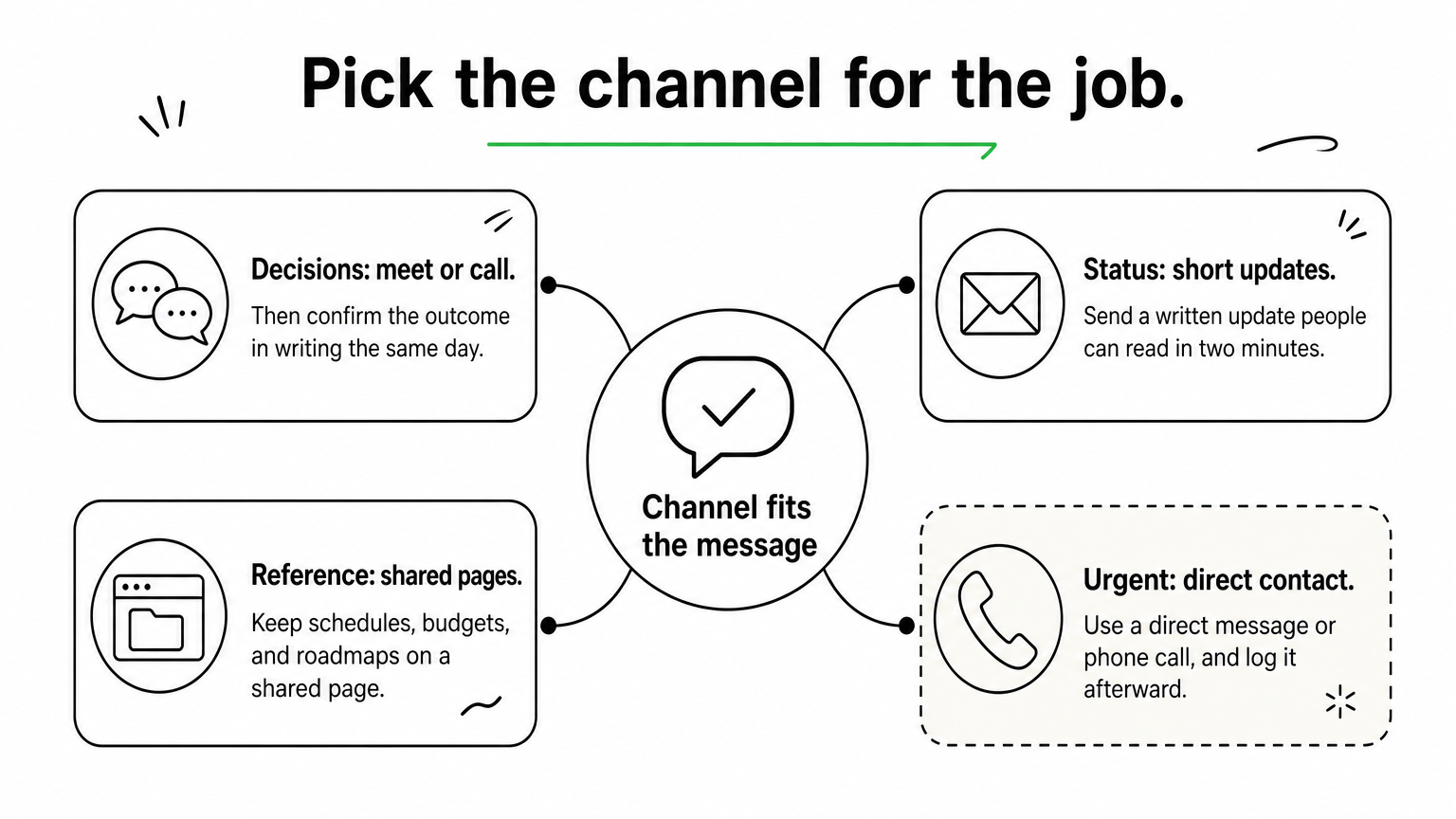
If a recurring meeting exists only to read out status, replace it with a written update and save the meeting for decisions.
Pick the channel for the job: conversations for decisions, writing for status, shared pages for reference.
Add two rules to your stakeholder management communication plan template: how stakeholders respond, and what happens when something goes wrong. Without them, your plan only broadcasts.
Choose a feedback route for each group. Sponsors may reply to the weekly email or join an interview each quarter. Delivery teams can comment in the project document. Customers can use a feedback portal. Add a short survey after major milestones if you need to measure whether the updates are useful.
Then decide what happens to each concern. Acknowledge it, record it, and report back on the outcome, even when the answer is no. Use this log for every concern:
Concern: ______
Raised by and date: ______
Who decides: ______
Action and owner: ______
Due date: ______
Reply sent to stakeholder (date): ______
Don't treat silence as agreement. If someone has not responded, check whether the channel and timing suit them before you assume they are fine. A concern stays open until someone decides, assigns the work, and tells the person who raised it.
An escalation path names who handles a problem first, who steps in next, and how fast each must respond. Agree on the thresholds with your sponsor before you need them. The rows below are examples, so replace the triggers and times with your own:

| Issue | First contact | Escalate to | Respond within |
|---|---|---|---|
| Schedule slip of more than one week | Project manager | Sponsor | 2 business days |
| Budget overrun above the agreed limit | Finance partner | Sponsor | 3 business days |
| Security or compliance problem | Engineering lead | Sponsor and legal | Same day |
| Conflict between stakeholders | Project manager | Sponsor | 2 business days |
Put the response time in writing. A path that says "escalate to the sponsor" without a deadline lets a problem sit in an inbox for a week.
A concern is only handled when someone has decided, acted, and told the person who raised it.
Once the matrix is approved, send updates in a repeatable format and review the plan on a fixed trigger. A plan that nobody revisits turns into a stale document within a quarter.
A fixed format lets stakeholders find what they need in seconds. Copy this status update and send it on the cadence from your matrix:
Subject: [Project name] status, [date]

Status: Green / Yellow / Red
Since the last update: [2-3 bullet points]
Next up: [2-3 bullet points]
Risks and blockers: [what, impact, owner]
Decisions needed from you: [decision, who, by when]
Put the decisions you need at the top of the message if any exist, because that is the line people skip when it sits at the bottom. The seven Cs of communication are a handy check before you hit send: clear, concise, concrete, correct, coherent, complete, and courteous. If a sponsor has to ask a follow-up question, one of them is missing.
Revisit the plan at every milestone and whenever one of these things happens:
At each review, count the decisions that waited longer than the response time you set, and ask two stakeholders from different groups whether the updates still help. Update the matrix, change the "last reviewed" date, and tell the team what changed. A stakeholder communication plan sample like the one above is a starting point, and the version that works is the one your stakeholders have shaped.
Review the plan at milestones and at changes in people, scope, or dates, not only when someone complains.
A good stakeholder communication plan is small. It lists who needs to hear from you, what they need, which channel carries it, how often, who sends it, and how they can answer. Map your stakeholders, fill in the matrix, add feedback and escalation rules, and review the plan at every milestone.
Start with your two or three highest-stakes stakeholders, send the first update on the agreed day, and fill in the rest as you go. If customers or users are among the people you need to keep informed, give them a place to speak and a way to see what happens next. You can collect customer feedback and share your roadmap with Koala Feedback, and set up a free Starter portal in a few minutes.

Start today and have your feedback portal up and running in minutes.