Building a product roadmap in Smartsheet can feel like assembling furniture without instructions, you know what you want, but getting there takes longer than expected. A good Smartsheet product roadmap template eliminates that friction by giving you a ready-made structure to visualize timelines, features, and release cycles without starting from scratch.
Whether you're coordinating launches across multiple teams or presenting your product direction to stakeholders, the right template helps you communicate priorities clearly and keep everyone aligned. But finding one that actually fits your SaaS workflow? That's where most product managers get stuck.
This article covers seven Smartsheet product roadmap templates you can download, customize, and start using right away. We've also included Excel and PowerPoint alternatives for teams that prefer those formats, so you're covered regardless of your tool preferences.
At Koala Feedback, we help SaaS teams collect user feedback and turn those insights into prioritized roadmap items. Once you've gathered input from your users through a centralized feedback portal, these templates give you a solid foundation to present your plans, whether you're sharing progress internally or building a public-facing roadmap for your customer base.
Before diving into traditional Smartsheet templates, consider a purpose-built alternative that eliminates the manual work of updating spreadsheets. Koala Feedback offers a public roadmap solution that automatically syncs with your feedback collection process, so you don't have to copy and paste between tools every time something changes. While a smartsheet product roadmap template gives you structure, Koala gives you automation that keeps your roadmap current without the spreadsheet maintenance.
Koala Feedback provides a customizable public roadmap that lives on your own domain and matches your brand colors. You get a feedback portal where users submit ideas, vote on features, and leave comments, which means your roadmap items come directly from the people using your product. The platform automatically deduplicates similar requests and organizes everything into prioritization boards based on your product areas or feature sets. Your roadmap displays planned features, work in progress, and completed releases in a clean, user-friendly interface that your customers can bookmark and check regularly.
Your users submit feedback through a dedicated portal that centralizes every request in one place. The system automatically categorizes submissions and flags duplicates, so you're not manually sifting through spreadsheets to identify patterns. You can organize feedback into logical boards that mirror your product structure, making it easier to spot which areas need attention. The built-in voting system shows you what matters most to your user base, giving you data-driven insights to guide your prioritization decisions instead of relying on guesswork or internal opinions.
"When your users can vote on features and see what you're building, they become invested in your product's direction."
Koala Feedback lets you publish a public roadmap that automatically reflects changes you make to feature statuses. When you move an item from "Planned" to "In Progress," your users see that update immediately without you sending an email or posting an announcement. You can customize status labels to match your development process and set expectations appropriately. The platform also allows users to subscribe to specific features, so they receive notifications when you ship something they voted for, which closes the feedback loop and builds trust.
This solution works best for SaaS teams that want to combine feedback collection with roadmap communication. If you're currently juggling multiple tools to capture user input, prioritize features, and share your plans, Koala streamlines all three into one platform. It's particularly valuable when you need to demonstrate transparency to your customer base and want users to feel heard throughout your development cycle.
Koala Feedback offers a free plan to get started, with paid tiers that unlock additional customization options and remove branding. You can test the platform without a credit card and upgrade when your feedback volume or feature needs grow.
The Smartsheet multiple product roadmap template gives you a single view to track several products simultaneously. You get Gantt chart functionality built into a spreadsheet structure, which means you can visualize overlapping timelines, dependencies, and resource allocation across your entire product portfolio. This smartsheet product roadmap template works particularly well when you're managing different products that share engineering resources or need to coordinate launches around similar dates.
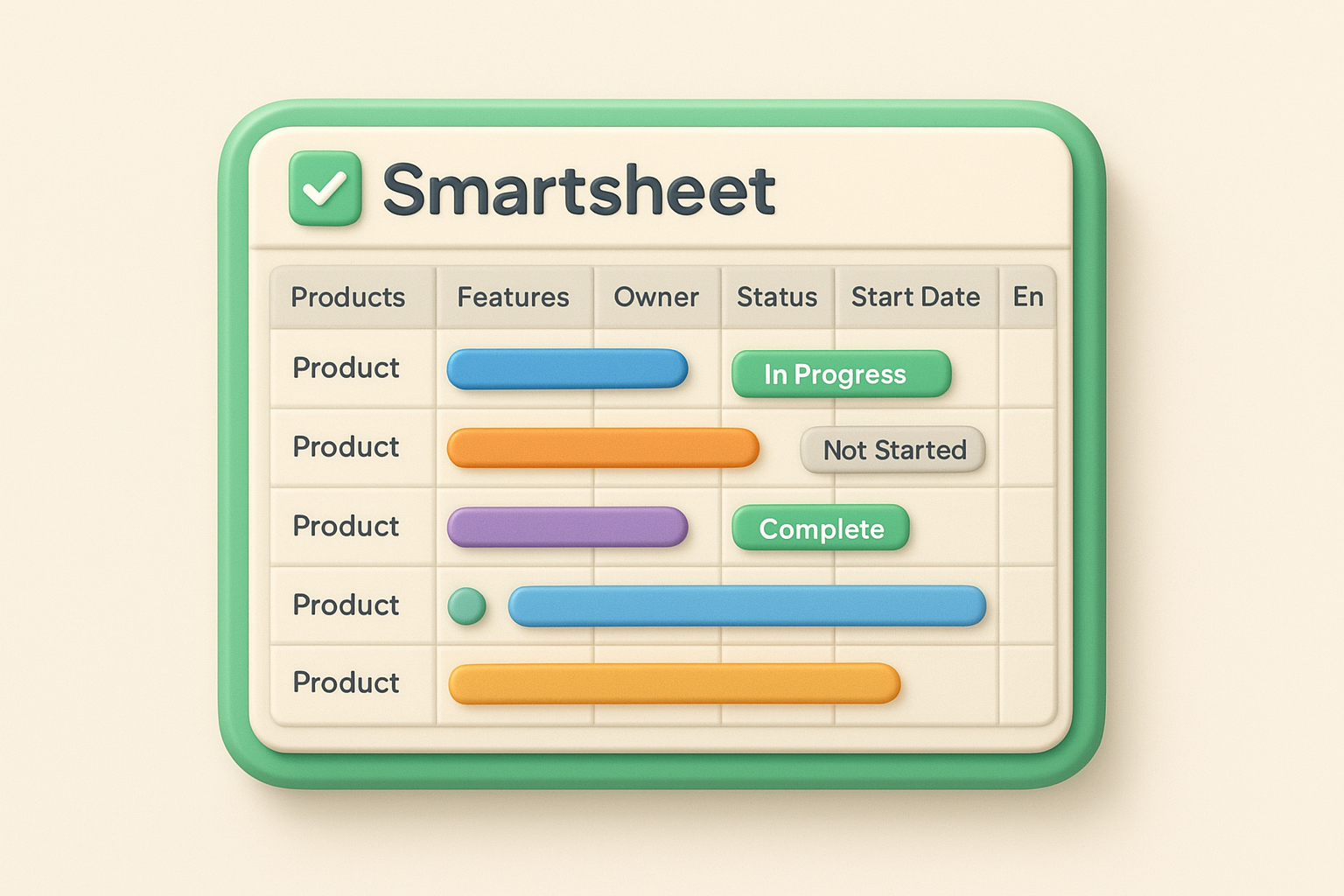
This template provides a spreadsheet-style layout with columns for product name, feature description, owner, status, start date, and end date. You can see all products displayed as horizontal bars on a timeline view that extends across months or quarters, making it simple to spot conflicts or gaps in your schedule. The template includes built-in formulas for calculating duration and progress percentages, plus conditional formatting that changes colors based on status updates.
Smartsheet groups each product into collapsible rows that you can expand or hide depending on what you need to review. You set up parent rows for each product line, then nest specific features or milestones underneath. The Gantt chart automatically adjusts bar positions when you modify dates, and you can drag bars directly on the timeline to reschedule work without editing individual cells.
"Seeing all your products in one timeline reveals scheduling conflicts before they derail your sprints."
This template fits teams managing multiple products under one roof, especially when those products compete for the same development resources. Portfolio managers and product directors find it valuable for high-level planning sessions where stakeholders need to understand the full picture of what's shipping and when.
Start by creating a master row for each major product, then break down features into sub-rows that represent individual releases or sprints. Use consistent status labels across all products so your reports stay clean. Set up automated workflows to notify team members when dates shift or dependencies change.
Smartsheet offers this template for free when you sign up for an account. Paid plans start at $7 per user monthly and unlock automation, reporting, and integration capabilities that become necessary as your team scales.
The Smartsheet agile product roadmap template adapts the standard roadmap format to fit sprint-based development cycles. You get a structure that breaks down your product vision into epics, themes, and sprint-level work, making it easier to connect high-level strategic goals with the tactical work your engineering team executes every two weeks. This smartsheet product roadmap template bridges the gap between long-term planning and short-term delivery, which matters when stakeholders need to understand both where you're headed and what ships next sprint.
This template provides columns for epic names, theme categories, sprint assignments, story points, and priority rankings. You can track each initiative across a timeline view that displays sprints as vertical dividers, so you see exactly which epics land in which sprint at a glance. The template includes formulas that automatically calculate velocity trends and capacity allocation, plus conditional formatting that highlights sprints approaching overload before you commit to too much work.
Smartsheet groups related epics under theme rows that represent your strategic focus areas like "Platform Stability" or "User Onboarding Improvements." You assign each epic to specific sprints by entering start and end dates, and the Gantt bars automatically adjust to show the sprint boundaries where work begins and ends. Dependencies between epics appear as connecting arrows, which helps you identify when one team's delays will impact another team's schedule.
"When your roadmap speaks the language of sprints and epics, your engineering team actually uses it."
This template works best for agile product teams running Scrum or Kanban frameworks where sprint planning drives your delivery cadence. Teams that need to communicate product direction to both technical and non-technical audiences find value in how it translates strategy into executable work.
Create separate sheets for quarterly roadmaps versus sprint-level execution so you don't clutter your strategic view with implementation details. Use consistent theme naming across quarters to track how your focus areas evolve. Set up automated alerts when epics shift between sprints so stakeholders know when timelines change.
Smartsheet includes this template at no additional cost with any paid plan, starting at $7 per user monthly for the individual tier.
The Smartsheet features roadmap template focuses specifically on individual feature development rather than broad product initiatives. You get a granular view of what features ship when, which status they hold, and how they sequence across your release calendar. This smartsheet product roadmap template helps you communicate detailed progress to stakeholders who need to understand specific functionality timelines instead of just high-level themes or epics.
This template provides columns for feature name, description, owner, priority level, current status, and planned release date. You can track features across a timeline view that displays them as horizontal bars spanning from development start to customer delivery. The template includes status dropdowns with options like "Researching," "Designing," "Building," and "Shipped," plus conditional formatting that color-codes each feature based on its current state.
Smartsheet displays features in priority order so your team knows what needs attention first. You set dependencies between related features using predecessor columns, which automatically adjusts downstream dates when earlier features slip. The timeline view shows sequencing patterns that reveal whether you're stacking too many complex features in one release or spreading work too thin across multiple quarters.
"Feature-level visibility stops surprises when stakeholders ask what ships next month."
This template fits teams that need to report feature-level progress to customers, sales teams, or executives who want specifics beyond epic-level commitments. Product managers working on feature-rich platforms find it valuable for tracking individual capabilities that ship independently rather than bundled releases.
Group features by product area or customer segment using parent rows so you can collapse sections that don't need immediate attention. Add columns for customer impact scores or revenue potential to justify sequencing decisions. Configure automated status reports that email stakeholders when features move from "Building" to "Ready for Release."
Smartsheet includes this template free with any account. Paid plans start at $7 per user monthly and add collaboration features that become necessary when multiple product managers share the same roadmap.
The Smartsheet release roadmap template organizes your shipping schedule around discrete releases rather than individual features or sprints. You get a structure that groups related work into versioned deliveries like "Q1 2026 Release" or "Winter Update," making it easier to coordinate across engineering, marketing, and customer success teams who all need to prepare for the same launch date. This smartsheet product roadmap template works particularly well when you ship updates on a predictable cadence and need everyone aligned around specific release milestones.
This template provides columns for release name, target ship date, included features, assigned teams, and release status. You can track each release as a horizontal bar on a timeline that shows preparation phases, development windows, and launch dates. The template includes percentage complete calculations that aggregate progress across all features within a release, plus conditional formatting that flags releases at risk of missing their target dates.
Smartsheet displays releases in chronological order so you see your entire shipping calendar at a glance. You assign specific teams to each release using dropdown selectors, which automatically filters views when team leads need to see only their commitments. The template supports cross-functional dependencies where marketing activities wait for engineering completion or documentation work blocks customer announcements.
"Coordinating releases across teams prevents the chaos of surprise launches that nobody prepared for."
This template fits teams that ship coordinated releases involving multiple departments rather than continuous deployment of isolated features. Organizations with formal release processes find it valuable for tracking the handoffs between development, QA, documentation, and go-to-market activities.
Create separate rows for major and minor releases so you can differentiate between substantial updates and maintenance patches. Add columns for release notes status and customer communication plans. Configure automated reminders that alert stakeholders two weeks before each release date.
Smartsheet includes this template free with any account. Paid plans start at $7 per user monthly and unlock workflow automation that becomes critical when managing complex multi-team releases.
The Smartsheet product development roadmap template bridges the gap between customer requests and actual development work. You get a structure that traces feature ideas from initial submission through research, design, development, and delivery, which creates accountability across your entire product lifecycle. This smartsheet product roadmap template helps teams answer the question every stakeholder asks: what happened to that feature request someone submitted three months ago?
This template provides columns for request ID, customer name, feature description, business justification, assigned owner, development phase, and completion percentage. You can track each request through stages like "Backlog," "Requirements," "Design Review," "Development," "QA," and "Deployed" using status dropdowns that trigger automatic progress updates. The template includes custom fields for effort estimates, revenue impact, and customer tier so you can prioritize based on business value rather than just submission order.
Smartsheet links incoming requests directly to development tasks using child rows that nest underneath each feature. You create sub-tasks for design mockups, API endpoints, database changes, and testing scenarios, then track completion percentage as engineers check off individual items. The parent row automatically calculates overall progress based on subtask completion, which gives stakeholders visibility into how close a feature is to shipping without micromanaging the details.
"Connecting requests to delivery tasks eliminates the black hole where feature ideas disappear after submission."
This template fits teams that need to demonstrate accountability for customer requests and show how feedback turns into shipped functionality. Product managers who field regular questions about request status find it valuable for maintaining transparency without constantly updating spreadsheets manually.
Add columns for feedback source like support tickets, sales calls, or user interviews so you can track which channels drive the most valuable requests. Configure automated notifications when requests move between development phases. Create filtered views for specific customer segments or product areas.
Smartsheet includes this template free with any account. Paid plans start at $7 per user monthly and add automation capabilities that streamline status updates as work progresses.
The Smartsheet technology roadmap template separates infrastructure and platform improvements from customer-facing feature work. You get a dedicated view for tracking technical debt, architecture upgrades, security enhancements, and developer tooling that rarely makes it onto standard product roadmaps but directly impacts your team's ability to ship features reliably. This smartsheet product roadmap template helps engineering leaders justify platform investments to stakeholders who need to understand why not every sprint delivers visible customer value.
This template provides columns for initiative name, technical category, business justification, assigned engineering team, implementation timeline, and dependency tracking. You can organize work into categories like "Infrastructure Stability," "Performance Optimization," "Security Hardening," or "Developer Experience" so stakeholders understand the different types of platform work your team handles. The template includes timeline views that display technical initiatives alongside product releases, making it clear how platform improvements enable or constrain feature delivery.
Smartsheet links each technical initiative to specific product objectives using reference columns that connect infrastructure work to customer-facing outcomes. You document how database upgrades enable faster feature development or how API refactoring unblocks integration requests. The template displays these connections in dependency chains that show when platform work must complete before product features can begin, which helps non-technical stakeholders understand the sequencing logic.
"Connecting platform work to product outcomes justifies technical investments that otherwise seem invisible to business stakeholders."
This template fits engineering leaders who need to communicate technical priorities to executives, product managers, or board members who measure progress primarily through shipped features. Teams struggling to secure resources for infrastructure improvements find it valuable for demonstrating how platform stability directly supports business goals.
Group initiatives by technical domain like backend, frontend, or infrastructure so different engineering teams can filter to their areas. Add columns for risk assessment and customer impact. Configure automated reports that summarize platform progress for monthly business reviews.
Smartsheet includes this template free with any account. Paid plans start at $7 per user monthly and unlock portfolio-level views that help you balance platform work against feature development across your entire organization.
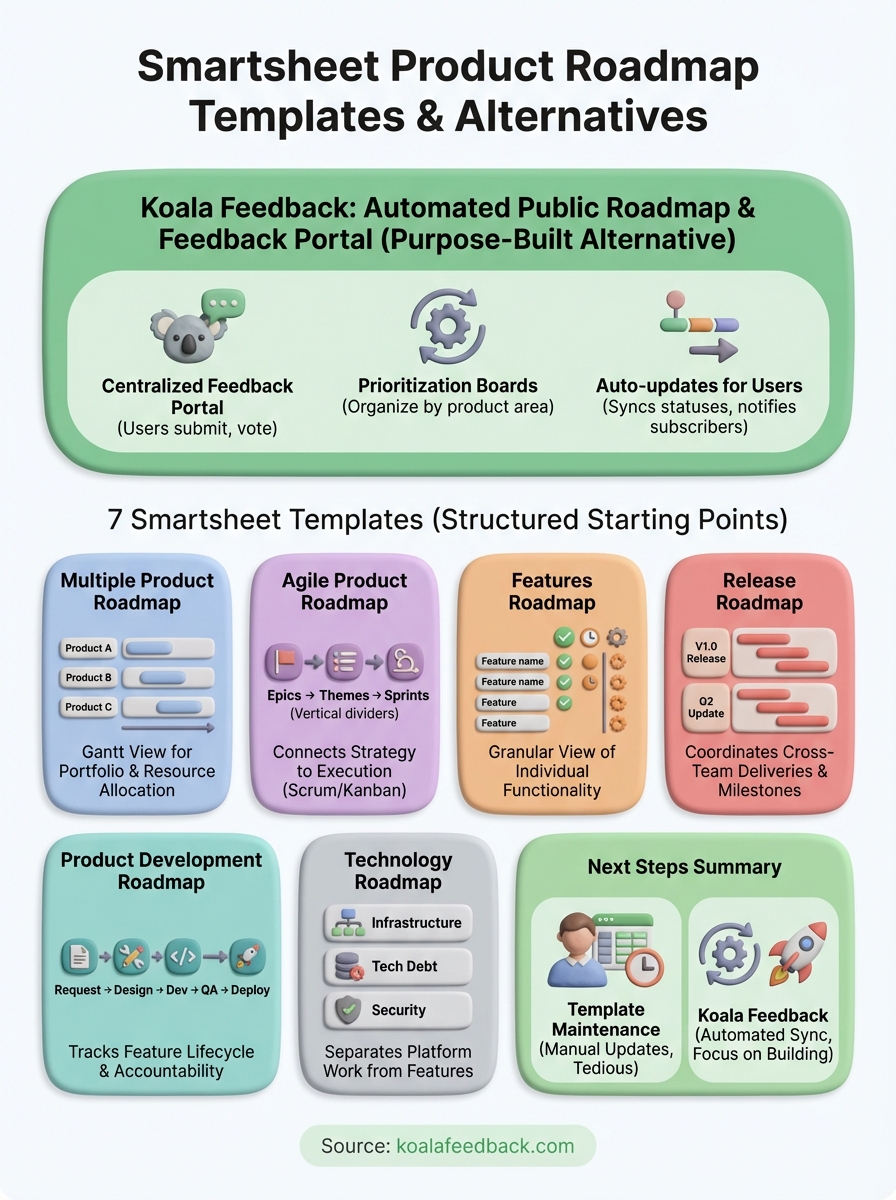
You now have seven smartsheet product roadmap template options that cover different aspects of product planning, from multi-product portfolios to technology infrastructure work. Each template gives you a structured starting point for organizing timelines, coordinating teams, and communicating your product direction to stakeholders who need visibility into what ships and when.
However, templates require manual maintenance that becomes tedious as your product evolves. You update dates, copy feedback from other tools, adjust status labels, and refresh reports every week just to keep your roadmap current. The process works, but it consumes hours you could spend actually building products instead of updating spreadsheets.
Koala Feedback eliminates that maintenance burden by automatically syncing your feedback collection with your public roadmap. Your users submit ideas, vote on priorities, and see exactly what you're building without you copying data between tools. Start with a free account that takes minutes to set up, then customize your roadmap to match your brand as your needs grow.

Start today and have your feedback portal up and running in minutes.

